PowerSchool Mobile

PowerSchool Mobile

Download on App StoreDownload on Google Play
Spark by MWM logo
Logo of PowerSchool Mobile

PowerSchool Mobile: Real-Time Insights for Academic Success

Stay ahead with instant access to grades, attendance, and GPA tracking. Empowering parents and students to monitor progress and master school life from the palm of their hand.

Publisher

PowerSchool Group LLC

Category

Education

Downloads

19M+

User Rating

4.5/5

Total Ratings

943K+

Locales

3

Success at a Glance

Discover the interface used by 19M+ users.
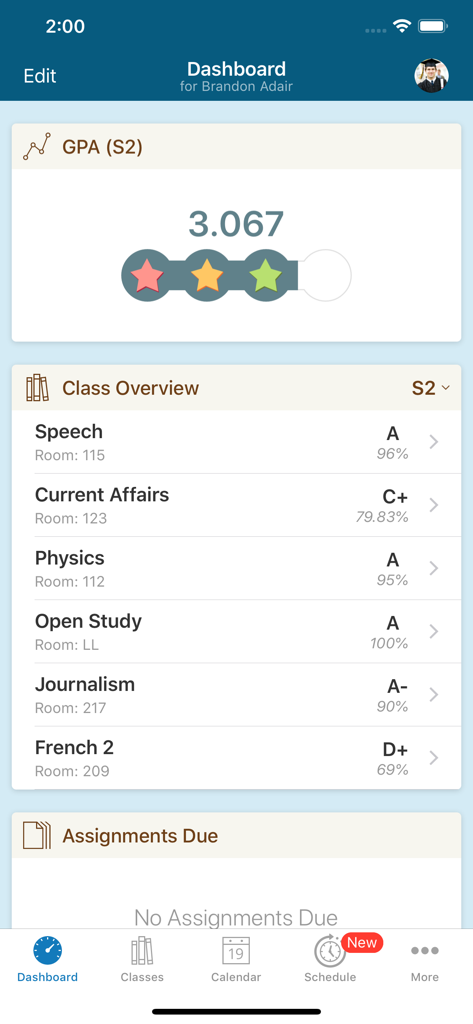
Screenshot of the PowerSchool Mobile app dashboard showing student GPA and class grades

Screenshot of the PowerSchool Mobile app dashboard showing student GPA and class grades

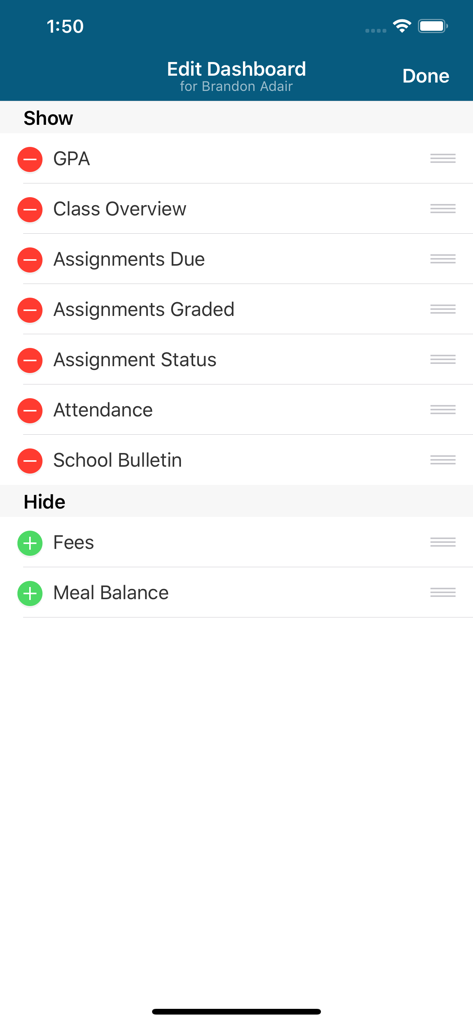
Screen for customizing dashboard widgets in the PowerSchool Mobile app including GPA assignments and attendance

Screen for customizing dashboard widgets in the PowerSchool Mobile app including GPA assignments and attendance

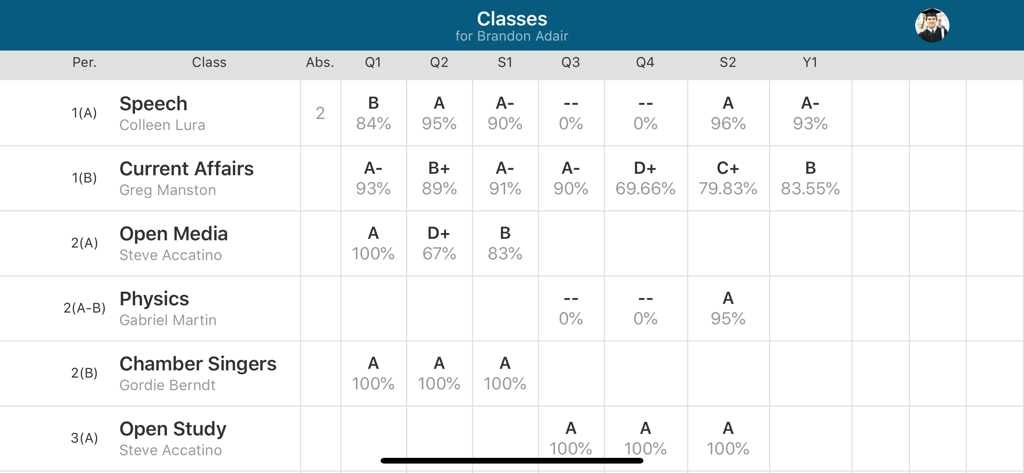
Table view of student grades and attendance records in the PowerSchool Mobile app.

Table view of student grades and attendance records in the PowerSchool Mobile app.

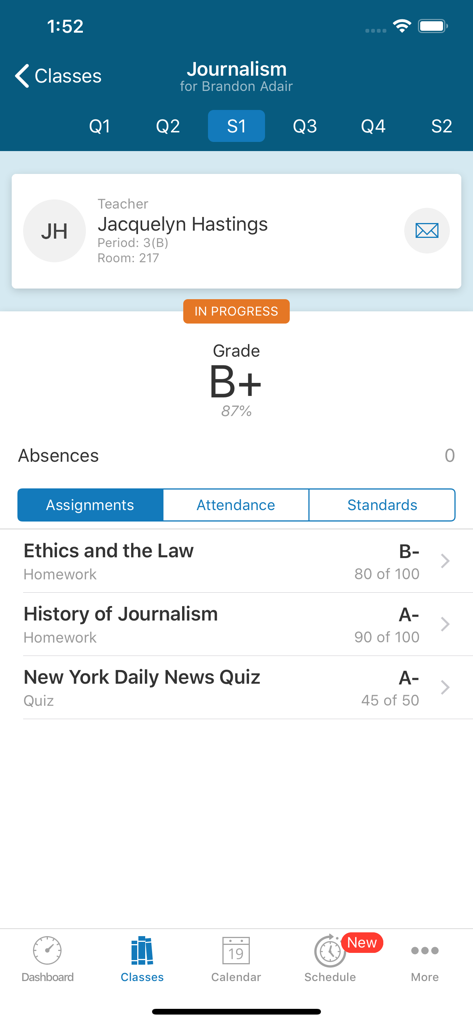
PowerSchool Mobile app screenshot showing a student's journalism class grades assignments and teacher information

PowerSchool Mobile app screenshot showing a student's journalism class grades assignments and teacher information

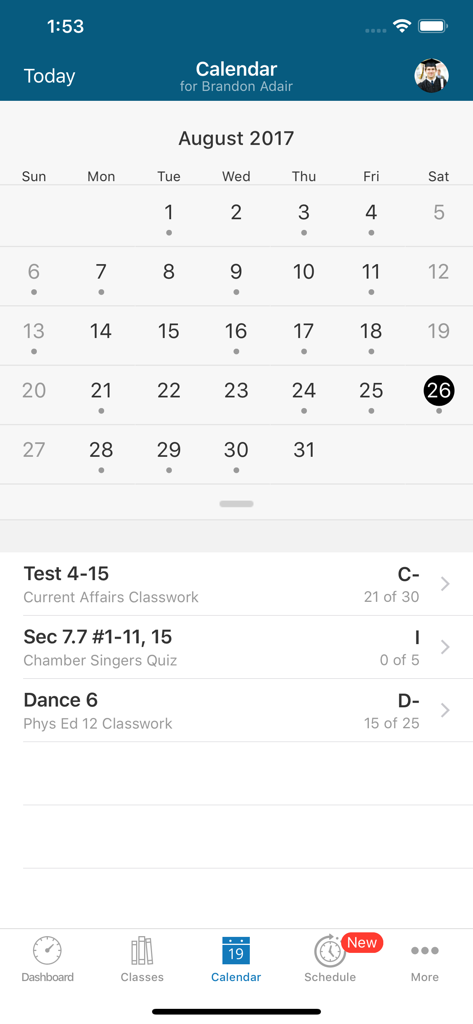
PowerSchool Mobile app calendar interface showing a student's assignments and grades for August

PowerSchool Mobile app calendar interface showing a student's assignments and grades for August

Stay Connected to Academic Success

The tools that make this app stand out, trusted by 19M+ users.

📈

Real-Time Progress Tracking

Monitor grades, GPA, and attendance as they happen, eliminating report card surprises and allowing for immediate academic support.

🔔

Instant Smart Notifications

Receive immediate push alerts for new grades, missing assignments, and school bulletins so you never miss a critical update.

🗓️

Customized Student Dashboard

Personalize your view with widgets for weekly assignment calendars, meal balances, and fees tailored to your priorities.

Loved by users worldwide

Trusted by 19M+ people who love this app.

"

"PowerSchool Mobile has completely changed how I stay involved in my kids' education. I love getting instant notifications for grades and attendance—it removes all the guesswork and 'Friday surprises.' The dashboard is super intuitive, and being able to manage meal balances and school fees in the same app saves me so much time every week."

Sarah Jenkins, Parent
"

"As a high school senior, this app is essential for staying on top of my college prep. The GPA widget and assignment calendar keep me organized and motivated. I check it every day to see my latest grades the second they're posted, which helps me stay ahead of my deadlines and keep my academic goals on track."

Marcus T., High School Student

About the app

Everything you need to know about PowerSchool Mobile.

Description

Built for convenient access to real-time student information like grades, assignments, and attendance, the PowerSchool Mobile App provides enhanced functionality for parents, guardians, and students. • Get easy access to the most important student data with an updated user interface, dashboard, and improved app structure • Use new dashboard widgets for quick access to important information including: GPA, Class Overview, Assignments Due, Assignments Graded, Attendance, School Bulletins, Meal Balance, and Fees • Customize the dashboard by reordering or hiding widgets to prioritize the information that is most important to you • Access class information and grades across terms and drill-down to detailed views of class assignments, attendance, and standards • View class assignments for the week or month in a new calendar view, and drill-down to assignment details • Manage push and email notifications, student profiles, access school information, and more PowerSchool is the leading K-12 education technology provider of solutions that improve the education experience for 100 million students, teachers, and parents in over 70 countries around the world. IMPORTANT! To access the PowerSchool Mobile App, your school district must be using the PowerSchool Student Information System. If you are not sure what SIS your school is using, contact your school or district. PLEASE NOTE • Requires iOS version 13.0 or higher • Access to PowerSchool is controlled by school administration • Requires a wireless connection or mobile data plan • Users must consent to receive push notifications when connecting to servers outside of the United States • Meal Balance totals are only available if your school uses the PowerLunch meal management feature in the PowerSchool SIS

Latest Version

25.12.0

Size

129.3 MB

First Released

Jun 30, 2015

Stay Ahead of Every Grade and Milestone

Join millions of parents and students using PowerSchool to track progress, manage schedules, and ensure academic success in real-time.

Download on App StoreDownload on Google Play
FAQ

Frequently Asked Questions

Everything you need to know about PowerSchool Mobile

What is the PowerSchool Mobile app?

The PowerSchool Mobile app provides parents, guardians, and students convenient access to real-time student information including grades, assignments, and attendance. It features an updated user interface and dashboard.

What student information can I access through the PowerSchool Mobile app?

The PowerSchool Mobile app provides access to real-time student data such as GPA, class overview, assignments due, assignments graded, attendance, school bulletins, meal balance, and fees.

Can users customize the dashboard in the PowerSchool Mobile app?

Yes, users can customize the dashboard in the PowerSchool Mobile app. They can reorder or hide various widgets to prioritize the information most important to them.

Does the PowerSchool Mobile app show detailed class assignments?

Yes, the PowerSchool Mobile app displays detailed class assignments. Users can drill down from class information to view specific assignment details and grades.

What are the system requirements for the PowerSchool Mobile app?

The PowerSchool Mobile app requires iOS version 13.0 or higher. A wireless connection or mobile data plan is also necessary for its operation.

Is a PowerSchool Student Information System required to use the app?

Yes, the PowerSchool Mobile app requires that your school district uses the PowerSchool Student Information System (SIS). The app does not function without it.

Can I view my academic calendar with assignments in PowerSchool Mobile?

Yes, the PowerSchool Mobile app includes a new calendar view. This allows users to see class assignments for the week or month and drill down to assignment details.

How can I manage notifications in the PowerSchool Mobile app?

The PowerSchool Mobile app allows users to manage both push and email notifications. This feature provides control over how students and parents receive updates.

Does PowerSchool Mobile provide attendance records?

Yes, the PowerSchool Mobile app provides access to attendance information. Users can view this data as part of the class overview and detailed views.

Are meal balance totals available in the PowerSchool Mobile app?

Yes, meal balance totals are available in the PowerSchool Mobile app, but only if your school uses the PowerLunch meal management feature within the PowerSchool SIS.