Pronto - San Diego

Pronto - San Diego

Download on App Store
Spark by MWM logo
Logo of Pronto - San Diego

Pronto - San Diego: The Smarter Way to Ride and Pay for Local Transit

Experience seamless travel across the MTS and NCTD networks with automatic fare capping, real-time arrivals, and effortless trip planning—all in one app.

Publisher

San Diego Metropolitan Transit System

Category

Travel

Downloads

1M+

User Rating

4.7/5

Total Ratings

33K+

Locales

2

Transit at Your Fingertips

Discover the interface used by 1M+ users.
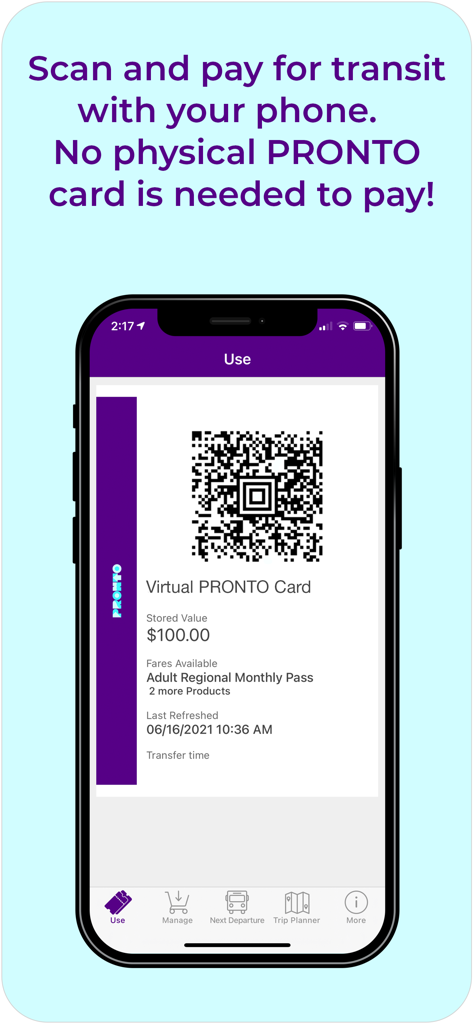
Smartphone showing the Pronto San Diego app virtual card and QR code for scanning and paying transit fares

Smartphone showing the Pronto San Diego app virtual card and QR code for scanning and paying transit fares

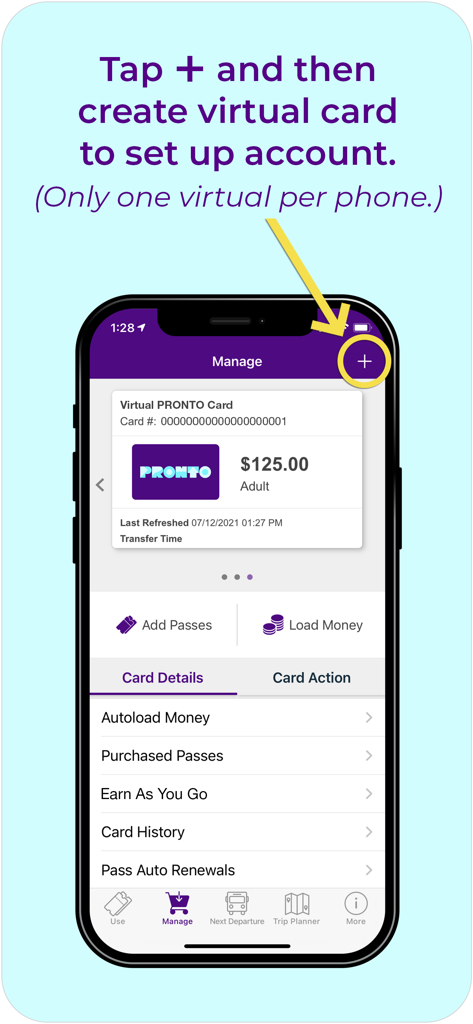
Interface of the Pronto San Diego app showing how to set up a virtual transit card

Interface of the Pronto San Diego app showing how to set up a virtual transit card

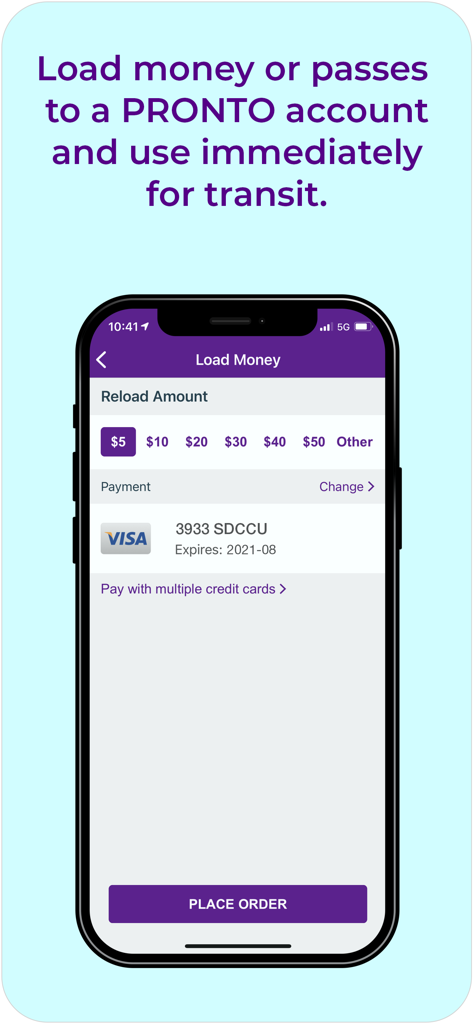
Interface for adding funds to a Pronto San Diego transit account

Interface for adding funds to a Pronto San Diego transit account

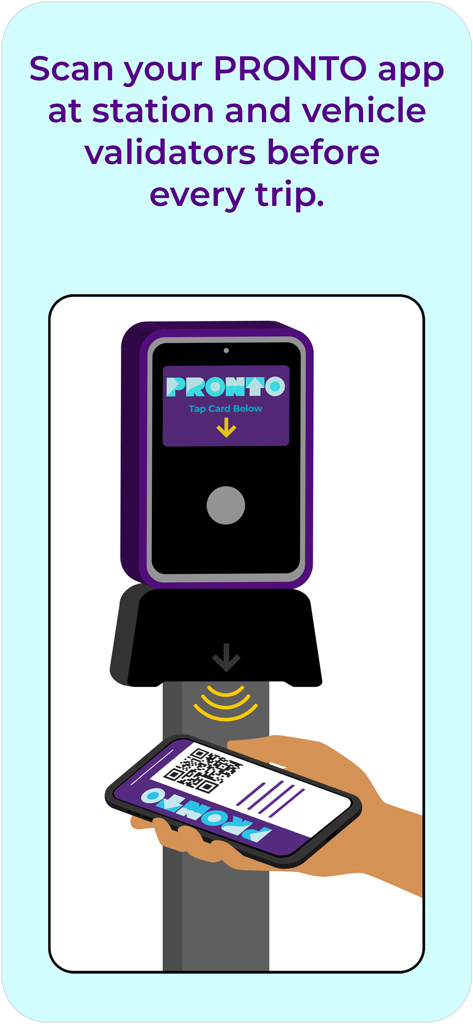
Scanning the Pronto app QR code on a transit validator

Scanning the Pronto app QR code on a transit validator

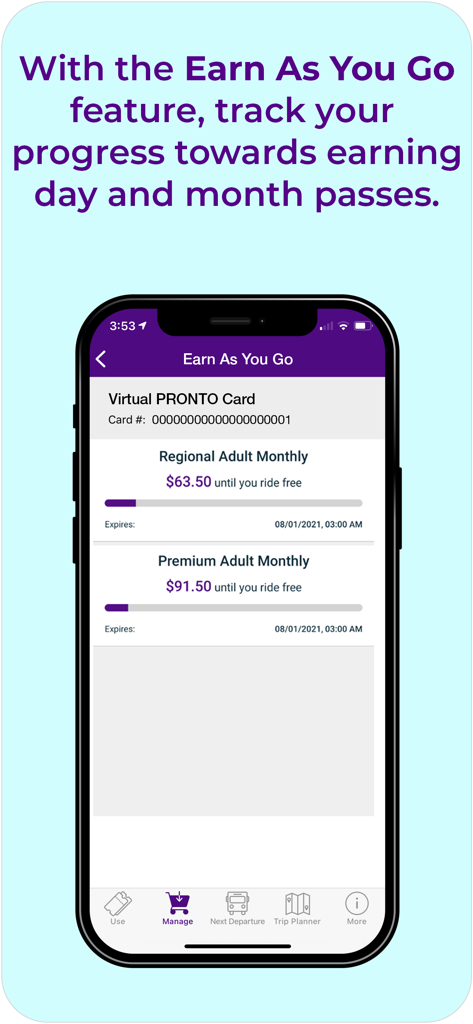
Mobile app screen showing the Earn As You Go feature with progress bars for monthly transit passes in San Diego

Mobile app screen showing the Earn As You Go feature with progress bars for monthly transit passes in San Diego

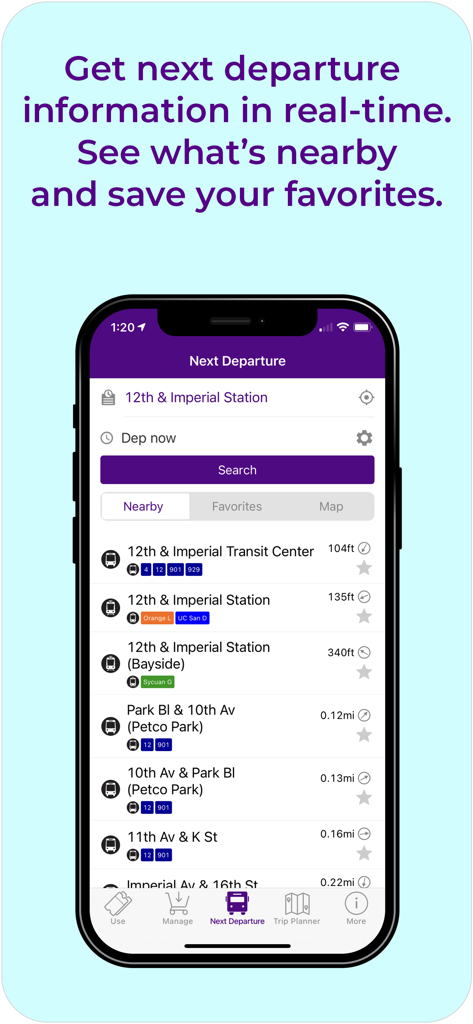
Next departure screen in the Pronto app showing real-time transit information and nearby stops in San Diego

Next departure screen in the Pronto app showing real-time transit information and nearby stops in San Diego

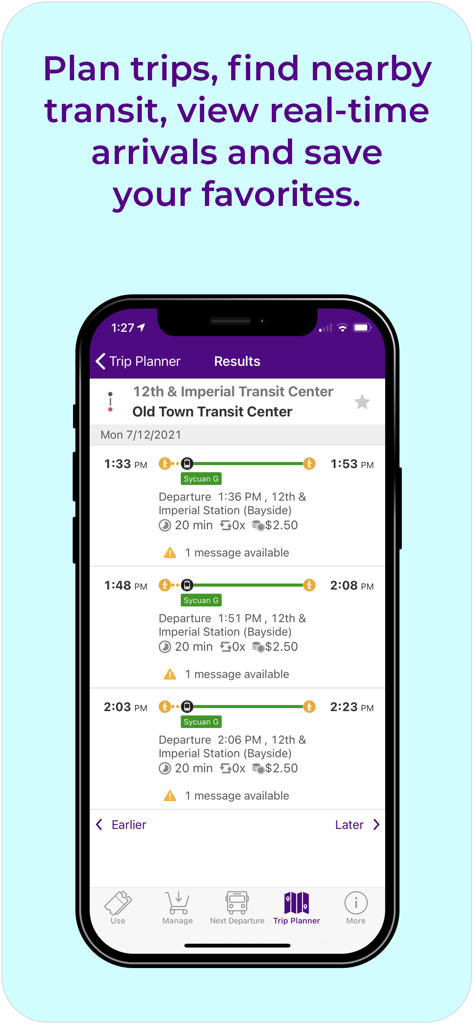
A smartphone display of the Pronto San Diego app trip planner results showing transit routes and real-time arrival times between stations.

A smartphone display of the Pronto San Diego app trip planner results showing transit routes and real-time arrival times between stations.

The Smarter Way to Ride San Diego

The tools that make this app stand out, trusted by 1M+ users.

🏷️

Always Get the Best Fare

Stop worrying about buying passes upfront. Our smart fare capping ensures you never pay more than a Day or Month pass, automatically.

🕒

Real-Time Transit Updates

Eliminate wait anxiety with live arrival times and service alerts for every bus, Trolley, SPRINTER, and COASTER station.

📱

Seamless Mobile Payments

Skip the ticket machine. Load funds instantly via the app and scan your phone at any validator for a frictionless boarding experience.

Loved by users worldwide

Trusted by 1M+ people who love this app.

"

"Pronto has completely changed my daily commute from Chula Vista to Downtown. The 'pay-as-you-go' feature is brilliant because I never have to guess which pass to buy, and the real-time tracking means I'm never left guessing when the next Trolley will arrive. It's the most seamless transit experience I've had."

Marcus T.
"

"As a student at SDSU, this app is an absolute lifesaver for getting around the city on a budget. I love that I can manage my balance right from my phone and the fare capping ensures I'm always getting the best deal. The trip planner makes exploring North Park and the beach on weekends totally stress-free!"

Elena S.

About the app

Everything you need to know about Pronto - San Diego.

Description

PRONTO makes buying fares for MTS and NCTD easier than ever. Add money to your PRONTO app, then scan your phone at the validator each trip you make. Our pay-as-you-go function means you always get the best fare! When using the app, hold your phone 5 to 6 inches below the validator to scan your barcode. The PRONTO app can also help you plan trips, see real-time arrivals, get service statuses, save favorite stations, and find stops for San Diego County area transit so you can plan your trip around San Diego without any problems. Always Get The Best Fare With PRONTO, you can pay-as-you-go* by adding money to your PRONTO account with a credit or debit card. Every time you scan your app, the appropriate one-way fare is deducted from your balance. Look for validators at Trolley, SPRINTER and COASTER stations, and onboard buses. You will never be charged more than a Day Pass ($6 Adult or $3 Reduced Fare) in a given calendar day, regardless of how many trips you make. Likewise, you will never be charged more than a Month Pass ($72 Adult or $23 Reduced Fare) regardless of the number of trips in a calendar month. You can track your progress toward a Day or Month Pass in the PRONTO app. *Pay-as-you go features not available for COASTER (must prepay for Day or Month Pass). Manage Your PRONTO Cards • Register your PRONTO card for balance protection • Load money onto your card using a debit/credit card • Set up autoload to top off your card automatically when your balance gets low • See your balance, current fare, and earned passes • Look up your recent scans, transfer times, and payment history • Manage multiple PRONTO cards for your family or group • Block/Unblock a lost or stolen card Next Departures: • Find Next Departures using stop number, address or landmarks • See real-time bus and train service statuses and news • Map and List view of Nearby Stops • List of recent stops and favorites Trip Planning: • Plan a trip using popular landmarks or addresses • Full trip itineraries with fare information, actual walking distance, and map view • Set alerts to notify you when transit is arriving • See a list of recent trip plans • Save favorite stops for easy access Need More Help? Contact PRONTO Support at 619-595-5636

Latest Version

4.100

Size

105.3 MB

First Released

Aug 15, 2021

Ready to Ride? Get Pronto Today.

Join over 1 million San Diegans and start enjoying the smartest, most affordable way to navigate the city.

Download on App Store
FAQ

Frequently Asked Questions

Everything you need to know about Pronto - San Diego

What is the PRONTO app?

The PRONTO app makes buying transit fares for MTS and NCTD easier. Users add money, scan their phone at validators, and utilize a pay-as-you-go function to ensure the best fare.

How do I use the PRONTO app to pay for transit?

To pay, add money to your PRONTO app, then scan your phone at the validator during each trip. Hold your phone 5 to 6 inches below the validator for scanning.

Can I use the PRONTO app without a physical card?

Yes, the PRONTO app allows users to scan and pay for transit using their phone. No physical PRONTO card is needed to pay.

How does the PRONTO app ensure I get the best fare?

The PRONTO app features a pay-as-you-go system. It automatically caps daily charges at a Day Pass price and monthly charges at a Month Pass price, ensuring you never pay more than the best fare.

What are the daily and monthly fare caps for the PRONTO app?

The daily fare cap is $6 for adults and $3 for reduced fare. The monthly fare cap is $72 for adults and $23 for reduced fare, regardless of the number of trips.

Can I use pay-as-you-go for COASTER services with PRONTO?

No, the pay-as-you-go feature is not available for COASTER services. Users must prepay for a Day or Month Pass when using PRONTO for COASTER.

How do I load money onto my PRONTO account?

You can load money onto your PRONTO account using a credit or debit card through the app. Options for various reload amounts, including $5, $10, and $20, are available.

Does the PRONTO app offer autoload for balances?

Yes, the PRONTO app allows users to set up autoload. This feature automatically tops off your card balance when it gets low, ensuring continuous service.

What information can I track about my PRONTO card in the app?

You can track your balance, current fare, earned passes, recent scans, transfer times, and payment history. The app also shows progress toward Day or Month Passes.

Can I plan trips using the PRONTO app?

Yes, the PRONTO app includes a trip planning feature. Users can plan trips using landmarks or addresses, view full itineraries with fare information, and see actual walking distances.

How do I find real-time departure information with the PRONTO app?

The PRONTO app provides real-time departure information under the 'Next Departures' section. You can find departures using stop numbers, addresses, or landmarks, and view service statuses.

Can I manage multiple PRONTO cards with one app?

Yes, the PRONTO app allows users to manage multiple PRONTO cards. This feature is useful for families or groups, streamlining transit fare management.

How do I block a lost or stolen PRONTO card in the app?

The PRONTO app allows users to block or unblock a lost or stolen card. This feature helps protect your balance and prevent unauthorized use.

Does the PRONTO app show my progress towards a monthly pass?

Yes, the PRONTO app's 'Earn As You Go' feature tracks your spending towards earning day and month passes. It shows the remaining amount until you ride free.