QR Code - QR Reader & Scanner

QR Code - QR Reader & Scanner

Download on App Store
Spark by MWM logo
Logo of QR Code - QR Reader & Scanner
QR Code - QR Reader & Scanner: The Simple, Reliable Way to Scan and Save Everything

Stop losing your scanned links. Experience the most user-friendly scanner with unlimited history storage, custom QR generation, and the power to scan directly from your photo library.

Download on App Store

Publisher

海文 王

Category

Utilities

Downloads

3M+

User Rating

3.4/5

Total Ratings

400

Locales

1

Scanning Made Simple

Discover the interface used by 3M+ users.
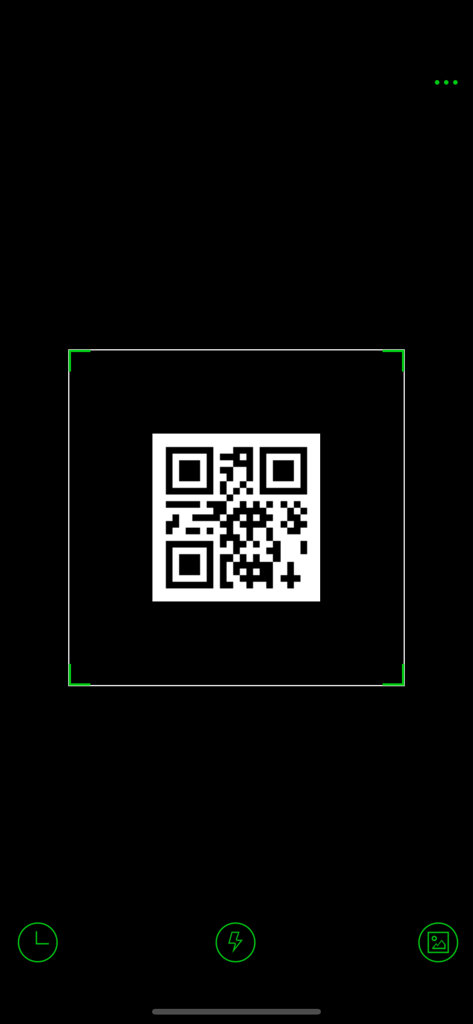
QR code scanner app interface showing a QR code within a scanning frame and utility buttons

QR code scanner app interface showing a QR code within a scanning frame and utility buttons

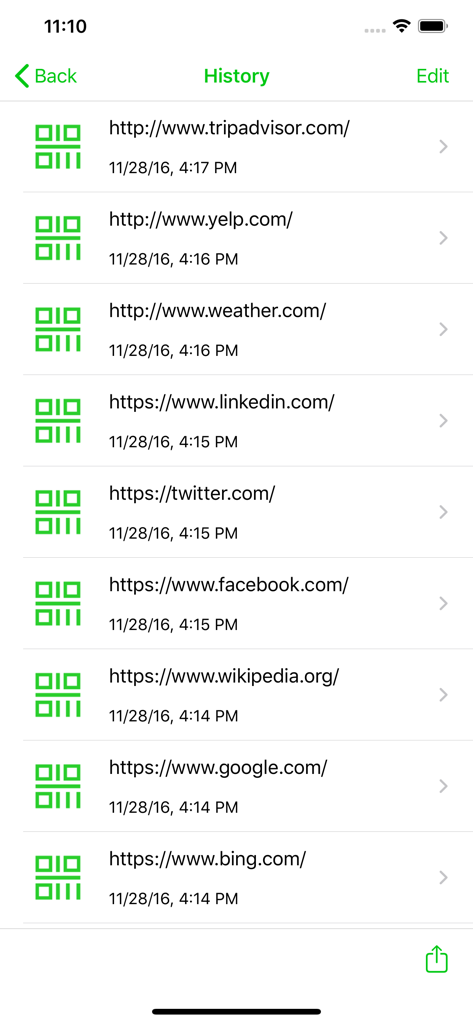
Screenshot of the QR code scanner history page showing a list of scanned website URLs and timestamps

Screenshot of the QR code scanner history page showing a list of scanned website URLs and timestamps

Powerfully Simple Scanning

The tools that make this app stand out, trusted by 3M+ users.

🕒

Automatic Scan History

Never lose a link again. Unlike the basic camera app, we store every scan in a searchable log so you can revisit important info days later.

🛠️

Create Your Own Codes

Professional-grade QR generation made easy. Instantly create custom codes for your business cards, website links, or home Wi-Fi.

🖼️

Scan Images & Photos

Found a code in a text message or online? Simply import images directly from your photo roll to decode them without needing a second screen.

Loved by users worldwide

Trusted by 3M+ people who love this app.

"

"I love how this app keeps a full history of everything I've scanned. I used to lose restaurant menus and coupon links all the time, but now I can just look them up in the app whenever I need them. It is so much more organized than using the basic phone camera."

Linda S., Home Organizer
"

"Being able to generate my own QR codes for my business cards directly on my phone is a game changer. Plus, the feature that allows me to scan codes from my photo library is incredibly useful for digital flyers I receive via email or text."

Mark R., Small Business Owner

About the app

Everything you need to know about QR Code - QR Reader & Scanner.

Description

QR Code Reader is the fastest and most user-friendly QR code scanner available. If your iPhone, iPad, or iPod came with a built-in scanner, this would be it. This app support both barcodes and QR codes, which encode URLs, contact details, emails, or any kind of data. You can also easily generate your own QR code. How to use: 1. Open the scanner 2. Point the camera to the QR code/barcode 3. Auto recognize, scan and decode 4. Get results and relevant options When scanning a QR code, if the code contains a website URL, you will automatically be taken to the site. If the code just contains text, you'll immediately see it. For other formats such as phone numbers, email addresses, or contact info, you will be prompted to take the appropriate action. Features: - For iPhone, iPod touch, and iPad. - Instant Scan. - Unlimited storage for scan history. - Create your own QR Codes. - Auto decode all types of QR codes: contact details, plain text, website URL, telephone number, SMS message, email address, locations... - Scan Barcodes & QR codes from photos in your Photo Roll. - Perform all the actions related to the QR code without quitting the app. - Flashlight supported for low light environment. - Open web links and map locations directly in the app. - Share by mail and text message. Enjoy!

Latest Version

1.0.5

Size

22.2 MB

First Released

Dec 6, 2016

Make Every Scan Matter

Join over 3 million users who demand more than a basic camera. Download now to enjoy the fastest scanning, unlimited history storage, and the power to create your own QR codes in seconds.

Download on App Store