Resume Builder⁺

Resume Builder⁺

Download on App Store
Spark by MWM logo
Logo of Resume Builder⁺

Resume Builder⁺: Land Your Dream Job Faster with AI-Powered Professionalism

Stop struggling with formatting and writer's block. Join 4 million+ professionals using expert-tested templates and AI-driven cover letters to stand out and get hired today.

Publisher

Rounding Squares BV

Category

Business

Downloads

4M+

User Rating

4.7/5

Total Ratings

163K+

Locales

12

Your Career, Visualized

Discover the interface used by 4M+ users.
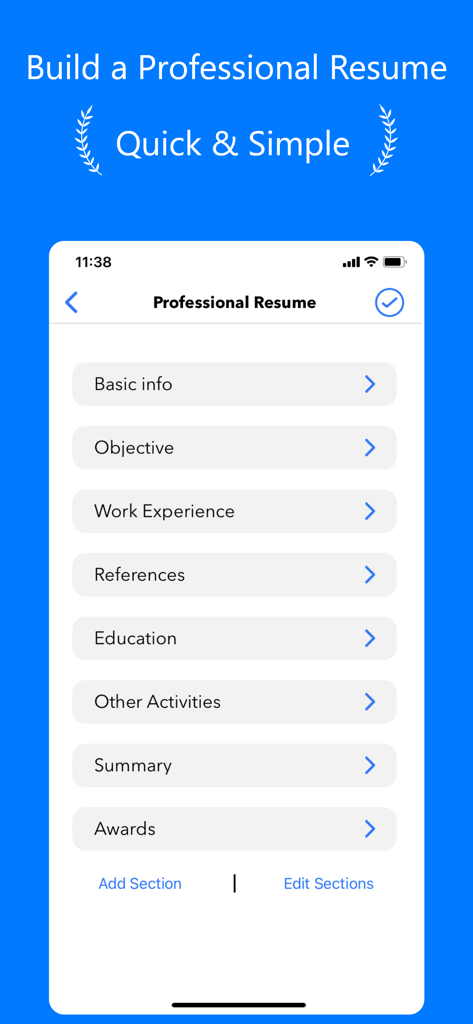
Resume Builder app interface showing categories for basic info work experience and education

Resume Builder app interface showing categories for basic info work experience and education

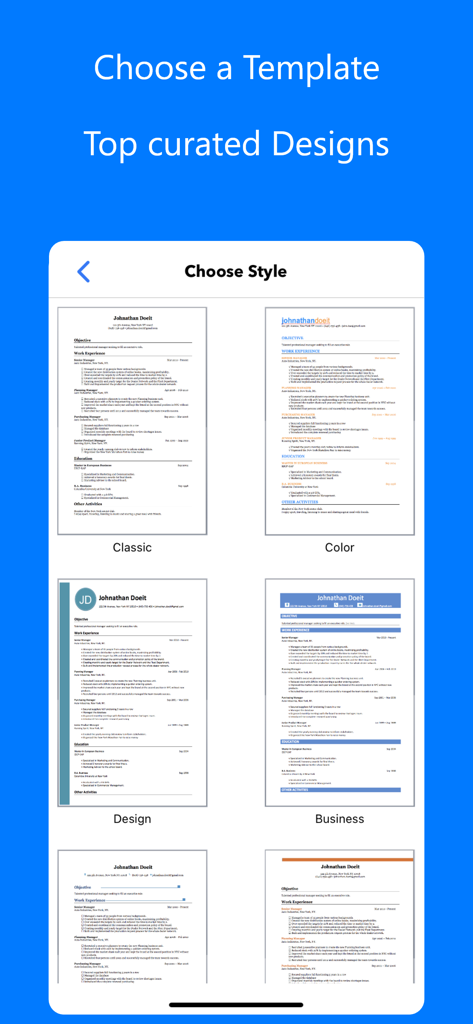
A mobile screen showing a selection of curated resume templates including classic and modern business styles

A mobile screen showing a selection of curated resume templates including classic and modern business styles

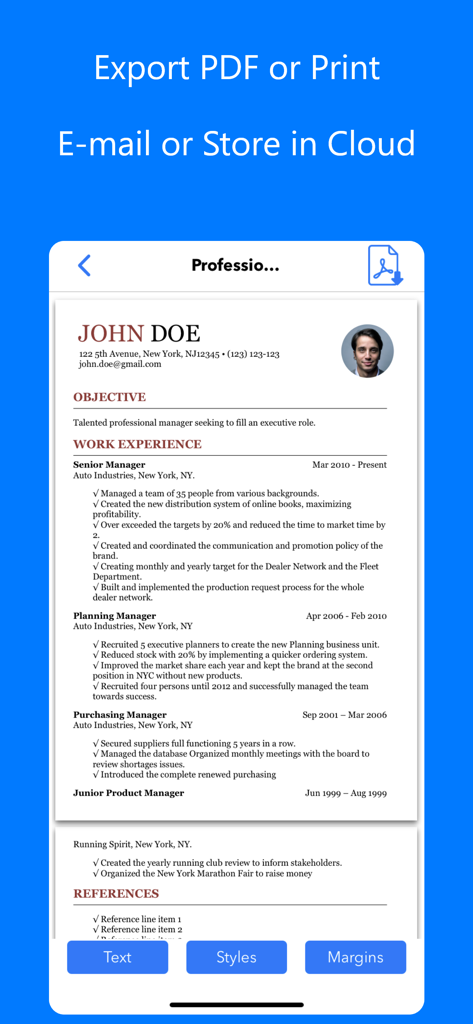
A mobile screen showing a professional resume preview with options to export to PDF, print, or share via email and cloud storage.

A mobile screen showing a professional resume preview with options to export to PDF, print, or share via email and cloud storage.

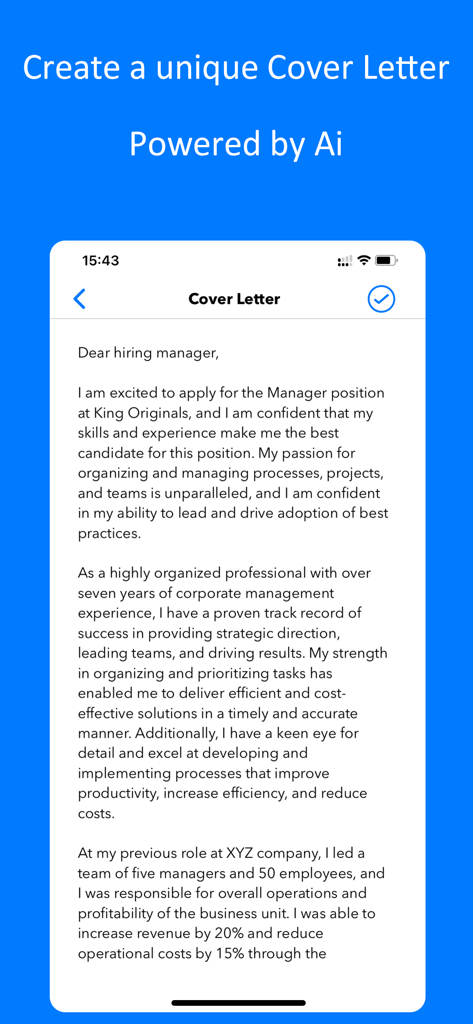
A professional cover letter being generated by AI on a mobile phone interface within the Resume Builder app.

A professional cover letter being generated by AI on a mobile phone interface within the Resume Builder app.

Everything You Need to Get Hired

The tools that make this app stand out, trusted by 4M+ users.

Build in Minutes, Not Hours

Skip the formatting struggle. Use our frictionless 3-step process to generate a professional resume on the go, directly from your iPhone.

🤖

AI-Powered Cover Letters

End writer's block instantly. Our advanced AI creates unique, tailored cover letters for every application to maximize your chances of success.

Recruiter-Approved Templates

Choose from premium, field-tested styles designed to bypass ATS filters and make a powerful first impression in a competitive job market.

Loved by users worldwide

Trusted by 4M+ people who love this app.

"

"As a recent graduate, I was completely overwhelmed by the job hunt. Resume Builder⁺ changed everything—I created a professional CV on my phone while commuting, and the AI cover letter feature is a literal lifesaver. It helped me articulate my skills perfectly without the usual writer's block. I landed three interviews in my first week of using it!"

Jordan S.
"

"I'm currently pivoting careers, and needing to tailor my resume for different industries was becoming a full-time job in itself. This app makes it incredibly easy to duplicate and tweak my CV for specific roles. No more fighting with margins in Word! The templates are sleek, modern, and definitely helped me stand out in a crowded market."

Elena M.

About the app

Everything you need to know about Resume Builder⁺.

Description

√ Build your Resume quickly in a few minutes √ Choose a professional Template to attract attention √ Create your unique Cover Letter with the power of Artificial Intelligence "This app will help you get the interview for your dream job!" Note: Access to certain features may require an in-app purchase. QUICK EASY 3 STEPS PROCESS 1. Fill in your information 2. Choose a professional template 3. Share, Print or Send directly per email 4. Create your unique Cover Letter with AI to maximise your chances FEATURES: - Customize it: Resume styles, fonts, colors and templates that have been long tested - Be accurate: Text Check, Auto-Correction and Predictive Text. - Make it personal: Add a photo to your curriculum vitae - Change Text Size or Margins in order to have a perfectly built resume - Duplicate your CV to create different Resumes for different job offers - Advanced Share feature: E-mail, Print, Save to Cloud (Dropbox, Google Drive, Files...) - Create multiple unique Cover Letters for each job application. The app AI models will build each specifically tailored to your needs SUBSCRIPTIONS: You can subscribe to upgrade to Premium features - Subscriptions length: weekly, monthly, semesterly - Your payment will be charged to iTunes Account at confirmation of purchase - Subscription automatically renews unless auto-renew is turned off at least 24-hours before the end of the current period - Account will be charged for renewal within 24-hours prior to the end of the current period, and identify the cost of the renewal - Subscriptions may be managed by the user and auto-renewal may be turned off by going to the user's Account Settings after purchase - To Manage or Cancel your subscription, it can be done via the Settings app of your device: Open the Settings app, Tap your name, Tap Subscriptions, Tap the subscription, Tap Cancel Subscription. You might need to scroll down to find the Cancel Subscription button. If there is no Cancel button or you see an expiration message in red text, the subscription is already canceled. For more detail, see https://support.apple.com/en-us/118428 . - To Manage or Cancel your subscription, it can also be done directly from the app: Go to ‘Settings’ screen inside our app, tap on ‘Manage Subscriptions’ and the app will directly open the list of your Subscriptions with the AppStore. You can select a subscription and check available plans or cancel subscription. - When canceling a subscription, your subscription will remain active until the end of the period. Auto-renewal will be disabled but the current subscription will not be refunded. - Any unused portion of a free trial period, if offered, will be forfeited when the user purchases a subscription to that publication, where applicable Read our Privacy Policy at: https://roundingsquares.com/privacy/ Read our Terms of Use at: https://roundingsquares.com/terms/

Latest Version

4.6.3

Size

48.4 MB

First Released

Jan 23, 2016

Ready to Land Your Next Big Role?

Join 4 million+ professionals using AI to build perfect resumes and cover letters in minutes. Download now and start applying with confidence.

Download on App Store
FAQ

Frequently Asked Questions

Everything you need to know about Resume Builder⁺

How does Resume Builder⁺ help create a resume quickly?

Resume Builder⁺ streamlines resume creation into three steps: input information, select a professional template, then share, print, or email. This process ensures quick and efficient document generation.

Does Resume Builder⁺ provide customizable templates for resumes?

Yes, Resume Builder⁺ offers customizable templates. Users can personalize their resumes with various styles, fonts, and colors to attract attention. Screenshot #2 displays template options.

Can Resume Builder⁺ generate cover letters using AI technology?

Yes, Resume Builder⁺ generates unique cover letters using Artificial Intelligence. The app's AI models tailor each letter specifically to user needs, maximizing job application success. Screenshot #4 shows the cover letter feature.

What are the export and sharing options available in Resume Builder⁺?

Resume Builder⁺ offers advanced export and sharing options. Users can email, print, or save their resumes directly to cloud services like Dropbox, Google Drive, and Files. Screenshot #3 depicts these options.

How can a user manage or cancel their Resume Builder⁺ subscription?

Users manage or cancel their Resume Builder⁺ subscription through their device's Settings app under 'Subscriptions'. Alternatively, they can access 'Manage Subscriptions' from the app's 'Settings' screen, which links to the AppStore.

Does Resume Builder⁺ include features for text accuracy like auto-correction?

Yes, Resume Builder⁺ includes text accuracy features. The app provides Text Check, Auto-Correction, and Predictive Text to help users ensure their resume content is precise and error-free.

Is it possible to add a personal photo to a resume in Resume Builder⁺?

Yes, Resume Builder⁺ allows users to add a personal photo to their curriculum vitae. This feature enables further personalization of the resume for job applications.

What are the available subscription durations for Resume Builder⁺ Premium features?

Resume Builder⁺ offers Premium features with flexible subscription durations. Users can choose from weekly, monthly, or semesterly subscription lengths to access enhanced functionalities.