Unicorn Blocker:Adblock

Unicorn Blocker:Adblock

Download on App Store
Spark by MWM logo
Logo of Unicorn Blocker:Adblock

Unicorn Blocker: Adblock for a Faster, Safer, and Longer-Lasting iPhone

Experience 3x faster browsing and 21% more battery life. Block intrusive ads, save mobile data, and protect your family from trackers and scams on Safari.

Publisher

OH NAM KWON

Category

Utilities

Downloads

366K+

User Rating

4.8/5

Total Ratings

48K+

Locales

3

A Glimpse of Pure Browsing

Discover the interface used by 366K+ users.
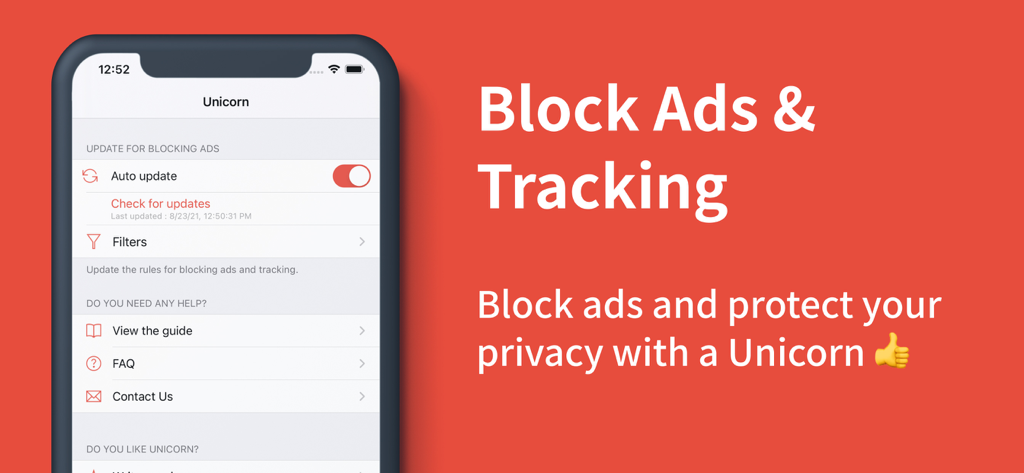
Unicorn Blocker app interface for blocking ads and tracking on iPhone

Unicorn Blocker app interface for blocking ads and tracking on iPhone

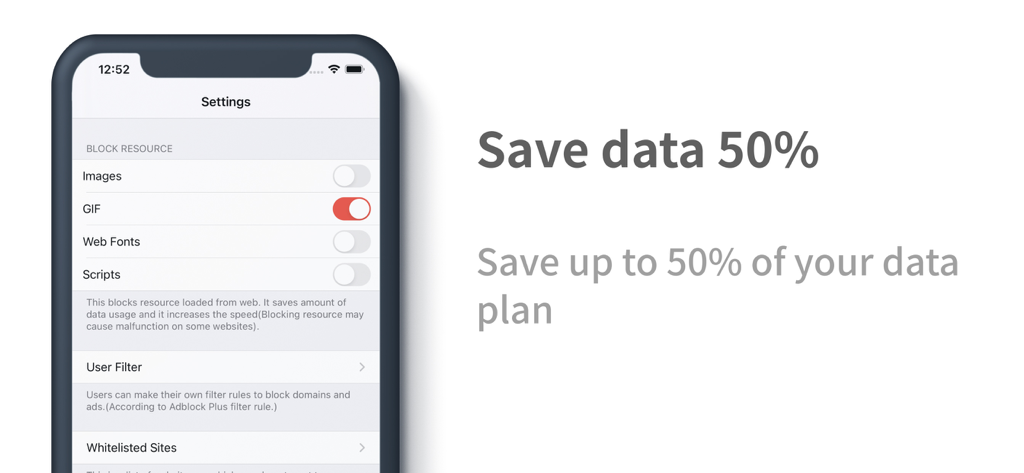
Smartphone screen showing Unicorn Blocker settings to save up to 50 percent of mobile data by blocking GIFs and scripts

Smartphone screen showing Unicorn Blocker settings to save up to 50 percent of mobile data by blocking GIFs and scripts

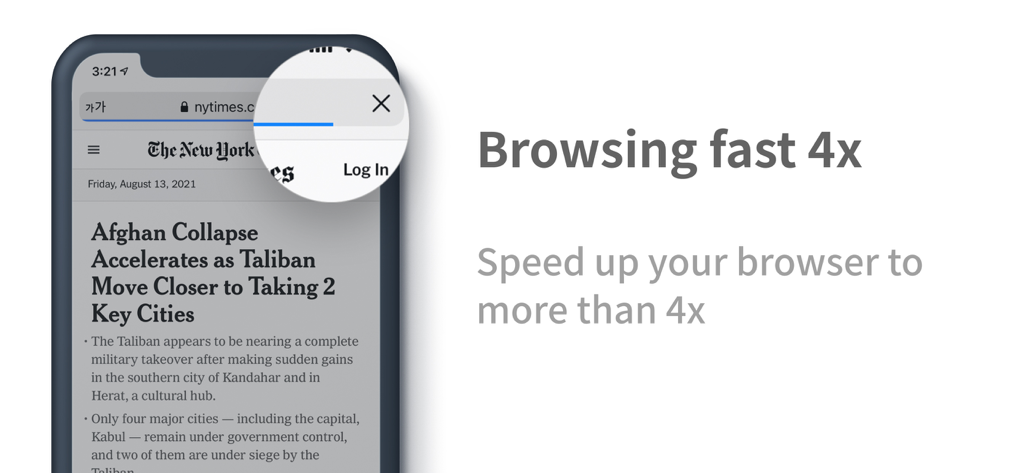
Unicorn Blocker app showing 4x faster browsing on an iPhone

Unicorn Blocker app showing 4x faster browsing on an iPhone

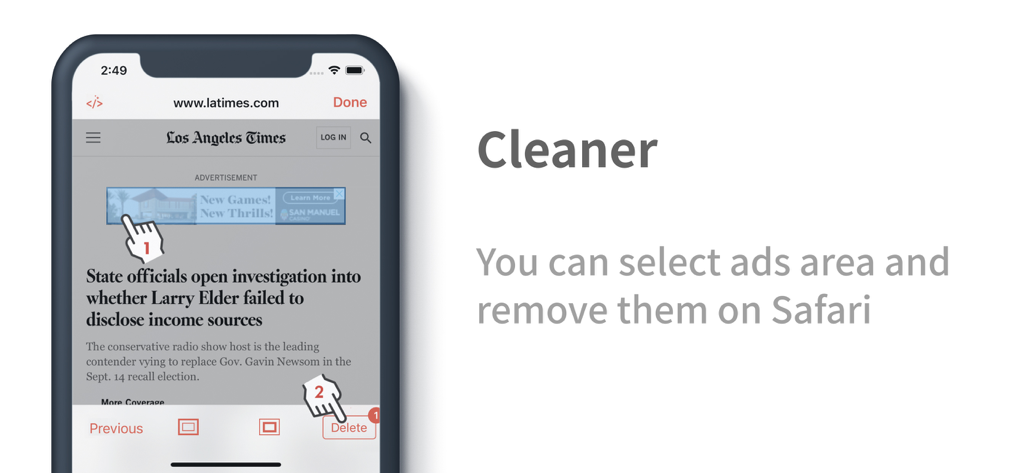
Unicorn Blocker cleaner tool showing manual selection and removal of ads on a Safari news website

Unicorn Blocker cleaner tool showing manual selection and removal of ads on a Safari news website

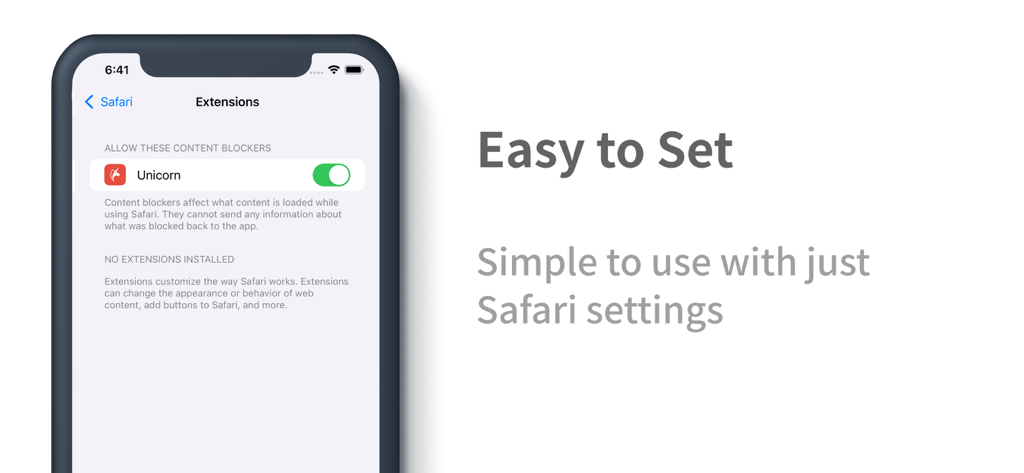
iPhone screen showing the Unicorn Blocker extension enabled in Safari settings

iPhone screen showing the Unicorn Blocker extension enabled in Safari settings

Browse Faster, Cleaner, and Longer

The tools that make this app stand out, trusted by 366K+ users.

3x Faster Browsing Speed

Eliminate resource-heavy scripts and ads to load pages up to 3 times faster while reducing data wastage by 4x on every site you visit.

🛡️

Protect Your Family

Keep your children safe from stimulating content and shield elderly parents from deceptive bait ads and phishing scams automatically.

🔋

21% More Battery Life

A lighter web environment means less CPU strain. Enjoy significantly longer battery life and reduced overheating during long reading sessions.

Loved by users worldwide

Trusted by 366K+ people who love this app.

"

"Since installing Unicorn Blocker, browsing on Safari feels like a completely different experience. It's significantly faster, and I've noticed a huge improvement in my iPhone's battery life during my daily commute. It's the ultimate 'set it and forget it' tool for anyone who hates digital clutter."

David Chen
"

"I bought this to protect my kids from seeing inappropriate ads while they use their iPads for school research. It works perfectly, blocking everything from annoying pop-ups to data-heavy video ads. It gives me peace of mind knowing they are browsing a much cleaner and safer web."

Elena Rodriguez

About the app

Everything you need to know about Unicorn Blocker:Adblock.

Description

Did you know that data wastage due to ads can increase by up to 4 times? Unicorn blocks ads to reduce unnecessary data usage by up to 4 times and improves your web browsing speed by more than 3 times. Experience an extended battery life of up to 21% with a lighter web environment. Caution: • After the initial installation, please ensure that you enable both of Unicorn’s extensions by going to iPhone → Settings → Apps → Safari → Extensions and switching both to “On,” then set them to “Allow” on all websites. User Reviews: • “I rarely leave reviews, but I absolutely have to buy this.” - yangxx • “Ever since I experienced an ad-free world, I only use Safari.” - no1xxx • “The database is extensive and the feedback is extremely fast.” - xxpi • “I’ve been using it for 3 months and I’m very satisfied.” - berxxxx Key Features: • Ad blocking effect (for the Safari browser) • Up to 4 times data saving • Up to 3 times speed improvement • Up to 21% increase in battery life (Source: The New York Times) Recommended Users: • Ad misclick prevention: In case you accidentally click on ads. • Blocking unnecessary ads: If you are disturbed by provocative adult ads or an overload of ads. • Child protection: If you don’t want your children to see stimulating ads. • Elderly protection: If you are concerned that older parents might fall for scam (bait) ads. • Data and battery saving: If you are worried about limited data, slow speeds, overheating, or battery drain. • Visual impairment support: For users who access the internet via voice guidance (for the visually impaired or low-vision users). Types of Ads That Can Be Blocked: • Website ads: Ads on domestic and international mobile and desktop sites. • Tracking ads: Ads that track your search information. • Embedded ads: Ads cleverly inserted in the middle of articles. • Popup ads: Ads that appear in a popup format. • Forced redirect ads: Ads that forcibly redirect you from a site. • Unnecessary SNS elements: Social media comments and share buttons. • Cryptocurrency mining scripts: Blocks illegal mining scripts. • Anti-adblock circumvention ads: Ads that bypass ad blockers. • Video ads: 5–15 second video ads (Ads on some sites that are beyond Safari’s content blocking capabilities may be difficult to block) • Screen cleanup: Removes any blank spaces left after ad removal. • Cleaner function: Allows users to directly select and remove content areas on sites where blocking is insufficient. ※ If ads are not completely blocked, please report them using the “Report Ad” feature within the app and we will respond accordingly. Cleaner Function: • Allows deletion of user-specified areas. • Run the cleaner within the app or select Cleaner via Safari’s share button. How to Update the Blocking Database: • Press the update button after launching the app. • Enable automatic updates within the app (background refresh required). Frequently Asked Questions (FAQ): • What if ads still remain? Some video sites, Twitter, Facebook, or sites with anti-adblock measures may not have ads blocked. → In this case, using Unicorn Pro will resolve most issues. • Does it block ads in apps or game apps? This app is for the Safari browser only and does not block ads within other apps. • What if ad blocking isn’t working well? If ads are not blocked at all, please refer to the in-app guide to check if the settings are correct. If problems persist, please uninstall and reinstall the app. • What should I do if I see an ad? In case of sudden ad appearance, please check if you can update to the latest blocking rules. • Can ad blocking sometimes fail? Since many sites frequently add or change ads, complete blocking may be difficult. Notice: ※ In cases beyond the technical scope of the extension, some ads (such as on video sites, Twitter, Facebook, or sites with anti-adblock measures) may not disappear. In such cases, using Unicorn Pro will resolve most issues. Customer Support: • Email: support@unicorn-soft.com

Latest Version

1.27.4

Size

124.3 MB

First Released

Oct 17, 2015

Ready for a Faster, Cleaner Safari?

Join 366,000+ users and start saving up to 4x data and 21% battery life today. Take back control of your browsing and experience the web the way it was meant to be.

Download on App Store
FAQ

Frequently Asked Questions

Everything you need to know about Unicorn Blocker:Adblock

What is Unicorn Blocker:Adblock?

Unicorn Blocker:Adblock blocks ads, reducing data usage up to 4 times, improving web browsing speed over 3 times, and extending battery life up to 21%.

Does Unicorn Blocker:Adblock save mobile data?

Yes, Unicorn Blocker:Adblock saves data by up to 4 times by reducing unnecessary data usage caused by ads.

Can Unicorn Blocker:Adblock improve browsing speed?

Yes, Unicorn Blocker:Adblock improves web browsing speed by more than 3 times, potentially up to 4 times, by creating a lighter web environment.

Does Unicorn Blocker:Adblock extend battery life?

Yes, Unicorn Blocker:Adblock extends battery life by up to 21% due to a lighter web environment and reduced data usage.

How do I enable Unicorn Blocker:Adblock extensions on my iPhone?

After installation, enable both Unicorn extensions in iPhone Settings → Apps → Safari → Extensions, switching them to "On" and setting them to "Allow" on all websites.

Who can benefit from using Unicorn Blocker:Adblock?

Unicorn Blocker:Adblock benefits users who want to prevent ad misclicks, block distracting ads, protect children or elderly, save data/battery, and support visual impairment via voice guidance.

What types of ads does Unicorn Blocker:Adblock block?

Unicorn Blocker:Adblock blocks website, tracking, embedded, popup, forced redirect, anti-adblock circumvention, and video ads. It also removes unnecessary SNS elements and cryptocurrency mining scripts.

What is the Cleaner Function in Unicorn Blocker:Adblock?

The Cleaner Function in Unicorn Blocker:Adblock allows users to directly select and remove specific content areas on websites where ad blocking might be insufficient.

How do I update the blocking database for Unicorn Blocker:Adblock?

To update the blocking database, press the update button within the Unicorn app or enable automatic updates, which requires background refresh.

Why do some ads still appear with Unicorn Blocker:Adblock?

Some ads may remain on video sites, Twitter, Facebook, or sites with anti-adblock measures because they are beyond Safari’s content blocking capabilities. Unicorn Pro resolves most such issues.

Does Unicorn Blocker:Adblock block ads in other apps or games?

No, Unicorn Blocker:Adblock is specifically for the Safari browser and does not block ads within other applications or game apps.

What if Unicorn Blocker:Adblock is not blocking ads effectively?

If ad blocking is not working, refer to the in-app guide to check settings. If issues persist, uninstall and reinstall the Unicorn Blocker:Adblock app.

What should I do if I suddenly see an ad while using Unicorn Blocker:Adblock?

If an ad suddenly appears, check if you can update to the latest blocking rules within the Unicorn Blocker:Adblock app.

Can Unicorn Blocker:Adblock sometimes fail to block ads?

Yes, complete ad blocking can sometimes fail because many sites frequently add or change their ad implementations.

How do I contact customer support for Unicorn Blocker:Adblock?

You can contact customer support for Unicorn Blocker:Adblock via email at support@unicorn-soft.com for assistance.

Can Unicorn Blocker:Adblock block specific web resources?

Yes, Unicorn Blocker:Adblock allows users to block specific web resources like images, GIFs, web fonts, and scripts to save data and increase speed.

Does Unicorn Blocker:Adblock offer a user filter?

Yes, Unicorn Blocker:Adblock includes a User Filter feature, allowing users to create custom rules to block domains and ads.

Does Unicorn Blocker:Adblock support whitelisting websites?

Yes, Unicorn Blocker:Adblock includes an option for Whitelisted Sites, allowing users to exempt specific websites from ad blocking.

Can I manually remove specific ads with Unicorn Blocker:Adblock?

Yes, Unicorn Blocker:Adblock features a "Cleaner" function that allows you to select specific ad areas and remove them directly from Safari.

Is Unicorn Blocker:Adblock easy to set up?

Yes, Unicorn Blocker:Adblock is easy to set up. You enable its content blocker directly within your iPhone's Safari settings.