Working Hours 4b

Working Hours 4b

Download on App Store
Spark by MWM logo
Logo of Working Hours 4b

Working Hours 4b: Your Professional Shift Tracker & Earnings Calculator

Stop relying on paper logs. Effortlessly track your overtime, manage multiple jobs, and calculate your exact pay with the intuitive app designed for the modern workforce.

Publisher

BUDESCU SORIN GEORGE

Category

Productivity

Downloads

317K+

User Rating

4.8/5

Total Ratings

8K+

Locales

43

Your Earnings at a Glance

Discover the interface used by 317K+ users.
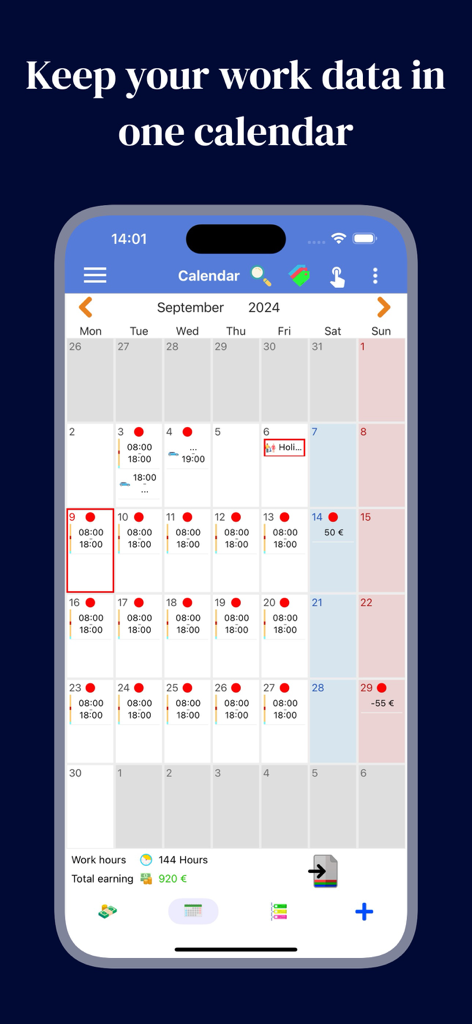
A monthly calendar interface within the Working Hours 4b app showing daily shift logs and total earnings

A monthly calendar interface within the Working Hours 4b app showing daily shift logs and total earnings

Dashboard of Working Hours 4b app showing monthly work hours and earnings summary

Dashboard of Working Hours 4b app showing monthly work hours and earnings summary

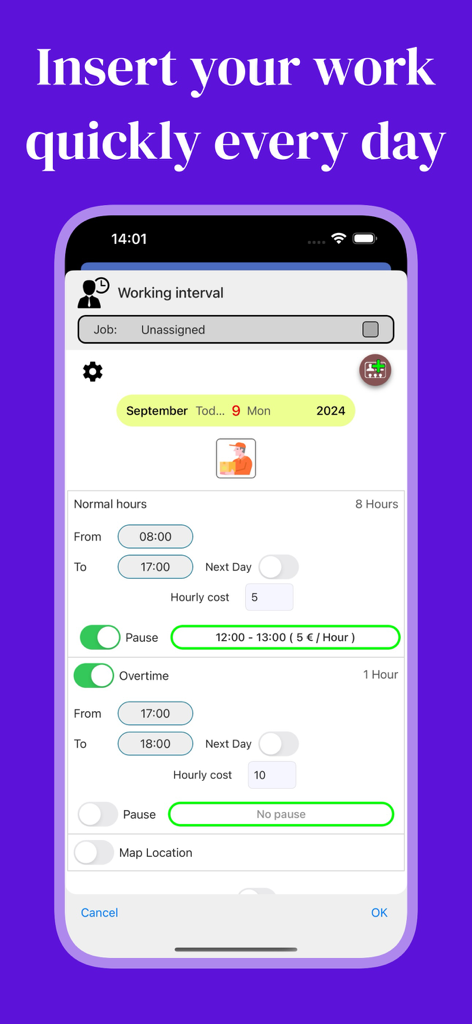
Smartphone screen displaying the Working Hours 4b interface for entering daily shift hours and overtime.

Smartphone screen displaying the Working Hours 4b interface for entering daily shift hours and overtime.

Mobile app interface displaying daily work events with shifts overtime and earnings details

Mobile app interface displaying daily work events with shifts overtime and earnings details

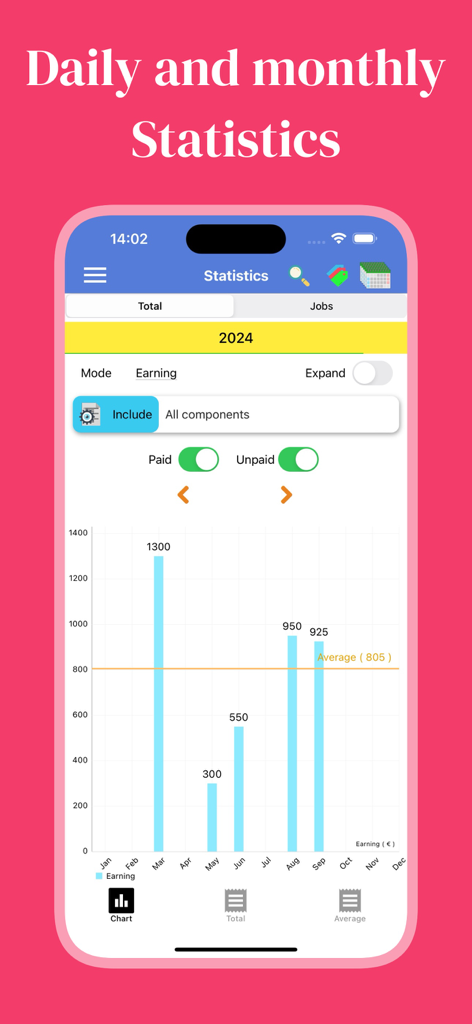
Working Hours 4b app displaying a bar chart of monthly earnings and average income for 2024

Working Hours 4b app displaying a bar chart of monthly earnings and average income for 2024

Take Complete Command of Your Paycheck

The tools that make this app stand out, trusted by 317K+ users.

⏱️

Smart Shift Versatility

Easily log early entries, overtime, and night shifts. Our 48-hour interval support ensures every minute is accounted for, even when your work crosses midnight.

💰

Live Earnings Insights

Calculate your net gain instantly including bonuses, tips, and expenses. See your daily, weekly, and monthly totals so you know exactly what your check should be.

📑

Audit-Ready Exports

Generate professional PDF, CSV, or plain text reports in one tap. Perfect for settling payroll disputes, tax preparation, or sending invoices to clients.

Loved by users worldwide

Trusted by 317K+ people who love this app.

"

"As a freelance contractor juggling multiple projects, this app is a lifesaver. The ability to export my hours as a PDF has made my billing process so much faster, and I haven't missed a single minute of overtime since I started using it."

Marcus T., Independent Contractor
"

"Working night shifts at the hospital used to make tracking my hours a nightmare. This app handles shifts that cross midnight perfectly. I love being able to see my earnings grow in the statistics tab—it is incredibly motivating!"

Sarah L., Registered Nurse

About the app

Everything you need to know about Working Hours 4b.

Description

Are you tired of always write on a piece of paper and at the end of the month to deal with the calculator ? Let Working Hours 4b help you ! Working Hours 4b through an easy and intuitive interface allows you to enter your work hours that may contain: - Regular hours - Extra: Early entry and Overtime - Pause (paid or unpaid) - Bonus - Expense - An icon and a note You can calculate your gain: -Monthly -Weekly -Biweekly - Fortnightly (14 or 15 days) -Annual -Custom interval With the calendar inside you can enter, edit and observe the intervals of your working hours for each month by consulting the details divided by hours and earnings: - Regular hours - Extra: Early entry and Overtime - Paid pause - Unpaid pause - Bonus - Expense - Total Use the paid indicator to track your intervals payments! Work intervals can cover a maximum of 48 hours which gives you the ability to insert both the daily hours, or night. The application contains a section for the utility that will allow you to: - Observe the statistics for a custom range - Export data in the form of: * Plain Text * CSV * PDF Share them at your pleasure! Do you have multiple ranges that are substantially the same for different days of the week but that may change for very little? No problem : Working profiles: Easily add more models intervals naming them differently (example: Monday, Tuesday or night shift, day) to add them easily in the desired day. The profiles are not immutable, you can change them or fix them when you are adding a new interval. Statistics: You can see your earnings or your annual hours (month to month) and monthly (daily) through the graph. Cloud and device synchronization: Your data is saved on cloud, using your identification method. You can have multiple devices synchronized between them in real time! For bugs, errors and ideas join the community: https://www.facebook.com/working.hours.4b/ Or send an email in the Contact section of the options! This app contains optional in-app purchases: - Ads Remove: disable the ads - Multiple jobs: make you able to insert more jobs Terms https://workinghours4b.com/terms-and-conditions

Latest Version

8.13.2

Size

116.4 MB

First Released

Apr 12, 2017

Take Control of Your Paycheck Today

Join over 317,000 professionals who use Working Hours 4b to track every minute of overtime, night shifts, and bonuses with ease. Ditch the paper and start earning with clarity.

Download on App Store
FAQ

Frequently Asked Questions

Everything you need to know about Working Hours 4b

What types of work hours can Working Hours 4b track?

Working Hours 4b tracks regular, extra (early entry, overtime), paid/unpaid pauses, bonuses, and expenses for detailed work logging.

How does Working Hours 4b calculate earnings?

Working Hours 4b calculates earnings monthly, weekly, biweekly (14 or 15 days), annually, or for custom intervals based on entered work data.

Does Working Hours 4b include a calendar for tracking work?

Yes, Working Hours 4b features an in-app calendar to enter, edit, and observe work intervals, showing details like hours, earnings, bonuses, and expenses.

Can users mark work intervals as paid in Working Hours 4b?

Yes, Working Hours 4b allows users to use a "paid indicator" to track and mark their work intervals' payments, ensuring proper financial tracking.

What is the maximum duration for a single work interval in Working Hours 4b?

Working Hours 4b allows work intervals to cover a maximum of 48 hours, enabling the insertion of both daily and night shifts within a single entry.

What data export options does Working Hours 4b provide?

Working Hours 4b offers data export in Plain Text, CSV, and PDF formats. Users can also observe statistics for custom ranges and share their exported data.

Does Working Hours 4b support predefined work schedules or profiles?

Yes, Working Hours 4b supports "Working profiles" to easily add patterned intervals, such as daily or shift-based models. These profiles are editable.

Does Working Hours 4b provide visual statistics for earnings and hours?

Yes, Working Hours 4b provides graphical statistics showing annual earnings (month to month) and monthly hours (daily) for comprehensive data visualization.

Does Working Hours 4b synchronize data across multiple devices?

Yes, Working Hours 4b synchronizes data across multiple devices in real-time. Data is saved on the cloud using the user's identification method.

Are there in-app purchases available in Working Hours 4b?

Yes, Working Hours 4b offers optional in-app purchases, including an "Ads Remove" option to disable advertisements and a "Multiple jobs" feature.

Is Working Hours 4b a free application to download?

Yes, Working Hours 4b is free to download, but it contains optional in-app purchases for features like ad removal and supporting multiple jobs.

How can users get support for Working Hours 4b?

Users can get support for Working Hours 4b by joining its Facebook community or sending an email via the Contact section in the app's options.

Where can I find the terms and conditions for Working Hours 4b?

The terms and conditions for Working Hours 4b are available at https://workinghours4b.com/terms-and-conditions, linked within the app description.