Speech Assist Switch

Speech Assist Switch

Télécharger sur App Store
Spark by MWM logo
Logo de Speech Assist Switch
Speech Assist Switch : Amplifiez Votre Voix grâce à un Contrôle par Manette Efficace

La solution CAA professionnelle conçue spécifiquement pour les utilisateurs d'iPad ayant des difficultés motrices. Communiquez en toute indépendance grâce à des schémas de balayage personnalisables, des bibliothèques de phrases personnalisées et des voix de haute qualité adaptées à vos besoins uniques.

Éditeur

Ton Schalke

Catégorie

Medical

Téléchargements

29K+

Note

1.0/5

Nombre d'avis

0

Langues

4

L'Autonomisation Rendue Visible

Découvrez l'interface utilisée par 29K+ utilisateurs.
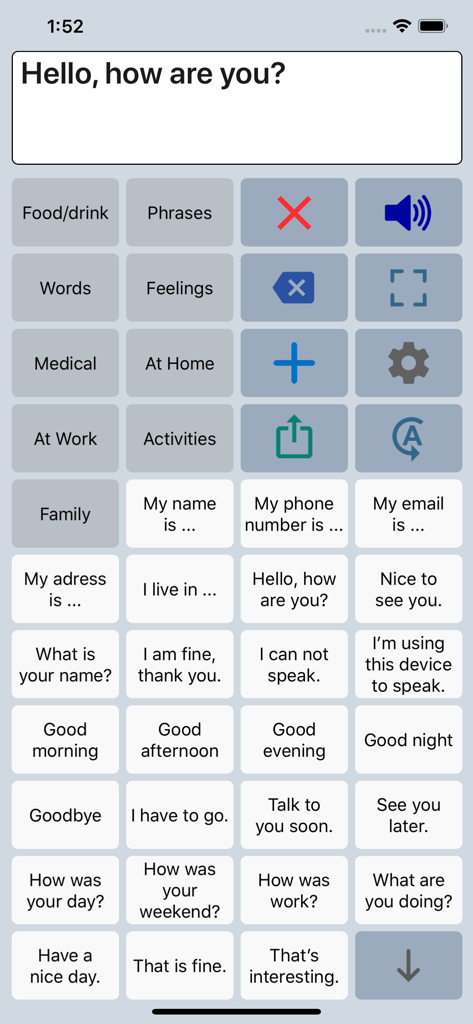
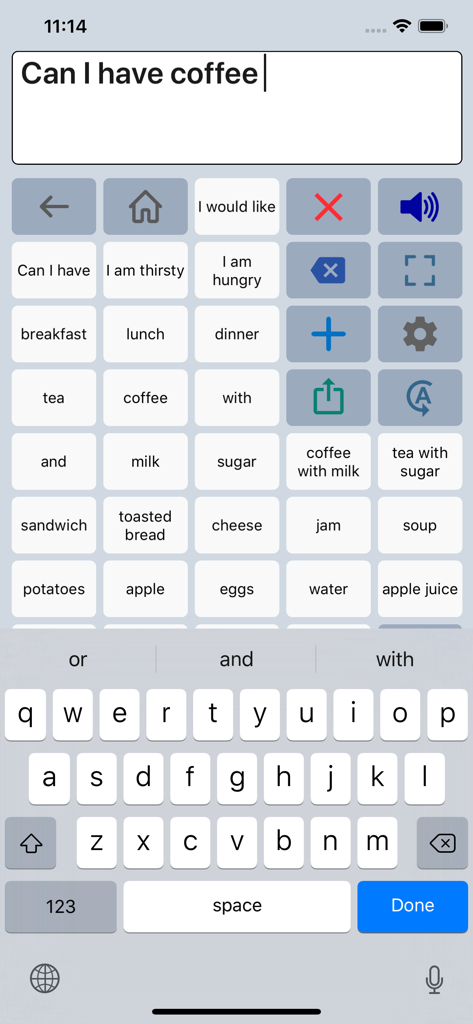
Interface de l'application CAA Speech Assist Switch présentant une grille de phrases et de catégories personnalisables pour l'assistance vocale.

Interface de l'application CAA Speech Assist Switch présentant une grille de phrases et de catégories personnalisables pour l'assistance vocale.

Interface de l'application Speech Assist Switch montrant une grille de phrases et un clavier pour la communication

Interface de l'application Speech Assist Switch montrant une grille de phrases et un clavier pour la communication

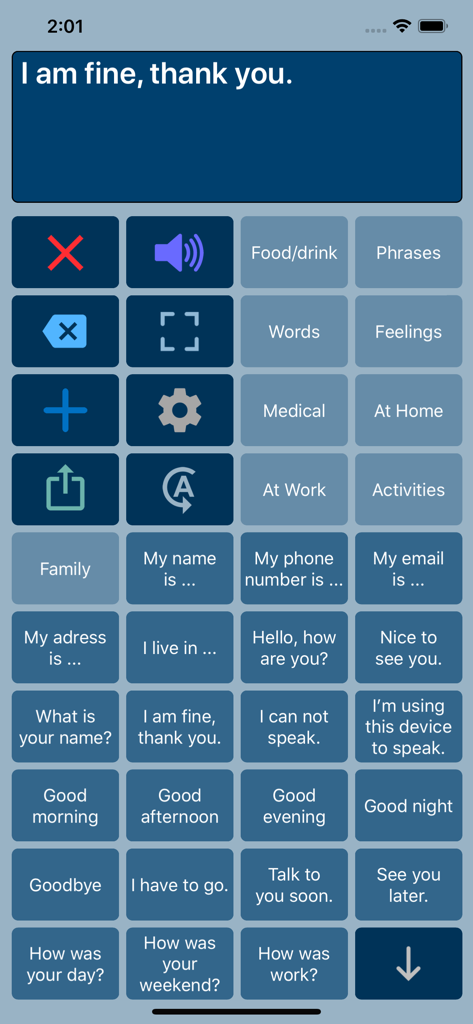
Interface de l'application Speech Assist Switch montrant une grille de boutons de communication avec des phrases courantes et des options de catégories

Interface de l'application Speech Assist Switch montrant une grille de boutons de communication avec des phrases courantes et des options de catégories

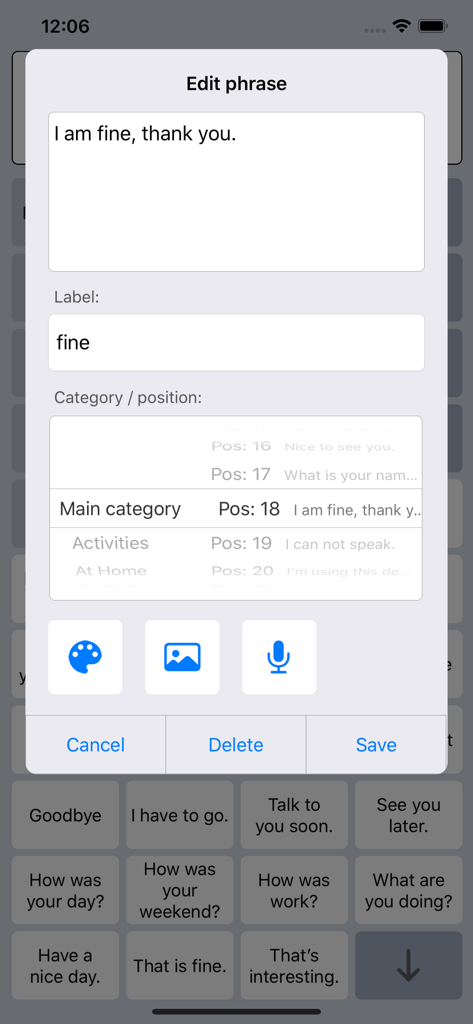
Interface pour éditer et personnaliser les phrases dans l'application Speech Assist Switch

Interface pour éditer et personnaliser les phrases dans l'application Speech Assist Switch

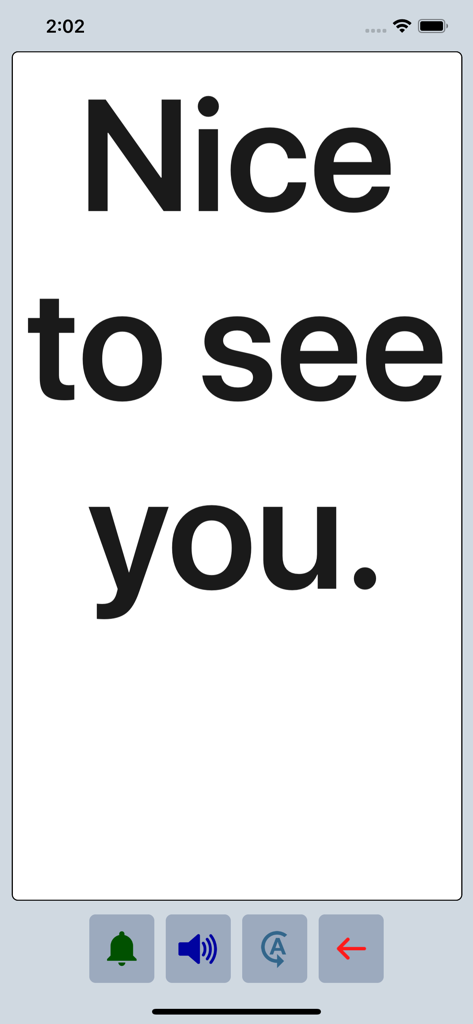
L'application Speech Assist Switch affichant la phrase "Nice to see you" en gros caractères gras en mode plein écran.

L'application Speech Assist Switch affichant la phrase "Nice to see you" en gros caractères gras en mode plein écran.

Pour une Voix Autonomisée avec une Accessibilité de Précision

Les outils qui font la différence, choisis par 29K+ utilisateurs.

🔘

Efficacité de Balayage Optimisée

Réduisez la fatigue physique grâce à un groupement réglable des lignes et des boutons, conçu pour minimiser les pressions sur la manette nécessaires pour trouver les bons mots.

📄

Navigation sans Défilement

Découvrez une interaction fluide grâce à des boutons dédiés pour monter et descendre les pages, éliminant ainsi la difficulté du défilement pour les utilisateurs ayant des troubles moteurs.

🗣️

Une Voix qui est Vraiment la Vôtre

Choisissez parmi plus de 90 voix iOS naturelles et personnalisez votre bibliothèque avec des symboles, des photos et des catégories personnalisés, adaptés à votre vie quotidienne.

Plébiscitée par les utilisateurs du monde entier

Approuvée par 29K+ personnes qui adorent cette app.

"

"En tant qu'orthophoniste, trouver une application CAA qui optimise réellement le contrôle par manette sur iOS est rare. La possibilité de personnaliser les schémas de balayage et d'utiliser la navigation par page au lieu du défilement a considérablement réduit la fatigue communicationnelle de mes élèves. C'est un outil de niveau professionnel qui offre une valeur incroyable à la communauté de l'accessibilité."

Sarah Miller, M.S., CCC-SLP
"

"Cette application m'a redonné ma voix. La mise en page est parfaite pour ma configuration de manette, et je peux enfin naviguer dans mes phrases sans la frustration du défilement. Les symboles personnalisés et les voix de haute qualité la rendent personnelle et naturelle. C'est facilement l'outil de communication le plus fiable que j'ai sur mon iPad."

David Jenkins, Utilisateur et Défenseur des droits des personnes handicapées

À propos de l'app

Tout ce que vous devez savoir sur Speech Assist Switch.

Description

Speech Assist Switch is an AAC app for people who are speech impaired and is designed to be used with iOS Switch Control. With Switch Control people with motor difficulties can operate their iPad with a switch. The app has special features for scanning with iOS Switch Control like the option to adjust the scanning pattern and has page up/down navigation buttons to avoid scrolling. If you don’t need these features, the original app ‘Speech Assistant AAC’ is the better choice. Key features • The app is designed for the iPad. • Easy to use and completely customizable to your needs and preferences. • Categories and subcategories to organize your phrases. • History for quick access to previously typed phrases. • Option to select photos from your Photo Library or Symbols on the buttons. • Option to record speech or use one of the many iOS text-to-speech voices. • Full screen button to show your message with a large font. • iCloud backup and restore (also for recordings). Special features for iOS Switch Control • The scanning pattern can be adjusted in the settings. • All the button are created in one large grid. • The buttons can be made very small, in the settings you can choose from 6 to 12 buttons per row on an iPad. • The category buttons can be placed anywhere and it is possible to create subcategories. • Navigation through the pages can be done with page up/down buttons. • A special optional bar for the keyboard with buttons to move the cursor a letter or word. Scanning pattern • When iOS Switch Control is enabled, the default scanning pattern scans row by row and then button by button. This is not always efficient and therefore the scanning pattern can be adjusted in the settings: • The number of rows that will be grouped during scanning. • The number of buttons in a row that will be grouped during scanning. Categories and phrases • Add, change or delete your own (sub)categories and phrases. • You can create an unlimited number of categories to organize your phrases for quick access. • Create users with their own categories, phrases and voice for different languages, persons or situations. • In the settings you can quickly and easily edit multiple phrases at once. • Backup and Restore your categories and phrases to iCloud, also convenient for transferring them to another iPhone/iPad. Fully Customizable • The size of the buttons, the textbox and the text can be adjusted. • The app has various color schemes and you can also create a personal color scheme. • Change the colors of the icons on the buttons. Full screen • Show your message full screen with a very large font. • Useful for communicating in a noisy environment. • Button to rotate the text to show your message to the person opposite of you. Speech • Pronunciation corrections can be defined in the settings. • The rate and pitch of the speech can be adjusted. • Option to speak each Word or Character directly while typing. • Optional highlighting of the spoken words. • Pause and resume speaking by tapping the speak button (optional setting). Other features • Connect a bluetooth keyboard and create shortcuts for the functions Speak, Clear, Show and Attention Sound. • Button to share your message to mail, text and social media. • Attention sound button on Main and Full screen. • Option to select symbols from the set of 3400 Mulberry Symbols (mulberrysymbols.org) to place on the buttons. About the app • This app is developed by ASoft. • Ben Fullerton, who has Cerebral Palsy, has been a great help with the special features for iOS Switch Control. • For feedback or questions, please contact: speechassistant@asoft.nl Voices • The voice can be selected in the settings of the app. • The app uses the built-in iOS text-to-speech voices. • There are 90 voices in 27 languages available, for instance 9 English US, 6 English UK and 4 Australian voices available.

Dernière version

3.5.2

Taille

67.7 MB

Date de sortie

3 mai 2019

Donnez à Votre Voix la Liberté qu'Elle Mérite

Rejoignez des milliers d'utilisateurs qui retrouvent leur indépendance grâce à la solution CAA spécialisée co-conçue pour l'efficacité et un contrôle par manette fluide sur iOS. Téléchargez Speech Assist Switch sur votre iPad dès aujourd'hui.

Télécharger sur App Store