Norton Family Companion App

Norton Family Companion App

Scarica su App Store
Spark by MWM logo
Logo di Norton Family Companion App

Norton Family Companion App: Aiuta i genitori a creare abitudini online più sicure

Gestisci il tempo trascorso davanti allo schermo, blocca i contenuti non idonei e mantieni i tuoi figli concentrati sui compiti con gli strumenti professionali necessari per la tua totale tranquillità.

Scarica su App Store

Editore

Gen Digital Inc.

Categoria

Utilities

Download

46K+

Valutazione

1.4/5

Valutazioni totali

600

Lingue

23

Tranquillità visualizzata

Scopri l'interfaccia usata da 46K+ utenti.
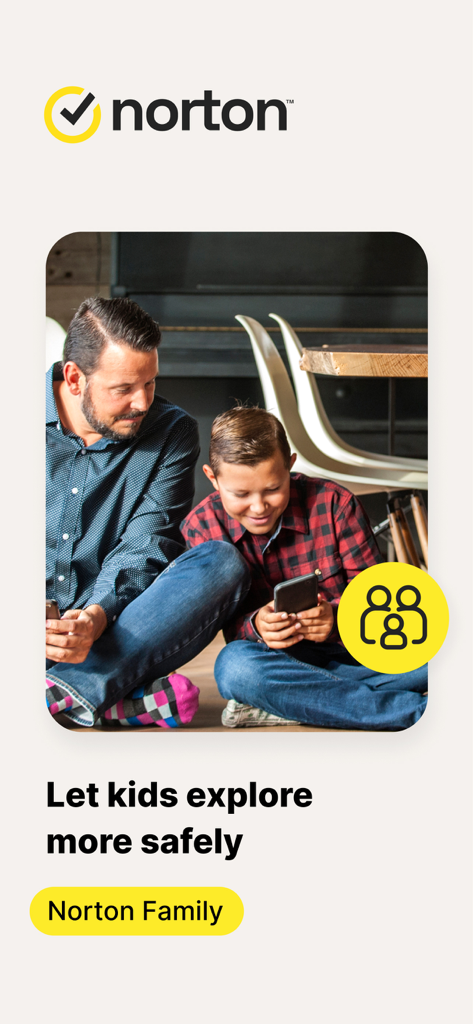
Padre e figlio che usano uno smartphone insieme con il logo dell'app Norton Family e un messaggio di sicurezza

Padre e figlio che usano uno smartphone insieme con il logo dell'app Norton Family e un messaggio di sicurezza

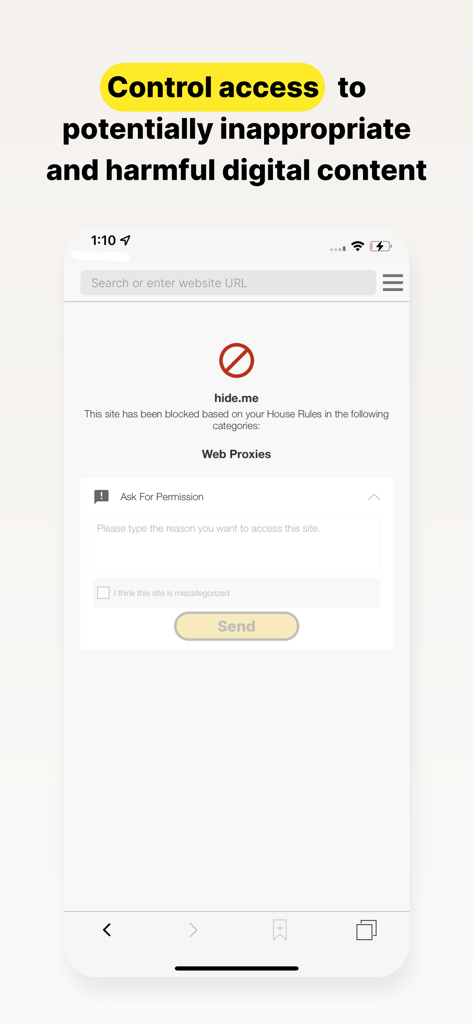
Schermata dell'app Norton Family che mostra un sito web bloccato con l'opzione per il bambino di chiedere il permesso per accedere al contenuto.

Schermata dell'app Norton Family che mostra un sito web bloccato con l'opzione per il bambino di chiedere il permesso per accedere al contenuto.

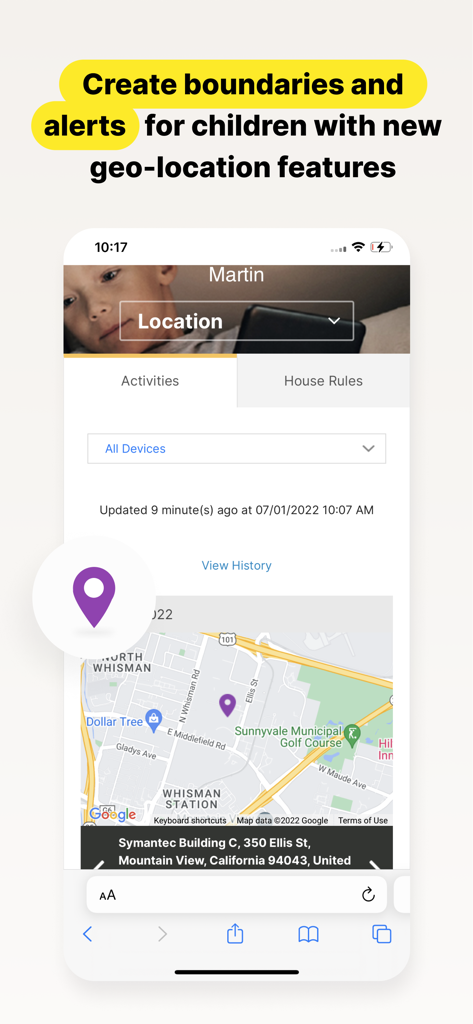
Interfaccia dell'app Norton Family che mostra una mappa con la posizione di un bambino e funzioni di avviso di geolocalizzazione per i genitori.

Interfaccia dell'app Norton Family che mostra una mappa con la posizione di un bambino e funzioni di avviso di geolocalizzazione per i genitori.

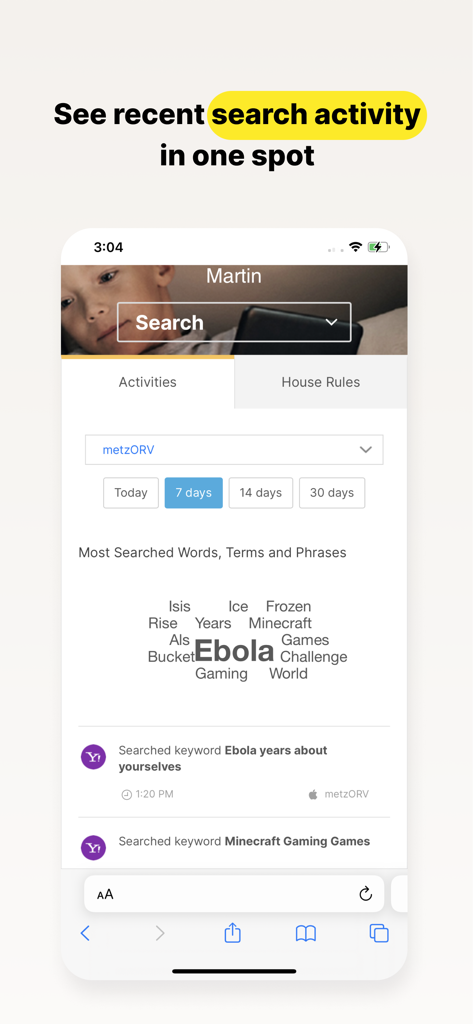
Dashboard dell'app Norton Family che visualizza una nuvola di parole e l'elenco delle attività di ricerca recenti di un bambino

Dashboard dell'app Norton Family che visualizza una nuvola di parole e l'elenco delle attività di ricerca recenti di un bambino

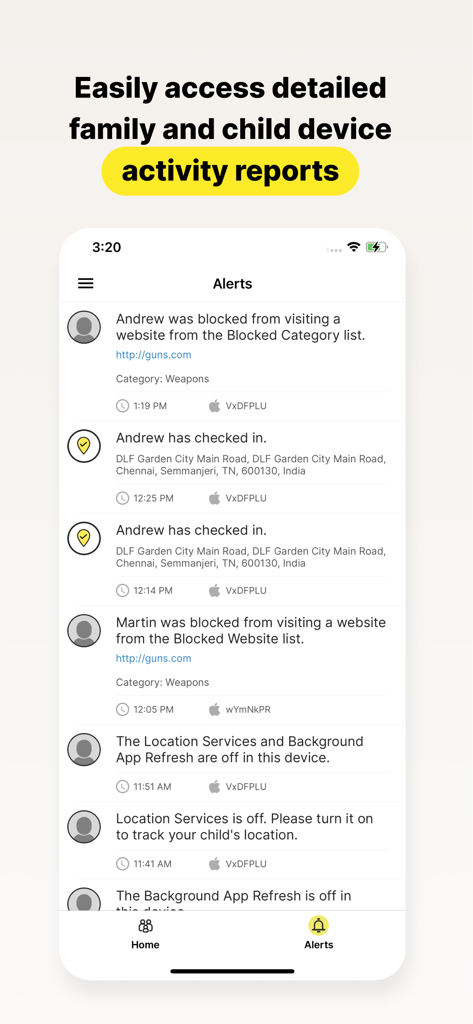
Schermata dell'app Norton Family che visualizza rapporti dettagliati sulle attività e avvisi per i dispositivi dei bambini

Schermata dell'app Norton Family che visualizza rapporti dettagliati sulle attività e avvisi per i dispositivi dei bambini

Migliora il tuo ruolo di genitore nell'era digitale

Gli strumenti che rendono questa app unica, scelti da 46K+ utenti.

🎓

Massimizza la concentrazione a scuola

Attiva 'Orario scolastico' per bloccare le distrazioni digitali come social media e giochi, mantenendo accessibili le risorse educative essenziali per l'apprendimento a distanza.

🛡️

Supervisione Web avanzata

Consenti ai tuoi figli di esplorare il Web liberamente mentre i nostri filtri leader del settore bloccano i contenuti non idonei e ti forniscono informazioni dettagliate sulle ricerche.

Limiti senza stress

Imposta limiti salutari per il tempo davanti allo schermo o usa il 'Blocco istantaneo' per mettere in pausa i dispositivi durante i pasti in famiglia, riducendo le frizioni quotidiane e aiutando tuo figlio a creare abitudini intelligenti.

Amata dagli utenti di tutto il mondo

Scelto da 46K+ persone che amano questa app.

"

"Norton Family ha cambiato le abitudini di studio di mio figlio. La funzione Orario scolastico assicura che rimanga concentrato sui suoi compiti senza essere distratto da giochi o YouTube durante la giornata scolastica. Mi dà una grande tranquillità sapere che è al sicuro mentre esplora il mondo digitale."

Sarah M.
"

"Mi fido del marchio Norton da anni, quindi scegliere questa app per l'iPad di mia figlia è stata una decisione facile. La funzione Blocco istantaneo è perfetta per l'ora di cena e i rapporti settimanali mi offrono la visibilità necessaria per aiutarla a creare abitudini online intelligenti."

David L.

Analisi recensioni

Approfondimenti dalle recensioni degli utenti.

Punteggio sentimento

17%
Negativo

Riepilogo

Users express significant dissatisfaction with this parental control app, citing numerous issues. A major complaint revolves around the app's tendency to delete or disorganize other applications on the device after screen time limits expire, making phones unusable and causing data loss for some. Many reviews highlight the app's over-restrictiveness, blocking legitimate apps like school-related tools and Gmail, and note specific compatibility problems with iOS 26, such as the "instant lock" feature failing. Despite these widespread criticisms, a small number of parents praise the app for its effectiveness in setting limits and ensuring child safety.

Temi comuni

App Blocking & Disappearance(16)
Over-Restrictiveness(14)
Bugs & Glitches(8)
Difficulty of Use/Management(8)
Annoying Notifications(4)
Parental Control Effectiveness(4)
iOS Compatibility Issues(2)

Info sull'app

Tutto quello che devi sapere su Norton Family Companion App.

Descrizione

This app should be installed on the child’s iOS device(s). Keeping your kids safer online requires more than managing screen time. Norton Family helps you supervise and manage your kids’ online activities. • Helps you manage your child’s remote learning environment, so you can keep your child focused on schoolwork during the school day. • It helps block unsuitable sites while your kids are surfing the Internet • Let’s you see what websites they’re visiting • Let’s you see what they’re searching for, and so much more… And while Norton Family lets you set online time limits, it also helps you start open and ongoing conversations about how to build safe and smart online habits. As a parent, it’s important to have insight into what your kids are doing. Our helpful tools allow you to monitor kids’ online activities at a glance or be notified by email alerts, so you know when it’s time to talk. IMPORTANT NOTICE: To use the features of Norton Family on your family’s iOS devices, this Norton Family app should first be installed on your child’s iOS device. Parents can configure household policies, manage alerts and reports from family.norton.com. To do this on iOS devices, please download the Norton Family for Parents app. Help your kids explore, learn, and enjoy their connected world more safely with the following features: School Time: Remote learning requires the internet, so pausing the internet on your child’s device is not an option. Norton Family School Time is a feature to help parents manage their child’s remote learning environment, so you can keep your child focused on schoolwork and avoid other internet distractions during the school day. Web Supervision: Let your kids explore the Web freely, with tools that help you block unsuitable websites while keeping you in the know about which sites they’re visiting. Time Supervision: Stay on top of how much time your kids spend on their devices. Search Supervision: See words, terms, and phrases your kids are searching for to gain insights into their interests and help protect them from inappropriate content. Video Supervision*: See a list of the YouTube videos your kids watch on their PCs or iOS devices and even view a snippet of each video, so you know when you need to talk. Instant Lock: Parents can help kids take a break by locking the device so they can re-focus, or join the family at dinner. Individual devices can be unlocked with a PIN. Parents and children can still contact each other while the device is in lock mode. Email Alerts: Receive an email when your kids attempt to visit a blocked site so that you can start a conversation about appropriate content. Access Request: Open the lines of communication by enabling your kids to send you a note from within Norton Family if they disagree with a blocked site or a house rule. Monthly/Weekly Reports: Opt to receive detailed reports of what your kids are doing online, right in your email in-box. Any questions? Send us an email nortonfamily.support@gendigital.com *Video Supervision monitors videos that your kids view on YouTube.com. It does not monitor or track YouTube videos that have been embedded in other websites or blogs. Mobile app must be downloaded separately. An account is required to use the Norton Family app. To set up, review, manage and customize your House Rules and Settings for each child you’ve added, sign in to your account at my.norton.com using the credentials you created.

Ultima versione

1.16.0

Dimensione

31.9 MB

Data di lancio

23 nov 2015

Il tuo partner per una genitorialità digitale più sicura e intelligente

Trasforma il modo in cui la tua famiglia interagisce con la tecnologia. Installa Norton Family sul dispositivo di tuo figlio oggi stesso per incoraggiare la concentrazione, bloccare le distrazioni e ottenere la tranquillità che meriti.

Scarica su App Store