Adobe Acrobat Reader: Sign PDF

Adobe Acrobat Reader: Sign PDF

ダウンロード: App Storeダウンロード: Google Play
Spark by MWM logo
ロゴ: Adobe Acrobat Reader: Sign PDF

Adobe Acrobat Reader: PDFに署名 – AI搭載ドキュメントアシスタント

単に表示するだけでなく、AIの力で複雑なファイルを要約したり、ドキュメントとチャットして即座に洞察を得たり、どこからでもPDFに署名または編集したりできます。

ダウンロード: App Store

開発元

Adobe Inc.

カテゴリ

Business

ダウンロード

156M+

ユーザー評価

4.6/5

評価数

2M+

対応言語

19

あなたのモバイルオフィスを可視化

このインターフェースを利用する 156M+ 人のユーザー.

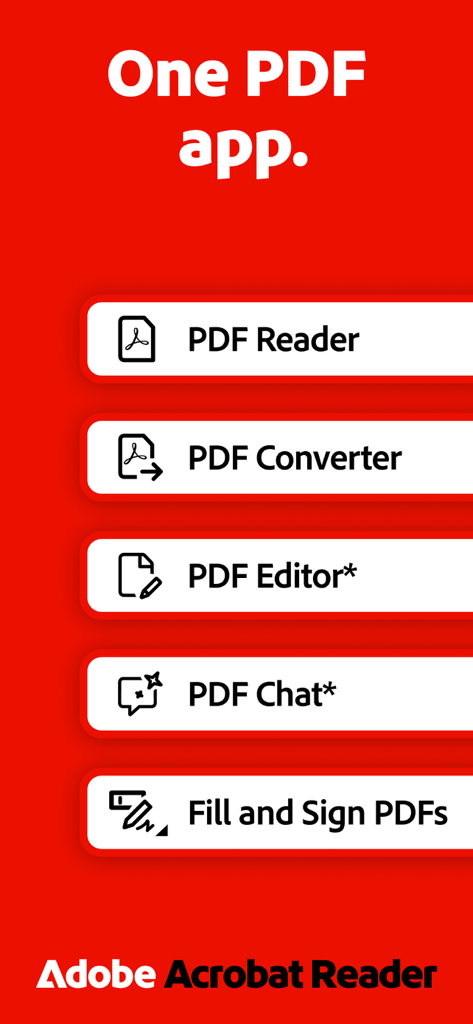
Adobe Acrobat Readerの機能概要。PDFリーダー、コンバーター、エディター、チャット、記入・署名ツールが赤い背景に表示されています。

Adobe Acrobat Readerの機能概要。PDFリーダー、コンバーター、エディター、チャット、記入・署名ツールが赤い背景に表示されています。

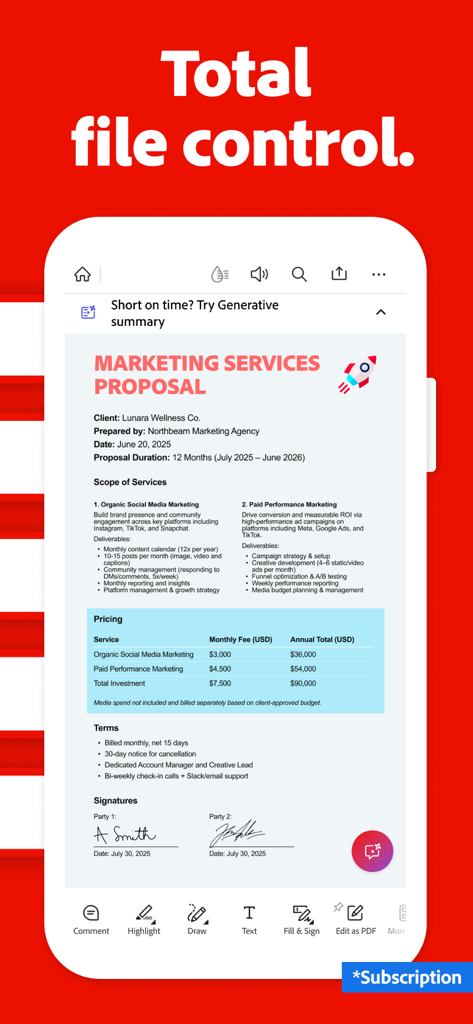
Adobe Acrobat Readerモバイルアプリ。編集ツールとAIアシスタント機能を備えたPDFマーケティング提案書を表示しています

Adobe Acrobat Readerモバイルアプリ。編集ツールとAIアシスタント機能を備えたPDFマーケティング提案書を表示しています

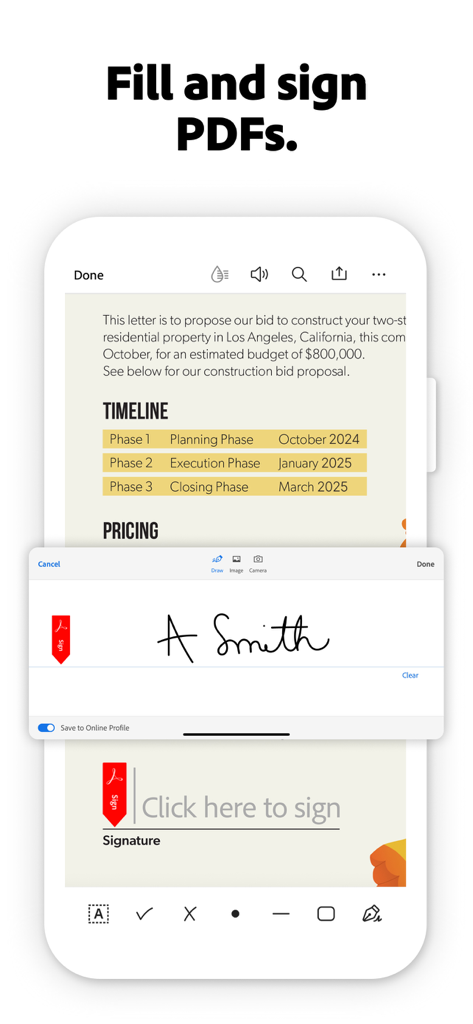
Adobe Acrobat Readerで、ユーザーがデジタル署名をドキュメントに追加している記入・署名機能を示すモバイルインターフェース。

Adobe Acrobat Readerで、ユーザーがデジタル署名をドキュメントに追加している記入・署名機能を示すモバイルインターフェース。

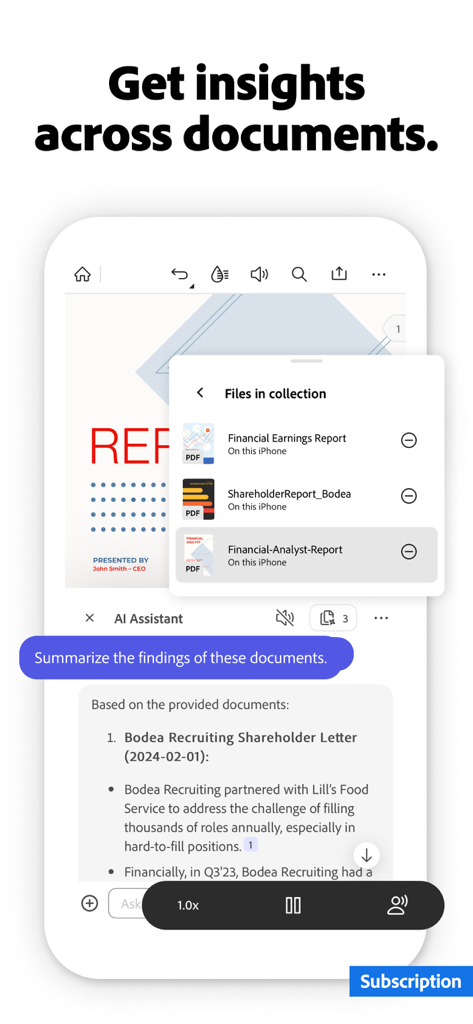
Adobe Acrobat Readerアプリ。複数のビジネスドキュメントにまたがるAIアシスタントの要約された洞察を表示しています

Adobe Acrobat Readerアプリ。複数のビジネスドキュメントにまたがるAIアシスタントの要約された洞察を表示しています

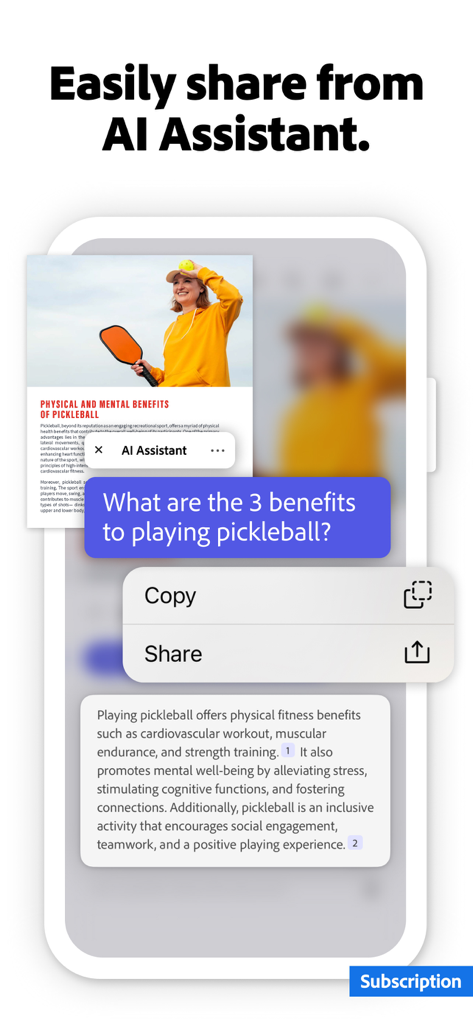
Adobe Acrobat Readerアプリ。PDFを要約し、共有およびコピーオプションを提供するAIアシスタントを表示しています

Adobe Acrobat Readerアプリ。PDFを要約し、共有およびコピーオプションを提供するAIアシスタントを表示しています

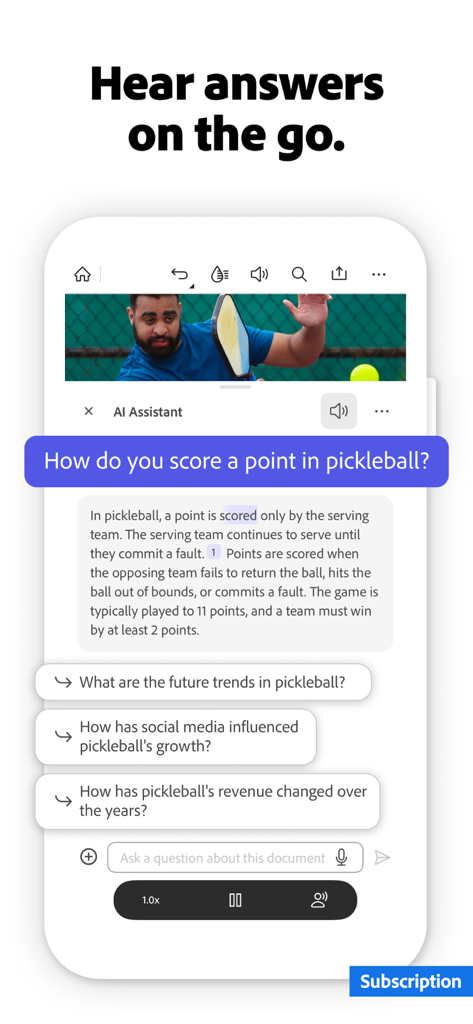
Adobe Acrobat AIアシスタントが、モバイルデバイス上のドキュメントに関する質問に音声で回答しています

Adobe Acrobat AIアシスタントが、モバイルデバイス上のドキュメントに関する質問に音声で回答しています

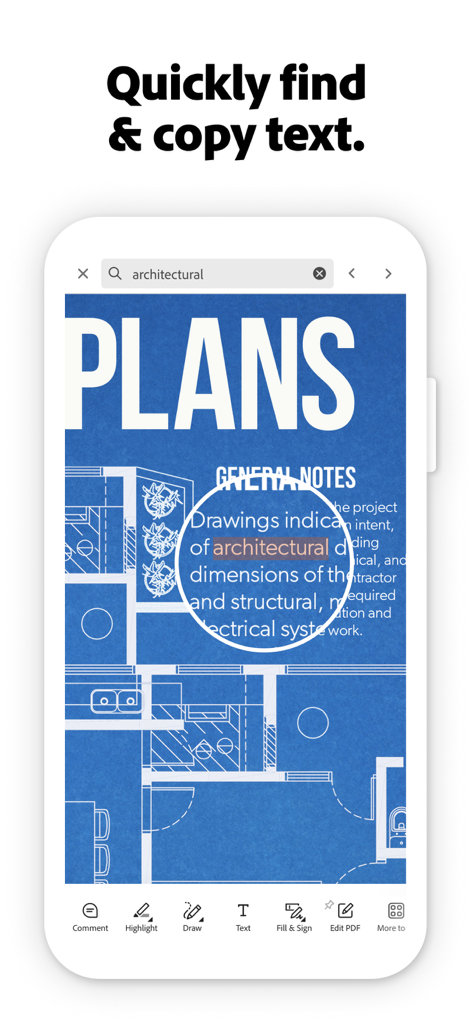
Adobe Acrobat Readerアプリ。建築計画ドキュメントでテキスト検索およびコピー機能を表示しています

Adobe Acrobat Readerアプリ。建築計画ドキュメントでテキスト検索およびコピー機能を表示しています

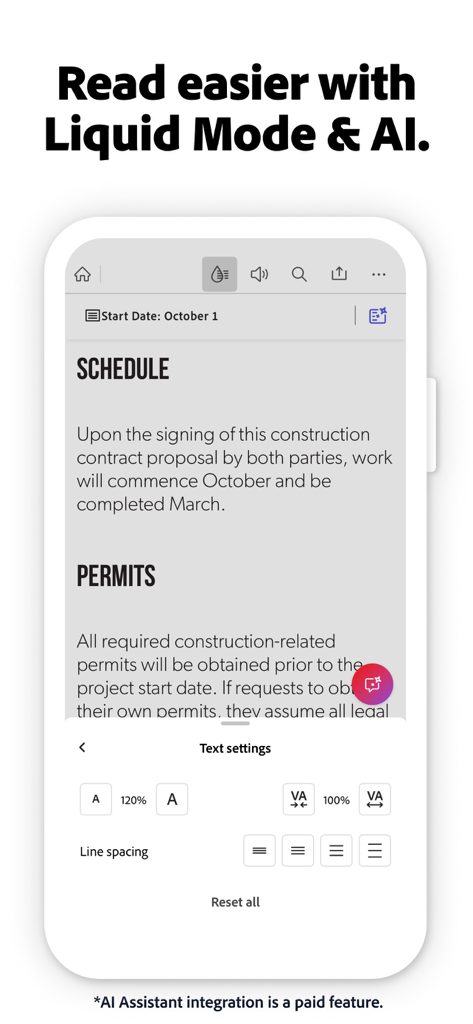
Adobe Acrobatモバイルアプリ画面。Liquid Modeと、ドキュメントの可読性を向上させるためのテキスト設定を表示しています

Adobe Acrobatモバイルアプリ画面。Liquid Modeと、ドキュメントの可読性を向上させるためのテキスト設定を表示しています

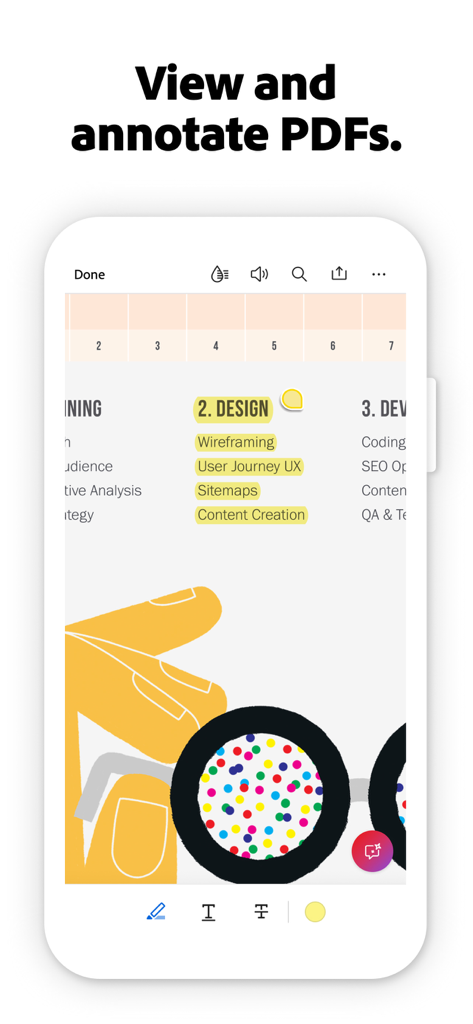
Adobe Acrobat Readerアプリ。スマートフォン画面で、ハイライトされたテキストと注釈ツールを備えたPDFドキュメントを表示しています。

Adobe Acrobat Readerアプリ。スマートフォン画面で、ハイライトされたテキストと注釈ツールを備えたPDFドキュメントを表示しています。

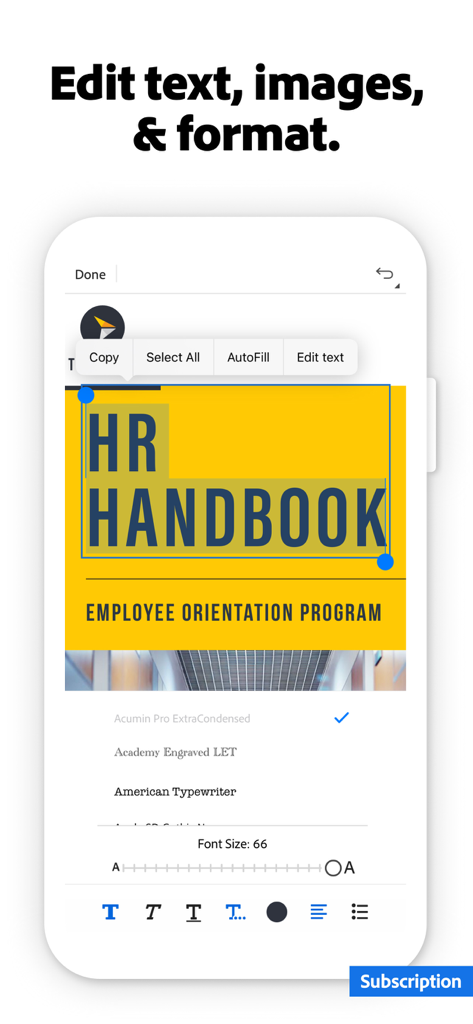
Adobe Acrobatモバイルアプリを使用して、PDFドキュメントでテキストの編集とフォーマットを行っています。

Adobe Acrobatモバイルアプリを使用して、PDFドキュメントでテキストの編集とフォーマットを行っています。

インテリジェンスでワークフローをマスターする

このアプリを際立たせるツール、 156M+ 人のユーザーが選択.

🤖

スマートAIアシスタント

複雑なドキュメントやレポートに関する質問への回答を引用付きで即座に要約し、読書時間を節約できます。

✍️

シームレスな記入と署名

数回のタップで外出先でも契約に署名し、フォームに記入して取引を成立させましょう。プリンターやスキャナーは不要です。

📱

最適化されたLiquid Mode

AI搭載の表示エクスペリエンスにより、ピンチやズームをやめましょう。PDFテキストをモバイル画面に完全にフィットするように再フォーマットします。

世界中のユーザーに愛されています

Trusted by 156M+ 人がこのアプリを愛用しています.

"

"新しいAIアシスタントは、私のワークフローにとって全くのゲームチェンジャーです。通勤中に50ページのプロジェクト概要を数秒で要約できるため、毎週何時間もの手作業による読書時間を節約できます。これはまさに私のポータブルオフィスです。"

サラ・ジェンキンス
"

"私はLiquid Modeを愛用しています。iPhoneで密度の高い研究論文を読むのが本当に楽しくなります。さらに、クラウド統合を介して契約に即座に署名して返信できることで、プリンターなしでビジネスを継続できます。"

デビッド・チェン

アプリについて

について知っておくべきこと Adobe Acrobat Reader: Sign PDF.

説明

Major new update: The new Adobe Acrobat AI Assistant makes it easier than ever to do more with PDFs. • Work across multiple files in one place with PDF Spaces. Collaborate, store, and use AI Assistant across files • Use voice or text prompts with AI Assistant chatbot • Ask questions and get cited answers about details in your document, including charts, graphs, and tables with Figures Q&A • Easily share the responses you get • Try voice support to ask queries and have answers read aloud. • Use new Hands-free to keep the conversation flowing with voice only • Instantly generate summaries from your PDFs with Generative AI Summaries • Get content for emails, text, study notes, blogs, and more [Adobe Acrobat AI Assistant is a paid feature*, free for a limited time] The world’s most trusted PDF reader, PDF editor, and PDF maker with more than 635 million installs. View, share, annotate, add comments, and sign documents - all in one app. You can store your files online and read documents anywhere. Get your 7-day free trial and try all the features of Acrobat Reader. Paid features: Edit PDFs • With our PDF editor, edit text and images directly in your PDF (mobile only) • Fix typos or add paragraphs with the PDF editor • Easily add, delete, or rotate any image • Use this PDF signer and PDF viewer to get your docs just right Recognize text • Optical Character Recognition (OCR) turns scanned PDFs into searchable, editable text to use in other formats Merge & organize PDFs with PDF Converter • Split or combine multiple files into one PDF with PDF converter • Use the PDF editor to insert, delete, rotate, crop & reorder pages in your PDF file Create, convert & export PDFs • Easily convert to PDF from any file type including Microsoft, Google Docs, and images • Export and convert PDFs to Microsoft Word, Excel, PowerPoint, or various image files • Convert web pages to PDFs Compress & highly secure PDFs • Compress PDF files for easy saving and sharing • Password Protect PDF documents Have your PDF read aloud • Listen to your PDFs on the go, great for reading support • Choose free voices or upgrade for high-quality options Subscribe now to access all these features and use Acrobat across mobile and web platforms. Free-to-use features: PDF signer: Fill & Sign Adobe Fill & Sign is free & available in Acrobat Reader. A form filler and PDF signer that lets you fill, sign, and send Liquid mode in the optimal PDF viewer • Get the best PDF reading experience with this PDF viewer • Search, navigate & adjust font size or spacing to fit your screen Share PDFs & collaborate • Share files for commenting or viewing, tag others with @mention, and manage all comments in one place • Receive activity notifications for shared files Annotate PDFs • Add sticky notes, comments, and highlight text Store & manage files • Link online storage accounts like Microsoft OneDrive, Dropbox, or Google Drive • Star files to quickly open important documents Connect the PDF viewer and reader to Google Drive • A PDF creator that lets you edit, compress, and export Google Drive files with a subscription Work with scanned documents • Access scanned PDFs from Adobe Scan in Acrobat to fill, sign, and share The Acrobat Reader mobile app is designed to work with customers who have Enterprise Mobility Management (EMM) enabled. *An Adobe Acrobat AI Assistant add-on plan is available to Acrobat Individual customers. iOS 16 or above required. Terms & Conditions: Your use of this application is governed by the Adobe General Terms of Use http://www.adobe.com/go/terms_linkfree_en and the Adobe Privacy Policy http://www.adobe.com/go/privacy_policy_linkfree_en Do not sell or share my personal information www.adobe.com/go/ca-rights-linkfree

最新バージョン

25.12.00

サイズ

448.3 MB

リリース日

2011年10月17日

よりスマートに、より効率的に働きませんか?

数秒でドキュメントに署名、編集、要約する6億3500万人のプロフェッショナルに加わりましょう。Adobe AIの力をあなたのポケットに入れて、今すぐ無料トライアルを開始しましょう。

ダウンロード: App Storeダウンロード: Google Play
FAQ

よくある質問

について知っておくべきこと Adobe Acrobat Reader: Sign PDF
Adobe Acrobat Reader: Sign PDF とは何ですか?

Adobe Acrobat Reader: Sign PDF は、PDF ドキュメントの表示、共有、注釈付け、コメント、署名ができる信頼できるモバイルアプリです。サブスクリプションにより、高度な編集、変換、AI 機能を利用して、ファイルを完全に管理できます。

Adobe Acrobat Reader は無料トライアルを提供していますか?

はい、Adobe Acrobat Reader は 7 日間の無料トライアルを提供しています。このトライアルではすべてのプレミアム機能にアクセスでき、サブスクライブする前にアプリの全機能をご利用いただけます。

Adobe Acrobat Reader で PDF を編集できますか?

はい、Adobe Acrobat Reader を使用すると、モバイルデバイスで PDF のテキストや画像を直接編集できます。タイプミスの修正や段落の追加などの機能は、有料サブスクリプションで利用できます。

Adobe Acrobat AI Assistant とは何ですか?

Adobe Acrobat AI Assistant は有料機能です。PDF Space 内の複数のファイルにわたる AI を使用して、質問、引用された回答、生成された要約、ドキュメントからのコンテンツ作成を行います。

Adobe Acrobat AI Assistant は無料で利用できますか?

いいえ、Adobe Acrobat AI Assistant は有料機能です。現在、期間限定で無料提供されています。Acrobat Individual のお客様には、アドオン プランが必要です。

Adobe Acrobat Reader でドキュメントに署名するにはどうすればよいですか?

Adobe Acrobat Reader には、無料の「入力と署名」機能が含まれています。これにより、サブスクリプションなしで、アプリケーション内で直接 PDF ドキュメントに入力、署名、送信できます。

Adobe Acrobat Reader はスキャンされたドキュメントの OCR に対応していますか?

はい、Adobe Acrobat Reader は有料機能として OCR(光学文字認識)をサポートしています。OCR は、スキャンされた PDF を検索可能で編集可能なテキストに変換し、他の形式で使用できるようにします。

Adobe Acrobat Reader で PDF ファイルを結合または分割できますか?

はい、Adobe Acrobat Reader の有料 PDF コンバーター機能を使用すると、複数のファイルを 1 つの PDF に分割または結合できます。ページを挿入、削除、回転、トリミング、再配置して整理することもできます。

Adobe Acrobat Reader で PDF を他の形式にエクスポートするにはどうすればよいですか?

Adobe Acrobat Reader を使用すると、PDF を Microsoft Word、Excel、PowerPoint、またはさまざまな画像ファイルなどの形式に変換およびエクスポートできます。このエクスポート機能は、サブスクリプションで利用できます。

Adobe Acrobat Reader は PDF ファイルを圧縮できますか?

はい、Adobe Acrobat Reader には PDF ファイルを圧縮する機能が含まれています。この機能は有料サブスクリプションの一部であり、ドキュメントの保存と共有を容易にします。

Adobe Acrobat Reader は PDF の読み上げ機能を提供していますか?

はい、Adobe Acrobat Reader は PDF の読み上げ機能を提供しています。ユーザーは無料の音声でドキュメントを聞くことができます。または、サブスクリプションに含まれる高品質な音声オプションにアップグレードできます。

Adobe Acrobat Reader はクラウド ストレージと統合されていますか?

はい、Adobe Acrobat Reader はクラウド ストレージサービスと統合されています。ユーザーは、Microsoft OneDrive、Dropbox、Google Drive などのアカウントをリンクして、アプリ内でシームレスなファイルストレージと管理を行うことができます。

Adobe Acrobat Reader のリキッドモードとは何ですか?

Adobe Acrobat Reader のリキッドモードは、最適化された PDF 閲覧体験を提供します。これは無料機能で、ユーザーは検索、ナビゲーション、フォントサイズやスペーシングの調整を画面に合わせて行うことができます。

Adobe Acrobat Reader で PDF に注釈を付けることはできますか?

はい、Adobe Acrobat Reader は無料の注釈機能を提供しています。ユーザーは、レビューや共同作業のために、PDF ドキュメント内に付箋、コメントを追加したり、テキストをハイライトしたりできます。

Adobe Acrobat Reader の料金はいくらですか?

Adobe Acrobat Reader は 7 日間の無料トライアルを提供しています。トライアル後、AI Assistant、高度な編集、変換などのプレミアム機能にアクセスするには、有料サブスクリプションが必要です。