Audio Extractor-Audio Editing

Audio Extractor-Audio Editing

ダウンロード: App Store
Spark by MWM logo
ロゴ: Audio Extractor-Audio Editing

オーディオ抽出-オーディオ編集:オールインワンのバイラルサウンドスタジオ

あらゆる動画を瞬時に高品質オーディオに。トレンドのサウンドを抽出し、カスタム着信音を作成し、プロのように編集してソーシャルメディアの創造性を刺激しましょう。

ダウンロード: App Store

開発元

正军 刘

カテゴリ

Music

ダウンロード

54K+

ユーザー評価

4.9/5

評価数

1K+

対応言語

2

指先で正確に

このインターフェースを利用する 54K+ 人のユーザー.

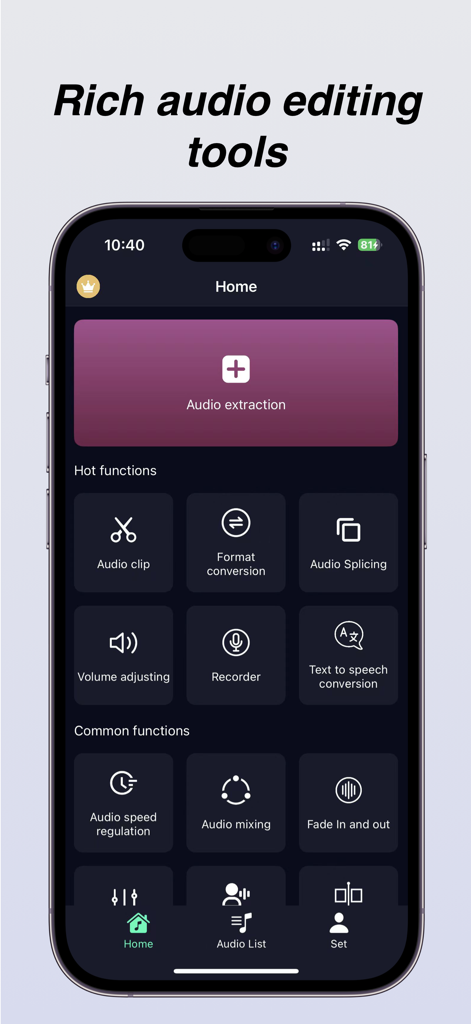
オーディオ抽出、クリッピング、フォーマット変換ツールの機能を備えたオーディオ抽出アプリのホーム画面。

オーディオ抽出、クリッピング、フォーマット変換ツールの機能を備えたオーディオ抽出アプリのホーム画面。

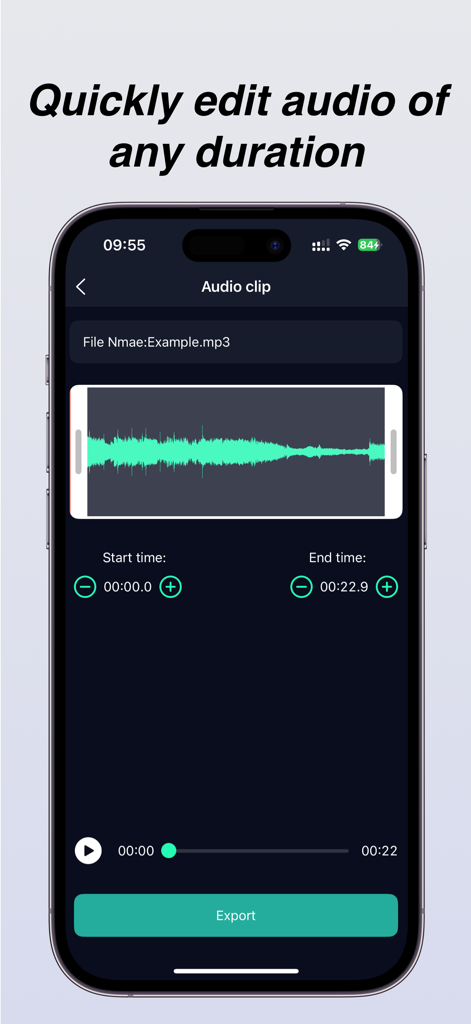
波形表示とエクスポートボタンを備えたオーディオクリップ編集画面

波形表示とエクスポートボタンを備えたオーディオクリップ編集画面

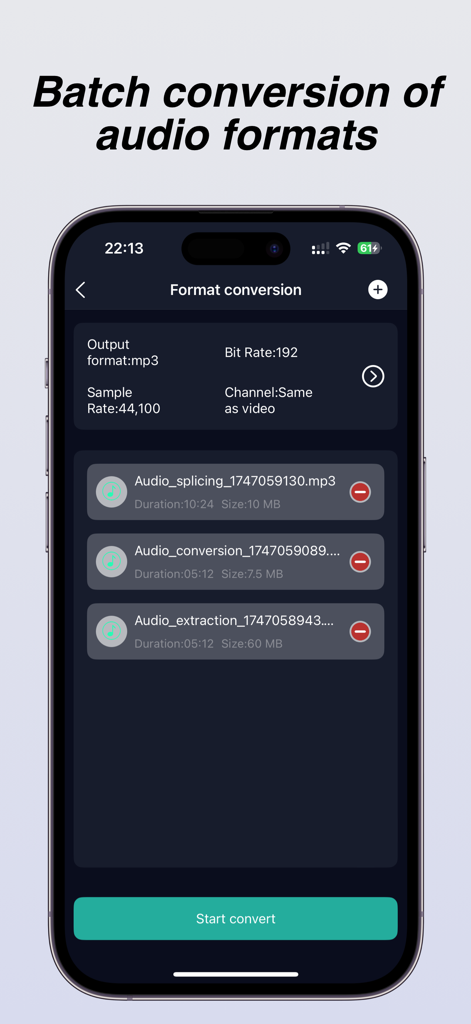
ビットレートとサンプルレートの設定が表示されているバッチオーディオフォーマット変換機能を示すオーディオ抽出アプリのインターフェイス。

ビットレートとサンプルレートの設定が表示されているバッチオーディオフォーマット変換機能を示すオーディオ抽出アプリのインターフェイス。

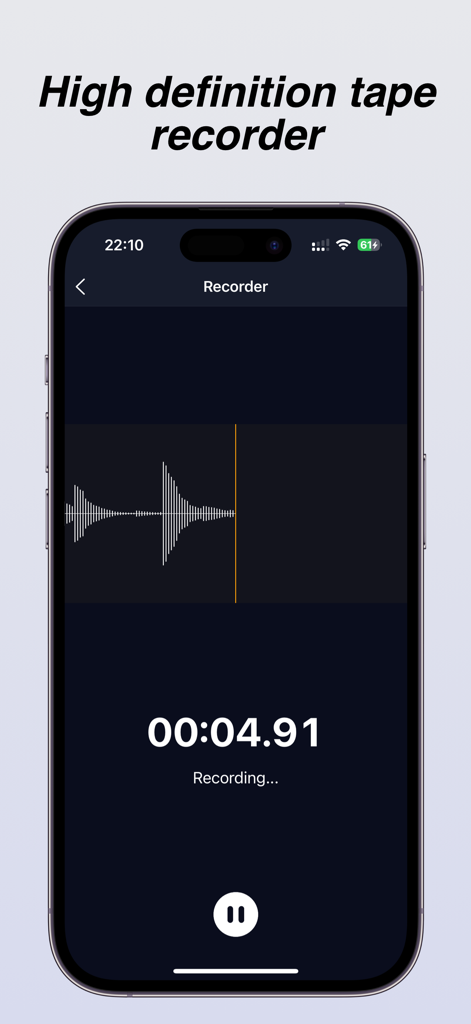
ライブ波形とタイマー表示を備えた高解像度テープレコーダーインターフェイス

ライブ波形とタイマー表示を備えた高解像度テープレコーダーインターフェイス

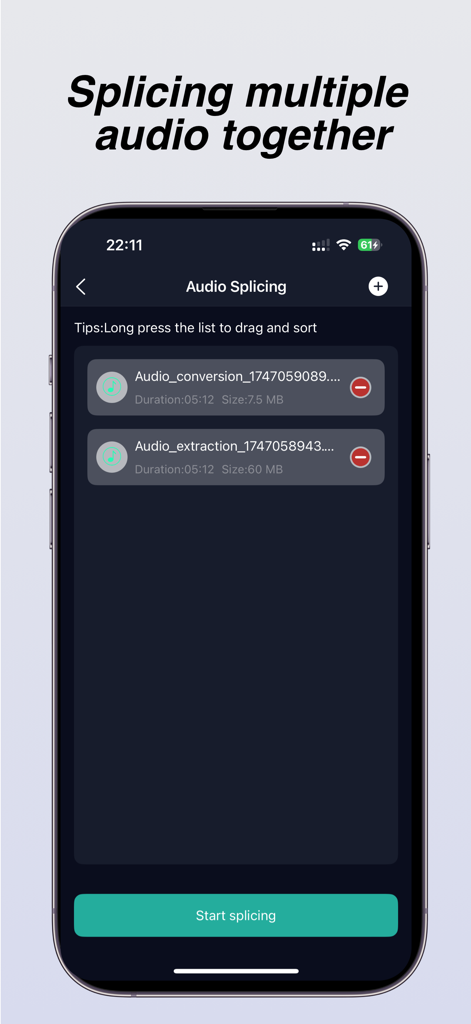
複数のオーディオファイルを結合するために使用されるオーディオスプライシング機能を示すiPhoneアプリ画面

複数のオーディオファイルを結合するために使用されるオーディオスプライシング機能を示すiPhoneアプリ画面

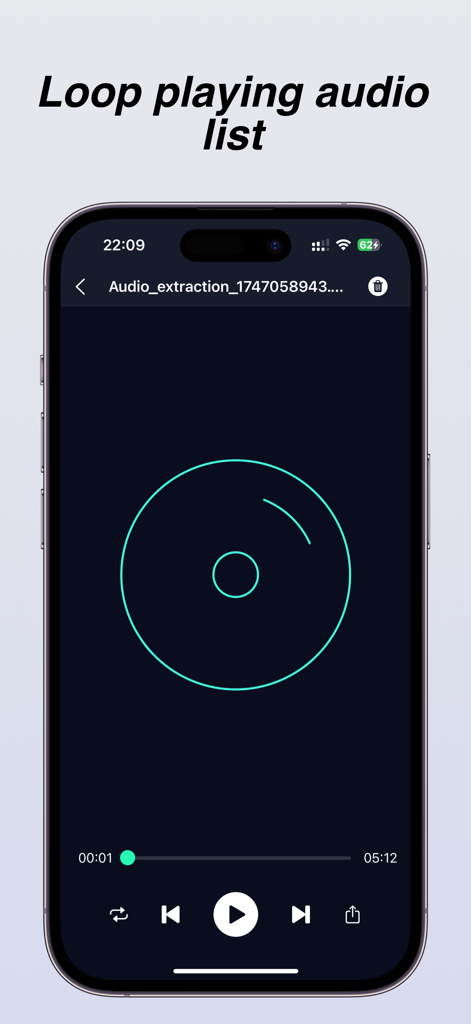
ループ再生機能と標準再生コントロールを備えたアプリのオーディオプレーヤーインターフェイスを表示するスマートフォンディスプレイ

ループ再生機能と標準再生コントロールを備えたアプリのオーディオプレーヤーインターフェイスを表示するスマートフォンディスプレイ

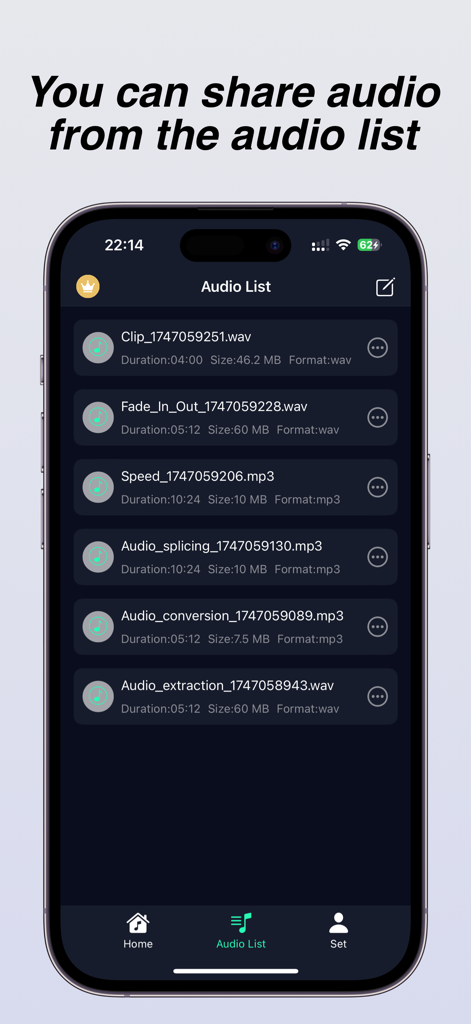
抽出やスプライシングなどの処理済みオーディオファイルのリストを共有用に表示するモバイルアプリインターフェイス

抽出やスプライシングなどの処理済みオーディオファイルのリストを共有用に表示するモバイルアプリインターフェイス

あなたのモバイルオーディオパワーハウス

このアプリを際立たせるツール、 54K+ 人のユーザーが選択.

インスタント動画からオーディオへ

カメラロールのあらゆる動画から、トレンドのサウンドやBGMをキャプチャ。高品質MP3として、品質を損なうことなく保存。カスタム着信音に最適です。

✂️

高精度スタジオ編集

0.1秒単位の精度でトラックをトリミング、結合、ミックス。フェードインを追加したり、再生速度を調整したり、BGMをレイヤー化して、際立つコンテンツを作成しましょう。

🔄

ユニバーサルフォーマットマスター

あらゆるファイルをMP3、AAC、FLAC、またはWAVに変換。ビットレートとサンプリングレートをカスタマイズして、あらゆるプラットフォームでプロフェッショナルなサウンドを保証します。

世界中のユーザーに愛されています

Trusted by 54K+ 人がこのアプリを愛用しています.

"

"コンピューターを使わずに、TikTokのトレンドサウンドをカスタム着信音に変える方法を見つけました。抽出は瞬時で、フェードイン機能のおかげで、電話が鳴っても怖くありません!iPhoneのオーディオカスタマイズに必要な唯一のツールです。"

Riley J.
"

"モバイルクリエイターとして、このアプリは救世主です。ギャラリーのあらゆる動画から高品質オーディオを取得し、ミリ秒単位でトリミングし、プロジェクト用にWAVに変換できます。バッチ変換とミキシングツールは、私のホーム画面にあった3つの他のアプリを正式に置き換えました。"

Marcus Chen

アプリについて

について知っておくべきこと Audio Extractor-Audio Editing.

説明

Audio extractor is a simple and professional audio extraction and editing tool that can quickly extract sound from videos, while ensuring that the audio is not distorted or damaged. It also supports defining and extracting audio segments from the video. You can specify which audio segment to extract from the video. When you find a beautiful background music while watching a short video and want to set it as your phone ringtone but cannot obtain the source audio, you can download and save the short video to your phone album, and then use an audio extractor to extract the music from the video. After extraction, you can directly set it as the ringtone. At the same time, the audio extractor also provides professional audio processing tools such as audio format conversion, batch conversion of audio formats, audio merging and splicing, volume adjustment, audio acceleration and deceleration, fade in and fade out, audio mixing, recording, etc., which can meet most of your audio processing needs and no longer worry about downloading a push of applications just to process a song. Main features: [Audio Extraction] The audio extractor can quickly extract and save the audio from the video to the phone, and the extracted audio has the same sound quality as the original video, ensuring the quality of the audio [Audio Editing] The audio extractor provides audio cropping function, which extracts a selected segment from your favorite audio to generate a new audio file. It supports splitting and deleting the middle segment of the audio, accurate to 0.1 seconds, and supports loading long audio [Format Conversion] The audio extractor provides mutual conversion between multiple audio formats to meet your needs for different audio formats, and supports custom parameter settings such as bit rate, sampling rate, channel, etc. The supported formats include mp3, flac, aac, wav.m4a, wma, and many other commonly used audio formats [Audio Splicing] The audio extractor can merge and splice multiple audio files into one MP3 format audio file, and can manually drag and sort the list of audio files to be spliced. Volume adjustment The audio extractor can amplify and reduce the volume of MP3 or other format audio files (in decibels) Audio speed regulation The audio extractor can adjust the playback speed of audio files, achieving faster or slower playback of audio, helping you create personalized music, and supporting speed adjustment range of [0.5-2.0] [Fading in and out] The fade in/fade out function allows you to add fade in/fade out when making phone ringtones, so that the ringtone will not suddenly play loudly when the phone calls [Audio Mixing] The audio mixing function can add background music to existing music, making your music more distinctive [Recorder] You can record your desired voice anytime, anywhere, during meetings, class notes, business negotiations, and other occasions. Member subscription: Payment: The "continuous monthly/annual subscription" product is an automatic renewal product. After confirming the purchase, the fee will be deducted from your Apple iTunes account; Renewal: 24 hours before the expiration of your subscription period, Apple will automatically deduct the fee from your iTunes account, and the membership benefits will be automatically extended upon success; To cancel automatic renewal, please manually disable it in your Apple ID account settings at least 24 hours before the subscription period expires. Once disabled, no further charges will be made. The automatic renewal subscription price is ¥ 15 per month and ¥ 69 per year The non automatic renewal subscription price is: ¥ 9 for weekly members, ¥ 19 for monthly members, and ¥ 99 for annual members Privacy Policy: http://appmanager.cn/privacy/app/ios/privacy/audio_editor_privatestatement_ios.html User Agreement: http://appmanager.cn/privacy/app/ios/userAgreement/audio_editor_user_agreement_ios.html 【 Contact Us 】 Email: yuanshundevelop@163.com

最新バージョン

1.8.0

サイズ

37.1 MB

リリース日

2024年5月23日

モバイルオーディオをマスターする準備はできましたか?

54,000人以上のクリエイターが、バイラルサウンドを抽出し、カスタム着信音をデザインし、プロフェッショナルな精度でオーディオを編集するこの強力なアプリに参加しています。

ダウンロード: App Store
FAQ

よくある質問

について知っておくべきこと Audio Extractor-Audio Editing

How can I extract audio from a video using Audio Extractor-Audio Editing?

はい、Audio Extractor-Audio Editing を使用すると、ビデオからサウンドをすばやく抽出できます。特定のオーディオセグメントの定義と抽出をサポートし、抽出されたオーディオを元の音質で電話に保存します。

What audio formats does Audio Extractor-Audio Editing support for conversion?

Audio Extractor-Audio Editing は、mp3、flac、aac、wav。m4a、wma など、さまざまなオーディオ形式間の相互変換をサポートしています。ユーザーは、ビットレート、サンプリングレート、チャネルなどのパラメータをカスタマイズすることもできます。

Can Audio Extractor-Audio Editing merge multiple audio files?

はい、Audio Extractor-Audio Editing は、複数のオーディオファイルを 1 つの MP3 形式ファイルにマージします。ユーザーは、スプライシングする前に、オーディオファイルのリストを手動でドラッグして並べ替えることができます。

Does the Audio Extractor-Audio Editing app have a recorder function?

はい、Audio Extractor-Audio Editing アプリにはレコーダー機能が含まれています。ユーザーは、会議、クラス、またはビジネス交渉中に、アプリケーション内でいつでも音声を録音できます。

How much does a subscription for Audio Extractor-Audio Editing cost?

Audio Extractor-Audio Editing は、月額 15 円または年額 69 円の自動更新サブスクリプションを提供しています。自動更新以外のオプションは、週額 9 円、月額 19 円、年額 99 円です。

Can I set custom audio parameters in Audio Extractor-Audio Editing during format conversion?

はい、Audio Extractor-Audio Editing では、オーディオ形式変換中にカスタムパラメータ設定を行うことができます。ユーザーは、特定のオーディオ形式のニーズに合わせて、ビットレート、サンプリングレート、チャネルを調整できます。

Can I adjust audio playback speed with Audio Extractor-Audio Editing?

はい、Audio Extractor-Audio Editing では、オーディオファイルの再生速度を調整できます。速度調整範囲は 0.5 から 2.0 で、オーディオの再生速度を速くしたり遅くしたりできます。

Does Audio Extractor-Audio Editing support trimming audio files?

はい、Audio Extractor-Audio Editing はオーディオクロッピング機能を提供します。ユーザーは、長いオーディオファイルでも、選択したセグメントを抽出、分割、または中央部分を削除できます。精度は 0.1 秒です。

Where can I find the privacy policy for Audio Extractor-Audio Editing?

Audio Extractor-Audio Editing のプライバシーポリシーは、http://appmanager.cn/privacy/app/ios/privacy/audio_editor_privatestatement_ios.html で入手できます。

How do I cancel the automatic renewal for Audio Extractor-Audio Editing?

Audio Extractor-Audio Editing の自動更新をキャンセルするには、サブスクリプション期間が満了する少なくとも 24 時間前に、Apple ID のアカウント設定で手動で無効にしてください。