Autodesk Construction Cloud

Autodesk Construction Cloud

ダウンロード: App Store
Spark by MWM logo
ロゴ: Autodesk Construction Cloud
Autodesk Construction Cloud:現場とオフィスチームをリアルタイムで接続

3Dモデル、図面、重要なワークフローを現場に持ち込みましょう。手戻りをなくし、建設管理で最も信頼されているモバイルプラットフォームで高品質なプロジェクトを期限内に完了させましょう。

ダウンロード: App Store

開発元

Autodesk

カテゴリ

Business

ダウンロード

1M+

ユーザー評価

4.7/5

評価数

24K+

対応言語

18

現場のために構築

このインターフェースを利用する 1M+ 人のユーザー.

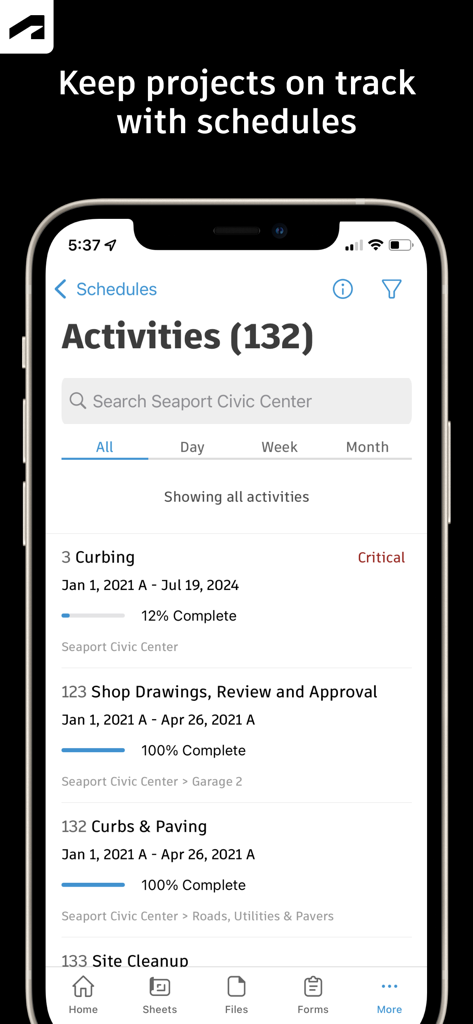
Autodesk Construction Cloudモバイルアプリに、進捗追跡と完了率が表示されたプロジェクトアクティビティスケジュールが表示されている

Autodesk Construction Cloudモバイルアプリに、進捗追跡と完了率が表示されたプロジェクトアクティビティスケジュールが表示されている

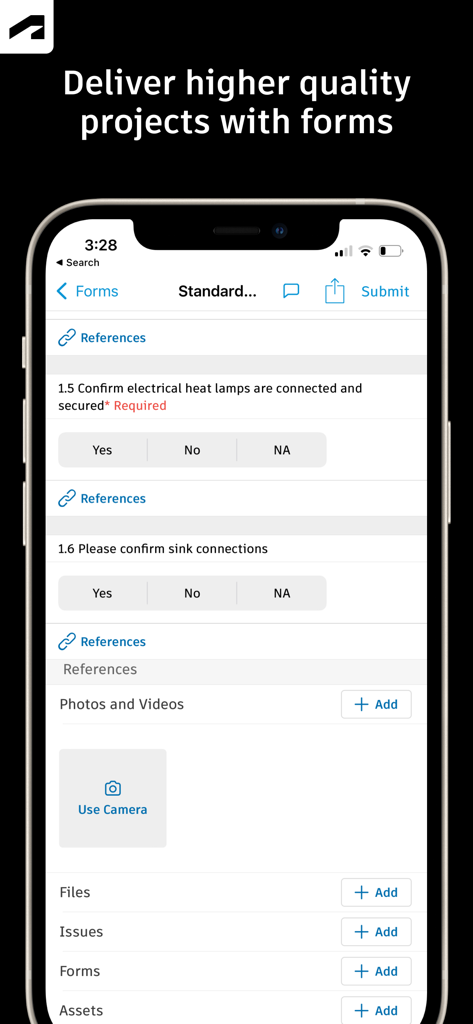
Autodesk Construction Cloudのモバイルインターフェイスに、プロジェクト品質管理のためのチェックリスト付きの建設現場検査フォームが表示されている

Autodesk Construction Cloudのモバイルインターフェイスに、プロジェクト品質管理のためのチェックリスト付きの建設現場検査フォームが表示されている

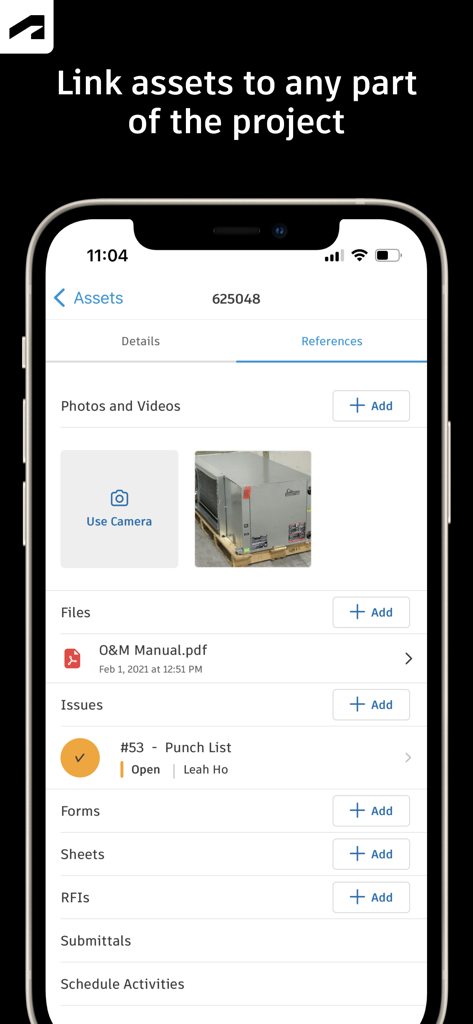
Autodesk Construction Cloudモバイルアプリの画面に、写真、ファイル、パンチリストの課題を含むアセット参照が表示されている

Autodesk Construction Cloudモバイルアプリの画面に、写真、ファイル、パンチリストの課題を含むアセット参照が表示されている

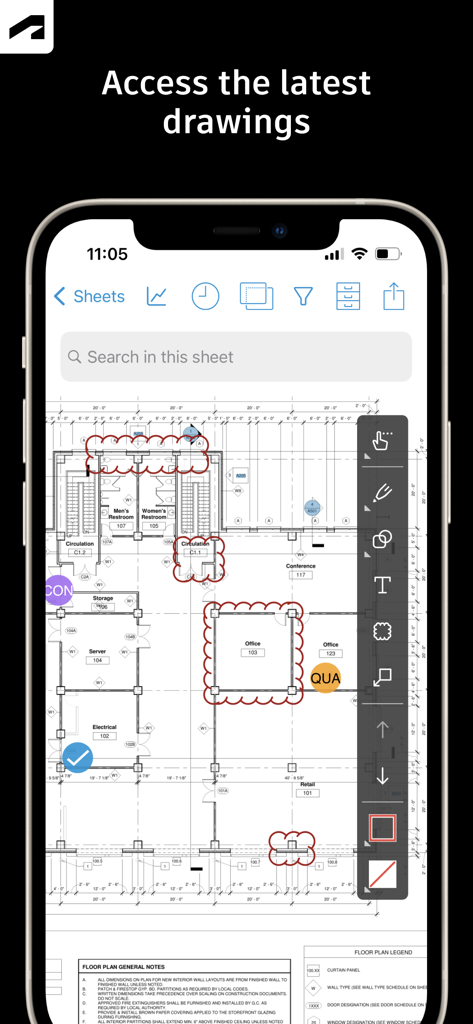
Autodesk Construction Cloudアプリに、スマートフォンの建設図面と注釈ツールが表示されている

Autodesk Construction Cloudアプリに、スマートフォンの建設図面と注釈ツールが表示されている

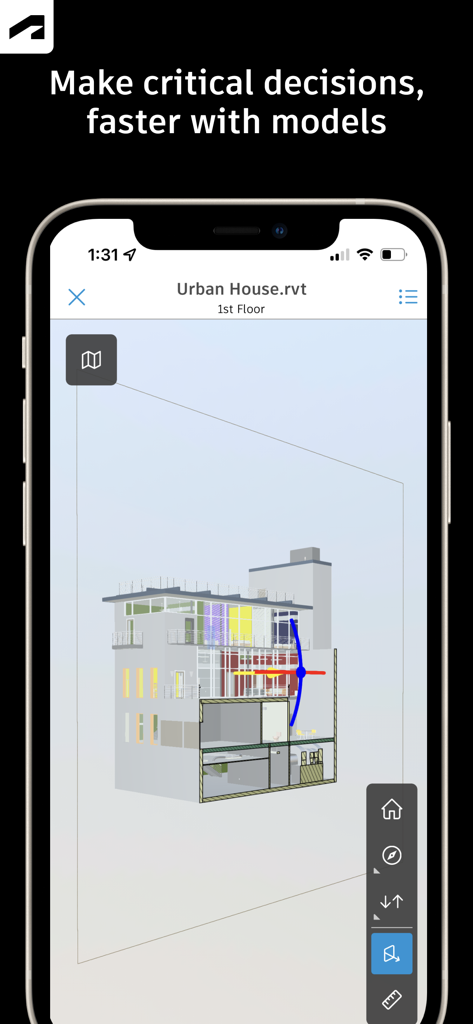
Autodesk Construction Cloudアプリを使用してスマートフォンに表示された、建物の3D建築モデル

Autodesk Construction Cloudアプリを使用してスマートフォンに表示された、建物の3D建築モデル

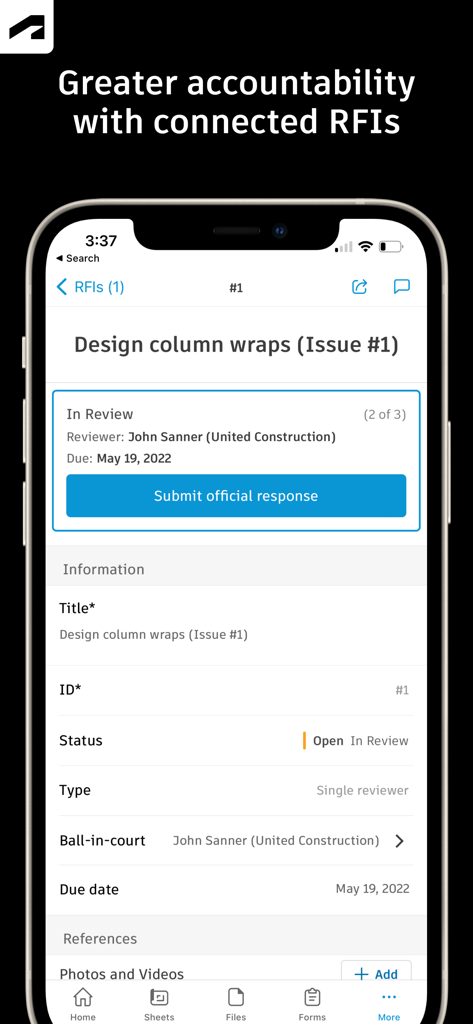
Autodesk Construction Cloudアプリに、ステータスとレビュー担当者の情報が含まれた、デザインコラムラップのRFI詳細画面が表示されている

Autodesk Construction Cloudアプリに、ステータスとレビュー担当者の情報が含まれた、デザインコラムラップのRFI詳細画面が表示されている

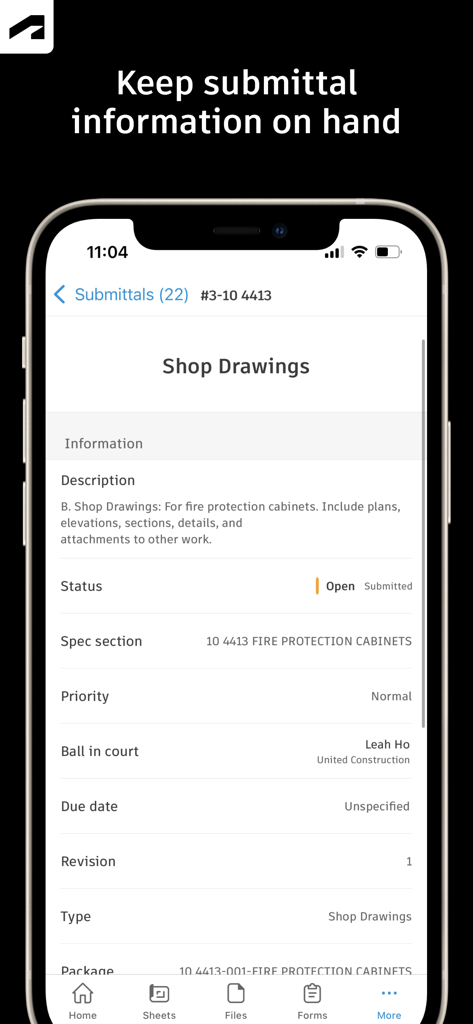
Autodesk Construction Cloudアプリに、モバイルデバイス上のショップ図面の提出詳細が表示されている

Autodesk Construction Cloudアプリに、モバイルデバイス上のショップ図面の提出詳細が表示されている

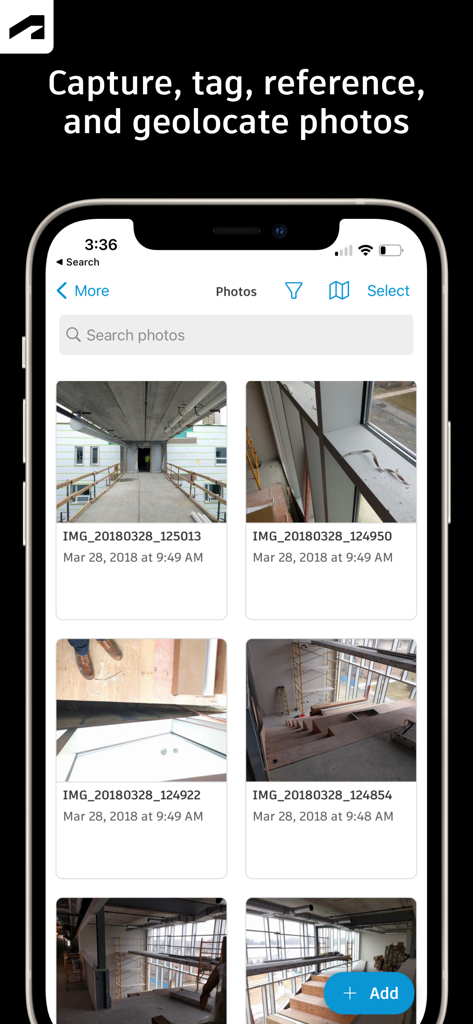
Autodesk Construction Cloudモバイルアプリのインターフェイスに、建設現場の進捗写真のギャラリーが表示されている

Autodesk Construction Cloudモバイルアプリのインターフェイスに、建設現場の進捗写真のギャラリーが表示されている

どこからでも現場をマスター

このアプリを際立たせるツール、 1M+ 人のユーザーが選択.

🏗️

BIM・2D図面へのインスタントアクセス

iPadでRevitおよびAutoCADモデルを直接表示しましょう。バージョンを比較し、図面にリアルタイムで注釈を付けて、手戻りをなくし、精度を確保しましょう。

🚩

シームレスなRFI・課題追跡

その場で担当者を割り当てることで、障害をより迅速に解決しましょう。課題に写真やドキュメントをリンクして、明確な責任の証跡を維持しましょう。

📝

自動化された現場ドキュメント

オフラインでも進捗写真を撮影し、安全フォームを記入しましょう。データを自動的に同期して、関係者に情報を提供し、プロジェクトをコンプライアンスに保ちましょう。

世界中のユーザーに愛されています

Trusted by 1M+ 人がこのアプリを愛用しています.

"

"このアプリは、現場チームにとって絶対に必要です。40ポンドもの紙の図面を持ち運ぶ必要がなくなりました。すべての課題とRFIをリアルタイムで追跡できるため、スケジュールを維持し、コストのかかる手戻りを回避できます。"

Marcus Rivera, Senior Superintendent
"

"3Dモデルビューアは信じられないほどスムーズです。現場に立ってBIMデータを重ね合わせることができるため、すぐに不整合を解決できます。これは私のデジタルツールボックスの中で最も信頼できるツールです。"

Sarah Chen, BIM Coordinator

レビュー分析

ユーザーレビューの分析.

感情スコア

15%
ネガティブ

概要

The Autodesk Construction Cloud mobile app receives largely negative feedback from users, primarily due to persistent issues with login and account access, app performance, and a frustrating user interface. Many users report difficulties signing in, receiving verification codes, or accessing their projects. Performance is a common complaint, with reports of frequent crashes, sluggishness, excessive battery drain, and unreliable sync processes. Users also express frustration with a lack of essential features such as model search, camera controls, robust markup tools, and the inability to share documents or perform administrative tasks directly within the app. Several recent updates have exacerbated these problems, leading to crashes, data loss (including projects), and overall performance degradation. Despite these significant drawbacks, some users find the app useful for project review and team collaboration in their construction operations.

主なテーマ

Feature Limitations(17)
Login & Account Access(10)
Performance & Stability(8)
Project Management & Collaboration(7)
Updates & Version Issues(6)
User Interface (UI/UX)(5)

アプリについて

について知っておくべきこと Autodesk Construction Cloud.

説明

Autodesk Inc. The best-in-class construction management app for Autodesk Build, Autodesk BIM Collaborate, Autodesk Docs and PlanGrid that makes it easy for teams on more than 2.5 million projects to manage their construction projects. Construction teams leverage Autodesk Construction Cloud’s simple automation, smart connections between tools, and comprehensive workflows to deliver quality construction projects on time and under budget. The Autodesk Construction Cloud mobile app brings Autodesk Build, Autodesk BIM Collaborate, Autodesk Docs, Revit, Navisworks, PlanGrid and AutoCAD to the field with construction and document management, collaboration tools, and project data available from anywhere. Autodesk Construction Cloud is made for the project team, like… • the superintendent managing the quality of work on site • the project manager tracking progress in real-time • the BIM team identifying issues ahead of installation • the architect doing a site walk • and the owner leveraging construction data and as-builts to improve daily operations Here's how we do it. CONSTRUCTION COLLABORATION + Issues Track issues, from design to handover, all in one place. Resolve issues faster by adding due dates, responsible parties, and easily reference photos, associated files, and RFIs. + Schedule Keep projects on track with a centralized schedule. View the schedule by different timespans or filter by critical items, review dependencies, and assess schedule suggestions. + Forms Gather critical information with forms that adapt to project requirements. Build a comprehensive safety program or track daily checklists. + Assets Easily manage the lifecycle of project assets from design through commissioning and handover. Assets are tracked, stored, and connected to other workflows in the app. + Meeting Minutes Stay ahead of the next meeting by creating meetings or meeting agenda items. Link to references like issues, models, RFIs, or photos. Check the status of outstanding items and follow up, all from the field. FILE MANAGEMENT + Sheets and Drawings Quickly access the latest drawings and shared plans with quick downloads and dynamic search. Compare, share, and markup sheets directly from the field to take the guesswork out of installation. + Models Make critical decisions faster with access to 3D models in the field. View installation details and effortlessly navigate single or multi-trade models to build with confidence. Supports Revit and AutoCAD file types and many more including RVT, DWG, NWC, IFC, NWD. QUALITY CONTROL  + RFIs Reduce the risk of data loss with seamless RFI management. Connect RFIs across the project lifecycle to cut down on duplicate work. + Submittals Keep all relevant submittal information on hand. With search, quickly find the necessary submittal to view progress and next steps. + Photos Use photos to track progress and add references to issues, RFIs, schedule activities, and more. With autotags and location data, quickly find the photo you need. See what our customers have to say: "The ability to access 3D models from the field eliminates confusion and allows us to come to a real-time resolution for any issues onsite. This capability reduces risk and provides cost and time savings while ensuring we deliver high-quality projects to our clients." Briana Mitchell, Project Manager, Boldt Company "We have about 460 field employees and for them to access documents in real-time directly on their iPhone or their iPad is priceless." Ken Mabe, Director of Field Operations, Eckardt Group "I'm excited about being able to effortlessly tag a snippet from a drawing onto an RFI and immediately assign responsibilities and track how the project team interacts with a particular issue or RFI. The ability to track an issue's progression in real-time helps us manage any roadblocks immediately." Amy Kozlowski​, Project Manager,​ Herrero Builders

最新バージョン

7.69.0

サイズ

638.9 MB

リリース日

2012年2月15日

現場に単一の真実の情報源をもたらす

図面、3Dモデル、RFIへのリアルタイムアクセスで手戻りをなくし、現場チームの能力を強化しましょう。250万以上のプロジェクトで自信を持って建築しましょう。

ダウンロード: App Store
FAQ

よくある質問

について知っておくべきこと Autodesk Construction Cloud

Autodesk Construction Cloud アプリとは何ですか?

Autodesk Construction Cloud アプリは、250万以上のプロジェクトで利用されている建設管理ツールです。Autodesk Build、BIM Collaborate、Docs、PlanGrid を統合し、包括的なプロジェクト管理を実現します。

Autodesk Construction Cloud モバイルアプリはどの Autodesk 製品と統合されていますか?

Autodesk Construction Cloud モバイルアプリは、Autodesk Build、BIM Collaborate、Autodesk Docs、Revit、Navisworks、PlanGrid、AutoCAD と統合されており、それらの機能を現場で利用できるようにします。

Autodesk Construction Cloud はプロジェクトのスケジュール管理にどのように役立ちますか?

Autodesk Construction Cloud アプリは、一元化されたスケジュールを提供します。ユーザーは期間で表示したり、重要な項目をフィルタリングしたり、依存関係を確認したり、スケジュール提案を評価したりして、プロジェクトを順調に進めることができます。

Autodesk Construction Cloud アプリで問題の追跡と解決はできますか?

はい、Autodesk Construction Cloud アプリを使用すると、設計から引き渡しまで問題の追跡が可能です。期日、担当者、写真、ファイル、RFI を追加して、問題をより迅速に解決できます。

Autodesk Construction Cloud アプリはフォームを使用して品質管理をどのように促進しますか?

Autodesk Construction Cloud アプリは、安全プログラムや日報チェックリストなどの重要な情報を収集するための適応可能なフォームを提供します。これにより、より高品質なプロジェクトの提供を支援します。

Autodesk Construction Cloud は資産ライフサイクル管理をサポートしていますか?

はい、Autodesk Construction Cloud アプリは、設計から試運転、引き渡しまでのプロジェクト資産のライフサイクルを管理します。資産はアプリ内で追跡、保存され、他のワークフローに接続されます。

Autodesk Construction Cloud モバイルアプリで図面にアクセスするにはどうすればよいですか?

Autodesk Construction Cloud モバイルアプリは、最新の図面や共有プランへの迅速なアクセスを提供します。ユーザーは現場から直接、シートのダウンロード、検索、比較、共有、マークアップを行うことができます。

Autodesk Construction Cloud アプリはどのような種類の 3D モデルをサポートしていますか?

Autodesk Construction Cloud アプリは、Revit、AutoCAD からの 3D モデルや、RVT、DWG、NWC、IFC、NWD などのその他のファイルタイプをサポートしており、現場での重要な意思決定を迅速化します。

Autodesk Construction Cloud アプリは RFI をどのように管理しますか?

Autodesk Construction Cloud アプリは、プロジェクトライフサイクル全体にわたる RFI を接続し、シームレスな RFI 管理を提供します。これにより、重複作業が削減され、説明責任が向上します。

Autodesk Construction Cloud アプリで提出書類情報を表示および検索できますか?

はい、Autodesk Construction Cloud アプリを使用すると、関連するすべての提出書類情報を手元に保持できます。ユーザーは提出書類をすばやく検索して、進捗状況や次のステップを確認できます。

Autodesk Construction Cloud アプリはどのような写真機能を提供していますか?

Autodesk Construction Cloud アプリでは、写真のキャプチャ、タグ付け、参照、ジオロケーションが可能です。写真は進捗状況を追跡し、問題、RFI、スケジュールアクティビティにリンクできます。