Blackmagic Camera

Blackmagic Camera

ダウンロード: App Store
Spark by MWM logo
ロゴ: Blackmagic Camera

Blackmagic Camera:ハリウッドの撮影技術をポケットに

受賞歴のある撮影現場で使用されているものと同じ直感的なインターフェースで、iPhoneをプロ仕様のシネマカメラに変えましょう。ISO、シャッターアングル、ホワイトバランスを完全にマニュアルでコントロールし、DaVinci Resolveに直接同期して、クラウドベースのシームレスなワークフローを実現します。

開発元

Blackmagic Design Inc

カテゴリ

Photo & Video

ダウンロード

21M+

ユーザー評価

4.8/5

評価数

92K+

対応言語

9

シネマコントロール、視覚化

このインターフェースを利用する 21M+ 人のユーザー.

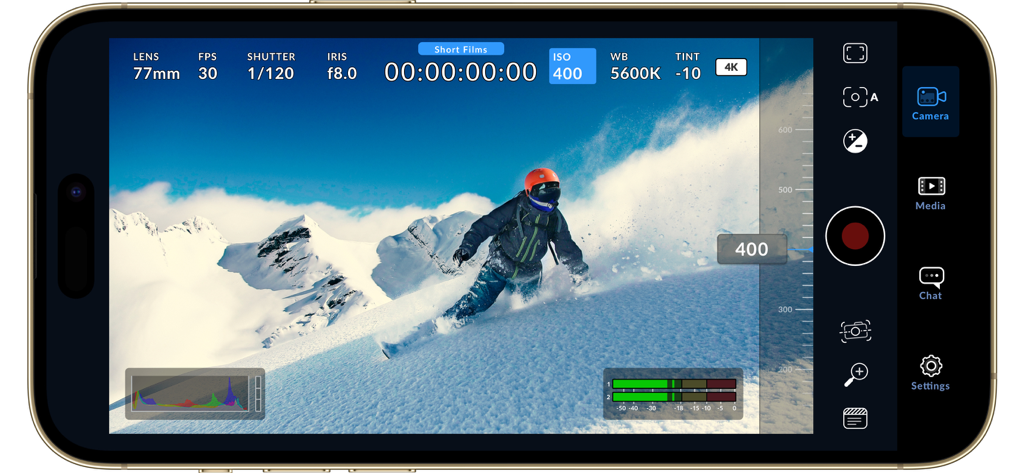
4Kでスノーボーダーを撮影中に、マニュアルビデオコントロールが表示されたBlackmagic Cameraアプリのインターフェース

4Kでスノーボーダーを撮影中に、マニュアルビデオコントロールが表示されたBlackmagic Cameraアプリのインターフェース

4Kでスノーボーダーを撮影中に、マニュアルのシネマティックコントロールを備えたBlackmagic Cameraアプリのインターフェース。

4Kでスノーボーダーを撮影中に、マニュアルのシネマティックコントロールを備えたBlackmagic Cameraアプリのインターフェース。

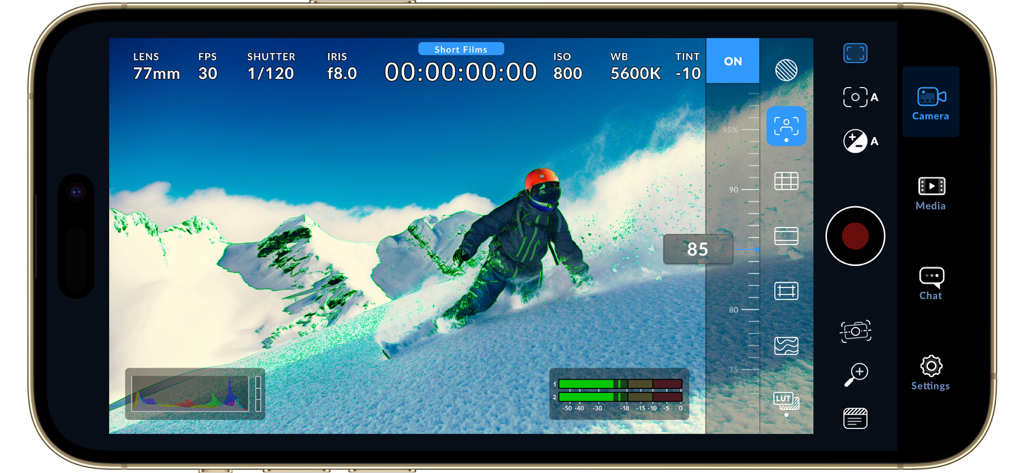
山でスノーボーダーと、プロフェッショナルなビデオコントロールが表示されたBlackmagic Cameraアプリのインターフェース

山でスノーボーダーと、プロフェッショナルなビデオコントロールが表示されたBlackmagic Cameraアプリのインターフェース

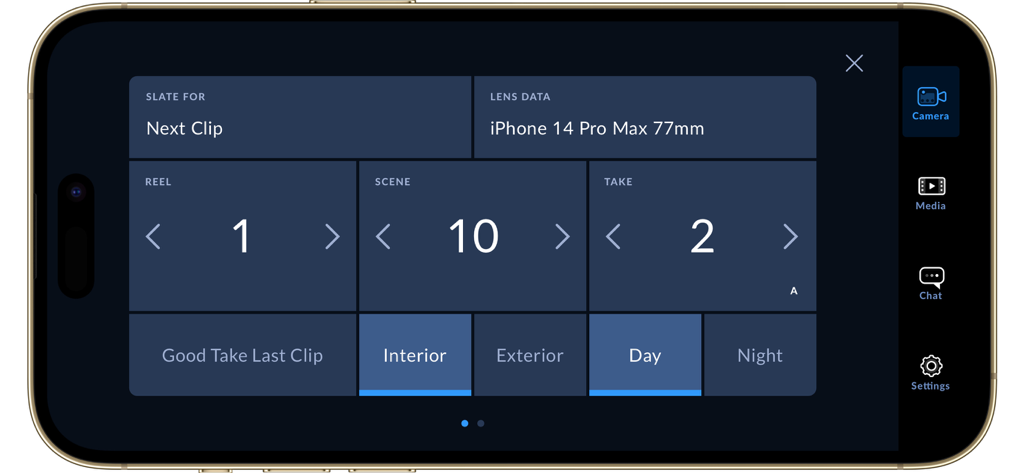
リール、シーン、テイク、場所のメタデータが表示されたBlackmagic Cameraアプリのデジタルスレートインターフェース

リール、シーン、テイク、場所のメタデータが表示されたBlackmagic Cameraアプリのデジタルスレートインターフェース

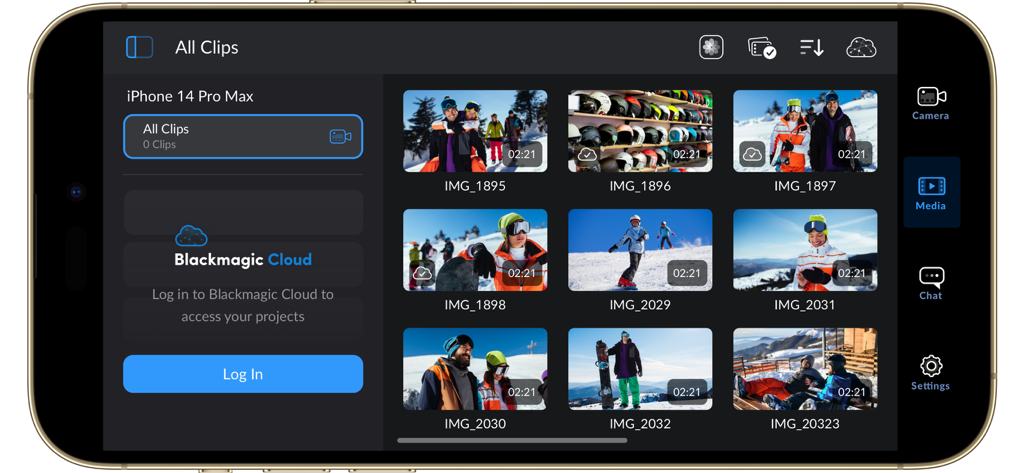
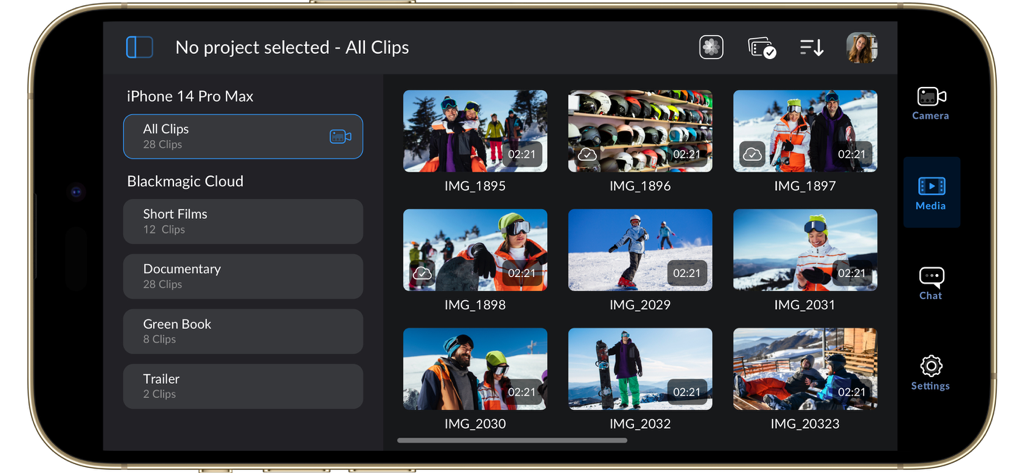
ビデオクリップのライブラリとBlackmagic Cloudログイン画面が表示されたBlackmagic Cameraアプリのインターフェース

ビデオクリップのライブラリとBlackmagic Cloudログイン画面が表示されたBlackmagic Cameraアプリのインターフェース

iPhone画面に、ビデオクリップのグリッドとクラウドプロジェクトフォルダが表示されたBlackmagic Cameraアプリのメディアライブラリインターフェース

iPhone画面に、ビデオクリップのグリッドとクラウドプロジェクトフォルダが表示されたBlackmagic Cameraアプリのメディアライブラリインターフェース

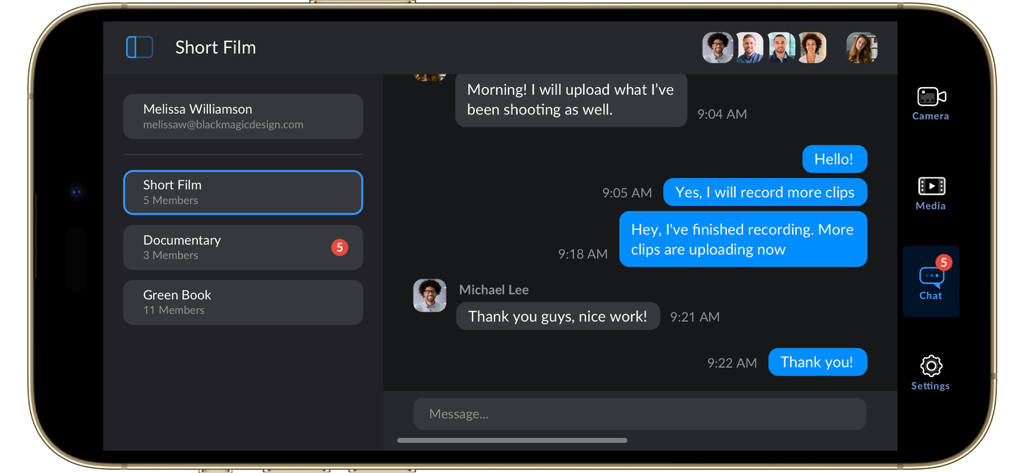
プロジェクトコラボレーションとメディアアップロードの更新のためのチームチャットインターフェースが表示されたBlackmagic Cameraアプリ

プロジェクトコラボレーションとメディアアップロードの更新のためのチームチャットインターフェースが表示されたBlackmagic Cameraアプリ

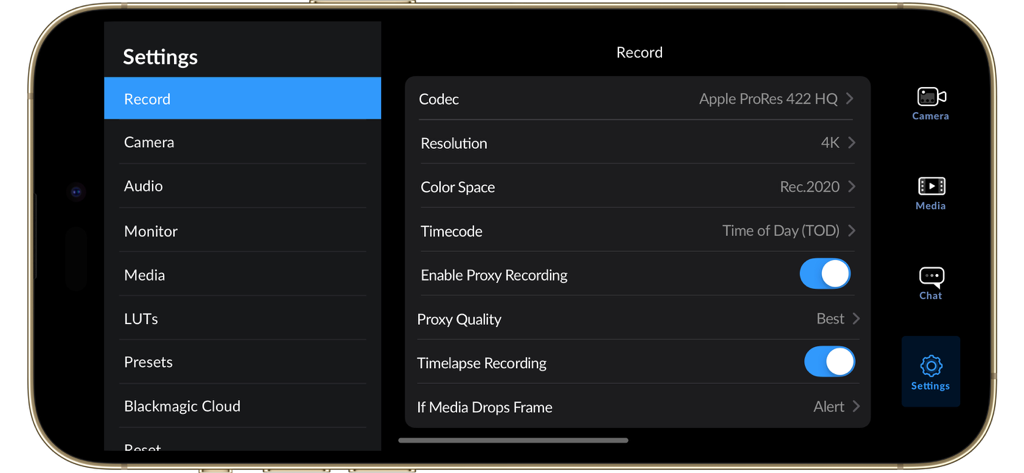
iPhone上の4K解像度とApple ProResコーデックのオプションが表示された、Blackmagic Cameraアプリの録画設定メニュー。

iPhone上の4K解像度とApple ProResコーデックのオプションが表示された、Blackmagic Cameraアプリの録画設定メニュー。

スノーボーダーを撮影中に、マニュアルビデオコントロールが表示されたBlackmagic Cameraアプリのインターフェース

スノーボーダーを撮影中に、マニュアルビデオコントロールが表示されたBlackmagic Cameraアプリのインターフェース

iPhone上のマニュアルコントロールとISO設定が表示された、Blackmagic Cameraアプリのプロフェッショナルビデオ録画インターフェース。

iPhone上のマニュアルコントロールとISO設定が表示された、Blackmagic Cameraアプリのプロフェッショナルビデオ録画インターフェース。

指先でプロの撮影技術を

このアプリを際立たせるツール、 21M+ 人のユーザーが選択.

🕹️

詳細なマニュアルコントロール

直感的でプログレードのヘッドアップディスプレイを通じて、ISO、シャッターアングル、ホワイトバランス設定に瞬時にアクセスし、あなたの技術をマスターしましょう。

🎬

シネマティックな画質

業界標準の10ビットApple ProResと4Kで録画し、YouTube、TikTok、またはインディーズ映画に、あの憧れのハリウッドルックを与えましょう。

クラウドパワーのワークフロー

撮影した映像をBlackmagic CloudとDaVinci Resolveに瞬時に同期し、あなたがまだロケ地にいる間に、編集者が作業を開始できるようにします。

世界中のユーザーに愛されています

Trusted by 21M+ 人がこのアプリを愛用しています.

"

"Blackmagic Cameraは、私のiPhoneをプロの撮影のための本物のBカメラに変えてくれました。シャッターアングルとISOのマニュアルコントロールは、ネイティブアプリにまさに欠けていたもので、クラウド経由でDaVinci Resolveに直接同期できることで、編集ワークフローから数時間を節約できました。"

Marcus Jensen, フリーランス撮影監督
"

"このアプリが私のコンテンツに与えてくれるシネマティックなルックに夢中です。スマートフォン特有の過度にシャープな感じを完全に排除してくれます。フォーカスピーキングやヒストグラムのようなプロフェッショナルなツールが画面上ですぐに使えるので、ソーシャルチャンネル向けのハイエンドな映像を撮影するのがずっと簡単になりました!"

Chloe Valenti, デジタルコンテンツクリエイター

アプリについて

について知っておくべきこと Blackmagic Camera.

説明

Introducing Digital Film for iPhone and iPad! Blackmagic Camera unlocks the power of your iPhone and iPad by adding digital film camera controls and operating systems! Now you can create the same cinematic ‘look’ as Hollywood feature films. You get the same intuitive and user friendly interface as Blackmagic Design’s award winning cameras. So it’s just like using a professional digital film camera! This means you can adjust settings such as frame rate, shutter angle, white balance and ISO all in a single tap. Or record directly to Blackmagic Cloud in industry standard 10-bit Apple ProRes files up to 4K! Recording to Blackmagic Cloud Storage lets you collaborate on DaVinci Resolve projects with editors anywhere in the world, all at the same time! Get the "Hollywood Look" with Digital Film! Blackmagic Camera puts the professional features you need for feature film, television and documentaries in your pocket. Now you can create YouTube and TikTok content with a cinematic look, and broadcast quality ENG! Imagine having a run and gun camera on hand to capture breaking news whenever it happens! Or use Blackmagic Camera as a B Cam to capture angles that are difficult to reach with traditional cameras, while still retaining control of important settings. Best of all, recording to Blackmagic Cloud allows you to get your footage to the newsroom or post production studio in minutes. Interactive Controls for Fast Setup Blackmagic Camera has all the controls you need to quickly setup and start shooting! Everything is interactive, so you can tap any item and instantly change settings without searching through confusing menus! The HUD shows status and record parameters, histogram, focus peaking indicators, levels, frame guides and more. Show or hide the HUD by swiping up or down. You can auto focus by tapping the screen in the area you want to focus. You can shoot in 16:9 or vertical aspect ratios, plus you can shoot 16:9 while holding your phone vertically if you want to shoot unobtrusively. On Screen Heads Up Display The heads up display, or HUD, controls have the most important camera controls such as lens selection, frame rate, shutter angle, timecode, ISO, white balance, gain and audio levels. You can adjust settings such as exposure by touching the ISO indicator, or you can change the audio levels simply by touching the audio meters. Everything is interactive, so if you tap any item you can instantaneously change its settings without having to search through complex menus! Camera Setup Menus The settings tab unlocks the full power of your phone’s camera, with quick access to advanced settings such as monitoring, audio, camera setup, recording and more! The record tab gives you total control over video resolution and recording format including industry standard Apple ProRes or space efficient H.264 and H.265. Plus, you can set anamorphic de-squeeze and lens correction settings. Professional audio options include AAC and PCM format and VU or PPM audio metering. You can even add external microphones! Or add 3D LUTs to recreate film looks! Media The Blackmagic Camera media tab has all the controls you need to browse or scrub clips for quick review, search and sort and view the upload status of your media. Access your media from Blackmagic Camera’s all clips folder by choosing the Media button to see the thumbnails for each clip you have stored. Plus, you can save to the files folder on the phone, send it to Blackmagic Cloud Storage via Blackmagic Cloud or manually choose which clips to upload to a project library. You can even sync media from Blackmagic Camera directly into the DaVinci Resolve project so you’re ready to edit! Live Sync to Blackmagic Cloud Storage When shooting with Blackmagic Camera, the video you capture can be instantly uploaded as a proxy file, followed by the camera originals, and saved to Blackmagic Cloud Storage. This means you can start editing quickly using your proxies, speeding up your workflow.

最新バージョン

3.2

サイズ

180.0 MB

リリース日

2023年9月14日

iPhoneでハリウッド級の映像制作を解き放つ

プロ仕様のマニュアルコントロールと10ビットProRes録画を使用するエリートクリエイターのコミュニティに参加しましょう。あなたのビジョンを完全にコントロールし、今日からDaVinci Resolveに直接同期しましょう。

ダウンロード: App Store
FAQ

よくある質問

について知っておくべきこと Blackmagic Camera

What is the Blackmagic Camera app?

Blackmagic Camera transforms an iPhone or iPad into a digital film camera. It provides professional controls and an operating system, enabling cinematic video production on mobile devices.

What advanced camera controls does Blackmagic Camera offer?

Blackmagic Camera offers digital film controls for frame rate, shutter angle, white balance, and ISO. Users adjust these settings with a single tap through the interactive interface and HUD.

Can Blackmagic Camera record 4K video?

Yes, Blackmagic Camera records industry-standard 10-bit Apple ProRes files up to 4K resolution. This ensures high-quality cinematic video capture on supported iPhone and iPad devices.

Does Blackmagic Camera support cloud collaboration?

Yes, Blackmagic Camera supports cloud collaboration by recording directly to Blackmagic Cloud. This feature allows users to work on DaVinci Resolve projects with editors globally.

What video recording formats are available in Blackmagic Camera?

Blackmagic Camera supports industry-standard Apple ProRes, H.264, and H.265 recording formats. Users manage video resolution and format through the dedicated settings menu.

How does Blackmagic Camera create cinematic video?

Blackmagic Camera provides professional features required for feature film, television, and documentaries. It enables users to achieve a cinematic look and broadcast quality for their content.

Does Blackmagic Camera feature an on-screen display (HUD)?

Yes, Blackmagic Camera features a Heads Up Display (HUD). This display shows status, record parameters, histogram, focus peaking, levels, and frame guides, which users can show or hide.

Can Blackmagic Camera record video vertically?

Yes, Blackmagic Camera allows recording in 16:9 or vertical aspect ratios. It also supports shooting 16:9 while holding the phone vertically for discrete recording.

How can I manage my media files within Blackmagic Camera?

Blackmagic Camera's media tab allows browsing, scrubbing, searching, and sorting clips. Users view upload status and can save files locally, to Blackmagic Cloud, or project libraries.

Does Blackmagic Camera support external microphones?

Yes, Blackmagic Camera supports external microphones. It offers professional audio options like AAC and PCM formats, with VU or PPM audio metering for precise sound control.

Can 3D LUTs be used with Blackmagic Camera?

Yes, Blackmagic Camera allows users to add 3D LUTs. This feature integrates specific film looks, providing creative control for achieving desired visual styles in recordings.

Does Blackmagic Camera offer live media syncing to the cloud?

Yes, Blackmagic Camera provides live sync to Blackmagic Cloud Storage. It instantly uploads proxy files, followed by camera originals, streamlining the workflow for quick editing access.