CamScanner HD

CamScanner HD

ダウンロード: App Storeダウンロード: Google Play
Spark by MWM logo
ロゴ: CamScanner HD

CamScanner HD: iPad用オールインワンプロフェッショナルドキュメントスキャナー&マネージャー

高解像度スキャン、スマートOCR、シームレスなクラウド同期でワークフローをデジタル化。6000万人以上のプロフェッショナルや学生がiPadを強力なポータブルオフィスに変えています。

ダウンロード: App Store

開発元

Shanghai Linguan Data Co.,Ltd

カテゴリ

Productivity

ダウンロード

3M+

ユーザー評価

3.5/5

評価数

1K+

対応言語

14

視覚的な精度

このインターフェースを利用する 3M+ 人のユーザー.

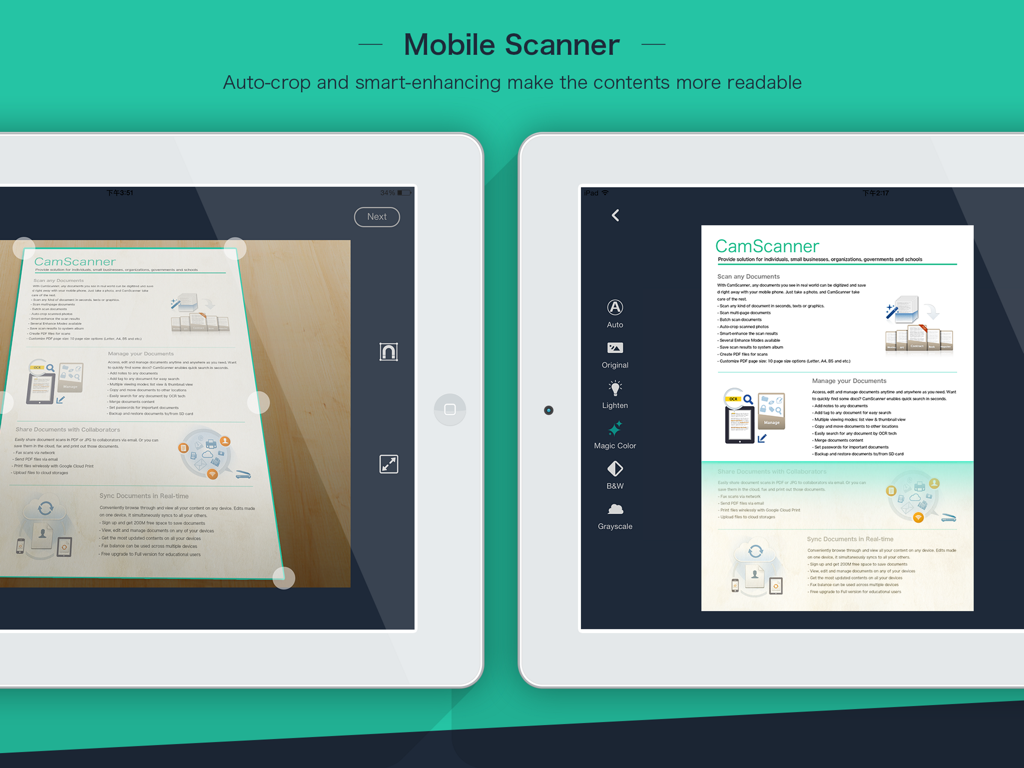
iPadでCamScanner HDアプリが自動トリミングとドキュメント強調機能を示すモバイルスキャン

iPadでCamScanner HDアプリが自動トリミングとドキュメント強調機能を示すモバイルスキャン

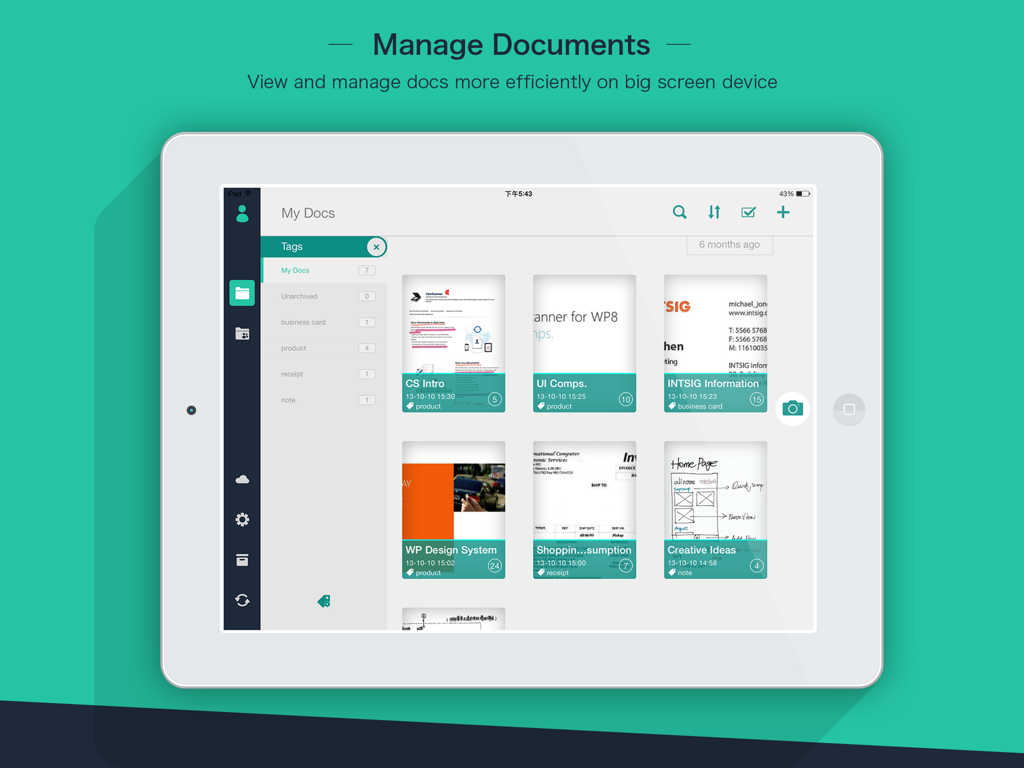
iPadでCamScanner HDアプリのインターフェースがスキャンされたドキュメントと整理タグを表示

iPadでCamScanner HDアプリのインターフェースがスキャンされたドキュメントと整理タグを表示

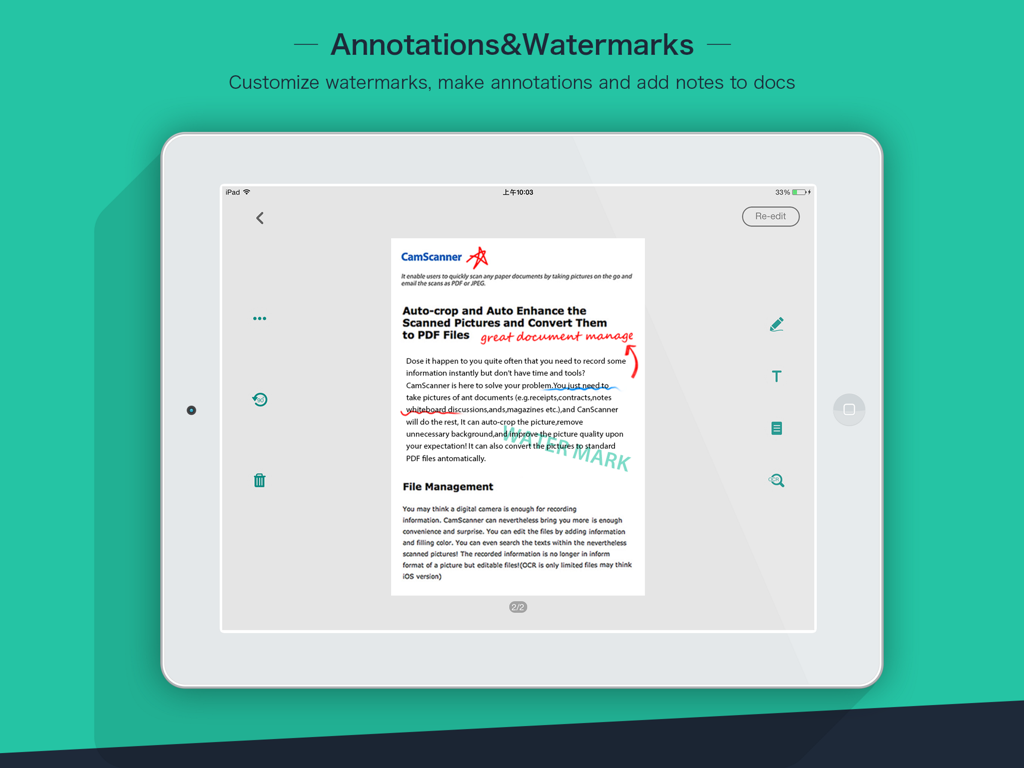
iPadでCamScanner HDアプリがドキュメントの注釈とカスタム透かしを表示

iPadでCamScanner HDアプリがドキュメントの注釈とカスタム透かしを表示

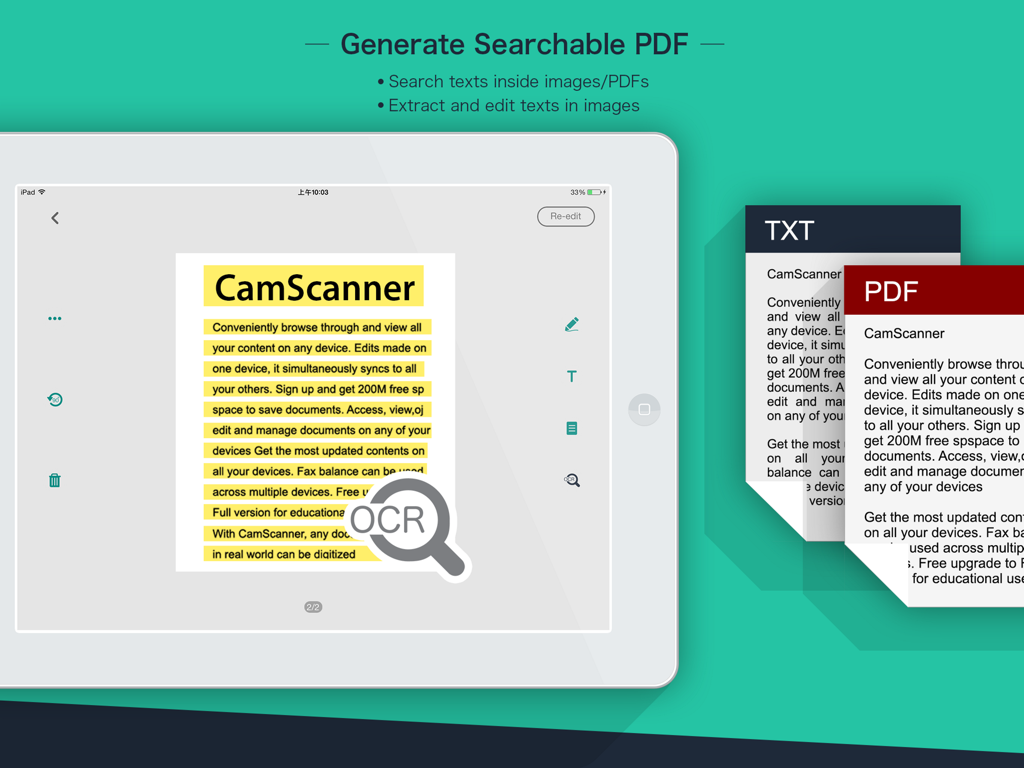
iPadでCamScanner HDのOCR機能が検索可能なPDFの生成とテキスト抽出を示す

iPadでCamScanner HDのOCR機能が検索可能なPDFの生成とテキスト抽出を示す

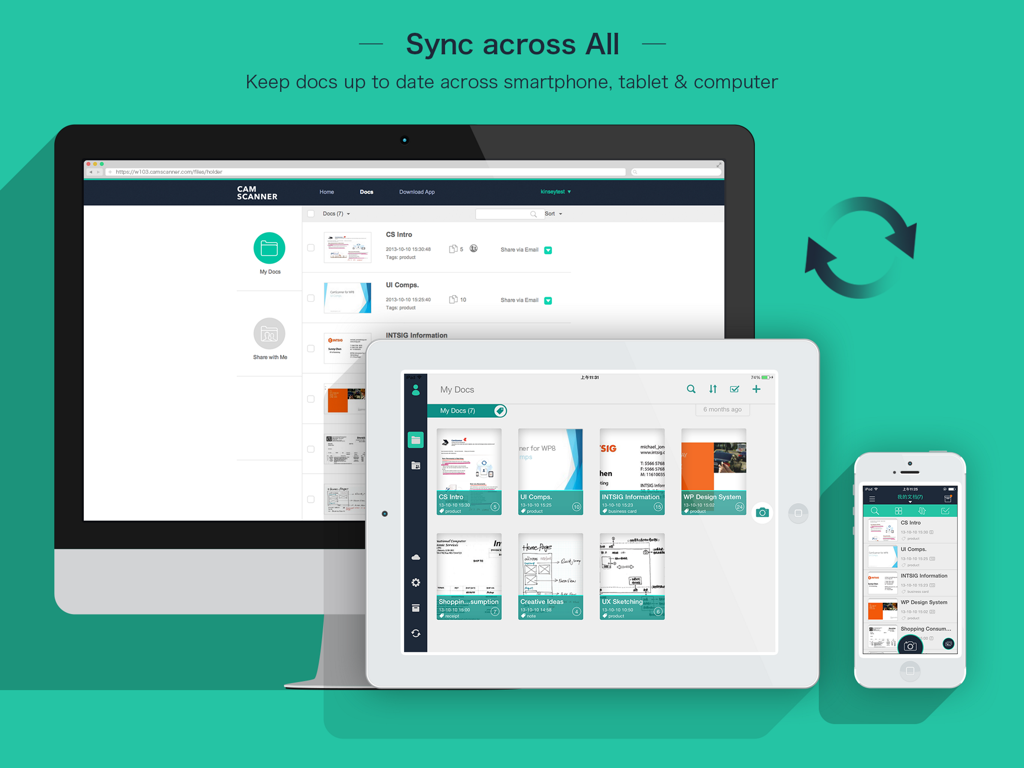
デスクトップ、iPad、iPhone間でのCamScanner HDドキュメント同期

デスクトップ、iPad、iPhone間でのCamScanner HDドキュメント同期

あなたのプロフェッショナルなドキュメントの拠点

このアプリを際立たせるツール、 3M+ 人のユーザーが選択.

プロフェッショナルグレードのスキャン品質

ぼやけた写真とはお別れです。スマートトリミングと自動強調アルゴリズムにより、すべてのドキュメントが高解像度でシャープ、クリア、そしてプロフェッショナルに見えます。

🔍

高度なOCRテクノロジー

画像内のテキストをアンロック。領収書、メモ、契約書からデータを抽出し、驚異的な速さでドキュメントを検索、編集、またはエクスポートできます。

☁️

シームレスなクラウドコラボレーション

すべてのデバイスでファイルを即座に同期。PDFを安全に共有し、注釈を追加し、チームやクラスメートとリアルタイムで共同作業できます。

世界中のユーザーに愛されています

Trusted by 3M+ 人がこのアプリを愛用しています.

"

"CamScanner HDは私の不動産ビジネスにとって絶対的なゲームチェンジャーです。契約の締結時に複数ページの契約書をスキャンし、iPadで注釈を付け、すぐにオフィスのGoogleドライブに同期できます。画質が非常に鮮明なので、クライアントから「フラットベッドスキャナーを物件に持ってきたのか」と尋ねられるほどです!"

サラ・ジェンキンス、不動産ブローカー
"

"医学生として、私は常に分厚い教科書やホワイトボードの図と格闘しています。このアプリは、すべてを簡単にデジタル化してくれます。OCR機能は命綱で、スキャンしたメモの中から特定の医学用語を数秒で検索できます。私のiPadでの生産性向上ワークフローにとって完璧な相棒です。"

デビッド・チェン、大学生

レビュー分析

ユーザーレビューの分析.

感情スコア

12%
ネガティブ

概要

This app receives overwhelmingly negative feedback from users, primarily stemming from a significant discrepancy in functionality and user experience compared to the mobile version. Many users report persistent login issues, numerous bugs, and a noticeable lack of features crucial for productivity, even among premium subscribers. Additionally, the app suffers from poor adaptation to various iPad models, resulting in display problems like incorrect screen ratios and black bars, alongside synchronization failures that hinder seamless workflow between devices. Despite a few positive remarks about its free nature for tablets or general scanning utility, these are largely overshadowed by a litany of unresolved technical and usability concerns.

主なテーマ

Feature Disparity with Mobile(13)
Bugs & Instability(7)
iPad Compatibility & Display(7)
Login & Access Issues(6)
Billing & Monetization(5)
Synchronization Problems(3)

アプリについて

について知っておくべきこと CamScanner HD.

説明

The world’s No. 1 mobile document scanning and sharing today! * Installed on over 60 million devices in over 200 countries around the world * Over 50,000 new registrations per day * CamScanner, 50 Best iPhone Apps, 2013 Edition – TIME * App Store 2011/2012 Rewind Top Productivity App * “The application employs its own image cropping and enhancing algorithm that leads to clearer images.” – Makeuseof.com * “CamScanner may just be the best deal for scanning documents on your iPhone.” – CNET.com CamScanner helps you scan, store, sync and collaborate on various contents across smartphones, iPads, tablets and computers. Features: *Quickly Digitize Document Just use your iPad camera to scan and digitize all kinds of paper documents: receipts, notes, invoices, whiteboard discussions, business cards, certificates, etc. *Optimize Scan Quality Smart cropping and auto enhancing ensures the texts and graphics in scanned documents are clear and sharp with premium colors and resolutions. *Extract Texts from Image OCR (optical character recognition) feature recognizes texts in document images and extract them from images for later searching, editing or sharing. (Paid app only) *Share PDF/JPEG Files Easily share documents in PDF or JPEG format with friends via various ways: post on social media, send attachment or document download link through email. *AirPrint & Fax Documents Instantly print out any documents in CamScanner with nearby printer via AirPrint; directly select document and fax to over 30 countries from the app. *Collaborate on Documents Want to get feedback on your documents? Invite friends or colleagues to collaborate on documents. They can view, comment and exchange ideas on documents in groups. (Registrants only) *Advanced Document Editing Make annotations on documents with a full set of editing tools. Also adding customized watermarks are made available to mark your own documents. *Quick Search When you have plenty of documents, you can use Tags to categorize and easily find them. In addition, OCR for Search helps you find texts inside image and notes. Just enter one keyword, you can quickly find the document you want. *Secure Important Documents If you want to protect confidential contents, you can set passcode for viewing important documents; also, while sending document download link, you can set password to protect others from seeing it. *Sync across Platforms Sign up to sync documents on the go. Just sign in to any smartphone, tablet or computer (visit CamScanner website) you own and you can view, edit and share any document. (Registrants only) Premium Subscription Service: 1. Edit OCR results and notes of the entire doc, exporting as .txt file 2. Add 10G cloud space 3. Add 40 extra collaborators 4. Send doc link with password protection and expiration date 5. Batch download PDF files in web app 6. Everything benefit registrants enjoys 7. Everything paid app offers Payment models for Premium subscription: -$ 4.99/month -$49.99/year Please note the subscription is automatically renewed within 24-hours prior to the end of the period unless you choose to cancel the subscription. Subscriptions may be managed by going to your iTunes Account Settings after purchase.  For Privacy Policy, please visit http://s.intsig.net/r/terms/PP_CamScanner_en-us.html CamScanner users scan and manage * Bill, Invoice, Contract, Tax Roll, Business Card… * Whiteboard, Memo, Script, Letter… * Blackboard, Note, PPT, Book, Article… * Credential, Certificate, Identity Documents… 3rd Party Cloud Storage Services Supported: -Box.com, Google Drive, Evernote, Dropbox, Check out other INTSIG’s products: CamCard - Business Card Reader CamDictionary - Snap Translator We’d love to hear your feedback: isupport@intsig.com Follow us on Twitter: @CamScanner Like us on Facebook: CamScanner Follow us on Google+: CamScanner

最新バージョン

3.12.0

サイズ

64.8 MB

リリース日

2018年3月26日

ペーパーレス革命に参加しよう

iPadを今日から高性能スキャナーに変えましょう。CamScanner HDをダウンロードして、プロの精度でドキュメントを管理する6000万人以上のプロフェッショナルや学生の仲間入りをしましょう。

ダウンロード: App Storeダウンロード: Google Play
FAQ

よくある質問

について知っておくべきこと CamScanner HD

CamScanner HDとは何ですか?

CamScanner HDは、最高のモバイルドキュメントスキャンおよび共有アプリケーションです。これにより、ユーザーはスマートフォン、iPad、タブレット、コンピューター間でさまざまなドキュメントをスキャン、保存、同期、共同作業できます。

CamScanner HDは物理的なドキュメントをデジタル化できますか?

はい、CamScanner HDはドキュメントを迅速にデジタル化できます。ユーザーはデバイスのカメラを使用して、レシート、メモ、請求書、名刺、証明書などのさまざまな紙のドキュメントをスキャンするだけです。

CamScanner HDには、テキスト抽出用のOCR機能がありますか?

はい、CamScanner HDにはOCR(光学文字認識)機能が搭載されています。これにより、ユーザーは後で検索、編集、または共有するために、ドキュメント画像からテキストを抽出できます。これは有料アプリ限定の機能です。

CamScanner HDでドキュメントを共有するにはどうすればよいですか?

CamScanner HDでは、PDFまたはJPEG形式でドキュメントを簡単に共有できます。ユーザーは、ソーシャルメディア、メールの添付ファイル、またはドキュメントのダウンロードリンクを送信することによって、友人とファイルを共有できます。

CamScanner HDはドキュメントの印刷とファックスをサポートしていますか?

はい、CamScanner HDはAirPrintとファックスの両方をサポートしています。ユーザーはAirPrint経由で近くのプリンターでドキュメントを即座に印刷したり、アプリから30か国以上に直接ドキュメントをファックスしたりできます。

CamScanner HDでドキュメントを共同編集できますか?

はい、CamScanner HDではドキュメントの共同編集が可能です。登録者は、指定されたグループ内でドキュメントを閲覧、コメント、アイデア交換するために、友人や同僚を招待できます。

CamScanner HDでドキュメントに透かしを追加できますか?

CamScanner HDは、注釈を付ける機能を含む高度な編集ツールを提供します。ユーザーは、ドキュメントにカスタム透かしを追加して、自分のものとしてマークすることもできます。

CamScanner HDは、ドキュメントをどのように整理し、検索できるようにしますか?

CamScanner HDは、タグを使用してドキュメントを整理し、迅速なカテゴリ分けと検索を可能にします。OCR for Search機能は、キーワードを使用して画像やメモ内のテキストを見つけやすくするのにも役立ちます。

CamScanner HDでは、ドキュメントを保護するためのセキュリティ機能はありますか?

はい、CamScanner HDにはセキュリティ機能があります。ユーザーは、機密ドキュメントの表示にパスコードを設定したり、アクセスを制限するためにドキュメントのダウンロードリンクにパスワードを追加したりできます。

CamScanner HDは、異なるデバイス間でドキュメントを同期しますか?

はい、CamScanner HDでは、登録者向けにドキュメントをクロスプラットフォームで同期できます。ユーザーは、スマートフォン、タブレット、コンピューターのいずれかでサインインして、ドキュメントにアクセス、編集、共有できます。

CamScanner HD Premiumサブスクリプションに含まれる特典は何ですか?

CamScanner HD Premiumサブスクリプションには、OCR結果の編集、10GBのクラウドスペース、追加の共同編集者40人、有効期限付きのパスワード保護リンク、WebアプリでのバッチPDFダウンロードが含まれます。

CamScanner HD Premiumサブスクリプションの価格はいくらですか?

CamScanner HD Premiumサブスクリプションは、月額4.99ドルまたは年額49.99ドルです。期間終了の24時間前までにキャンセルされない限り、サブスクリプションは自動的に更新されます。

CamScanner HDは、他のクラウドストレージサービスに接続できますか?

はい、CamScanner HDは、いくつかのサードパーティ製クラウドストレージサービスとの統合をサポートしています。これらには、Box.com、Google Drive、Evernote、Dropboxが含まれており、ストレージとアクセスのオプションを強化します。