Channels for HDHomeRun!

Channels for HDHomeRun!

ダウンロード: App Store
Spark by MWM logo
ロゴ: Channels for HDHomeRun!
HDHomeRun用Channels!:コードカッターのための究極のライブTV体験

地元のスポーツ、ニュース、放送ネットワークをApple TVやiOSデバイスに直接届けます。プレミアムなグリッドガイドと高忠実度のパフォーマンスで、ライブTVをホームネットワークにシームレスに統合します。

開発元

Fancy Bits, LLC

カテゴリ

Entertainment

ダウンロード

448K+

ユーザー評価

4.4/5

評価数

1K+

対応言語

1

テレビの再定義

このインターフェースを利用する 448K+ 人のユーザー.

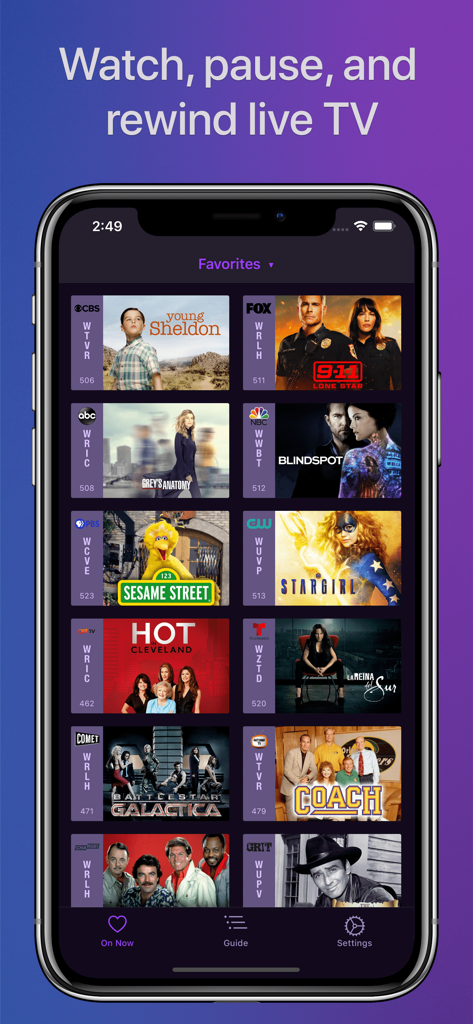
『ヤング・シェルドン』や『セサミストリート』などのライブTVのお気に入りのグリッドを表示するChannelsアプリのインターフェース

『ヤング・シェルドン』や『セサミストリート』などのライブTVのお気に入りのグリッドを表示するChannelsアプリのインターフェース

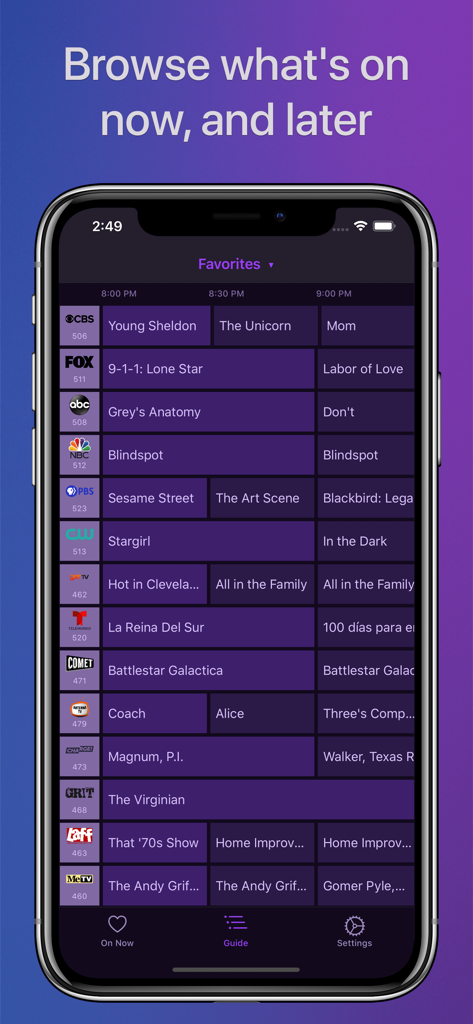
iPhoneの画面にフルグリッドのテレビガイドを表示するHDHomeRun用Channelsアプリ。

iPhoneの画面にフルグリッドのテレビガイドを表示するHDHomeRun用Channelsアプリ。

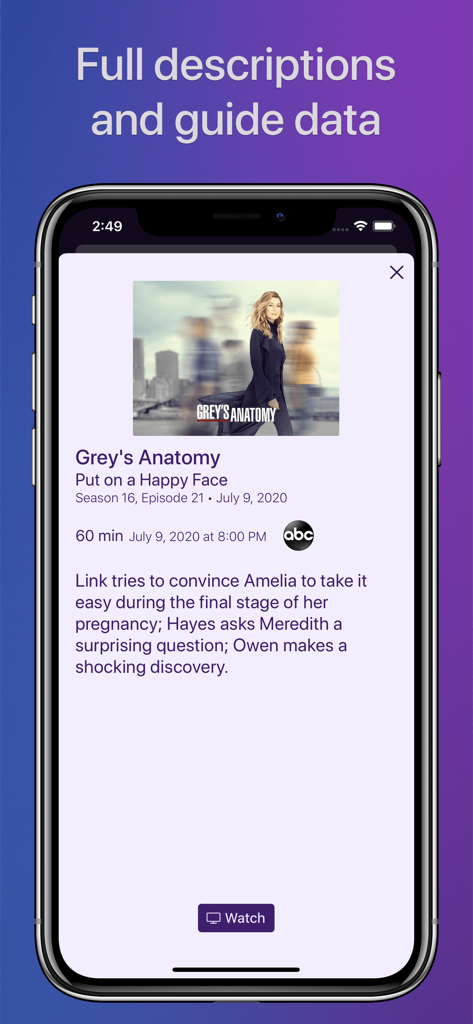
iPhoneで詳細なテレビ番組ガイドデータとエピソード説明を表示するChannelsアプリのスクリーンショット

iPhoneで詳細なテレビ番組ガイドデータとエピソード説明を表示するChannelsアプリのスクリーンショット

ホームシアターのための究極のアップグレード

このアプリを際立たせるツール、 448K+ 人のユーザーが選択.

プロフェッショナルなグリッドガイド

肥大化したケーブルボックスはもう不要です。Appleデバイスでネイティブに感じられるように設計された、高性能で直感的なインターフェースでチャンネルを操作できます。

🏟️

妥協のないビデオ品質

5.1サラウンドサウンドを備えたフルHDでスポーツやローカルニュースを視聴できます。インターネットストリーミングの遅延なしに、直接チューナー接続による安定性を楽しんでください。

📱

シームレスなマルチルームアクセス

テレビが家中どこへでも付いてきます。1つのアンテナでネットワーク上のすべてのデバイスに配信でき、Apple TVからiPadへの切り替えも数秒で行えます。

世界中のユーザーに愛されています

Trusted by 448K+ 人がこのアプリを愛用しています.

"

"Channelsはコードカッターにとって間違いなく最高基準です。インターフェースは標準のチューナーアプリより遥かに進んでおり、Apple TVとの統合もシームレスです。肥大化したケーブル契約なしで、ついに地元のスポーツやニュースをフルHDで楽しめるようになりました。私のホームシアターセットアップに欠けていた最後のピースです。"

マーカス・トンプソン
"

"リビングルームからキッチンのiPadへ、ワンプレーも見逃さずに試合を持ち運べるのが最高です。グリッドガイドは驚くほど速く、5.1サラウンドサウンドの品質も一流です。アンテナのセットアップが、プレミアムなケーブルサービスのように感じられますが、より直感的です。"

サラ・ジェンキンス

アプリについて

について知っておくべきこと Channels for HDHomeRun!.

説明

Watch live TV, right next to your apps. Channels lets you play, pause, and rewind local or cable TV directly on your Apple TV with your HDHomeRun TV tuner. If you are a Channels Plus subscriber with DVR Service, search for the free app: Channels: Whole Home DVR. Channels requires an HDHomeRun networked TV tuner to watch live TV on your iPhone, iPad, or iPod Touch. Learn more about how this works below. • Pause, rewind, and fast forward live TV • Guide Data • Full grid guide • Full HD streaming (bandwidth permitting) • 5.1 Surround Sound • Closed captioning • Full support for VoiceOver • Channel favoriting • Jump back to last channel • Auto Discovery • Browse what's on other channels while watching TV • Manage your HDHomeRun devices from Channels "If you’re a cord cutter, then Channels coupled with an HDHomeRun and antenna is one of the best purchases you can make." — 9to5mac "If live television has been a missing or irritating-to-use piece for your viewing pleasure, Channels plus a networked tuner pulls it neatly into your iPhone, iPod touch, or iPad." — Macworld Channels requires modern iOS devices and 802.11AC wireless for HD streaming. But as usual, your milage may vary. Supported devices: All iOS devices with an A7 chip and up. Note: Channels does not support Picture in Picture mode on the iPad or AirPlay on any device due to the video format provided by the HDHomeRun tuners. This is an iOS limitation. -- Why Use Channels? -- Channels is the missing piece of your puzzle. If you already watch everything through streaming apps, Channels lets you finally watch sports, award shows, local news, and other live events on your same device. • Watch live primetime TV, local news, and sports on your Apple TV. • Netflix, Hulu, Movies, Games, AirPlay, and now live TV on the same device. • Already using antenna for live TV? Channels lets you use one antenna to watch TV on all the devices in your home. • Want sports on your porch? News in the kitchen? Channels lets you watch these anywhere in the home. Let your TV watching follow you around the house. -- How Does It Work? -- An HDHomeRun is a simple TV tuner that can broadcast television over your home network. Channels streams that video directly to your device. 1. Plug an HD antenna or your cable into your HDHomeRun. 2. Plug your HDHomeRun into your router. 3. Watch live TV via the Channels app. -- How Do You Use It? -- Here's some protips on how to get the most out of Channels. • Pick your favorite channels by selecting your HDHomeRun device in the Settings tab and tapping on a channel. • See quickly what’s currently on your favorite channels with the On Now tab. • Tap on a channel to view more info about it (or just 3D Touch it). • Live TV buffer works for ~90 mins or less depending on how much storage is available on your device. • Skip ahead 30s by swiping right. Skip back 7s by swiping left. • Double-tap with 2 fingers to switch to the previous channel. • Swipe up/down on the Quick Guide to see what else is on your favorite channels. Tap it to change to that channel. -- HDHomeRun Device Support -- All HDHomeRun devices are supported by Channels. • HDHomeRun PRIME • HDHomeRun EXTEND • HDHomeRun EXPAND • HDHomeRun CONNECT • HDHomeRun CONNECT DUO • HDHomeRun CONNECT QUATRO • HDHomeRun DUAL • HDHomeRun ORIGINAL (blue and white tuners) Learn more about HDHomeRun tuners on silicondust.com. Simply plug a compatible tuner into your home network router and start watching Live TV with Channels today! • DRM protected streams are *not* currently supported. • Channels does *not* work outside of your home. It only works when connected to the same network as your HDHomeRun Device For questions, concerns, bug reports, and feature requests, contact us on twitter @getchannels or via email support@getchannels.com. You can talk about everything Channels on our community site at: https://community.getchannels.com.

最新バージョン

7.0.1

サイズ

156.0 MB

リリース日

2016年7月30日

プロシューマー向けのコードカッティング環境を完成させましょう

ライブTVを取り戻した40万人以上の愛好家の仲間入りをしましょう。HDHomeRunをお気に入りのAppleデバイスに接続して、ホームネットワークにふさわしいプレミアムでラグのない体験を楽しんでください。

ダウンロード: App Store