iBFD

iBFD

ダウンロード: App Store
Spark by MWM logo
ロゴ: iBFD

iBFD:必須のバックアップ飛行ディスプレイと安全スイート

iPhoneまたはiPadでプロフェッショナルグレードのバックアップ計器を使用して、コックピットの安全性を向上させましょう。精密な姿勢指示器、センサーフュージョン技術、およびフライトデータレコーディング機能を内蔵し、あらゆるフライトで究極の安心を提供します。

開発元

Tatsuo Saeki

カテゴリ

Navigation

ダウンロード

106K+

ユーザー評価

3.8/5

評価数

0

対応言語

1

ディスプレイ上の精度

このインターフェースを利用する 106K+ 人のユーザー.

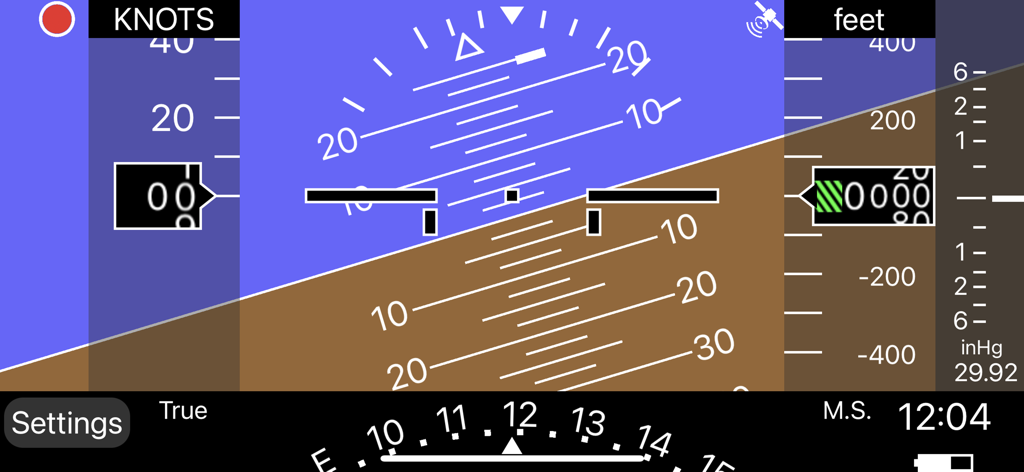
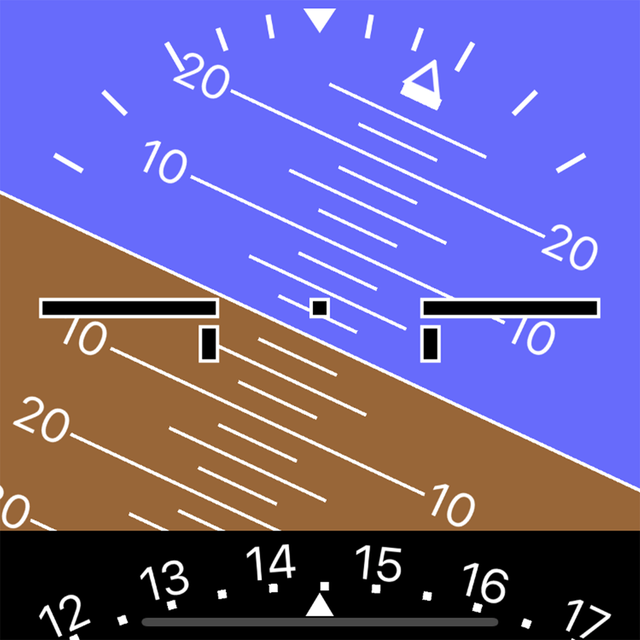
姿勢指示器と高度計を備えたデジタルバックアップ飛行ディスプレイインターフェイス

姿勢指示器と高度計を備えたデジタルバックアップ飛行ディスプレイインターフェイス

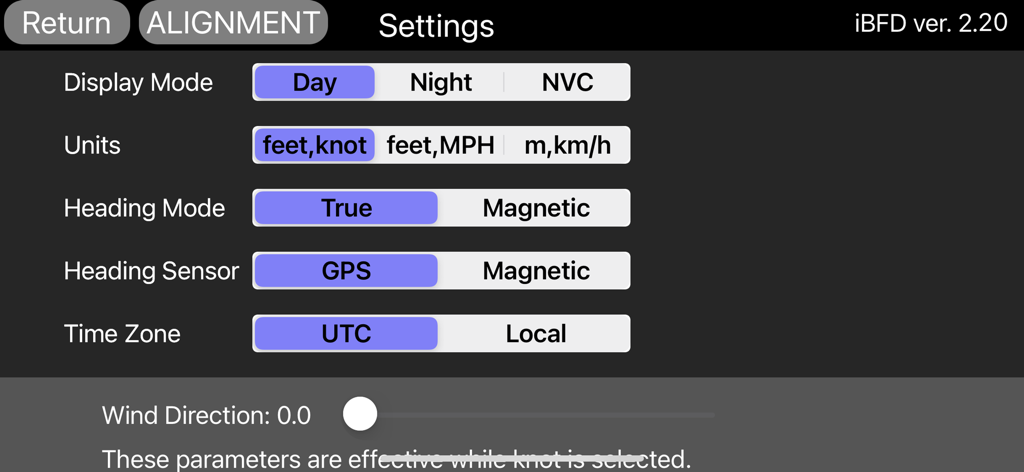
フライトディスプレイ、単位、センサーの設定オプションを表示するiBFDアプリの設定画面。

フライトディスプレイ、単位、センサーの設定オプションを表示するiBFDアプリの設定画面。

プロフェッショナルグレードのバックアップ計器

このアプリを際立たせるツール、 106K+ 人のユーザーが選択.

🎛️

統合フライトスイート

高度なカルマンフィルターの精度で駆動される、姿勢、方位、対気速度指示器を備えた完全なセカンダリパネルにアクセスできます。

⏺️

FDR & コックピットボイスレコーディング

内蔵のフライトデータおよびボイスレコーディングにより、安全文化を強化し、あらゆるミッションに不可欠なドキュメントを提供します。

🛡️

緊急対応可能な信頼性

昼間、夜間、NVCモードで、あらゆるシナリオに備え、クリティカルな瞬間に高視認性のナビゲーションと空港ガイダンスを確保します。

世界中のユーザーに愛されています

Trusted by 106K+ 人がこのアプリを愛用しています.

"

"真空システムが一つしかない1970年代のセスナを操縦するプライベートパイロットとして、iBFDは究極の安心材料です。最近のクロスカントリー飛行中、プライマリー計器の完璧なバックアップとして機能しました。姿勢指示器は驚くほど安定しており、FDR機能は飛行後の操作を見直すのに最適です。ゼネラルアビエーションのコックピットにとって、デジタル保険の必須アイテムです。"

David Miller, Private Pilot (ASEL)
"

"iBFDのセンサーフュージョンロジックは、他のアプリと比較して本当に印象的です。iPhoneでランディングシェードに取り付けたまま、iPadでナビゲーションに使用しています。ピッチとロールデータの精度は最高レベルで、NVCモードは夜間の着陸時に夜間視力を維持するためのライフセーバーです。安全性と冗長性を最優先するパイロットにとって必須のツールです。"

Sarah Jenkins, Flight Instructor

アプリについて

について知っておくべきこと iBFD.

説明

integrated Backup Flight Display (iBFD) Pilots understand the risk of a primary flight instrument failure while flying. In certain situations the loss of the Attitude Indicator is perhaps the greatest risk a pilot can face. This iPhone based integrated Backup Flight Display (iBFD) is an inexpensive, easy to operate tool intended to reduce risk and improve safety if an instrument fails and no other backup is available. This application consists of an Attitude Indicator, Heading Indicator, Altimeter, Vertical Speed Indicator, speed Indicator, Side Slip Indicator, and Clock. Furthermore, in the portrait mode of the iPad, a Map is displayed below the Attitude Indicator, and when you enter an airport code such as KFTW, the direction and distance to the airport are displayed. It can also be used as Flight Data Recorder(FDR) and Cockpit Voice Recorder(CVR). This function is activated by touching the red circle in the upper left corner. Recording is stopped by touching the red circle again or it will be stopped automatically when large G is applied. iBFD uses the iPhone's 3 axis Gyro sensor as its primary sensor. Pitch and Roll angles are calculated using the Gyro data and the same algorithm as strap down Inertial Reference Systems (IRS). GPS and Accelerometer are used with Kalman filter as sensor fusion to prevent gyro drift and improve Accuracy. The iBFD performs noticeably better than other comparable applications on the market. Unfortunately the iBFD doesn't have FAA certification. It doesn't have enough reliability for use as Primary Flight Instruments, and neither our software nor your iPhone have been subjected to rigorous certification tests. And the accuracy of Map and Airport Information is not guaranteed. All information displayed on the iBFD is for reference only! Therefore, we are not responsible for any death, injury or damage as a result of using the iBFD. USE THIS DEVICE AT YOUR OWN RISK! Nevertheless, during an In Flight Emergency having an iBFD is far better than having no instrument at all. Particularly if in a limited visibility situation with an inoperative Attitude Indicator. Engine vibration can affect accuracy of the iBFD, so special consideration must be given to mounting the iPhone to the cockpit instrument panel or glare shield. Other features (1) There are three display color modes; Day, Night or NVC. (2) Altitude/Speed is selectable in units of feet/knots, feet/MPH or meter/kilometers per hour. (3) Airspeed is calculated using GPS Speed, Wind Direction, and Wind Velocity. Wind Direction and Velocity are obtained via ATIS and set manually. (4) Pitch angle zero can be adjusted manually by touching center of the display or slider setting. (5) Magnetic Heading or True Heading, and GPS or M.S.(Magnetic Sensor) are selectable. (6) Settings Window for entering parameters and user preferences. (7) Battery Icon indication. (8) Recorded data can be accessed by Files. (9) Magnetic Heading can be adjusted with the slider. (10) Function to correct roll angle. However, when performing this function, the iPhone needs to be correctly placed horizontally. (11) Local time or UTC is selectable. (12) GPS Altimeter and Barometric Altimeter. (13) Roll indication by Sky pointer and Ground pointer. Note: Initial roll and pitch angle are calculated using the accelerometer at the time of alignment (same as real IRS). Therefore, if acceleration due to motion is applied during alignment, an angle error will occur. However, such initial angle error automatically decreases with time and disappears after a few minutes in case of level flight.

最新バージョン

2.30

サイズ

12.9 MB

リリース日

2017年3月1日

万全の準備で飛行を。コックピットの必須冗長性はここから始まります。

iBFDを緊急時のバックアップおよび飛行記録のために信頼する10万人以上のゼネラルアビエーションパイロットの仲間入りをしましょう。究極の安心のために今すぐダウンロードしてください。

ダウンロード: App Store