Ivanti Mobile@Work™ Client

Ivanti Mobile@Work™ Client

ダウンロード: App Store
Spark by MWM logo
ロゴ: Ivanti Mobile@Work™ Client

Ivanti Mobile@Work™ Client:職場への安全でシームレスなアクセス

エンタープライズグレードのセキュリティで、会社のメール、VPN、アプリに即座に接続。個人プライバシーを尊重し保護します。

ダウンロード: App Store

開発元

MobileIron

カテゴリ

Business

ダウンロード

4M+

ユーザー評価

2.8/5

評価数

4K+

対応言語

18

透明性が行動に

このインターフェースを利用する 4M+ 人のユーザー.

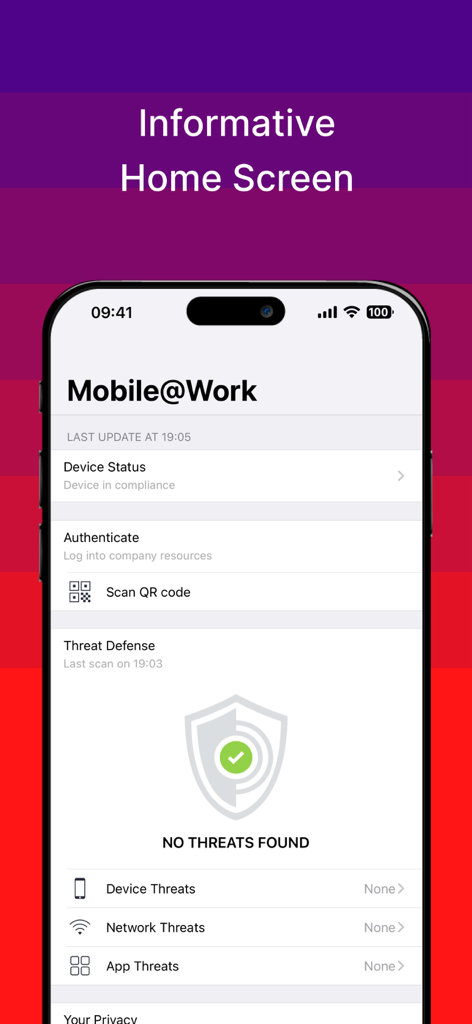
Ivanti Mobile at Workのホーム画面。デバイスのコンプライアンスと脅威防御のステータスが表示されています。

Ivanti Mobile at Workのホーム画面。デバイスのコンプライアンスと脅威防御のステータスが表示されています。

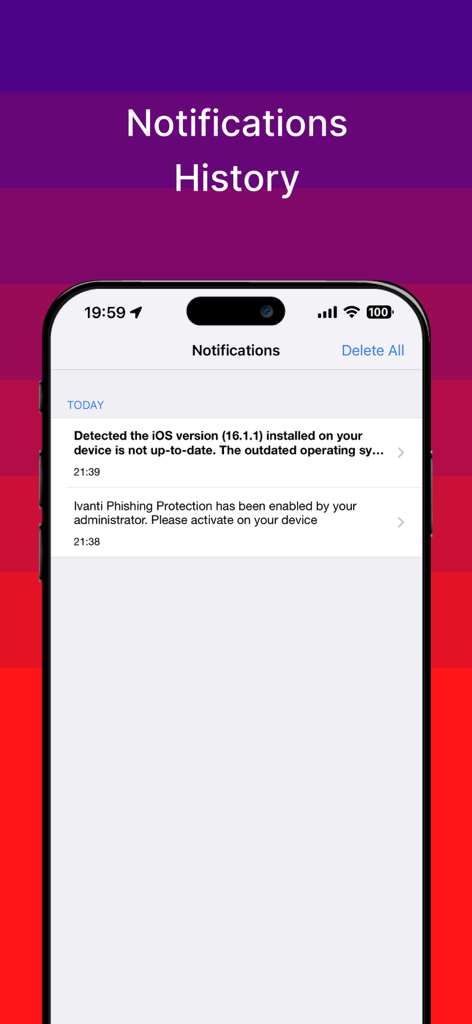
Ivanti Mobile at Workアプリの通知履歴画面。セキュリティアラートとデバイスコンプライアンスの通知が表示されています。

Ivanti Mobile at Workアプリの通知履歴画面。セキュリティアラートとデバイスコンプライアンスの通知が表示されています。

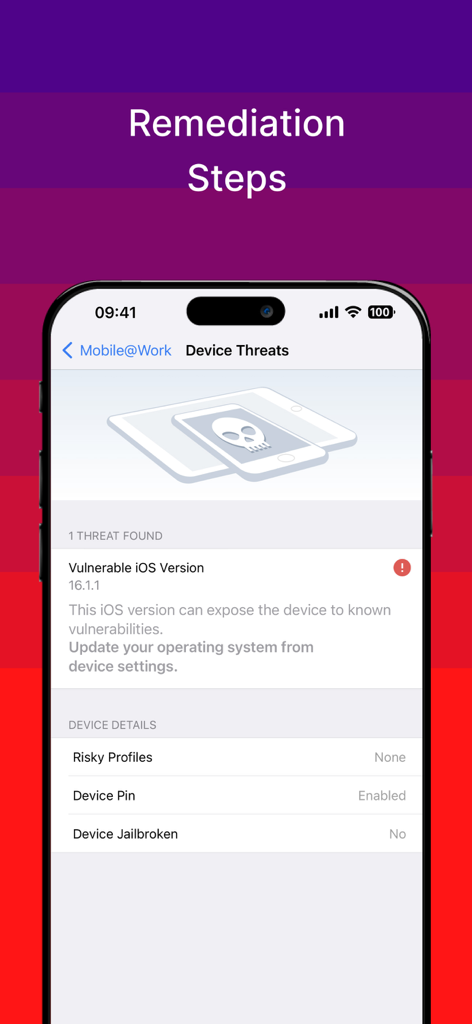
Mobile at Workアプリの画面。デバイスのセキュリティ脅威と、脆弱なOSバージョンに対する修復手順が表示されています。

Mobile at Workアプリの画面。デバイスのセキュリティ脅威と、脆弱なOSバージョンに対する修復手順が表示されています。

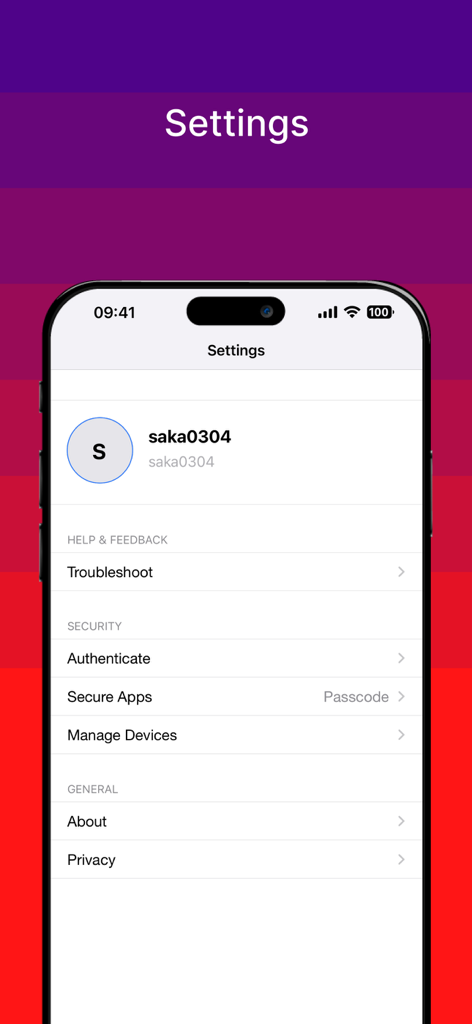
Ivanti Mobile at Workアプリの設定メニュー。アカウントのセキュリティとプライバシー構成が表示されています。

Ivanti Mobile at Workアプリの設定メニュー。アカウントのセキュリティとプライバシー構成が表示されています。

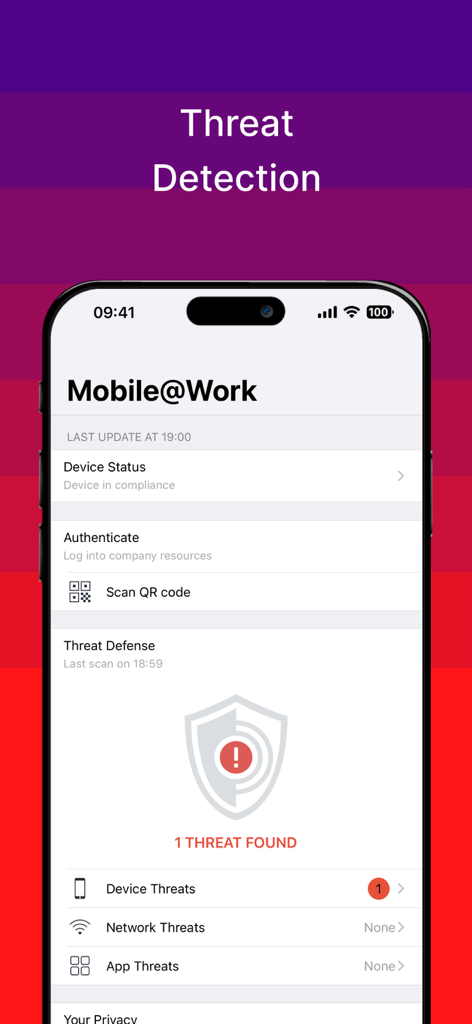
Ivanti Mobile at Workアプリの脅威検出画面。1つのデバイス脅威が見つかりました。

Ivanti Mobile at Workアプリの脅威検出画面。1つのデバイス脅威が見つかりました。

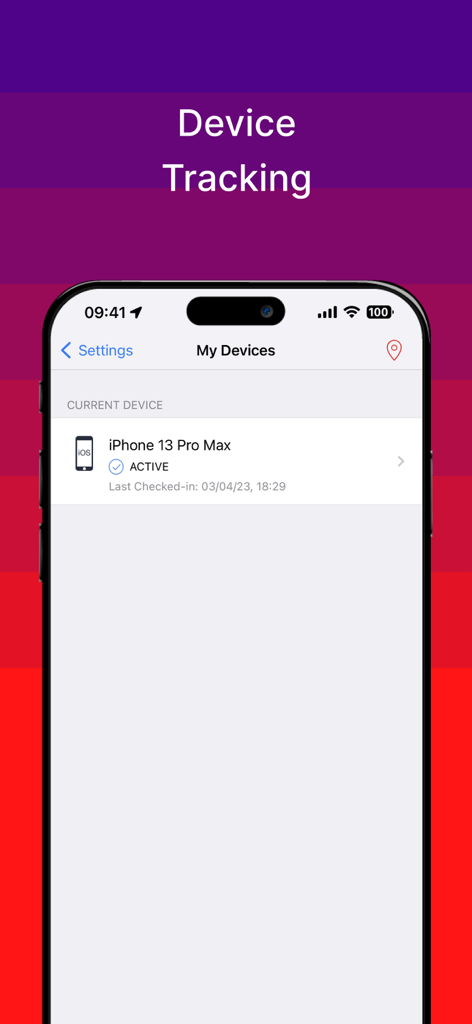
Ivanti Mobile at Workアプリの画面。iPhoneのデバイス追跡がアクティブであることが表示されています。

Ivanti Mobile at Workアプリの画面。iPhoneのデバイス追跡がアクティブであることが表示されています。

あなたのオフィスをデバイスに

このアプリを際立たせるツール、 4M+ 人のユーザーが選択.

🛡️

視覚的なプライバシー保証

データに対する完全な透明性。会社が何にアクセスできるかを正確に確認し、個人の写真、テキスト、アプリがプライベートのままであることを知って安心してください。

シームレスなワンタップアクセス

手動設定を排除します。会社のWi-FiおよびVPNネットワークに自動的に接続し、メール、カレンダー、連絡先に即座にアクセスできます。

📦

会社アプリカタログ

成功するために必要なプロフェッショナルツールを発見してインストールします。組織によって承認されたビジネスアプリケーションのキュレーションされたライブラリにアクセスします。

世界中のユーザーに愛されています

Trusted by 4M+ 人がこのアプリを愛用しています.

"

"ハイブリッドワーカーとして、このアプリはゲームチェンジャーです。VPNと会社のWi-Fiを自動的に構成してくれるので、どこからでもメールやカレンダーに即座にアクセスできます。バックグラウンドで動作するため、モバイルワークフローは完全にシームレスになります。"

Sarah Jenkins, Senior Project Manager
"

"個人の携帯電話を仕事に使うことに躊躇していましたが、視覚的なプライバシー機能のおかげで完全に安心できました。IT部門がアクセスできるものとできないものを正確に確認できるので、個人の写真やテキストがプライベートのままで生産性を維持できることを嬉しく思います。"

Marcus Thompson, Financial Analyst

レビュー分析

ユーザーレビューの分析.

感情スコア

26%
ネガティブ

概要

The mobile app receives overwhelmingly negative feedback from users, reflected in a low global sentiment score of 26 out of 100. Many users report critical issues such as frequent crashes, freezing, and general instability, often citing compatibility problems with specific iOS versions including iOS 12, 17, 17.1, 18, and Apple Vision Pro. Key functionalities like notifications are consistently non-operational, and users struggle with difficult installation, persistent login errors, and challenges in removing the application. This results in a poor user experience, marked by performance issues like excessive battery drain and overall unreliability.

主なテーマ

App Stability(20)
User Experience(13)
iOS Compatibility(12)
Setup & Login(8)
Notifications(5)
Performance(2)
Uninstallation(2)

アプリについて

について知っておくべきこと Ivanti Mobile@Work™ Client.

説明

Ivanti’s Mobile@Work securely connects your iOS device to your company network so that you can easily access email and other work resources. Best Technology • Purpose-built for Mobile IT with millions of users globally • Complete separation of corporate and personal data • 500+ of Global 2000 customers • More than 97% customer support satisfaction rate With just a few quick steps, Ivanti Mobile@Work makes getting access to corporate resources easy on your iOS device: ► PRIVACY: Visual Privacy capabilities provide transparency to employees by allowing them to view exactly which data their company can see and which actions their company can take on the device. ► FAST ACCESS: Immediate access to corporate email, calendar and contacts. ► AUTOMATED: Connect automatically to corporate Wi-Fi and VPN networks. ► EASY: Discover and install work related applications on your device wherever you are. ► SECURE: Automated compliance with corporate security policies. ► FIND MY PHONE: Locate lost or stolen devices and remotely manage them. NOTES: Ivanti Mobile@Work works in conjunction with Ivanti Core deployed by your company’s IT organization. Please follow the instructions from your IT organization to use this app. Ivanti Mobile@Work is required to access corporate resources and therefore should not be removed without first consulting your IT organization. Visual Privacy allows your organization to see device details such as model name, OS version, roaming status, and company apps. However, IT cannot see personal information such as personal email, text messages, personal contacts, photos and videos and voicemail. Learn about Mobile Device Management: https://www.ivanti.com/products/ivanti-neurons-for-mdm Learn about Mobile Security: https://www.ivanti.com/solutions/security/mobile-security?miredirect Follow us on Facebook: https://www.facebook.com/GoIvanti Follow us on Twitter: https://twitter.com/goivanti Find more about Ivanti: http://www.ivanti.com

最新バージョン

12.12.71

サイズ

111.0 MB

リリース日

2009年7月27日

安全なモバイルワークスペースをアンロック

業界をリードするプライバシーファーストのモバイルクライアントで、会社のメール、VPN、アプリに即座にアクセスできるMillions of professionalsに参加しましょう。

ダウンロード: App Store
FAQ

よくある質問

について知っておくべきこと Ivanti Mobile@Work™ Client

Ivanti Mobile@Workとは何ですか、また何をするものですか?

Ivanti Mobile@Workは、iOSデバイスを会社のネットワークに安全に接続します。会社のメール、カレンダー、連絡先、Wi-Fi、VPN、および仕事関連のアプリケーションへのアクセスを提供し、安全で自動化されたリソースアクセスを保証します。

Ivanti Mobile@Workはユーザーにプライバシーの透明性を提供しますか?

はい、Ivanti Mobile@WorkにはVisual Privacy機能があります。これにより、従業員は会社がどのデータを見ることができるか、また会社がデバイス上でどのような操作を行えるかを正確に確認でき、透明性を確保します。

Ivanti Mobile@Workは、紛失または盗難にあったiOSデバイスを見つけるのに役立ちますか?

はい、Ivanti Mobile@Workには「携帯電話を探す」機能が含まれています。この機能により、ユーザーまたはIT管理者は、紛失または盗難にあったデバイスを見つけ、必要に応じてリモート管理アクションを実行できます。

Ivanti Mobile@Workを使用している場合、ITはどの個人データにアクセスできますか?

IT組織は、モデル名、OSバージョン、ローミングステータス、会社のアプリケーションなどのデバイスの詳細を見ることができます。個人のメール、テキストメッセージ、写真、連絡先などの個人情報を見ることはできません。

Ivanti Mobile@Workは私のデバイスの脅威検出を提供しますか?

はい、Ivanti Mobile@WorkにはThreat Defense機能が含まれています。デバイス、ネットワーク、アプリの脅威を積極的にスキャンして検出し、コンプライアンスステータスを表示し、問題が見つかった場合は修復手順を提供します。

Ivanti Mobile@Workはどのように会社のセキュリティポリシーを強制しますか?

Ivanti Mobile@Workは、会社のセキュリティポリシーへの自動コンプライアンスを保証します。会社のIT組織によって展開されるIvanti Coreと統合され、安全なデバイス環境を維持します。

私のデバイスからIvanti Mobile@Workアプリを削除しても安全ですか?

いいえ、Ivanti Mobile@Workは会社のresoucesにアクセスするために必要です。重要な仕事のツールへのアクセスを失うことを避けるために、まず会社のIT組織に相談せずにアプリを削除しないでください。

Ivanti Mobile@Workはデバイスの古いiOSバージョンを検出できますか?

はい、Ivanti Mobile@Workは古いiOSバージョンを検出します。オペレーティングシステムが最新でない場合にユーザーに通知し、警告を表示して、潜在的な脆弱性に対処するためのアップデートを提案します。