iziCast

iziCast

ダウンロード: App Store
Spark by MWM logo
ロゴ: iziCast

iziCast:ポケットに入るプロフェッショナル音声&ビデオ放送

スタジオグレードのコントロールでモバイルストリームを強化。お気に入りの外部機材やミキサーを使用して、Icecast、Shoutcast、またはRTMPに高音質のサウンドを放送しましょう。

開発元

Daniel Noethen

カテゴリ

Music

ダウンロード

82K+

ユーザー評価

4.7/5

評価数

300

対応言語

2

スタジオがあなたの指先に

このインターフェースを利用する 82K+ 人のユーザー.

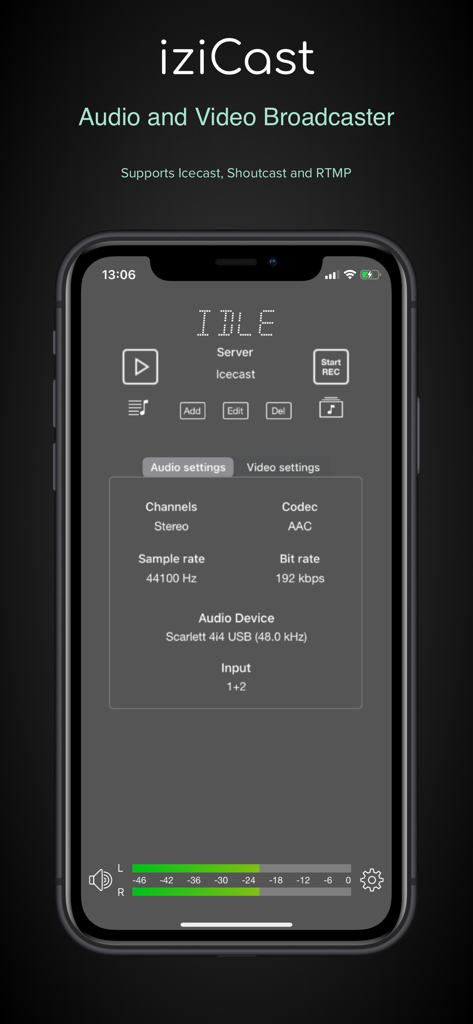
iziCastモバイルアプリインターフェース、音声設定とハードウェア接続状態を表示

iziCastモバイルアプリインターフェース、音声設定とハードウェア接続状態を表示

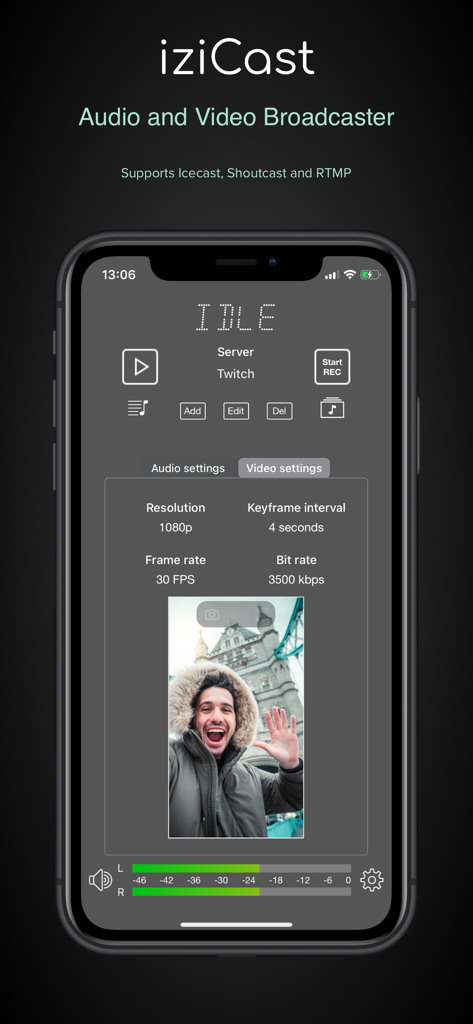
iziCastアプリのビデオ設定インターフェース、iPhoneの解像度とフレームレートを表示

iziCastアプリのビデオ設定インターフェース、iPhoneの解像度とフレームレートを表示

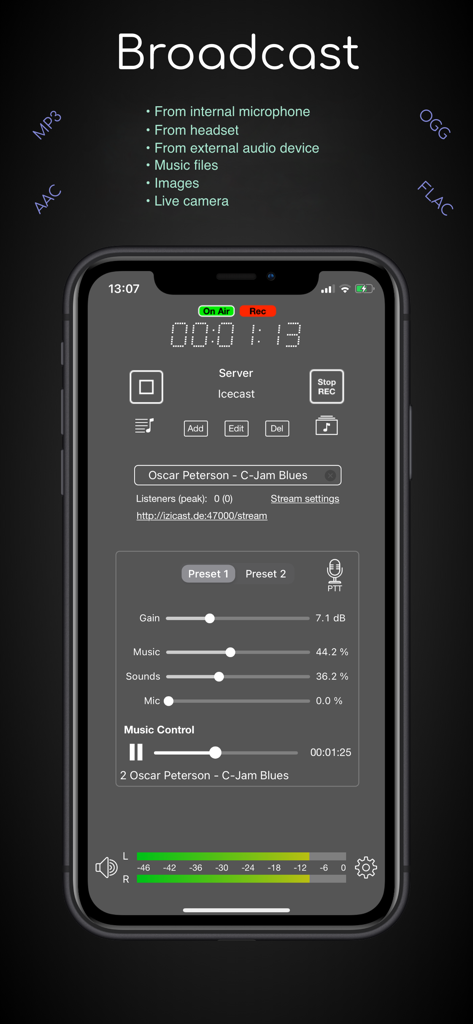
iziCastアプリのディスプレイ、スマートフォンでプロフェッショナルなライブ音声放送コントロールを表示

iziCastアプリのディスプレイ、スマートフォンでプロフェッショナルなライブ音声放送コントロールを表示

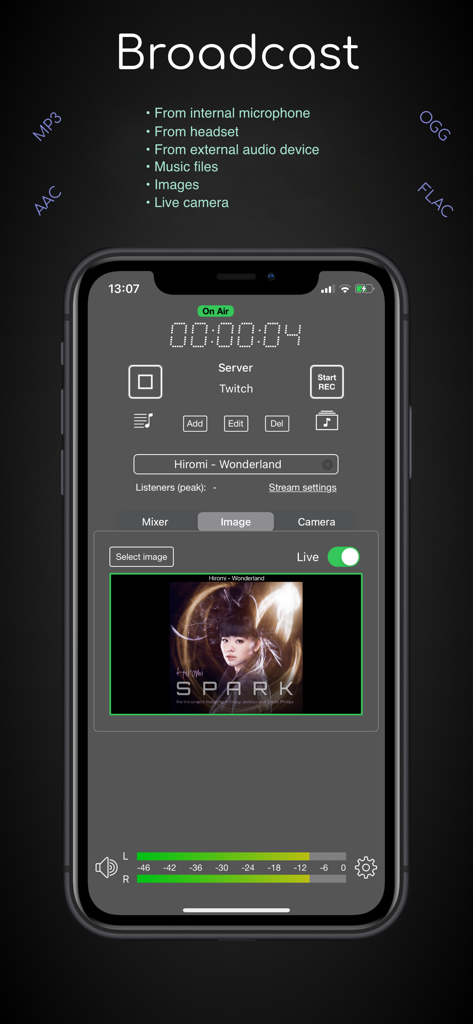
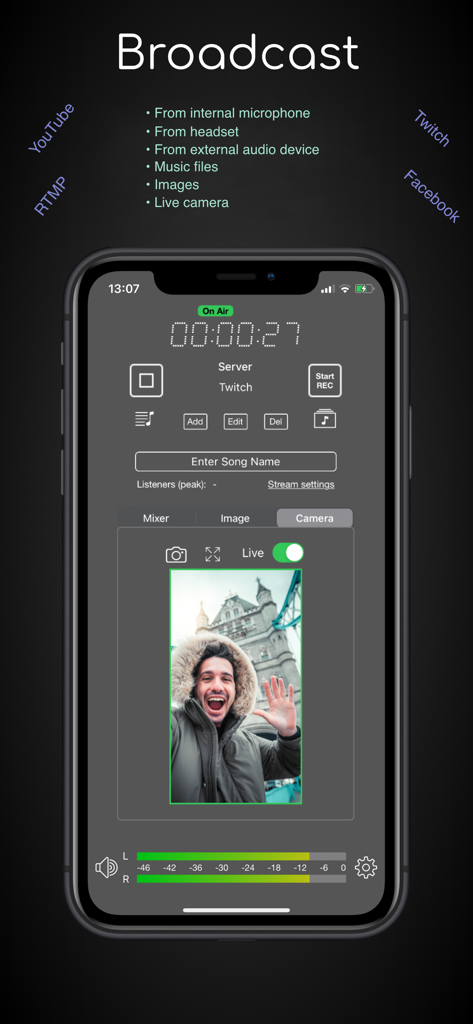
iziCastアプリインターフェース、音声レベルとアルバムアート付きのライブTwitchストリームを表示

iziCastアプリインターフェース、音声レベルとアルバムアート付きのライブTwitchストリームを表示

iziCastアプリインターフェース、リアルタイム音声レベルモニタリング付きのライブビデオ放送を表示

iziCastアプリインターフェース、リアルタイム音声レベルモニタリング付きのライブビデオ放送を表示

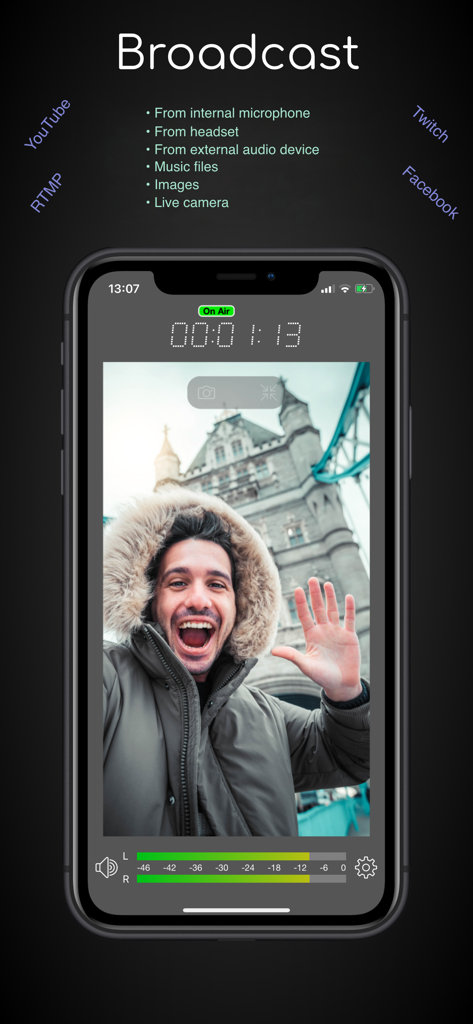
iziCastアプリインターフェース、オンエアタイマーと音声レベルメーター付きのライブビデオ放送を表示

iziCastアプリインターフェース、オンエアタイマーと音声レベルメーター付きのライブビデオ放送を表示

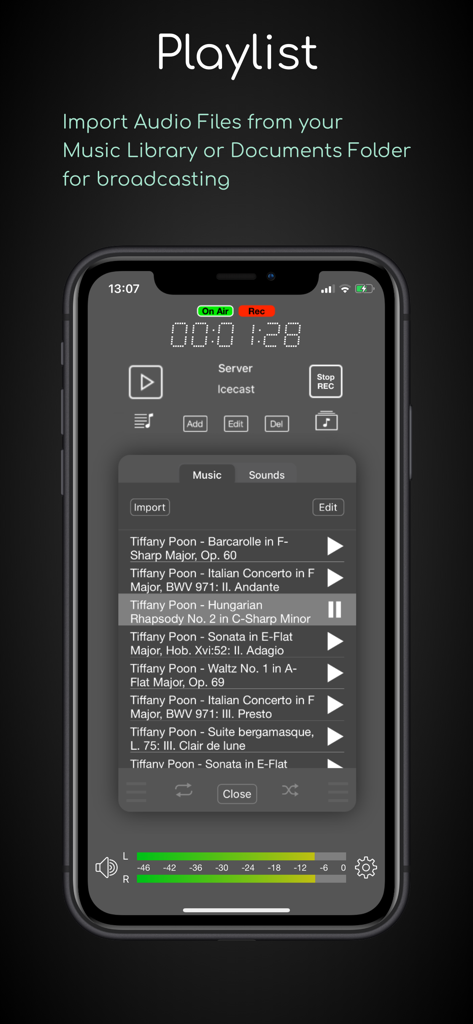
iziCastアプリのプレイリストインターフェース、ライブ放送用の音楽トラックリスト、音量レベル、録音ステータスを表示

iziCastアプリのプレイリストインターフェース、ライブ放送用の音楽トラックリスト、音量レベル、録音ステータスを表示

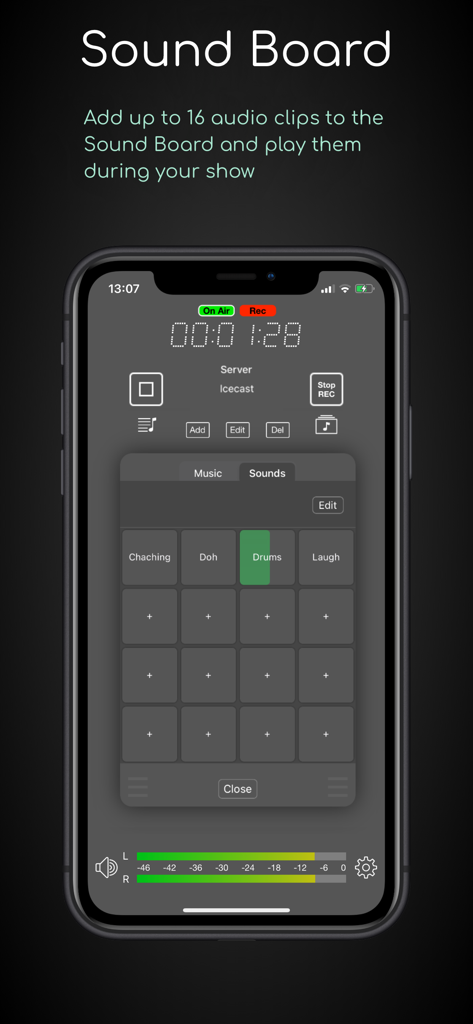
iziCastアプリのサウンドボード機能、ライブ放送用の16個のオーディオパッドを表示

iziCastアプリのサウンドボード機能、ライブ放送用の16個のオーディオパッドを表示

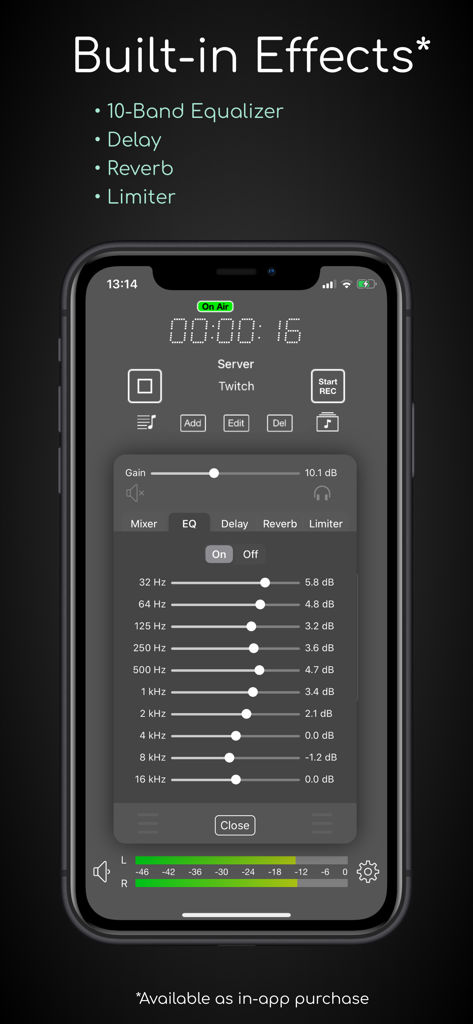
iziCastアプリインターフェース、ライブ放送用の10バンドイコライザーと内蔵オーディオエフェクトを表示

iziCastアプリインターフェース、ライブ放送用の10バンドイコライザーと内蔵オーディオエフェクトを表示

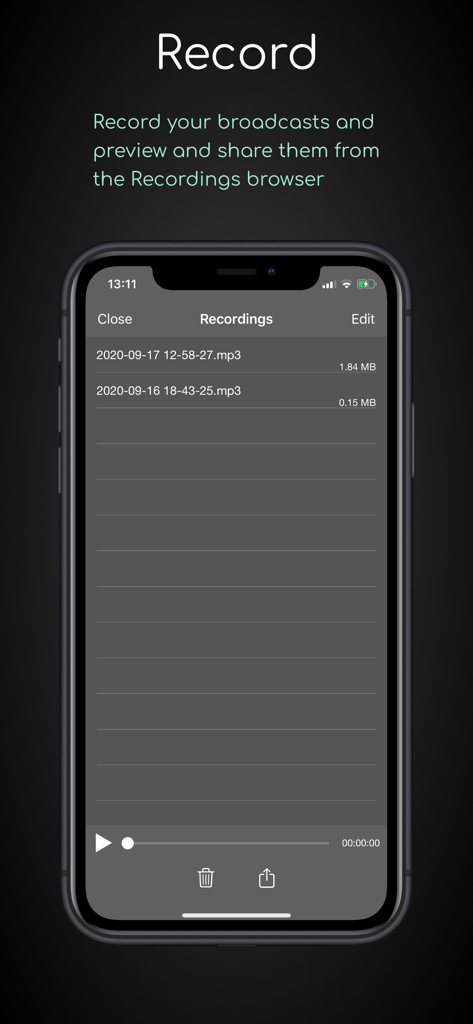
iziCastアプリのインターフェース、録音された音声放送のリストと携帯電話での再生コントロールを表示

iziCastアプリのインターフェース、録音された音声放送のリストと携帯電話での再生コントロールを表示

どこでもスタジオグレードの放送

このアプリを際立たせるツール、 82K+ 人のユーザーが選択.

🎛️

プロ向けハードウェア連携

クラスに準拠したミキサー、インターフェース、マイクを接続できます。FocusriteからZoomまで、プロ仕様の機材を活用して、モバイルセットアップでクリアな音声を実現しましょう。

📡

ユニバーサルストリーミング対応

RTMP経由でYouTube、Twitch、Facebookにライブ配信したり、IcecastやShoutcastサーバーで独自の番組をホストしたりできます。放送先を完全にコントロールできます。

🔊

高度な音声制作

10バンドEQ、ライブトリガー用の16パッドサウンドボード、高ビットレートのAAC、MP3、ロスレスFLACフォーマットをサポートし、サウンドをマスターしましょう。

世界中のユーザーに愛されています

Trusted by 82K+ 人がこのアプリを愛用しています.

"

"iziCastは私のモバイルDJセットにとってゲームチェンジャーです。Focusrite ScarlettをiPadに直接接続し、遅延ゼロでリスナーに高品質のAACを放送しています。内蔵EQとリミッターは、外出先でのプロフェッショナルなサウンドにさらに磨きをかけてくれます。"

Marcus R.、インディペンデントDJ
"

"ついに、IcecastとShoutcastを真剣に扱ってくれるモバイルアプリが登場しました。ライブラジオ番組のイントロにはサウンドボードを使用し、メタデータの更新はシームレスです。リモート放送のためにラップトップを完全に置き換えました。"

Sarah T.、デジタルラジオホスト

アプリについて

について知っておくべきこと iziCast.

説明

iziCast is a versatile audio and video broadcaster. You can broadcast audio from the internal microphone, external audio devices, audio files and Audiobus compatible apps to Icecast, Shoutcast and RTMP servers.  Live video from your camera can be broadcasted to any RTMP compatible service, such as YouTube, Twitch, Facebook and Telegram. Any of the supported audio sources listed above can be combined with your live camera.   When using RTMP you can decide if you want to use one of your device cameras as video source or simply an image. In case of an image it is up to you if you want to stream a single image, the album cover of the current track or just a black image to save bandwidth.  The image can be changed during the broadcast and you can even let iziCast write text like the current song on the image. Besides that, iziCast comes with a lot more features. Have a look at the list below to find out what else iziCast can do. If you have any questions or suggestions feel free to contact me at izicast@danielnoethen.de The following features are included in iziCast: • Supports internal microphones • Supports external multi channel audio devices • Supports video streaming from your device camera • Supports audio files • Sound Board with up to 16 sound pads • Supports Icecast 2 and Shoutcast 1 & 2 (legacy mode) • Supports Liquidsoap based internet radio platforms (e.g. Airtime/Azuracast) • Supports RTMP/RTMPS (YouTube, Twitch, Facebook, Telegram, etc.) • Supports Audiobus • Supports audio recording • Supports Push To Talk • Preview and share your audio recordings • Provides multiple effects via In-App Purchase (10-Band EQ, Delay, Reverb, Limiter) • Supports MP3 (bit rates from 8 kbps to 320 kbps) • Supports AAC (bit rates from 96 kbps to 320 kbps) • Supports AAC+/AAC-HE (bit rates from 24 bps to 80 kbps) • Supports OGG/Vorbis (bit rates from 16 kbps to 320 kbps) • Supports FLAC (Free Lossless Audio Codec) • Shows you the input audio volume on its level meter • Shows you the used traffic and file size of a session (tap the dot matrix text) • Shows you the number of current and peak listeners • Automatically reconnects on connection failures • Allows you to update the song information • Allows you to apply gain to the input volume • Allows you to mix multiple audio sources with individual volumes • Supports monitoring Which external audio devices are supported?  Basically, every class-compliant audio device is supported. Manufacturers will usually indicate whether a device is class-compliant or not.  If you cannot find information about class compliance, a good rule of thumb is that an audio device is class-compliant if it does not need a driver to work on macOS. So, if your device works on macOS without a driver, it will also work on your iPhone or iPad with iziCast. List of successfully tested external audio devices: (There is a very high chance that your device will work with iziCast even if it is not listed here) • 1010music Bluebox • Alesis MultiMux 12 USB (Please set the preferred input sample rate to 44100 Hz) • Apogee jam+ • Apple AirPods (Pro) • Apple EarPods • Behringer U-Control UCA202 / UCA222 • Behringer Xenyx 302 USB • Behringer U-Phoria UMC404HD • Elektron Digitakt • Elektron Syntakt • Evermix MixBox • Focusrite Scarlett 4i4 • M-audio Fast Track Ultra Pro • Pyle PAD30MXUBT • Roland go:mixer • Tascam iM2X • Tascam iXJ2 • Tascam US-1800 • Traktor Z1 • Yamaha SC2 Silent Piano • Zoom F1 • Zoom H2 Recorder (Please set the sample rate on the device to 48 kHz) • Zoom H3-VR • Zoom H4n Pro • Zoom H6

最新バージョン

1.10.7

サイズ

24.4 MB

リリース日

2019年5月17日

妥協のない放送の準備はできていますか?

82,000人以上のインディペンデント放送局が利用しています。プロ仕様のハードウェアを接続し、今すぐIcecast、RTMP、またはShoutcastでスタジオ品質のストリームを開始しましょう。

ダウンロード: App Store