Microsoft PowerPoint

Microsoft PowerPoint

ダウンロード: App Storeダウンロード: Google Play
Spark by MWM logo
ロゴ: Microsoft PowerPoint

Microsoft PowerPoint: あらゆる場所で自信を持って作成、編集、プレゼンテーション

モバイル生産性のプロフェッショナルスタンダード。デバイス間でシームレスに同期し、AI搭載コーチングでピッチを磨き、スマートフォンやタブレットから直接インパクトのあるプレゼンテーションを行います。

ダウンロード: App Store

開発元

Microsoft Corporation

カテゴリ

Productivity

ダウンロード

123M+

ユーザー評価

4.7/5

評価数

3M+

対応言語

33

すべてのピクセルにプロフェッショナリズム

このインターフェースを利用する 123M+ 人のユーザー.

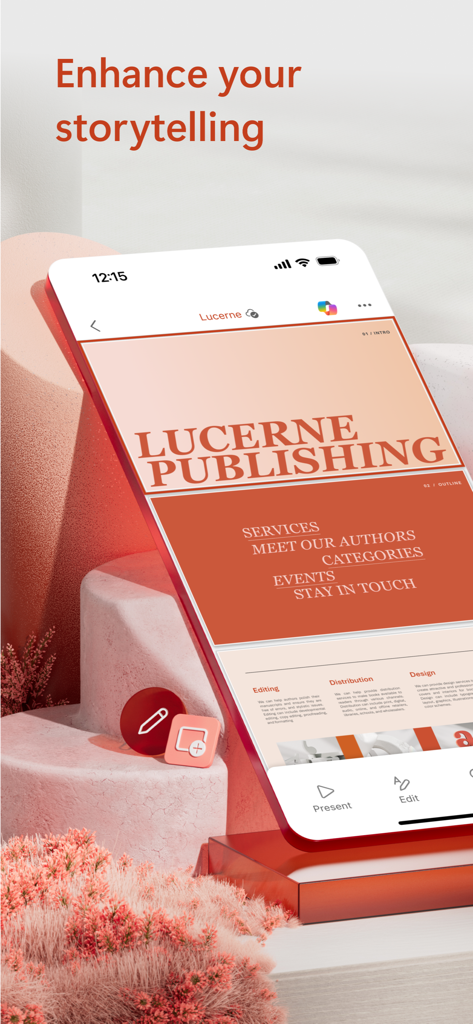
Microsoft PowerPointモバイルアプリのインターフェイス。見出し「ストーリーテリングを強化する」が付いたプロフェッショナルなプレゼンテーションデッキを表示しています。

Microsoft PowerPointモバイルアプリのインターフェイス。見出し「ストーリーテリングを強化する」が付いたプロフェッショナルなプレゼンテーションデッキを表示しています。

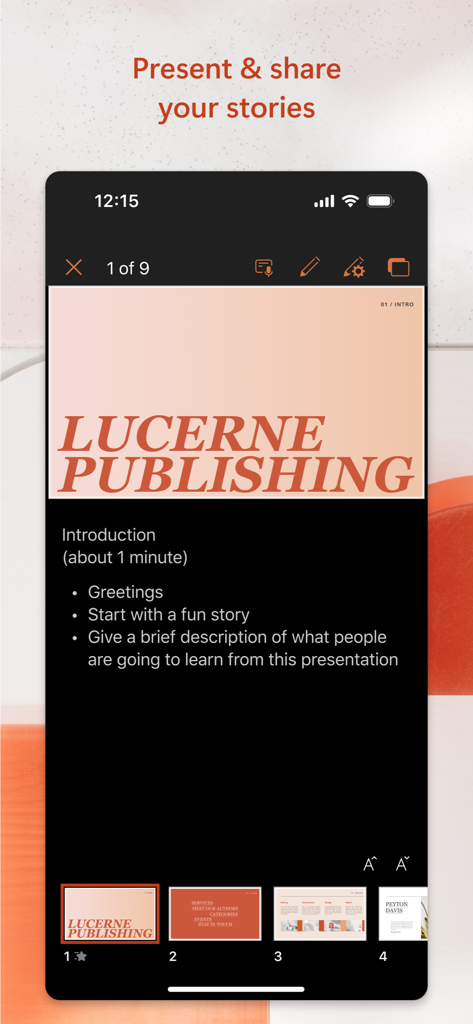
Microsoft PowerPointモバイルアプリのインターフェイス。スピーカーノートが付いたプレゼンテーションスライドを表示しています。

Microsoft PowerPointモバイルアプリのインターフェイス。スピーカーノートが付いたプレゼンテーションスライドを表示しています。

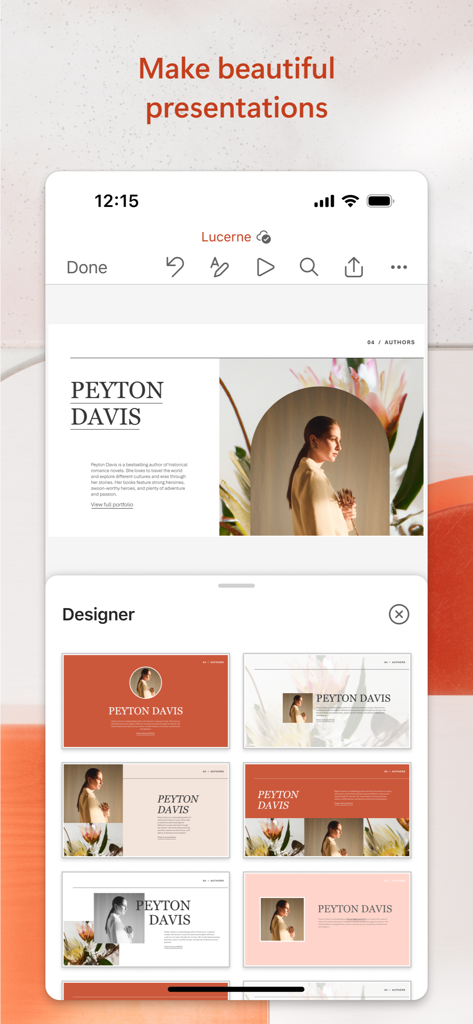
Microsoft PowerPointモバイルアプリ。プロフェッショナルなプレゼンテーションの自動スライドレイアウトの提案を行うデザイナーツールを表示しています。

Microsoft PowerPointモバイルアプリ。プロフェッショナルなプレゼンテーションの自動スライドレイアウトの提案を行うデザイナーツールを表示しています。

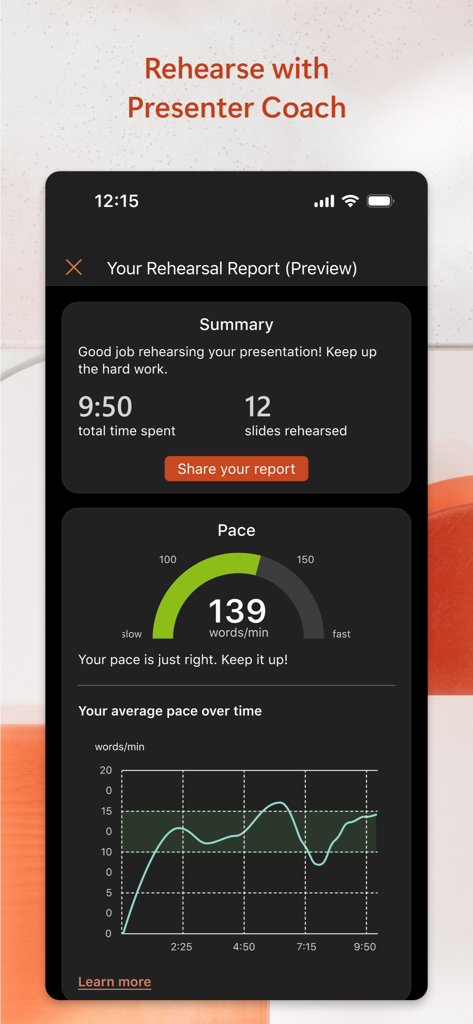
Microsoft PowerPointプレゼンターコーチのリハーサルレポート。スピーチのペースと要約統計を表示しています。

Microsoft PowerPointプレゼンターコーチのリハーサルレポート。スピーチのペースと要約統計を表示しています。

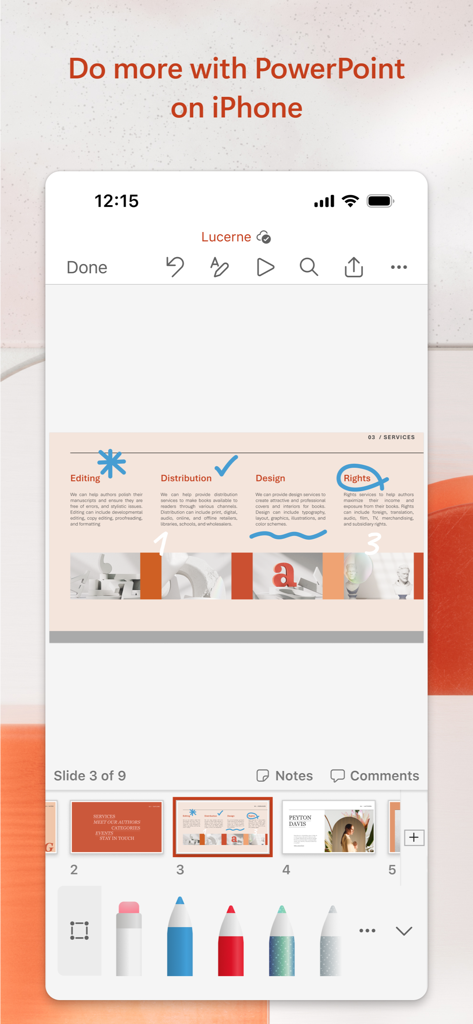
iPhone上のMicrosoft PowerPointアプリ。デジタル描画および注釈ツールを使用してプレゼンテーションスライドを編集しています。

iPhone上のMicrosoft PowerPointアプリ。デジタル描画および注釈ツールを使用してプレゼンテーションスライドを編集しています。

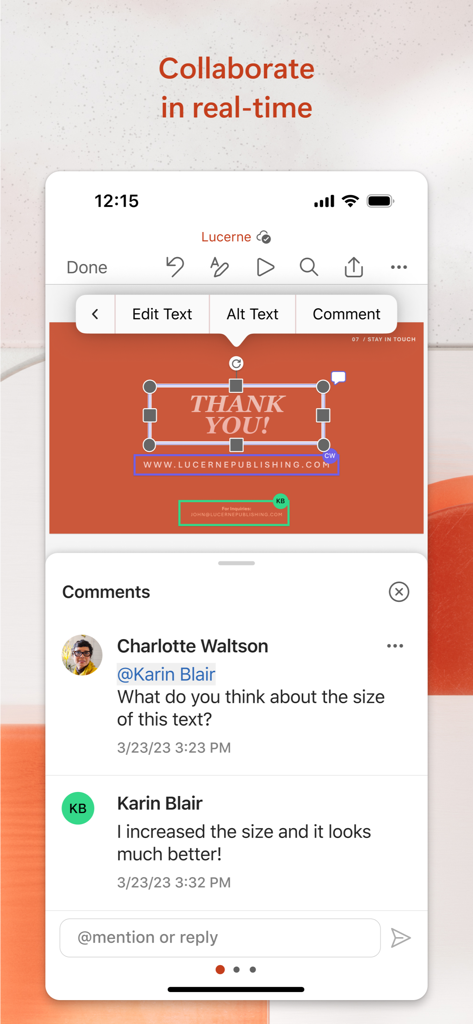
Microsoft PowerPointモバイルアプリでのリアルタイムコラボレーションとコメント

Microsoft PowerPointモバイルアプリでのリアルタイムコラボレーションとコメント

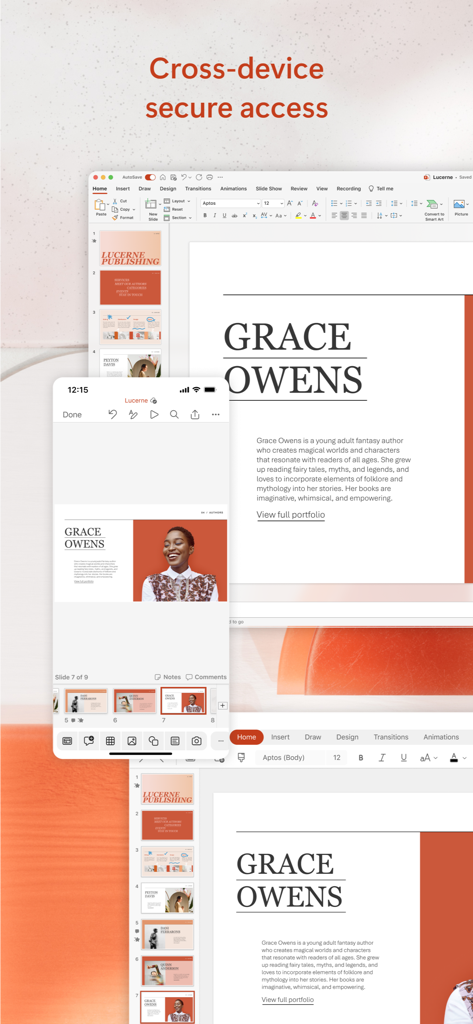
デスクトップと携帯電話の画面に同期されたMicrosoft PowerPointプレゼンテーション

デスクトップと携帯電話の画面に同期されたMicrosoft PowerPointプレゼンテーション

どこでもプレゼンテーションをマスターする

このアプリを際立たせるツール、 123M+ 人のユーザーが選択.

🔄

シームレスなクラウド連携

PCで開始し、モバイルデバイスで仕上げます。OneDriveにより、最新の編集は常に同期され、重要な瞬間に備えられます。

🎤

AI搭載プレゼンターコーチ

ペースとスピーチに関するリアルタイムのフィードバックでプレゼンテーションを練習し、あらゆる場所から絶対的な自信を持ってプレゼンテーションを行います。

🤝

リアルタイムコラボレーション

チームとリアルタイムで協力します。スライドを共有し、変更を追跡し、スマートフォンやタブレットから直接コメントに応答します。

世界中のユーザーに愛されています

Trusted by 123M+ 人がこのアプリを愛用しています.

"

"営業担当者として、クライアントとの会議の間を常に移動しています。電車の中でピッチデッキを洗練させ、到着するまでにラップトップと完全に同期させることができるのは信じられないことです。モバイルアプリはデスクトップ版と同じくらい強力で、数え切れないほど私を救ってくれました。"

David Sterling
"

"プレゼンターコーチは、大学のセミナーの準備方法を完全に変えました。私のペースを追跡し、よく使う言葉を避けるのに役立ちます。これは以前は私にとって大きな苦労でした。iPhoneだけでどこでも練習できるのが気に入っていますが、ステージに対して完全に準備ができていると感じられます。"

Sarah Jenkins

アプリについて

について知っておくべきこと Microsoft PowerPoint.

説明

The PowerPoint app gives you access to the familiar slideshow maker tool you already know. Create, edit, view, present, or share presentations quickly and easily from anywhere. Need to access your PowerPoint files quickly while on the go? PowerPoint provides a quick view of your recent slides and presentations for easy access on any device. Worried about multiple file versions when you work on PowerPoint mobile? Syncing is seamless across devices via OneDrive. PowerPoint lets you make a lasting impression with powerful and customizable slides and presentations that make you stand out. Create slideshows and present with confidence from anywhere. Making a delightful and impactful presentation has never been easier. PowerPoint gives you templates to work from and automatic design ideas for your presentations. Master your presentation with Presenter Coach, a AI tool designed to help with public speaking. Practice your presentation and get real-time suggestions to adjust your pacing, avoid “umms” and speak confidently. Requires an active Microsoft 365 subscription. Customize your presentations on the go, collaborating with others in real time. Sync your PowerPoint documents via OneDrive, share with coworkers and create amazing presentations as a team. Get the power of AI with Copilot1 in your favorite apps when you sign in with your Microsoft 365 subscription. Create, edit and share presentations with ease when you download Microsoft PowerPoint today. Present with confidence • Never miss a beat with PowerPoint on the go. You can make new presentations or continue working on existing ones. • PowerPoint syncs your presentations to OneDrive, so you can start a presentation on your PC, then edit using PowerPoint mobile. • A new Presenter Coach designed to provide feedback and assistance for your presentations. Customizable Slideshow Maker • With the powerful and highly customizable experience in PowerPoint, creating presentations that will make an impression and help you stand out is easy. • Create a slideshow from a template or make a presentation from scratch. Collaborate on Presentations • PowerPoint makes it easy to collaborate with others. • With 1-click sharing, quickly invite others to edit, view, or provide feedback on your slides. • Easily manage permissions and see who’s working on your presentation. • Stay on top of changes and feedback with integrated comments within the slides. • Compare changes to see how your presentation has evolved over time. Download Microsoft PowerPoint now and get the best way to create, edit and share slideshows and presentations from your iPhone or iPad. To create or edit documents, sign in with a free Microsoft account on devices with a screen size smaller than 10.1 inches. Unlock the premium Microsoft 365 experience with a qualifying subscription for your phone, tablet, PC, and Mac. Monthly Microsoft 365 subscriptions purchased from the app will be charged to your App Store account and will automatically renew within 24 hours prior to the end of the current subscription period unless auto-renewal is disabled beforehand. You can manage your subscriptions in your App Store account settings. This app is provided by either Microsoft or a third-party app publisher and is subject to a separate privacy statement and terms and conditions. Data provided through the use of this store and this app may be accessible to Microsoft or the third-party app publisher, as applicable, and transferred to, stored, and processed in the United States or any other country where Microsoft or the app publisher and their affiliates or service providers maintain facilities. Please refer to the Microsoft Software License Terms for Microsoft 365. See “License Agreement” link under Information. By installing the app, you agree to these terms and conditions.

最新バージョン

2.105

サイズ

419.4 MB

リリース日

2014年3月27日

最高の自分をプレゼンテーションする準備はできましたか?

何百万人ものハイアチーバーに参加しましょう。PowerPointを今すぐダウンロードして、デバイス間で作業をシームレスに同期し、AIコーチングでプレゼンテーションを完璧にし、外出先でインパクトのある編集を行います。

ダウンロード: App Storeダウンロード: Google Play
FAQ

よくある質問

について知っておくべきこと Microsoft PowerPoint

Microsoft PowerPointアプリとは何ですか?

Microsoft PowerPointアプリは、プレゼンテーションの作成、編集、表示、提示、共有を行うためのスライドショー作成ツールです。最近使用したファイルにすばやくアクセスでき、デバイス間での同期もシームレスに行えます。

Microsoft PowerPointアプリで新しいプレゼンテーションを作成できますか?

はい、Microsoft PowerPointアプリでは新しいプレゼンテーションを作成できます。テンプレートや自動デザイン機能により、インパクトのあるスライドショーを簡単に作成できます。

Microsoft PowerPointアプリは共同作業機能をサポートしていますか?

はい、PowerPointアプリはリアルタイム共同作業をサポートしています。ユーザーは他のユーザーを招待して編集、表示、フィードバックを提供したり、アクセス許可を管理したり、コメント機能で変更を追跡したりできます。

Microsoft PowerPointアプリで発表者コーチは利用できますか?

はい、Microsoft PowerPointアプリにはAIツールである発表者コーチが含まれています。練習中に、話すペースの調整、フィラーワードの回避、自信を持った話し方に関するリアルタイムの提案を提供します。

Microsoft PowerPointで発表者コーチを使用するには何が必要ですか?

Microsoft PowerPointアプリの発表者コーチを使用するには、アクティブなMicrosoft 365サブスクリプションが必要です。このサブスクリプションにより、AI搭載ツールなどの高度な機能が利用可能になります。

複数のデバイスでPowerPointファイルにアクセスできますか?

はい、Microsoft PowerPointアプリはクロスデバイスアクセスを提供します。OneDriveを介してデバイス間でプレゼンテーションをシームレスに同期し、ユーザーは1つのデバイスで開始して別のデバイスで編集できます。

Microsoft PowerPointアプリでプレミアム機能を利用するにはどうすればよいですか?

PowerPointアプリでプレミアムMicrosoft 365エクスペリエンスを有効にするには、 qualifying Microsoft 365サブスクリプションが必要です。このサブスクリプションは、電話、タブレット、PC、Macで利用できます。

Microsoft PowerPointアプリでドキュメントを無料で編集できますか?

はい、画面サイズが10.1インチ未満のデバイスでは、PowerPointアプリで無料のMicrosoftアカウントにサインインして、ドキュメントを無料で作成または編集できます。

Microsoft PowerPointのサブスクリプションはどのように更新されますか?

PowerPointアプリを通じて購入された月間Microsoft 365サブスクリプションは、現在の期間が終了する24時間前までに自動的に更新されます。自動更新はApp Storeのアカウント設定で無効にできます。

Microsoft PowerPointアプリのプライバシーポリシーはどこで見られますか?

Microsoft PowerPointアプリは、個別のプライバシーステートメントおよび利用規約の対象となります。データの使用に関する詳細はそこで入手でき、アプリの発行元から提供されます。

Microsoft PowerPointアプリはデザインの提案を提供しますか?

はい、Microsoft PowerPointアプリはプレゼンテーションのための自動デザイン機能を提供します。また、ユーザーがインパクトがありカスタマイズ可能なスライドを作成するのに役立つテンプレートも提供します。