Network Scanner: Device Finder

Network Scanner: Device Finder

ダウンロード: App Storeダウンロード: Google Play
Spark by MWM logo
ロゴ: Network Scanner: Device Finder

ネットワークスキャナー:デバイスファインダー — プライバシーを保護し、隠しカメラを検出

安心して旅行しましょう。隠しデバイスを簡単にスキャンし、近くの接続を監視し、特殊なフィルターを使用して、ホテルやレンタルスペースで見えないものを見つけましょう。

開発元

AI APPS S.R.L.

カテゴリ

Utilities

ダウンロード

983K+

ユーザー評価

4.6/5

評価数

9K+

対応言語

1

見えないものを見る

このインターフェースを利用する 983K+ 人のユーザー.

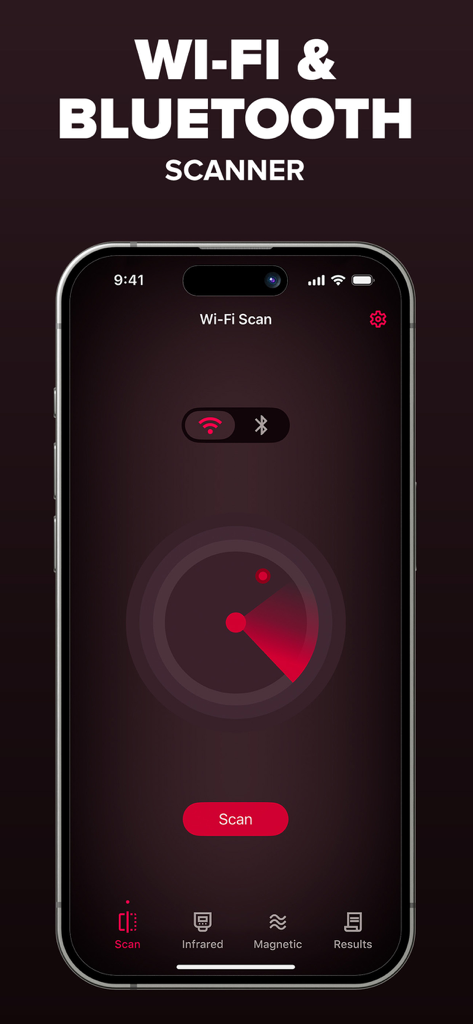
ネットワークスキャナーアプリのインターフェース。近くのWi-FiおよびBluetoothデバイスをスキャンする赤いレーダーが表示されています

ネットワークスキャナーアプリのインターフェース。近くのWi-FiおよびBluetoothデバイスをスキャンする赤いレーダーが表示されています

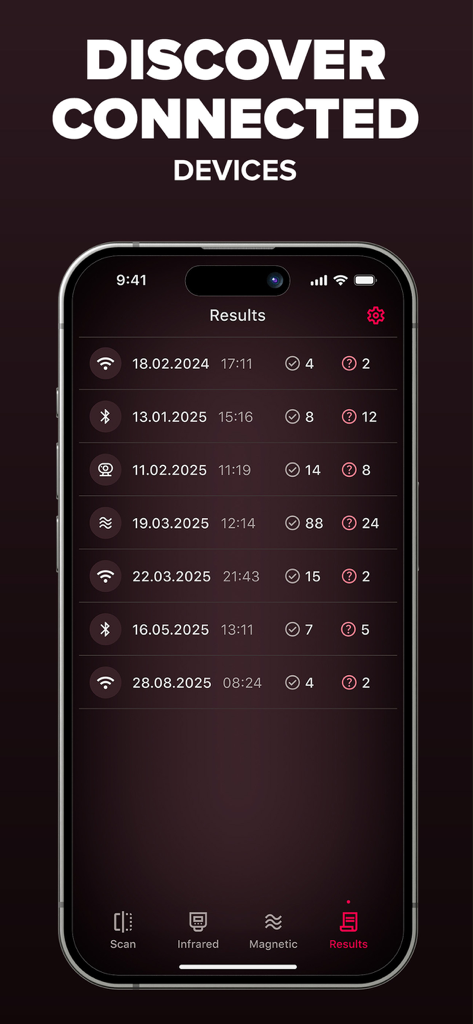
ネットワークスキャナーアプリの結果画面。スキャン履歴の日付とともに、検出されたBluetoothおよびWi-Fiデバイスのリストが表示されています

ネットワークスキャナーアプリの結果画面。スキャン履歴の日付とともに、検出されたBluetoothおよびWi-Fiデバイスのリストが表示されています

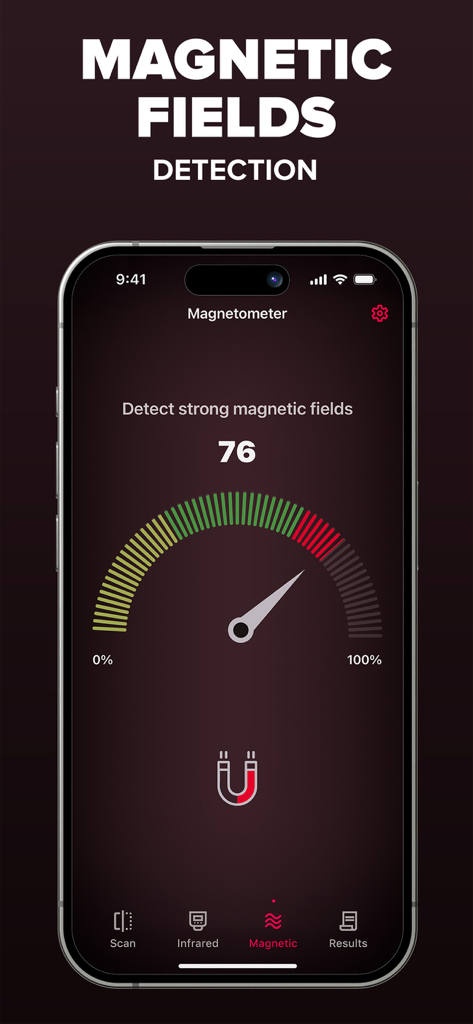
スマートフォンのアプリインターフェース。磁場検出用の磁力計ゲージが表示されています

スマートフォンのアプリインターフェース。磁場検出用の磁力計ゲージが表示されています

あなたのパーソナルプライバシーツールキット

このアプリを際立たせるツール、 983K+ 人のユーザーが選択.

🔍

ネットワークの透明性

Wi-FiとBluetooth信号をすばやくスキャンして、周囲のすべてのデバイスを特定し、デジタルブラインドスポットを排除します。

👁️

赤外線カメラシールド

人間の目には見えない電子ハードウェアを明らかにする高度な視覚フィルターを使用して、隠しレンズを発見します。

🧲

精密ハードウェアロケーター

電話の組み込みセンサーを使用して磁場変化を追跡し、家具や壁の中に隠された録音デバイスを見つけます。

世界中のユーザーに愛されています

Trusted by 983K+ 人がこのアプリを愛用しています.

"

"一人で旅行し、頻繁にAirbnbを利用する者として、このアプリはゲームチェンジャーです。赤外線カメラフィルターとネットワークスキャナーにより、チェックインした瞬間から非常に安心できます。使い方は非常に簡単で、新しい環境でとても安全だと感じさせてくれます。"

Sarah M.
"

"ほぼ毎週仕事で旅行しているので、これは私の定番ユーティリティになりました。Wi-Fiスキャナーと磁気センサーが1つのシンプルなインターフェースにバンドルされているのが気に入っています。高速で信頼性が高く、ホテルの会議室で周囲のテクノロジーを把握するのに役立ちます。"

James L.

アプリについて

について知っておくべきこと Network Scanner: Device Finder.

説明

Network Scanner is a simple utility app that helps you explore your surroundings in fun and informative ways. With a combination of Wi-Fi, Bluetooth, magnetic field, and camera filter tools, you can better understand the environment around you and feel more confident wherever you are. What it does: - Wi-Fi & Bluetooth Device Finder – Scan nearby connections to see what devices are around you. - Magnetometer Sensor – Detect changes in magnetic fields using your phone's built-in sensor. - Infrared Camera Filters – Apply unique filters (green, red, blue, and monochrome) to discover what your camera sees in different visual layers. - Simple & Accessible – Easy-to-use tools, no technical knowledge required. Why Use Network Scanner? - Explore Your Environment – See what's connected, what's nearby, and how signals behave. - Stay Curious – Use filters and sensors to view the world in a new way. - Peace of Mind – Feel more aware of your surroundings when traveling or at home. Try Network Scanner today and take control of your privacy. Upgrade to Premium to enjoy an ad-free experience, Unlimited scanning, Advanced Device Identification Subscription: Payment will be charged to iTunes Account at confirmation of purchase. Subscription with a free trial period will automatically renew to a paid subscription. Subscription automatically renews unless auto-renew is turned off at least 24 hours before the end of the current period. Account will be charged for renewal within 24 hours prior to the end of the current period at the rate of the selected plan. Subscriptions and auto-renewal may be managed by going to Account Settings after purchase. You can cancel your subscription or free trial in the iTunes settings at least 24-hours before the end of the free trial period. The cancellation will take effect the day after the last day of the current subscription period and you will be downgraded to the free service. Subscription options: Week Price: $ 3.99 Lifetime: $ 59.99 Privacy policy: https://aiapps.com.co/privacy-policy/ Terms of use: https://aiapps.com.co/terms/ Contact: support@aiapps.com.co

最新バージョン

2.2

サイズ

45.0 MB

リリース日

2024年3月8日

プライバシーを保護し、安心して旅行しましょう

ネットワークスキャナーを信頼し、あらゆるホテルやレンタルスペースで隠しデバイスを検出し、プライベート空間を保護している983,000人以上のユーザーに加わりましょう。今すぐダウンロードして、あなたの環境を管理しましょう。

ダウンロード: App Storeダウンロード: Google Play
FAQ

よくある質問

について知っておくべきこと Network Scanner: Device Finder

Network Scanner: Device Finderとは何ですか?

Network Scanner: Device Finderは、Wi-Fi、Bluetooth、磁場、カメラフィルターツールを使用して周囲を探索するユーティリティアプリです。ユーザーが環境を理解し、近くの接続を特定するのに役立ちます。

Network Scanner: Device Finderにはどのような機能がありますか?

Network Scanner: Device Finderは、Wi-Fi & Bluetoothデバイス検索、磁力計センサー、赤外線カメラフィルター(緑、赤、青、モノクロ)を提供し、視覚的なレイヤーを探索できます。シンプルでアクセスしやすいツールを提供します。

Network Scanner: Device FinderにはWi-Fiスキャナーが含まれていますか?

はい、Network Scanner: Device FinderにはWi-Fiデバイス検索機能が含まれています。これにより、ユーザーは近くのWi-Fi接続をスキャンして、近隣のデバイスを特定できます。

Network Scanner: Device FinderはBluetoothデバイスを検出できますか?

はい、Network Scanner: Device FinderはBluetoothデバイスを検出します。このアプリには、近くの接続をスキャンしてアクティブなBluetoothデバイスを特定するためのBluetoothデバイス検索機能が搭載されています。

Network Scanner: Device Finderは磁場をどのように使用しますか?

Network Scanner: Device Finderは磁力計センサーを使用して磁場の変化を検出します。この機能は、スマートフォンの内蔵センサーを利用して周囲の環境を探索します。

Network Scanner: Device Finderにはどのようなカメラフィルターがありますか?

Network Scanner: Device Finderは赤外線カメラフィルターを提供します。ユーザーは、緑、赤、青、モノクロを含むユニークなフィルターを適用して、カメラを通してさまざまな視覚レイヤーを発見できます。

Network Scanner: Device Finderにはプレミアムバージョンがありますか?

はい、Network Scanner: Device Finderはプレミアムアップグレードを提供しています。このアップグレードにより、広告なしのエクスペリエンス、無制限のスキャン、高度なデバイス識別機能が利用できます。

Network Scanner: Device Finder Premiumの料金はいくらですか?

Network Scanner: Device Finder Premiumは、週払いサブスクリプションが3.99ドル、または生涯購入が59.99ドルです。支払いはiTunesアカウントに請求されます。

Network Scanner: Device Finderのサブスクリプションをキャンセルするにはどうすればよいですか?

Network Scanner: Device Finderのサブスクリプションは、無料トライアルまたは現在の期間が終了する少なくとも24時間前にiTunes設定でキャンセルできます。自動更新もそこで管理できます。

Network Scanner: Device Finderにはプライバシーポリシーがありますか?

はい、Network Scanner: Device Finderにはプライバシーポリシーがあります。https://aiapps.com.co/privacy-policy/で確認でき、ユーザーデータの取り扱い方法が記載されています。

Network Scanner: Device Finderのスキャン結果を見ることができますか?

はい、Network Scanner: Device Finderはスキャン結果を表示します。ユーザーは「結果」タブにアクセスして、Wi-FiおよびBluetoothスキャンの履歴データを表示できます。