ProKnockOut-Cut Paste Photos

ProKnockOut-Cut Paste Photos

ダウンロード: App Store
Spark by MWM logo
ロゴ: ProKnockOut-Cut Paste Photos

ProKnockOut - 写真の切り抜き&貼り付け:プロフェッショナルAI編集が簡単に

クリエイターやソロプレナーが、プロレベルのAIの力で精密な切り抜き、製品のバッチ処理、魅力的なビジュアルデザインを実現するためのオールインワンツールキット。

ダウンロード: App Store

開発元

Shenzhen Qianhai Happy Tour Network Technology Co., Ltd.

カテゴリ

Photo & Video

ダウンロード

19M+

ユーザー評価

4.8/5

評価数

881K+

対応言語

9

あなたのスタジオを再定義

このインターフェースを利用する 19M+ 人のユーザー.

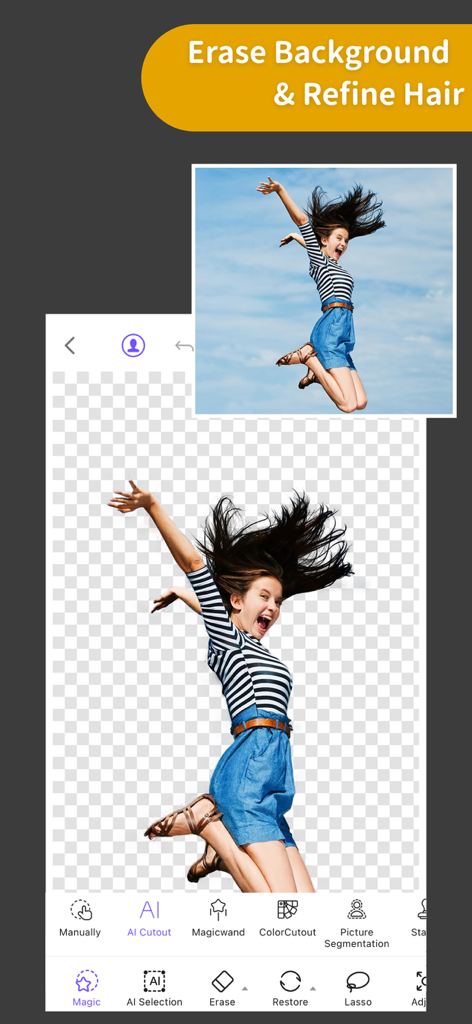
ProKnockOutアプリのインターフェース。背景が消去され、髪の毛の細かいディテールが保持された女性がジャンプしている様子を表示。

ProKnockOutアプリのインターフェース。背景が消去され、髪の毛の細かいディテールが保持された女性がジャンプしている様子を表示。

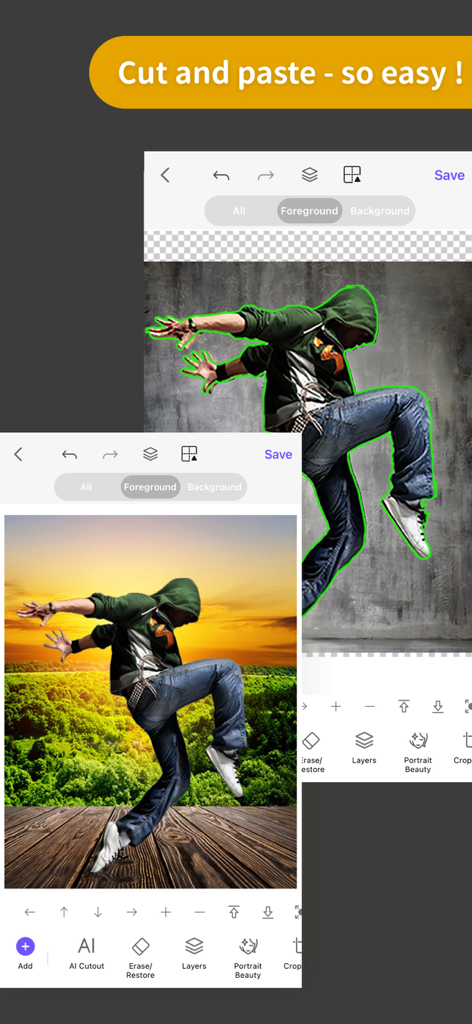
ProKnockOutモバイルアプリ。ダンサーの切り抜きを新しい夕日の背景に貼り付けている様子を表示。

ProKnockOutモバイルアプリ。ダンサーの切り抜きを新しい夕日の背景に貼り付けている様子を表示。

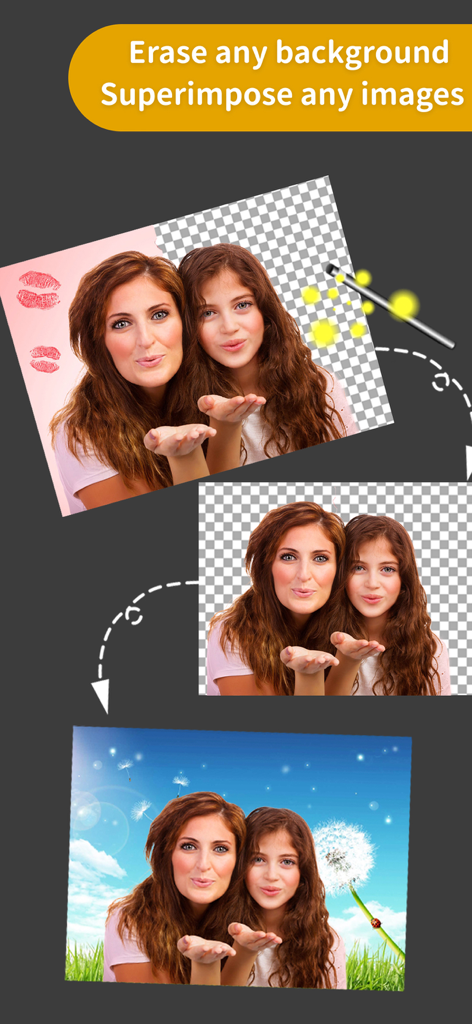
写真の背景を消去し、人物を新しい空の背景に重ね合わせる方法を示すステップバイステップのビジュアル。

写真の背景を消去し、人物を新しい空の背景に重ね合わせる方法を示すステップバイステップのビジュアル。

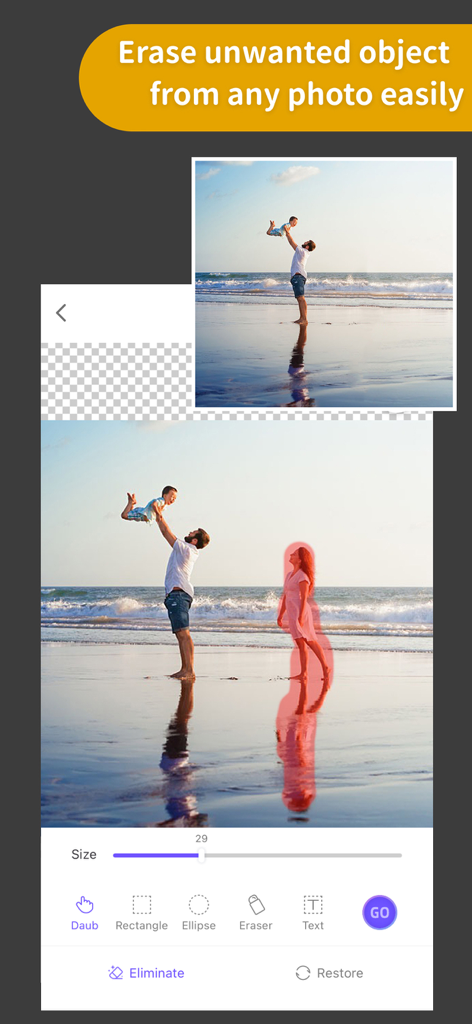
ビーチの写真。オブジェクト削除ツールが背景の人物を削除し、クリーンな画像を作成している様子。

ビーチの写真。オブジェクト削除ツールが背景の人物を削除し、クリーンな画像を作成している様子。

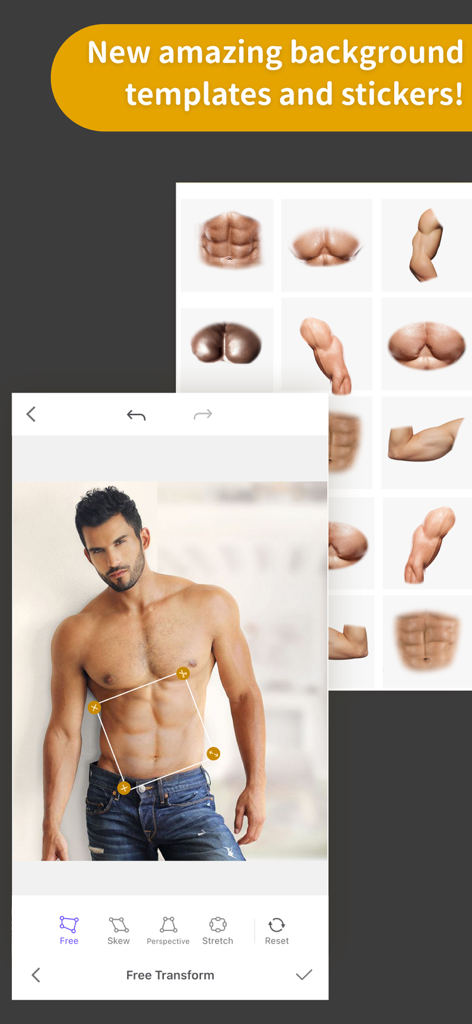
ProKnockOutアプリの自由変形ツールを使用して、筋肉の腹部ステッカーで編集されている男性の写真。

ProKnockOutアプリの自由変形ツールを使用して、筋肉の腹部ステッカーで編集されている男性の写真。

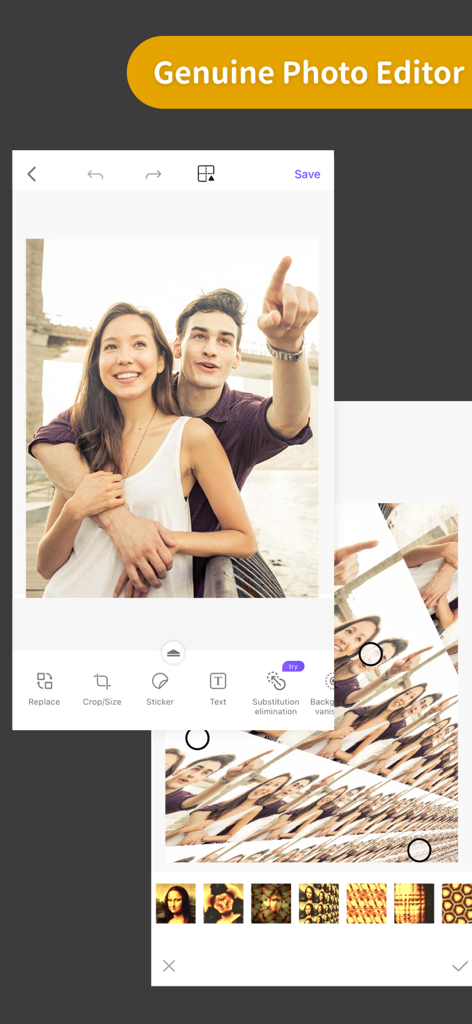
ProKnockOutモバイルアプリの写真編集ツールとフィルターを表示するスクリーンショット。

ProKnockOutモバイルアプリの写真編集ツールとフィルターを表示するスクリーンショット。

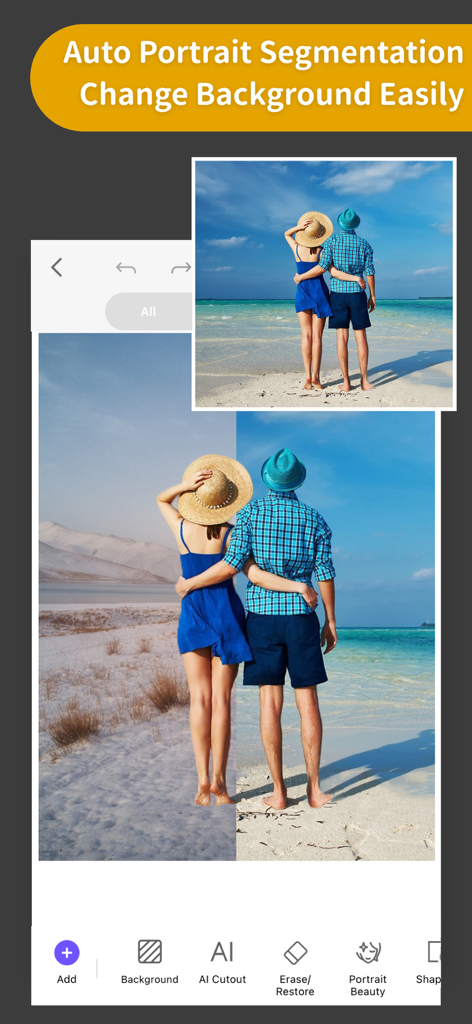
ProKnockOutアプリのインターフェース。自動ポートレートセグメンテーションと背景置換機能を表示し、ビフォーアフター比較。

ProKnockOutアプリのインターフェース。自動ポートレートセグメンテーションと背景置換機能を表示し、ビフォーアフター比較。

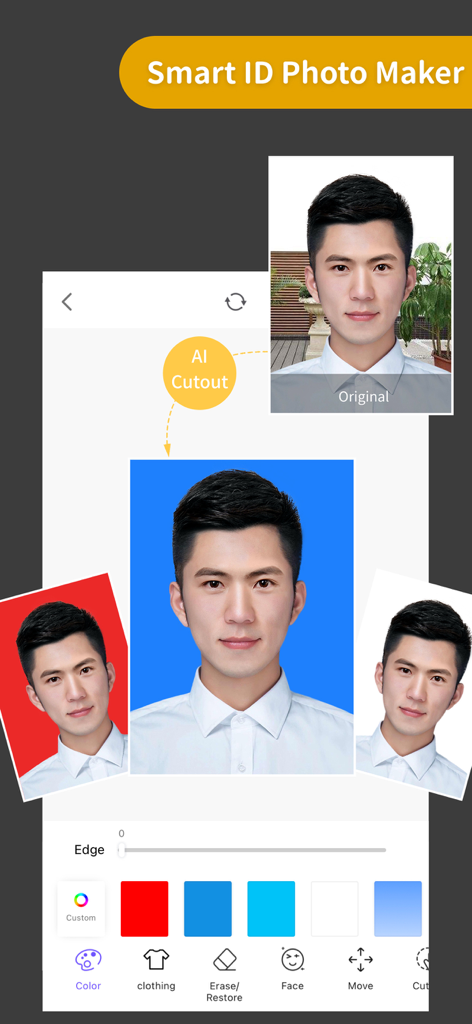
ProKnockOutアプリのスマートIDフォトメーカー機能のデモンストレーション。パスポートスタイルの写真を作成するためにAI背景削除プロセスを表示し、さまざまな背景色を使用。

ProKnockOutアプリのスマートIDフォトメーカー機能のデモンストレーション。パスポートスタイルの写真を作成するためにAI背景削除プロセスを表示し、さまざまな背景色を使用。

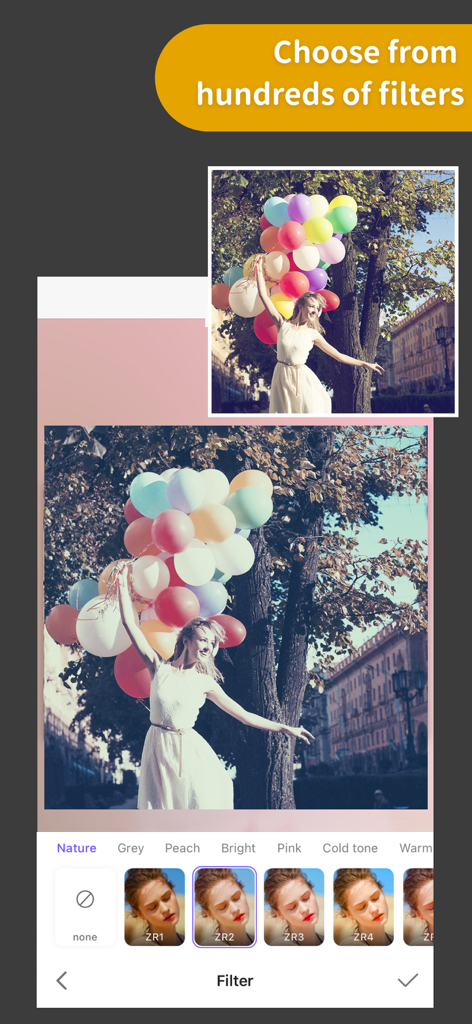
カラフルな風船を持つ女性。画面下部に表示された芸術的な写真フィルターのセレクション。

カラフルな風船を持つ女性。画面下部に表示された芸術的な写真フィルターのセレクション。

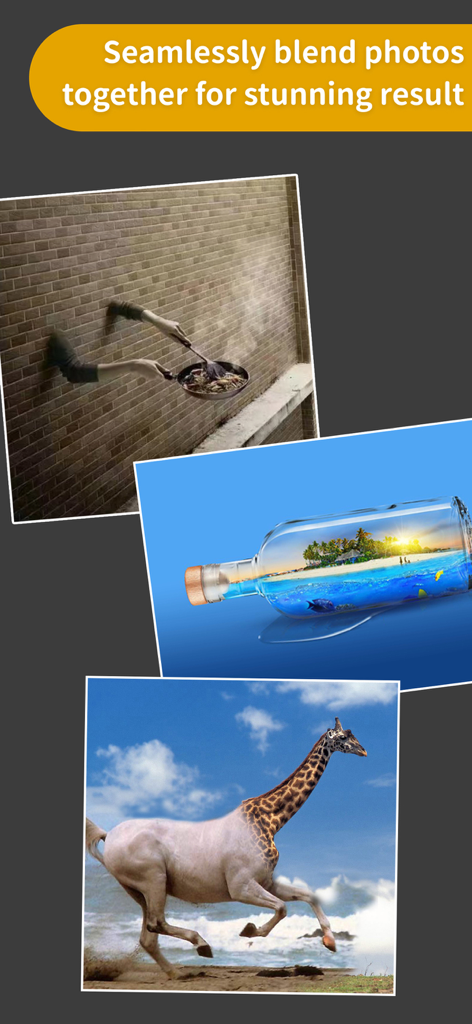
キリンと馬のハイブリッドや、ガラス瓶の中の熱帯の島など、クリエイティブな写真ブレンドの例。

キリンと馬のハイブリッドや、ガラス瓶の中の熱帯の島など、クリエイティブな写真ブレンドの例。

プロフェッショナルな編集をシンプルに

このアプリを際立たせるツール、 19M+ 人のユーザーが選択.

✂️

ワンクリックAI切り抜き

プロフェッショナルな精度で瞬時に背景を削除します。製品写真のバッチ処理や、数秒でのカスタムステッカー作成に最適です。

髪の毛&エッジの精密編集

ギザギザのエッジにさよならを。高度なツールが髪の毛や毛皮のような細かいディテールを処理し、切り抜きが自然でプロフェッショナルに見えるようにします。

🎨

プロ マルチレイヤー構図

複数の画像をシームレスにブレンドし、空を入れ替え、不要なオブジェクトを消去して、魅力的なソーシャルメディアコンテンツやマーケティングビジュアルを作成します。

世界中のユーザーに愛されています

Trusted by 19M+ 人がこのアプリを愛用しています.

"

"Etsyセラーとして、ProKnockOutは私のショップにとってまさにゲームチェンジャーでした。バッチ切り抜き機能は、製品写真の編集時間を何時間も節約してくれますし、髪の毛編集ツールはすべてをプロフェッショナルでクリーンに見せてくれます。まるでポケットの中にスタジオがあるようです!"

Sarah M.、小規模ビジネスオーナー
"

"このアプリでユニークなコンテンツを簡単に作成できるのが気に入っています。マジック消しゴムは、旅行写真から観光客を削除するのに最適で、空の入れ替えツールは驚くほどです。私のInstagramフィードがこんなに良くなったことはありません!"

Jason K.、コンテンツクリエイター

アプリについて

について知っておくべきこと ProKnockOut-Cut Paste Photos.

説明

Come and experience the Top 1 professional cutout and photo editing tool in Appstore! With this tool, you will become a master in photo editing area even if you are a beginner. One-click cutout、 multi-layer synthesis of pictures、 making ID photos、collages、 instantly erase redundant passers-by in photos、green screen cutouts、replace the sky··· In addition, a large number of templates and stickers making design extremely simple。 *One-click cutout & batch cutout -After selecting the picture, you can get the results of the cutout with one click. Buckle out the characters, animals, products, stamps and other content in the picture with one click, and also support batch cutouts, which greatly improves the efficiency of the cutout. -Manually selection tools: Lasso, instant alpha, eraser, a lot of manual tools to cutout if you are not satisfied with the result of the automatic cutout tool. -The new "Hair Refine" and "Edge Refine" tools, offering you a first glimpse of how much easier it could be to select hair, fur and other fine details in an image. *Multi-layer composition Powerful image synthesis function, seamlessly synthesize multiple pictures, the effect is amazing. *ID photo ID camera + multiple ID photo sizes + automatic cutout + modified background color + exquisite male and female formal wear + beauty *MagicEraser Don’t worry if you stray passers-by in the photo, "Photo Eraser" helps you erase passers-by with one click and intelligently repair the background. *100+ filters&effects There are over 100 filters and effects to make your photos unique! *23 blend modes *Powerful photo editor *Transparent PNG and colorful background JPG support Knockout Plus subscription - You can subscribe for new weekly updates (every week, new images will be available for download) - Payment will be charged to iTunes Account at confirmation of purchase - You will be able to color all available images for the duration of the subscription - Subscription automatically renews for the same price and duration period as the original "one week"/"one month"/"one year" package unless auto-renew is turned off at least 24-hours before the end of the current period - Account will be charged for renewal within 24-hours prior to the end of the current period at the cost of the chosen package (weekly, monthly or yearly package) - Subscriptions may be managed by the user and auto-renewal may be turned off by going to the user's iTunes Account Settings after purchase - No cancellation of the current subscription is allowed during active subscription period - You may cancel a subscription during its free trial period via the subscription setting through your iTunes account. This must be done 24 hours before the end of the subscription period to avoid being charged. Please visit http://support.apple.com/kb/ht4098 for more information - You may turn off the auto-renewal of your subscription via your iTunes Account Settings. However, you are not able to cancel the current subscription during its active period - Any unused portion of a free-trial period, will be forfeited when the user purchases a Knockout Plus subscription Links to our Terms of Service and Privacy Policy can be found below Privacy Policy:http://www.godimage.mobi/policy Terms of Use: http://www.godimage.mobi/terms

最新バージョン

7.83

サイズ

202.1 MB

リリース日

2014年12月4日

プロのようにクリエイトする準備はできましたか?

1900万人以上のクリエイターや副業をしている人たちに参加しましょう。プロレベルの切り抜き、シームレスな構図、魔法のような消去機能をワンタップで解放しましょう。

ダウンロード: App Store
FAQ

よくある質問

について知っておくべきこと ProKnockOut-Cut Paste Photos

ProKnockOut-Cut Paste Photosとは何ですか?

ProKnockOut-Cut Paste Photosは、プロフェッショナルな写真編集ツールです。ワンクリック切り抜き、マルチレイヤー合成、証明写真作成、不要物削除、各種フィルターやエフェクトなどの機能を提供します。

ProKnockOut-Cut Paste Photosはどのようにオブジェクトを切り抜きますか?

ProKnockOut-Cut Paste Photosは、ワンクリックAI、バッチ処理、なげなわツールや消しゴムなどの手動選択ツールを使用してオブジェクトを切り抜きます。正確なディテールのために、「髪の毛の修正」と「エッジの修正」も含まれています。

ProKnockOut-Cut Paste Photosで写真から不要なオブジェクトや通行人を削除できますか?

はい、ProKnockOut-Cut Paste Photosには「MagicEraser」ツールが搭載されています。このツールを使用すると、ワンクリックで不要な通行人やオブジェクトを削除し、背景をインテリジェントに修復できます。

ProKnockOut-Cut Paste Photosは証明写真の作成機能を提供していますか?

はい、ProKnockOut-Cut Paste Photosには「Smart ID Photo Maker」機能が用意されています。IDカメラ、複数の証明写真サイズ、自動切り抜き、背景色の変更、フォーマルウェアのオプションが含まれています。

ProKnockOut-Cut Paste PhotosのKnockout Plusサブスクリプションを管理するにはどうすればよいですか?

ユーザーは購入後、iTunesアカウント設定を通じてKnockout Plusサブスクリプションを管理します。請求を避けるために、現在の期間が終了する少なくとも24時間前にここで自動更新をオフにすることができます。

ProKnockOut-Cut Paste Photosではいくつのフィルターが利用可能ですか?

ProKnockOut-Cut Paste Photosは100以上のフィルターとエフェクトを提供しています。これらのオプションにより、写真はユニークになり、画像のさまざまな側面を強化するように設計されています。

ProKnockOut-Cut Paste Photosは複数の写真をブレンドできますか?

はい、ProKnockOut-Cut Paste Photosには強力なマルチレイヤー合成機能があります。複数の画像をシームレスに合成して、見事な効果を実現します。