Scanner: Document Scan App

Scanner: Document Scan App

ダウンロード: App Store
Spark by MWM logo
ロゴ: Scanner: Document Scan App

スキャナー: ドキュメントスキャンアプリ – ペーパーレスな世界のプロフェッショナルなポケットオフィス

高精度OCR、インスタント1:1 IDスキャン、シームレスなPDF編集を信頼する300万人以上のユーザーに加わり、いつでもどこでも生産性を維持し、整理整頓しましょう。

ダウンロード: App Store

開発元

阳杰 刘

カテゴリ

Productivity

ダウンロード

3M+

ユーザー評価

4.9/5

評価数

126K+

対応言語

5

指先での精度

このインターフェースを利用する 3M+ 人のユーザー.

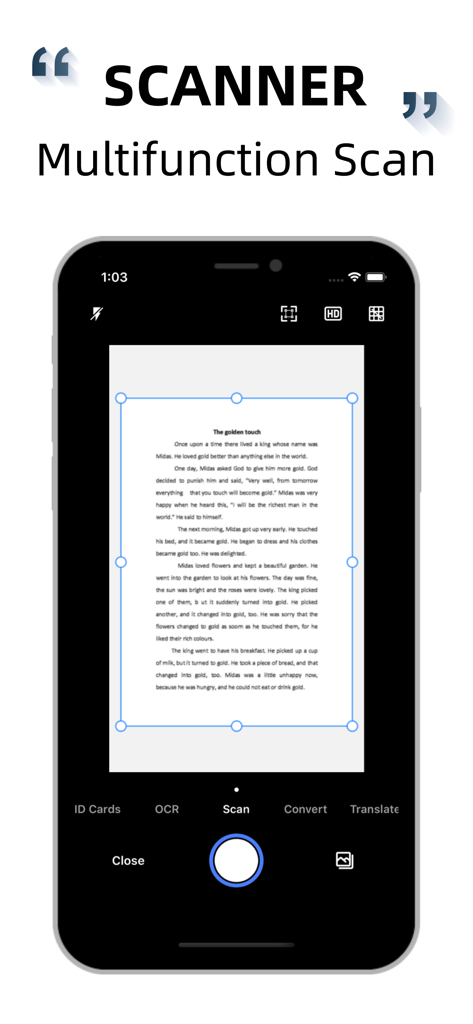
ドキュメントがスキャンされているスマートフォンインターフェイス。自動エッジ検出と多機能が表示されています。

ドキュメントがスキャンされているスマートフォンインターフェイス。自動エッジ検出と多機能が表示されています。

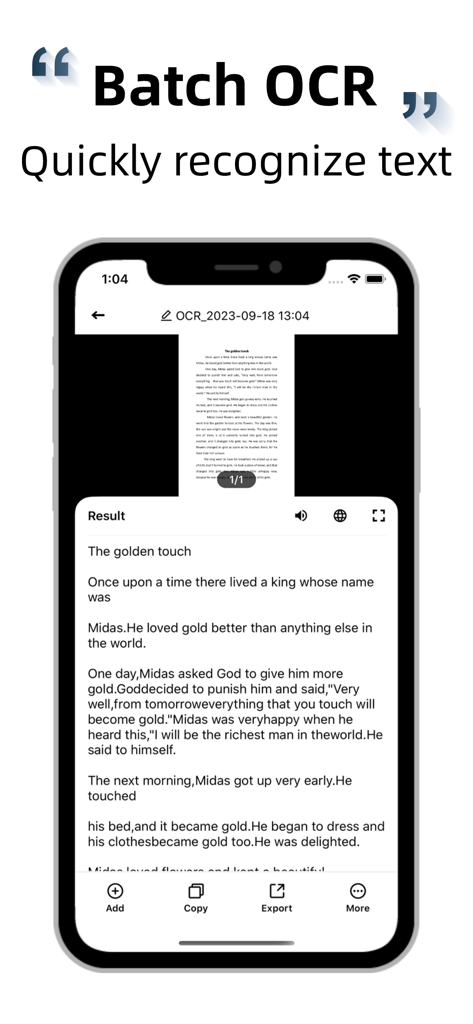
ScannerアプリのバッチOCR機能がドキュメントからテキストを抽出しているスマートフォンスクリーン。

ScannerアプリのバッチOCR機能がドキュメントからテキストを抽出しているスマートフォンスクリーン。

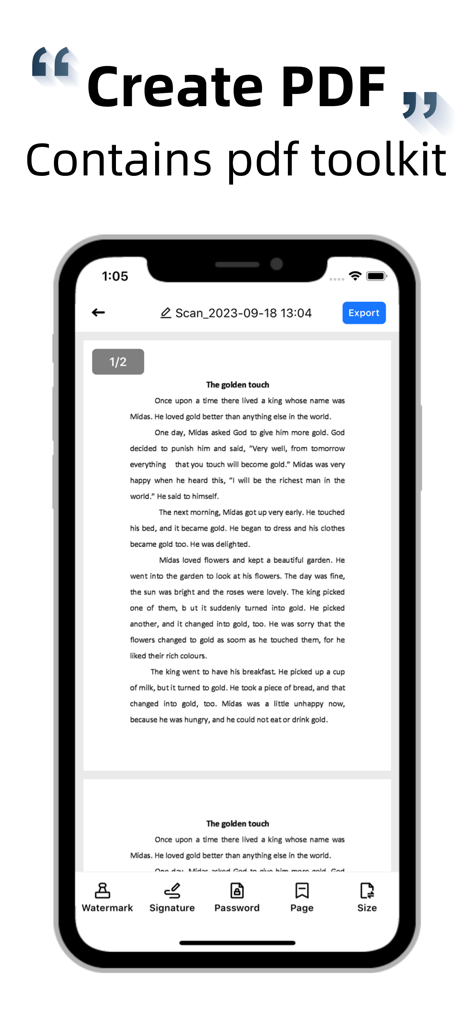
Scanner Document Scan Appのスマートフォンインターフェイス。署名やパスワード保護などのPDFツールキット機能が表示されています。

Scanner Document Scan Appのスマートフォンインターフェイス。署名やパスワード保護などのPDFツールキット機能が表示されています。

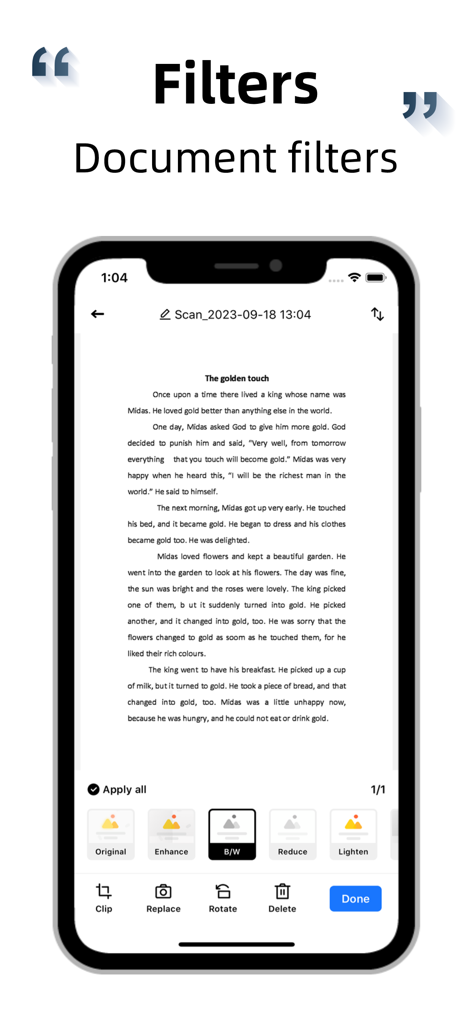
白黒などのドキュメント編集フィルターを表示するモバイルスキャナーアプリインターフェイス。

白黒などのドキュメント編集フィルターを表示するモバイルスキャナーアプリインターフェイス。

iPhoneを生産性のパワフルなツールに変える

このアプリを際立たせるツール、 3M+ 人のユーザーが選択.

📸

プロ仕様のドキュメントスキャン

かさばるハードウェアは忘れてください。AIが自動的にエッジを検出し、パースペクティブを補正し、あらゆるハンドヘルド写真から鮮明でプロフェッショナルなPDFを即座に提供します。

📝

スマートOCR&テキスト抽出

再入力をやめましょう。画像を編集可能なテキストに変換し、高精度認識技術を使用してコンテンツをコピー、エクスポート、または複数の言語に翻訳します。

🆔

ワンタップID&パスポートデジタル化

究極の管理ショートカット。IDまたは公式ドキュメントをA4サイズに1:1でスケーリングしてスキャンします。保険、銀行、旅行の要件に最適です。

世界中のユーザーに愛されています

Trusted by 3M+ 人がこのアプリを愛用しています.

"

"このアプリは私の不動産業界にとってゲームチェンジャーです。1:1でA4にスケーリングされるIDスキャン機能は、クライアントのオンボーディングに最適であり、エッジ検出により、車内にいてもすべての契約書がプロフェッショナルにスキャンされたように見えます。"

Sarah J.、不動産業者
"

"学生として、OCRと翻訳機能は人生を変えるものです。ライブラリの抜粋を即座にデジタル化し、電話から直接外国語の研究論文を翻訳できます。かさばるデスクトップスキャナーを完全に置き換えました。"

David M.、博士課程候補者

アプリについて

について知っておくべきこと Scanner: Document Scan App.

説明

Scanner is a powerful scanning software, provides document scanning, text recognition, document scanning, create PDF, photo translation and other practical functions. Software use of advanced image recognition technology, combined with automatic edge search, automatic cutting, perspective correction, can batch, fast, efficient processing of all kinds of documents, is your work, learning super good helper. Main function - Fast document scanning, automatic trimming, perspective correction, PDF editing kit available. - High precision character recognition technology, super recognition engine, fast recognition. - PDF file generation, automatic image batch conversion to PDF. - ID scanning, 1:1 reduction to A4 paper. - Batch export, copy and move - Photo translation, multi-language support. - Powerful file management. - Free to capture text content or individual areas on the picture. - Automatic segmentation, maximizing the restoration of original typesetting. Document scan Fast scan documents, automatic edge recognition, automatic clipping, perspective correction, provide a variety of filters for you to choose, one button generation of PDF format, support to add/remove watermark, adjust page number, size, set PDF open password, etc. OCR Recognition Using advanced image recognition technology (OCR), the text in the image is turned into editable content, which you can modify, copy, export, and translate into many languages at will. PDF generation To convert pictures taken or photos in albums to PDF format, you only need to set the conversion area, you can complete the automatic conversion. You can also export the converted PDF documents to your email, mobile phone, or major sharing platforms. ID scan Automatic scanning of various documents, 1:1 reduction to A4 paper, out to handle affairs, work and study necessary. Photo Translation Direct translation of photos or photo albums in the text content, support multiple languages, you can edit, save, share. Subscription specification If you confirm the purchase of the subscription product, iTunes will directly deduct the relevant subscription fee. If the subscription is not cancelled within 24 hours before the end of the current subscription period, the premium account will be automatically renewed for the next period. During the current subscription period, you cannot cancel the use of the current subscription period. You can manage or cancel the purchase through the Settings of your iTunes account. Privacy agreement: https://bmob-cdn-9914.bmobpay.com/2024/06/06/19291ea840313c608013bd71187c7c0a.pdf Renewal agreement: https://bmob-cdn-9914.bmobpay.com/2024/06/06/2c1a718040dcbd4b8019a66981b0802f.pdf EULA: https://bmob-cdn-9914.bmobpay.com/2024/06/06/04d505e240750fc580ba03d9cf162106.pdf Contact us Email address: qnscanner2021@163.com

最新バージョン

8.9

サイズ

11.1 MB

リリース日

2018年6月14日

ワークフローを変革する準備はできましたか?

iPhoneを高性能オフィスに変える300万人以上のプロフェッショナルや学生に加わりましょう。今日からドキュメントのスキャン、翻訳、デジタル化を始めましょう。

ダウンロード: App Store
FAQ

よくある質問

について知っておくべきこと Scanner: Document Scan App

Scanner: Document Scan App の主な機能は何ですか?

Scanner: Document Scan App は、ドキュメントスキャン、高精度な文字認識 (OCR)、編集ツール付きの PDF 作成、写真翻訳機能を提供します。仕事や勉強に必要な様々なドキュメントを効率的に処理できます。

Scanner: Document Scan App は OCR (光学文字認識) 機能を提供していますか?

はい、Scanner アプリは高精度な OCR 技術を提供しています。画像からテキストを編集可能なコンテンツに変換し、認識されたテキストの編集、コピー、エクスポート、多言語への翻訳を可能にします。

Scanner アプリはドキュメントスキャンの品質とオプションをどのように向上させますか?

Scanner アプリは、高度な画像認識、自動エッジ検出、トリミング、パースペクティブ補正によりスキャンを強化します。ウォーターマークや PDF パスワードのための様々なフィルターやオプションを提供し、出力を最適化します。

Scanner: Document Scan App を使用して PDF ドキュメントを作成できますか?

はい、Scanner アプリはスキャンしたドキュメントや既存の写真から PDF ファイルを生成します。ユーザーは変換領域を定義し、生成された PDF を電子メール、モバイル、または様々な共有プラットフォーム経由でエクスポートできます。

Scanner: Document Scan App は写真翻訳サービスを提供していますか?

Scanner アプリは、画像やアルバム内のテキストコンテンツの写真翻訳を提供します。多言語に対応しており、ユーザーは翻訳されたコンテンツを直接編集、保存、共有できます。

Scanner: Document Scan App は ID カードスキャンをサポートしていますか?

はい、Scanner アプリには ID スキャン機能が含まれています。ID ドキュメントを A4 用紙サイズに 1:1 で縮小し、様々な公式および学習目的に実用的です。

Scanner アプリのサブスクリプションの自動更新条件は何ですか?

Scanner アプリのサブスクリプションは、現在の期間が終了する少なくとも 24 時間前にキャンセルされない限り自動的に更新されます。iTunes はサブスクリプション料金を直接差し引きます。期間途中のキャンセルはできません。

Scanner アプリのサブスクリプションを管理またはキャンセルするにはどうすればよいですか?

ユーザーは iTunes アカウント設定を通じて Scanner アプリのサブスクリプションを管理またはキャンセルします。自動更新を防ぐには、現在のサブスクリプション期間が終了する少なくとも 24 時間前までにキャンセルする必要があります。