Teleprompter

Teleprompter

ダウンロード: App Store
Spark by MWM logo
ロゴ: Teleprompter

テレプロンプター:自信を持ってプロフェッショナルなビデオを録画

400万人以上のクリエイターやプロフェッショナルが、完璧なアイコンタクトで完璧なスクリプトを配信しています。TikTok、YouTube、Zoom会議など、NetflixやBBCのような業界リーダーに信頼されるツールを手に入れましょう。

ダウンロード: App Store

開発元

Teleprompter Apps Ltd

カテゴリ

Productivity

ダウンロード

4M+

ユーザー評価

4.8/5

評価数

96K+

対応言語

10

プロフェッショナリズムに焦点を当てる

このインターフェースを利用する 4M+ 人のユーザー.

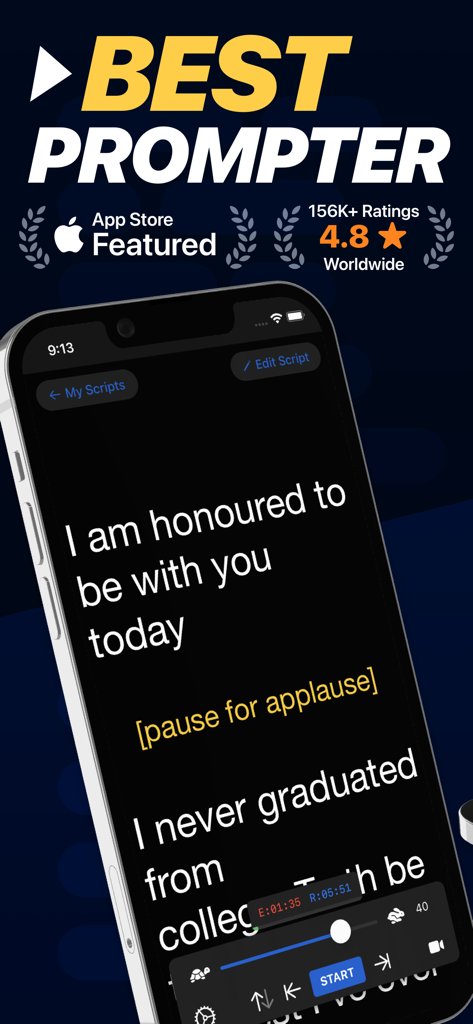
iPhone上のテレプロンプターアプリのインターフェイス。公開スピーチ用のスクリプトが表示され、スクロールと速度制御が可能です。

iPhone上のテレプロンプターアプリのインターフェイス。公開スピーチ用のスクリプトが表示され、スクロールと速度制御が可能です。

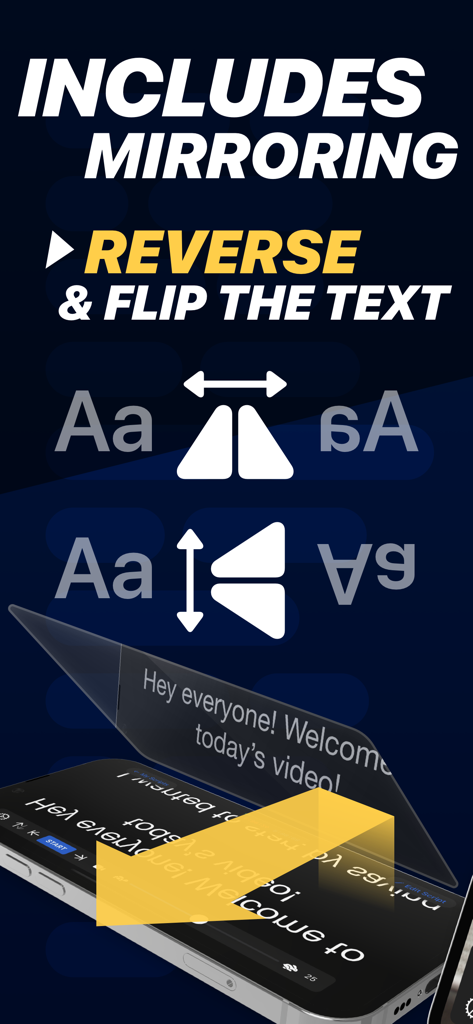
プロフェッショナルなカメラリグ用にテキストをミラーリングおよび反転するテレプロンプターアプリの機能

プロフェッショナルなカメラリグ用にテキストをミラーリングおよび反転するテレプロンプターアプリの機能

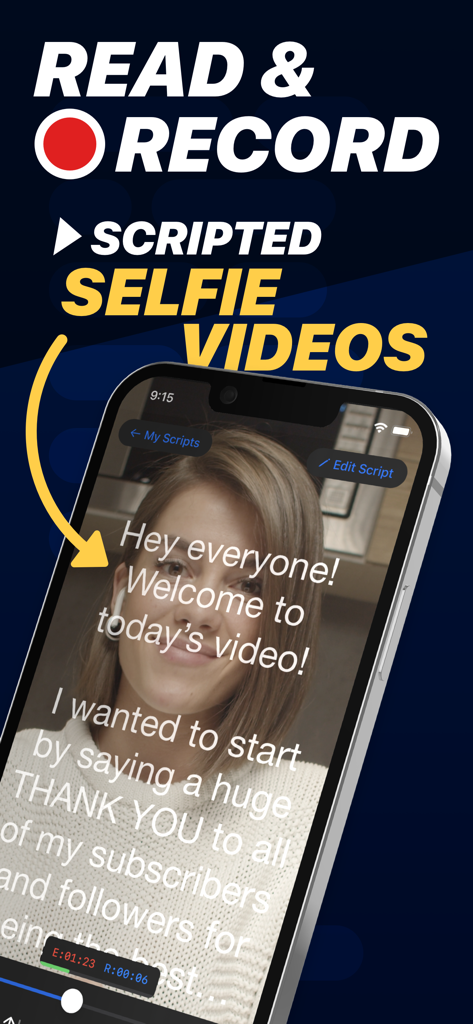
スクロールするテキストが表示されるテレプロンプターアプリのインターフェイスを使用して、スクリプト付きのセルフィービデオを録画している女性

スクロールするテキストが表示されるテレプロンプターアプリのインターフェイスを使用して、スクリプト付きのセルフィービデオを録画している女性

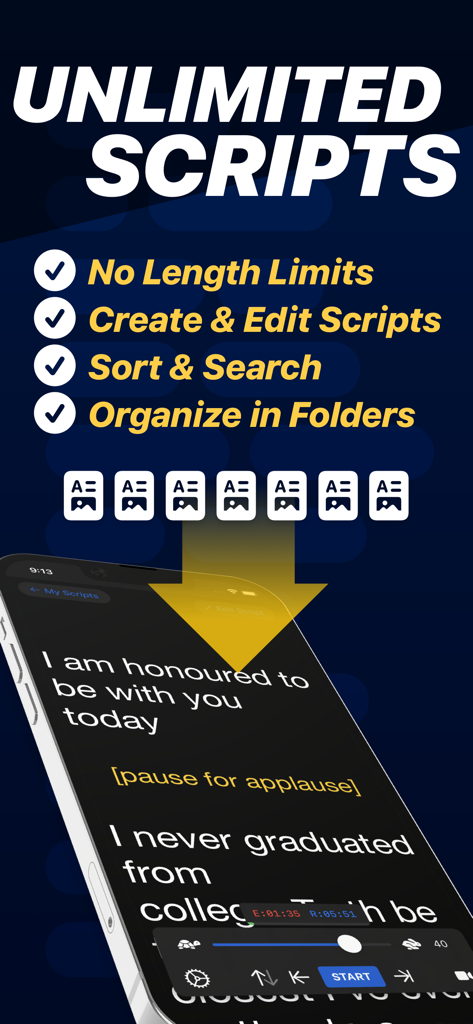
スクロールするスクリプトと無制限のスクリプトを管理するための機能が表示されているテレプロンプターアプリを搭載したスマートフォン

スクロールするスクリプトと無制限のスクリプトを管理するための機能が表示されているテレプロンプターアプリを搭載したスマートフォン

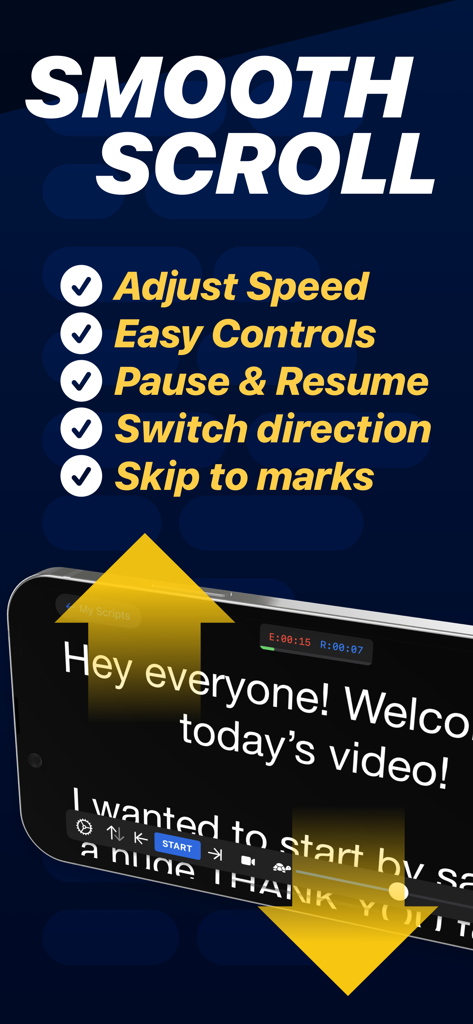
iPhone上のスムーズなスクロール機能とスクリプトコントロールを表示するテレプロンプターアプリのインターフェイス

iPhone上のスムーズなスクロール機能とスクリプトコントロールを表示するテレプロンプターアプリのインターフェイス

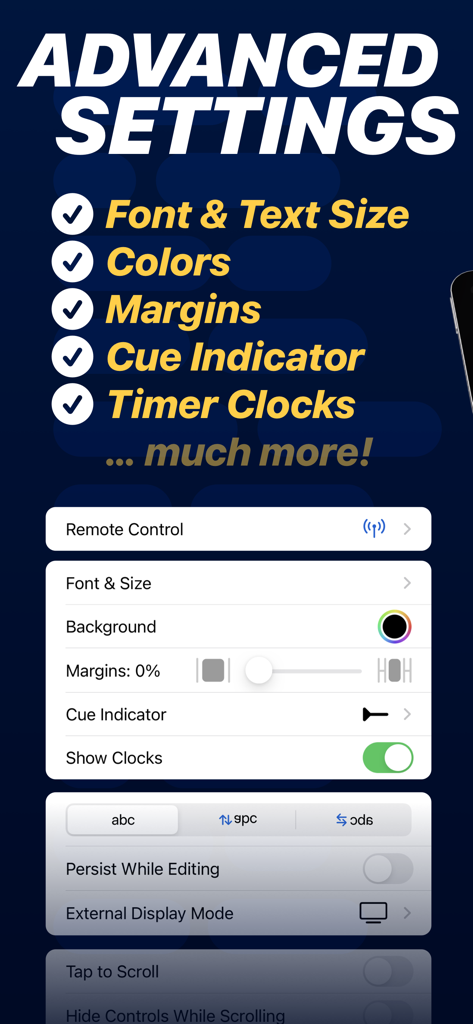
フォント、マージン、キューインジケーターのカスタマイズオプションを表示するテレプロンプターアプリの高度な設定メニュー

フォント、マージン、キューインジケーターのカスタマイズオプションを表示するテレプロンプターアプリの高度な設定メニュー

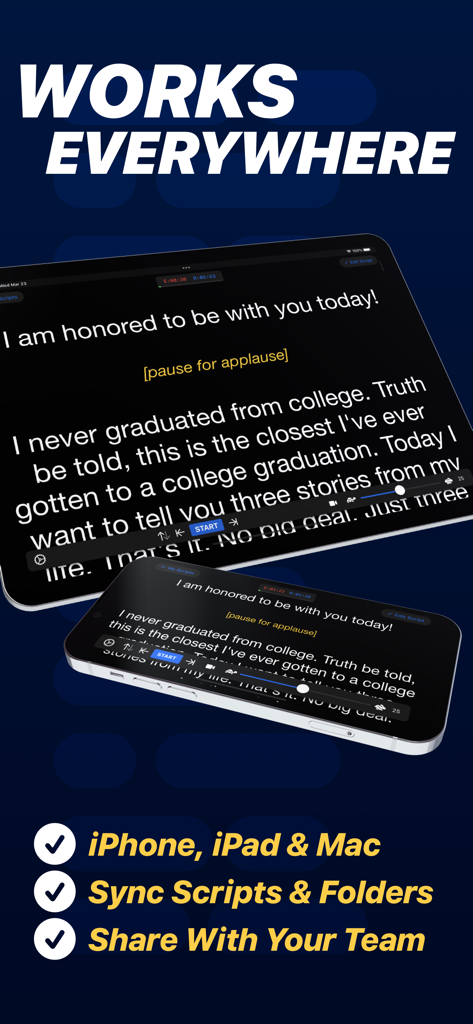
ビデオコンテンツ作成のためにiPhoneとiPad全体で同期されたスクリプトを表示するテレプロンプターアプリ

ビデオコンテンツ作成のためにiPhoneとiPad全体で同期されたスクリプトを表示するテレプロンプターアプリ

画面上での存在感をマスター

このアプリを際立たせるツール、 4M+ 人のユーザーが選択.

🤳

数秒で録画して共有

スクリプトを読みながら高品質のビデオをキャプチャし、TikTok、Instagram、またはYouTubeに直接投稿して、コンテンツの流れを維持しましょう。

👁️

完璧なアイコンタクト

スクリプトを読みながらカメラレンズに視線を合わせ、Zoom通話やプロフェッショナルな録画中に自信があり、エンゲージしているように見えます。

🎮

シームレスなリモートコントロール

Apple Watch、キーボード、さらにはゲームコントローラーを使用して、速度とスクリプトをリモートで調整し、ハンズフリーで自然な配信を実現します。

世界中のユーザーに愛されています

Trusted by 4M+ 人がこのアプリを愛用しています.

"

"このアプリをTikTokとYouTubeのコンテンツに使い始めてから、制作時間が半分になりました。長くて詳細なスクリプトを、フォロワーと自然なアイコンタクトを維持しながら一度のテイクで録画できます。スムーズなスクロールと簡単な速度制御により、すべての録画がプロフェッショナルに感じられます。"

Marcus Rivera, ソーシャルメディアクリエイター
"

"これは私のリモートプレゼンテーションに不可欠なツールです。iPadのSplit View機能を使用して、スクリプトをZoom会議の隣に表示し、クライアントに直接目を向けながら、重要なポイントを逃さないようにしています。Wordからスクリプトをインポートするのは迅速かつ完璧です。"

Elena Rodriguez, シニアマーケティングディレクター

アプリについて

について知っておくべきこと Teleprompter.

説明

Turn your device into a Teleprompter for free... Teleprompter is the best free teleprompter app used by creators and studios including Netflix, ABC, CBS, BBC, Fox, ITV, Channel 4, UKTV and many more. Engineered for real-world reliability, Teleprompter is packed with everything you'll need for your content, production or presentation. Available for Free: • Compose, create, and manage unlimited scripts with NO character or length limits • Adjust text size, font, and colour to suit your setup • Import (up to 5) documents in Word, PDF, .txt, and .rtf formats from any app • Record videos using your device camera while reading from the Teleprompter • Save recorded videos directly to Photos or share to apps like Instagram, YouTube, and TikTok • Apply real-time video effects (Virtual Backgrounds, portrait mode) • Scripts scroll smoothly with easy speed control • Scroll up to 120Hz on ProMotion devices • Use any font installed on your device for your teleprompter scripts • Basic control options from connected keyboards and controllers • Export and share scripts easily, or save as backup files • Add cue points to jump to specific parts of your script • Add a countdown timer before scrolling begins • Re-arrange scripts by title, date, or custom order • AirDrop scripts to nearby devices • (Optional) Synchronise your scripts across all your devices automatically via cloud sync • Use Timed Scrolling to scroll your script over a set duration • Display elapsed and remaining time based on scroll speed • Display a reading guide arrow or line with customisable style and position • Set custom default settings (font, colour, layout) for new and imported scripts • Display your scripts full screen by hiding the controls while scrolling • Set a custom background colour behind your script • Adjust side margins to reduce eye movement or fit beam splitter glass • Select between "Continuous" or "Paging" scroll modes • Use the Teleprompter while participating in video meetings (e.g., Zoom or Google Meet) • Use Slide Over or Split View on iPad to multitask with other apps Extra features available with the optional Pro upgrade: • Import unlimited documents in Word, PDF, .txt, and .rtf formats from any app • Mirror or reverse the text for use in professional on-camera Teleprompter rigs • Control the Teleprompter from any web browser on the same WiFi network • Use other nearby iOS devices to monitor and control scrolling and speed via Bluetooth • Control the Teleprompter remotely using keyboard, handheld remote, foot pedal, or gaming controller (including PlayStation and Xbox) • Customisable button/key assignments for remote controls and keyboards • Use Apple Watch to control the scrolling of your script on iPhone • Use the IKAN Elite Remote for scrolling control • Display your script full screen on a connected display or AirPlay TV, with optional independent mirroring • Use the built-in script editor to format text with rich text features like bold, italic, underline, and text colour • Export scripts as Rich Text (.rtf) files for editing on other devices • Connect via HDMI or AirPlay to external displays with "clean feed" • Automatically generate '.srt' captions and subtitles for your videos • Retrieve backups of your recordings from the cloud Designed to be the best free Teleprompter app with mirroring. Teleprompter is designed for presentations, lectures, broadcasters, filmmakers, musicians & singers, business professionals, or any public speaking! Pro Upgrade Purchase: The Teleprompter Pro upgrade is available as a one-time in-app purchase forever, or as a subscription. If you chose to subscribe (optional), you can cancel anytime within the app, or from your Apple ID account settings. Terms: https://teleprompterpro.com/terms Privacy: https://teleprompterpro.com/privacy

最新バージョン

3.57.0

サイズ

59.2 MB

リリース日

2015年2月17日

一度のテイクでメッセージをマスター

自信と権威を持って話す400万人以上のクリエイターやプロフェッショナルに加わりましょう。今日、iPhoneまたはiPadで世界で最も信頼されているテレプロンプターを無料でダウンロードしてください。

ダウンロード: App Store
FAQ

よくある質問

について知っておくべきこと Teleprompter

Teleprompterアプリとは何ですか?

Teleprompterアプリは、あなたのデバイスを無料のテレプロンプターに変えます。Netflix、ABC、BBCのようなクリエイターやスタジオが使用しており、コンテンツ作成、制作、プレゼンテーションに不可欠なツールを提供します。

Teleprompterアプリは無料で使えますか?

はい、Teleprompterアプリは無料でダウンロードして使用できます。無制限のスクリプト管理、テキスト調整、ビデオ録画などのコア機能が含まれており、オプションのアップグレードで追加のPro機能も利用できます。

Teleprompterアプリ内で直接ビデオを録画できますか?

はい、Teleprompterアプリでは、テレプロンプターを読みながらデバイスのカメラを使用してビデオを録画できます。リアルタイムのビデオエフェクトを適用したり、録画を直接写真に保存したりすることもできます。

Teleprompterはプロフェッショナルなセットアップのためにテキストミラーリングをサポートしていますか?

はい、Teleprompterアプリはテキストのミラーリングまたは反転をサポートしています。この機能はProアップグレードで利用可能で、プロ仕様のオンカメラテレプロンプターリグでの使用を目的としています。

Teleprompterアプリはどのようなファイル形式をインポートできますか?

Teleprompterアプリの無料版では、Word、PDF、.txt、.rtf形式のドキュメントを最大5つまでインポートできます。Proアップグレードにより、これらの形式での無制限のドキュメントインポートが可能になります。

Teleprompterアプリをリモートで制御できますか?

はい、TeleprompterアプリはProアップグレードでさまざまなリモート制御オプションを提供しています。これには、Webブラウザ、Bluetooth経由の他のiOSデバイス、キーボード、フットペダル、ゲームコントローラー、Apple Watchからの制御が含まれます。

Teleprompterはスクリプトをどのように扱いますか?長さの制限はありますか?

Teleprompterアプリでは、文字数や長さの制限なしに、無制限のスクリプトを作成、編集、管理できます。また、スクリプトの設定を調整したり、キューポイントを追加したり、並べ替えたりすることもできます。

Teleprompter Proアップグレードはサブスクリプションですか、それとも買い切りですか?

Teleprompter Proアップグレードは、永続的なアクセスを可能にする買い切り型のアプリ内購入、またはオプションのサブスクリプションとして利用できます。サブスクリプションはいつでもキャンセルできます。

ZoomやGoogle Meetのようなビデオ通話中にTeleprompterを使用できますか?

はい、Teleprompterアプリはビデオ会議と連携します。ユーザーはZoomやGoogle Meetのようなビデオ会議に参加しながらTeleprompterを利用できます。

Teleprompterは複数のデバイス間でスクリプトを同期しますか?

はい、Teleprompterアプリはオプションのクラウド同期を提供しており、すべてのデバイス間でスクリプトを自動的に同期します。この機能は、iPhone、iPad、Mac間でスクリプトをシームレスに管理するのに役立ちます。