Thunderstorm for LIFX

Thunderstorm for LIFX

ダウンロード: App Storeダウンロード: Google Play
Spark by MWM logo
ロゴ: Thunderstorm for LIFX

Thunderstorm for LIFX:スマートホームに没入感あふれる自然の風景を

リビングスペースを映画のような感覚体験へと変貌させます。究極のリラクゼーション、睡眠、雰囲気への没入のために設計された、超リアルな雷エフェクトとハイファイなサウンドスケープにLIFXライトを同期させましょう。

ダウンロード: App Store

開発元

Scott Dodson

カテゴリ

Entertainment

ダウンロード

11K+

ユーザー評価

3.0/5

評価数

0

対応言語

1

その雰囲気を目撃する

このインターフェースを利用する 11K+ 人のユーザー.

様々な嵐の強度設定とスリープタイマーを表示するThunderstorm for LIFXアプリのインターフェース

様々な嵐の強度設定とスリープタイマーを表示するThunderstorm for LIFXアプリのインターフェース

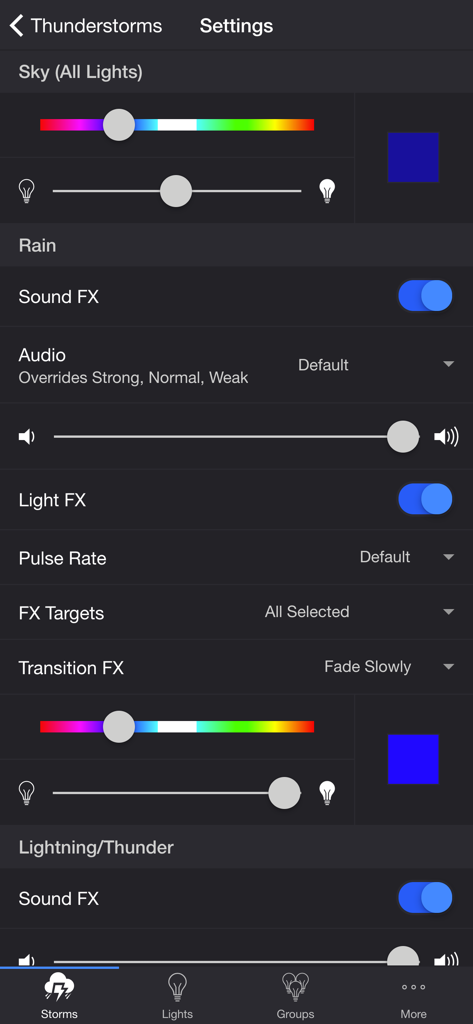
雨音と光のエフェクトのカスタマイズオプションを表示するThunderstorm for LIFXアプリの設定インターフェース

雨音と光のエフェクトのカスタマイズオプションを表示するThunderstorm for LIFXアプリの設定インターフェース

デスクランプやフロアランプなどの接続済みスマート電球のリストを表示するThunderstorm for LIFXアプリの「ライト」タブのスクリーンショット

デスクランプやフロアランプなどの接続済みスマート電球のリストを表示するThunderstorm for LIFXアプリの「ライト」タブのスクリーンショット

スマートライトのグループリストと新規作成ボタンを表示するThunderstorm for LIFXアプリのグループインターフェース

スマートライトのグループリストと新規作成ボタンを表示するThunderstorm for LIFXアプリのグループインターフェース

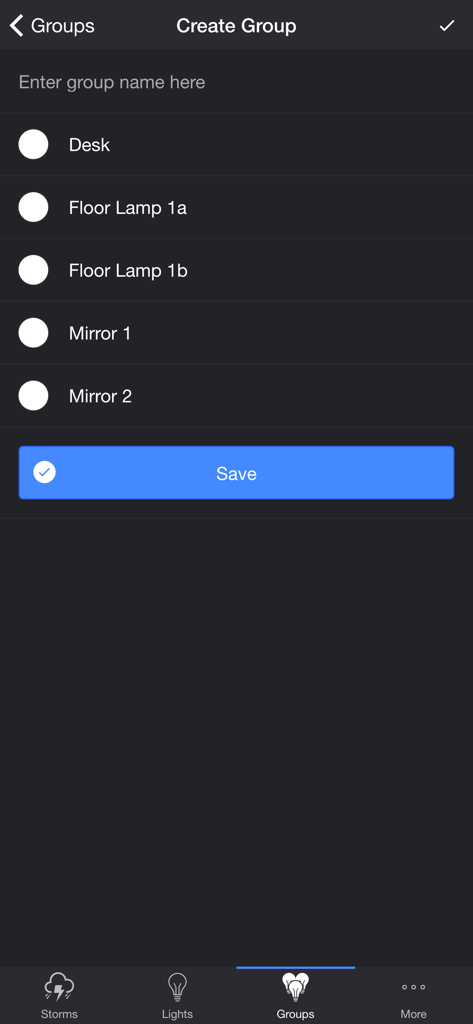
デスクランプとフロアランプを含むライトグループを作成するためのThunderstorm for LIFXアプリの画面

デスクランプとフロアランプを含むライトグループを作成するためのThunderstorm for LIFXアプリの画面

究極の没入環境

このアプリを際立たせるツール、 11K+ 人のユーザーが選択.

⛈️

超リアルな嵐

小雨の穏やかなリズムから、激しい雷雨の圧倒的なパワーまで、4つの異なる嵐の強度を体験してください。

⚙️

完全なクリエイティブ・コントロール

雷の頻度、雨の質感、トランジションエフェクト、さらには没入感を高める背景の野生動物の鳴き声まで、あらゆる詳細をカスタマイズできます。

🛌

スマートな睡眠連携

自動スリープタイマー、オーディオフェードアウト、そして嵐が去った後のカスタマイズ可能なライト状態で、自然に眠りにつくことができます。

世界中のユーザーに愛されています

Trusted by 11K+ 人がこのアプリを愛用しています.

"

"スマートホーム愛好家として、これは私のLIFXセットアップで見つけた最高のサードパーティ統合です。設定の細かさは素晴らしく、雷の遅延をAirPlayスピーカーと完璧に同期させることができます。リビングルームが映画のような体験に変わり、映画鑑賞会のゲストをいつも驚かせています。"

Marcus Thorne
"

"私は不眠症に悩まされており、あらゆる睡眠補助剤を試してきました。『トタン屋根に降る雨』の音とゆっくりと点滅する青い光のエフェクトを組み合わせることは、私にとって究極のリラックス儀式になりました。スリープタイマーとオーディオのフェードアウトは完璧に実行され、毎晩のウェルネスルーティンに欠かせないものとなっています。"

Sarah Jenkins

アプリについて

について知っておくべきこと Thunderstorm for LIFX.

説明

Summon a thunderstorm light show using your LIFX lights. Watch your lights pulse and flash to the sounds of a storm.* THUNDERSTORMS • Strong Thunderstorm — Heavy rain with frequent lightning and thunder nearby Lights pulse quickly to the sound of heavy rain. Booming sounds of thunder accompany bright flashes of light. • Normal Thunderstorm — Steady rain with a full range of lightning and thunder Lights pulse to the sound of rain. The sound of thunder can be heard from various distances. The closer the lightning, the louder the sound, and the brighter the flashes of light! • Weak Thunderstorm — Light rain with occasional lightning and thunder far off Lights pulse slowly to the sound of light rain. Dim flashes of light are followed by soft sounds of thunder. • Passing Thunderstorms — Rain and lightning intensity changes as the storms pass Lights pulse and flash at different rates to correspond with the current strength of the storm. SETTINGS • Change the color and brightness of your lights • Toggle rain sound effects • Change rain audio (default, heavy rain, steady rain, light rain, rain on tin roof) • Set rain volume • Toggle rain light effects • Change rain pulse rate (default, slow, medium, fast) • Target lights for rain light effects • Change rain transition effects (pulse, fade quickly, fade slowly) • Change the color and brightness of the rain light effects • Toggle thunder sound effects • Set thunder volume • Change delay lightning • Toggle delay thunder • Toggle lightning light effects • Target lights for lightning light effects • Change lightning transition effects (random, pulse, fade quickly, fade slowly, flicker) • Change lightning/thunder occurrence (default, never, occasional, normal, frequent, unreal) • Change the color and max brightness of the lightning light effects • Change starting storm for Passing Thunderstorms (weak, normal, strong) • Change cycle time for Passing Thunderstorms (15 min, 30 min, 60 min) • Toggle background sounds (birds, cicadas, crickets, frogs) • Set background volume • Change default end state (on, off, revert) • Change sleep end state (on, off, revert) • Auto-start, Auto-stop, and Auto-restart thunderstorm (auto-restart activates auto-start and auto-stop) LIGHTS / GROUPS Select one or more lights for your thunderstorm light show on the Lights/Groups tab. Choose a group that you set up using your LIFX app, or create a new group in the Thunderstorm for LIFX app. To edit an in-app group in the list, swipe the item to the left and tap the pencil icon. When you add, remove, or change lights, pull down the list to refresh. ADDITIONAL FEATURES • Lightning on demand. Start a storm and tap one of the lightning buttons at the bottom of the page. • Sleep Timer with audio fade out. Sleep End State setting lets you choose what happens to the state of the lights when the sleep timer ends. • Bluetooth and AirPlay supported via Control Center. Delay Lightning setting lets you choose how much time to delay the lightning to compensate for the wireless audio delay. I'd love to hear your thoughts and appreciate you taking the time to rate the app. By leaving a review, I can continue to improve Thunderstorm for LIFX and create a great experience for you and future users. Thank you! —Scott *Internet connection and LIFX Cloud account required

最新バージョン

4.5.0

サイズ

74.0 MB

リリース日

2016年5月5日

リビングルームに嵐を呼び起こす

11,000人以上のスマートホーム愛好家の仲間入りをして、高度にカスタマイズ可能な雷と雨のエフェクトで、LIFXエコシステムを究極の没入型サンクチュアリに変えましょう。

ダウンロード: App Storeダウンロード: Google Play