Unicorn Blocker:Adblock

Unicorn Blocker:Adblock

ダウンロード: App Store
Spark by MWM logo
ロゴ: Unicorn Blocker:Adblock

Unicorn Blocker: iPhoneをより高速に、安全に、そして長時間使えるようにする広告ブロック

3倍高速なブラウジングと21%のバッテリー寿命向上を体験してください。不快な広告をブロックし、モバイルデータを節約し、Safari上でのトラッカーや詐欺から家族を守ります。

ダウンロード: App Store

開発元

OH NAM KWON

カテゴリ

Utilities

ダウンロード

366K+

ユーザー評価

4.8/5

評価数

48K+

対応言語

3

純粋なブラウジング体験を

このインターフェースを利用する 366K+ 人のユーザー.

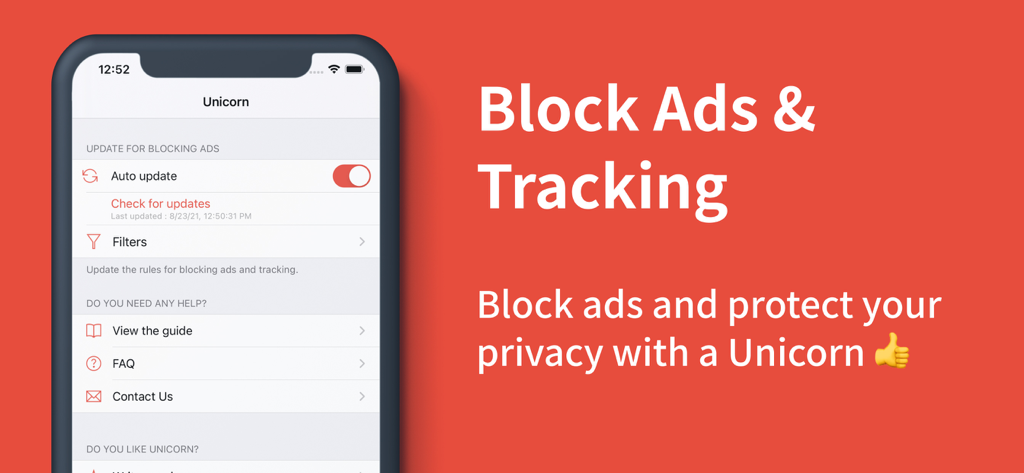
iPhoneで広告やトラッキングをブロックするためのUnicorn Blockerアプリインターフェース

iPhoneで広告やトラッキングをブロックするためのUnicorn Blockerアプリインターフェース

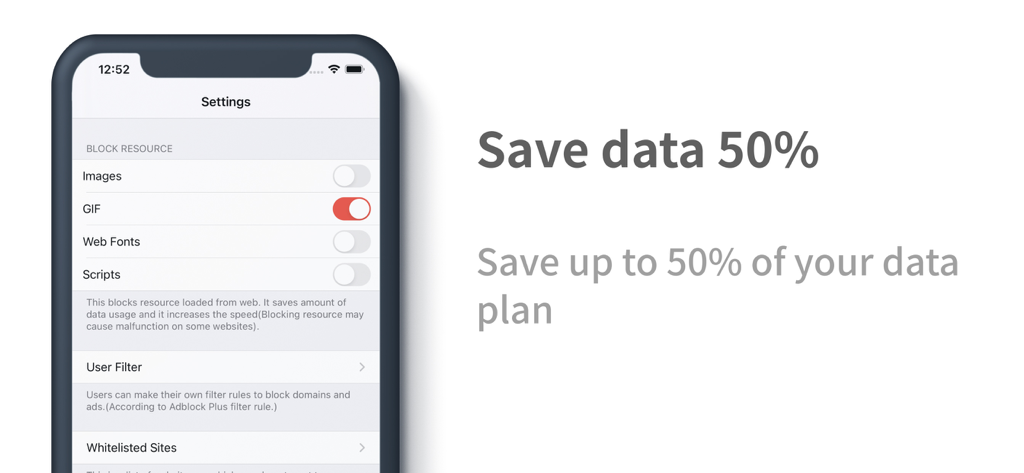
GIFやスクリプトをブロックしてモバイルデータを最大50%節約するUnicorn Blockerの設定画面が表示されたスマートフォンの画面

GIFやスクリプトをブロックしてモバイルデータを最大50%節約するUnicorn Blockerの設定画面が表示されたスマートフォンの画面

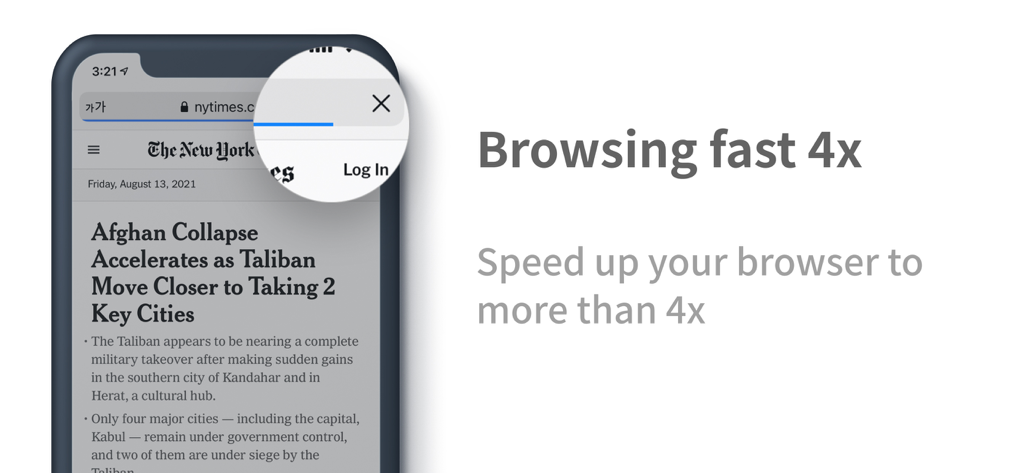
iPhoneで4倍高速なブラウジングを表示するUnicorn Blockerアプリ

iPhoneで4倍高速なブラウジングを表示するUnicorn Blockerアプリ

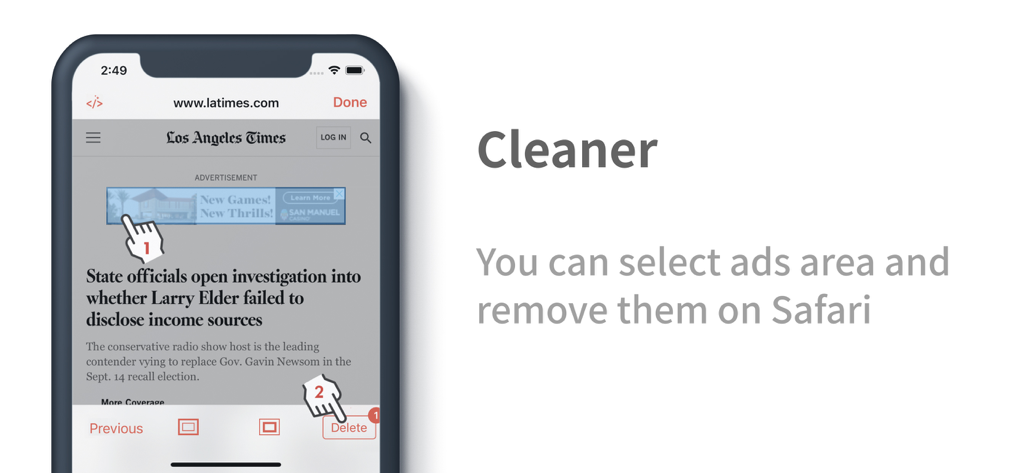
Safariのニュースサイトで広告を手動で選択して削除するUnicorn Blockerクリーナーツール

Safariのニュースサイトで広告を手動で選択して削除するUnicorn Blockerクリーナーツール

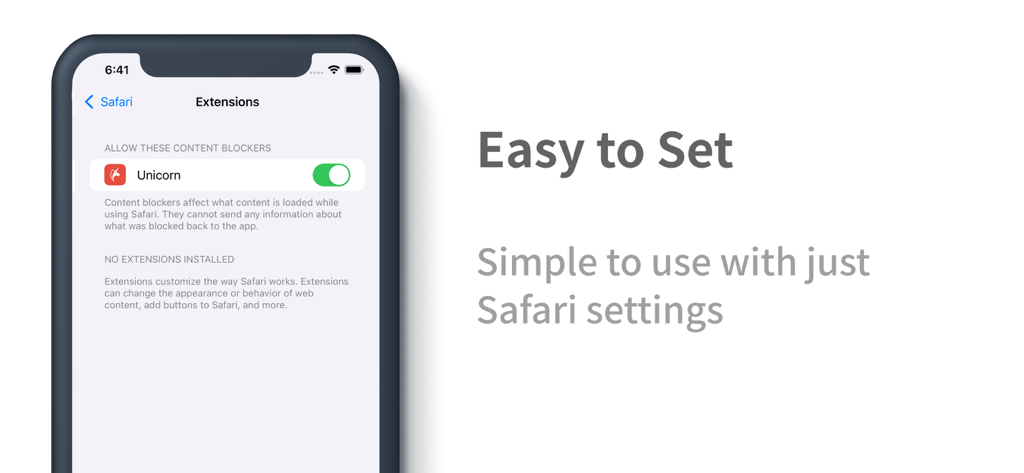
Safari設定でUnicorn Blocker拡張機能が有効になっているiPhoneの画面

Safari設定でUnicorn Blocker拡張機能が有効になっているiPhoneの画面

より速く、クリーンに、そして長くブラウジング

このアプリを際立たせるツール、 366K+ 人のユーザーが選択.

3倍高速なブラウジング速度

リソースを大量に消費するスクリプトや広告を排除し、アクセスするすべてのサイトでデータ消費を4分の1に抑えながら、ページの読み込み速度を最大3倍に向上させます。

🛡️

家族を守る

子供たちを刺激的なコンテンツから守り、高齢の両親を欺瞞的な釣り広告やフィッシング詐欺から自動的に保護します。

🔋

バッテリー寿命が21%向上

Web環境が軽くなることで、CPUへの負荷が軽減されます。長時間の読書中もバッテリーが大幅に長持ちし、発熱も抑えられます。

世界中のユーザーに愛されています

Trusted by 366K+ 人がこのアプリを愛用しています.

"

"Unicorn Blockerをインストールしてから、Safariでのブラウジング体験が全く別物になりました。明らかに速くなり、通勤中のiPhoneのバッテリーの持ちも劇的に改善されました。デジタルの煩わしさが嫌いな人にとって、これ以上ない「一度設定すればOK」なツールです。"

デビッド・チェン
"

"子供たちが学校の調べ物でiPadを使っているときに、不適切な広告を見ないようにと購入しました。完璧に動作し、迷惑なポップアップから大容量ビデオ広告まで全てブロックしてくれます。子供たちがよりクリーンで安全なWebを閲覧しているという安心感があります。"

エレナ・ロドリゲス

アプリについて

について知っておくべきこと Unicorn Blocker:Adblock.

説明

Did you know that data wastage due to ads can increase by up to 4 times? Unicorn blocks ads to reduce unnecessary data usage by up to 4 times and improves your web browsing speed by more than 3 times. Experience an extended battery life of up to 21% with a lighter web environment. Caution: • After the initial installation, please ensure that you enable both of Unicorn’s extensions by going to iPhone → Settings → Apps → Safari → Extensions and switching both to “On,” then set them to “Allow” on all websites. User Reviews: • “I rarely leave reviews, but I absolutely have to buy this.” - yangxx • “Ever since I experienced an ad-free world, I only use Safari.” - no1xxx • “The database is extensive and the feedback is extremely fast.” - xxpi • “I’ve been using it for 3 months and I’m very satisfied.” - berxxxx Key Features: • Ad blocking effect (for the Safari browser) • Up to 4 times data saving • Up to 3 times speed improvement • Up to 21% increase in battery life (Source: The New York Times) Recommended Users: • Ad misclick prevention: In case you accidentally click on ads. • Blocking unnecessary ads: If you are disturbed by provocative adult ads or an overload of ads. • Child protection: If you don’t want your children to see stimulating ads. • Elderly protection: If you are concerned that older parents might fall for scam (bait) ads. • Data and battery saving: If you are worried about limited data, slow speeds, overheating, or battery drain. • Visual impairment support: For users who access the internet via voice guidance (for the visually impaired or low-vision users). Types of Ads That Can Be Blocked: • Website ads: Ads on domestic and international mobile and desktop sites. • Tracking ads: Ads that track your search information. • Embedded ads: Ads cleverly inserted in the middle of articles. • Popup ads: Ads that appear in a popup format. • Forced redirect ads: Ads that forcibly redirect you from a site. • Unnecessary SNS elements: Social media comments and share buttons. • Cryptocurrency mining scripts: Blocks illegal mining scripts. • Anti-adblock circumvention ads: Ads that bypass ad blockers. • Video ads: 5–15 second video ads (Ads on some sites that are beyond Safari’s content blocking capabilities may be difficult to block) • Screen cleanup: Removes any blank spaces left after ad removal. • Cleaner function: Allows users to directly select and remove content areas on sites where blocking is insufficient. ※ If ads are not completely blocked, please report them using the “Report Ad” feature within the app and we will respond accordingly. Cleaner Function: • Allows deletion of user-specified areas. • Run the cleaner within the app or select Cleaner via Safari’s share button. How to Update the Blocking Database: • Press the update button after launching the app. • Enable automatic updates within the app (background refresh required). Frequently Asked Questions (FAQ): • What if ads still remain? Some video sites, Twitter, Facebook, or sites with anti-adblock measures may not have ads blocked. → In this case, using Unicorn Pro will resolve most issues. • Does it block ads in apps or game apps? This app is for the Safari browser only and does not block ads within other apps. • What if ad blocking isn’t working well? If ads are not blocked at all, please refer to the in-app guide to check if the settings are correct. If problems persist, please uninstall and reinstall the app. • What should I do if I see an ad? In case of sudden ad appearance, please check if you can update to the latest blocking rules. • Can ad blocking sometimes fail? Since many sites frequently add or change ads, complete blocking may be difficult. Notice: ※ In cases beyond the technical scope of the extension, some ads (such as on video sites, Twitter, Facebook, or sites with anti-adblock measures) may not disappear. In such cases, using Unicorn Pro will resolve most issues. Customer Support: • Email: support@unicorn-soft.com

最新バージョン

1.27.4

サイズ

124.3 MB

リリース日

2015年10月17日

より速く、クリーンなSafariを体験する準備はできましたか?

366,000人以上のユーザーに加わり、今すぐデータ消費を最大4分の1に、バッテリー寿命を21%向上させましょう。ブラウジングの主導権を取り戻し、インターネットを本来あるべき姿で楽しみましょう。

ダウンロード: App Store
FAQ

よくある質問

について知っておくべきこと Unicorn Blocker:Adblock

Unicorn Blocker:Adblockとは何ですか?

Unicorn Blocker:Adblockは広告をブロックし、データ使用量を最大4倍削減、ウェブブラウジング速度を3倍以上向上、バッテリー寿命を最大21%延長します。

Unicorn Blocker:Adblockはモバイルデータを節約できますか?

はい、Unicorn Blocker:Adblockは、広告による不要なデータ使用量を削減することで、最大4倍のデータを節約します。

Unicorn Blocker:Adblockはブラウジング速度を向上させますか?

はい、Unicorn Blocker:Adblockは、より軽量なウェブ環境を作り出すことで、ウェブブラウジング速度を3倍以上、最大4倍向上させます。

Unicorn Blocker:Adblockはバッテリー寿命を延長しますか?

はい、Unicorn Blocker:Adblockは、より軽量なウェブ環境とデータ使用量の削減により、バッテリー寿命を最大21%延長します。

iPhoneでUnicorn Blocker:Adblock拡張機能を有効にするにはどうすればよいですか?

インストール後、iPhoneの「設定」→「アプリ」→「Safari」→「拡張機能」で両方のUnicorn拡張機能を有効にし、「オン」に切り替えて、すべてのウェブサイトで「許可」するように設定してください。

Unicorn Blocker:Adblockの使用から恩恵を受けられるのは誰ですか?

Unicorn Blocker:Adblockは、広告の誤クリックを防ぎたい、気が散る広告をブロックしたい、子供や高齢者を保護したい、データ/バッテリーを節約したい、音声ガイダンスによる視覚障害をサポートしたいユーザーに役立ちます。

Unicorn Blocker:Adblockはどのような種類の広告をブロックしますか?

Unicorn Blocker:Adblockは、ウェブサイト広告、トラッキング広告、埋め込み広告、ポップアップ広告、強制リダイレクト広告、アンチ広告ブロック回避広告、動画広告をブロックします。また、不要なSNS要素や暗号通貨マイニングスクリプトも削除します。

Unicorn Blocker:Adblockのクリーナー機能とは何ですか?

Unicorn Blocker:Adblockのクリーナー機能は、広告ブロックが不十分な可能性のあるウェブサイトの特定のコンテンツ領域をユーザーが直接選択して削除することを可能にします。

Unicorn Blocker:Adblockのブロックデータベースを更新するにはどうすればよいですか?

ブロックデータベースを更新するには、Unicornアプリ内の更新ボタンを押すか、バックグラウンド更新が必要な自動更新を有効にしてください。

Unicorn Blocker:Adblockを使用しているのに、なぜ一部の広告が表示されるのですか?

動画サイト、Twitter、Facebook、またはアンチ広告ブロック対策が施されているサイトでは、Safariのコンテンツブロック機能の範囲外であるため、一部の広告が残る場合があります。Unicorn Proでこれらの問題のほとんどが解決されます。

Unicorn Blocker:Adblockは他のアプリやゲームの広告もブロックしますか?

いいえ、Unicorn Blocker:AdblockはSafariブラウザ専用であり、他のアプリケーションやゲームアプリ内の広告はブロックしません。

Unicorn Blocker:Adblockが効果的に広告をブロックしない場合はどうすればよいですか?

広告ブロックが機能しない場合は、アプリ内のガイドを参照して設定を確認してください。問題が解決しない場合は、Unicorn Blocker:Adblockアプリをアンインストールして再インストールしてください。

Unicorn Blocker:Adblockを使用中に突然広告が表示された場合はどうすればよいですか?

突然広告が表示された場合は、Unicorn Blocker:Adblockアプリ内で最新のブロックルールに更新できるか確認してください。

Unicorn Blocker:Adblockが広告をブロックできないことはありますか?

はい、多くのサイトが広告の実装を頻繁に追加または変更するため、完全な広告ブロックができない場合があります。

Unicorn Blocker:Adblockのカスタマーサポートに連絡するにはどうすればよいですか?

Unicorn Blocker:Adblockのカスタマーサポートには、support@unicorn-soft.comまでメールで連絡して支援を受けてください。

Unicorn Blocker:Adblockは特定のウェブリソースをブロックできますか?

はい、Unicorn Blocker:Adblockは、画像、GIF、ウェブフォント、スクリプトなどの特定のウェブリソースをユーザーがブロックできるようにし、データを節約して速度を向上させます。

Unicorn Blocker:Adblockはユーザーフィルターを提供していますか?

はい、Unicorn Blocker:Adblockにはユーザーフィルター機能があり、ユーザーはカスタムルールを作成してドメインや広告をブロックできます。

Unicorn Blocker:Adblockはウェブサイトのホワイトリスト登録をサポートしていますか?

はい、Unicorn Blocker:Adblockにはホワイトリスト登録サイトのオプションがあり、ユーザーは特定のウェブサイトを広告ブロックから除外できます。

Unicorn Blocker:Adblockで特定の広告を手動で削除できますか?

はい、Unicorn Blocker:Adblockには「クリーナー」機能があり、Safariから直接特定の広告領域を選択して削除できます。

Unicorn Blocker:Adblockは簡単にセットアップできますか?

はい、Unicorn Blocker:Adblockは簡単にセットアップできます。iPhoneのSafari設定内で直接コンテンツブロッカーを有効にします。