Video Size Compressor

Video Size Compressor

ダウンロード: App Store
Spark by MWM logo
ロゴ: Video Size Compressor
ビデオサイズ圧縮アプリ:必要な正確なサイズにファイルを縮小

ファイルサイズの制限に悩むのはもうやめましょう。数秒で任意のビデオをターゲットMBに圧縮し、1フレームも切り取らずにメール、WhatsApp、またはiMessageで簡単に共有できます。

ダウンロード: App Store

開発元

Ruchira Ramesh

カテゴリ

Photo & Video

ダウンロード

12K+

ユーザー評価

4.6/5

評価数

0

対応言語

1

一目でわかる精度

このインターフェースを利用する 12K+ 人のユーザー.

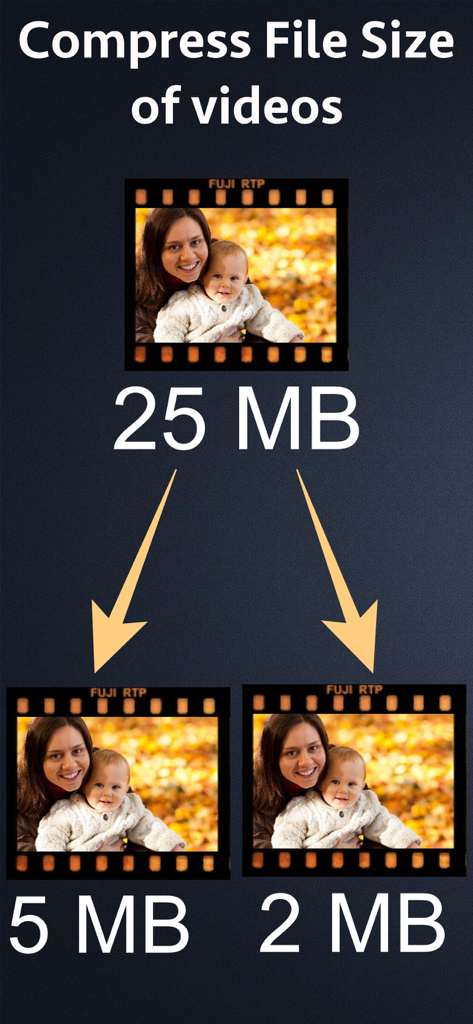
25MBのビデオが5MBと2MBのサイズに圧縮される様子を示すグラフィック

25MBのビデオが5MBと2MBのサイズに圧縮される様子を示すグラフィック

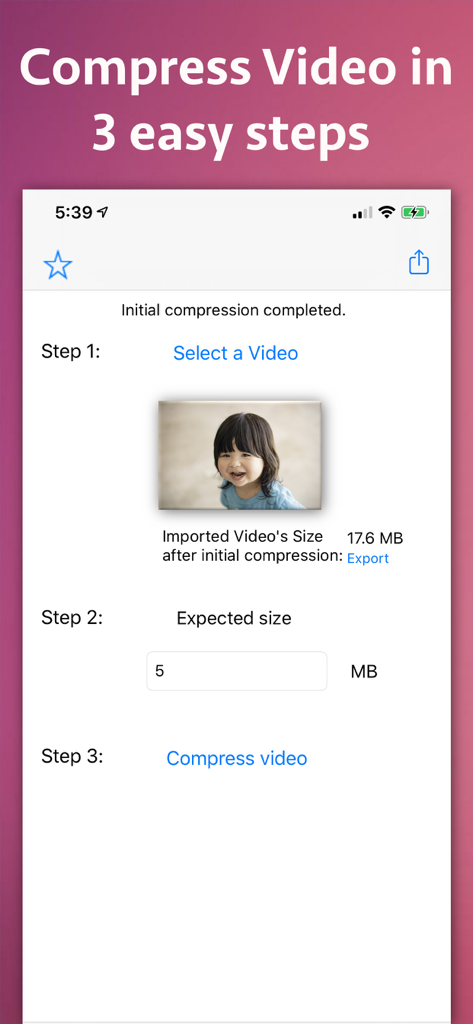
ビデオサイズ圧縮アプリの画面で、ビデオファイルサイズを縮小する3つの簡単なステップが表示されている

ビデオサイズ圧縮アプリの画面で、ビデオファイルサイズを縮小する3つの簡単なステップが表示されている

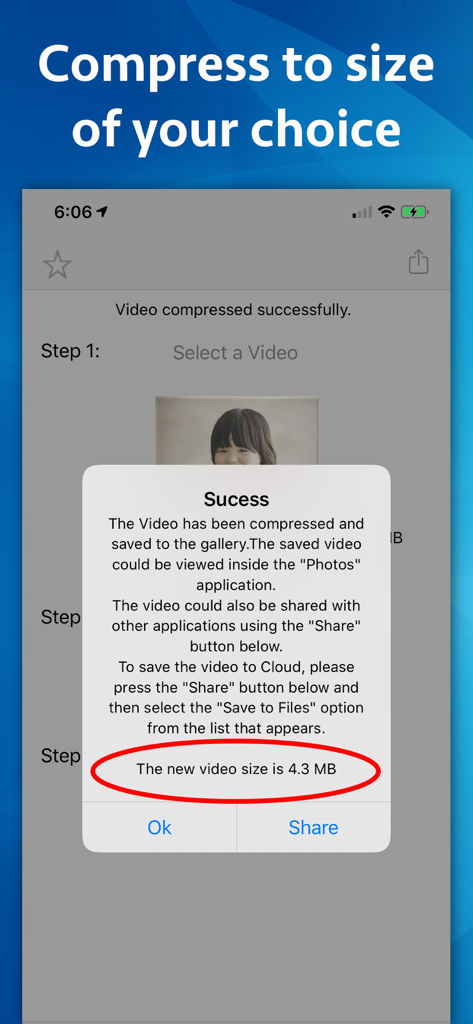
ビデオサイズ圧縮アプリで、圧縮されたビデオサイズが4.3MBであることを確認する成功ポップアップ

ビデオサイズ圧縮アプリで、圧縮されたビデオサイズが4.3MBであることを確認する成功ポップアップ

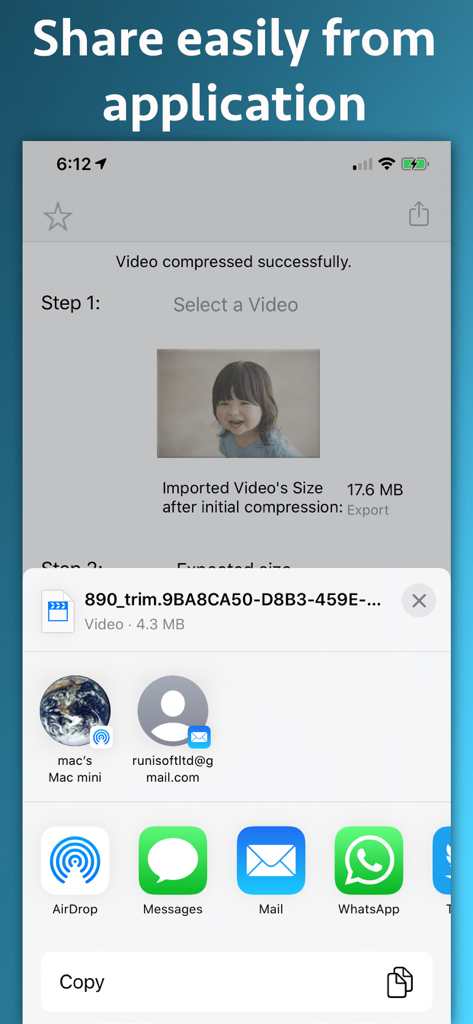
iOS画面に、正常に圧縮されたビデオと、メールおよびメッセージアプリ経由での共有オプションが表示されている

iOS画面に、正常に圧縮されたビデオと、メールおよびメッセージアプリ経由での共有オプションが表示されている

強力な圧縮が簡単に

このアプリを際立たせるツール、 12K+ 人のユーザーが選択.

🎯

正確なサイズ指定

GmailやOutlookなどのメール添付ファイルにぴったり収まるように、MB単位の特定のターゲットサイズを入力します。

🎞️

切り取りなし保証

シーンをトリミングしたりカットしたりすることなく、ビデオ全体のファイルサイズを縮小し、ストーリー全体をそのまま保持します。

インスタントワークフロー

ビデオを選択し、サイズを設定して、圧縮します。忙しいプロフェッショナルや外出中のクリエイターのために作られた3ステップのプロセスです。

世界中のユーザーに愛されています

Trusted by 12K+ 人がこのアプリを愛用しています.

"

"このアプリは私のワークフローのゲームチェンジャーです。クライアントにビデオウォークスルーをメールで送信する必要がよくありますが、25MBの制限に達すると、重要な部分をカットせずに送信することは不可能でした。今では、ターゲットサイズを設定するだけで、Gmail用に全クリップを数秒で完璧に圧縮してくれます。"

Sarah Jenkins, 不動産業者
"

"ついに、フラストレーションなしで家族のビデオ全体を共有する方法を見つけました。ほとんどのアプリでは映像をトリミングする必要がありますが、このアプリではビデオ全体を保持したままファイルサイズを縮小できるため、WhatsAppにぴったり収まります。使い方は信じられないほど簡単で、多くのストレージスペースを節約できました。"

Mark Thompson, デジタルクリエイター

アプリについて

について知っておくべきこと Video Size Compressor.

説明

Reduce the file size of a video to a size of your choice without clipping any part of it. For example - If there is a Video of size 25 MB, the application could reduce its size to 5 MB, 10MB, 15 MB and etc. In order to use the application, just specify the size of the video in MB that you want to achieve and it will compress the video to that size. There are various places where reducing the Video size helps.For example, in emails the attachment sizes are limited to 25 MB.In such cases the large videos could be compressed to 25 MB and sent across emails. Many messaging platforms like WhatsApp do not allow large sized videos to be shared.In such scenarios, we have to often cut a part of the video to send and we are unable to send the full video. Using Video Size Compressor you will be able to overcome this problem. Using the application , you will be able to reduce the file size of the entire video to a smaller size. After this, you will be able to share the entire video easily without cutting any part of it. Smaller sized videos also help to upload them to a website and could be transferred easily using file sharing services and pen drives.If you are a website owner, you could offer different sizes of the same video to your customers.This will help them to download the video as per their requirements. The compressed videos also help to save the space on phone, harddisk or the pen drives wherever they are used. The application itself is very easy to use.The videos could be compressed using the application in 3 easy steps. In order to compress the video, just select it from gallery ,specify the required size and click on "Compress Video" button.The application will reduce the video size and it will save it to gallery.It will also display a share page using which you will be able to share the video directly with various other applications and services like WhatsApp, iCloud, Mail, AirDrop,Save to Files,Cloud services and many more.

最新バージョン

9.2

サイズ

15.1 MB

リリース日

2017年12月29日

「ファイルが大きすぎます」エラーにさようなら

数秒で必要な正確なMBにビデオを圧縮します。メールの制限を回避し、トリミングなしでWhatsAppやSlackで全長の映像を共有するのに最適です。

ダウンロード: App Store