Yard Planner

Yard Planner

ダウンロード: App Store
Spark by MWM logo
ロゴ: Yard Planner

Yard Planner:夢の景観を簡単にデザイン

掘削する前に、完璧な屋外空間を視覚化しましょう。直感的なドラッグ&ドロップツールとGoogleマップ連携を利用して、プロのような景観レイアウトを数分で作成している360,000人以上の住宅所有者に加わりましょう。

開発元

Home Outside, Inc.

カテゴリ

Lifestyle

ダウンロード

362K+

ユーザー評価

3.2/5

評価数

900

対応言語

1

屋外のオアシスを視覚化

このインターフェースを利用する 362K+ 人のユーザー.

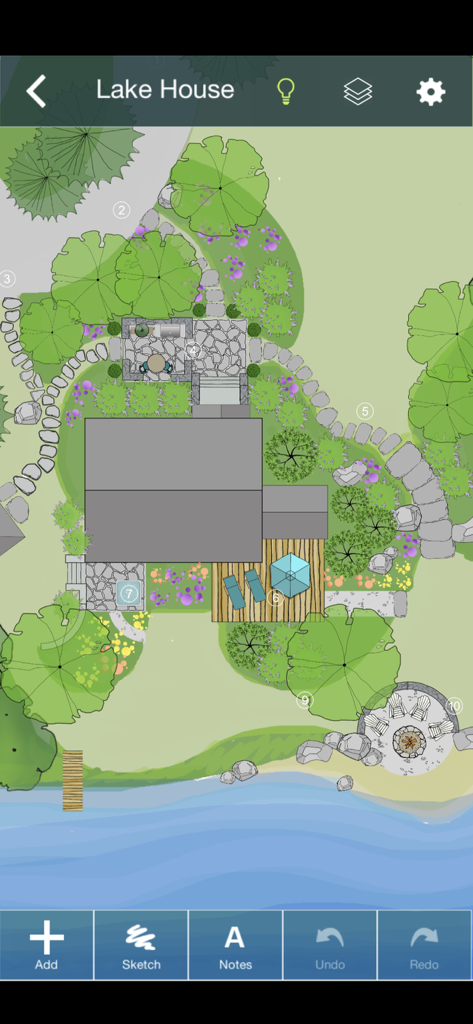
湖畔の家のための2D景観デザインのトップダウンビュー。木、石畳の道、デッキ、暖炉が見えます。

湖畔の家のための2D景観デザインのトップダウンビュー。木、石畳の道、デッキ、暖炉が見えます。

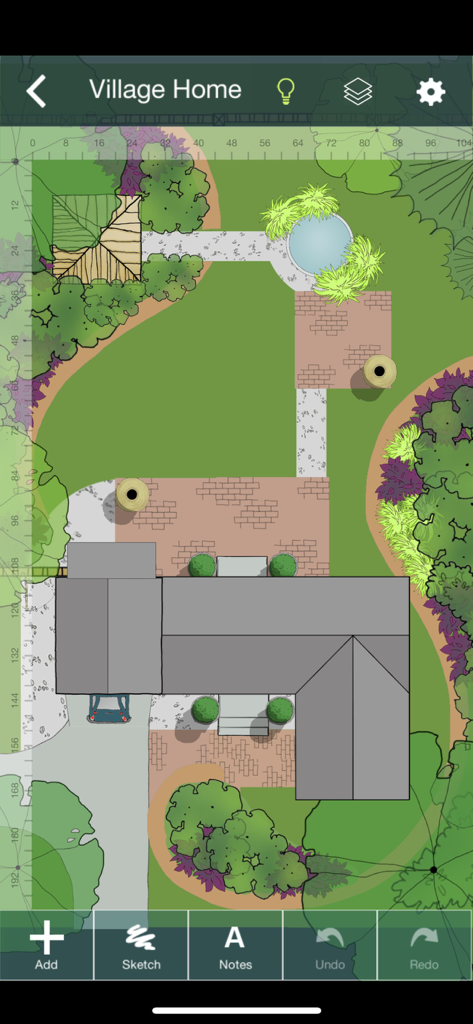
Yard Plannerアプリでの物件のトップダウン2D景観デザイン

Yard Plannerアプリでの物件のトップダウン2D景観デザイン

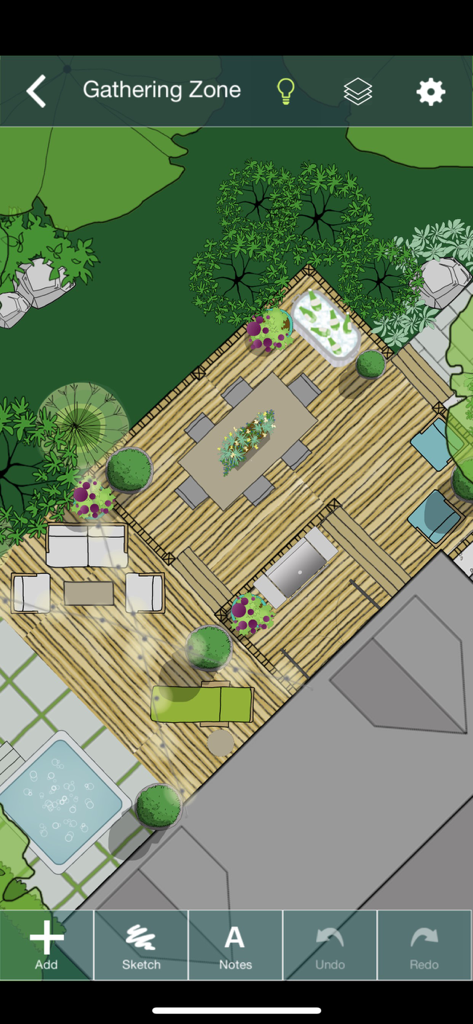
Yard Plannerアプリで、デッキ、ダイニングテーブル、ホットタブを備えた裏庭の集まりエリアのトップダウン2D景観デザイン。

Yard Plannerアプリで、デッキ、ダイニングテーブル、ホットタブを備えた裏庭の集まりエリアのトップダウン2D景観デザイン。

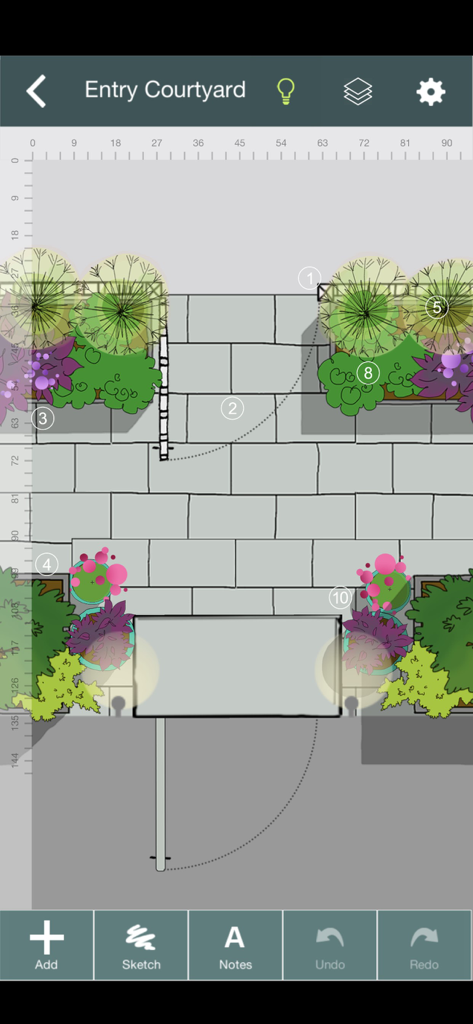
Yard Plannerでの石畳の道と花壇のあるエントランスコートヤードの2D景観デザイン

Yard Plannerでの石畳の道と花壇のあるエントランスコートヤードの2D景観デザイン

夢の屋外リビング空間をデザイン

このアプリを際立たせるツール、 362K+ 人のユーザーが選択.

📍

正確な敷地マッピング

Googleマップ連携を使用して実際の敷地境界線をインポートし、すべての木やパティオが土地に完璧に収まるようにします。

🌳

ドラッグ&ドロップで創造性を

季節の庭、プール、パティオ、私道など、800以上の手描きの要素で、あなたのビジョンを即座に実現しましょう。

🤝

自信を持って共同作業

編集可能なデザインを配偶者や造園請負業者と共有し、正確な見積もりを取得し、最終的なビジョンについて全員が合意していることを確認しましょう。

世界中のユーザーに愛されています

Trusted by 362K+ 人がこのアプリを愛用しています.

"

"初めての住宅所有者として、造園で高額な間違いを犯すのではないかと恐れていました。Yard Plannerは救世主でした!Googleマップツールを使って実際の敷地の境界線を取得し、何時間も木を「植え」パティオを配置して、何が一番良く見えるかを確認しました。漠然としたアイデアを、請負業者に見せられる具体的な計画に変えてくれました。プロのCADソフトウェアよりもはるかに使いやすいです。"

Sarah M.、住宅所有者
"

"私は小規模な造園事業を経営しており、Yard Plannerは初期のクライアントとの相談に不可欠なツールになりました。iPadを取り出して、クライアントの前で庭やプールのエリアの美しい手描きのモックアップをすぐに作成できます。これにより、クライアントはスペースの可能性を即座に視覚化でき、予約率が大幅に向上しました。編集可能なデザインをチームにメールで送信できることは、まさに「 icing on the cake 」です。"

David L.、造園デザイナー

アプリについて

について知っておくべきこと Yard Planner.

説明

YARD PLANNER is a simple drag-and-drop 2D landscape design app with all the tools you need to mock up your property, create new designs, and share them with friends and family. YARD PLANNER is ideal for homeowners who want to try out fresh ideas for their yard. Useful for landscape professionals to share designs with clients and contractors. Also perfect for children and adults alike to exercise their imagination and creativity! Use YARD PLANNER to select and place over 800 beautiful hand-drawn elements including trees, gardens, pools, patios, hammocks, driveways, houses and sheds, solar panels, and just about anything you might want for your property–even parties and weddings! Features include: • Sample designs to inspire or get you started • Simple drag-and-drop functionality • 34 palettes (800+ hand-drawn elements) to create your landscape design layout • Resize, Rotate, Undo/Redo, Duplicate, Flip, Group • Rotate elements with “Snap to 90” or turn off to rotate more precisely • Snap to grid (elements stick to a re-sizeable grid of guidelines, turn on/off in Settings) • Rulers (visible at edges of design; zoom in to the single unit; user selects feet/meters; can be turned on/off) • Choose from 15 different background colors • Sketch Tool (allows users to draw garden beds and other free-form shapes with an eraser and brushes of different colors, widths and opacity) • Map Tool (This highly accurate mapping tool based on Google Maps allows you to drop pins at the corners of your property and import the map image with measurements into the app as a background.) • North arrow (appears with Map Tool) • Site Analysis palettes to mark the locations of your site’s utilities and light and moisture conditions • Notes (allows users to tag elements in their designs with typed comments or descriptions) • Light/Dark mode (changes Note tags and North arrow from white to black for visibility against light backgrounds.) • Animated Figures (a palette of animated elements—a person, dog, cat, bird, and car—that move through your design on a looped or repeating path, adjustable speed, play and stop animation) • Import a Photo as a background (useful for importing a digital image of your property plan) • Create different Layers of elements in your design. Add, delete, rename layers, make each layer visible/invisible, lock/unlock for editing, and reorder layer position. • In-app step-by-step guide to creating your Property Plan. • Designs automatically save to the app’s Saved Designs gallery • Share designs on social media • Email an editable design so friends can edit one another’s designs and email them back and forth ***As featured in The New York Times, Fox News, USA Today, Gardenista, and more. “Home Outside allows you to create intricate and varied landscapes…And when you’re finished designing your yard or indulging in a little dreamscaping, you can email results to friend.” –Kate Murphy, The New York Times “The app gives you drag and drop tools to create a garden design idiosyncratic to your garden [and] allows you to choose hardscape materials, design paths and patios, and arrange furniture in your outdoor space.” –Dalilah Arja, Gardenista “I can’t imagine a designer who wouldn’t want to have this on their phone or tablet. I’ve tried this app … it’s a great tool for a ‘quickie’ design that you can show clients … and then refine as you like.” –Jane Berger, Garden Design Online

最新バージョン

3.6.2

サイズ

761.7 MB

リリース日

2011年6月1日

夢の庭のデザインを始めませんか?

Yard Plannerを利用して完璧な屋外空間を視覚化している362,000人以上の住宅所有者やプロフェッショナルに加わりましょう。iPhoneまたはiPadで今日からデザインを始め、シャベルを手に取る前に、あなたの土地の可能性を見てみましょう。


ダウンロード: App Store