Zip, RAR, 7z File Extractor

Zip, RAR, 7z File Extractor

ダウンロード: App Store
Spark by MWM logo
ロゴ: Zip, RAR, 7z File Extractor

ExZip:モバイルプロフェッショナルのためのオールインワンファイル抽出・管理ツール

あらゆるフォーマットを簡単に解凍し、パスワード保護でデータを保護し、ラップトップ不要で外出先でワークフロー全体を管理できます。

開発元

FANGZHOU INTERACTIVE TECHNOLOGY CO., LIMITED

カテゴリ

Productivity

ダウンロード

294K+

ユーザー評価

4.7/5

評価数

700

対応言語

21

効率を実際に確認

このインターフェースを利用する 294K+ 人のユーザー.

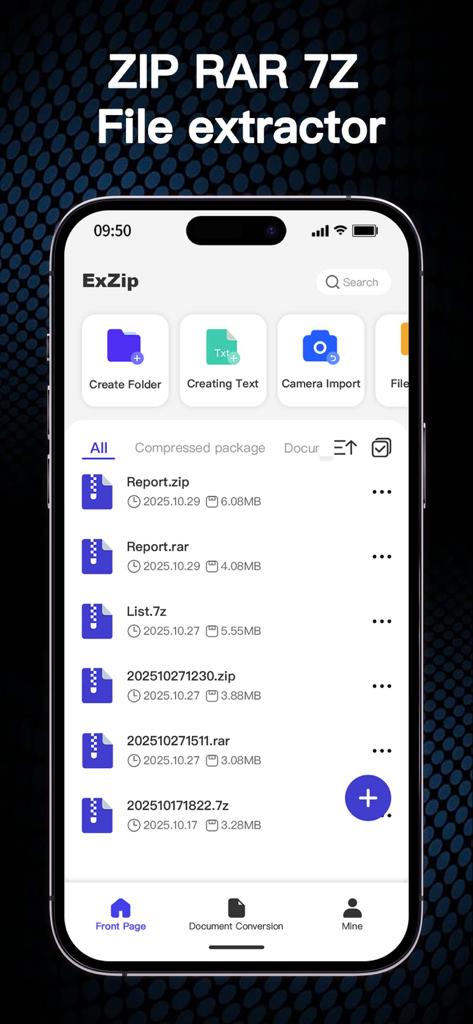
ZIP RAR 7Zファイルのリストを表示するExZipモバイルアプリのメイン画面

ZIP RAR 7Zファイルのリストを表示するExZipモバイルアプリのメイン画面

管理オプションを備えたZIP RAR 7Zファイルのリストを表示するiPhone上のExZipアプリのインターフェイス

管理オプションを備えたZIP RAR 7Zファイルのリストを表示するiPhone上のExZipアプリのインターフェイス

暗号化されたZIP RARまたは7Zファイルのパスワード入力プロンプトを表示するモバイルインターフェイス

暗号化されたZIP RARまたは7Zファイルのパスワード入力プロンプトを表示するモバイルインターフェイス

圧縮および整理ファイルのオプションを示すバッチファイル管理機能を備えたExZipアプリのスクリーンショット

圧縮および整理ファイルのオプションを示すバッチファイル管理機能を備えたExZipアプリのスクリーンショット

サッカーの試合を再生するExZipアプリのビデオプレーヤーを示すiPhone画面、見出しはマルチメディア再生をサポート

サッカーの試合を再生するExZipアプリのビデオプレーヤーを示すiPhone画面、見出しはマルチメディア再生をサポート

年次概要レポートのPDFプレビューを表示するExZipアプリ

年次概要レポートのPDFプレビューを表示するExZipアプリ

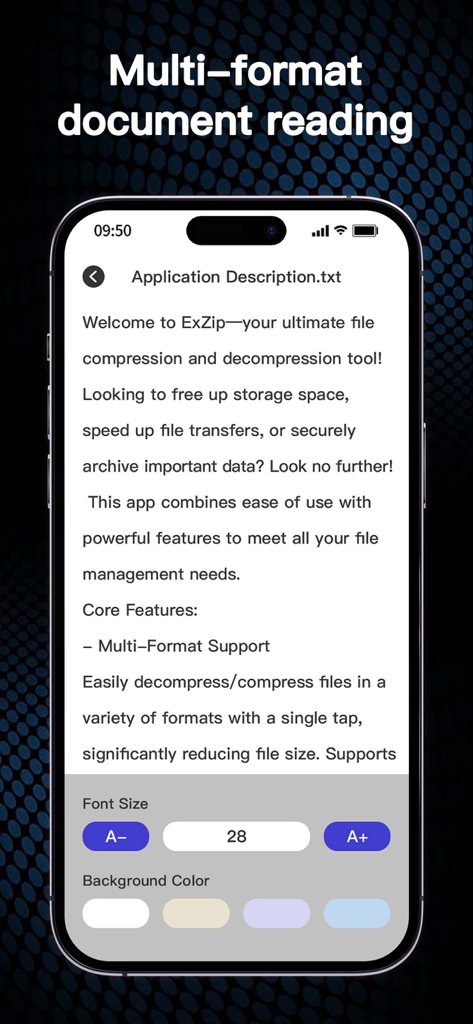
フォントサイズと背景色を調整するオプションを備えたテキストファイルビューアを示すExZipアプリのインターフェイス。

フォントサイズと背景色を調整するオプションを備えたテキストファイルビューアを示すExZipアプリのインターフェイス。

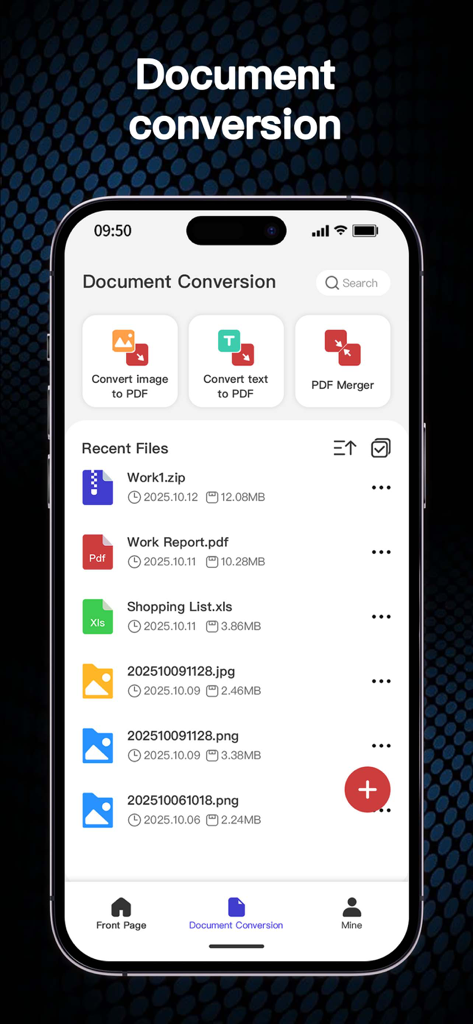
画像からPDFへの変換ツールとPDFマージーツールを示すExZipアプリのドキュメント変換画面

画像からPDFへの変換ツールとPDFマージーツールを示すExZipアプリのドキュメント変換画面

外出先でのファイル管理に必要なすべて

このアプリを際立たせるツール、 294K+ 人のユーザーが選択.

📦

あらゆるフォーマットを即座に開封

RAR、7ZからISO、TARまで、20以上のフォーマットをサポートしており、コンピューターなしで、すべての添付ファイルにアクセスできます。

🔒

プロレベルのプライバシーとセキュリティ

強力なパスワード暗号化で機密性の高いビジネスアーカイブを保護し、すべてのファイル処理をローカルで行うことで、最大限のデータプライバシーを実現します。

🛠️

内蔵生産性ツールキット

抽出にとどまりません。単一の合理化されたモバイルワークスペース内で、PDFを結合し、テキストファイルを編集し、画像をドキュメントに変換します。

世界中のユーザーに愛されています

Trusted by 294K+ 人がこのアプリを愛用しています.

"

"フリーランスデザイナーとして、私は常に.7zや.rarなどのさまざまなフォーマットのアセットパックを受け取ります。ExZipはiPhoneでそれらを楽に処理し、ラップトップを開くことなく通勤中にクライアントファイルを確認できます。超高速解凍は、私の毎日の生産性にとってまったくのゲームチェンジャーです。"

Sarah Jenkins, Creative Director
"

"このアプリは、私のiPadのみのワークフローに不可欠な部分です。機密性の高い契約書にパスワード保護をかけ、PDFをすべて1つのインターフェース内で結合できるのは驚くべきことです。ネイティブシステムにはないプロフェッショナルレベルのファイル管理を提供し、リモートワークの生活をよりスムーズで安全なものにします。"

Marcus Thompson, Marketing Consultant

アプリについて

について知っておくべきこと Zip, RAR, 7z File Extractor.

説明

Welcome to ExZip—your ultimate file compression and decompression tool! Looking to free up storage space, speed up file transfers, or securely archive important data? Look no further! This app combines ease of use with powerful features to meet all your file management needs. Core Features: - Multi-Format Support Easily decompress/compress files in a variety of formats with a single tap, significantly reducing file size. Supports ZIP, RAR, 7Z, Lzh, ZIPX, TAR, GZIP, BZIP, TGZ, TBZ, ISO, DEB, CAB, CBZ, CBR, JAR, RPM, GZ, ACE, AES, MSI, and more. - Smart Decompression Automatically identifies and decompresses various compressed files, instantly restoring them to their original state without having to manually select a format. - Comprehensive File Management Powerful file management tools, including move, copy, delete, and rename options, ensure your device stays organized. - Password Protection Protect your sensitive files with password protection for enhanced privacy and security. - Offline Capability Compress and decompress files anytime, anywhere, without an internet connection, making it ideal for travel and mobile work. Advantages and Highlights: · Lightning-Fast Processing Adopting advanced compression algorithms, this app significantly improves compression and decompression speeds, saving you valuable time. · Wide Compatibility Fully compatible with the latest iOS on iPhone, maximizing device performance. · User-Centered Design An intuitive and easy-to-use interface makes it easy for even beginners to get started and enjoy efficient file management. · Regular Updates We continually incorporate user feedback to release new features and optimize the app to maintain optimal performance. Download Now: Say goodbye to tedious file management! Download "ExZip" now and start your smooth file management journey. Whether you're working, studying, or just living your daily life, it's your go-to app! Subscription Information Thank you for using ExZip! Our app offers an auto-renewing subscription. Please read the following details carefully before subscribing: 1. Subscription Content Subscribers can use features such as file compression, encrypted compression records, multi-format compression and decompression, file recovery from the Recycle Bin, PDF merging, and TXT document editing. If you haven't subscribed yet, you can use features such as file compression and decompression, image to PDF conversion, and text to PDF conversion. Subscription benefits are valid throughout the subscription period. 2. Payment Upon confirmation of purchase, payment will be charged to your Apple ID account. Subscription automatically renews unless auto-renew is turned off at least 24 hours before the end of the current period. The renewal fee will be charged within 24 hours prior to the end of the current period. 3. Managing Subscriptions You can manage and cancel your subscription at any time by going to Settings → Apple ID → Subscriptions on your iOS device. After canceling your subscription, your subscription benefits will continue until the end of the current billing period. 4. Free Trial (if applicable) If a free trial is offered, it will automatically convert to a paid subscription unless canceled at least 24 hours before the end of the trial period. Any unused portion of a free trial will be forfeited when you purchase a subscription. Privacy Policy: https://sites.google.com/view/zip-privacy-policy Terms: https://sites.google.com/view/zip-terms

最新バージョン

1.2.5

サイズ

51.2 MB

リリース日

2024年12月3日

どこでも、どんなファイルでも扱える準備はできていますか?

モバイル生産性を向上させた294K人以上のユーザーに加わりましょう。超高速圧縮、完全なフォーマットサポート、外出先での安全なファイル管理のために、今すぐExZipをダウンロードしてください。

ダウンロード: App Store
FAQ

よくある質問

について知っておくべきこと Zip, RAR, 7z File Extractor

ExZipとは何で、どのような機能がありますか?

ExZipは、iOSデバイスのストレージ容量を解放し、ファイル転送を高速化し、重要なデータを安全にアーカイブすることを目的としたファイル圧縮・解凍ツールです。強力なファイル管理機能も提供します。

ExZipアプリはどのファイル形式をサポートしていますか?

ExZipは、ZIP、RAR、7Z、Lzh、ZIPX、TAR、GZIP、BZIP、TGZ、TBZ、ISO、DEB、CAB、CBZ、CBR、JAR、RPM、GZ、ACE、AES、MSIなど、幅広い形式の圧縮・解凍をサポートしています。

ExZipは自動ファイル解凍機能を提供していますか?

はい、ExZipにはスマート解凍機能が搭載されています。これにより、アプリはさまざまな圧縮ファイルを自動的に識別して解凍し、手動で形式を選択する必要なく、瞬時に元の状態に戻すことができます。

ExZipアプリを使用してファイルをパスワードで保護できますか?

はい、ExZipは機密性の高いファイルに対してパスワード保護を提供します。このコア機能はプライバシーとセキュリティを強化し、ユーザーは圧縮パッケージを暗号化してデータを保護できます。

ExZipはインターネット接続なしで動作しますか?

はい、ExZipはオフライン機能を提供します。ユーザーはインターネット接続を必要とせずに、いつでもどこでもファイルを圧縮・解凍できるため、旅行やモバイルワークに適しています。

ExZipはどのようなファイル管理機能を提供していますか?

ExZipには包括的なファイル管理ツールが含まれています。これにより、ユーザーは移動、コピー、削除、名前変更のオプションを使用でき、デバイスを整理し、効率的なファイル処理を促進するのに役立ちます。

ExZipはiPhoneの最新iOSと互換性がありますか?

ExZipはiPhoneの最新iOSバージョンと完全に互換性があります。これにより、最適なパフォーマンスと最新のAppleモバイルオペレーティングシステムとのシームレスな統合が保証されます。

ExZipサブスクリプションで利用できる限定機能は何ですか?

ExZipサブスクリプションでは、暗号化された圧縮レコード、マルチフォーマット圧縮/解凍、ゴミ箱からのファイル復元、PDFマージ、TXTドキュメント編集などの追加機能が利用可能になります。

ExZipでサブスクリプションなしで利用できる機能は何ですか?

ExZipサブスクリプションなしでも、基本的なファイル圧縮・解凍、画像からPDFへの変換、テキストからPDFへの変換機能にアクセスできます。

ExZipサブスクリプションの管理またはキャンセル方法を教えてください。

ExZipサブスクリプションはいつでも管理またはキャンセルできます。iOSデバイスで[設定] → [Apple ID] → [サブスクリプション]に移動して、サブスクリプションを管理してください。

ExZipはドキュメント変換機能に対応していますか?

はい、ExZipはさまざまなドキュメント変換に対応しています。画像からPDFへの変換、テキストからPDFへの変換、複数のPDFドキュメントのマージなどの機能を提供します。

ExZip内でマルチメディアファイルを再生できますか?

はい、ExZipはマルチメディア再生に対応しています。アプリケーションにより、ユーザーはインターフェイス内で直接さまざまなマルチメディアファイルを閲覧および再生できます。

ExZipはどのように高速な圧縮・解凍速度を実現していますか?

ExZipは、高度な圧縮アルゴリズムを利用することで、驚異的な高速処理速度を実現しています。この技術は、圧縮と解凍の両方の時間を大幅に短縮し、ユーザーの貴重な時間を節約します。