Animoog Z Synthesizer

Animoog Z Synthesizer

다운로드: App Store
Spark by MWM logo
로고: Animoog Z Synthesizer

Animoog Z: 다차원 신디사이저의 진화

Moog의 Anisotropic Synth Engine의 강력한 성능을 활용하여 시각적으로 새로운 사운드 세계를 탐험하세요. 표현력이 풍부한 퍼포먼스와 전문적인 사운드 디자인을 위해 설계된 Animoog Z는 iPad, iPhone 및 Mac에서 전설적인 Moog 사운드를 제공합니다.

개발사

Moog Music Inc.

카테고리

Music

다운로드

137K+

사용자 평점

4.8/5

총 평가 수

2K+

지원 언어

1

사운드의 차원

이 인터페이스를 사용하는 137K+ 명의 사용자.

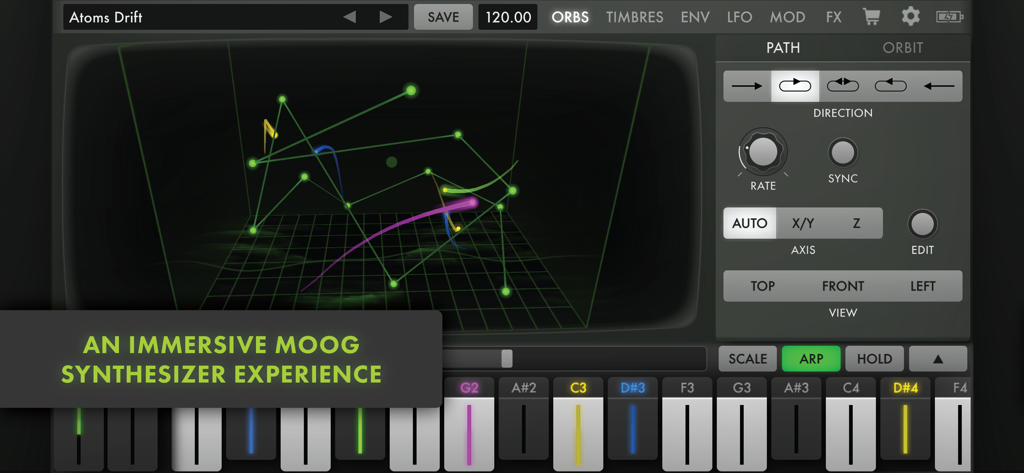
Animoog Z 신디사이저 인터페이스, 3D 오브 사운드 디자인 화면 표시

Animoog Z 신디사이저 인터페이스, 3D 오브 사운드 디자인 화면 표시

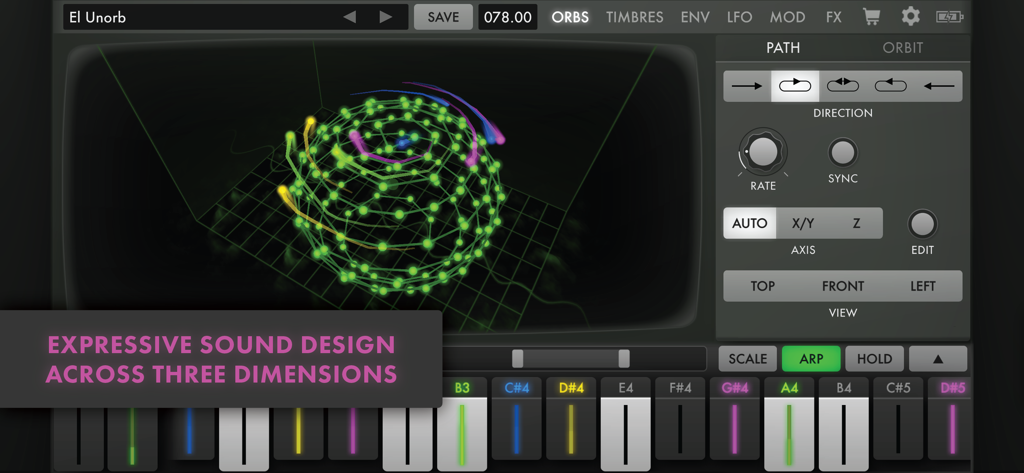
Animoog Z 신디사이저 앱 인터페이스, 3D 사운드 디자인 시각화 및 터치 키보드 특징

Animoog Z 신디사이저 앱 인터페이스, 3D 사운드 디자인 시각화 및 터치 키보드 특징

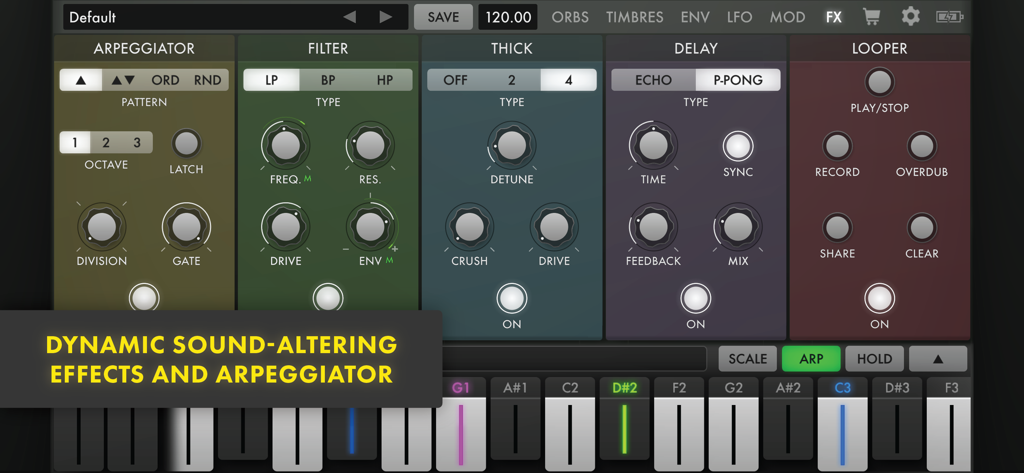
Animoog Z 앱 인터페이스, 아르페지에이터 필터 틱 딜레이 및 루퍼를 포함한 효과 설정 표시

Animoog Z 앱 인터페이스, 아르페지에이터 필터 틱 딜레이 및 루퍼를 포함한 효과 설정 표시

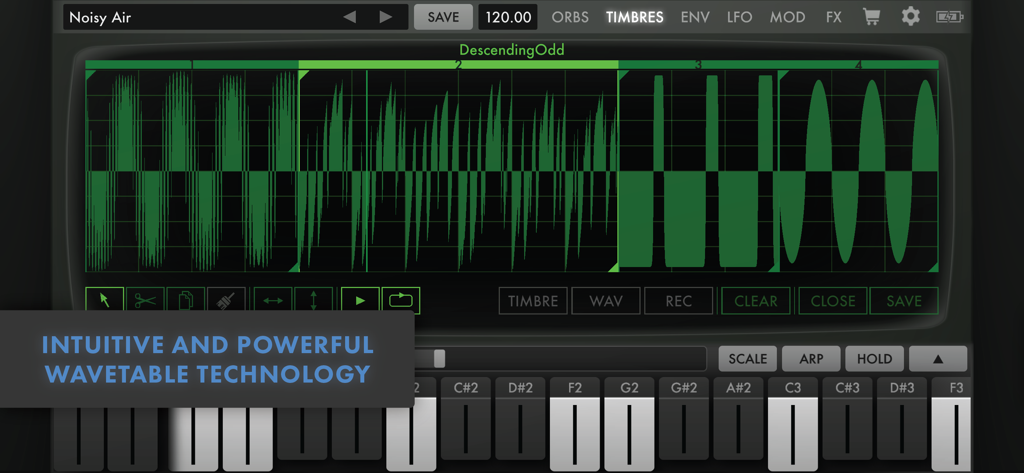
Animoog Z 신디사이저 음색 편집기, 녹색 파형 웨이브테이블 및 디지털 키보드 표시

Animoog Z 신디사이저 음색 편집기, 녹색 파형 웨이브테이블 및 디지털 키보드 표시

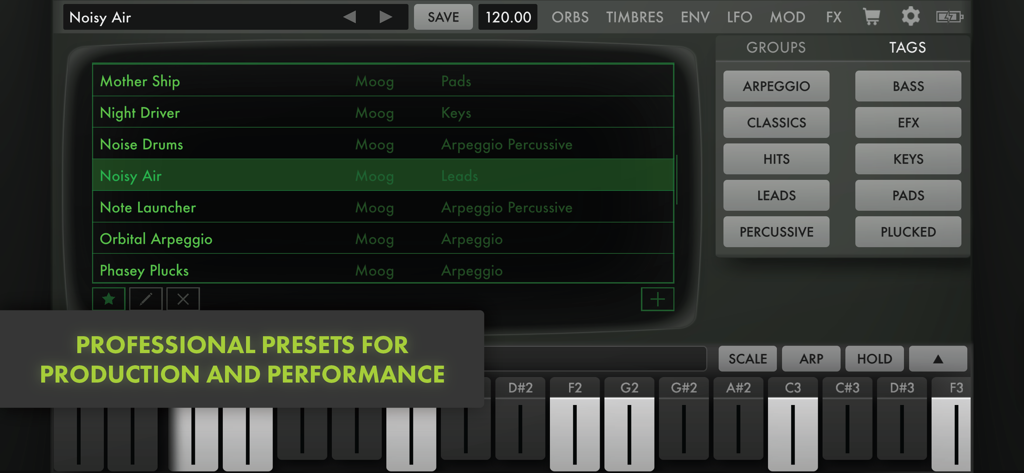
Animoog Z 신디사이저 인터페이스, 전문 사운드 프리셋 및 카테고리 태그 표시

Animoog Z 신디사이저 인터페이스, 전문 사운드 프리셋 및 카테고리 태그 표시

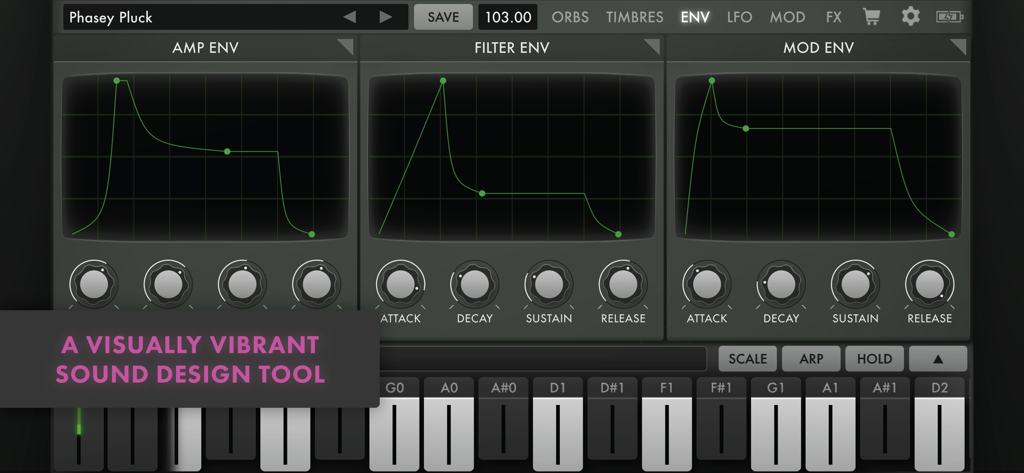
Animoog Z 신디사이저 앱 인터페이스, 진폭 필터 및 모듈레이션 엔벨로프에 대한 시각적 제어 표시

Animoog Z 신디사이저 앱 인터페이스, 진폭 필터 및 모듈레이션 엔벨로프에 대한 시각적 제어 표시

신디사이저의 미래를 마스터하세요

이 앱을 돋보이게 하는 도구, 137K+ 명의 사용자가 선택.

🌌

3D 사운드스케이프 탐색

Anisotropic Synth Engine을 사용하여 3개의 축을 가로질러 사운드를 시각적으로 탐색하며 실시간으로 변화하는 유동적인 질감을 만듭니다.

🎹

비교할 수 없는 촉각적 표현

MPE와 다성음 터치 키보드의 성능을 활용하여 전문가 수준의 정밀도로 사운드의 모든 뉘앙스를 제어하세요.

🔗

매끄러운 스튜디오 통합

AUv3 지원을 통해 모든 DAW에 Moog 사운드를 가져오고 iPhone, iPad 및 Mac 간의 창의적 흐름을 동기화하세요.

전 세계 사용자들에게 사랑받는 앱

Trusted by 137K+ 명이 이 앱을 사랑합니다.

"

"Animoog Z는 제 모바일 프로덕션 워크플로우를 완전히 재정의했습니다. MPE 구현은 놀랍도록 반응성이 뛰어나며, Logic Pro for iPad 내에서 AUv3로 실행하면 스튜디오에 하드웨어가 가득하지 않아도 전설적인 Moog의 따뜻함을 얻을 수 있습니다. Anisotropic Synth Engine은 다른 곳에서는 얻을 수 없는 독특한 질감을 만들어냅니다."

Alex Rivera
"

"사운드 디자인을 좋아하지만 종종 전통적인 신디사이저가 어렵다고 느끼는 사람으로서, 여기의 시각적 UI는 게임 체인저입니다. 궤도 경로를 드래그하여 사운드가 실시간으로 진화하는 것을 보고 듣는 것은 정말 마법 같습니다. 터치스크린에서 연주해 본 악기 중 가장 직관적이고 영감을 주는 악기입니다."

Jordan Wells

앱 소개

에 대해 알아야 할 모든 것 Animoog Z Synthesizer.

설명

Designed by Moog Music, the world’s first synth company, Animoog Z is an inspiring 16-voice polyphonic synthesizer that invites you to explore new concepts of multidimensional sound design and performance. Powered by Moog’s Anisotropic Synth Engine (ASE), Animoog Z empowers you to visually traverse new sonic universes and even create your own! ASE utilizes a novel orbit system to expand the concepts of wavetable and vector synthesis, allowing you to navigate dynamically through the X, Y, and Z axes of sound. Spontaneous sound design with Animoog Z is easy—simply select and drag the orbit path to explore endless sonic configurations. Animoog Z captures the immediate and intuitive experience of Moog synthesizers and applies it to the modern digital paradigm, enabling you to quickly sculpt incredibly fluid sounds that live, breathe, and evolve as you play. Use Animoog Z’s built-in keyboard to control pitch and pressure per voice (or send MIDI out), or connect your favorite MPE controller and explore Animoog Z’s MPE-compliant sound engine. Animoog’s diverse library of timbres includes digital tones and spectral sources alongside analog waveforms recorded from classic Moog circuits. If you ever run out of sounds, you can use the built-in Timbre Editor to record and edit your own timbres! Visually captivating and sonically immersive, Animoog Z brings music production to the next level. Whether you are new to synthesis or a professional musician, Animoog’s unique user interface gives you the power to easily create a visually vibrant and sonically rich universe. Key Features: • Multiplatform Experience: Share presets, timbres, and in-app purchases across your compatible Apple devices. • Anisotropic Synth Engine (ASE): An exciting Moog technology that allows you to move through the X, Y, and Z axes of unique timbres to create an expressive and constantly evolving soundscape. Sonic modulations are visualized in real time, providing a multisensory feedback mechanism for sound creation. • Polyphonic Modulation and Pitch Shifting: Control Animoog Z's advanced touch surface keyboard with configurable scales, key distances, pitch correction, and glide. Simply slide your fingers to control multiple per-voice parameters in Animoog Z right from the keys. • Timbre Editor: Go beyond simple sample playback and build unique sounds that evolve in multi-dimensional space. Select from a wide variety of built-in timbres or customize your sound by recording your own timbres (or import your own WAV files). • ENV/LFO Page: Articulate your dynamics with 3 independent six-stage DAHDSR envelopes for Amp, Filter, and Mod, each with loop and sync functionality. Give motion to your sound with 3 independent LFOs featuring continuously variable wave shapes, phase offset, delayed start, sync, and support for 1-8 repeats. • MOD Page: Highly flexible modulation matrix with 10 lanes and a multitude of sources, controllers, and destinations—including global destinations like Delay and Thick. Use the Solo and Enable controls to explore complex modulations layer by layer. • Effects Page: A collection of dynamic sound-altering and sound-augmenting effects with Delay, Chorus, Bitcrush, Filter, Arpeggiator, and Looper. Oscilloscope-style views display the output and impact of your effects. • MIDI: Use your favorite MIDI controller to control Animoog Z (with full support for MPE input) or go MIDI out to use Animoog Z's highly expressive keyboard to control your favorite instruments. Go even deeper with Animoog Z's exhaustive MIDI CC mapping system featuring MIDI Learn, multiple destinations for a single CC, and detailed control of which presets are loaded with program change. • Additional Features: Backwards compatibility with presets and timbres from the original Animoog, AUv3 support, 440Hz base frequency offset (+/- 10Hz), preset tagging, preset sharing, Global BPM, Tap Tempo, Ableton Link, keyboard typing and shortcuts, random presets, and undo/redo.

최신 버전

1.3.2

크기

77.8 MB

출시일

2021년 11월 23일

사운드의 새로운 차원으로 들어가 보세요

Animoog Z를 다운로드하고 iPhone, iPad 또는 Mac에서 전설적인 Moog 사운드로 다차원 사운드스케이프를 조각하기 시작하세요.

다운로드: App Store