Artstudio Pro: Draw, Paint

Artstudio Pro: Draw, Paint

다운로드: App Store
Spark by MWM logo
로고: Artstudio Pro: Draw, Paint
Artstudio Pro: iPad 및 Mac을 위한 가장 강력한 데스크톱급 스튜디오

GPU 가속 엔진, 무제한 레이어, 완벽한 Photoshop 브러시 지원으로 창의력을 발휘하세요. Apple Pencil에 최적화되고 구독 없이 성능을 요구하는 진지한 크리에이터를 위해 제작된 전문가 수준의 페인팅, 사진 편집 및 애니메이션을 경험하세요.

개발사

Sylwester Los

카테고리

Graphics & Design

다운로드

2M+

사용자 평점

4.7/5

총 평가 수

15K+

지원 언어

3

모든 픽셀의 숙련도

이 인터페이스를 사용하는 2M+ 명의 사용자.

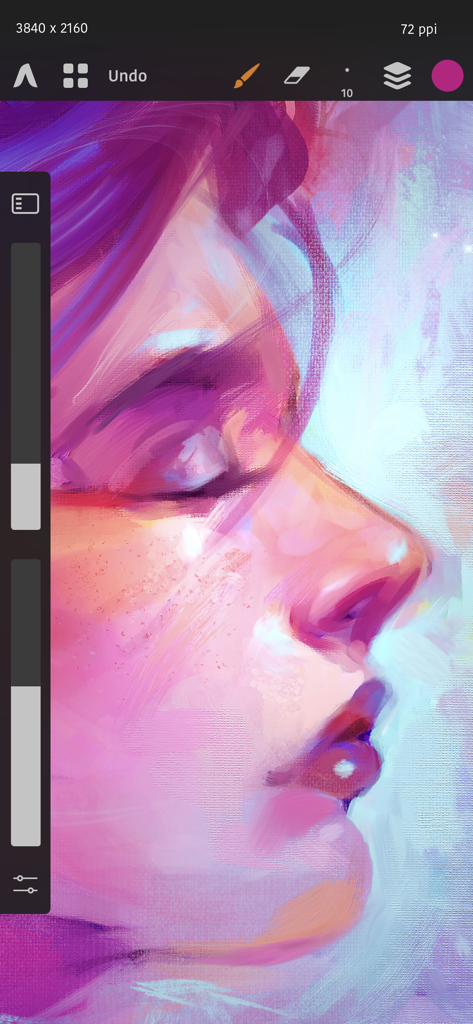
Artstudio Pro에서 브러시 도구와 캔버스 질감을 보여주는 디지털 인물화

Artstudio Pro에서 브러시 도구와 캔버스 질감을 보여주는 디지털 인물화

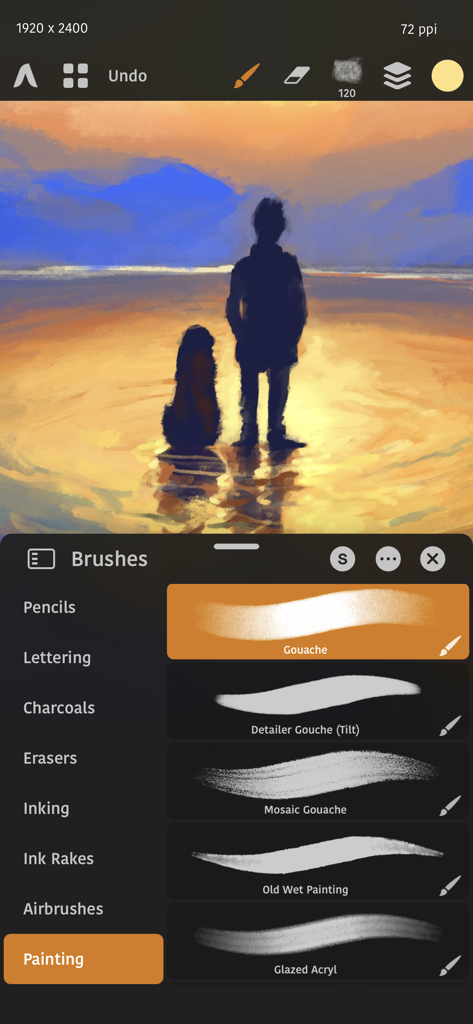
Artstudio Pro 인터페이스에 디지털 일몰 그림과 전문가용 페인팅 브러시 모음이 표시됩니다.

Artstudio Pro 인터페이스에 디지털 일몰 그림과 전문가용 페인팅 브러시 모음이 표시됩니다.

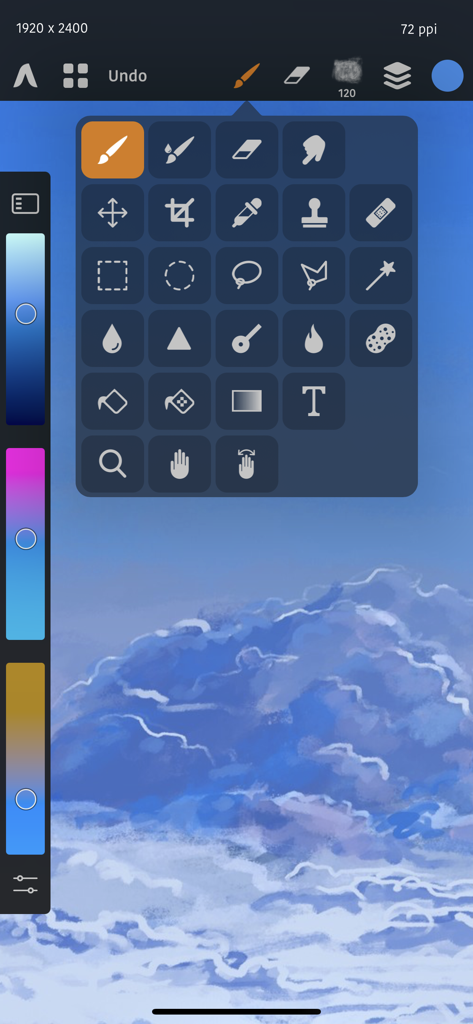
Artstudio Pro 앱의 전문 도구 팔레트 및 페인팅 인터페이스

Artstudio Pro 앱의 전문 도구 팔레트 및 페인팅 인터페이스

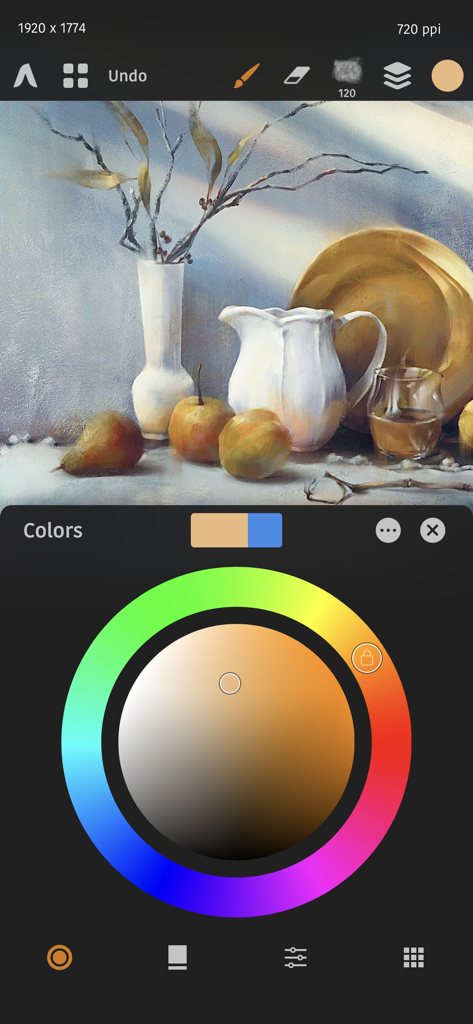
Artstudio Pro의 디지털 정물화 및 색상환 인터페이스

Artstudio Pro의 디지털 정물화 및 색상환 인터페이스

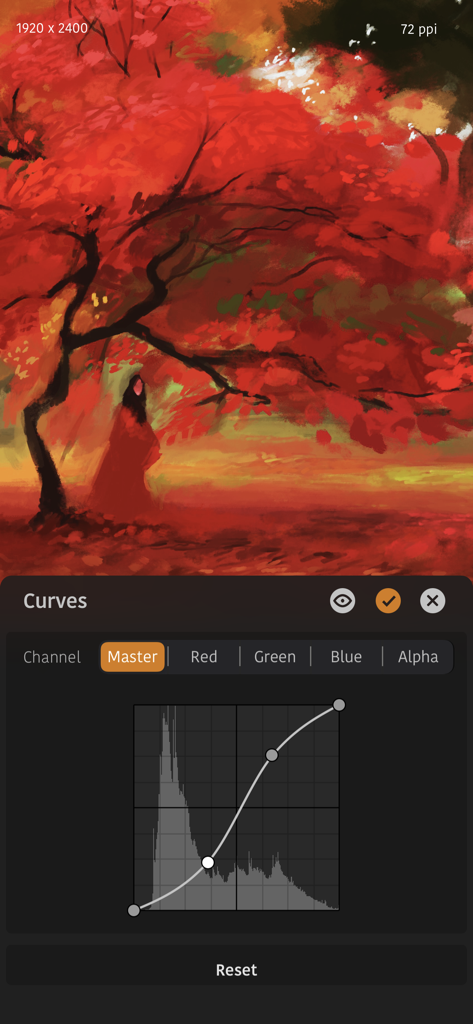
Artstudio Pro 인터페이스에서 붉은 가을 나무 디지털 그림 위에 곡선 조정 도구가 표시됩니다.

Artstudio Pro 인터페이스에서 붉은 가을 나무 디지털 그림 위에 곡선 조정 도구가 표시됩니다.

전문가 수준의 성능, 모바일의 자유

이 앱을 돋보이게 하는 도구, 2M+ 명의 사용자가 선택.

💎

데스크톱급 레이어 시스템

비파괴 조정 레이어, 클리핑 마스크 및 그룹화를 통해 복잡한 구성을 마스터하세요. 월별 요금 없이 전문 데스크톱 소프트웨어에서 기대하는 모든 것을 제공합니다.

Metal 가속 성능

당사의 64비트 ArtEngine으로 지연 없는 경험을 제공합니다. 멀티 코어 프로세서와 Apple Pencil에 최적화되어 있으며, 64Mpix의 거대한 캔버스도 유연하고 실시간으로 반응하며 처리합니다.

📂

원활한 프로 워크플로

완벽한 PSD 및 ABR 브러시 지원으로 기존 작업을 유지하세요. 좋아하는 도구를 가져오고 iCloud를 통해 기기 간에 프로젝트를 동기화하여 진정한 모바일 스튜디오 경험을 누리세요.

전 세계 사용자들에게 사랑받는 앱

Trusted by 2M+ 명이 이 앱을 사랑합니다.

"

"드디어 iPad를 위한 진정한 포토샵급 강력함이 등장했습니다. 전문 일러스트레이터로서 비파괴 조정 레이어와 .abr 브러시 지원은 다른 대부분의 앱에는 없는 절대적인 필수 기능입니다. 유연하고 강력하며, 가장 좋은 점은 월별 구독료가 없다는 것입니다."

엘레나 로드리게스, 프리랜서 컨셉 아티스트
"

"Artstudio Pro는 저의 올인원 크리에이티브 허브입니다. 사진을 보정하거나, 캐릭터 디자인을 그리거나, 소셜 미디어를 위한 애니메이션을 만들 때도 성능은 완벽합니다. 엔진은 거대한 64Mpix 캔버스도 전혀 지연 없이 처리합니다."

마커스 첸, 디지털 콘텐츠 크리에이터

앱 소개

에 대해 알아야 할 모든 것 Artstudio Pro: Draw, Paint.

설명

Introducing Artstudio Pro, the most powerful painting and photo editing app available for both iOS and macOS. The successor to our famous ArtStudio app has been redesigned bringing many new features and improvements taking full advantage of the latest technologies Metal, iCloud Drive, Apple Pencil, and optimized for 64-bit multi-core processors to achieve the smoothest possible workflow. Powerful engine App is based on the powerful GPU accelerated ArtEngine developed by Lucky Clan. It allows working with multiple documents, supports large canvas sizes and an unlimited number of layers. Incredible optimization ensures smooth work even with large canvases. • Realistic Color Pigment Blending • Canvas size up to 64Mpix • Unlimited layers • Multiple open documents • 27 tools: Move, Select, Crop, Eyedropper, Paint, Wet Paint, Eraser, Bucket/Pattern/Gradient Fill, Smudge, Dodge, Burn, Sponge, Text, Heal, Clone, and more • Full iCloud integration Flexible layer system Artstudio Pro introduces a new layer system with grouping, non-destructive layer effects, and adjustment layers. • Groups • Masks, clipping masks • Adjustment Layers • 9 layer effects: Bevel/Emboss, Stroke, Inner Shadow, Inner Glow, Outer Glow, Color/Gradient/Pattern Overlay, Drop Shadow • Text layers Advanced Brush engine Perfectly optimized, lag free mechanism generating smooth, real looking strokes, making the most of Apple Pencil. • Brush size up to 4000x4000 • 64-bit painting with pattern, double stamp, wet brush, dynamics • Brush editor with over 100 customizable settings • Over 150 built-in brushes divided into multiple groups: Pens, Pencils, Oil Painting, Inking, Charcoals, Airbrushes, Watercolor and many more • Symmetric painting Professional photo editor Photo editing options developed in cooperation with professional photographers. Each feature was tested in several scenarios and light conditions. • 15 adjustments available as non-destructive layer or simple adjustment: Brightness/Contrast, Levels, Curves, Exposure/Gamma, Shadows/Highlights, Vibrance, Hue/Saturation, Color Balance, Temperature/Tint, Black and White, Gradient Map and more • 4 auto adjustments: Auto Contrast, Levels, Lightness, Saturation • Transform: Basic, Perspective, Warp • Dozens of filters with realtime preview and the ability to generate seamless patterns • Inpaint, Elastify (Liquify) • Retouching tools: Heal, Dodge, Burn, Sponge and more • Image resize, Canvas resize • Crop and Trim Animation Create animation from layers or groups and finally export it to one of the most popular animation format • Scrollable timeline view with Play/Pause • Onion skin • Customizable Frame duration • Always visible layers • Export to MP4, HEVC, Animated GIF/PNG Import/Export We have implemented many parsers from the most popular assets/images formats and we are especially proud of our ABR/TPL parser which not only reads brush stamps and patterns, but also most settings which are converted to Artstudio Pro brush engine values. Import • Images - PNG, JPEG, PSD, HEIC, TIFF, GIF, PDF, most raw formats • Brushes - ABR, TPL • Color swatches - ASE, ACO • Patterns - PAT • Gradients - GRD • Fonts - TTF, OTF Export • Images - PNG, JPEG, PSD, TIFF, PDF Other features • Floating panels for Colors, Layers, Brushes etc • Screen recording • Customizable Quick menu • Customizable Shortcuts • Snapping to guidelines, dynamic guidelines, grid • Perspective grid assist • Mirror (flipped) view • Support of iPad Drag and Drop, Split View, Sharing Extension, Open In, Clipboard Free version limitations: • locked Saving • canvas size limited to device screen size • layers count limited to 3 • export only to jpg • locked animation export Minimum System Requirements Artstudio Pro for iOS requires iPhone or iPad running iOS 15.0 or above Privacy policy: https://luckyclan.com/privacy-policy Terms of use: https://luckyclan.com/terms-use

최신 버전

5.2.9

크기

384.5 MB

출시일

2017년 12월 13일

전문 스튜디오의 강력함을 어디에서나 누리세요

iOS에서 가장 강력한 페인팅 및 사진 편집 엔진을 위해 구독을 포기한 2백만 명이 넘는 크리에이터와 함께하세요. 당신의 걸작이 여기에서 시작됩니다.

다운로드: App Store
FAQ

자주 묻는 질문

에 대해 알아야 할 모든 것 Artstudio Pro: Draw, Paint

Artstudio Pro란 무엇인가요?

Artstudio Pro는 iOS 및 macOS에서 사용할 수 있는 강력한 페인팅 및 사진 편집 애플리케이션입니다. 원래 ArtStudio 앱의 후속 제품으로, 최적화되고 원활한 워크플로 경험을 위해 고급 기술을 활용합니다.

Artstudio Pro에는 어떤 기능이 있나요?

Artstudio Pro는 GPU 가속 엔진, 유연한 레이어 시스템, 고급 브러시 엔진, 전문 사진 편집 도구 및 애니메이션 기능을 제공합니다. 또한 포괄적인 가져오기/내보내기 옵션과 iCloud 통합을 포함합니다.

Artstudio Pro로 애니메이션을 만들 수 있나요?

네, Artstudio Pro를 사용하면 레이어나 그룹에서 애니메이션을 만들 수 있습니다. 양파 껍질, 사용자 정의 가능한 프레임 기간, MP4, HEVC, 애니메이션 GIF 또는 PNG 형식으로 애니메이션을 내보내는 옵션을 제공합니다.

Artstudio Pro는 어떤 파일 형식을 가져오고 내보낼 수 있나요?

Artstudio Pro는 PNG, JPEG, PSD, HEIC, TIFF, GIF, PDF 및 대부분의 원시 이미지 형식을 가져옵니다. ABR/TPL 브러시 가져오기도 지원합니다. 내보내기 옵션에는 PNG, JPEG, PSD, TIFF 및 PDF 이미지가 포함됩니다.

Artstudio Pro는 Apple Pencil을 지원하나요?

네, Artstudio Pro는 Apple Pencil을 완벽하게 지원합니다. 앱의 고급 브러시 엔진은 Apple Pencil의 기능을 활용하도록 최적화되어 그림 및 드로잉 중에 부드럽고 사실적인 획을 가능하게 합니다.

Artstudio Pro 무료 버전의 제한 사항은 무엇인가요?

Artstudio Pro 무료 버전에는 몇 가지 제한 사항이 있습니다. 저장 기능 잠금, 기기 화면으로 제한된 캔버스 크기, 최대 3개의 레이어, JPG 형식으로만 내보내기, 애니메이션 내보내기 기능 잠금 등이 포함됩니다.

Artstudio Pro의 iOS 시스템 요구 사항은 무엇인가요?

iOS용 Artstudio Pro는 iOS 15.0 이상을 실행하는 iPhone 또는 iPad가 필요합니다. 이를 통해 앱의 강력한 기능과 성능 최적화가 호환되는 기기에서 올바르게 작동하도록 보장합니다.

Artstudio Pro는 몇 개의 레이어를 처리할 수 있나요?

Artstudio Pro는 무제한의 레이어를 지원하여 복잡하고 상세한 구성을 가능하게 합니다. 또한 최대 64메가픽셀의 대형 캔버스 크기를 처리하며 부드러운 성능을 위해 최적화되었습니다.

Artstudio Pro에는 곡선(Curves)과 같은 사진 편집 도구가 포함되어 있나요?

네, Artstudio Pro에는 곡선(Curves)과 같은 전문 사진 편집 도구가 포함되어 있습니다. 앱의 UI 내에서 볼 수 있는 레벨, 노출/감마, 곡선을 포함한 15가지 비파괴 조정을 제공합니다.

Artstudio Pro에는 어떤 종류의 브러시를 사용할 수 있나요?

Artstudio Pro는 다양한 범주로 구성된 150개 이상의 내장 브러시를 제공합니다. 여기에는 브러시 메뉴 인터페이스에서 볼 수 있듯이 펜, 연필, 유화, 잉크, 목탄, 에어브러시, 수채화 등이 포함됩니다.

Artstudio Pro는 iCloud 통합을 지원하나요?

네, Artstudio Pro는 완전한 iCloud 통합 기능을 제공합니다. 이 기능을 통해 사용자는 iCloud Drive가 활성화된 모든 기기에서 창의적인 프로젝트 및 파일을 원활하게 저장하고 액세스할 수 있습니다.

Artstudio Pro는 왜곡(Warp)과 같은 고급 변환을 수행할 수 있나요?

네, Artstudio Pro는 전문 사진 편집기 내에서 고급 변환 옵션을 제공합니다. 이러한 도구를 사용하면 기본, 원근, 왜곡 변환을 통해 이미지를 정확하게 조작할 수 있습니다.

Artstudio Pro는 비파괴 레이어 효과를 제공하나요?

네, Artstudio Pro는 비파괴 레이어 효과를 지원하는 유연한 레이어 시스템을 특징으로 합니다. 또한 레이어 그룹화, 마스크, 클리핑 마스크 및 고급 편집 워크플로를 위한 다양한 조정 레이어를 포함합니다.