Audio / Spectrum Analyzer

Audio / Spectrum Analyzer

다운로드: App Store
Spark by MWM logo
로고: Audio / Spectrum Analyzer
오디오 / 스펙트럼 분석기: 사운드 전문가를 위한 정밀 실시간 분석

실험실 수준의 정확도로 언제 어디서든 오디오를 보정, 문제 해결 및 시각화하기 위해 전문가급 FFT, RTA 및 신호 생성의 힘을 활용하십시오.

개발사

Loop-Sessions.LLC.

카테고리

Music

다운로드

297K+

사용자 평점

4.5/5

총 평가 수

1K+

지원 언어

2

모든 프레임에 담긴 정밀도

이 인터페이스를 사용하는 297K+ 명의 사용자.

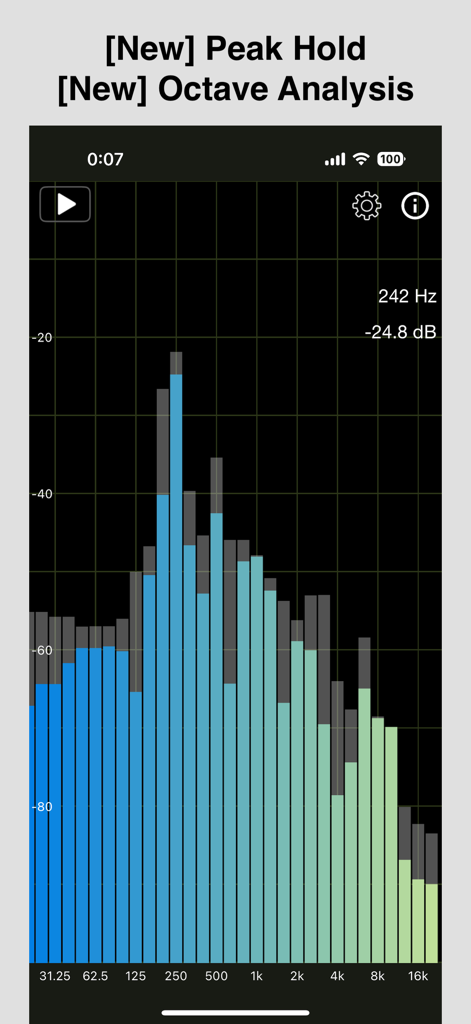
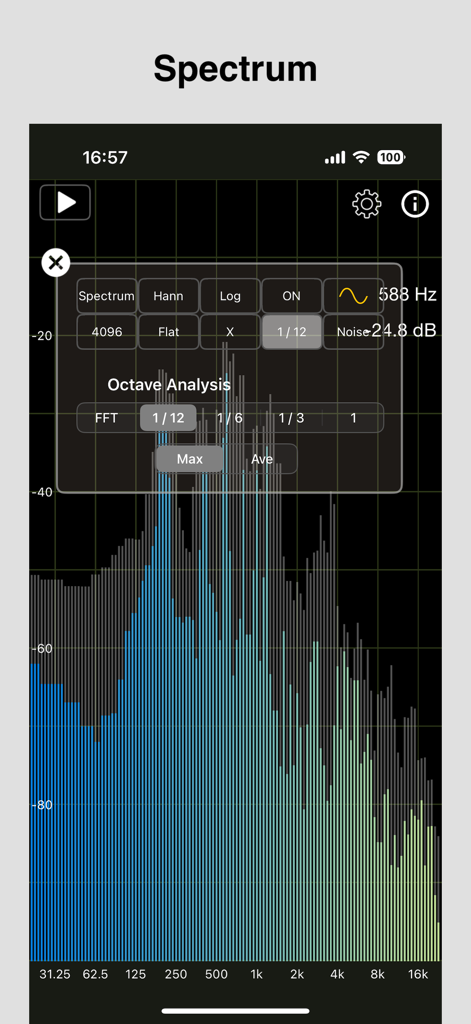
옥타브 분석 및 피크 홀드 디스플레이를 보여주는 오디오 스펙트럼 분석기 앱

옥타브 분석 및 피크 홀드 디스플레이를 보여주는 오디오 스펙트럼 분석기 앱

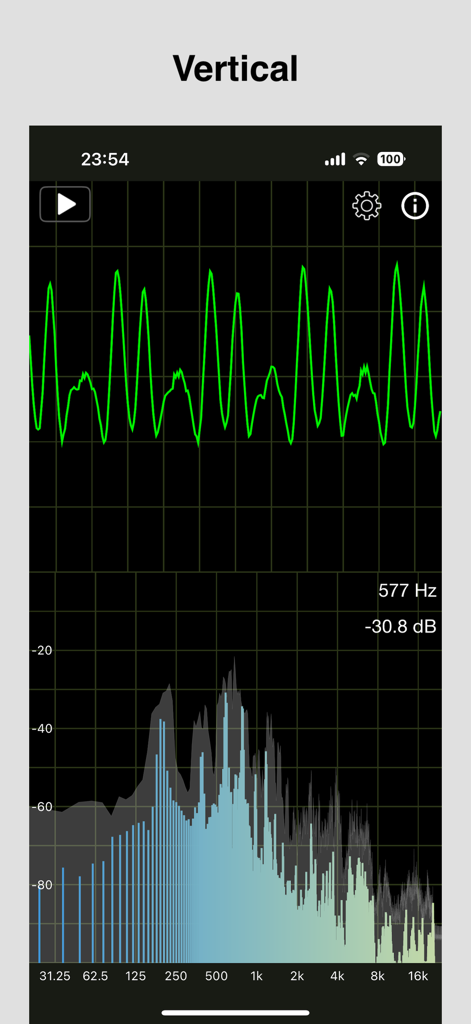
오디오 파형 및 주파수 스펙트럼 분석을 보여주는 실시간 수직 디스플레이.

오디오 파형 및 주파수 스펙트럼 분석을 보여주는 실시간 수직 디스플레이.

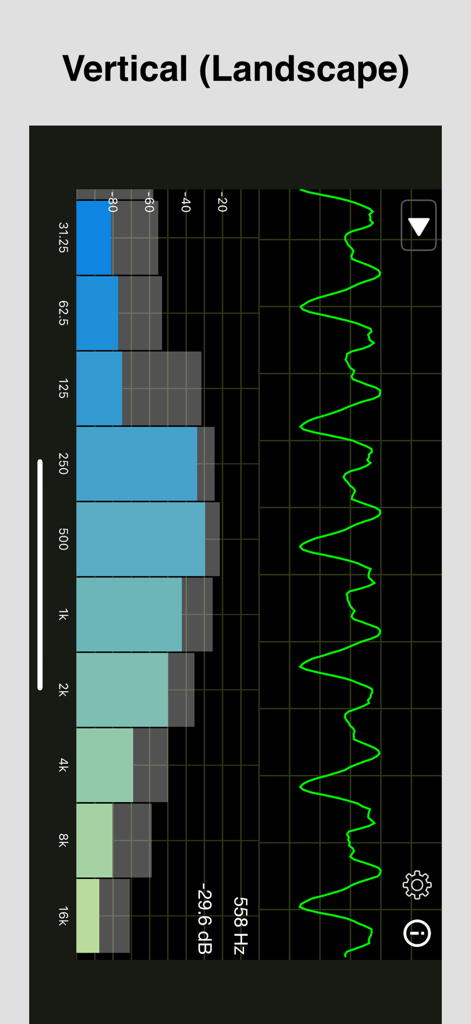
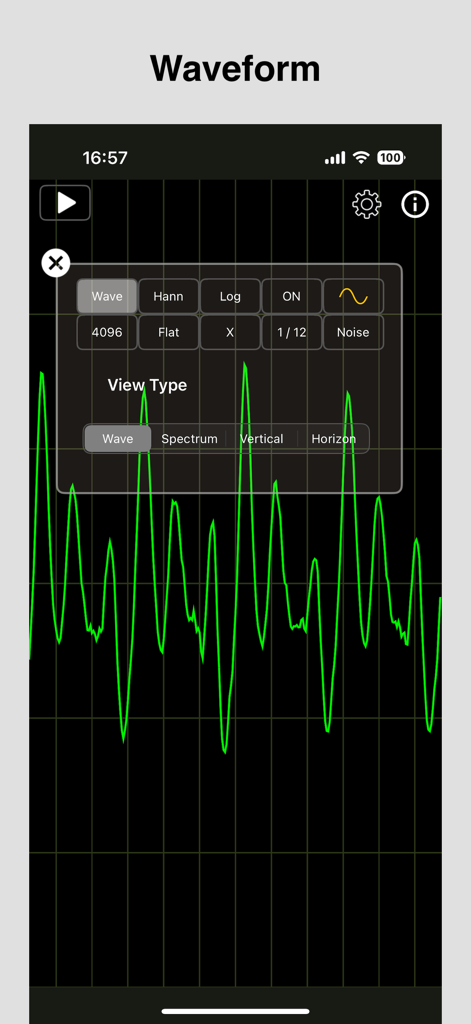
주파수 스펙트럼 막대와 파형 선을 보여주는 실시간 오디오 분석기

주파수 스펙트럼 막대와 파형 선을 보여주는 실시간 오디오 분석기

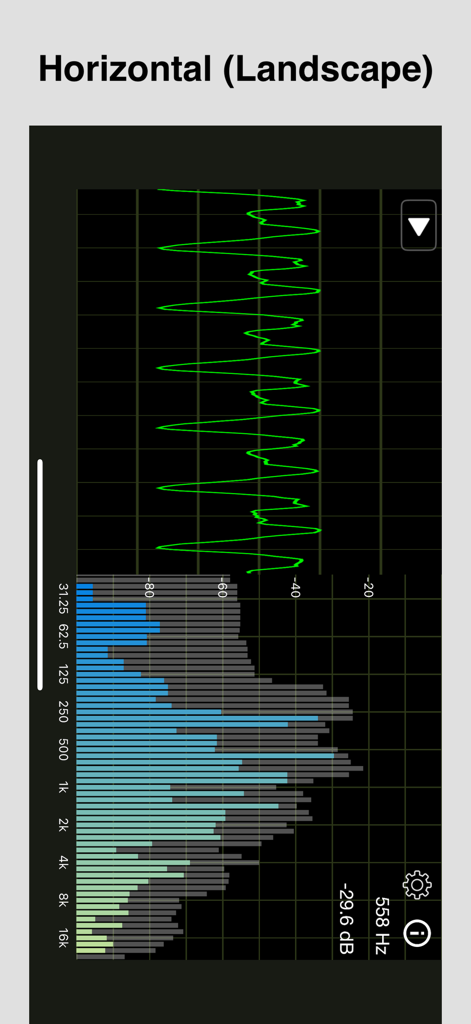
가로 모드에서 파형 및 주파수 스펙트럼을 보여주는 오디오 스펙트럼 분석기 앱 인터페이스

가로 모드에서 파형 및 주파수 스펙트럼을 보여주는 오디오 스펙트럼 분석기 앱 인터페이스

전문 옥타브 분석 설정 메뉴가 오버레이된 실시간 주파수 스펙트럼 그래프.

전문 옥타브 분석 설정 메뉴가 오버레이된 실시간 주파수 스펙트럼 그래프.

분석기 앱에서 검은색 그리드에 표시되는 실시간 녹색 오디오 파형

분석기 앱에서 검은색 그리드에 표시되는 실시간 녹색 오디오 파형

사운드 전문가를 위한 정밀 엔지니어링

이 앱을 돋보이게 하는 도구, 297K+ 명의 사용자가 선택.

📊

고해상도 FFT 분석

최대 8192개의 조정 가능한 FFT 크기와 실험실 수준의 정확도를 위한 여러 창 함수를 사용하여 수술 수준의 정밀도로 오디오 신호를 시각화합니다.

🔊

내장 신호 및 노이즈 생성기

외부 하드웨어 없이 핑크 노이즈, 화이트 노이즈 또는 특정 파형을 생성하여 보정 워크플로우를 간소화하여 환경을 조정합니다.

📏

고급 음향 측정 지표

전문 스튜디오 보정 업계 표준을 충족하기 위해 상세한 옥타브 대역 분석을 수행하고 A, C 또는 Z 가중 필터를 적용합니다.

전 세계 사용자들에게 사랑받는 앱

Trusted by 297K+ 명이 이 앱을 사랑합니다.

"

"이 앱은 라이브 사운드 툴킷의 필수적인 부분이 되었습니다. FFT 해상도와 실시간 응답은 사운드 체크 중 실시간으로 피드백 주파수를 식별하는 데 놀랍습니다. 핑크 노이즈를 생성하면서 로그 및 선형 스케일 간 전환 기능은 룸 보정을 훨씬 더 효율적으로 만듭니다. 모바일에서 사용한 RTA 중 가장 안정적입니다."

Marcus Thorne, 라이브 사운드 엔지니어
"

"이 앱을 사용하여 홈 시어터 크로스오버 설정을 미세 조정했으며 그 결과는 이전과 완전히 달라졌습니다. 옥타브 분석 및 피크 홀드 기능을 통해 룸 모드가 저음역에 간섭하는 지점을 정확히 파악할 수 있었습니다. 하이엔드 오디오 보정에 필요한 기술적 깊이의 데이터를 제공하는 전문가급 스펙트럼 분석기입니다."

Elena Rodriguez, 음향 컨설턴트

앱 소개

에 대해 알아야 할 모든 것 Audio / Spectrum Analyzer.

설명

This RTA app supports simultaneous display of "audio waveform" and "amplitude spectrum" (size of FFT calculation result for each frequency) for audio signals input from a microphone. (FFT: Fast Fourier Transform, RTA: Real Time Analyzer) [Features] - Supports simultaneous display of audio waveform / amplitude spectrum. - Supports orientation both portrait and landscape. - Selectable configuration of "audio waveform" / "amplitude spectrum" display. - Selectable FFT size. - Selectable window function. (used in amplitude spectrum calculation) - Selectable frequency weighting. (A-weighting, C-weighting, Flat/Z-weighting) - Selectable the type of expressing the X direction (frequency) of the amplitude spectrum. (Linear, Log) - Displays the peak level and its frequency of the amplitude spectrum. - Peak Hold (displays the results of holding past peak values ​​of the amplitude spectrum). - Octave Analysis (displays the amplitude spectrum divided into octave bands). - Generates the audio signal (4 types of waveform) - Generates the noise signal (white noise, pink noise) [Setting items] 1. Screen structure : Screen configuration can be selected. - Wave: Display audio waveform only. - Spectrum: Display amplitude spectrum only. - Vertical: Display audio waveform / amplitude spectrum vertically. - Horizon: Display audio waveform / amplitude spectrum horizontally. 2. FFT size : Selectable FFT size. (number of samples used when performing FFT) 1024, 2048, 4096, 8192 3. Window function : Selectable window function (multiplication just before FFT) used for amplitude spectrum calculation. Hanning, Hamming, Blackman, No window 4. Frequency Weighting : Selectable frequency weighting. - Flat (Z-weighting): No frequency weighting is applied. - A-weighting: Frequency response that takes into account human hearing. - C-weighting: Relatively flat response. 5. Spectrum X Scale Type : Selectable the type of expressing the X direction (frequency) of the amplitude spectrum. - Linear: Distributed at equal intervals - Log: The intervals increase logarithmically 6. Spectrum Zoom Direction : Select the zoomable direction of the amplitude spectrum from the X direction (frequency) or Y direction (amplitude). (For ease of use, we have made it possible to zoom only in the selected direction.) 7. Peak Hold : Displays the results of holding the past maximum values ​​(peak values) of the amplitude spectrum. 8. Octave Analysis : Displays the results of classifying the amplitude spectrum into octave bands. Division method: - FFT: Spectral display - 1/12, 1/6, 1/3, 1 octave: Display divided into octave bands Calculation method: - Max: Displays the maximum spectrum value in each band - Average: Displays the average spectrum value in each band 9. Generates the audio signal : Set the audio signal to be generated. - There are 4 types of waveform. (Sine, Triangle, Squire, Saw) - It can set the value of the frequency in 20Hz - 20000Hz. 10. Generates the noise signal : Set the noise signal to be generated. - There are 2 types of noise. (White noise, pink noise) - The volume can be adjusted. [Other] - Supports background color selection (black, white). - Supports adjusting the waveform line width. (1 ~ 5 px) - Supports amplitude spectrum bar color selection (solid, colorful). - Supports Bluetooth connection policy selection (disabled, HFP, A2DP). - Supports scaling of waveform/spectrum screens in the Y direction (magnification: 0.5 - 2.0). - Supports scaling of spectrum screens in the X direction (magnification: 1.0 - 16.0). [Information] - The vertical line spacing in the audio waveform display is 2 mSec. - The amplitude spectrum calculation uses the vDSP library. If you need multi audio signals, please try "Multiple Tone Generator" from the link on the setting screen in this app. This app generates the audio signal (Sine, Triangle, Squire, Saw) of 6 ch (Up to 16 ch). This app can hide ads by In-App Purchase. If you like this app, we hope you can use it.

최신 버전

1.9.3

크기

4.9 MB

출시일

2020년 5월 18일

전문가급 정밀도로 사운드 환경을 마스터하십시오

고급 RTA 및 FFT 도구를 사용하여 모든 오디오 신호를 분석, 보정 및 완벽하게 만들기 위해 당사의 도구를 사용하는 수천 명의 사운드 엔지니어 및 오디오 애호가와 함께하십시오.

다운로드: App Store
FAQ

자주 묻는 질문

에 대해 알아야 할 모든 것 Audio / Spectrum Analyzer

"Audio / Spectrum Analyzer" 앱이란 무엇인가요?

"Audio / Spectrum Analyzer" 앱은 마이크 입력에서 오디오 파형과 진폭 스펙트럼을 동시에 표시하는 RTA(실시간 분석기) 도구입니다. 분석을 위해 고속 푸리에 변환(FFT)을 사용합니다.

"Audio / Spectrum Analyzer" 앱은 오디오 파형과 진폭 스펙트럼을 동시에 표시할 수 있나요?

네, "Audio / Spectrum Analyzer" 앱은 오디오 파형과 진폭 스펙트럼을 동시에 표시하는 것을 지원합니다. 사용자는 다양한 화면 구성을 선택할 수도 있습니다.

"Audio / Spectrum Analyzer" 앱은 어떤 FFT 크기를 지원하나요?

"Audio / Spectrum Analyzer" 앱은 1024, 2048, 4096, 8192 샘플의 선택 가능한 FFT 크기를 지원합니다. 이는 고속 푸리에 변환을 수행하는 데 사용됩니다.

"Audio / Spectrum Analyzer" 앱은 화면 방향을 어떻게 처리하나요?

"Audio / Spectrum Analyzer" 앱은 세로 및 가로 화면 방향을 모두 지원합니다. 사용자는 파형/스펙트럼 결합 디스플레이에 대해 세로 또는 가로 레이아웃을 선택할 수도 있습니다.

"Audio / Spectrum Analyzer"에 피크 홀드 기능이 포함되어 있나요?

네, "Audio / Spectrum Analyzer" 앱에는 피크 홀드 기능이 포함되어 있습니다. 이 기능은 시간 경과에 따른 진폭 스펙트럼의 최대 피크 값을 표시하여 이력 데이터를 제공합니다.

"Audio / Spectrum Analyzer" 앱의 옥타브 분석이란 무엇인가요?

"Audio / Spectrum Analyzer" 앱의 옥타브 분석은 진폭 스펙트럼을 옥타브 대역으로 나누어 표시합니다. FFT, 1/12, 1/6, 1/3, 1 옥타브와 같은 분할 방법을 제공합니다.

"Audio / Spectrum Analyzer" 앱에서 오디오 신호를 생성할 수 있나요?

네, "Audio / Spectrum Analyzer" 앱은 사인, 삼각형, 사각형, 톱니파의 네 가지 유형의 오디오 파형을 생성할 수 있습니다. 사용자는 20Hz에서 20000Hz까지 주파수를 설정할 수 있습니다.

"Audio / Spectrum Analyzer" 앱은 어떤 유형의 노이즈 신호를 생성할 수 있나요?

"Audio / Spectrum Analyzer" 앱은 백색 노이즈와 핑크 노이즈의 두 가지 유형의 노이즈 신호를 생성합니다. 이러한 생성된 노이즈 신호의 볼륨은 앱 내에서 조절할 수 있습니다.

"Audio / Spectrum Analyzer" 앱에서 주파수 가중치 옵션을 제공하나요?

네, "Audio / Spectrum Analyzer" 앱은 가중치가 없는 Flat(Z-가중치), 인간의 청각에 대한 A-가중치, 상대적으로 평탄한 응답을 위한 C-가중치를 포함한 선택 가능한 주파수 가중치 옵션을 제공합니다.

"Audio / Spectrum Analyzer" 앱에서 광고를 제거하려면 어떻게 해야 하나요?

사용자는 인앱 구매를 통해 "Audio / Spectrum Analyzer" 앱의 광고를 제거할 수 있습니다. 이 옵션은 앱을 지원하고자 하는 사용자에게 제공됩니다.