Autodesk Construction Cloud

Autodesk Construction Cloud

다운로드: App Store
Spark by MWM logo
로고: Autodesk Construction Cloud
Autodesk Construction Cloud: 현장 및 사무실 팀을 실시간으로 연결

3D 모델, 시트 및 중요 워크플로우를 현장으로 가져오세요. 재작업을 제거하고 가장 신뢰할 수 있는 건설 관리 모바일 플랫폼으로 고품질 프로젝트를 제시간에 완료하세요.

개발사

Autodesk

카테고리

Business

다운로드

1M+

사용자 평점

4.7/5

총 평가 수

24K+

지원 언어

18

현장을 위해 제작됨

이 인터페이스를 사용하는 1M+ 명의 사용자.

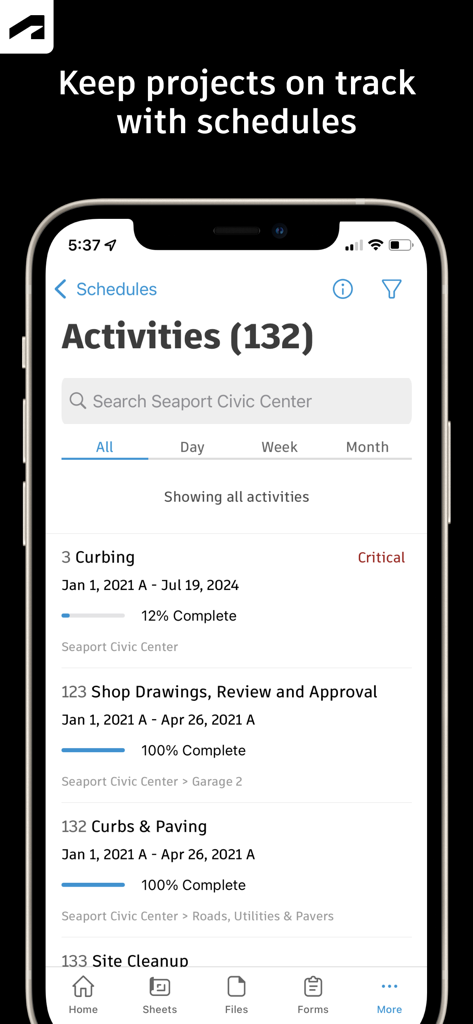
Autodesk Construction Cloud 모바일 앱이 프로젝트 활동 일정을 표시하고 진행 상황 추적 및 완료 백분율 표시

Autodesk Construction Cloud 모바일 앱이 프로젝트 활동 일정을 표시하고 진행 상황 추적 및 완료 백분율 표시

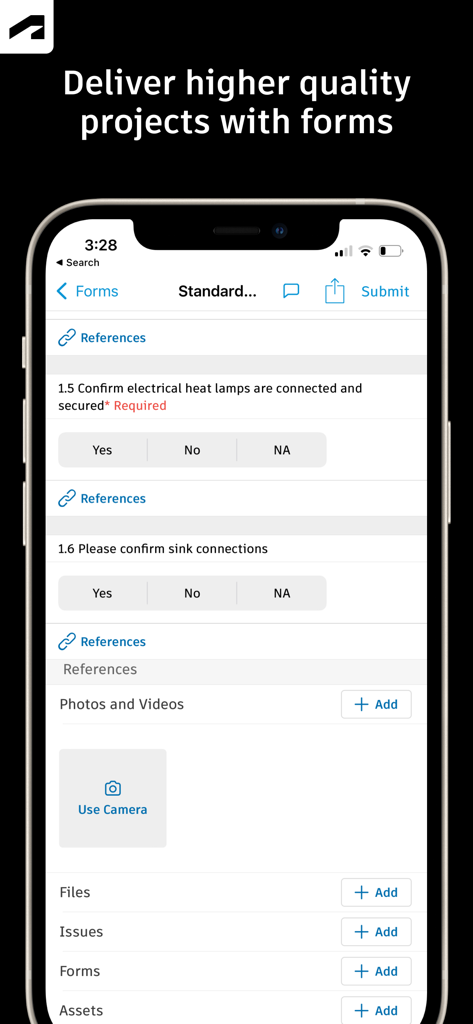
Autodesk Construction Cloud의 모바일 인터페이스가 프로젝트 품질 관리를 위한 체크리스트가 있는 건설 현장 검사 양식 표시

Autodesk Construction Cloud의 모바일 인터페이스가 프로젝트 품질 관리를 위한 체크리스트가 있는 건설 현장 검사 양식 표시

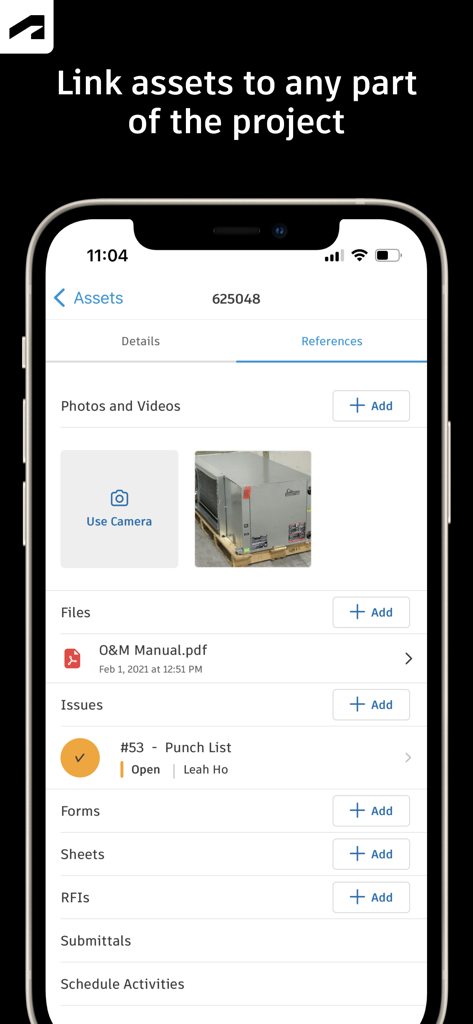
Autodesk Construction Cloud 모바일 앱 화면이 사진 파일 및 펀치 목록 이슈를 포함한 자산 참조 표시

Autodesk Construction Cloud 모바일 앱 화면이 사진 파일 및 펀치 목록 이슈를 포함한 자산 참조 표시

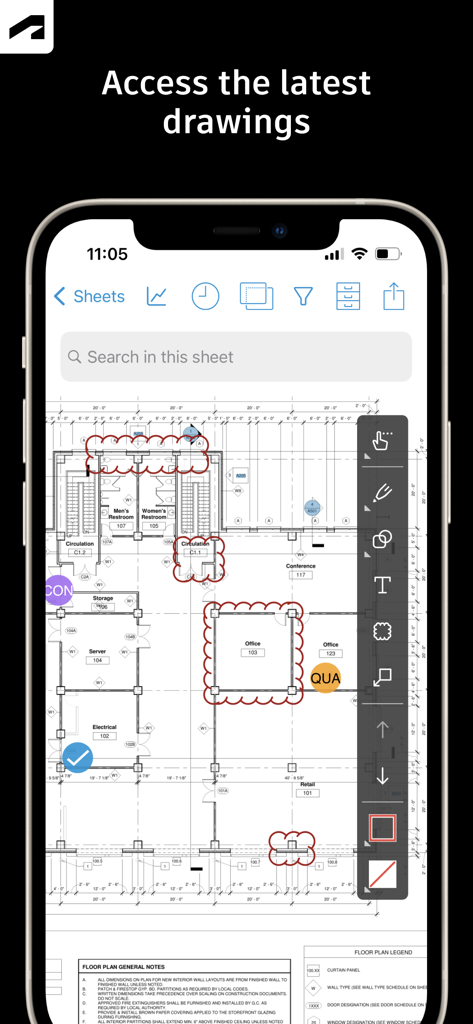
Autodesk Construction Cloud 앱이 스마트폰에서 건설 도면 및 마크업 도구 표시

Autodesk Construction Cloud 앱이 스마트폰에서 건설 도면 및 마크업 도구 표시

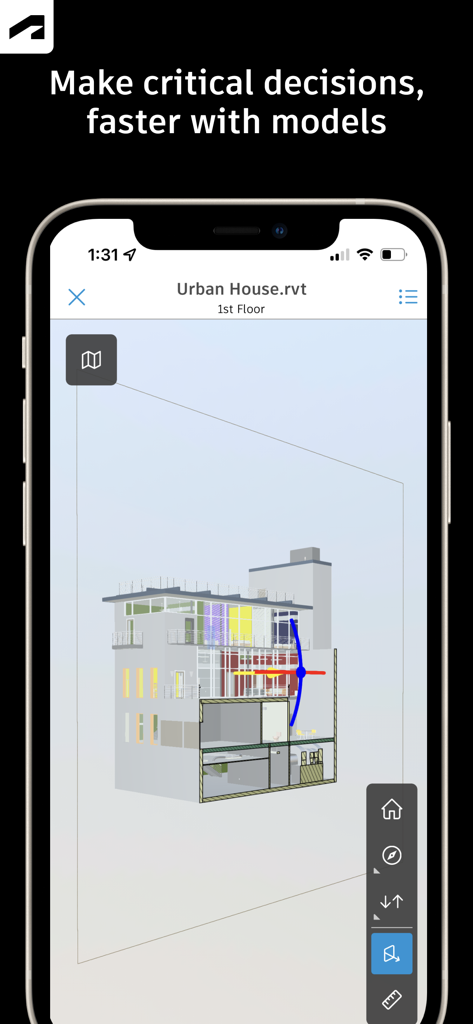
Autodesk Construction Cloud 앱을 사용하여 스마트폰에 표시되는 건물의 3D 건축 모델

Autodesk Construction Cloud 앱을 사용하여 스마트폰에 표시되는 건물의 3D 건축 모델

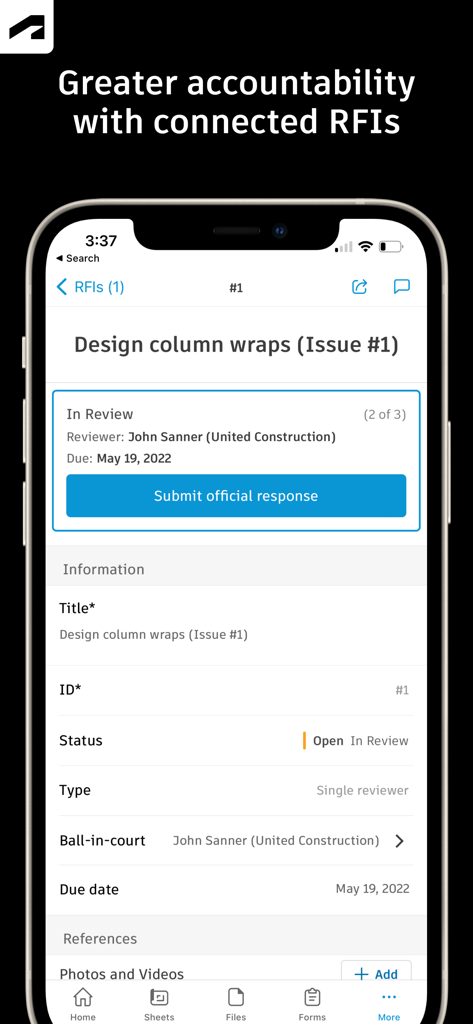
Autodesk Construction Cloud 앱이 상태 및 검토자 정보가 있는 디자인 열 랩에 대한 RFI 세부 정보 화면 표시

Autodesk Construction Cloud 앱이 상태 및 검토자 정보가 있는 디자인 열 랩에 대한 RFI 세부 정보 화면 표시

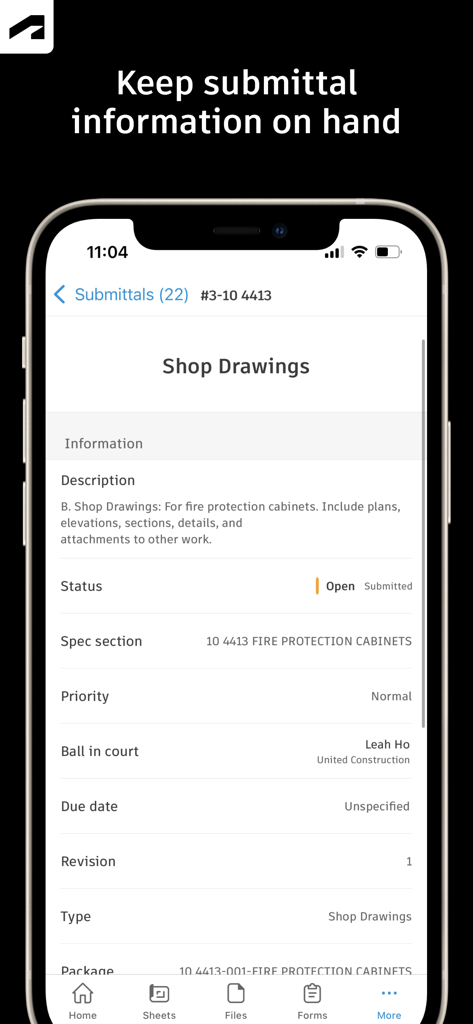
Autodesk Construction Cloud 앱이 모바일 장치에서 상점 도면에 대한 제출 세부 정보 표시

Autodesk Construction Cloud 앱이 모바일 장치에서 상점 도면에 대한 제출 세부 정보 표시

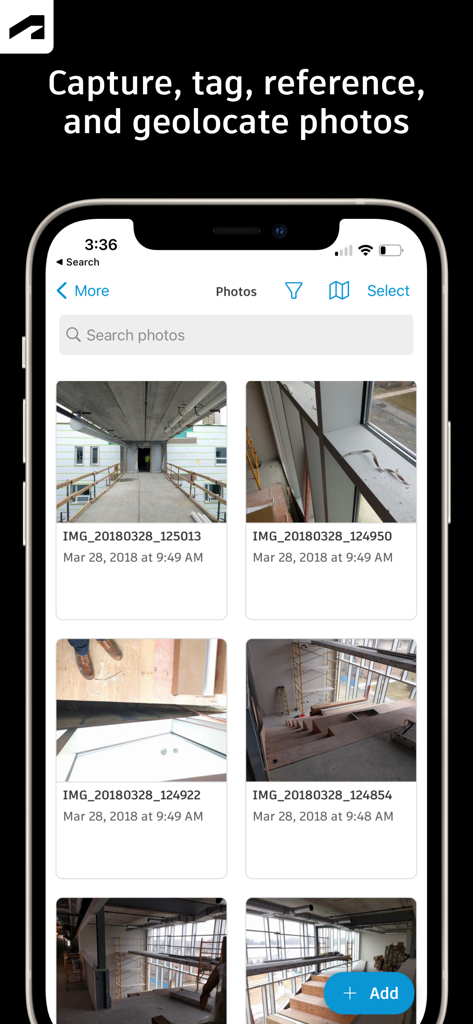
Autodesk Construction Cloud 모바일 앱의 인터페이스가 건설 현장 진행 사진 갤러리 표시

Autodesk Construction Cloud 모바일 앱의 인터페이스가 건설 현장 진행 사진 갤러리 표시

어디서든 현장 작업 마스터

이 앱을 돋보이게 하는 도구, 1M+ 명의 사용자가 선택.

🏗️

BIM 및 2D 도면에 즉시 액세스

iPad에서 Revit 및 AutoCAD 모델을 직접 확인하세요. 버전을 비교하고 도면에 실시간으로 마크업하여 재작업을 제거하고 정확성을 보장하세요.

🚩

원활한 RFI 및 이슈 추적

실시간으로 책임을 할당하여 문제를 더 빨리 해결하세요. 사진 및 문서를 이슈에 연결하여 명확한 책임 추적을 유지하세요.

📝

자동화된 현장 문서화

오프라인 상태에서도 진행 상황 사진을 캡처하고 안전 양식을 작성하세요. 데이터를 자동으로 동기화하여 이해 관계자에게 정보를 제공하고 프로젝트를 규정에 맞게 유지하세요.

전 세계 사용자들에게 사랑받는 앱

Trusted by 1M+ 명이 이 앱을 사랑합니다.

"

"이 앱은 우리 현장 팀에게 절대적으로 필수적입니다. 더 이상 40파운드의 종이 도면을 들고 다닐 필요가 없습니다. 모든 이슈와 RFI를 실시간으로 추적하여 일정을 유지하고 비용이 많이 드는 재작업을 피할 수 있습니다."

Marcus Rivera, 수석 감독
"

"3D 모델 뷰어가 매우 부드럽습니다. 현장에서 BIM 데이터를 오버레이할 수 있으면 충돌을 즉시 해결하는 데 도움이 됩니다. 이것은 제 디지털 툴박스에서 가장 신뢰할 수 있는 도구입니다."

Sarah Chen, BIM 코디네이터

리뷰 분석

사용자 리뷰 인사이트.

감정 점수

15%
부정적

요약

The Autodesk Construction Cloud mobile app receives largely negative feedback from users, primarily due to persistent issues with login and account access, app performance, and a frustrating user interface. Many users report difficulties signing in, receiving verification codes, or accessing their projects. Performance is a common complaint, with reports of frequent crashes, sluggishness, excessive battery drain, and unreliable sync processes. Users also express frustration with a lack of essential features such as model search, camera controls, robust markup tools, and the inability to share documents or perform administrative tasks directly within the app. Several recent updates have exacerbated these problems, leading to crashes, data loss (including projects), and overall performance degradation. Despite these significant drawbacks, some users find the app useful for project review and team collaboration in their construction operations.

주요 테마

Feature Limitations(17)
Login & Account Access(10)
Performance & Stability(8)
Project Management & Collaboration(7)
Updates & Version Issues(6)
User Interface (UI/UX)(5)

앱 소개

에 대해 알아야 할 모든 것 Autodesk Construction Cloud.

설명

Autodesk Inc. The best-in-class construction management app for Autodesk Build, Autodesk BIM Collaborate, Autodesk Docs and PlanGrid that makes it easy for teams on more than 2.5 million projects to manage their construction projects. Construction teams leverage Autodesk Construction Cloud’s simple automation, smart connections between tools, and comprehensive workflows to deliver quality construction projects on time and under budget. The Autodesk Construction Cloud mobile app brings Autodesk Build, Autodesk BIM Collaborate, Autodesk Docs, Revit, Navisworks, PlanGrid and AutoCAD to the field with construction and document management, collaboration tools, and project data available from anywhere. Autodesk Construction Cloud is made for the project team, like… • the superintendent managing the quality of work on site • the project manager tracking progress in real-time • the BIM team identifying issues ahead of installation • the architect doing a site walk • and the owner leveraging construction data and as-builts to improve daily operations Here's how we do it. CONSTRUCTION COLLABORATION + Issues Track issues, from design to handover, all in one place. Resolve issues faster by adding due dates, responsible parties, and easily reference photos, associated files, and RFIs. + Schedule Keep projects on track with a centralized schedule. View the schedule by different timespans or filter by critical items, review dependencies, and assess schedule suggestions. + Forms Gather critical information with forms that adapt to project requirements. Build a comprehensive safety program or track daily checklists. + Assets Easily manage the lifecycle of project assets from design through commissioning and handover. Assets are tracked, stored, and connected to other workflows in the app. + Meeting Minutes Stay ahead of the next meeting by creating meetings or meeting agenda items. Link to references like issues, models, RFIs, or photos. Check the status of outstanding items and follow up, all from the field. FILE MANAGEMENT + Sheets and Drawings Quickly access the latest drawings and shared plans with quick downloads and dynamic search. Compare, share, and markup sheets directly from the field to take the guesswork out of installation. + Models Make critical decisions faster with access to 3D models in the field. View installation details and effortlessly navigate single or multi-trade models to build with confidence. Supports Revit and AutoCAD file types and many more including RVT, DWG, NWC, IFC, NWD. QUALITY CONTROL  + RFIs Reduce the risk of data loss with seamless RFI management. Connect RFIs across the project lifecycle to cut down on duplicate work. + Submittals Keep all relevant submittal information on hand. With search, quickly find the necessary submittal to view progress and next steps. + Photos Use photos to track progress and add references to issues, RFIs, schedule activities, and more. With autotags and location data, quickly find the photo you need. See what our customers have to say: "The ability to access 3D models from the field eliminates confusion and allows us to come to a real-time resolution for any issues onsite. This capability reduces risk and provides cost and time savings while ensuring we deliver high-quality projects to our clients." Briana Mitchell, Project Manager, Boldt Company "We have about 460 field employees and for them to access documents in real-time directly on their iPhone or their iPad is priceless." Ken Mabe, Director of Field Operations, Eckardt Group "I'm excited about being able to effortlessly tag a snippet from a drawing onto an RFI and immediately assign responsibilities and track how the project team interacts with a particular issue or RFI. The ability to track an issue's progression in real-time helps us manage any roadblocks immediately." Amy Kozlowski​, Project Manager,​ Herrero Builders

최신 버전

7.69.0

크기

638.9 MB

출시일

2012년 2월 15일

현장에 단일 진실 공급원 적용

재작업을 제거하고 도면, 3D 모델 및 RFI에 실시간으로 액세스하여 현장 팀에 힘을 실어주세요. 250만 개 이상의 프로젝트에 참여하여 자신 있게 구축하세요.

다운로드: App Store
FAQ

자주 묻는 질문

에 대해 알아야 할 모든 것 Autodesk Construction Cloud

Autodesk Construction Cloud 앱이란 무엇인가요?

Autodesk Construction Cloud 앱은 250만 개 이상의 프로젝트에서 팀을 위한 건설 관리 도구입니다. 포괄적인 프로젝트 관리를 위해 Autodesk Build, BIM Collaborate, Docs, PlanGrid를 통합합니다.

어떤 Autodesk 제품이 Autodesk Construction Cloud 모바일 앱과 통합되나요?

Autodesk Construction Cloud 모바일 앱은 Autodesk Build, BIM Collaborate, Autodesk Docs, Revit, Navisworks, PlanGrid, AutoCAD와 통합되어 현장에서 해당 기능을 제공합니다.

Autodesk Construction Cloud는 프로젝트 일정을 관리하는 데 어떻게 도움이 되나요?

Autodesk Construction Cloud 앱은 중앙 집중식 일정을 제공합니다. 사용자는 기간별로 일정을 확인하고, 중요 항목을 필터링하고, 종속성을 검토하고, 제안된 일정을 평가하여 프로젝트를 일정대로 진행할 수 있습니다.

사용자는 Autodesk Construction Cloud 앱을 사용하여 문제를 추적하고 해결할 수 있나요?

예, Autodesk Construction Cloud 앱을 사용하면 설계부터 인계까지의 문제를 추적할 수 있습니다. 마감일, 담당자, 사진, 파일 및 RFI를 추가하여 문제를 더 빠르게 해결할 수 있습니다.

Autodesk Construction Cloud 앱은 양식을 사용하여 품질 관리를 어떻게 촉진하나요?

Autodesk Construction Cloud 앱은 안전 프로그램 또는 일일 체크리스트와 같은 중요 정보를 수집하기 위한 유연한 양식을 제공합니다. 이를 통해 더 높은 품질의 프로젝트를 제공할 수 있습니다.

Autodesk Construction Cloud는 자산 수명 주기 관리를 지원하나요?

예, Autodesk Construction Cloud 앱은 설계부터 시운전 및 인계까지 프로젝트 자산의 수명 주기를 관리합니다. 자산은 앱 내에서 추적, 저장 및 다른 워크플로에 연결됩니다.

Autodesk Construction Cloud 모바일 앱에서 도면에 어떻게 액세스하나요?

Autodesk Construction Cloud 모바일 앱은 최신 도면 및 공유 계획에 빠르게 액세스할 수 있도록 합니다. 사용자는 현장에서 직접 시트를 다운로드, 검색, 비교, 공유 및 마크업할 수 있습니다.

Autodesk Construction Cloud 앱은 어떤 종류의 3D 모델을 지원하나요?

Autodesk Construction Cloud 앱은 Revit, AutoCAD의 3D 모델과 RVT, DWG, NWC, IFC, NWD를 포함한 기타 파일 형식을 지원하여 현장에서 더 빠르게 중요한 결정을 내릴 수 있도록 합니다.

Autodesk Construction Cloud 앱은 RFI를 어떻게 관리하나요?

Autodesk Construction Cloud 앱은 원활한 RFI 관리를 제공하여 프로젝트 수명 주기 전반에 걸쳐 RFI를 연결합니다. 이를 통해 중복 작업을 줄이고 더 큰 책임성을 보장합니다.

사용자는 Autodesk Construction Cloud 앱에서 제출 정보를 보거나 검색할 수 있나요?

예, Autodesk Construction Cloud 앱을 사용하면 모든 관련 제출 정보를 항상 가지고 있을 수 있습니다. 사용자는 제출 정보를 빠르게 검색하여 진행 상황과 다음 단계를 볼 수 있습니다.

Autodesk Construction Cloud 앱은 어떤 사진 기능을 제공하나요?

Autodesk Construction Cloud 앱을 사용하면 사진을 캡처, 태그, 참조 및 지리적 위치를 지정할 수 있습니다. 사진은 진행 상황을 추적하고 문제, RFI 및 일정 활동에 연결될 수 있습니다.