Blurrr-Music video editor

Blurrr-Music video editor

다운로드: App Store다운로드: Google Play
Spark by MWM logo
로고: Blurrr-Music video editor

Blurrr: 바이럴 속도 편집 및 전문가급 3D 영상 제작

사용자 지정 키프레임, AI 매팅 및 3D 카메라 기능으로 흐름을 마스터하세요. 이동 중에도 전문가 수준의 효과와 완벽한 비트 동기화를 원하는 크리에이터를 위한 최고의 모바일 편집기입니다.

개발사

TBPS INTERNATIONAL TECHNOLOGY PTE. LTD.

카테고리

Photo & Video

다운로드

4M+

사용자 평점

4.6/5

총 평가 수

18K+

지원 언어

15

주머니 속 VFX 파워

이 인터페이스를 사용하는 4M+ 명의 사용자.

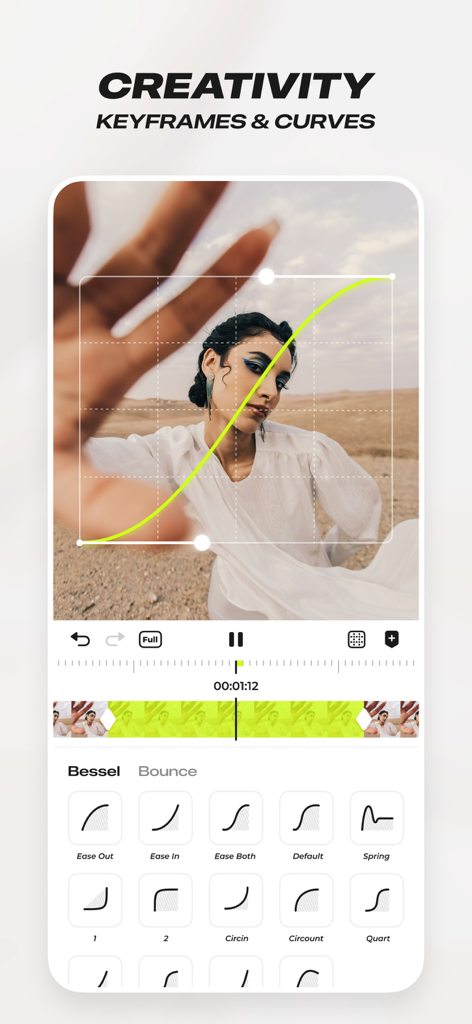
전문 비디오 편집을 위한 사용자 지정 키프레임 및 애니메이션 곡선을 보여주는 Blurrr 앱 인터페이스

전문 비디오 편집을 위한 사용자 지정 키프레임 및 애니메이션 곡선을 보여주는 Blurrr 앱 인터페이스

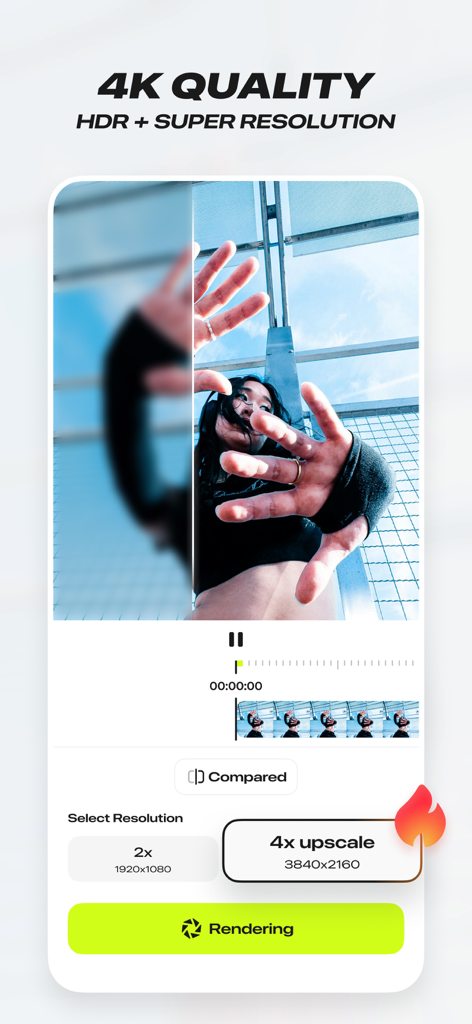
Blurrr 앱 인터페이스, 4K HDR 및 슈퍼 해상도 비디오 업스케일링 기능 표시

Blurrr 앱 인터페이스, 4K HDR 및 슈퍼 해상도 비디오 업스케일링 기능 표시

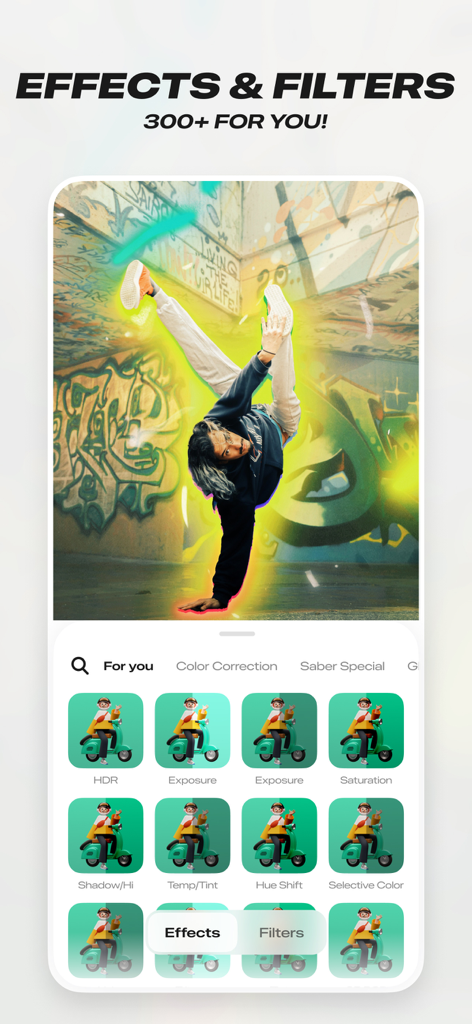
300개 이상의 효과와 필터를 보여주는 Blurrr 앱 인터페이스, 브레이크 댄서에게 빛나는 후광 효과 적용

300개 이상의 효과와 필터를 보여주는 Blurrr 앱 인터페이스, 브레이크 댄서에게 빛나는 후광 효과 적용

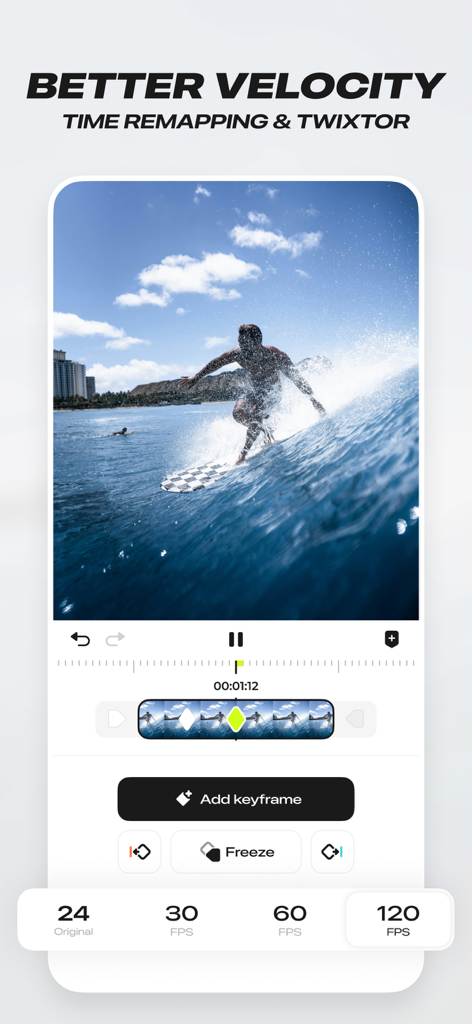
비디오 편집을 위한 시간 재매핑 및 속도 기능을 시연하는 Blurrr 앱 인터페이스

비디오 편집을 위한 시간 재매핑 및 속도 기능을 시연하는 Blurrr 앱 인터페이스

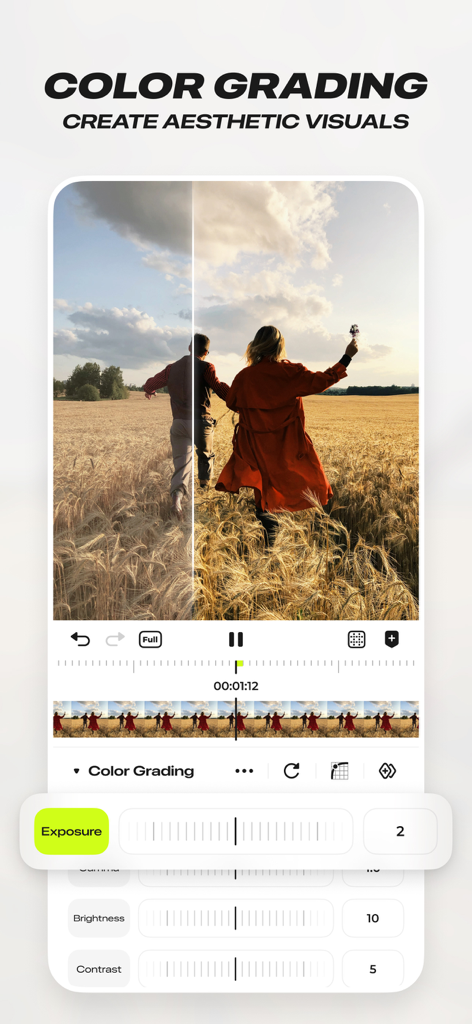
노출 및 대비 컨트롤을 보여주는 Blurrr 뮤직 비디오 편집기의 전문 색상 보정 인터페이스

노출 및 대비 컨트롤을 보여주는 Blurrr 뮤직 비디오 편집기의 전문 색상 보정 인터페이스

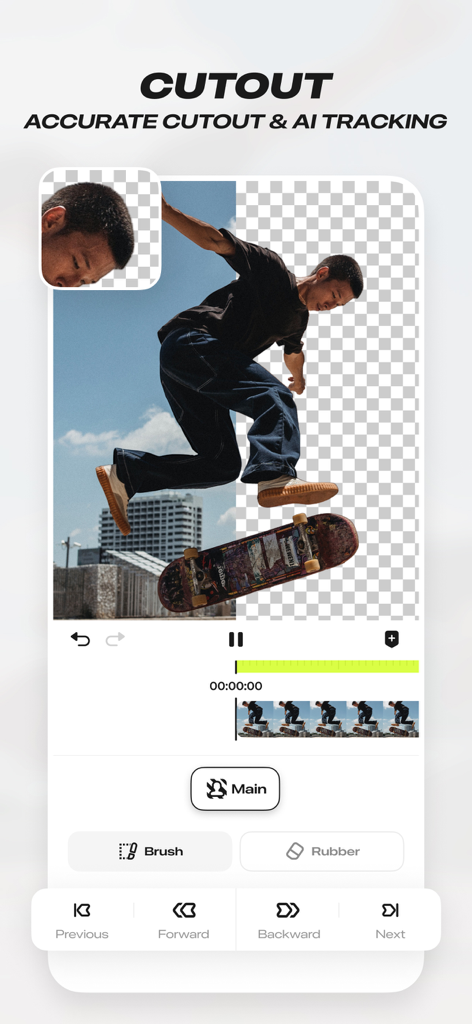
스케이트보더가 배경에서 분리된 AI 컷아웃 및 정확한 추적 도구를 보여주는 Blurrr-Music 비디오 편집기의 모바일 앱 인터페이스

스케이트보더가 배경에서 분리된 AI 컷아웃 및 정확한 추적 도구를 보여주는 Blurrr-Music 비디오 편집기의 모바일 앱 인터페이스

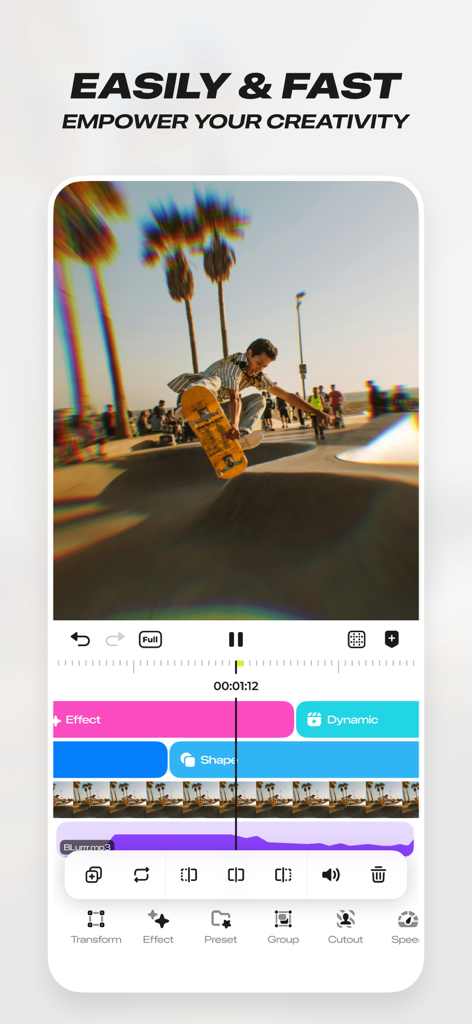
여러 편집 레이어 및 효과가 있는 스케이트보드 비디오 클립을 보여주는 Blurrr 뮤직 비디오 편집기의 인터페이스

여러 편집 레이어 및 효과가 있는 스케이트보드 비디오 클립을 보여주는 Blurrr 뮤직 비디오 편집기의 인터페이스

콘텐츠 수준을 높이세요

이 앱을 돋보이게 하는 도구, 4M+ 명의 사용자가 선택.

바이럴 속도 마스터

고급 시간 재매핑 및 부드러운 곡선 사전 설정을 사용하여 클립을 비트에 완벽하게 동기화하여 완벽한 바이럴 흐름을 만드세요.

📈

정밀 키프레임 편집

사용자 지정 곡선 및 다중 레이어 믹싱으로 완전한 창의적 자유를 경험하고 데스크톱 소프트웨어에 필적하는 애니메이션을 만드세요.

몰입형 입자, 3D 카메라 움직임 및 즉각적인 AI 기반 배경 제거를 통해 2D를 넘어 놀라운 VFX를 구현하세요.

전 세계 사용자들에게 사랑받는 앱

Trusted by 4M+ 명이 이 앱을 사랑합니다.

"

"애니메이션 팬 편집을 위해 모든 편집 앱을 사용해봤지만, Blurrr의 속도 도구에 비할 바는 없습니다. 키프레임 곡선이 매우 부드럽고 클릭 한 번으로 비트를 완벽하게 동기화할 수 있다는 점은 정말 획기적입니다. 마치 iPhone에서 After Effects를 사용한 것 같아요!"

Mia J., 디지털 콘텐츠 크리에이터
"

"고품질 게임 몽타주를 만드는 사람으로서 Blurrr의 3D 카메라와 입자 기능은 정말 대단합니다. AI 매팅은 모바일에서 본 것 중 최고이며 수동 마스킹에 드는 시간을 몇 시간씩 절약해 줍니다. 소셜 미디어 입지를 진지하게 생각한다면 이것이 필요한 유일한 앱입니다."

Alex VFX, 게이밍 인플루언서

앱 소개

에 대해 알아야 할 모든 것 Blurrr-Music video editor.

설명

BLURRR, the new gen video editor, professional effect and animate video editor. It's easy to use and powerful, with not only great effects and rich presets, but also HD quality. Whether you are a professional video editor or a beginner, you can easily use it for video editing. ●Highly Enjoyable and Smooth & Simple Velocity Feature● Using Timeremap feature to help you edit viral velocity videos. Through automatically marking the beats and moving the keyframes, you can easily complete the synchronization of music and images and use graphs presets to achieve more time-saving video production. •[One-click Application of Massive Templates] Blurrr provides you with a vast array of templates, where you can freely choose from options like •[FREE TRACK LAYER MIX] Mix multiple video, audio, and image layers together to achieve a more diverse video effect. You can also mix multiple materials and effects together to create richer visual effects and make your video more vivid and interesting. •[CUSTOM KEYFRAMES and CURVES] With custom keyframes and curves, you can completely control the changes and animation effects in the video. Use keyframes and curve functions to make your video more vivid and interesting, and unleash your creativity. •[RICH and HIGH QUALUTY EFFECTS] Over 140 special effects and nearly 100 filters are carefully crafted by a team of visual effects experts to make your videos cooler and more interesting. Use the special effects and filter functions to make your video more outstanding and leave a deep impression on your audience or fans. Supports layer adjustment, creating multiple special effects and multiple filters within the same track, and freely arranging their layer order. •[AI INTELLIGENT MATTING] Use the intelligent matting function to get rid of background restrictions and make your creation more free. The intelligent matting function allows you to easily achieve matting and make your video more stunning. •[3D & CAMERA function] Supports 3D and camera functions, making your video more three-dimensional and interesting. No matter if you are making a 3D tunnel, 3D conveyor belt, 3D cube, or even building VFX, I, Blurrr, can handle it. Use 3D & camera functions to make your creation more realistic and immersive for your audience or fans. •[3D Particle] Whether it’s the brilliant blooming of dreamy fireworks or the overflowing passion of realistic flames; whether it’s the warmth and tranquility of fluttering snowflakes or the depth of the romantic starry sky, everything is possible and within reach. •[Text Animation Presets] Text Animation Presets In Blurrr, you can freely edit text layout, text styles, and text animations, and you’re provided with a wide range of presets to easily access with just one click. •[Shape Pen Tool Shape Pen Tool A true vector pen drawing tool, which allows you to create various shapes through path points, and supports high freedom editing with keyframes. It also comes with a large collection of shapes for one-click graphic animation creation. ●Follow us: Tiktok / YouTube / Instagram: Search Blurrr App Discord invite: JVWdwaTa If you have any questions or suggestions, please feel free to contact my creators! ●Subscription Service Statement● 1. Service name: Yearly VIP, Yearly SVIP 2. Payment will be charged to AppleID at confirmation of purchase. Subscription automatically renews unless auto-renew is turned off at least 24-hours before the end of the current period. To cancel renewal, manually turn off automatic renewals in AppleID setup 24 hours before the current subscription period expires. 3. You can suspend or terminate this service by: Goto iPhone Settings -> Apple ID -> Subscribe to cancel the subscription. 4. Service Statement Privacy policy: https://blurrr.saladvideo.com/privacy.html?lang=en User agreement: https://blurrr.saladvideo.com/user.html?lang=en Subscription Notice: https://blurrr.saladvideo.com/vip.html?lang=en

최신 버전

2.3.56

크기

423.2 MB

출시일

2021년 12월 22일

다음 트렌드를 이끌 준비가 되셨나요?

전문 키프레임, 3D 입자 및 바이럴 속도를 사용하여 모든 피드를 장악하는 4백만 명 이상의 크리에이터와 함께하세요. After Effects의 강력함을 주머니에 담아 오늘부터 창작을 시작하세요.

다운로드: App Store다운로드: Google Play
FAQ

자주 묻는 질문

에 대해 알아야 할 모든 것 Blurrr-Music video editor

Blurrr-Music video editor란 무엇인가요?

Blurrr는 초보자와 전문가 모두를 위한 전문 비디오 편집기로, 비디오 편집을 위한 고급 효과, 풍부한 사전 설정 및 HD 품질을 제공합니다. 키프레임, 곡선 및 속도 편집과 같은 기능이 포함되어 있습니다.

Blurrr 앱은 4K 비디오 편집을 지원하나요?

네, Blurrr-Music video editor는 HDR 및 Super Resolution과 함께 4K 품질을 지원합니다. 사용자는 렌더링 중에 비디오를 최대 4배(3840x2160)까지 업스케일할 수 있습니다.

Blurrr 앱에서 속도 편집을 어떻게 만드나요?

Blurrr 앱에는 속도 비디오를 위한 Timeremap 기능이 있습니다. 비트를 자동으로 표시하고 키프레임을 이동하여 사용자가 그래프 사전 설정을 사용하여 음악과 이미지를 동기화할 수 있습니다.

Blurrr-Music video editor에서 사용자 정의 키프레임을 사용할 수 있나요?

네, Blurrr는 사용자 정의 키프레임과 곡선을 제공하여 사용자가 비디오 내의 애니메이션 효과 및 변경 사항을 완벽하게 제어할 수 있습니다. 이를 통해 역동적이고 창의적인 편집이 가능합니다.

Blurrr 앱은 몇 가지 효과와 필터를 제공하나요?

Blurrr 앱은 140개 이상의 특수 효과와 거의 100개의 필터를 제공합니다. 이러한 효과와 필터는 시각 효과 전문가가 제작하여 비디오를 향상시키고 강한 인상을 남깁니다.

Blurrr는 AI 배경 제거 기능을 제공하나요?

네, Blurrr-Music video editor에는 AI Intelligent Matting 기능이 포함되어 있습니다. 이 기능을 통해 사용자는 배경을 쉽게 제거하여 창의적인 비디오 제작에 자유를 제공합니다.

Blurrr 앱에서 3D 효과를 어떻게 적용하나요?

Blurrr 앱은 3D 및 카메라 기능을 지원하여 3차원 비디오를 만듭니다. 터널, 컨베이어 벨트, 큐브 및 VFX와 같은 다양한 3D 구성을 처리하여 사실감을 향상시킬 수 있습니다.

Blurrr-Music video editor의 구독 옵션은 무엇인가요?

Blurrr는 Yearly VIP 및 Yearly SVIP라는 구독 서비스를 제공합니다. 결제는 AppleID로 청구되며, 현재 기간 종료 24시간 전에 비활성화하지 않으면 구독은 자동 갱신됩니다.

Blurrr에서 비디오 편집을 위해 여러 레이어를 혼합할 수 있나요?

네, Blurrr에는 FREE TRACK LAYER MIX 기능이 있습니다. 이를 통해 사용자는 여러 비디오, 오디오 및 이미지 레이어를 결합하여 다양하고 풍부한 시각 효과를 만들 수 있습니다.

Blurrr 앱 구독을 어떻게 취소하나요?

Blurrr 구독을 취소하려면 현재 기간이 만료되기 24시간 전에 Apple ID 설정에서 자동 갱신을 수동으로 해제해야 합니다. iPhone 설정 > Apple ID > 구독으로 이동하세요.

Blurrr는 텍스트 애니메이션 사전 설정을 제공하나요?

네, Blurrr는 텍스트 애니메이션 사전 설정을 제공합니다. 사용자는 텍스트 레이아웃, 스타일 및 애니메이션을 자유롭게 편집할 수 있으며, 한 번의 클릭으로 적용할 수 있는 다양한 사전 설정이 있습니다.