CamScanner HD

CamScanner HD

다운로드: App Store다운로드: Google Play
Spark by MWM logo
로고: CamScanner HD

CamScanner HD: iPad를 위한 올인원 전문 문서 스캐너 및 관리자

고해상도 스캔, 스마트 OCR 및 원활한 클라우드 동기화로 워크플로우를 디지털화하세요. iPad를 강력한 휴대용 사무실로 바꾸는 6천만 명 이상의 전문가 및 학생들과 함께하세요.

개발사

Shanghai Linguan Data Co.,Ltd

카테고리

Productivity

다운로드

3M+

사용자 평점

3.5/5

총 평가 수

1K+

지원 언어

14

정밀한 시야

이 인터페이스를 사용하는 3M+ 명의 사용자.

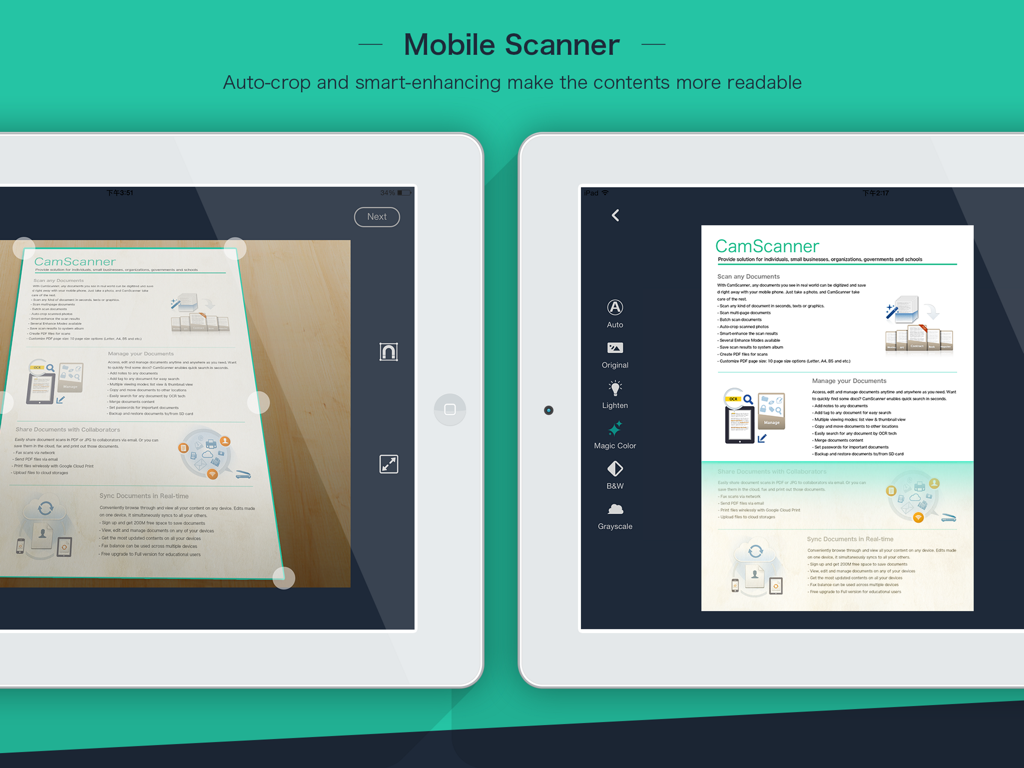
CamScanner HD 앱이 iPad에서 모바일 스캔을 위한 자동 자르기 및 문서 보정 기능을 보여줍니다.

CamScanner HD 앱이 iPad에서 모바일 스캔을 위한 자동 자르기 및 문서 보정 기능을 보여줍니다.

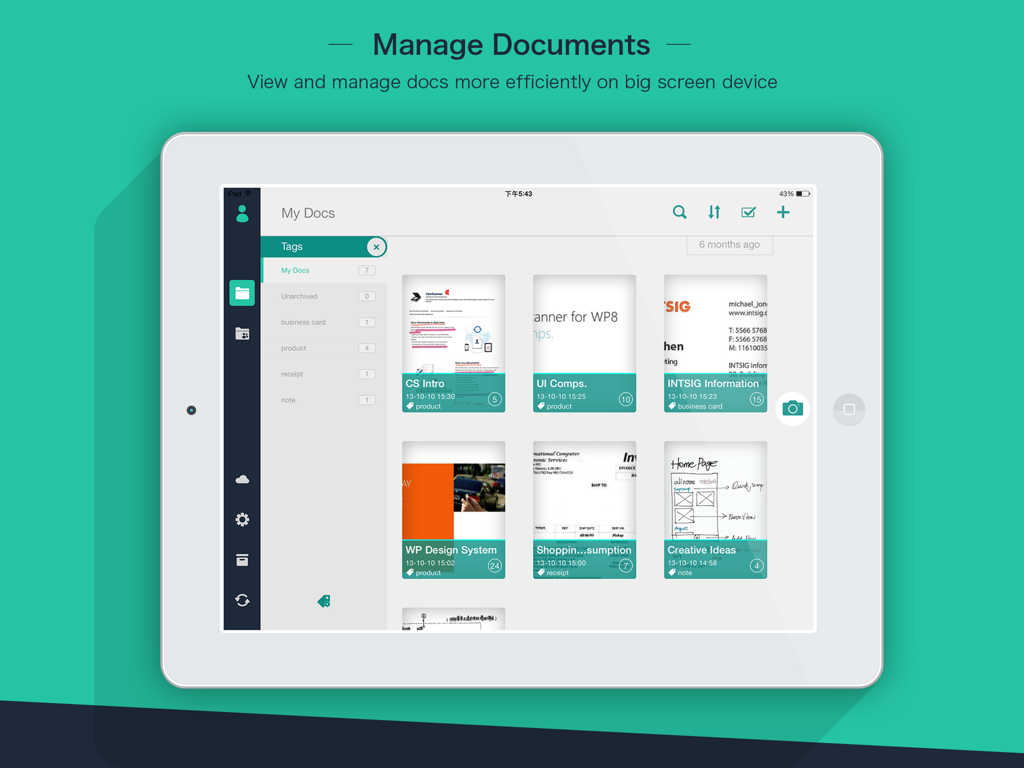
CamScanner HD 앱 인터페이스가 iPad에서 스캔된 문서와 구성 태그를 표시합니다.

CamScanner HD 앱 인터페이스가 iPad에서 스캔된 문서와 구성 태그를 표시합니다.

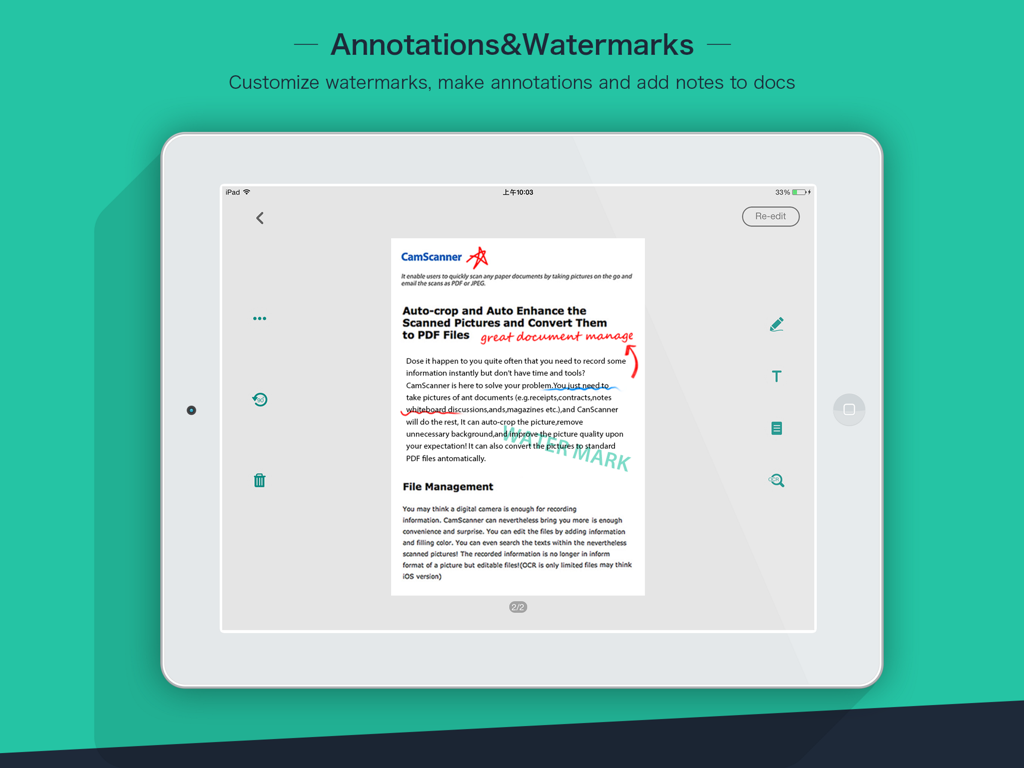
CamScanner HD 앱이 iPad에서 문서 주석 및 사용자 지정 워터마크를 보여줍니다.

CamScanner HD 앱이 iPad에서 문서 주석 및 사용자 지정 워터마크를 보여줍니다.

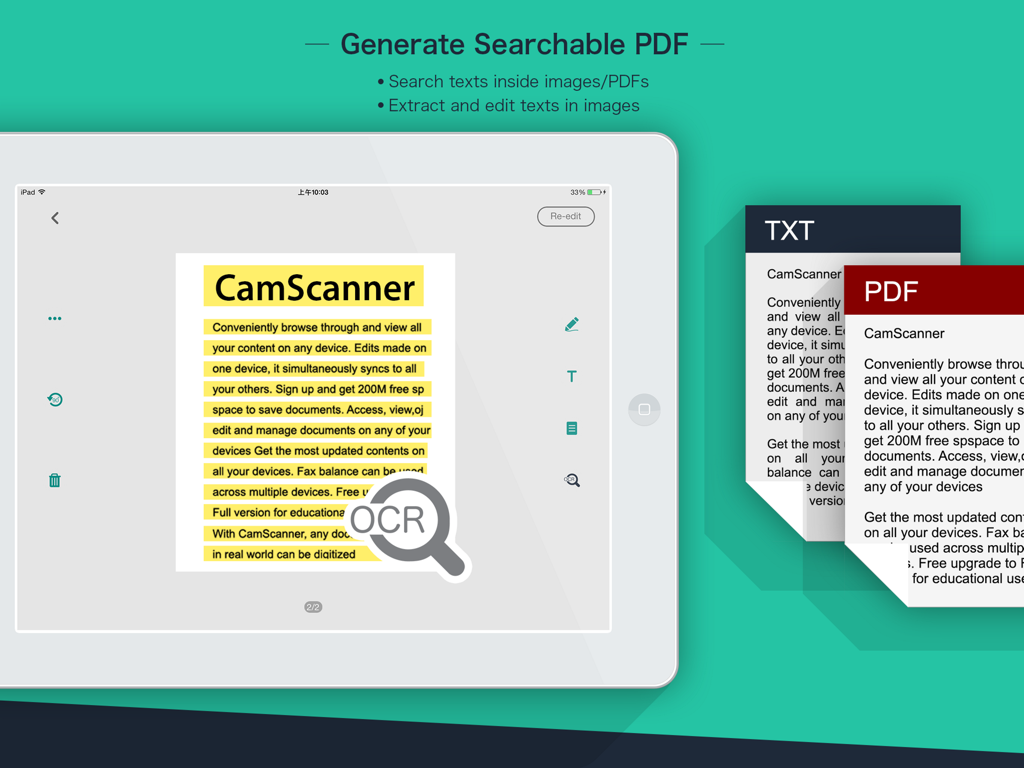
CamScanner HD OCR 기능이 iPad에서 검색 가능한 PDF를 생성하고 텍스트를 추출합니다.

CamScanner HD OCR 기능이 iPad에서 검색 가능한 PDF를 생성하고 텍스트를 추출합니다.

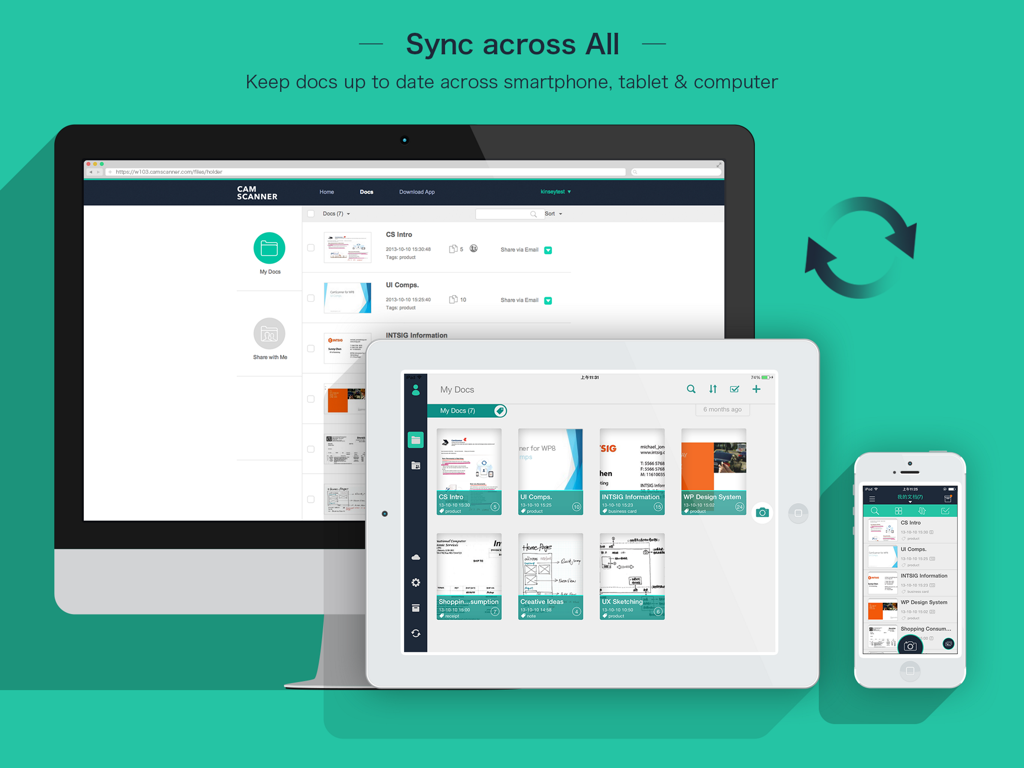
CamScanner HD 문서가 데스크톱, iPad 및 iPhone 간에 동기화됩니다.

CamScanner HD 문서가 데스크톱, iPad 및 iPhone 간에 동기화됩니다.

전문 문서 파워하우스

이 앱을 돋보이게 하는 도구, 3M+ 명의 사용자가 선택.

전문가 수준의 스캔 품질

흐릿한 사진은 이제 그만. 스마트 자르기 및 자동 보정 알고리즘은 모든 문서가 고해상도에서 선명하고 깨끗하며 전문적으로 보이도록 보장합니다.

🔍

고급 OCR 기술

이미지 속 텍스트를 잠금 해제하세요. 영수증, 메모 또는 계약서에서 데이터를 추출하여 lightning 속도로 문서를 검색, 편집 또는 내보내세요.

☁️

원활한 클라우드 협업

모든 기기에서 파일을 즉시 동기화하세요. PDF를 안전하게 공유하고, 주석을 추가하고, 팀원 또는 학급 친구와 실시간으로 협업하세요.

전 세계 사용자들에게 사랑받는 앱

Trusted by 3M+ 명이 이 앱을 사랑합니다.

"

"CamScanner HD는 제 부동산 사업에 절대적인 게임 체인저입니다. 계약서가 나오자마자 iPad에서 바로 스캔하고, 주석을 달고, 사무실의 Google Drive에 즉시 동기화할 수 있습니다. 이미지 품질이 너무 선명해서 고객들이 제가 부동산에 평판 스캐너를 가져왔는지 묻곤 합니다!"

Sarah Jenkins, 부동산 중개인
"

"의대생으로서 저는 항상 무거운 교과서와 칠판 도표를 다루어야 합니다. 이 앱은 모든 것을 손쉽게 디지털화합니다. OCR 기능은 정말 구세주입니다. 스캔한 메모에서 특정 의학 용어를 몇 초 안에 검색할 수 있습니다. iPad 생산성 워크플로우에 완벽한 동반자입니다."

David Chen, 대학생

리뷰 분석

사용자 리뷰 인사이트.

감정 점수

12%
부정적

요약

This app receives overwhelmingly negative feedback from users, primarily stemming from a significant discrepancy in functionality and user experience compared to the mobile version. Many users report persistent login issues, numerous bugs, and a noticeable lack of features crucial for productivity, even among premium subscribers. Additionally, the app suffers from poor adaptation to various iPad models, resulting in display problems like incorrect screen ratios and black bars, alongside synchronization failures that hinder seamless workflow between devices. Despite a few positive remarks about its free nature for tablets or general scanning utility, these are largely overshadowed by a litany of unresolved technical and usability concerns.

주요 테마

Feature Disparity with Mobile(13)
Bugs & Instability(7)
iPad Compatibility & Display(7)
Login & Access Issues(6)
Billing & Monetization(5)
Synchronization Problems(3)

앱 소개

에 대해 알아야 할 모든 것 CamScanner HD.

설명

The world’s No. 1 mobile document scanning and sharing today! * Installed on over 60 million devices in over 200 countries around the world * Over 50,000 new registrations per day * CamScanner, 50 Best iPhone Apps, 2013 Edition – TIME * App Store 2011/2012 Rewind Top Productivity App * “The application employs its own image cropping and enhancing algorithm that leads to clearer images.” – Makeuseof.com * “CamScanner may just be the best deal for scanning documents on your iPhone.” – CNET.com CamScanner helps you scan, store, sync and collaborate on various contents across smartphones, iPads, tablets and computers. Features: *Quickly Digitize Document Just use your iPad camera to scan and digitize all kinds of paper documents: receipts, notes, invoices, whiteboard discussions, business cards, certificates, etc. *Optimize Scan Quality Smart cropping and auto enhancing ensures the texts and graphics in scanned documents are clear and sharp with premium colors and resolutions. *Extract Texts from Image OCR (optical character recognition) feature recognizes texts in document images and extract them from images for later searching, editing or sharing. (Paid app only) *Share PDF/JPEG Files Easily share documents in PDF or JPEG format with friends via various ways: post on social media, send attachment or document download link through email. *AirPrint & Fax Documents Instantly print out any documents in CamScanner with nearby printer via AirPrint; directly select document and fax to over 30 countries from the app. *Collaborate on Documents Want to get feedback on your documents? Invite friends or colleagues to collaborate on documents. They can view, comment and exchange ideas on documents in groups. (Registrants only) *Advanced Document Editing Make annotations on documents with a full set of editing tools. Also adding customized watermarks are made available to mark your own documents. *Quick Search When you have plenty of documents, you can use Tags to categorize and easily find them. In addition, OCR for Search helps you find texts inside image and notes. Just enter one keyword, you can quickly find the document you want. *Secure Important Documents If you want to protect confidential contents, you can set passcode for viewing important documents; also, while sending document download link, you can set password to protect others from seeing it. *Sync across Platforms Sign up to sync documents on the go. Just sign in to any smartphone, tablet or computer (visit CamScanner website) you own and you can view, edit and share any document. (Registrants only) Premium Subscription Service: 1. Edit OCR results and notes of the entire doc, exporting as .txt file 2. Add 10G cloud space 3. Add 40 extra collaborators 4. Send doc link with password protection and expiration date 5. Batch download PDF files in web app 6. Everything benefit registrants enjoys 7. Everything paid app offers Payment models for Premium subscription: -$ 4.99/month -$49.99/year Please note the subscription is automatically renewed within 24-hours prior to the end of the period unless you choose to cancel the subscription. Subscriptions may be managed by going to your iTunes Account Settings after purchase.  For Privacy Policy, please visit http://s.intsig.net/r/terms/PP_CamScanner_en-us.html CamScanner users scan and manage * Bill, Invoice, Contract, Tax Roll, Business Card… * Whiteboard, Memo, Script, Letter… * Blackboard, Note, PPT, Book, Article… * Credential, Certificate, Identity Documents… 3rd Party Cloud Storage Services Supported: -Box.com, Google Drive, Evernote, Dropbox, Check out other INTSIG’s products: CamCard - Business Card Reader CamDictionary - Snap Translator We’d love to hear your feedback: isupport@intsig.com Follow us on Twitter: @CamScanner Like us on Facebook: CamScanner Follow us on Google+: CamScanner

최신 버전

3.12.0

크기

64.8 MB

출시일

2018년 3월 26일

종이 없는 혁명에 동참하세요

오늘 바로 iPad를 고성능 스캐너로 바꿔보세요. CamScanner HD를 다운로드하고 전문적인 정확성으로 문서를 관리하는 6천만 명 이상의 전문가 및 학생들과 함께하세요.

다운로드: App Store다운로드: Google Play
FAQ

자주 묻는 질문

에 대해 알아야 할 모든 것 CamScanner HD

CamScanner HD는 무엇인가요?

CamScanner HD는 최고의 모바일 문서 스캔 및 공유 애플리케이션입니다. 사용자는 스마트폰, iPad, 태블릿, 컴퓨터에서 다양한 문서를 스캔, 저장, 동기화 및 공동 작업할 수 있습니다.

CamScanner HD는 물리적인 문서를 디지털화할 수 있나요?

네, CamScanner HD는 문서를 빠르게 디지털화할 수 있습니다. 사용자는 기기 카메라를 사용하여 영수증, 메모, 송장, 명함, 증명서 등 다양한 종이 문서를 스캔하기만 하면 됩니다.

CamScanner HD에는 텍스트 추출을 위한 OCR 기능이 있나요?

네, CamScanner HD에는 OCR(광학 문자 인식) 기능이 있습니다. 이를 통해 사용자는 나중에 검색, 편집 또는 공유할 수 있도록 문서 이미지에서 텍스트를 추출할 수 있습니다. 이것은 유료 앱 전용 기능입니다.

CamScanner HD를 사용하여 문서를 공유하려면 어떻게 해야 하나요?

CamScanner HD를 사용하면 문서를 PDF 또는 JPEG 형식으로 쉽게 공유할 수 있습니다. 사용자는 소셜 미디어, 이메일 첨부 파일 또는 문서 다운로드 링크를 보내 친구와 파일을 공유할 수 있습니다.

CamScanner HD는 문서 인쇄 및 팩스를 지원하나요?

네, CamScanner HD는 AirPrint 및 팩스를 모두 지원합니다. 사용자는 AirPrint를 통해 가까운 프린터로 문서를 즉시 인쇄하거나 앱에서 30개 이상의 국가로 직접 문서를 팩스로 보낼 수 있습니다.

CamScanner HD에서 문서를 공동으로 작업할 수 있나요?

네, CamScanner HD는 문서 공동 작업을 가능하게 합니다. 등록자는 친구나 동료를 초대하여 지정된 그룹 내에서 문서에 대한 보기, 댓글 및 아이디어 교환을 할 수 있습니다.

CamScanner HD에서 사용자는 문서에 워터마크를 추가할 수 있나요?

CamScanner HD는 주석을 추가하는 기능을 포함하여 고급 편집 도구를 제공합니다. 사용자는 자신의 문서에 사용자 지정 워터마크를 추가하여 자신의 문서임을 표시할 수도 있습니다.

CamScanner HD는 문서를 어떻게 구성하고 검색을 허용하나요?

CamScanner HD는 태그를 사용하여 문서를 구성하고 신속하게 분류하고 찾을 수 있도록 도와줍니다. 검색용 OCR 기능은 키워드를 사용하여 이미지 및 메모 내부의 텍스트를 찾는 데도 도움이 됩니다.

CamScanner HD에는 문서를 보호하기 위한 보안 기능이 있나요?

네, CamScanner HD는 보안 기능을 제공합니다. 사용자는 기밀 문서 보기를 위한 암호를 설정하고 액세스를 제한하기 위해 문서 다운로드 링크에 암호를 추가할 수 있습니다.

CamScanner HD는 다른 장치 간에 문서를 동기화하나요?

네, CamScanner HD는 등록자를 위해 플랫폼 간에 문서를 동기화할 수 있습니다. 사용자는 스마트폰, 태블릿 또는 컴퓨터에서 로그인하여 문서에 액세스, 편집 및 공유할 수 있습니다.

CamScanner HD 프리미엄 구독에는 어떤 혜택이 포함되나요?

CamScanner HD 프리미엄 구독에는 OCR 결과 편집, 10GB 클라우드 공간, 40명의 추가 공동 작업자, 만료일이 있는 암호로 보호된 링크, 웹 앱에서의 일괄 PDF 다운로드가 포함됩니다.

CamScanner HD 프리미엄 구독 가격은 얼마인가요?

CamScanner HD 프리미엄 구독은 월 $4.99 또는 연 $49.99입니다. 기간이 종료되기 24시간 전에 취소하지 않으면 구독은 자동으로 갱신됩니다.

CamScanner HD는 다른 클라우드 스토리지 서비스에 연결할 수 있나요?

네, CamScanner HD는 여러 타사 클라우드 스토리지 서비스와의 통합을 지원합니다. 여기에는 향상된 스토리지 및 액세스 옵션을 위해 Box.com, Google Drive, Evernote 및 Dropbox가 포함됩니다.