CamToPlan - AR tape measure

CamToPlan - AR tape measure

다운로드: App Store다운로드: Google Play
Spark by MWM logo
로고: CamToPlan - AR tape measure

CamToPlan — 즉석 평면도를 위한 스마트 AR 줄자

가구를 옮기지 마세요. 수동 자도 버리세요. 카메라를 사용하여 어떤 공간이든 3D로 측정하고 전문가 수준의 청사진을 몇 초 만에 내보낼 수 있습니다.

개발사

Tasmanic Editions

카테고리

Utilities

다운로드

6M+

사용자 평점

4.6/5

총 평가 수

35K+

지원 언어

32

정밀함, 실행되다

이 인터페이스를 사용하는 6M+ 명의 사용자.

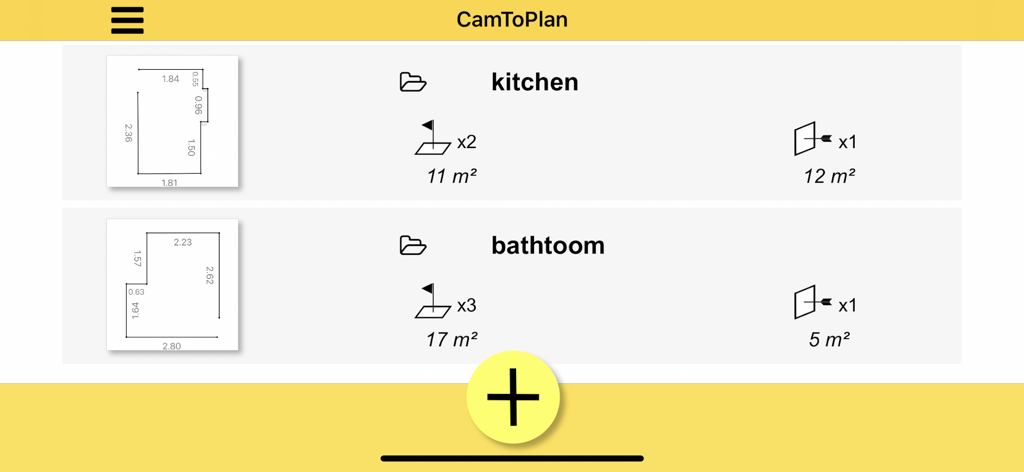
주택 개조 프로젝트를 위해 저장된 디지털 평면도 및 면적 측정 목록을 보여주는 앱 화면

주택 개조 프로젝트를 위해 저장된 디지털 평면도 및 면적 측정 목록을 보여주는 앱 화면

CamToPlan 앱을 사용한 바닥 및 문 치수의 AR 측정

CamToPlan 앱을 사용한 바닥 및 문 치수의 AR 측정

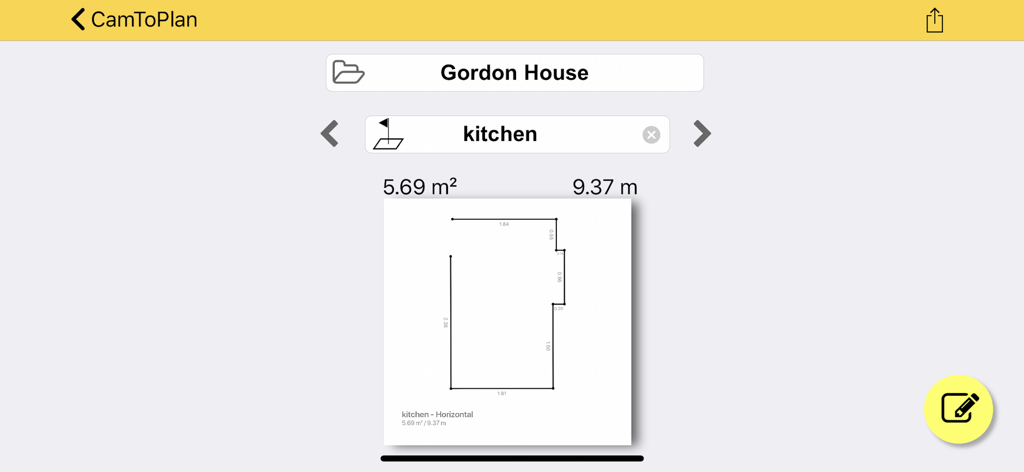
CamToPlan 앱 인터페이스에 면적 및 둘레 측정이 표시된 디지털 2D 주방 평면도

CamToPlan 앱 인터페이스에 면적 및 둘레 측정이 표시된 디지털 2D 주방 평면도

더 스마트하게 측정하고, 프로젝트를 더 빠르게 완료하세요

이 앱을 돋보이게 하는 도구, 6M+ 명의 사용자가 선택.

📏

고급 AR 줄자

수동 줄자는 이제 그만. 카메라 뷰에서 직접 길이, 면적, 거리를 3D로 측정하며, 미터법 및 야드파운드법 단위 모두에서 전문가 수준의 정확도를 제공합니다.

🛋️

장애물 없는 스캔

허리와 시간을 아끼세요. 당사의 지능형 알고리즘은 무거운 가구 뒤에서도 벽-바닥 교차점을 계산하여, 가구가 배치된 방도 몇 초 만에 매핑할 수 있게 합니다.

🏗️

전문가 수준의 CAD & PDF 내보내기

현장 방문과 제도판 사이의 간극을 연결합니다. 측정값을 즉시 PDF, PNG 또는 DXF 파일로 내보내어 전문 CAD 소프트웨어에서 원활하게 사용할 수 있습니다.

전 세계 사용자들에게 사랑받는 앱

Trusted by 6M+ 명이 이 앱을 사랑합니다.

"

"인테리어 디자이너로서 저는 가구로 가득 찬 방을 측정해야 할 때가 많습니다. CamToPlan은 장애물이 있을 때도 바닥-벽 교차점을 계산하여 이 문제를 완벽하게 처리합니다. 제 작업 흐름을 완전히 바꿔 놓았습니다."

엘레나 로드리게스
"

"혼자 바닥 공사를 할 때 물리적인 줄자로 어려움을 겪곤 했습니다. 이 앱을 사용하면 몇 초 만에 방의 전체 면적을 매핑하고 바로 계약자에게 내보낼 수 있습니다. 모든 DIY어에게 강력히 추천합니다."

제임스 첸

앱 소개

에 대해 알아야 할 모든 것 CamToPlan - AR tape measure.

설명

Measure anything with CamToPlan! Horizontally and vertically! Length, distance, area of any surface… Measure everything with this virtual ruler and tape measure thanks to augmented reality. Measuring a length is now easier than with a laser meter or any other measure tool. You draw your measurement lines in 3D thanks to the camera directly on the video of your phone or tablet. You export your plans in PDF, PNG or DXF. CamToPlan is the AR measuring app that brings your measures from cam…to…plan ! For personal or professional use, always measure like a pro. Thanks to Virtual Reality (VR), you can measure floors, dimensions of walls, windows, doors or a whole home in a few seconds. No more tape measure or ruler needed! This app has infinite applications for everybody: - Personal use: the length measure app for the handyman who loves DIY ! - Real estate professionals (real estate agent, interior design decorator or designer, architect, topographer, energy adviser...): this app will help you make a floorplan of a house, apartment, a specific room of a flat. - Construction workers can use it to quickly measure jobs : concreter, tile layer, carpet fitter, painter, drywall guy, plasterer, builder, carpenter, electrician, plumber, slater... - For gardener, landscaper, swimming pool builders and maintenance, digger, earth-moving, navvy: this app also works outside - Cost estimation professionals: this length measure app can make pricing estimates, it will be a great assistant for quantity surveyor, price studies technician, economist… - Building industry: foreman, site manager or engineer can drop their tape measure and ruler to perform a quick measurement check How does this measuring app work? It relies on ARKit by Apple. Machine learning algorithms combine the device sensors data (accelerometer, gyroscope…) with odometry which analyses in real time the video of the camera and relies on visual details of images, in order to scan the environment and find the position and rotation angle of the device. Please note: - you can measure in metric (meters, centimeters) or imperial units (feet, inches) - the app measures distances horizontally (= on the ground) and vertically! - no need to remove the furniture from the room for measurements. The application determines the intersection between the floor and the target, even if it is hidden. - The application may have difficulty with some types of tiles. - The accuracy is not guaranteed. - you can move while performing measurements to get closer to your target point, for maximum precision, even if it is not visible and calculated by extrapolation. CamToPlan Premium = + No ads + Vertical mode + Expert mode + Unlock Edit & Export + Access all your drawings CamToPlan Premium is a recurring subscription. You can cancel a free trial or subscription anytime by going to your account settings on the App Store. Subscription with a free trial period will automatically renew to a paid subscription unless it is canceled at least 24 hours before the end of the free trial period. Subscription automatically renews unless it is canceled at least 24 hours before the end of the current period. Your Apple ID account will be charged for renewal within 24 hours prior to the end of the current period. Terms of use: http://misc.tasmanic.com/camtoplanterms2.html Privacy policy: http://misc.tasmanic.com/iosctppolicy2.html

최신 버전

3.10

크기

37.1 MB

출시일

2017년 10월 20일

휴대폰을 전문적인 평면도 도구로 바꾸세요

줄자를 최고의 AR 자로 바꾼 6백만 명 이상의 전문가 및 DIY어와 함께하세요. 즉시 측정하고 PDF 또는 DXF로 내보내세요. 가구를 옮길 필요가 없습니다.

다운로드: App Store다운로드: Google Play
FAQ

자주 묻는 질문

에 대해 알아야 할 모든 것 CamToPlan - AR tape measure
CamToPlan이란 무엇인가요?

CamToPlan은 가상 줄자 및 측정 테이프 역할을 하는 증강 현실(AR) 앱입니다. 사용자는 기기 카메라를 사용하여 수평 및 수직 길이, 거리, 면적을 측정할 수 있습니다.

CamToPlan은 어떻게 측정을 수행하나요?

CamToPlan은 Apple의 ARKit를 활용하여 기기 센서 데이터와 주행 거리계를 결합합니다. 실시간 카메라 비디오 및 시각적 세부 정보를 분석하여 환경을 스캔하고 측정에 필요한 기기의 위치와 회전을 결정합니다.

CamToPlan은 수평 및 수직 거리를 모두 측정할 수 있나요?

예, CamToPlan은 수평(바닥) 및 수직 거리를 측정합니다. 이 기능을 통해 사용자는 다양한 물체와 공간에 대한 포괄적인 측정을 얻을 수 있습니다.

CamToPlan은 어떤 내보내기 형식을 지원하나요?

CamToPlan은 측정된 도면을 PDF, PNG 및 DXF 형식으로 내보낼 수 있습니다. 이 기능을 통해 사용자는 다양한 애플리케이션에서 측정 데이터를 공유하고 활용할 수 있습니다.

CamToPlan Premium에는 어떤 기능이 포함되나요?

CamToPlan Premium에는 광고 없음, 수직 모드, 전문가 모드, 잠금 해제된 편집 및 내보내기 기능, 저장된 모든 도면에 대한 액세스가 포함됩니다. 향상된 측정 및 관리 기능을 제공합니다.

CamToPlan Premium에 무료 평가판을 사용할 수 있나요?

예, CamToPlan Premium은 무료 평가 기간을 제공합니다. 사용자는 자동 갱신을 피하기 위해 App Store의 계정 설정을 통해 언제든지 무료 평가판 또는 구독을 취소할 수 있습니다.

CamToPlan으로 집 전체를 측정할 수 있나요?

예, CamToPlan은 몇 초 안에 집 전체를 측정합니다. 또한 가상 현실(VR) 기능을 사용하여 바닥, 벽 치수, 창문 및 문을 효율적으로 측정합니다.

CamToPlan 측정의 정확성이 보장되나요?

아니요, CamToPlan으로 수행한 측정의 정확성은 보장되지 않습니다. 애플리케이션은 사용자에게 이 제한 사항을 명시적으로 명시합니다.

사용자는 CamToPlan에서 측정 도면을 편집할 수 있나요?

예, 사용자는 CamToPlan에서 측정 도면을 편집할 수 있습니다. "편집 및 내보내기 잠금 해제" 기능은 CamToPlan Premium 구독의 일부로 제공됩니다.

CamToPlan은 실외 환경에서도 작동하나요?

예, CamToPlan은 실외 환경에서도 작동합니다. 정원사, 조경사, 수영장 건설업자와 같은 전문가가 외부 측정 요구 사항을 충족하도록 지원합니다.