Channels for HDHomeRun!

Channels for HDHomeRun!

다운로드: App Store
Spark by MWM logo
로고: Channels for HDHomeRun!
HDHomeRun용 Channels!: 코드 커터를 위한 궁극의 라이브 TV 경험

지역 스포츠, 뉴스, 방송 네트워크를 Apple TV 및 iOS 기기로 직접 가져오세요. 프리미엄 그리드 가이드와 고성능 퍼포먼스로 라이브 TV를 홈 네트워크에 매끄럽게 통합하세요.

개발사

Fancy Bits, LLC

카테고리

Entertainment

다운로드

448K+

사용자 평점

4.4/5

총 평가 수

1K+

지원 언어

1

새롭게 정의된 텔레비전

이 인터페이스를 사용하는 448K+ 명의 사용자.

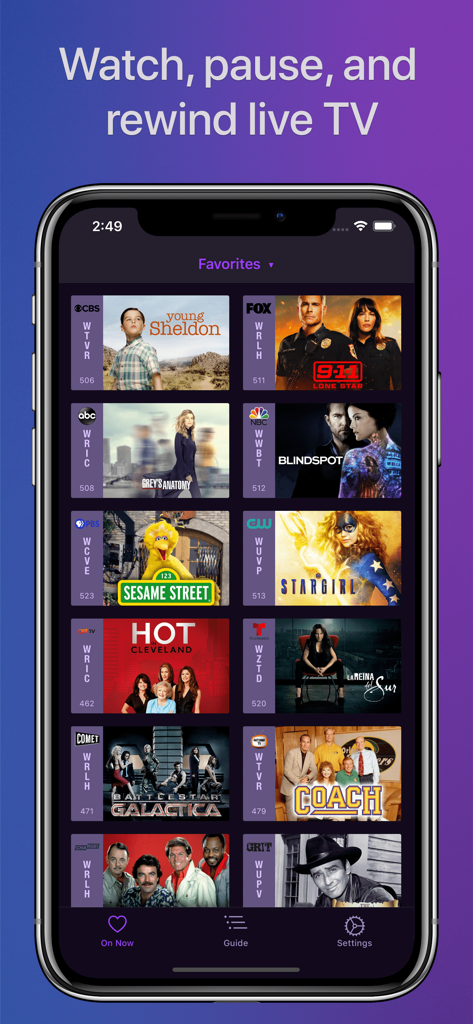
영 쉘든(Young Sheldon)과 세서미 스트리트(Sesame Street)를 포함한 라이브 TV 즐겨찾기 그리드를 보여주는 Channels 앱 인터페이스

영 쉘든(Young Sheldon)과 세서미 스트리트(Sesame Street)를 포함한 라이브 TV 즐겨찾기 그리드를 보여주는 Channels 앱 인터페이스

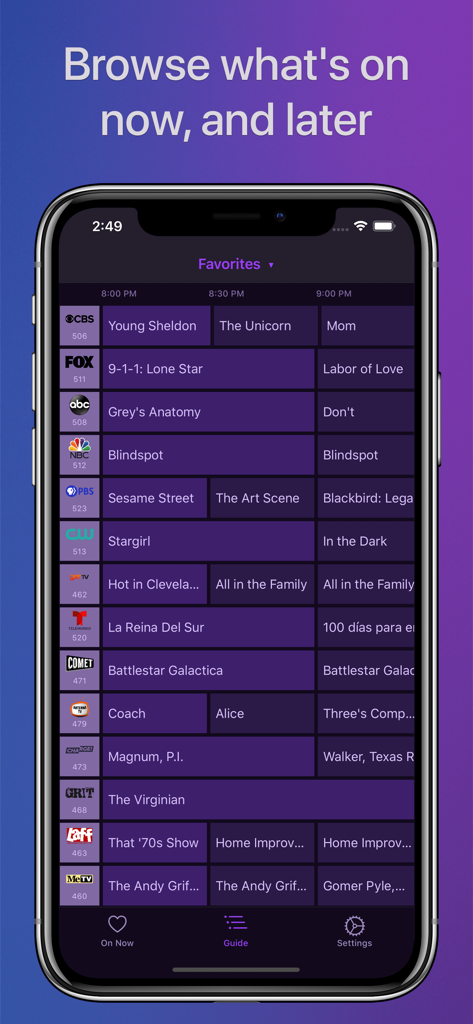
iPhone 화면에서 전체 그리드 TV 가이드를 보여주는 HDHomeRun용 Channels 앱

iPhone 화면에서 전체 그리드 TV 가이드를 보여주는 HDHomeRun용 Channels 앱

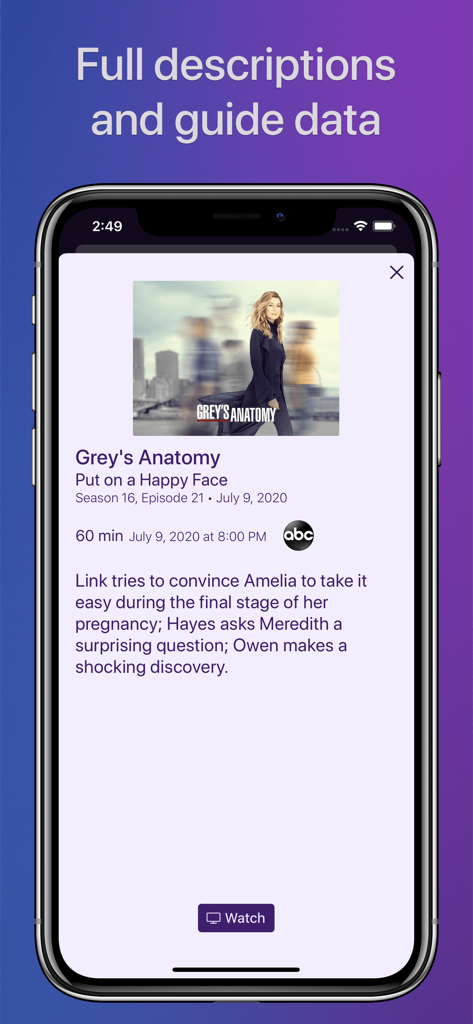
iPhone에서 상세한 TV 쇼 가이드 데이터와 에피소드 설명을 보여주는 Channels 앱의 스크린샷

iPhone에서 상세한 TV 쇼 가이드 데이터와 에피소드 설명을 보여주는 Channels 앱의 스크린샷

홈 시어터를 위한 궁극의 업그레이드

이 앱을 돋보이게 하는 도구, 448K+ 명의 사용자가 선택.

전문적인 그리드 가이드

복잡한 케이블 셋톱박스는 잊으세요. Apple 기기에서 네이티브 앱처럼 느껴지도록 설계된 고성능의 직관적인 인터페이스로 채널을 탐색하세요.

🏟️

타협 없는 비디오 화질

5.1 서라운드 사운드와 함께 풀 HD로 스포츠와 지역 뉴스를 시청하세요. 인터넷 스트리밍의 지연 없이 직접 튜너 연결의 안정성을 즐기세요.

📱

원활한 멀티룸 액세스

집 안 어디서나 TV를 시청하세요. 하나의 안테나가 네트워크의 모든 기기에 신호를 공급하여 Apple TV에서 iPad로 몇 초 만에 전환할 수 있습니다.

전 세계 사용자들에게 사랑받는 앱

Trusted by 448K+ 명이 이 앱을 사랑합니다.

"

"Channels는 코드 커터들에게 절대적인 기준입니다. 인터페이스는 다른 기본 튜너 앱보다 훨씬 앞서 있으며, Apple TV와의 통합은 완벽합니다. 마침내 값비싼 케이블 계약 없이 풀 HD로 지역 스포츠와 뉴스를 볼 수 있게 되었습니다. 제 홈 시어터 구성의 마지막 퍼즐 조각입니다."

마커스 톰슨
"

"거실에서 보던 경기를 주방에 있는 iPad로 가져가서 단 한 장면도 놓치지 않고 볼 수 있다는 점이 정말 좋습니다. 그리드 가이드는 믿을 수 없을 정도로 빠르며, 5.1 서라운드 사운드 품질은 최고 수준입니다. 제 안테나 설정을 프리미엄 케이블 서비스처럼 느끼게 해주면서도 훨씬 직관적입니다."

사라 젠킨스

앱 소개

에 대해 알아야 할 모든 것 Channels for HDHomeRun!.

설명

Watch live TV, right next to your apps. Channels lets you play, pause, and rewind local or cable TV directly on your Apple TV with your HDHomeRun TV tuner. If you are a Channels Plus subscriber with DVR Service, search for the free app: Channels: Whole Home DVR. Channels requires an HDHomeRun networked TV tuner to watch live TV on your iPhone, iPad, or iPod Touch. Learn more about how this works below. • Pause, rewind, and fast forward live TV • Guide Data • Full grid guide • Full HD streaming (bandwidth permitting) • 5.1 Surround Sound • Closed captioning • Full support for VoiceOver • Channel favoriting • Jump back to last channel • Auto Discovery • Browse what's on other channels while watching TV • Manage your HDHomeRun devices from Channels "If you’re a cord cutter, then Channels coupled with an HDHomeRun and antenna is one of the best purchases you can make." — 9to5mac "If live television has been a missing or irritating-to-use piece for your viewing pleasure, Channels plus a networked tuner pulls it neatly into your iPhone, iPod touch, or iPad." — Macworld Channels requires modern iOS devices and 802.11AC wireless for HD streaming. But as usual, your milage may vary. Supported devices: All iOS devices with an A7 chip and up. Note: Channels does not support Picture in Picture mode on the iPad or AirPlay on any device due to the video format provided by the HDHomeRun tuners. This is an iOS limitation. -- Why Use Channels? -- Channels is the missing piece of your puzzle. If you already watch everything through streaming apps, Channels lets you finally watch sports, award shows, local news, and other live events on your same device. • Watch live primetime TV, local news, and sports on your Apple TV. • Netflix, Hulu, Movies, Games, AirPlay, and now live TV on the same device. • Already using antenna for live TV? Channels lets you use one antenna to watch TV on all the devices in your home. • Want sports on your porch? News in the kitchen? Channels lets you watch these anywhere in the home. Let your TV watching follow you around the house. -- How Does It Work? -- An HDHomeRun is a simple TV tuner that can broadcast television over your home network. Channels streams that video directly to your device. 1. Plug an HD antenna or your cable into your HDHomeRun. 2. Plug your HDHomeRun into your router. 3. Watch live TV via the Channels app. -- How Do You Use It? -- Here's some protips on how to get the most out of Channels. • Pick your favorite channels by selecting your HDHomeRun device in the Settings tab and tapping on a channel. • See quickly what’s currently on your favorite channels with the On Now tab. • Tap on a channel to view more info about it (or just 3D Touch it). • Live TV buffer works for ~90 mins or less depending on how much storage is available on your device. • Skip ahead 30s by swiping right. Skip back 7s by swiping left. • Double-tap with 2 fingers to switch to the previous channel. • Swipe up/down on the Quick Guide to see what else is on your favorite channels. Tap it to change to that channel. -- HDHomeRun Device Support -- All HDHomeRun devices are supported by Channels. • HDHomeRun PRIME • HDHomeRun EXTEND • HDHomeRun EXPAND • HDHomeRun CONNECT • HDHomeRun CONNECT DUO • HDHomeRun CONNECT QUATRO • HDHomeRun DUAL • HDHomeRun ORIGINAL (blue and white tuners) Learn more about HDHomeRun tuners on silicondust.com. Simply plug a compatible tuner into your home network router and start watching Live TV with Channels today! • DRM protected streams are *not* currently supported. • Channels does *not* work outside of your home. It only works when connected to the same network as your HDHomeRun Device For questions, concerns, bug reports, and feature requests, contact us on twitter @getchannels or via email support@getchannels.com. You can talk about everything Channels on our community site at: https://community.getchannels.com.

최신 버전

7.0.1

크기

156.0 MB

출시일

2016년 7월 30일

프로슈머 코드 커팅 설정을 완성하세요

라이브 TV를 되찾은 40만 명 이상의 마니아들과 함께하세요. HDHomeRun을 선호하는 Apple 기기에 연결하여 홈 네트워크에 걸맞은 프리미엄급 지연 없는 경험을 누리세요.

다운로드: App Store