Cisco Secure Client

Cisco Secure Client

다운로드: App Store
Spark by MWM logo
로고: Cisco Secure Client

Cisco Secure Client: 하이브리드 워크스페이스를 원활하게 보호하세요

지속적이고 암호화된 네트워크 연결을 위한 업계 표준입니다. 전문적인 업무 환경에 필요한 안정성과 성능으로 기업 리소스, 비즈니스 이메일 및 중요 앱에 액세스하세요.

개발사

Cisco

카테고리

Business

다운로드

14M+

사용자 평점

3.2/5

총 평가 수

8K+

지원 언어

1

인터페이스 살펴보기

이 인터페이스를 사용하는 14M+ 명의 사용자.

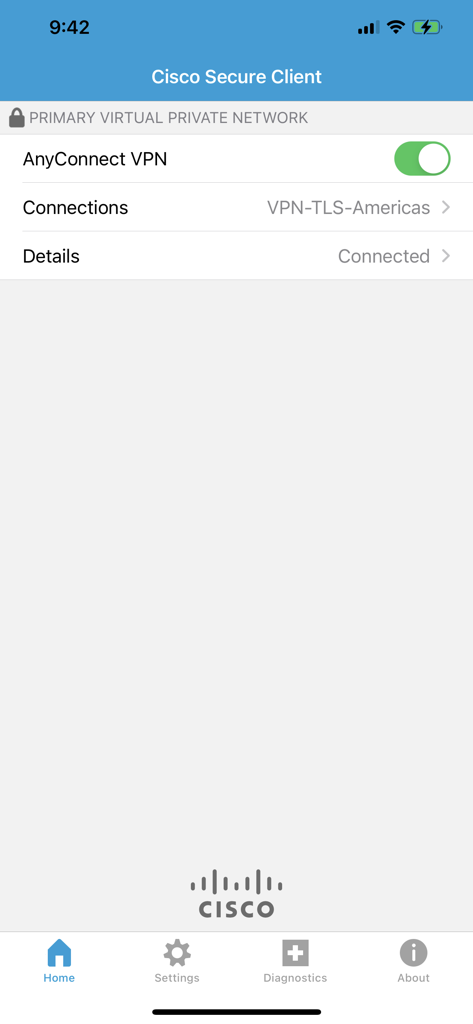
iPhone에서 VPN 연결 상태를 보여주는 Cisco Secure Client 앱 홈 화면

iPhone에서 VPN 연결 상태를 보여주는 Cisco Secure Client 앱 홈 화면

현대 전문가를 위한 엔터프라이즈급 액세스

이 앱을 돋보이게 하는 도구, 14M+ 명의 사용자가 선택.

🔄

원활한 네트워크 로밍

수동 재시작 없이 지속적인 연결을 유지하세요. 가정용 Wi-Fi, 공용 핫스팟 및 셀룰러 데이터 간을 이동할 때 VPN 세션이 자동으로 재개됩니다.

🛡️

철저한 보안 및 규정 준수

차세대 암호화 및 다요소 인증으로 민감한 기업 데이터를 보호하여 엄격한 HIPAA, 금융 또는 정부 보안 표준을 준수하세요.

실시간 업무에 최적화

지연 없는 화상 회의와 선명한 VoIP 세션을 경험하세요. DTLS 기술은 지연에 민감한 트래픽에 우선순위를 두어 회의가 중단 없이 전문적으로 유지되도록 합니다.

전 세계 사용자들에게 사랑받는 앱

Trusted by 14M+ 명이 이 앱을 사랑합니다.

"

"새로운 Cisco Secure Client로의 전환은 완벽했습니다. DTLS 지원은 VoIP 통화에서 눈에 띄는 차이를 만들어내며, 5G와 사무실 Wi-Fi를 전환할 때 네트워크 로밍이 매우 안정적입니다. 제가 iOS에서 사용해 본 VPN 클라이언트 중 가장 신뢰할 수 있는 제품입니다."

David L., 수석 네트워크 엔지니어
"

"업무상 출장이 잦은 저에게는 속도를 늦추지 않는 보안이 필요합니다. 이 앱은 즉시 연결되며 공항 공용 네트워크에서도 기업 데이터를 안전하게 보호해 줍니다. 간단하고 신뢰할 수 있으며, 원격 업무 워크플로우에 반드시 필요한 앱입니다."

Sarah M., 프로젝트 디렉터

앱 소개

에 대해 알아야 할 모든 것 Cisco Secure Client.

설명

This is the Cisco Secure Client (including AnyConnect VPN) application for Apple iOS. Please report any questions to ac-mobile-feedback@cisco.com. Please consult with your EMM/MDM vendor on configuration changes required to configure this new version if you are not setting it up manually. Samples at: https://community.cisco.com/t5/security-blogs/anyconnect-apple-ios-transition-to-apple-s-latest-vpn-framework/ba-p/3098264 LICENSING AND INFRASTRUCTURE REQUIREMENTS: You must have an active AnyConnect Plus, Apex or VPN Only term/contract to utilize this software. Use is no longer permitted for older Essentials/Premium with Mobile licensing. AnyConnect may never be used with non-Cisco servers. Trial AnyConnect Apex (ASA) licenses are available for administrators at www.cisco.com/go/license AnyConnect for iOS requires Cisco Adaptive Security Appliance (ASA) Boot image 8.0(4) or later. Per App VPN requires ASA 9.3(2) or later (5500-X/ASAv only) with Plus, Apex or VPN Only licensing and a minimum Apple iOS version of 10.x. For additional licensing questions, please contact ac-mobile-license-request (AT) cisco.com and include a copy of "show version" from your Cisco ASA. Ordering and Licensing Guide: https://www.cisco.com/c/en/us/products/collateral/security/anyconnect-secure-mobility-client/secure-client-og.html Cisco Secure Client (including AnyConnect VPN) provides reliable and easy-to-deploy encrypted network connectivity from any Apple iOS by delivering persistent corporate access for users on the go. Whether providing access to business email, a virtual desktop session, or most other iOS applications, AnyConnect enables business-critical application connectivity. Through the use of Datagram Transport Layer Security (DTLS), TCP-based applications and latency-sensitive traffic (such as voice over IP [VoIP]) are provided an optimized communication path to corporate resources. Additionally, the Cisco Secure Client support IPsec IKEv2 with Next Generation Encryption. Features: - Automatically adapts its tunneling to the most efficient method possible based on network constraints, using TLS and DTLS. - DTLS provides an optimized connection for TCP-based application access and latency-sensitive traffic, such as VoIP traffic - Network roaming capability allows connectivity to resume seamlessly after IP address change, loss of connectivity, or device standby - Wide Range of Authentication Options: RADIUS, RSA SecurID, Active Directory/Kerberos, Digital Certificates, LDAP, multifactor authentication - Supports certificate deployment using Apple iOS and AnyConnect integrated SCEP - Compatible with Apple iOS Connect On Demand VPN capability for automatic VPN connections when required by an application - Policies can be preconfigured or configured locally, and can be automatically updated from the VPN headend - Access to internal IPv4 and IPv6 network resources - Administrator-controlled split / full tunneling network access policy - Per App VPN (TCP and UDP) - MDM controlled If you are an end-user and have any issues or concerns, please contact your organization’s support department. If you are a System Administrator having difficulties configuring or utilizing the Application, please contact your designated support point of contact. Release Notes: https://www.cisco.com/c/en/us/support/security/anyconnect-secure-mobility-client/products-release-notes-list.html User Guide: https://www.cisco.com/c/en/us/support/security/anyconnect-secure-mobility-client/products-user-guide-list.html End user license: https://www.cisco.com/c/dam/en_us/about/doing_business/legal/seula/anyconnect-SEULA-v4x.pdf

최신 버전

5.1.11423

크기

24.7 MB

출시일

2017년 6월 14일

원활한 연결성. 절대적인 보안.

신뢰할 수 있는 업계 표준으로 하이브리드 워크스페이스를 강화하세요. Cisco Secure Client를 다운로드하여 어디서나 기업 리소스에 안전하게 액세스하세요.

다운로드: App Store
FAQ

자주 묻는 질문

에 대해 알아야 할 모든 것 Cisco Secure Client

Cisco Secure Client for iOS는 무엇인가요?

AnyConnect VPN을 포함한 Cisco Secure Client는 Apple iOS 장치에 안정적이고 암호화된 네트워크 연결을 제공하여 사용자에게 지속적인 기업 액세스를 제공합니다. 비즈니스에 필수적인 애플리케이션 연결을 지원합니다.

Cisco Secure Client는 Apple iOS에서 VPN을 지원하나요?

예, Cisco Secure Client에는 AnyConnect VPN이 포함되어 있어 모든 Apple iOS 장치에서 암호화된 네트워크 연결을 사용할 수 있습니다. 이동 중인 사용자에게 지속적인 기업 액세스를 제공합니다.

Cisco Secure Client(AnyConnect VPN)를 사용하려면 어떤 라이선스가 필요하나요?

활성 AnyConnect Plus, Apex 또는 VPN Only 기간/계약이 필요합니다. 이전 Essentials/Premium with Mobile 라이선스는 Cisco Secure Client와 함께 사용할 수 없습니다.

iOS용 Cisco Secure Client에는 어떤 Cisco ASA 버전이 필요하나요?

iOS용 Cisco Secure Client에는 Cisco Adaptive Security Appliance(ASA) 부트 이미지 8.0(4) 이상이 필요합니다. 앱별 VPN 기능에는 ASA 9.3(2) 이상이 필요합니다.

Cisco Secure Client는 어떤 VPN 터널링 방법을 사용하나요?

Cisco Secure Client는 네트워크 제약 조건에 따라 최적화된 연결을 위해 TLS 및 DTLS를 사용하여 가능한 가장 효율적인 방법으로 터널링을 자동으로 조정합니다.

Cisco Secure Client는 다단계 인증(MFA)을 지원하나요?

예, Cisco Secure Client는 다단계 인증(MFA), RADIUS, RSA SecurID, Active Directory/Kerberos, 디지털 인증서 및 LDAP를 포함한 광범위한 인증 옵션을 지원합니다.

Cisco Secure Client는 iOS에서 VPN을 자동으로 연결할 수 있나요?

예, Cisco Secure Client는 Apple iOS Connect On Demand VPN 기능과 호환되어 애플리케이션이 필요할 때 자동으로 VPN을 연결합니다.

Cisco Secure Client에서 VPN 연결 상태를 어떻게 확인할 수 있나요?

앱 상단에 'PRIMARY VIRTUAL PRIVATE NETWORK'이 표시되고 'Details' 아래에 'Connected'가 표시되어 활성 VPN 연결을 확인합니다. 'AnyConnect VPN'에 대한 녹색 토글은 활성 상태임을 나타냅니다.