Detail: AI Video Editor

Detail: AI Video Editor

다운로드: App Store
Spark by MWM logo
로고: Detail: AI Video Editor

Detail: AI 동영상 편집기 — AI 기반 전문가 동영상 스튜디오

앱 스토어 수상작인 Detail을 사용하는 645,000명 이상의 크리에이터와 함께 몇 초 만에 바이럴 쇼츠, 팟캐스트, 브이로그를 녹화, 자동 편집, 공유하세요.

개발사

Detail Technologies B.V.

카테고리

Photo & Video

다운로드

645K+

사용자 평점

4.5/5

총 평가 수

3K+

지원 언어

40

작업 중인 스튜디오

이 인터페이스를 사용하는 645K+ 명의 사용자.

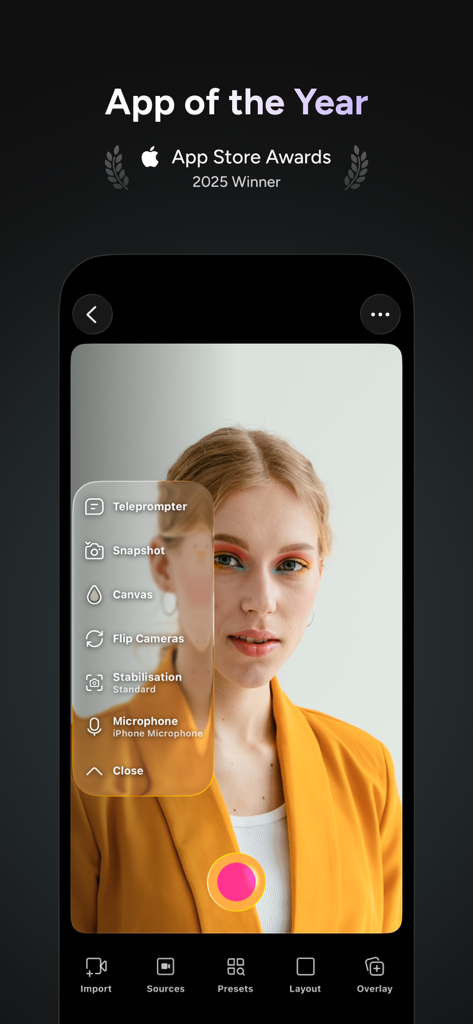
프롬프터 메뉴와 전문가 녹화 도구가 있는 Detail AI 동영상 편집기 카메라 인터페이스

프롬프터 메뉴와 전문가 녹화 도구가 있는 Detail AI 동영상 편집기 카메라 인터페이스

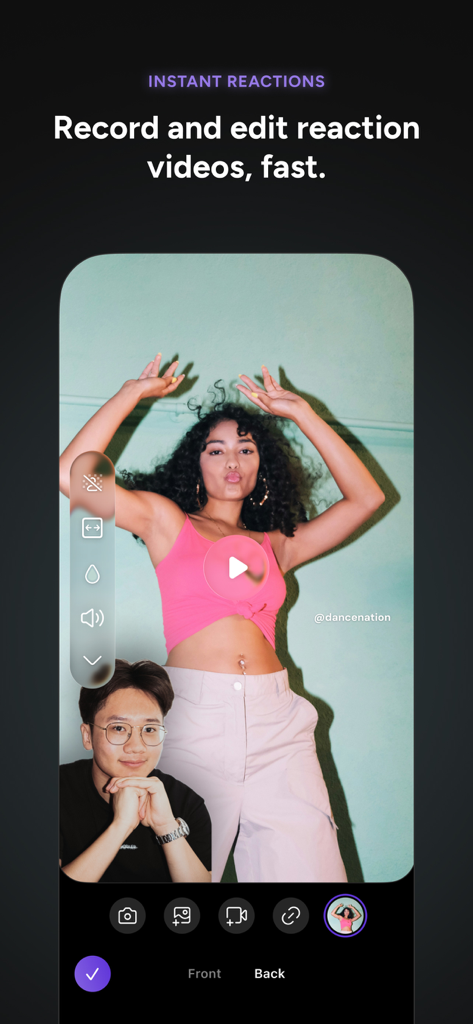
Picture-in-picture 레이아웃으로 즉각적인 반응 동영상 녹화 기능을 보여주는 Detail AI 동영상 편집기 앱의 모바일 인터페이스.

Picture-in-picture 레이아웃으로 즉각적인 반응 동영상 녹화 기능을 보여주는 Detail AI 동영상 편집기 앱의 모바일 인터페이스.

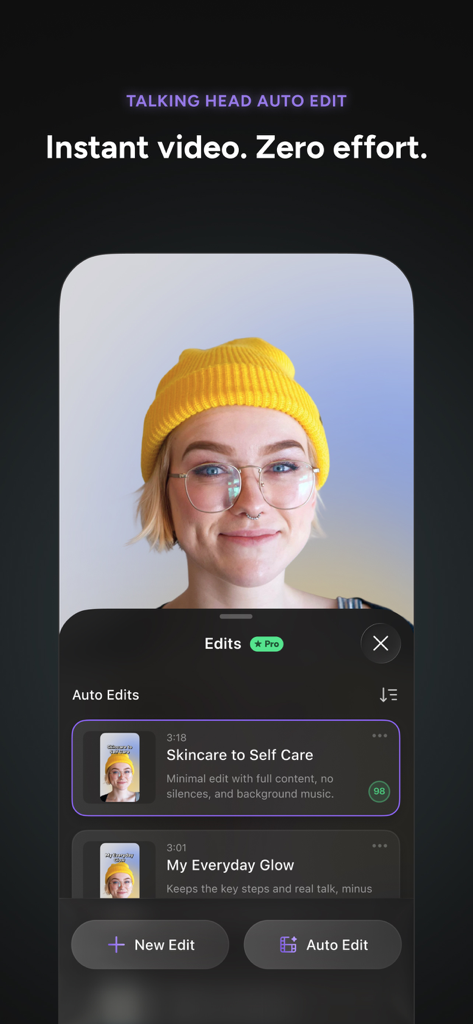
말하는 사람 영상 제작자를 위한 자동 편집을 보여주는 Detail AI 동영상 편집기 인터페이스

말하는 사람 영상 제작자를 위한 자동 편집을 보여주는 Detail AI 동영상 편집기 인터페이스

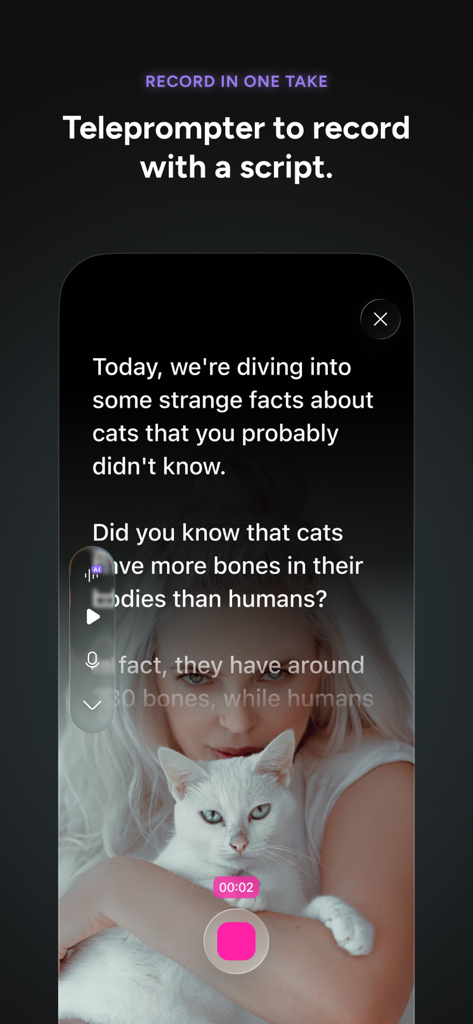
스크립트를 녹화하는 동안 Detail AI 동영상 편집기의 프롬프터 기능을 보여주는 모바일 화면

스크립트를 녹화하는 동안 Detail AI 동영상 편집기의 프롬프터 기능을 보여주는 모바일 화면

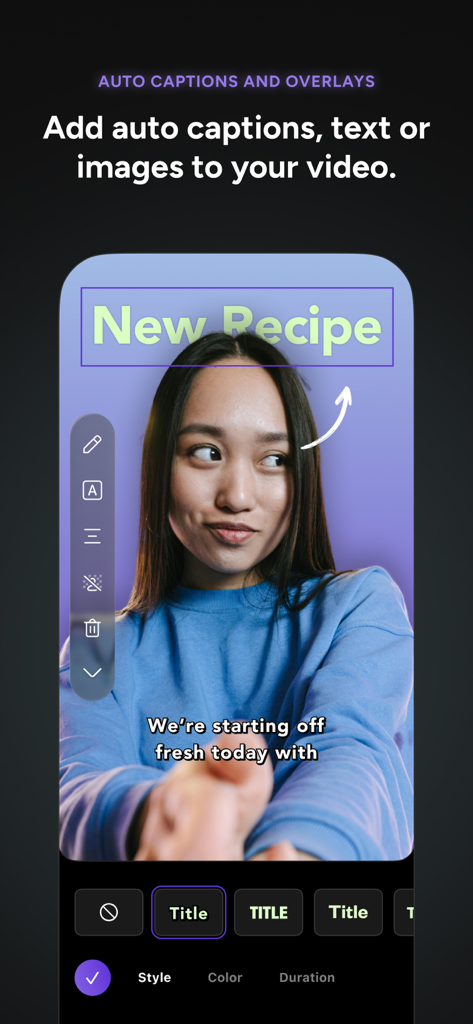
자동 자막과 브이로그 녹화에 새로운 레시피 텍스트 오버레이를 보여주는 Detail AI 동영상 편집기의 모바일 인터페이스

자동 자막과 브이로그 녹화에 새로운 레시피 텍스트 오버레이를 보여주는 Detail AI 동영상 편집기의 모바일 인터페이스

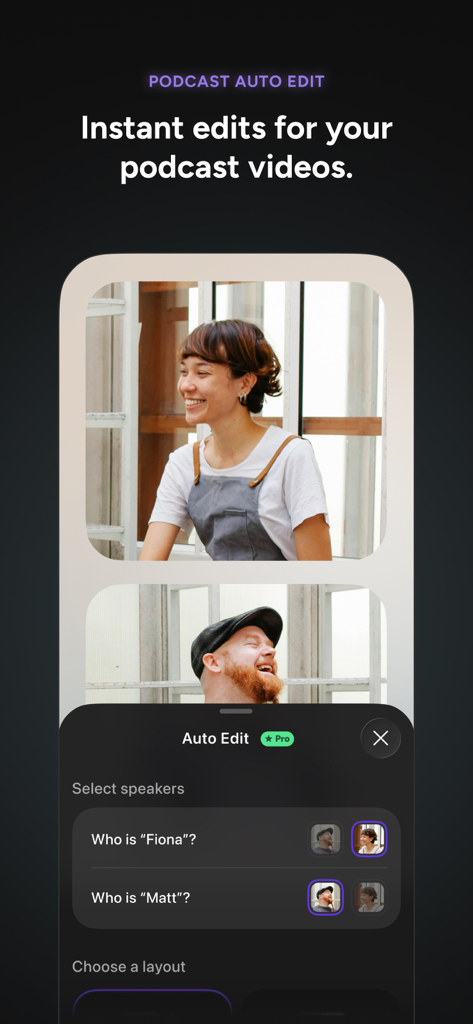
멀티 카메라 동영상 팟캐스트의 화자 선택 기능이 있는 팟캐스트 자동 편집 인터페이스를 특징으로 하는 Detail AI 동영상 편집기 스크린샷.

멀티 카메라 동영상 팟캐스트의 화자 선택 기능이 있는 팟캐스트 자동 편집 인터페이스를 특징으로 하는 Detail AI 동영상 편집기 스크린샷.

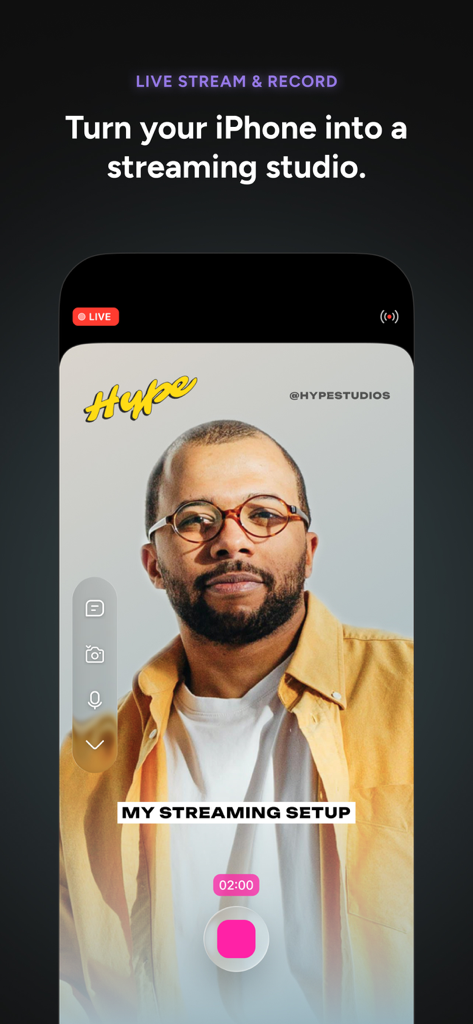
iPhone에서 Detail AI 동영상 편집기 라이브 스트리밍 및 녹화 인터페이스

iPhone에서 Detail AI 동영상 편집기 라이브 스트리밍 및 녹화 인터페이스

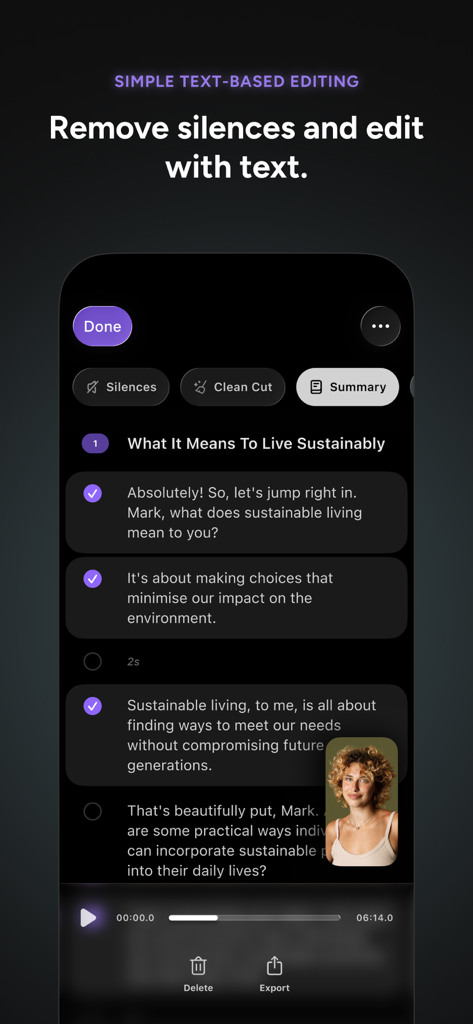
크리에이터를 위한 텍스트 기반 편집 및 무음 제거 기능을 보여주는 Detail AI 동영상 편집기의 모바일 인터페이스.

크리에이터를 위한 텍스트 기반 편집 및 무음 제거 기능을 보여주는 Detail AI 동영상 편집기의 모바일 인터페이스.

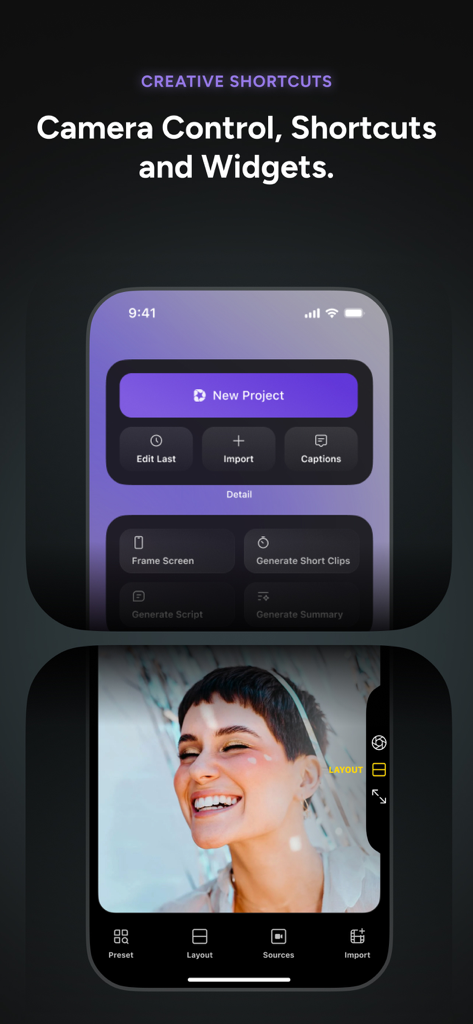
창의적인 단축키와 카메라 컨트롤을 보여주는 Detail AI 동영상 편집기 앱 인터페이스.

창의적인 단축키와 카메라 컨트롤을 보여주는 Detail AI 동영상 편집기 앱 인터페이스.

AI 속도로 전문가 수준의 콘텐츠를 제작하세요

이 앱을 돋보이게 하는 도구, 645K+ 명의 사용자가 선택.

🪄

즉각적인 AI 자동 편집

수동 편집 시간을 절약하세요. AI가 최고의 하이라이트를 식별하고 한 번의 탭으로 틱톡 및 릴스를 위한 완성도 높은 자막 포함 쇼츠를 제작합니다.

🗣️

스마트 디렉터 & 프롬프터

자신 있게 메시지를 전달하세요. AI 디렉터를 사용하여 스토리텔링을 안내하고 내장된 프롬프터를 사용하여 언제든지 완벽한 촬영을 하세요.

📸

주머니 속 전문가 스튜디오

AI 오디오 향상 및 즉각적인 그린 스크린 효과로 멀티캠 인터뷰, 반응 동영상 또는 전문가 발표를 녹화하세요.

전 세계 사용자들에게 사랑받는 앱

Trusted by 645K+ 명이 이 앱을 사랑합니다.

"

"부동산 전문 중개인으로서 복잡한 편집을 할 시간이 없습니다. Detail의 AI 자동 편집 및 프롬프터 덕분에 몇 분 만에 자막이 포함된 전문가 수준의 부동산 투어 영상을 촬영할 수 있습니다. 워크플로우가 완전히 간소화되었고, Detail을 사용한 이후로 인스타그램 참여율이 급증했습니다."

Sarah Jenkins, 부동산 전문가
"

"멀티캠 기능은 제 팟캐스트에 정말 큰 변화를 가져왔습니다. 두 개의 아이폰을 동기화하고 AI 디렉터를 사용하여 녹화를 안내할 수 있다는 점이 장비 비용과 후반 작업 시간을 수천 달러 절약해주었습니다. 모바일 기기에서 사용해 본 영상 도구 중 가장 강력합니다."

Marcus Thorne, 디지털 콘텐츠 크리에이터

리뷰 분석

사용자 리뷰 인사이트.

감정 점수

32%
부정적

요약

The Detail app receives highly mixed, but predominantly negative, feedback from users. While some praise its AI editing capabilities for speeding up content creation, its accurate transcription feature, and its dual-cam recording, the app is plagued by significant performance and stability issues. Users frequently report slow export times, app crashes, freezing, and persistent audio/video synchronization problems, making it unreliable for many. The user interface is often described as confusing and not user-friendly, and there are widespread complaints regarding the subscription model, including high costs, deceptive free trials, and difficulties obtaining refunds. There were no specific version-related bugs consistently reported across multiple reviews.

주요 테마

AI Editing(4)
Performance(2)
Ease of Use / UI(2)
Transcription Feature(2)
Audio/Video Sync(1)
Subscription & Pricing(1)
Dual-Cam Recording(1)

앱 소개

에 대해 알아야 할 모든 것 Detail: AI Video Editor.

설명

With Detail, everyone can tell their story with video. App Store Awards Winner 2025. Detail combines the simplicity of a camera app with the power of a video editor. Whether you're creating a 60-second reaction video, a presentation, a 30-minute interview or podcast, or a live stream, you can do it all in one place with Detail. Record or import a video and use AI Auto-Edit to create videos and shorts automatically. Instant video. Record, done! Turn your iPhone or iPad into a professional video studio with Detail, the ultimate AI video editor for content creators. Whether you're making TikTok shorts, YouTube vlogs, reels, podcasts, or Instagram stories, Detail has everything you need without juggling complicated apps or gear. NEW: Auto-Edit & AI Director • AI Director: A conversational guide in the teleprompter that helps you record your story. Just talk — no prep needed. • Auto-Edit: Finds the best moments and creates ready-to-share videos, from long-form to short clips. • Edits: Create multiple versions of your timeline in one project. • Shortcuts: Jump into your next video faster with new Home Screen Shortcuts. AI Video Editing Made Easy Say goodbye to complicated editing software. Detail's AI editor helps you craft professional content in minutes. The teleprompter and Auto-Edit streamline your workflow. Create perfect cuts and transitions for vlogs, shorts, and reels ideal for TikTok and Instagram. Get unlimited recording, remote recording, captions and editing for free; upgrade to Pro to unlock AI features like Auto-Edit. Powerful Camera Features • Easy multi-camera recording with two iPhones or iPads. • Switch between front and back cameras. • Create instant reaction videos—import content and convert into social-ready shorts. • Display video behind you for commentary, tutorials, or presentations. YouTube Vlogger's Dream • Import Photos or Videos to create a video • Create end screens to boost subscribers. • YouTube-optimized export settings. • Generate stand-out thumbnails. Instagram Story & Reel Enhancer • Text-based editing for create reels and shorts fast. • Pre-configured aspect ratios. • Instagram-style filters. Podcast Production Suite • Podcast Auto-Edit for quick, polished video podcasts. • Record with iPhone mic, Rode/DJI wireless, or USB microphones. • AI audio enhancement. • Publish to major platforms with one tap. • Extract audio from any video. Livestream with Professional Quality • Stream to YouTube, Twitch, Instagram, LinkedIn, Kick or Facebook via RTMP. • Record high-quality video while streaming. • Use overlays, layouts, and multi-camera setups. Advanced Editing Tools • Green screen effects with Chroma Key. • Speed up video or slow motion clips. • Motion graphics and text animation. • Integrated teleprompter with AI Director. • AI color grading with filters. Captions & Subtitles • AI auto-captions in multiple languages. • Customizable caption styles. • Burned-in subtitles. Collaboration & Workflow • Cloud sync for saving and sharing projects. • Collaborate on edits and share recordings. • Organize videos, shorts, and reels with cloud storage. Everyone can create, stream, and edit like a pro. Join thousands of creators using Detail to produce YouTube vlogs, TikTok shorts, video podcasts, and Instagram reels. Whether you're a beginner or an experienced creator, Detail's AI-powered tools help you create unique content faster. Download Detail now and start recording, editing, and live streaming with ease!

최신 버전

5.5.3

크기

325.1 MB

출시일

2023년 3월 10일

AI 제작 스튜디오를 탭 한 번으로 이용하세요

타임라인에서 몇 시간씩 보내는 것을 멈추세요. 645,000명 이상의 크리에이터와 함께 AI를 사용하여 틱톡, 유튜브 등을 위한 전문가 수준의 콘텐츠를 녹화, 자동 편집, 확장하세요.

다운로드: App Store
FAQ

자주 묻는 질문

에 대해 알아야 할 모든 것 Detail: AI Video Editor

Detail: AI Video Editor에서 자동 동영상 편집 기능을 제공하나요?

네, Detail: AI Video Editor는 AI Auto-Edit를 사용하여 녹화된 영상에서 최고의 순간을 자동으로 찾아주며, 긴 콘텐츠부터 짧은 클립까지 공유 가능한 동영상 및 쇼츠를 제작합니다.

Detail: AI Video Editor에 텔레프롬프터 기능이 있나요?

네, Detail에는 AI 디렉터가 포함된 통합 텔레프롬프터가 있습니다. 이 대화형 가이드는 사용자가 스크립트를 표시하여 별도의 준비 없이도 원활한 녹화 경험을 통해 스토리를 녹화할 수 있도록 도와줍니다.

Detail: AI Video Editor를 사용하여 소셜 미디어 플랫폼으로 라이브 스트리밍을 할 수 있나요?

네, Detail을 사용하면 RTMP를 통해 YouTube, Twitch, Instagram, LinkedIn, Kick, Facebook과 같은 플랫폼으로 직접 라이브 스트리밍을 할 수 있으며, iPhone을 전문적인 스트리밍 스튜디오로 만들 수 있습니다.

Detail: AI Video Editor에는 무료 기능이 제공되나요, 아니면 Pro 전용 앱인가요?

네, Detail은 무제한 녹화, 원격 녹화, 자막 및 기본 편집을 무료로 제공합니다. Pro 버전으로 업그레이드하면 Auto-Edit 및 팟캐스트 전용 AI 도구와 같은 고급 AI 기능을 사용할 수 있습니다.

Detail: AI Video Editor에서 여러 카메라를 동시에 녹화할 수 있나요?

네, Detail은 두 대의 iPhone 또는 iPad를 사용하여 손쉬운 멀티 카메라 녹화를 지원합니다. 이 기능을 통해 사용자는 전면 및 후면 카메라 간 전환을 하고 여러 각도에서 동시에 녹화할 수 있습니다.

Detail: AI Video Editor에서 텍스트 기반 편집을 지원하여 동영상 제작을 단순화하나요?

네, Detail은 텍스트 기반 편집을 제공하여 사용자가 녹취된 텍스트를 조작하여 침묵을 제거하고 동영상을 편집할 수 있도록 합니다. 이는 콘텐츠 제작자의 편집 과정을 간소화합니다.

Detail: AI Video Editor가 수상 경력이나 인정을 받은 적이 있나요?

네, Detail: AI Video Editor는 2025년 App Store Awards 수상작입니다. 간단한 카메라 기능과 강력한 동영상 편집 기능을 결합한 점을 인정받았습니다.