ETA - GPS & maps driving times

ETA - GPS & maps driving times

다운로드: App Store
Spark by MWM logo
로고: ETA - GPS & maps driving times

ETA - 즉각적인 도착 예정 시간으로 일정을 관리하세요

효율성을 추구하는 전문가를 위한 필수 대시보드입니다. 홈 화면이나 Apple Watch에서 좋아하는 목적지 및 캘린더 이벤트에 대한 실시간 교통 정보와 도착 예정 시간을 바로 확인하세요.

다운로드: App Store

개발사

Eastwood Co Pty Ltd

카테고리

Navigation

다운로드

218K+

사용자 평점

3.8/5

총 평가 수

1K+

지원 언어

17

한눈에 보는 것으로 충분합니다

이 인터페이스를 사용하는 218K+ 명의 사용자.

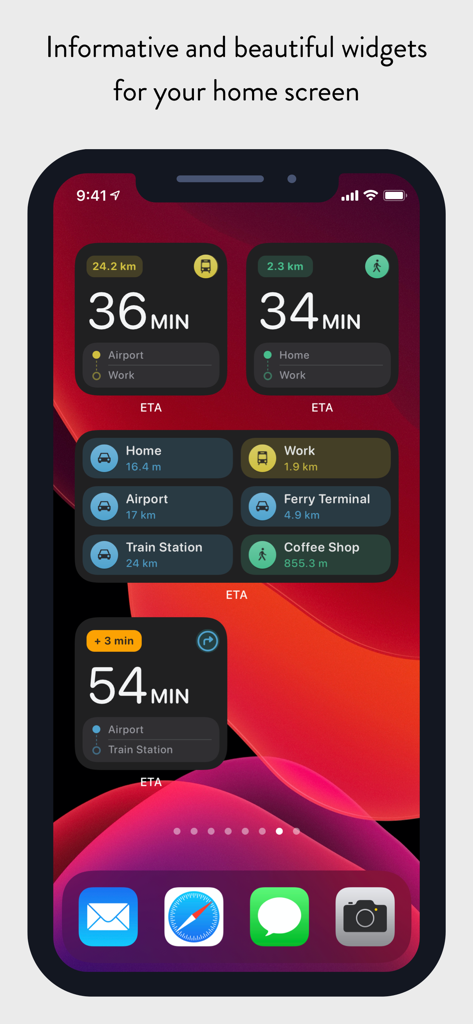
다양한 위치와 교통수단의 도착 예정 시간을 보여주는 ETA 위젯이 표시된 iPhone 홈 화면

다양한 위치와 교통수단의 도착 예정 시간을 보여주는 ETA 위젯이 표시된 iPhone 홈 화면

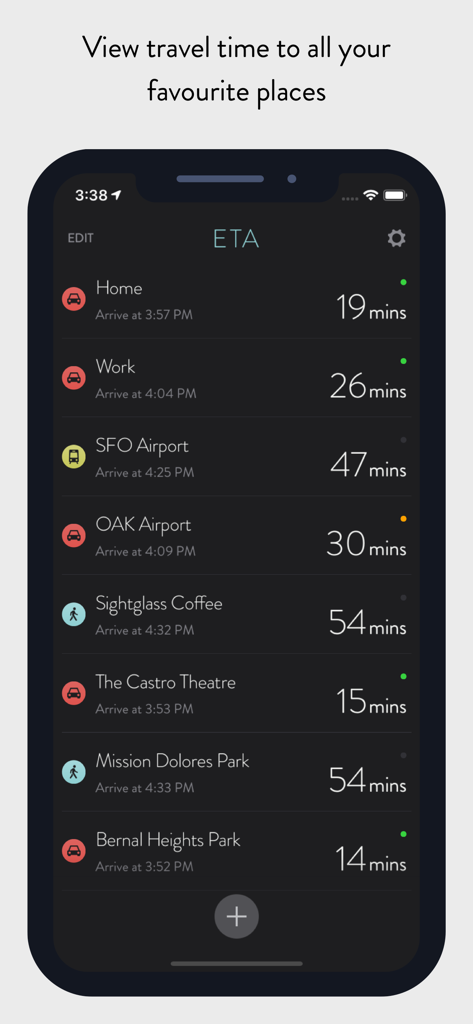
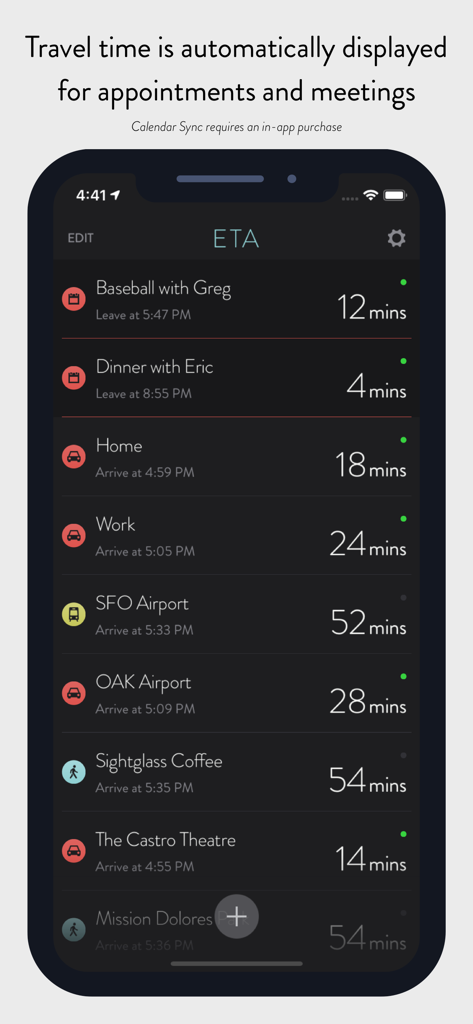
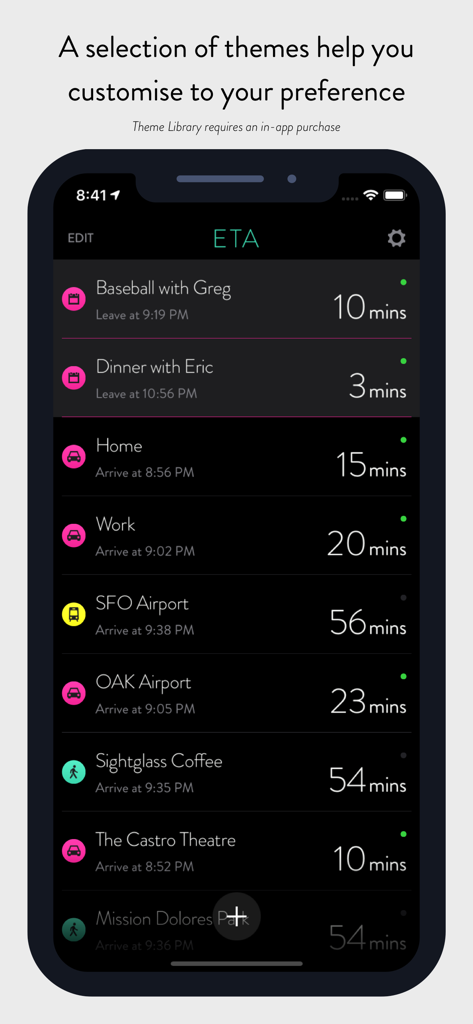
집이나 직장과 같은 여러 목적지의 도착 예정 시간과 예상 도착 시간을 보여주는 ETA 앱 대시보드

집이나 직장과 같은 여러 목적지의 도착 예정 시간과 예상 도착 시간을 보여주는 ETA 앱 대시보드

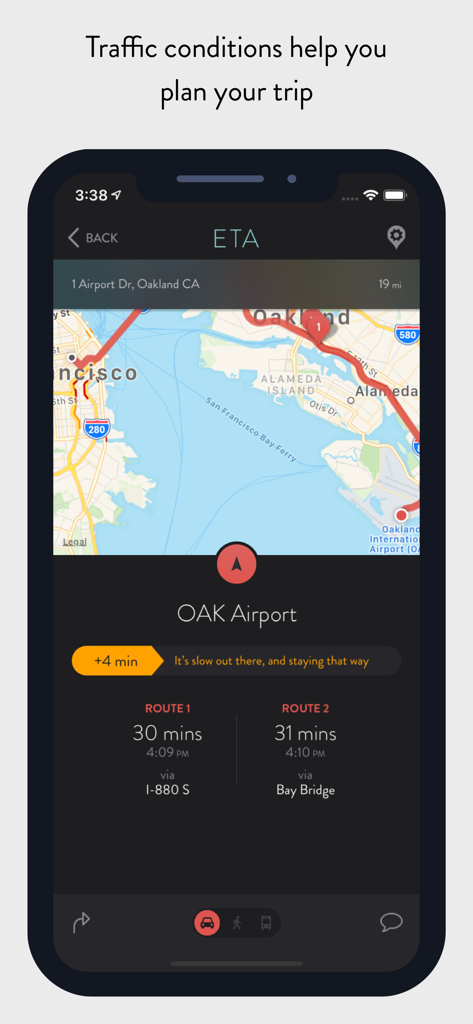
오클랜드 공항으로 가는 여러 경로의 운전 시간과 교통 상황을 보여주는 ETA 앱 인터페이스

오클랜드 공항으로 가는 여러 경로의 운전 시간과 교통 상황을 보여주는 ETA 앱 인터페이스

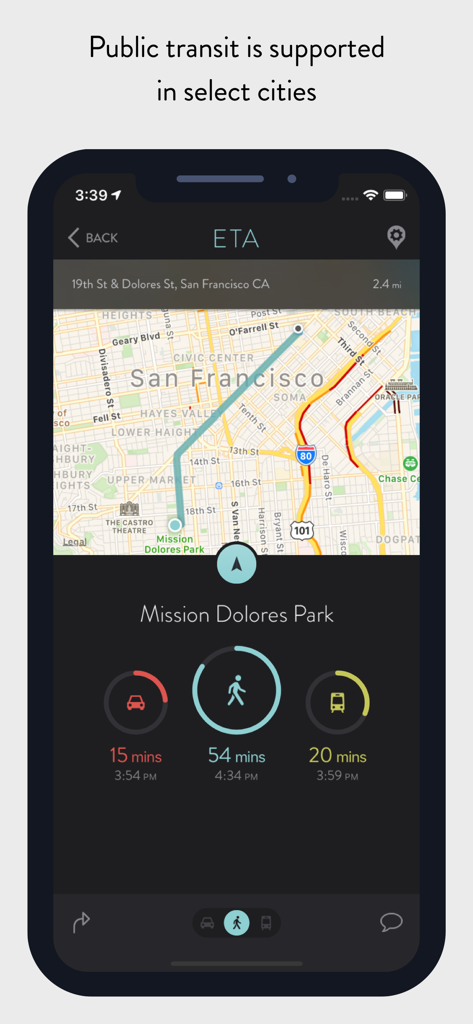
미션 돌로레스 파크의 운전, 도보, 대중교통 시간을 보여주는 ETA 앱이 있는 iPhone 화면

미션 돌로레스 파크의 운전, 도보, 대중교통 시간을 보여주는 ETA 앱이 있는 iPhone 화면

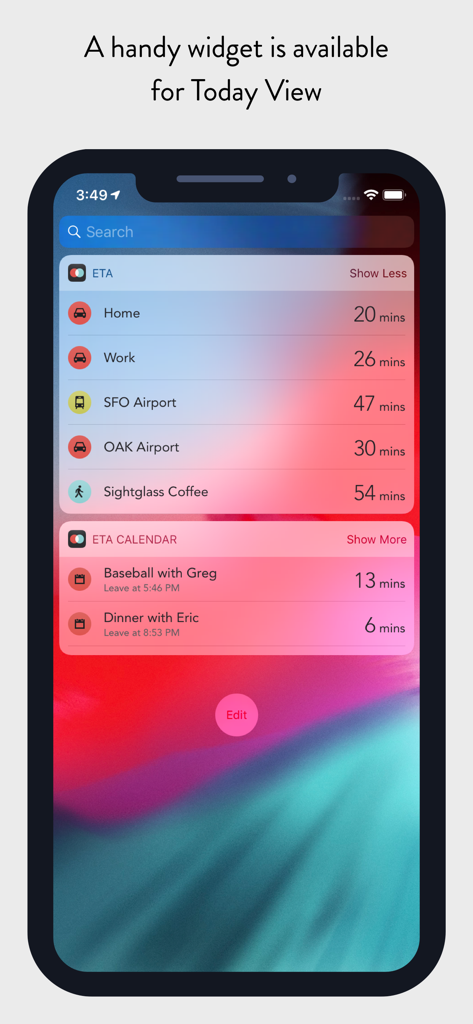
자주 가는 위치 및 캘린더 약속의 도착 예정 시간을 보여주는 ETA 앱 위젯이 표시된 iPhone 화면

자주 가는 위치 및 캘린더 약속의 도착 예정 시간을 보여주는 ETA 앱 위젯이 표시된 iPhone 화면

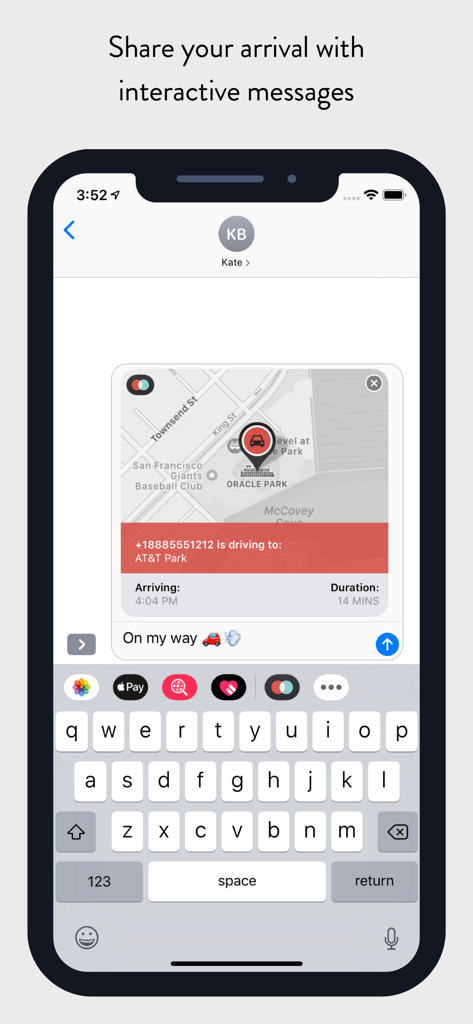
운전 시간과 도착 상태를 공유하는 대화형 ETA 카드가 있는 iMessage 대화창을 보여주는 iPhone 화면

운전 시간과 도착 상태를 공유하는 대화형 ETA 카드가 있는 iMessage 대화창을 보여주는 iPhone 화면

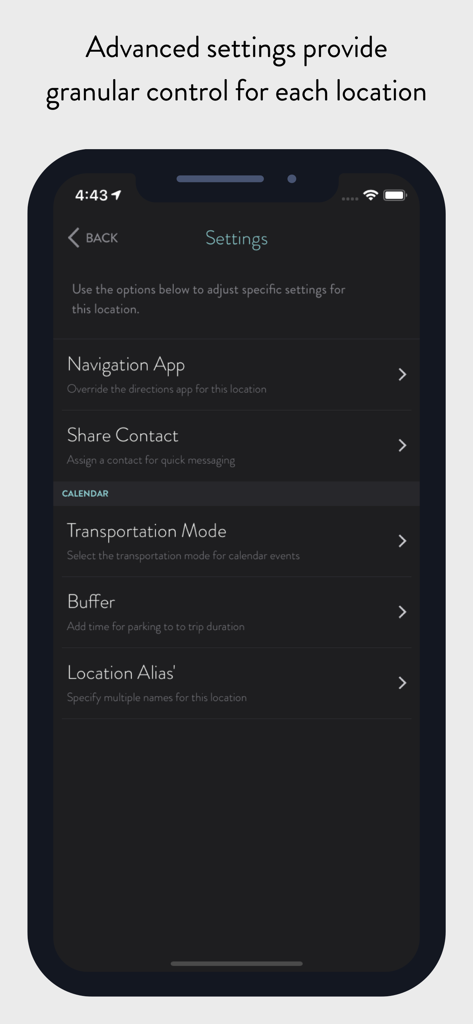
탐색 앱 교통 모드 및 이동 시간 버퍼 옵션을 보여주는 ETA 앱의 고급 위치 설정 인터페이스

탐색 앱 교통 모드 및 이동 시간 버퍼 옵션을 보여주는 ETA 앱의 고급 위치 설정 인터페이스

캘린더 이벤트 및 저장된 목적지의 도착 예정 시간을 표시하는 ETA 앱

캘린더 이벤트 및 저장된 목적지의 도착 예정 시간을 표시하는 ETA 앱

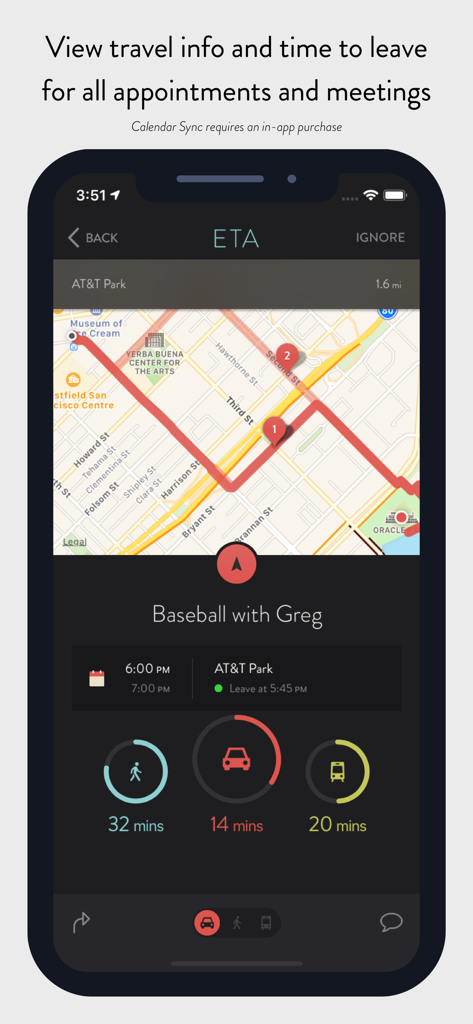
캘린더 이벤트로 가는 운전, 도보, 대중교통 시간을 표시하는 모바일 앱 인터페이스

캘린더 이벤트로 가는 운전, 도보, 대중교통 시간을 표시하는 모바일 앱 인터페이스

목적지 및 캘린더 이벤트의 도착 예정 시간을 보여주는 ETA 앱 인터페이스

목적지 및 캘린더 이벤트의 도착 예정 시간을 보여주는 ETA 앱 인터페이스

일정을 손쉽게 관리하세요

이 앱을 돋보이게 하는 도구, 218K+ 명의 사용자가 선택.

한눈에 보는 도착 예정 시간

검색은 건너뛰세요. 앱을 열지 않고도 iOS 위젯과 Apple Watch 컴플리케이션을 통해 운전, 대중교통, 도보 시간을 즉시 확인하세요.

📅

스마트 캘린더 연동

약속을 동기화하고 ETA가 실시간 교통 정보를 기반으로 최적의 출발 시간을 계산하도록 하세요. 모든 회의에 차분하고 정시에 도착할 수 있습니다.

🚦

사전 교통 알림

실시간 지연 업데이트로 도시 교통 체증을 이겨내세요. 지금 출발해야 할지 아니면 5분 더 걸릴지 결정하는 데 필요한 데이터를 얻으세요.

전 세계 사용자들에게 사랑받는 앱

Trusted by 218K+ 명이 이 앱을 사랑합니다.

"

"ETA는 제 업무 일과를 관리하는 방식을 완전히 바꿔 놓았습니다. 캘린더 연동이 매끄럽고, 홈 화면 위젯에 도착 예정 시간이 바로 표시되어 아이들 픽업 전에 스트레스를 많이 줄여줍니다. 마치 늦지 않도록 도와주는 개인 비서가 생긴 것 같아요."

Sarah Jenkins, 마케팅 이사
"

"Apple Watch 연동은 정말 탁월합니다. 손목을 보는 것만으로도 기차를 타러 가야 할 시간인지, 아니면 몇 분 더 여유가 있는지 즉시 알 수 있습니다. 제 시계 화면에서 가장 많이 사용하는 컴플리케이션이며, 개인 정보 보호 우선 접근 방식 덕분에 안심할 수 있습니다."

Mark Thompson, 소프트웨어 엔지니어

앱 소개

에 대해 알아야 할 모든 것 ETA - GPS & maps driving times.

설명

** ETA supports the latest iOS and watchOS features including informative iOS Home Screen widgets and powerful complications for your Apple Watch watch face. With ETA you'll always know how long it'll take to get to your destination. ** ETA instantly shows travel time (including support for driving, public transit*, cycling* and walking) to your favourite places. When driving, ETA also supplies traffic information that details any delays on your route. ## The only app that provides driving times and traffic information on your iPhone Home Screen ## Our thoughtfully designed iOS Home Screen widgets will keep you informed of the travel and traffic situation without you needing to open the app. The calendar widget automatically retrieves your appointments so you know when best to leave to arrive on time. In line with Apple's guidelines our Home Screen widgets update at regular intervals during the day. ## The only app that shows driving time on your watch face ## You can rely on ETA to show you travel time on the watch face of your Apple Watch. Whether you travel by car, bike, public transit or foot, ETA will update in the background and show you an updated travel time as you move. ETA adheres to Apple's guidelines and updates at minimum every 15 minutes ensuring your watch face displays current travel time and traffic conditions. ## The only app that gives you travel time to meetings and appointments in one place ## ETA's 'set and forget' calendar functionality is a must have to keep you on time for your appointments and meetings. Once setup, ETA automatically monitors your calendar (securely and privately on your device) and displays travel time and traffic conditions for your upcoming events. This is available across our apps on iOS and Apple Watch, on your Apple Watch watch face as well in widgets on your iPhone Home Screen and Today View. ## Five star support ETA is backed by our great support to help you get the most from the app. Browse our knowledgeable or reach out to one of our friendly support members. We're here for you whether you have a simple question or need a helping hand getting the best from a feature. === ETA has a long history on the App Store since initial launch in the Australian summer of 2014. The app has grown and evolved over that time welcoming hundreds-of-thousands of happy users. Read our many user reviews here on the App Store and also from our friends in the press across publications such as TechCrunch, MacStories, iMore, Wired, FastCompany, Gizmodo, Macworld and more. ETA is your personal assistant providing you with quick access to travel times and traffic conditions to all your favourite destinations. Don't drive? Don't worry! ETA also supports public transit (in select cities), cycling (Apple Watch only) and walking. Share your arrival time securely to friends and family via our interative iMessage cards. In a tap get driving directions in your favourite maps app. Driving times to your locations are conveniently presented on a single screen with an indication of current traffic alongside. In a tap you're delivered pre-routed, turn-by-turn driving directions in your favourite navigation app. ETA works with Apple Maps, Google Maps, Waze, HERE Maps, CityMapper, Transit, TomTom and more. Travelling by transit? No problems, ETA has you covered. In addition to driving and walking, ETA offers travel time travelling by public transportation (check http://www.apple.com/ios/feature-availability/#transit to see if this feature is available in your area). Our Apple Watch app allows you to start cycling and walking workouts to your locations. ETA for Apple Watch works with Apple Health to sync workouts and activity data. # Countries Supported # To calculate travel time ETA requires Apple Maps support for driving directions in your country. Please check the following list to ensure ETA will work in your area: https://www.apple.com/ios/feature-availability/#maps-directions

최신 버전

2.8.0

크기

21.9 MB

출시일

2014년 2월 26일

교통 체증을 이겨내세요. 하루를 지배하세요.

200,000명 이상의 효율성을 중시하는 전문가들과 함께하세요. 홈 화면과 Apple Watch에서 바로 확인할 수 있는 도착 예정 시간과 스마트 캘린더 알림을 받으세요.

다운로드: App Store