FileMate

FileMate

다운로드: App Store
Spark by MWM logo
로고: FileMate

FileMate: 파워 유저 및 개인 정보 보호를 위한 최고의 파일 관리자

기본 기능을 넘어서세요. RAR/7z 아카이브 압축 해제, 코드 편집, 민감한 문서 보안 저장소에 숨기기—모든 것을 데스크톱 경험의 속도와 유연성으로 경험하세요.

개발사

俊波 贾

카테고리

Productivity

다운로드

1M+

사용자 평점

4.7/5

총 평가 수

21K+

지원 언어

11

당신의 파일, 더욱 세련되게

이 인터페이스를 사용하는 1M+ 명의 사용자.

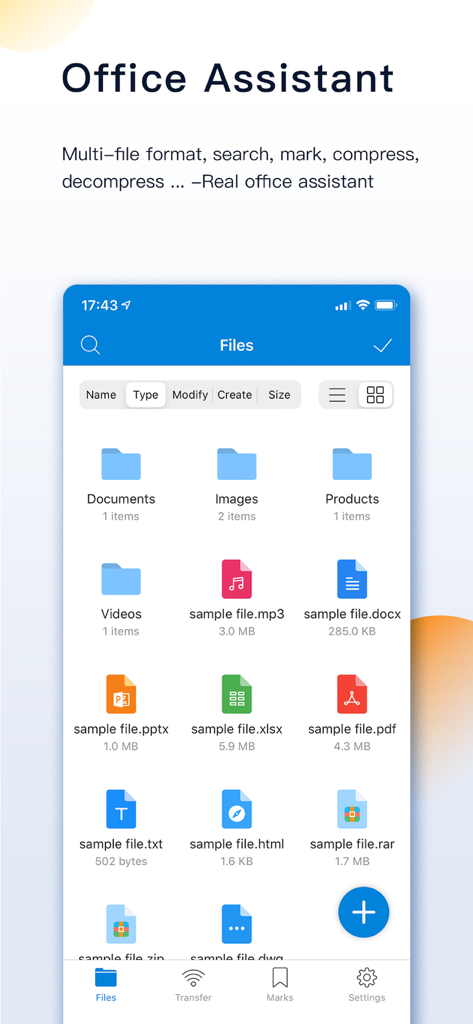
FileMate 앱 화면에 정리된 폴더와 모바일 생산성을 위한 다양한 파일 형식이 표시됩니다.

FileMate 앱 화면에 정리된 폴더와 모바일 생산성을 위한 다양한 파일 형식이 표시됩니다.

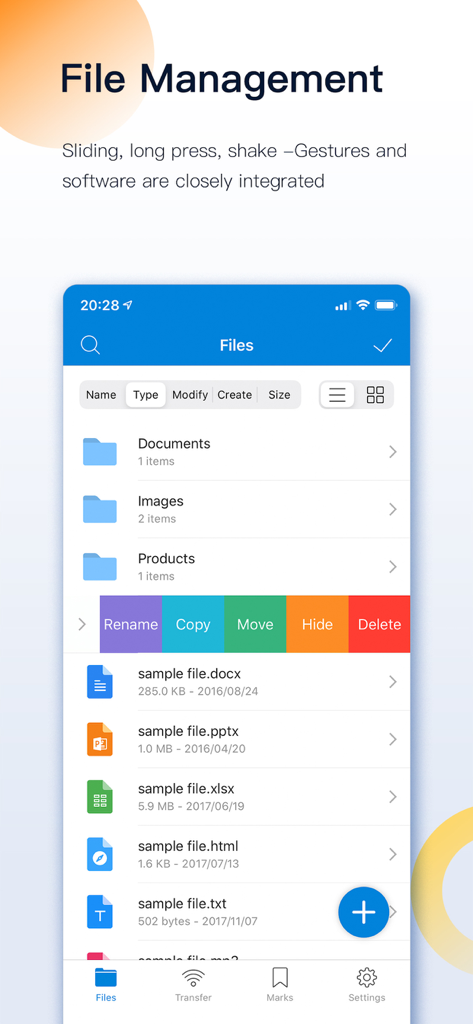
FileMate 앱 인터페이스에 폴더 이름 변경, 복사, 이동, 숨기기 및 삭제를 위한 스와이프 제스처 파일 관리가 표시됩니다.

FileMate 앱 인터페이스에 폴더 이름 변경, 복사, 이동, 숨기기 및 삭제를 위한 스와이프 제스처 파일 관리가 표시됩니다.

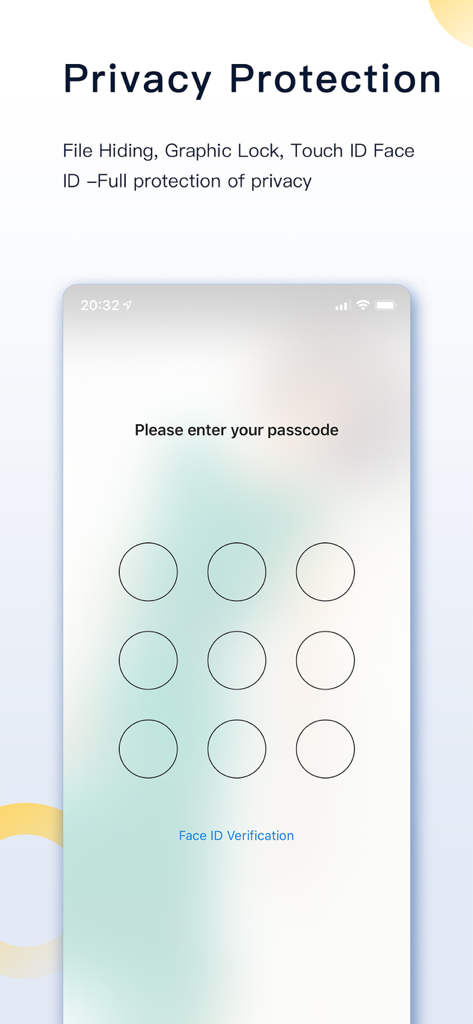
FileMate 앱 인터페이스에 개인 정보 보호를 위한 비밀번호 잠금 화면이 표시됩니다.

FileMate 앱 인터페이스에 개인 정보 보호를 위한 비밀번호 잠금 화면이 표시됩니다.

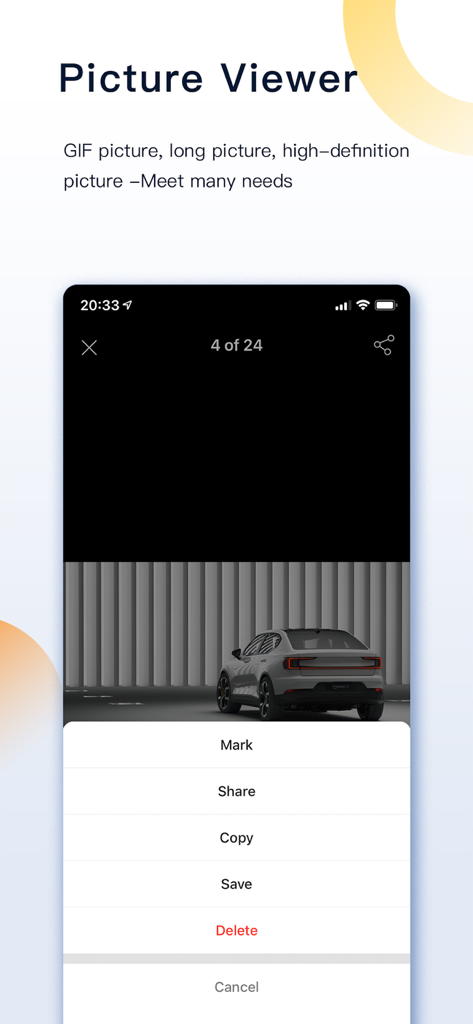
FileMate 앱에서 고화질 이미지를 표시, 공유, 복사 및 저장하는 옵션이 있는 사진 뷰어 인터페이스를 보여줍니다.

FileMate 앱에서 고화질 이미지를 표시, 공유, 복사 및 저장하는 옵션이 있는 사진 뷰어 인터페이스를 보여줍니다.

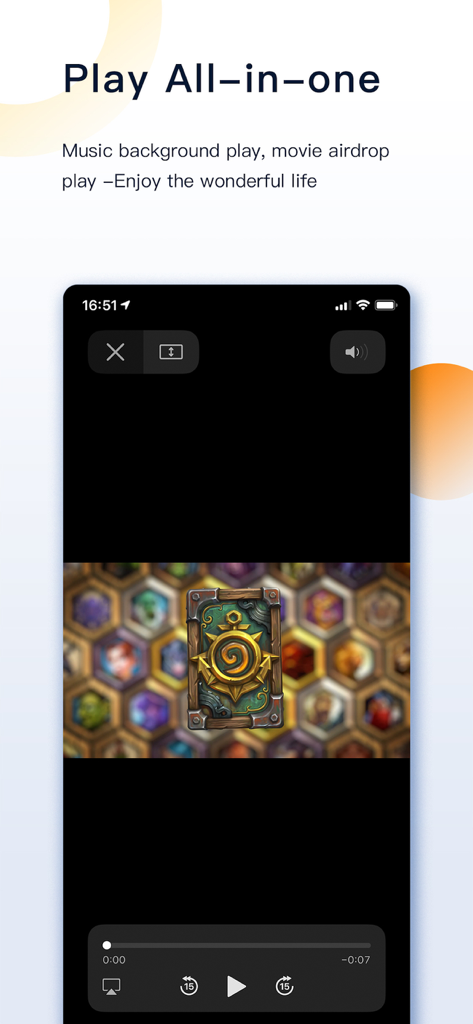
FileMate 앱 비디오 플레이어 인터페이스에 스마트폰에서 재생 컨트롤과 함께 비디오가 재생되는 모습이 표시됩니다.

FileMate 앱 비디오 플레이어 인터페이스에 스마트폰에서 재생 컨트롤과 함께 비디오가 재생되는 모습이 표시됩니다.

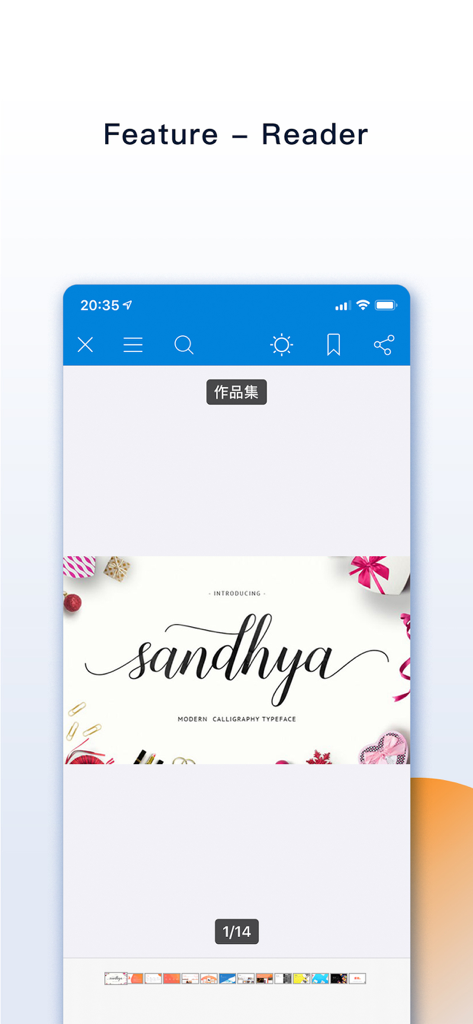
FileMate 앱 리더 인터페이스에 iPhone 화면에 캘리그라피 글꼴 문서가 표시됩니다.

FileMate 앱 리더 인터페이스에 iPhone 화면에 캘리그라피 글꼴 문서가 표시됩니다.

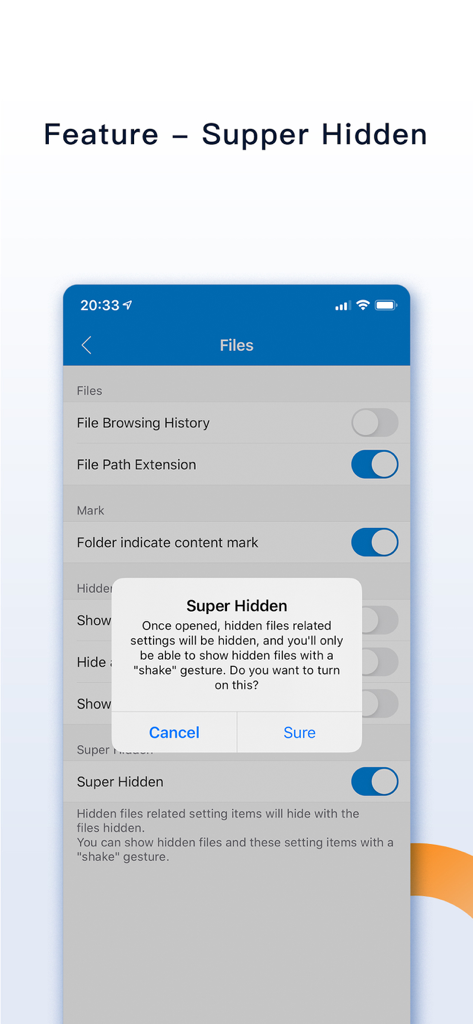
FileMate 앱의 스크린샷으로, 흔들기 제스처를 사용할 때까지 개인 설정이 숨겨지는 Super Hidden 기능 대화 상자가 표시됩니다.

FileMate 앱의 스크린샷으로, 흔들기 제스처를 사용할 때까지 개인 설정이 숨겨지는 Super Hidden 기능 대화 상자가 표시됩니다.

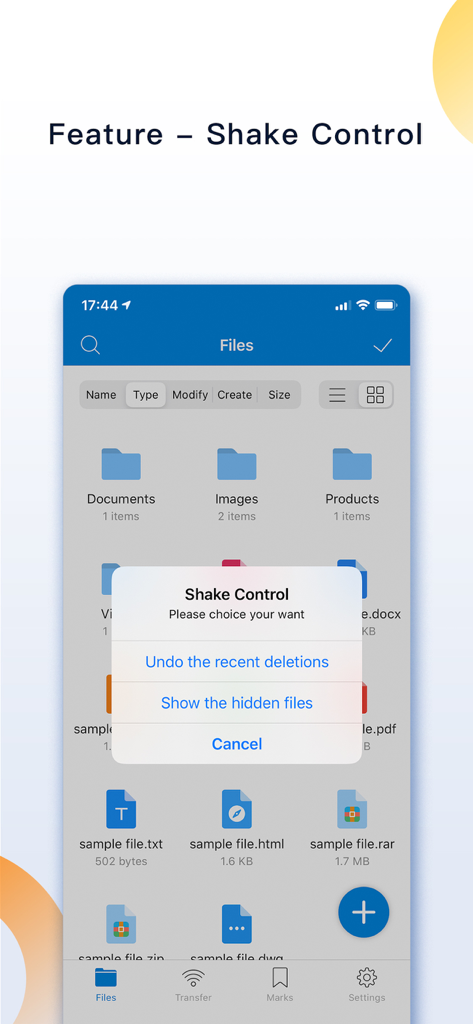
FileMate 앱 인터페이스에 실행 취소 및 숨김 파일 표시 옵션이 있는 흔들기 제어 팝업 메뉴가 표시됩니다.

FileMate 앱 인터페이스에 실행 취소 및 숨김 파일 표시 옵션이 있는 흔들기 제어 팝업 메뉴가 표시됩니다.

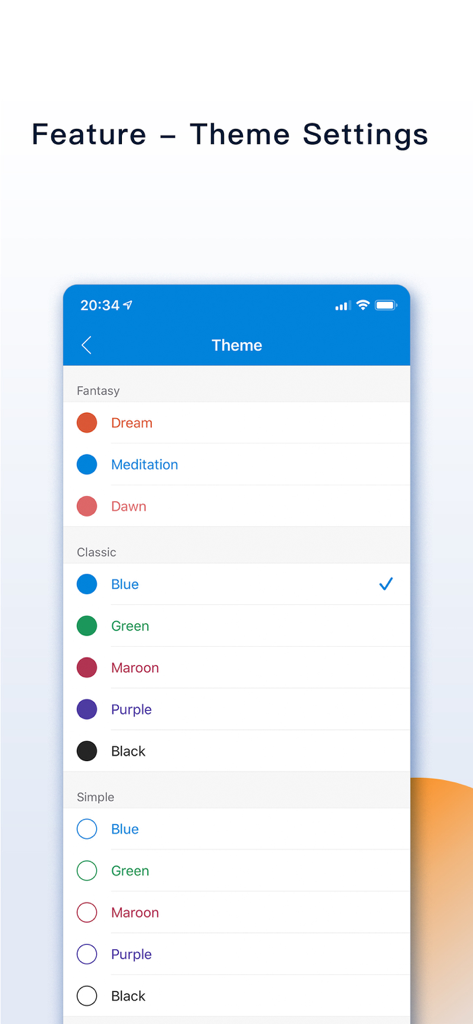
FileMate 앱 테마 사용자 지정 메뉴에 Fantasy, Classic, Simple 등 다양한 색상 옵션이 표시됩니다.

FileMate 앱 테마 사용자 지정 메뉴에 Fantasy, Classic, Simple 등 다양한 색상 옵션이 표시됩니다.

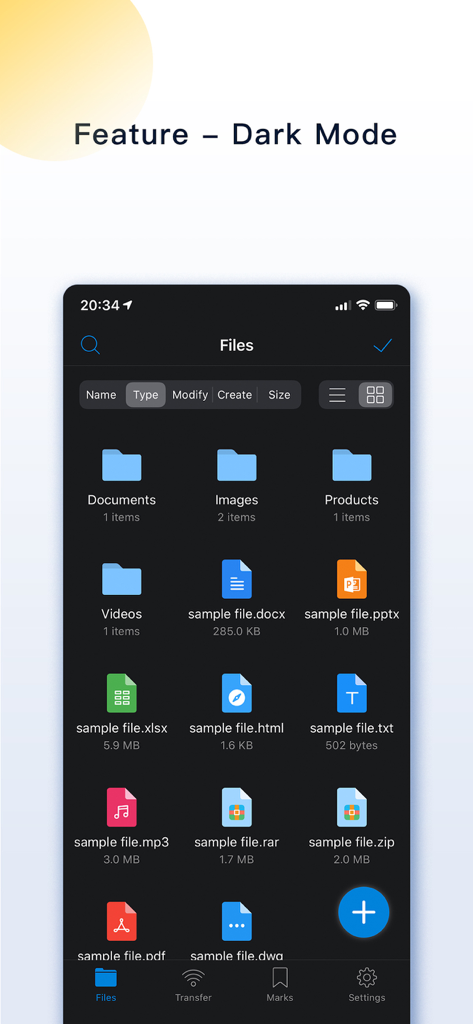
FileMate 앱 인터페이스가 다크 모드로 표시되며 문서, 이미지, 아카이브 등 다양한 파일 형식이 표시됩니다.

FileMate 앱 인터페이스가 다크 모드로 표시되며 문서, 이미지, 아카이브 등 다양한 파일 형식이 표시됩니다.

모바일 작업 공간을 지휘하세요

이 앱을 돋보이게 하는 도구, 1M+ 명의 사용자가 선택.

🛡️

철통 같은 개인 정보 보호 저장소

Face ID 및 Super Hidden 모드로 민감한 파일을 숨기고 암호화하여 개인 데이터를 자신 외에는 아무도 볼 수 없도록 유지하세요.

📦

전문가 수준의 아카이브 및 편집

7z, RAR 및 ZIP 아카이브를 쉽게 압축 해제하세요. 앱을 벗어나지 않고도 코드, 문서 및 고해상도 미디어를 보고 편집할 수 있습니다.

무선 PC 및 Mac 동기화

케이블은 잊으세요. 고속 WiFi 전송 또는 Finder 통합을 통해 iPhone과 컴퓨터 간에 파일을 즉시 이동하세요.

전 세계 사용자들에게 사랑받는 앱

Trusted by 1M+ 명이 이 앱을 사랑합니다.

"

"FileMate는 제 모바일 워크플로우에 혁신을 가져왔습니다. JavaScript 및 Swift와 같은 코드 파일을 iPhone에서 직접 탐색하고 편집할 수 있다는 점은 놀랍습니다. iOS와 실제 데스크톱 경험 간의 격차를 해소하며, WiFi 전송 기능 덕분에 PC에서 에셋을 쉽게 옮길 수 있습니다."

Alex R., 소프트웨어 엔지니어
"

"드디어 RAR 및 7z 파일을 문제없이 처리하는 앱이 나왔습니다! 강의 노트와 개인 연구 논문을 정리하는 데 사용합니다. Face ID 잠금 기능 덕분에 민감한 파일이 안전하다는 안심감을 얻었고, Super Hidden 모드는 개인 정보 보호를 위한 최고의 기능입니다."

Chloe M., 대학원생

앱 소개

에 대해 알아야 할 모든 것 FileMate.

설명

FileMate is a local file management tool that can help you easily manage your phone files. [Core functions] - Browse: Allows you to view documents, browse pictures, and play videos conveniently and quickly. - Management: Provide you with a wealth of operations, allowing you to easily manage local files. - Privacy protection: your private files are hidden inside the APP, and your private files are isolated outside the APP. [Introduction to use] 1. Add files You can create folders, text files, photos, videos in the APP; Import files from the system [Photos], [Files] or other APP; Share files between PC and iphone via [WiFi]; Share files between Mac and iphone through [Finder] and [iTunes]. 2. Browse files You can browse various Office files and pdf files; Browse and edit various text files, such as txt, json, js, log, java, php, swift, xml; Browse pictures in various formats, including long vertical screenshots and high-resolution large pictures; Use efficient and low-power players to play audio and video files. 3. Manage files You can create new directories, rename, copy, move, delete, view attributes, and set hidden files; Sort by name, type, time, size; 4. Archive and unarchive You can archive and unarchive files in 7z, rar, zip, tar format, with passwords. 5. Mark the file You can mark important and frequently viewed files and display them in different sorting types. 6. Search for files You can quickly find the file you want through fuzzy search and multi-keyword combination search. 7. Hidden files You can set private files as hidden files. Hidden files are not displayed by default, and you can display them when you need them. 8. Password lock You can open the password lock, and only enter the correct password to enter the APP; Set the Face ID, Touch ID unlock, and authentication-free time intervals to make it more convenient for you to enter. 9. Super hidden You can hide all the setting items related to hidden files in the APP, and finally only you know what hidden functions the APP has. 10. Other functions Sharing panel: through the sharing panel, batch share files into the APP or out-to other APP; Theme setting: modify the theme, folder, menu structure, text size and other styles of the APP; Unread reminder: Set a reminder time for unread files to remind you to check files in time; [Contact and feedback] If you have any questions or suggestions about the product, please feel free to contact us Email: orange_family@icloud.com QQ group: 398168949 [Auto-renewable subscription service] 1. Service: All Access, Removing Ad (1 Month) 2. Period: 1 Month 3. Price: $0.99 / Month 4. Payment will be charged to iTunes Account at confirmation of purchase 5. Subscription automatically renews unless auto-renew is turned off at least 24-hours before the end of the current period 6. Account will be charged for renewal within 24-hours prior to the end of the current period, and identify the cost of the renewal 7. Subscriptions may be managed by the user and auto-renewal may be turned off by going to the user's Account Settings after purchase 8. Terms of Use: http://www.orangestall.com/folder/subscription.html 9. Privacy Policy: http://www.orangestall.com/legal/privacy.html 1. Service: All Access, Removing Ad (1 Year) 2. Period: 1 Year 3. Price: $9.99 / Year 4. Payment will be charged to iTunes Account at confirmation of purchase 5. Subscription automatically renews unless auto-renew is turned off at least 24-hours before the end of the current period 6. Account will be charged for renewal within 24-hours prior to the end of the current period, and identify the cost of the renewal 7. Subscriptions may be managed by the user and auto-renewal may be turned off by going to the user's Account Settings after purchase 8. Terms of Use: http://www.orangestall.com/folder/subscription.html 9. Privacy Policy: http://www.orangestall.com/legal/privacy.html

최신 버전

12.8

크기

90.9 MB

출시일

2015년 4월 18일

모바일 파일에 대한 통제권을 되찾을 준비가 되셨나요?

iOS에서 데스크톱 수준의 관리와 절대적인 개인 정보 보호를 위해 FileMate를 신뢰하는 100만 명 이상의 파워 유저와 함께하세요. 지금 다운로드하고 무제한으로 정리하세요.

다운로드: App Store
FAQ

자주 묻는 질문

에 대해 알아야 할 모든 것 FileMate

FileMate는 무엇인가요?

FileMate는 사용자가 파일을 검색, 관리 및 보호할 수 있는 휴대폰용 로컬 파일 관리 도구입니다. 다양한 파일 형식을 지원하며 아카이빙, 검색, 개인 정보 보호와 같은 기능을 제공합니다.

FileMate는 어떤 종류의 파일을 검색할 수 있나요?

FileMate는 Office, PDF 및 txt, json, java, php, swift, xml과 같은 다양한 텍스트 파일을 검색할 수 있습니다. 또한 긴 세로 이미지 및 고해상도 이미지를 포함한 사진 형식도 지원하며 오디오/비디오 파일을 재생합니다.

FileMate에 파일을 추가하려면 어떻게 해야 하나요?

사용자는 앱 내에서 파일을 생성하거나, 시스템 사진/파일 또는 다른 앱에서 가져오거나, WiFi를 통해 PC와 iPhone 간에 공유하여 FileMate에 파일을 추가할 수 있습니다. Mac 사용자는 Finder와 iTunes를 사용할 수 있습니다.

FileMate는 어떤 파일 관리 작업을 지원하나요?

FileMate는 새 디렉터리 생성, 이름 바꾸기, 복사, 이동, 삭제, 속성 보기, 숨김 파일 설정을 지원합니다. 사용자는 이름, 유형, 시간, 크기별로 파일을 정렬할 수도 있습니다.

FileMate는 파일에 대한 개인 정보 보호 기능을 제공하나요?

예, FileMate는 숨김 파일, 암호 잠금, Face ID 및 Touch ID 잠금 해제를 통해 개인 정보 보호를 제공합니다. 또한 "Super hidden" 기능을 포함하여 관련 설정을 숨길 수 있습니다.

FileMate는 파일을 압축하고 압축을 해제할 수 있나요?

예, FileMate는 7z, rar, zip 및 tar 형식의 파일 압축 및 압축 해제를 지원합니다. 또한 압축된 파일에 암호를 설정할 수 있습니다.

FileMate의 숨김 파일 기능은 어떻게 작동하나요?

FileMate를 사용하면 사용자가 개인 파일을 숨김으로 설정하여 기본적으로 표시되지 않도록 할 수 있습니다. 숨김 파일은 필요할 때 표시할 수 있으며, 해당 설정은 "Super hidden"으로 설정할 수 있습니다.

FileMate에 암호로 보호할 수 있나요?

예, FileMate는 앱에 액세스하기 위한 암호 잠금을 제공합니다. 또한 Face ID 및 Touch ID 잠금 해제를 지원하며 편의를 위해 인증 없는 시간 간격을 사용자 정의할 수 있습니다.

FileMate의 월간 구독료는 얼마인가요?

FileMate "All Access, Removing Ad" 구독은 월 $0.99입니다. 이 서비스는 현재 기간이 종료되기 최소 24시간 전에 비활성화하지 않으면 자동으로 갱신됩니다.

FileMate의 연간 구독 가격은 얼마인가요?

FileMate의 연간 "All Access, Removing Ad" 구독은 연간 $9.99입니다. 이 구독은 현재 기간 종료 최소 24시간 전에 비활성화하지 않으면 자동으로 갱신됩니다.

FileMate 구독은 어떻게 관리하나요?

구매 후 iTunes 계정 설정을 통해 FileMate 구독을 관리하고 자동 갱신을 비활성화할 수 있습니다. 이를 통해 구독 기본 설정을 완전히 제어할 수 있습니다.

FileMate의 "Super Hidden" 기능은 무엇인가요?

"Super hidden" 기능은 사용자가 앱 내에서 숨김 파일과 관련된 모든 설정 항목을 숨길 수 있도록 합니다. 그런 다음 기기를 흔들어 이러한 숨김 설정을 다시 표시할 수 있습니다.

FileMate에 "Shake Control" 기능이 있나요?

예, FileMate에는 "Shake Control" 기능이 있습니다. 사용자는 기기를 흔들어 최근 삭제를 취소하거나 숨김 파일을 표시할 수 있습니다.

FileMate의 모양을 사용자 정의할 수 있나요?

예, FileMate는 앱의 테마, 폴더 모양, 메뉴 구조 및 텍스트 크기를 수정할 수 있는 테마 설정을 제공합니다. 다크 모드도 사용자 정의를 위해 사용할 수 있습니다.