Filmora: AI Video Editor&Maker

Filmora: AI Video Editor&Maker

다운로드: App Store다운로드: Google Play
Spark by MWM logo
로고: Filmora: AI Video Editor&Maker

Filmora: 바이럴 영상을 위한 AI 동영상 편집기 및 제작 도구

손쉬운 AI 도구로 창의력을 발휘하세요. 다이내믹 캡션부터 시네마틱 자동 컷까지, TikTok, Instagram, YouTube용 전문 수준의 콘텐츠를 순식간에 제작할 수 있습니다.

개발사

Shenzhen Wondershare Software Co., Ltd

카테고리

Photo & Video

다운로드

24M+

사용자 평점

4.7/5

총 평가 수

338K+

지원 언어

21

AI 마법의 비결

이 인터페이스를 사용하는 24M+ 명의 사용자.

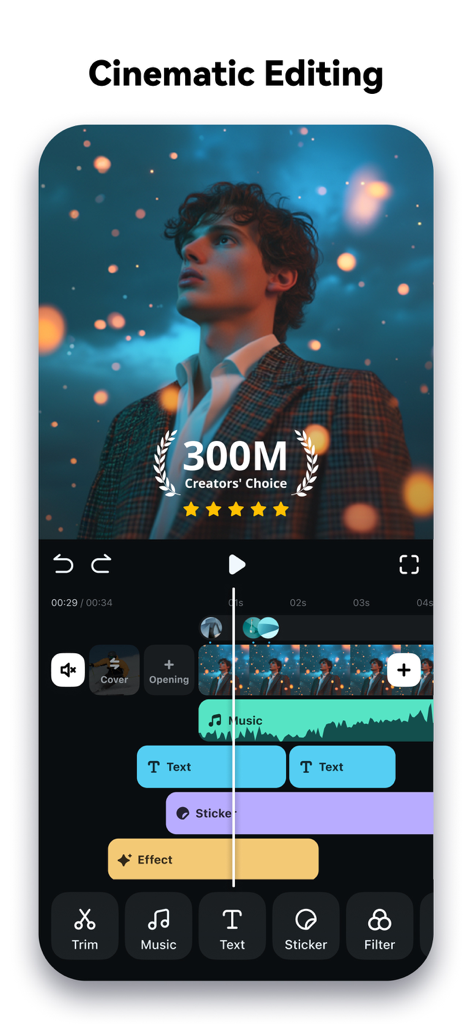
텍스트, 음악, 효과가 포함된 시네마틱 영상 편집을 위한 멀티 레이어 타임라인을 보여주는 Filmora 모바일 앱 인터페이스

텍스트, 음악, 효과가 포함된 시네마틱 영상 편집을 위한 멀티 레이어 타임라인을 보여주는 Filmora 모바일 앱 인터페이스

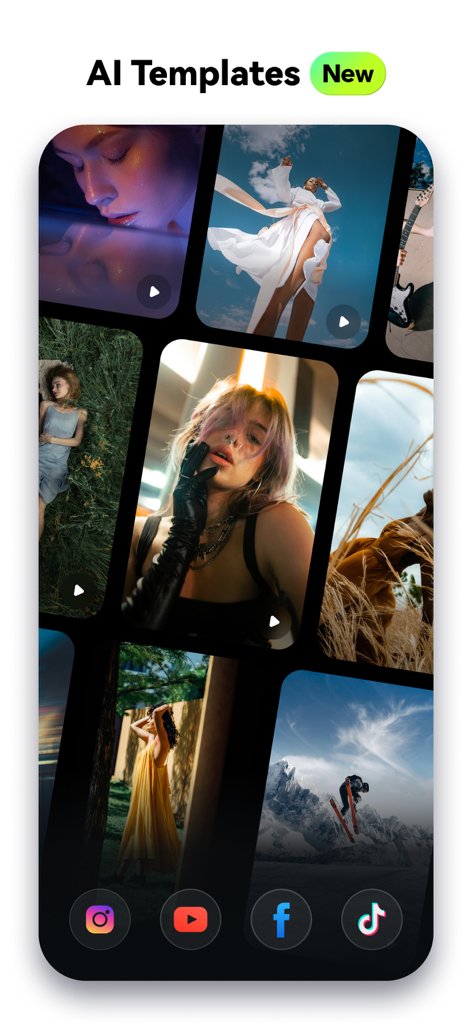
Filmora 앱 내 소셜 미디어 크리에이터를 위한 예술적인 AI 영상 템플릿 모음

Filmora 앱 내 소셜 미디어 크리에이터를 위한 예술적인 AI 영상 템플릿 모음

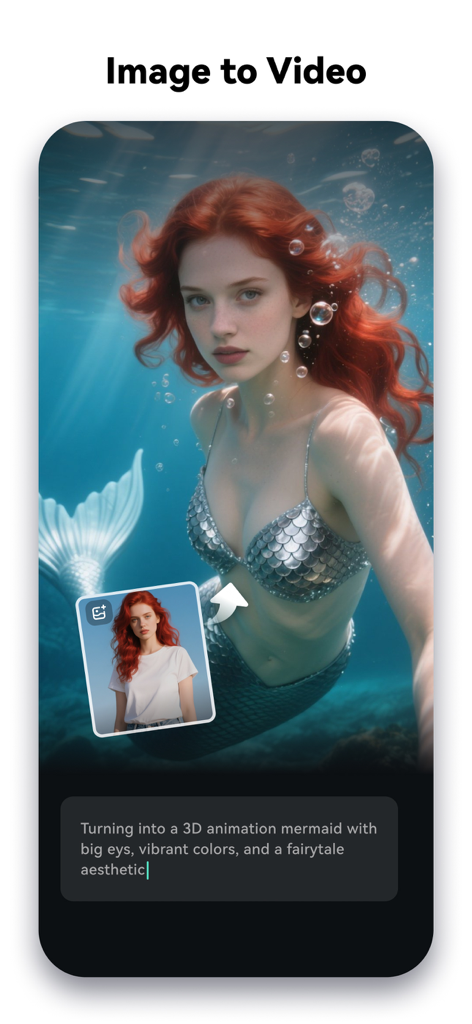
여성이 3D 인어 애니메이션으로 변하는 이미지-투-비디오 변환을 보여주는 Filmora AI 동영상 편집기 인터페이스

여성이 3D 인어 애니메이션으로 변하는 이미지-투-비디오 변환을 보여주는 Filmora AI 동영상 편집기 인터페이스

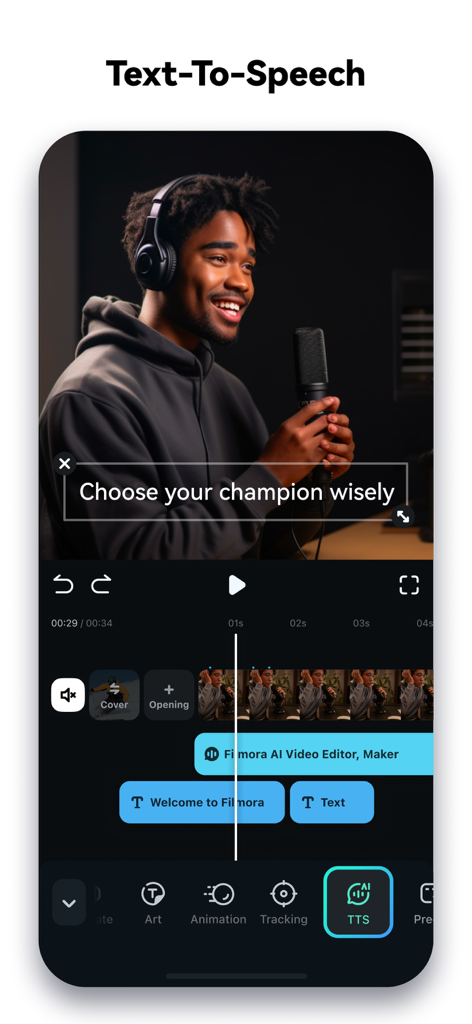
영상 편집을 위한 텍스트 음성 변환(TTS) 기능을 보여주는 Filmora 모바일 앱 인터페이스

영상 편집을 위한 텍스트 음성 변환(TTS) 기능을 보여주는 Filmora 모바일 앱 인터페이스

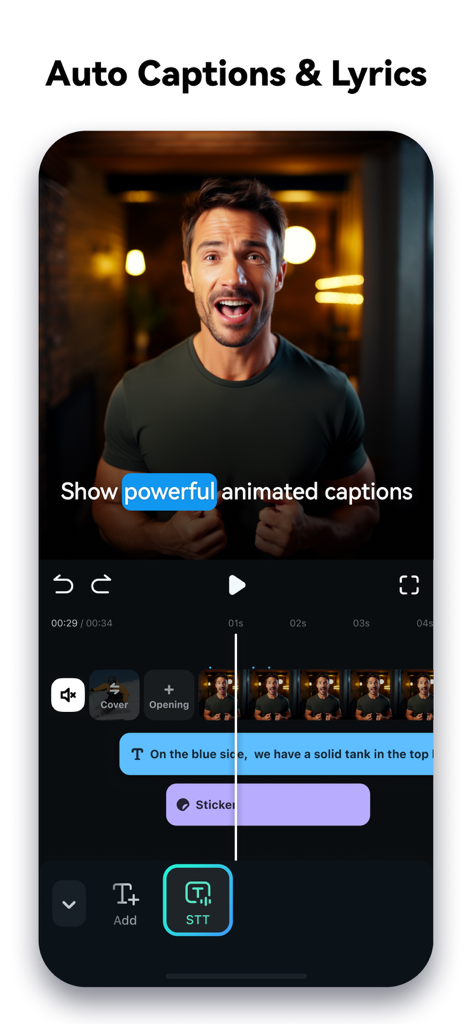
자동화된 다이내믹 자막과 음성-텍스트 변환 기능을 보여주는 모바일 동영상 편집기 인터페이스

자동화된 다이내믹 자막과 음성-텍스트 변환 기능을 보여주는 모바일 동영상 편집기 인터페이스

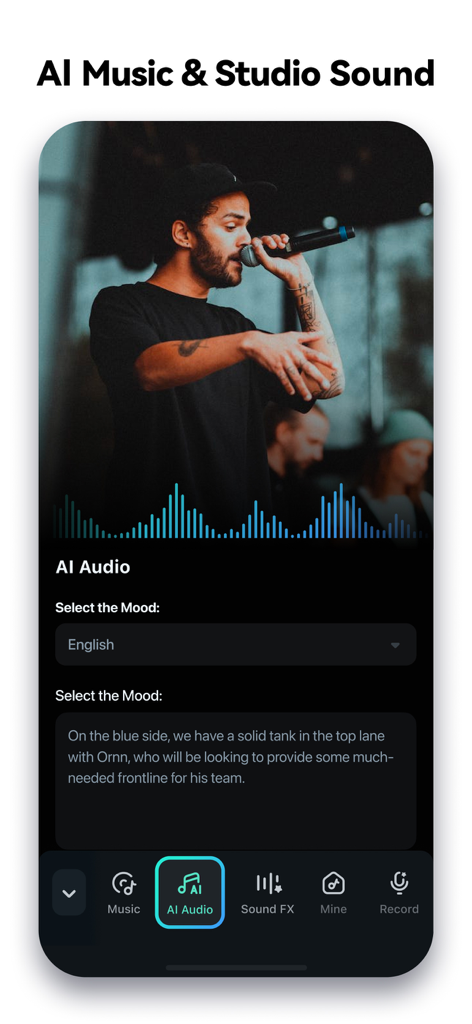
AI 음악 및 스튜디오 사운드 편집 기능을 보여주는 Filmora 모바일 앱 인터페이스

AI 음악 및 스튜디오 사운드 편집 기능을 보여주는 Filmora 모바일 앱 인터페이스

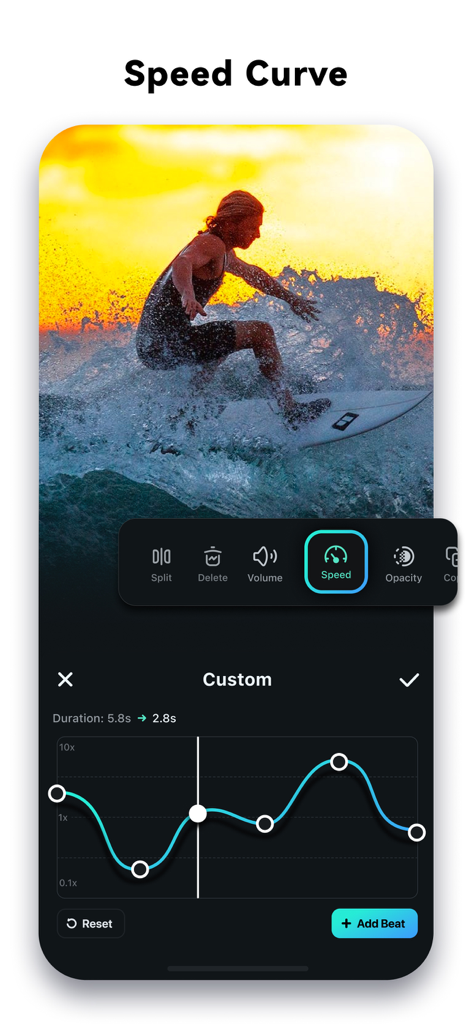
동영상 템포 조정을 위한 속도 곡선 도구를 보여주는 Filmora AI 동영상 편집기 인터페이스

동영상 템포 조정을 위한 속도 곡선 도구를 보여주는 Filmora AI 동영상 편집기 인터페이스

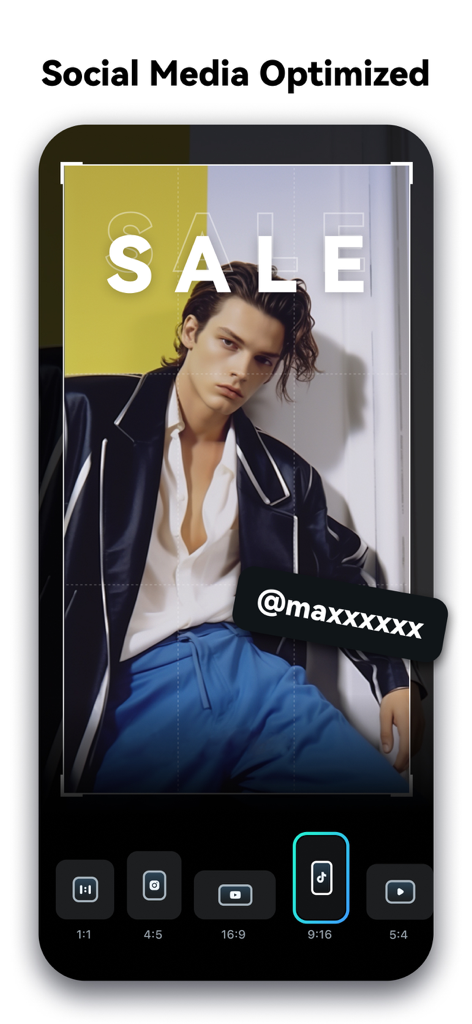
소셜 미디어 동영상 가로세로 비율 최적화를 위한 Filmora 앱 인터페이스

소셜 미디어 동영상 가로세로 비율 최적화를 위한 Filmora 앱 인터페이스

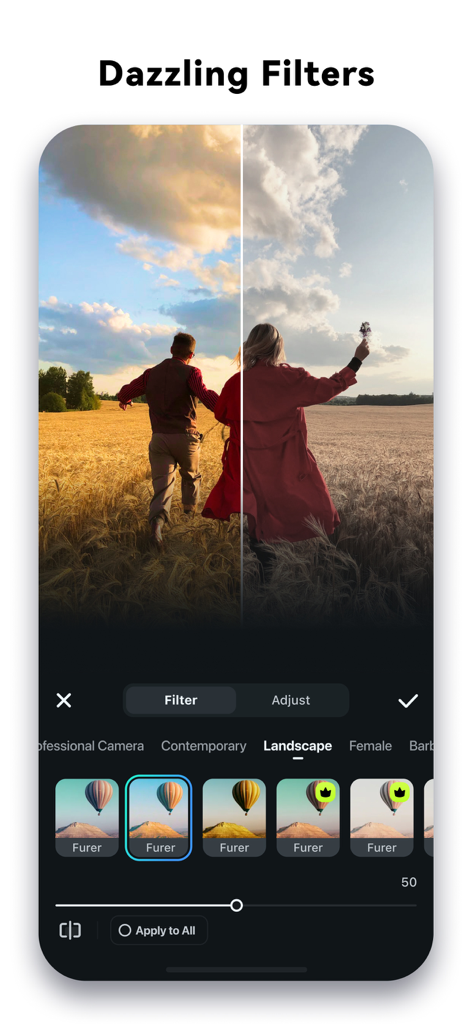
Filmora 앱에서 풍경 필터를 적용하기 전과 후의 영상을 나란히 비교한 모습

Filmora 앱에서 풍경 필터를 적용하기 전과 후의 영상을 나란히 비교한 모습

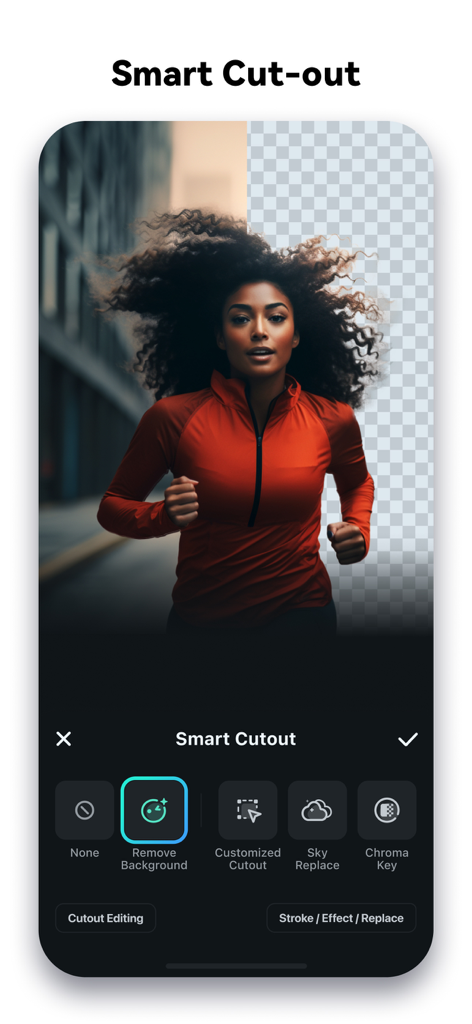
달리는 여성의 영상에서 배경을 제거하는 AI 스마트 컷아웃 기능을 보여주는 Filmora 동영상 편집 앱 인터페이스

달리는 여성의 영상에서 배경을 제거하는 AI 스마트 컷아웃 기능을 보여주는 Filmora 동영상 편집 앱 인터페이스

여러분의 바이럴 시대가 여기서 시작됩니다

이 앱을 돋보이게 하는 도구, 24M+ 명의 사용자가 선택.

🪄

AI 스마트 편집

지루한 트리밍 작업은 건너뛰세요. AI 자동 컷이 최고의 순간을 찾아 시네마틱한 스토리로 즉시 연결해 줍니다.

💬

바이럴 다이내믹 캡션

음성 해설과 완벽하게 동기화되는 자동 생성 단어별 자막으로 시청자의 시선을 사로잡으세요.

전문가급 AI 효과

무한 줌부터 스마트 컷아웃까지, 전문 스튜디오에서나 가능했던 고급 시각 효과를 경험해 보세요.

전 세계 사용자들에게 사랑받는 앱

Trusted by 24M+ 명이 이 앱을 사랑합니다.

"

"매주 브이로그를 편집하는 데 몇 시간씩 걸리곤 했는데, Filmora의 AI 자동 컷은 정말 구세주 같아요. 최고의 순간을 찾아내서 내 Reels에 딱 맞게 연결해 주거든요! 다이내믹 캡션 덕분에 별다른 노력 없이도 콘텐츠가 훨씬 더 전문적으로 보여요."

Chloe V., 라이프스타일 크리에이터
"

"AI 스마트 컷아웃은 정말 놀라워요. 휴대폰에서 바로 배경을 바꾸고 멋진 효과를 몇 초 만에 추가할 수 있거든요. 많은 모바일 편집기를 써봤지만, Filmora의 키프레임과 트래킹의 정밀함을 따라올 앱은 없어요. 모바일에서 데스크톱 경험에 가장 근접한 앱입니다."

Marcus J., 테크 인플루언서

앱 소개

에 대해 알아야 할 모든 것 Filmora: AI Video Editor&Maker.

설명

It’s your turn to go viral now! Filmora AI Video Editor (formerly FilmoraGo video editor) is an AI-based video editor & movie maker, featuring VideoGen, AI Auto Cut, AI Remover, Dynamic Captions, Text to Video, etc! Let Filmora help you to become the next star on RedNote, lemon8, TikTok, Clapper and Flip! [ AI Video Editor & AI Features ] VideoGen - This video-to-video feature lets you seamlessly swap or add elements to your videos. AI Auto Cut - Seamlessly stitching highlight moments into cinematic tales! AI Remover - Effortlessly erasing unwanted elements from videos. Dynamic Captions - Auto speech to text into dynamic word-by-word captions. Text to Video - Generate videos with AI copywriting and subtitles, while maintaining visual quality and adherence to your prompt. Text to Speech - Transform text into professional voiceovers for your videos. AI video effects - AI Show: Transform your photos into stunning, stylized photos or videos with just one click! - Infinite Zoom: Dive into the world of endless visual possibilities. AI Music & Sound Effects - Generate professional music and soundscapes for your videos! AI Smart Cutout - Customized Cutout: Swipe your finger, then intelligently identify the target area and cut anything out as you want! - Cutout Plus: You can set strokes, overlay effects, and replace backgrounds for your keyed objects. Rhythm Master - You can sync rhythm videos to the perfect beat for a seamless creation experience. [ User-friendly video editing for beginners ] - Trim, split, duplicate, or merge video clips without losing quality. - Add text, emoji, and exclusive stickers. - Add music, sound effects & voice-overs. - Extract music from the video and split audio to remove unwanted parts - Rotate or crop: Adjust the orientation or size - Adjust video ratios for Instagram/TikTok/Youtube posts. - Adjust speed for fast or slow motion. Speed control with customizable & pre-set curves for various themes. - Stunning templates help create videos in one click. [ Full-featured video editing for professionals ] - All-in-one Keyframe: More adjustment items support keyframes, combined with color and special effects, you can create more cool animations. - Chromakey: Easily edit green screen video. - PIP (Picture in Picture): add multiple layers of video, images, stickers, special effects, text, etc. - Masking: Cover and mix video clips, get different video effects. - Smart tracking: Support stickers, text, and picture-in-picture intelligent tracking targets, whether you need to track faces, objects, or anything else. [ FILMORA PRO SUBSCRIPTION ] - With Filmora Pro video editor unlimited subscription, you can access all features and paid editing materials including stickers, filter packages, etc. Watermark and Logo Roll will be removed automatically. - With “iOS Pro”, you can access all Pro features and paid editing materials on iOS. - Subscription: Monthly, Annual or Perpetual billing. - Payments will be charged to your iTunes account. - Subscriptions will automatically be renewed unless auto-renew is turned off at least 24 hours before the time of renewal. - Your account will be charged for the subscription renewal up to 24 hours prior to the end of your current subscription period in order to avoid service gaps. - You can turn off auto-renewal at any time through your Account Settings. - Any unused portion of a free trial period, if offered, will be forfeited when the user purchases a subscription. [ PRIVACY & TERMS ] Terms of Use https://www.wondershare.com/company/terms_conditions.html Privacy Policy https://www.wondershare.com/privacy.html [ CONTACT US ] We value your feedback and here’s how you can contact us: mailer@service.wondershare.com http://support.wondershare.com https://www.facebook.com/filmoravideoeditor https://www.instagram.com/filmora_editor/ https://www.youtube.com/c/FilmoraWondershare

최신 버전

15.1.91

크기

645.0 MB

출시일

2016년 4월 28일

화제가 될 준비가 되셨나요? 지금 AI로 창작을 시작하세요

Filmora를 사용하여 자신의 아이디어를 TikTok, Reels, Lemon8 트렌드 영상으로 바꾸는 2,400만 명 이상의 크리에이터와 함께하세요.

다운로드: App Store다운로드: Google Play
FAQ

자주 묻는 질문

에 대해 알아야 할 모든 것 Filmora: AI Video Editor&Maker
Filmora AI Video Editor는 무엇인가요?

Filmora AI Video Editor는 AI 기반 비디오 편집기 및 영화 제작기입니다. 사용자가 비디오를 만들고 편집하는 데 도움이 되는 Image to Video, VideoGen, AI Auto Cut, Dynamic Captions와 같은 도구를 제공합니다.

Filmora AI Video Editor에 "Image to Video" 기능이 있나요?

네, Filmora AI Video Editor에는 "Image to Video" 기능이 포함되어 있습니다. 사용자가 창의적인 아이디어를 입력하면 AI가 사진을 동적인 비디오로 변환합니다. 이 기능은 스크린샷 #3에서도 확인할 수 있습니다.

Filmora AI Video Editor로 동영상에서 원치 않는 요소를 제거할 수 있나요?

네, Filmora AI Video Editor에는 동영상에서 원치 않는 요소를 쉽게 제거할 수 있는 "AI Remover"가 포함되어 있습니다. 또한 맞춤형 객체 제거 및 배경 교체를 위한 "AI Smart Cutout" 기능도 제공합니다.

Filmora Pro의 구독 옵션은 무엇인가요?

Filmora Pro 구독은 월간, 연간 또는 영구 결제 옵션을 제공합니다. 이러한 구독은 모든 기능 및 유료 편집 자료에 대한 액세스를 제공하며, 워터마크 및 로고 롤을 자동으로 제거합니다.

Filmora AI Video Editor에서 텍스트 음성 변환을 지원하나요?

네, Filmora AI Video Editor는 텍스트 음성 변환을 지원합니다. 이 기능은 텍스트를 동영상에 전문적인 음성 해설로 변환하여 청각 콘텐츠를 향상시킵니다. 스크린샷 #4는 텍스트-음성 변환 기능을 보여줍니다.

Filmora AI Video Editor는 자막을 어떻게 처리하나요?

Filmora AI Video Editor는 음성을 텍스트로 자동 변환하여 단어별 자막을 생성하는 "Dynamic Captions"를 제공합니다. 또한 AI 카피라이팅 및 자막으로 비디오를 생성하는 "Text to Video" 기능도 제공합니다.

Filmora AI Video Editor에서 동영상 속도를 조절할 수 있나요?

네, Filmora AI Video Editor에서는 사용자가 동영상 속도를 조절할 수 있습니다. 사용자 정의 및 사전 설정 곡선을 포함한 속도 제어 기능을 제공하여 빠른 재생 또는 슬로우 모션 효과를 가능하게 합니다. 스크린샷 #7은 "Speed Curve" 인터페이스를 보여줍니다.

Filmora AI Video Editor로 동영상에서 음악을 추출할 수 있나요?

네, Filmora AI Video Editor는 동영상에서 직접 음악을 추출할 수 있습니다. 또한 오디오를 분할하여 원치 않는 부분을 제거하고 다양한 음악, 음향 효과 또는 음성 해설을 추가할 수 있습니다.

Filmora AI Video Editor는 초보자에게 적합한가요?

네, Filmora AI Video Editor는 초보자를 위한 사용자 친화적인 기능을 제공합니다. 여기에는 클립 트리밍, 분할, 병합, 텍스트 및 이모티콘 추가, 원클릭 동영상 생성을 위한 멋진 템플릿 사용 등이 포함됩니다.

Filmora AI Video Editor의 고객 지원팀에 어떻게 연락하나요?

Filmora AI Video Editor의 고객 지원팀에는 mailer@service.wondershare.com으로 이메일을 보내거나 http://support.wondershare.com의 지원 웹사이트를 방문하여 연락할 수 있습니다.