Fitness Workout Log Calendar

Fitness Workout Log Calendar

다운로드: App Store
Spark by MWM logo
로고: Fitness Workout Log Calendar
피트니스 운동 기록 캘린더: AI 인사이트로 진행 상황 최적화

데이터 중심적인 운동선수를 위한 궁극의 동반자. 세트 기록, Apple Health 동기화, AI 성과 분석을 통해 최고 기록 달성을 도와드립니다.

개발사

isao utsumi

카테고리

Sports

다운로드

178K+

사용자 평점

4.4/5

총 평가 수

4K+

지원 언어

12

당신의 성과, 시각화

이 인터페이스를 사용하는 178K+ 명의 사용자.

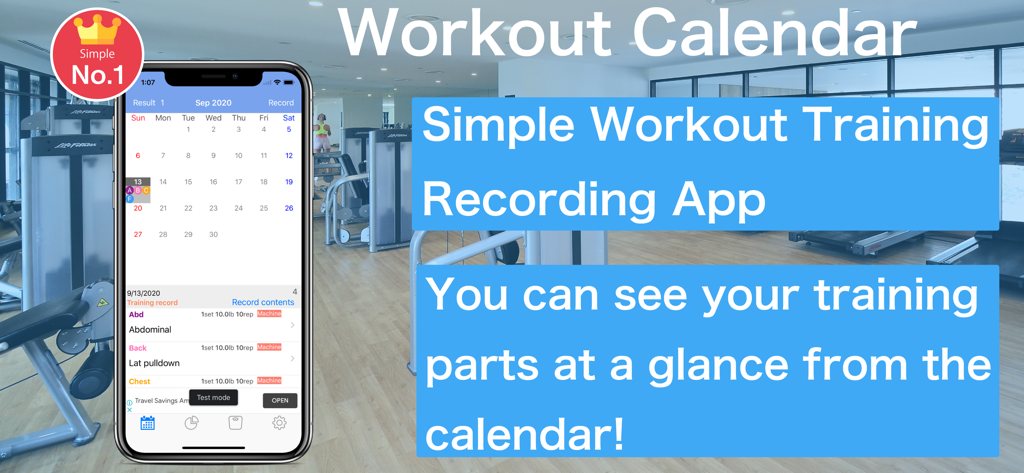
월간 운동 일정과 기록된 운동이 표시된 피트니스 운동 기록 캘린더 앱 인터페이스를 보여주는 스마트폰.

월간 운동 일정과 기록된 운동이 표시된 피트니스 운동 기록 캘린더 앱 인터페이스를 보여주는 스마트폰.

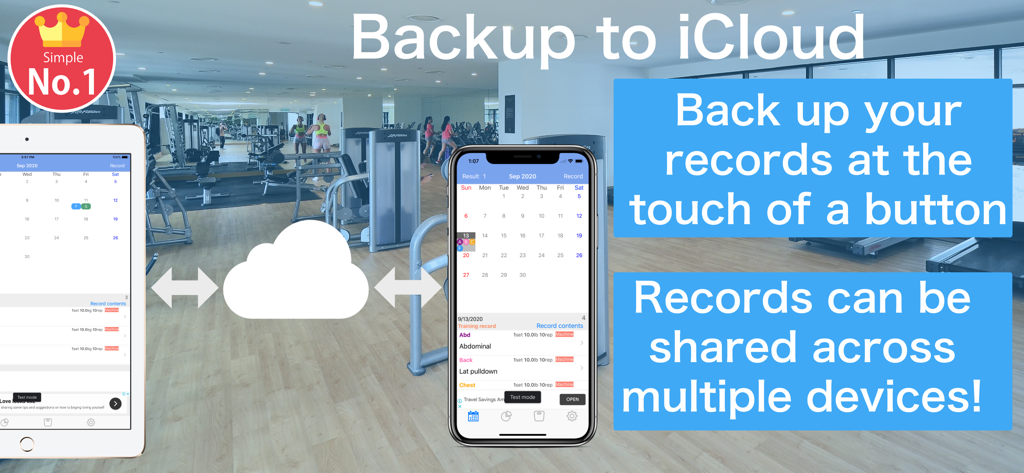
iPhone 및 iPad에서 iCloud 백업 및 다중 장치 동기화 기능을 보여주는 피트니스 운동 기록 캘린더 앱 인터페이스

iPhone 및 iPad에서 iCloud 백업 및 다중 장치 동기화 기능을 보여주는 피트니스 운동 기록 캘린더 앱 인터페이스

데이터 기반 인사이트로 실력 향상을 마스터하세요

이 앱을 돋보이게 하는 도구, 178K+ 명의 사용자가 선택.

🧠

AI 기반 성과 코칭

특정 훈련 습관에 맞춰 개인화된 동기 부여 조언과 월간 진행 상황 분석을 받아 정체를 극복하세요.

📅

간편한 캘린더 기록

기구, 프리 웨이트, 유산소 운동을 몇 초 안에 빠르게 기록하세요. 꾸준함을 시각화하고 예정된 운동을 다시는 놓치지 마세요.

📈

Apple 생태계 통합

Apple Health와 원활하게 동기화하고, iCloud에 데이터를 백업하고, CSV로 기록을 내보내 고급 개인 데이터 분석을 수행하세요.

전 세계 사용자들에게 사랑받는 앱

Trusted by 178K+ 명이 이 앱을 사랑합니다.

"

"데이터에 집착하는 사람으로서 CSV 내보내기와 상세한 무게 그래프는 제가 필요했던 것입니다. 마침내 헬스장 기록을 Excel로 원활하게 옮길 수 있습니다. 인터페이스는 깔끔하고 빠르며 세트 기록에 방해가 되지 않습니다. iOS에서 찾은 전통적인 훈련 기록의 최고의 디지털 대체품입니다."

David R., 소프트웨어 엔지니어
"

"이 앱이 Apple Health와 통합되는 것이 정말 좋습니다. 더 이상 체중을 수동으로 기록할 필요가 없고, 캘린더에서 바로 운동 일정을 볼 수 있어 책임감을 유지하게 됩니다. AI 기반 동기 부여 메시지는 실제로 헬스장에 가기 싫은 날에 힘을 북돋아 주는 좋은 점입니다."

Sarah M., 마케팅 디렉터

앱 소개

에 대해 알아야 할 모든 것 Fitness Workout Log Calendar.

설명

Let AI analyze your training! Motivational advice and encouraging messages are available exclusively with the Premium plan. AI analyzes your training records from the past month and delivers advice and encouraging messages tailored to you. This will help you maintain motivation and set your next goal. Machine, free, body weight, and cardio support! Backup to iCloud at the touch of a button! Muscle Training Even for beginners, it is a muscle training calendar app that can be recorded easily. how to use 1. Press the Record button on the calendar screen to move to the training menu screen 2. The training menu can be selected from "machine", "free", "self-weight" and "erobic" 3. Enter and save basic training content. Even if the training day has not been decided, you can save it without completing it. 3.1 You can turn on or off the recording of training time per set and rest time between sets. 4. If you select a saved training menu, it will be recorded on the date selected in the calendar 5. You can edit it by selecting the recorded training 6. On the scheduled training day, the part name is displayed lightly in the calendar 7. Tap on the training schedule record will be recorded in the calendar 8. You can also record your weight to check the effectiveness of your training. 9. You can check the weight you recorded on the graph. 10. You can check past training records from the recording screen. Tap the training you want to check and a list of past records will be displayed. This app can automatically capture weight records in the health app in conjunction with the health app. Main function ・ You can record training time and rest time between sets. ・ We will notify by notification when muscle training is scheduled. You can back up data to iCloud. ・In conjunction with health care, you can check your weight and body fat percentage within the app. Recommended for such people ・ I want to check the contents of muscle training with a graph ・ I want to backup data to iCloud ・ I want to export a CSV file and manage it in Excel About the Premium Plan ・Service name Premium plan ・Service contents Remove all ads CSV export function Sorting of training records. Multiple selection of training records. Pause training. 【About Premium Plan Automatic Continuation Charge】 About Premium Plans ・ Payments are charged via the AppStore (iTunes account). If the automatic renewal is not canceled more than 24 hours before the term end date, the contract term will be renewed automatically. Premium plans can be canceled automatically at any time in the user's account settings. · Failure during Premium Plan Migration, In that case, please try restoring using the 'Restore' button. If the restoration fails, the purchase procedure has not been completed. In that case, please purchase from the button to register again. If you purchase Apple's System Premium Plan once, you can not purchase Premium plan again. Please be assured that you will not be billed in duplicate. ・ Model change The migration of the terminal of the same Apple product can do the transition of the premium plan from 'Restore' button. · About cancellation Even if you delete the application will not be cancellation. Follow the procedure below to cancel. Tap 'Settings'. Tap iTunes Store/App Store. Tap 'Apple ID' -> 'Show Apple ID'. Tap 'Manage'. Tap a membership that has been enabled. Turning off the 'Auto Update' update option cancels in-app billing. You can also cancel from here. You can also cancel from here. https://buy.itunes.apple.com/WebObjects/MZFinance.woa/wa/manageSubscriptions Explanation of Apple's official cancellation method https://support.apple.com/HT202039 ・ Model change, migration method The same Apple product device migration can be migrated from the "Restore Purchase" button to the premium plan. · Terms of Use · Privacy Policy http://hobbybowl.com/privacy_policy.html

최신 버전

5.5.6

크기

54.1 MB

출시일

2018년 11월 4일

훈련 데이터를 측정 가능한 진행 상황으로 전환하세요

AI 인사이트와 원활한 Apple Health 통합을 사용하여 178,000명 이상의 데이터 중심적인 운동선수들과 함께 피트니스 여정을 마스터하세요. 지금 바로 새로운 디지털 운동 기록을 다운로드하세요.

다운로드: App Store