iBFD

iBFD

다운로드: App Store
Spark by MWM logo
로고: iBFD

iBFD: 필수 백업 비행 디스플레이 및 안전 기능 모음

iPhone 또는 iPad에서 전문가 수준의 백업 계측기로 조종실 안전을 향상시키십시오. 정밀 자세 표시기, 센서 융합 기술 및 내장 비행 데이터 기록 기능을 특징으로 하여 모든 비행에서 최고의 안심을 제공합니다.

개발사

Tatsuo Saeki

카테고리

Navigation

다운로드

106K+

사용자 평점

3.8/5

총 평가 수

0

지원 언어

1

정밀 디스플레이

이 인터페이스를 사용하는 106K+ 명의 사용자.

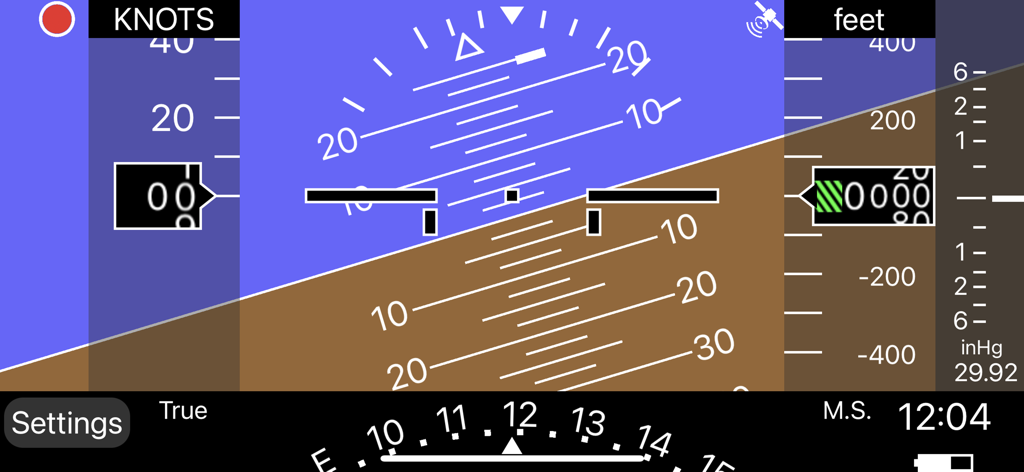
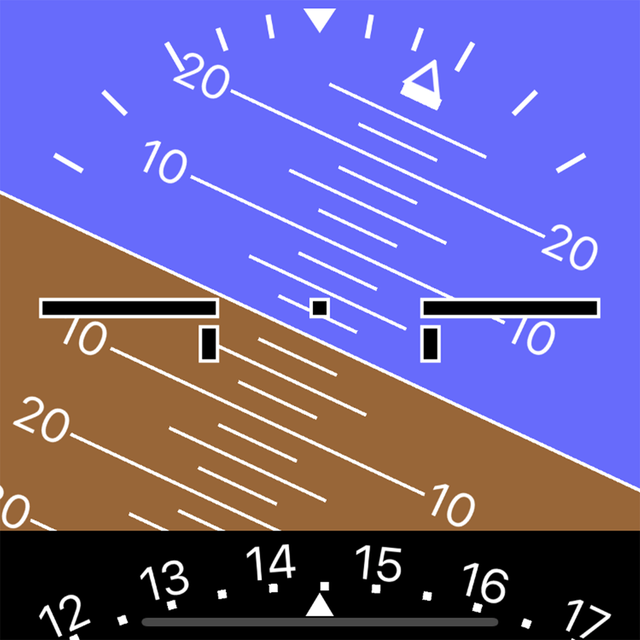
자세 표시기와 고도계가 있는 디지털 백업 비행 디스플레이 인터페이스

자세 표시기와 고도계가 있는 디지털 백업 비행 디스플레이 인터페이스

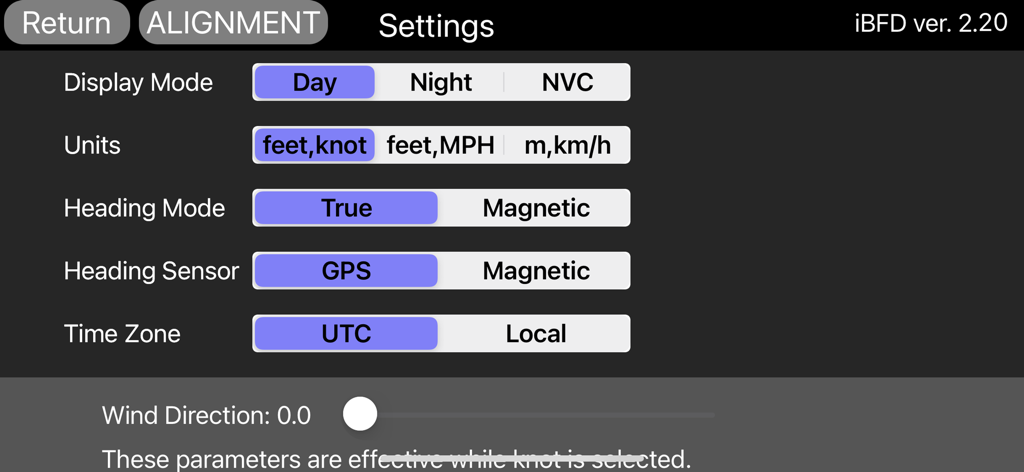
비행 디스플레이, 단위 및 센서에 대한 구성 옵션을 보여주는 iBFD 앱 설정 화면.

비행 디스플레이, 단위 및 센서에 대한 구성 옵션을 보여주는 iBFD 앱 설정 화면.

전문가 수준의 백업 계측기

이 앱을 돋보이게 하는 도구, 106K+ 명의 사용자가 선택.

🎛️

통합 비행 기능 모음

고급 칼만 필터 정밀도로 구동되는 자세, 방향 및 수직 속도 표시기를 포함한 완벽한 보조 패널에 액세스하십시오.

⏺️

FDR 및 조종실 음성 녹음

모든 임무에 대한 필수 문서를 제공하는 내장 비행 데이터 및 음성 녹음을 통해 안전 문화를 향상시키십시오.

🛡️

비상 대비 안정성

주야간 및 NVC 모드를 통해 모든 시나리오에 대비하여 중요한 순간에 높은 가시성의 항해 및 공항 안내를 보장합니다.

전 세계 사용자들에게 사랑받는 앱

Trusted by 106K+ 명이 이 앱을 사랑합니다.

"

"단일 진공 시스템을 갖춘 1970년대 세스나를 비행하는 개인 조종사로서 iBFD는 저에게 최고의 안심입니다. 최근 장거리 비행 중에 기본 계측기의 완벽한 백업 역할을 했습니다. 자세 표시기는 놀랍도록 안정적이며 FDR 기능은 비행 후 기동을 검토하는 데 환상적입니다. 모든 일반 항공 조종실을 위한 필수 디지털 보험입니다."

David Miller, 개인 조종사 (ASEL)
"

"iBFD의 센서 융합 로직은 다른 앱에 비해 정말 인상적입니다. 항해용 iPad를 사용하는 동안 글레어 쉴드에 장착된 iPhone에서 실행합니다. 피치 및 롤 데이터의 정확성은 최고 수준이며 NVC 모드는 늦은 저녁 접근 시 야간 시력을 보존하는 데 생명의 은인입니다. 안전과 백업을 우선시하는 조종사를 위한 필수 도구입니다."

Sarah Jenkins, 비행 교관

앱 소개

에 대해 알아야 할 모든 것 iBFD.

설명

integrated Backup Flight Display (iBFD) Pilots understand the risk of a primary flight instrument failure while flying. In certain situations the loss of the Attitude Indicator is perhaps the greatest risk a pilot can face. This iPhone based integrated Backup Flight Display (iBFD) is an inexpensive, easy to operate tool intended to reduce risk and improve safety if an instrument fails and no other backup is available. This application consists of an Attitude Indicator, Heading Indicator, Altimeter, Vertical Speed Indicator, speed Indicator, Side Slip Indicator, and Clock. Furthermore, in the portrait mode of the iPad, a Map is displayed below the Attitude Indicator, and when you enter an airport code such as KFTW, the direction and distance to the airport are displayed. It can also be used as Flight Data Recorder(FDR) and Cockpit Voice Recorder(CVR). This function is activated by touching the red circle in the upper left corner. Recording is stopped by touching the red circle again or it will be stopped automatically when large G is applied. iBFD uses the iPhone's 3 axis Gyro sensor as its primary sensor. Pitch and Roll angles are calculated using the Gyro data and the same algorithm as strap down Inertial Reference Systems (IRS). GPS and Accelerometer are used with Kalman filter as sensor fusion to prevent gyro drift and improve Accuracy. The iBFD performs noticeably better than other comparable applications on the market. Unfortunately the iBFD doesn't have FAA certification. It doesn't have enough reliability for use as Primary Flight Instruments, and neither our software nor your iPhone have been subjected to rigorous certification tests. And the accuracy of Map and Airport Information is not guaranteed. All information displayed on the iBFD is for reference only! Therefore, we are not responsible for any death, injury or damage as a result of using the iBFD. USE THIS DEVICE AT YOUR OWN RISK! Nevertheless, during an In Flight Emergency having an iBFD is far better than having no instrument at all. Particularly if in a limited visibility situation with an inoperative Attitude Indicator. Engine vibration can affect accuracy of the iBFD, so special consideration must be given to mounting the iPhone to the cockpit instrument panel or glare shield. Other features (1) There are three display color modes; Day, Night or NVC. (2) Altitude/Speed is selectable in units of feet/knots, feet/MPH or meter/kilometers per hour. (3) Airspeed is calculated using GPS Speed, Wind Direction, and Wind Velocity. Wind Direction and Velocity are obtained via ATIS and set manually. (4) Pitch angle zero can be adjusted manually by touching center of the display or slider setting. (5) Magnetic Heading or True Heading, and GPS or M.S.(Magnetic Sensor) are selectable. (6) Settings Window for entering parameters and user preferences. (7) Battery Icon indication. (8) Recorded data can be accessed by Files. (9) Magnetic Heading can be adjusted with the slider. (10) Function to correct roll angle. However, when performing this function, the iPhone needs to be correctly placed horizontally. (11) Local time or UTC is selectable. (12) GPS Altimeter and Barometric Altimeter. (13) Roll indication by Sky pointer and Ground pointer. Note: Initial roll and pitch angle are calculated using the accelerometer at the time of alignment (same as real IRS). Therefore, if acceleration due to motion is applied during alignment, an angle error will occur. However, such initial angle error automatically decreases with time and disappears after a few minutes in case of level flight.

최신 버전

2.30

크기

12.9 MB

출시일

2017년 3월 1일

준비된 상태로 비행하십시오. 귀하의 조종실 필수 백업이 여기서 시작됩니다.

iBFD를 비상 백업 및 비행 기록용으로 신뢰하는 100,000명 이상의 일반 항공 조종사 커뮤니티에 참여하십시오. 궁극적인 안심을 위해 지금 다운로드하십시오.

다운로드: App Store