Identificatie-app AMP Groep

Identificatie-app AMP Groep

다운로드: App Store
Spark by MWM logo
로고: Identificatie-app AMP Groep

AMP Group 신원 인증 앱: 빠르고 안전하며 완전한 디지털 신원 확인

서류 작업은 건너뛰고 어디서든 신원을 확인하세요. 고급 NFC 스캔 및 안전한 얼굴 비교 기술로 몇 분 안에 의무 KYC 프로세스를 완료하세요.

개발사

AMP Logistics bv

카테고리

Business

다운로드

233K+

사용자 평점

4.1/5

총 평가 수

8K+

지원 언어

2

간단. 안전. 확인됨.

이 인터페이스를 사용하는 233K+ 명의 사용자.

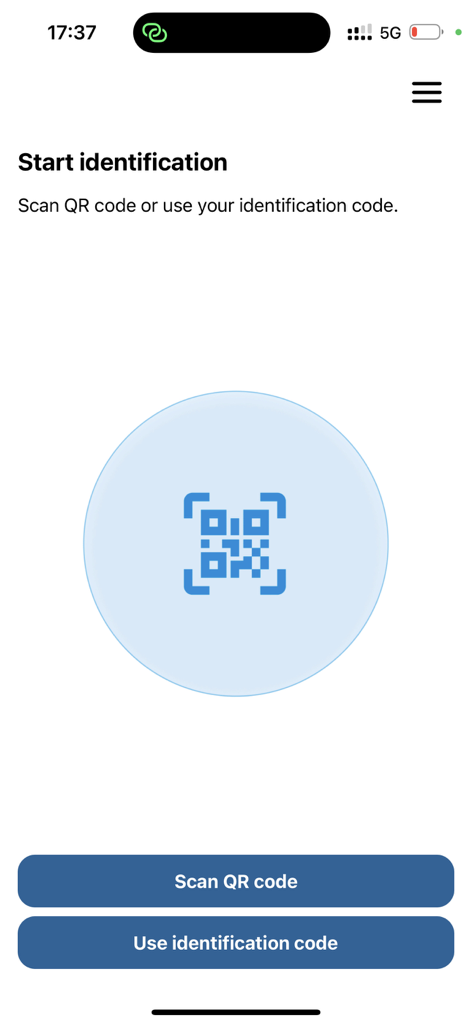
QR 코드 스캔 또는 신원 확인 코드 입력을 위한 옵션이 있는 신원 확인 시작 화면

QR 코드 스캔 또는 신원 확인 코드 입력을 위한 옵션이 있는 신원 확인 시작 화면

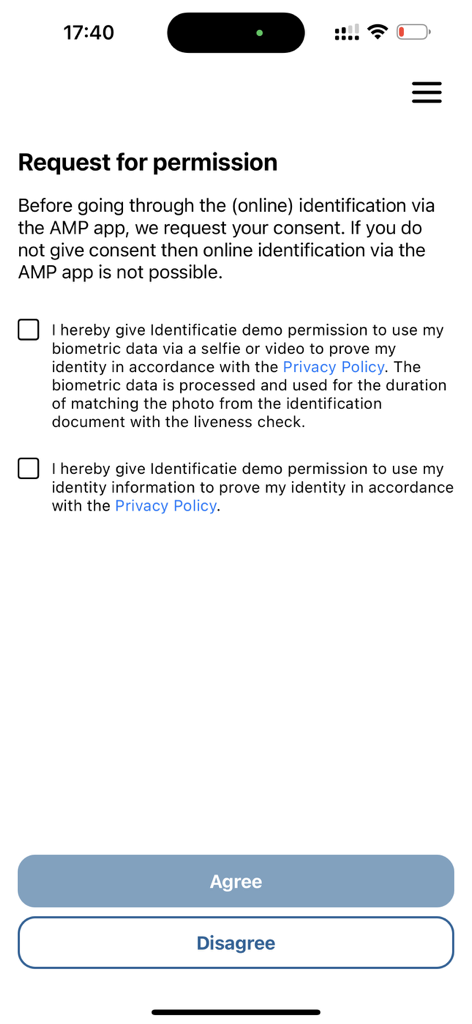
AMP Group 신원 확인 앱에서 생체 인식 및 신원 데이터 처리를 위한 권한 요청 화면

AMP Group 신원 확인 앱에서 생체 인식 및 신원 데이터 처리를 위한 권한 요청 화면

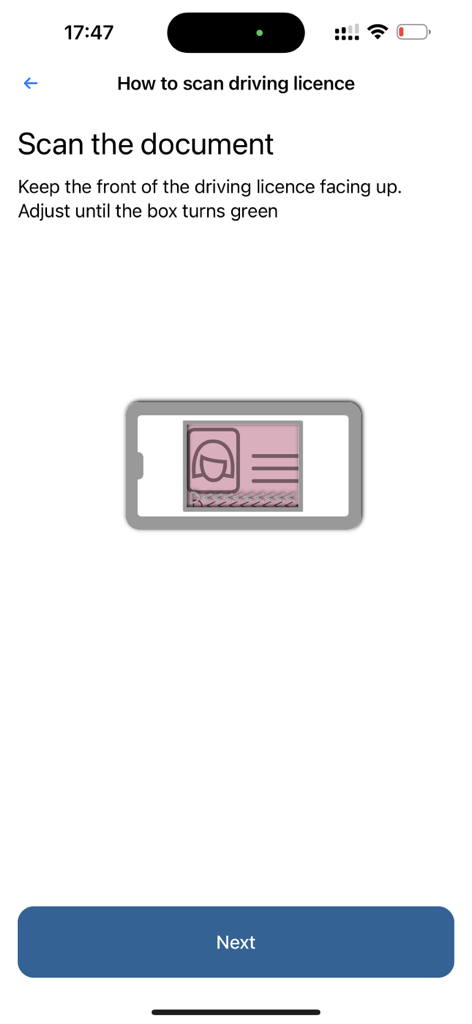
AMP Group 신원 확인 앱 내에서 운전 면허증 스캔 지침 화면

AMP Group 신원 확인 앱 내에서 운전 면허증 스캔 지침 화면

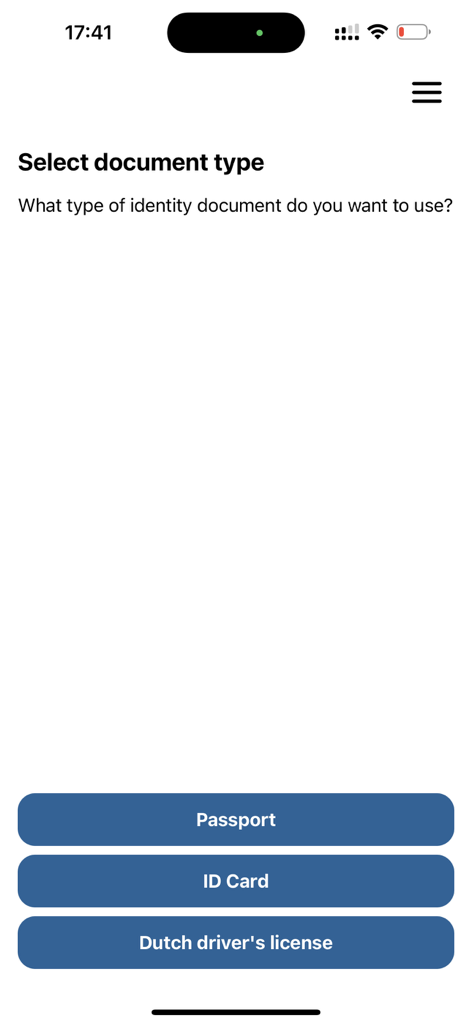
여권, 신분증, 네덜란드 운전 면허증 옵션이 있는 신원 증명서 유형 선택을 위한 모바일 앱 인터페이스

여권, 신분증, 네덜란드 운전 면허증 옵션이 있는 신원 증명서 유형 선택을 위한 모바일 앱 인터페이스

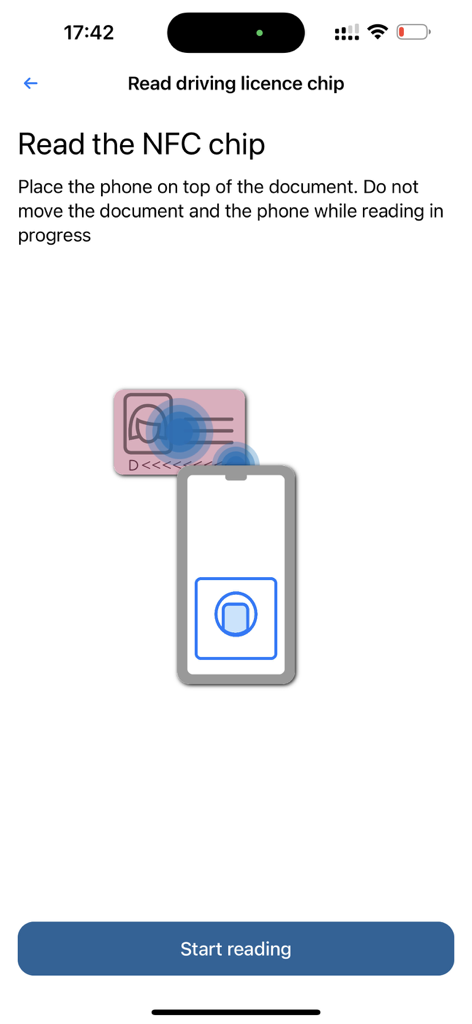
NFC를 통해 신분증을 스캔하는 스마트폰 그래픽을 보여주는 AMP Group 신원 확인 앱의 지침 화면.

NFC를 통해 신분증을 스캔하는 스마트폰 그래픽을 보여주는 AMP Group 신원 확인 앱의 지침 화면.

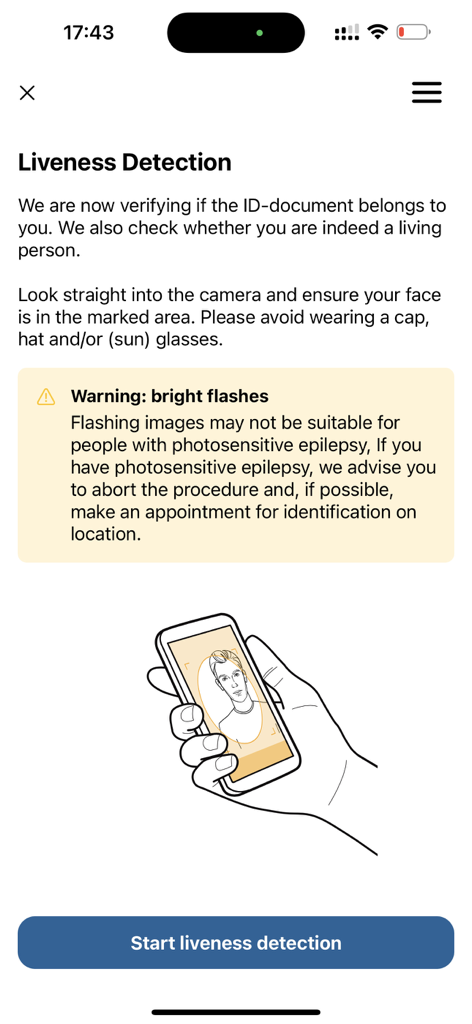
신원 확인을 위한 얼굴 스캔 지침이 있는 라이브니스 감지 화면

신원 확인을 위한 얼굴 스캔 지침이 있는 라이브니스 감지 화면

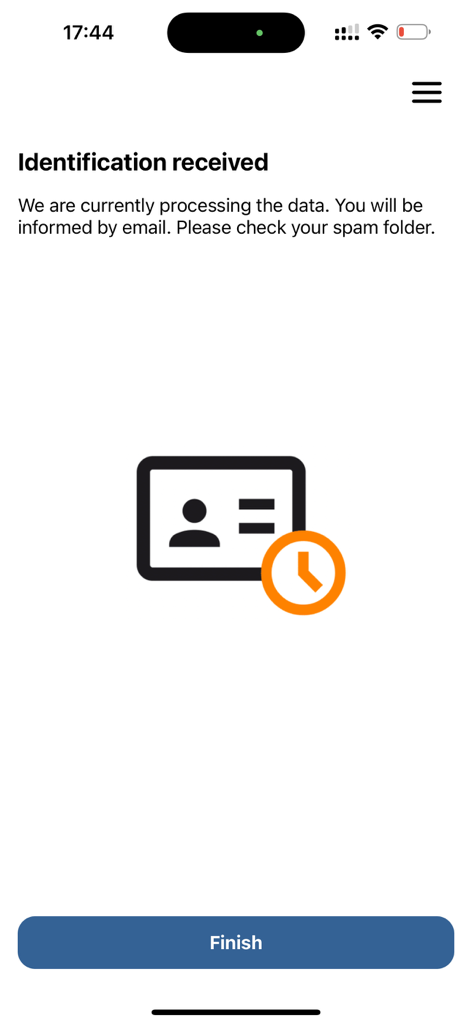
AMP Group 앱에서 신원 확인 데이터 수신 및 처리 중임을 보여주는 확인 화면

AMP Group 앱에서 신원 확인 데이터 수신 및 처리 중임을 보여주는 확인 화면

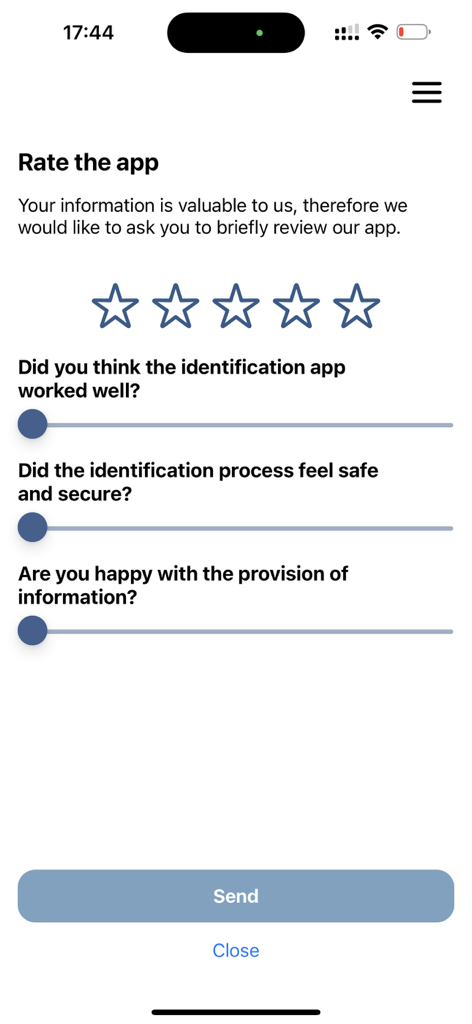
별점과 사용자 만족도 설문 조사 질문이 포함된 신원 확인 앱에 대한 피드백 및 평가 화면

별점과 사용자 만족도 설문 조사 질문이 포함된 신원 확인 앱에 대한 피드백 및 평가 화면

간편한 신원 확인

이 앱을 돋보이게 하는 도구, 233K+ 명의 사용자가 선택.

📱

번개처럼 빠른 스캔

그냥 겨냥하고 스캔하세요. 저희의 스마트 카메라 기술이 ID를 즉시 인식하고 필요한 데이터를 추출하므로 아무것도 입력할 필요가 없습니다.

🔒

은행급 NFC 보안

휴대폰의 내장 NFC 리더를 활용하여 ID 칩의 진위 여부를 확인하고 개인 정보에 대한 최고 수준의 보안을 제공합니다.

생체 인식 얼굴 일치

저희의 고급 얼굴 비교는 신원증 사진과 실시간 셀카를 일치시켜 귀하가 말하는 사람이 귀하임을 보장하며, 원활하고 안전한 경험을 제공합니다.

전 세계 사용자들에게 사랑받는 앱

Trusted by 233K+ 명이 이 앱을 사랑합니다.

"

"새로운 원격 직책을 위해 신원을 확인해야 했는데, 물리적인 약속의 번거로움을 걱정했습니다. 이 앱은 이를 매우 쉽게 만들어 주었습니다. 지침이 명확했고 NFC 스캔이 완벽하게 작동했으며 전체 프로세스는 거실에서 5분도 채 걸리지 않았습니다."

Sarah Jenkins
"

"인상적인 기술입니다. 얼굴 비교와 칩 읽기는 매우 안전하게 느껴졌으며, 새 투자 계좌를 개설하는 동안 안심할 수 있었습니다. 이렇게 정교하면서도 사용자 친화적인 신원 확인 프로세스를 찾는 것은 드뭅니다."

Marcus Thorne

리뷰 분석

사용자 리뷰 인사이트.

감정 점수

28%
부정적

요약

The app receives largely negative feedback, with users praising its speed and ease of use when successfully completing identification. However, many users report significant difficulties with the scanning process, particularly concerning ID cards and NFC chip detection, often leading to frustration and repeated attempts. Core concerns revolve around privacy implications, the mandatory nature of the app for accessing governmental services, and a general perception of complexity and poor app stability due to frequent crashes. A recurring sentiment is the preference for simpler, existing alternatives like DigiD.

주요 테마

Scanning Difficulty(10)
Complexity(7)
Mandatory Use(7)
Privacy Concerns(6)
Ease of Use(6)
Cost Concerns(4)
App Stability(3)
Instructions/Guidance(3)

앱 소개

에 대해 알아야 할 모든 것 Identificatie-app AMP Groep.

설명

With our identification app, we are the link between one of our clients and you. Simply download the app, scan the QR code you received from us and start your online identification. When do you use AMP Group's identification app? You have submitted an application to one of our clients and need to be identified for it. This identification process will be handled by AMP Group. How does the online identification work? - Scan the QR code or enter your ID code manually - In the first step, the ID proof is scanned with the phone's camera. This reads the MRZ code and recognizes and classifies the type of document. - Next, you are given instructions for reading the chip via the phone's NFC reader.Among other things, the certificate of the chip is checked for authenticity. - In the final step, during facial comparison, we check whether the holder of the ID certificate matches the photo on the chip. What do you need for successful identification? We would like to give you some tips so that identification goes smoothly and without problems. Make sure that you have - Have a stable internet connection - Have a valid ID document at hand - Have a smartphone with a camera - Are in a room with enough natural light More information about AMP Group's identification app can be found at: https://ampgroep.nl/wat-we-doen/identificeren/identificatie-app/ It is simple. During the identification process, you will be explained exactly what the steps are for a successful identification.

최신 버전

2.2.18

크기

19.6 MB

출시일

2021년 2월 2일

몇 분 안에 신원 확인

사무실 방문과 서류 작업은 건너뛰세요. 지금 AMP Group 앱을 다운로드하여 스마트폰에서 직접 신원 확인 프로세스를 안전하게 완료하세요.

다운로드: App Store
FAQ

자주 묻는 질문

에 대해 알아야 할 모든 것 Identificatie-app AMP Groep

Identificatie-app AMP Groep는 무엇에 사용되나요?

Identificatie-app AMP Groep는 AMP Group 고객에게 신청하는 개인의 온라인 신원 확인을 용이하게 합니다. 공식 문서를 통해 신원을 확인합니다.

Identificatie-app AMP Groep로 온라인 신원 확인은 어떻게 하나요?

QR 코드를 스캔하고, 신분증을 스캔하고, NFC로 문서 칩을 읽고, 최종적으로 얼굴 비교를 통해 신원을 확인하는 과정입니다.

Identificatie-app AMP Groep에서 허용되는 신분증은 무엇인가요?

Identificatie-app AMP Groep는 온라인 신원 확인을 위해 여권, 신분증, 네덜란드 운전면허증을 허용합니다. 앱에서 문서 유형을 선택합니다.

Identificatie-app AMP Groep를 사용하여 신원 확인을 성공적으로 완료하려면 무엇이 필요한가요?

성공적인 신원 확인을 위해 안정적인 인터넷 연결, 유효한 신분증, 카메라가 있는 스마트폰, 그리고 충분한 자연광이 있는 위치가 필요합니다.

Identificatie-app AMP Groep는 신원 확인을 위해 생체 데이터를 사용하나요?

네, Identificatie-app AMP Groep는 셀카 또는 동영상에서 생체 데이터를 사용하기 위한 동의를 요청합니다. 이는 신원 증명 및 라이브니스 확인을 위한 것입니다.

Identificatie-app AMP Groep에 NFC 기술이 필요한가요?

네, Identificatie-app AMP Groep는 스마트폰의 NFC 리더가 필요합니다. 이를 통해 신분증 칩을 읽어 문서의 진위 여부를 확인합니다.

Identificatie-app AMP Groep에서 신원 확인 세션을 어떻게 시작하나요?

고객이 제공한 QR 코드를 스캔하거나 앱에 고유 식별 코드를 직접 입력하여 신원 확인 세션을 시작합니다.

Identificatie-app AMP Groep로 신원 확인을 완료한 후에는 어떻게 되나요?

완료 후 Identificatie-app AMP Groep는 제출된 데이터를 처리합니다. 신원 확인 처리가 완료되면 이메일 알림을 받게 됩니다.

Identificatie-app AMP Groep는 라이브니스 감지를 수행하나요?

네, Identificatie-app AMP Groep는 라이브니스 감지를 포함합니다. 이 단계는 귀하가 실제 살아있는 사람인지 확인하고 얼굴을 신분증 사진과 비교합니다.