Infocar - OBD2 ELM Scanner

Infocar - OBD2 ELM Scanner

다운로드: App Store다운로드: Google Play
Spark by MWM logo
로고: Infocar - OBD2 ELM Scanner

Infocar - OBD2 ELM 스캐너: 앱 하나에 담은 전문 정비사

"체크 엔진" 경고등에 대한 추측은 이제 그만. 딜러 수준의 진단, 800개 이상의 센서 실시간 모니터링, 그리고 최고의 차량 관리 도구로 수리 비용 수백 달러를 절약하세요.

개발사

Infocar Co., Ltd.

카테고리

Utilities

다운로드

820K+

사용자 평점

4.6/5

총 평가 수

1K+

지원 언어

21

차량 내부를 살펴보세요

이 인터페이스를 사용하는 820K+ 명의 사용자.

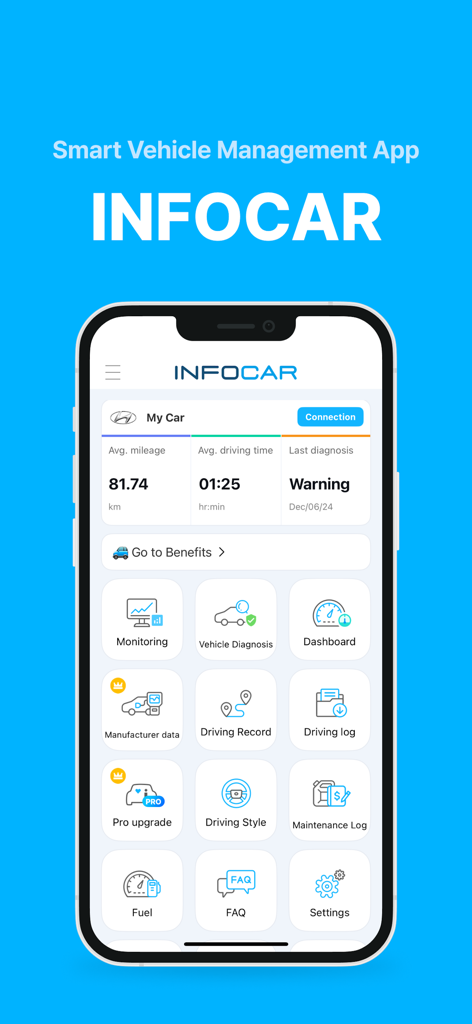
Infocar OBD2 스캐너 앱 대시보드: 차량 건강 및 진단 아이콘 표시

Infocar OBD2 스캐너 앱 대시보드: 차량 건강 및 진단 아이콘 표시

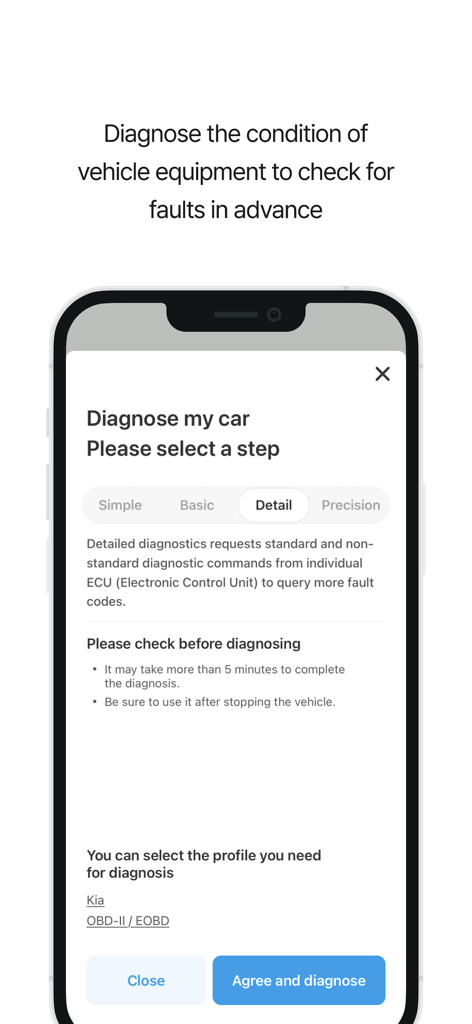
Infocar 앱 화면: 기아 차량의 상세 ECU 고장 코드 스캔 옵션이 있는 자동차 진단 설정 표시

Infocar 앱 화면: 기아 차량의 상세 ECU 고장 코드 스캔 옵션이 있는 자동차 진단 설정 표시

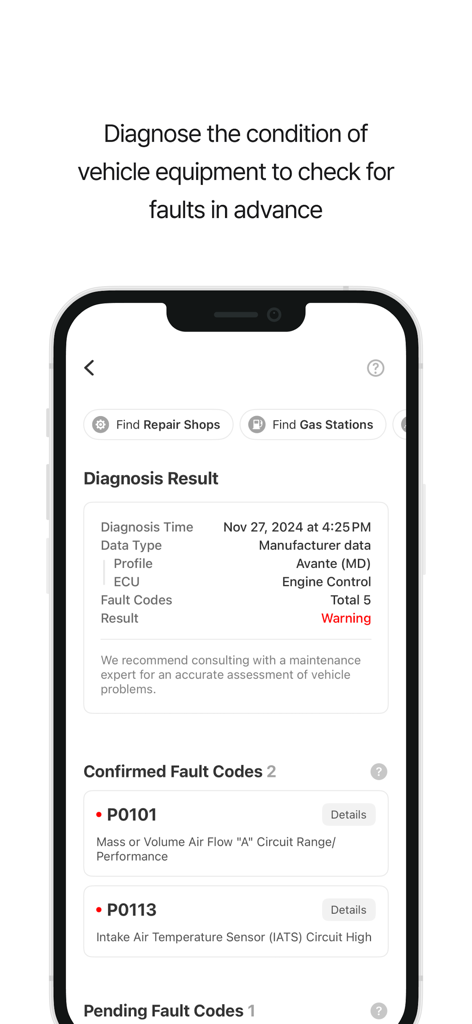
스마트폰 화면: Infocar 앱에서 차량 진단 결과 및 엔진 고장 코드 표시

스마트폰 화면: Infocar 앱에서 차량 진단 결과 및 엔진 고장 코드 표시

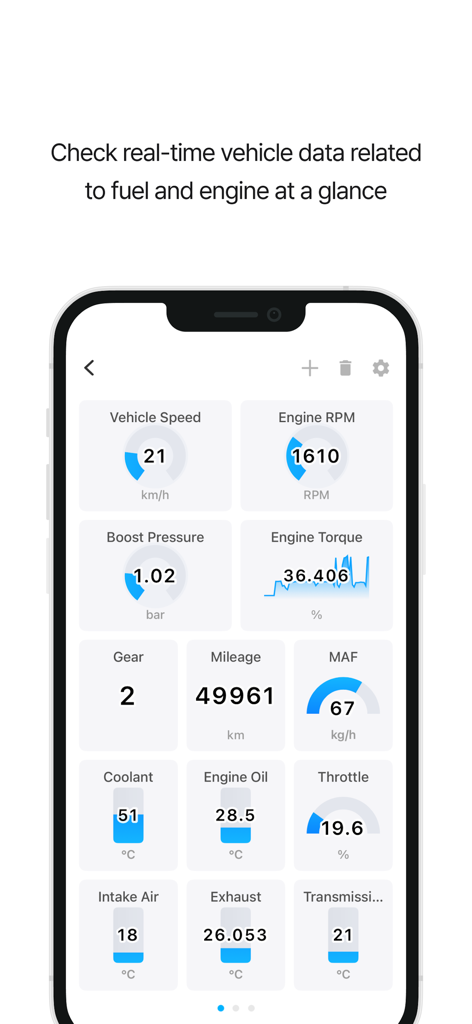
Infocar 앱 대시보드: 엔진 RPM 및 속도를 포함한 실시간 차량 센서 데이터 표시

Infocar 앱 대시보드: 엔진 RPM 및 속도를 포함한 실시간 차량 센서 데이터 표시

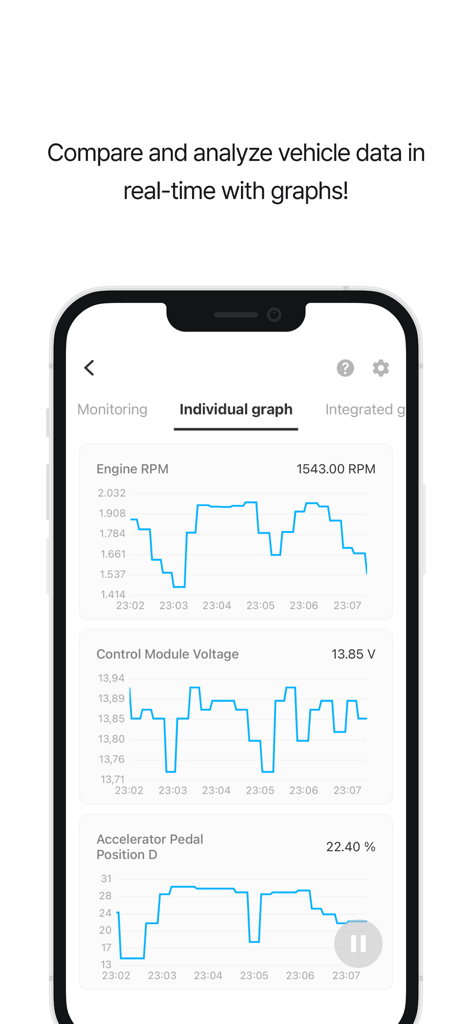
Infocar 앱: 엔진 RPM 및 제어 모듈 전압에 대한 실시간 차량 진단 그래프 표시

Infocar 앱: 엔진 RPM 및 제어 모듈 전압에 대한 실시간 차량 진단 그래프 표시

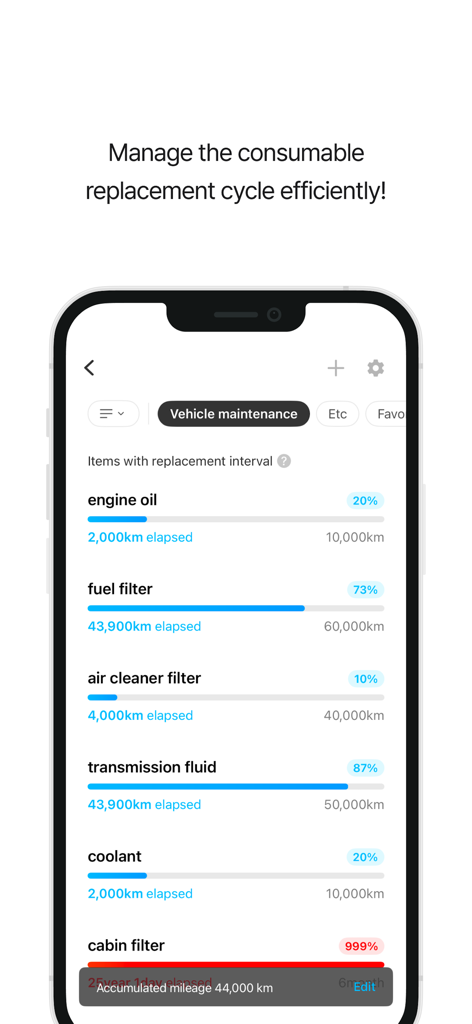
Infocar 앱 대시보드: 오일 및 필터에 대한 차량 유지보수 주기 표시

Infocar 앱 대시보드: 오일 및 필터에 대한 차량 유지보수 주기 표시

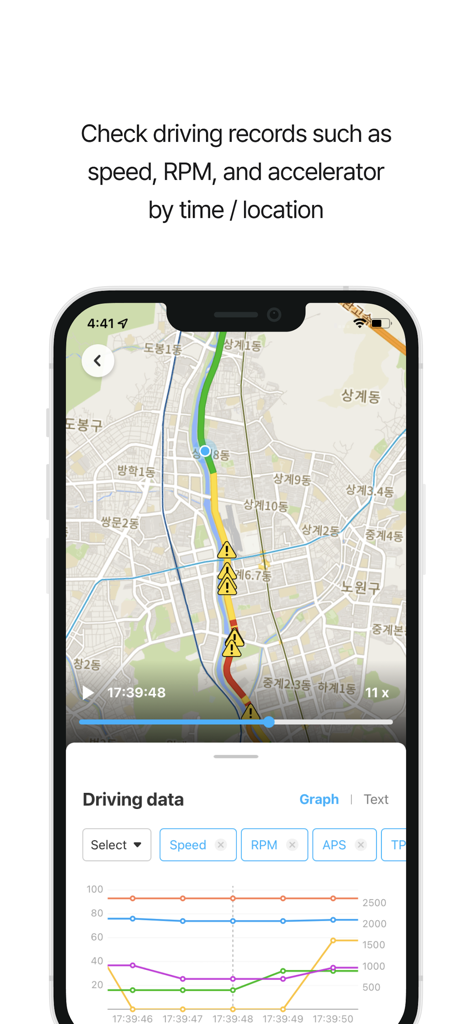
Infocar 앱 인터페이스: 지도상의 주행 기록 및 성능 지표 그래프 표시

Infocar 앱 인터페이스: 지도상의 주행 기록 및 성능 지표 그래프 표시

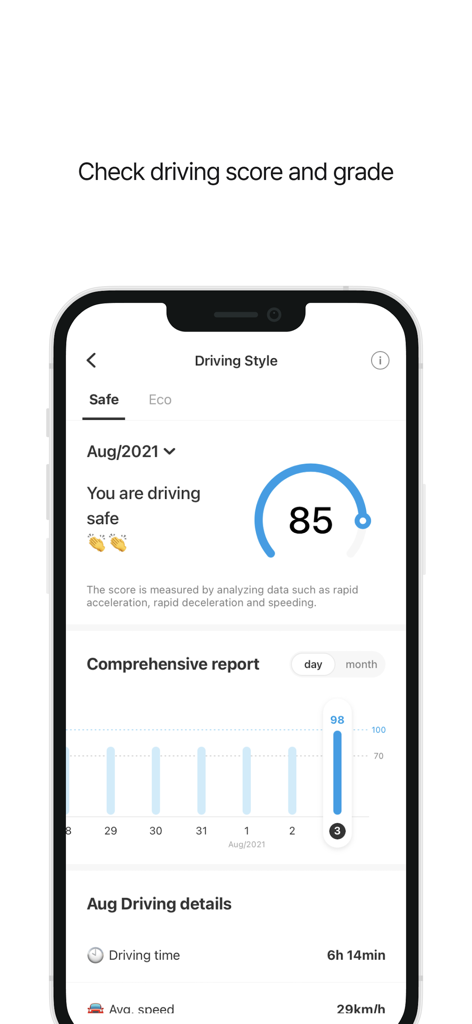
Infocar 앱 화면: 안전 점수 및 종합적인 운전 보고서와 함께 운전 스타일 분석 표시

Infocar 앱 화면: 안전 점수 및 종합적인 운전 보고서와 함께 운전 스타일 분석 표시

차량 건강 상태를 완벽하게 관리하세요

이 앱을 돋보이게 하는 도구, 820K+ 명의 사용자가 선택.

🛠️

전문가 수준의 진단

"체크 엔진" 경고등 문제를 즉시 파악하고 고장 코드를 직접 삭제하여 비싸고 불필요한 정비소 방문을 피하세요.

🏎️

스마트 실시간 HUD

미래 지향적인 헤드업 디스플레이로 대시보드를 혁신하세요. 속도와 RPM을 앞유리에 투사하여 더 안전하고 집중력 있는 운전을 제공합니다.

📈

자동 주행 거리 및 연료 기록

수출 가능한 데이터를 통해 모든 주행 및 연료 비용을 손쉽게 추적하세요. 세금 공제, 긱 워크 기록, 예산 관리에 완벽합니다.

전 세계 사용자들에게 사랑받는 앱

Trusted by 820K+ 명이 이 앱을 사랑합니다.

"

"Infocar 덕분에 딜러십에서 120달러의 진단비를 절약했습니다. 간단한 센서 문제를 직접 파악하고 몇 초 만에 고장 코드를 삭제할 수 있었습니다. 상세한 제조사 데이터 덕분에 정비소에서 바가지 쓰지 않고 직접 제 차량을 관리할 수 있다는 자신감이 생겼습니다."

David Miller
"

"라이드쉐어 운전자라면 필수입니다! 운행 기록과 Excel 내보내기 기능을 사용하여 세금 신고를 위한 주행 거리를 완벽하게 추적합니다. 또한, 실시간 연비 모니터링 덕분에 운전 습관을 바꾸고 매달 가스 비용을 크게 절약할 수 있었습니다."

Jessica Chen

앱 소개

에 대해 알아야 할 모든 것 Infocar - OBD2 ELM Scanner.

설명

Smart Vehicle Management App, Infocar Manage your vehicle smarter with Infocar, from vehicle diagnostics to driving style analysis! ■ Vehicle Diagnostics * Check your vehicle's condition yourself! Inspect ignition systems, exhaust systems, electronic circuits, and more to detect any faults. * Fault Code Descriptions Understand problems easily with fault codes categorized into three levels. Use the deletion feature to clear fault codes stored in the ECU effortlessly. ■ Manufacturer Data * Experience diagnostic results 99% identical to those from repair shops. * Manage your vehicle more accurately with over 2,000 manufacturer-specific sensor data points tailored to each vehicle model. * View detailed diagnostic results by control unit (ECU). ■ Real-Time Monitoring * Access real-time data from over 800 OBD2 sensors! * Visualize data with graphs to understand your vehicle’s status at a glance. ■ Dashboard * View all the essential data you need while driving in one place! * Optimized for convenience Customize the display to your preferences and easily monitor real-time fuel efficiency and remaining fuel levels. * HUD (Head-Up Display) Stay informed about speed, RPM, mileage, and more while driving, with data reflected onto your windshield for safer driving. ■ Driving Style Analysis * Check your safety and eco-driving scores Analyze your driving habits with Infocar’s algorithm and discover your unique driving style. * Continuously improve with statistical graphs and driving records. ■ Driving Records * Track every drive! Record your driving distance, time, average speed, fuel efficiency, and more. View warnings for overspeeding, rapid acceleration, sudden braking, and sharp turns on a map. * Driving Replay Review speed, RPM, and acceleration data by time and location. * Download your driving logs as an Excel file for detailed analysis. ■ Vehicle Management * Manage maintenance schedules effortlessly Keep track of recommended replacement intervals and maintenance schedules based on your vehicle's mileage. * Expense Tracker Organize your expenses and review them by category or date to plan your budget effectively. ■ Compatible OBD2 Devices * Infocar supports various devices based on the international OBD2 protocol. However, it is optimized for Infocar devices, and some features may be limited when using third-party products. ■ Required and Optional Permissions * Location: For driving records and parking location tracking. * Bluetooth: For connecting to the scanner. * Microphone: For voice recording with the dashcam feature. * Camera: For capturing videos with the dashcam feature. *Note: You can use the app’s main features without granting optional permissions.* ■ Support and Inquiries * Having trouble with Bluetooth or vehicle registration? Go to Settings > FAQ > 1:1 Inquiry in the Infocar app to send us an email, and we’ll assist you promptly. * [Terms and Conditions](https://infocarmobility.com/sub/service_lang/en) ■ Subscription and In-App Purchases Infocar is free to use, but some features require a subscription or in-app purchase. * Subscriptions are billed to your Apple account and automatically renew unless auto-renewal is disabled at least 24 hours before the end of the current period. * You can manage or cancel your subscription anytime through your account settings. * Deleting the app does not automatically cancel your subscription, so please cancel it manually if needed. Start your journey to smarter vehicle management with Infocar!

최신 버전

2.9.17

크기

217.1 MB

출시일

2019년 1월 24일

수리비 과다 지불은 이제 그만, 더 스마트하게 운전하세요

전문가 수준의 진단과 실시간 성능 추적을 손안에서 경험하세요. Infocar를 신뢰하는 800,000명 이상의 운전자와 함께하며 비용을 절약하고 차량 건강 상태를 완벽하게 관리하세요.

다운로드: App Store다운로드: Google Play