MarginNote 3

MarginNote 3

다운로드: App Store
Spark by MWM logo
로고: MarginNote 3

MarginNote 3: 지식을 설계하고 복잡한 주제를 마스터하세요

PDF를 대화형 마인드맵 및 플래시카드로 변환하여 심층 학습 및 장기 기억을 위한 파워 유저를 위한 궁극의 올인원 워크스페이스입니다.

개발사

Beijing Yunsi Software Technology Co., Ltd

카테고리

Productivity

다운로드

5M+

사용자 평점

4.8/5

총 평가 수

172K+

지원 언어

4

당신의 숙달을 시각화하세요

이 인터페이스를 사용하는 5M+ 명의 사용자.

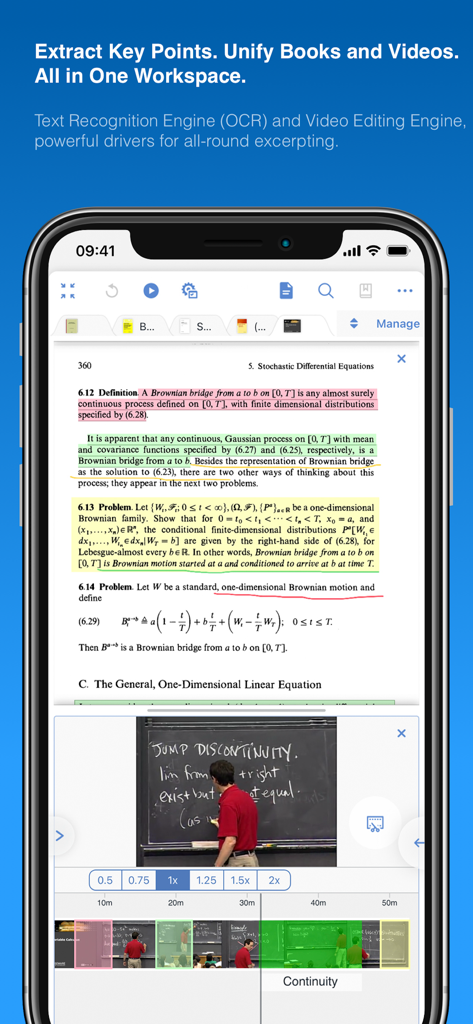
통합 학습을 위한 수학 PDF와 강의 비디오를 보여주는 MarginNote 3 앱의 분할 화면

통합 학습을 위한 수학 PDF와 강의 비디오를 보여주는 MarginNote 3 앱의 분할 화면

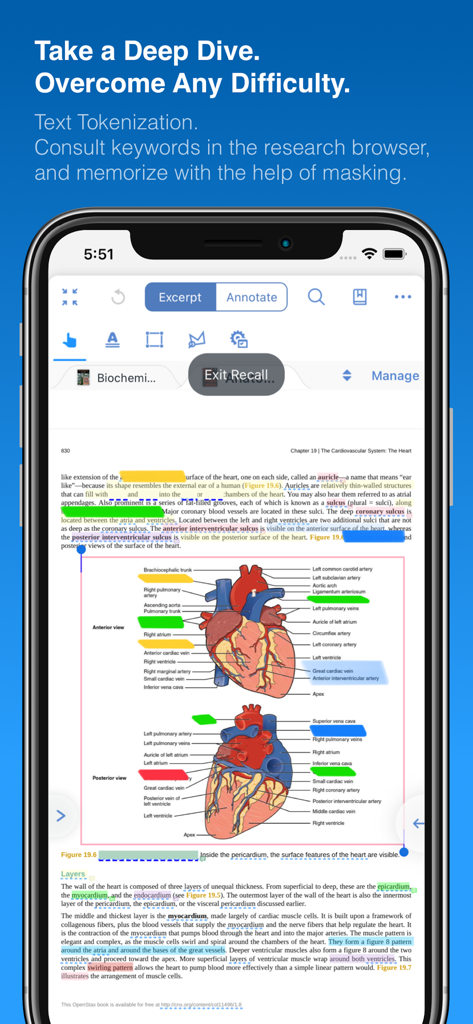
심장 해부도에 마스크 처리된 레이블이 있는 MarginNote 3 회상 모드.

심장 해부도에 마스크 처리된 레이블이 있는 MarginNote 3 회상 모드.

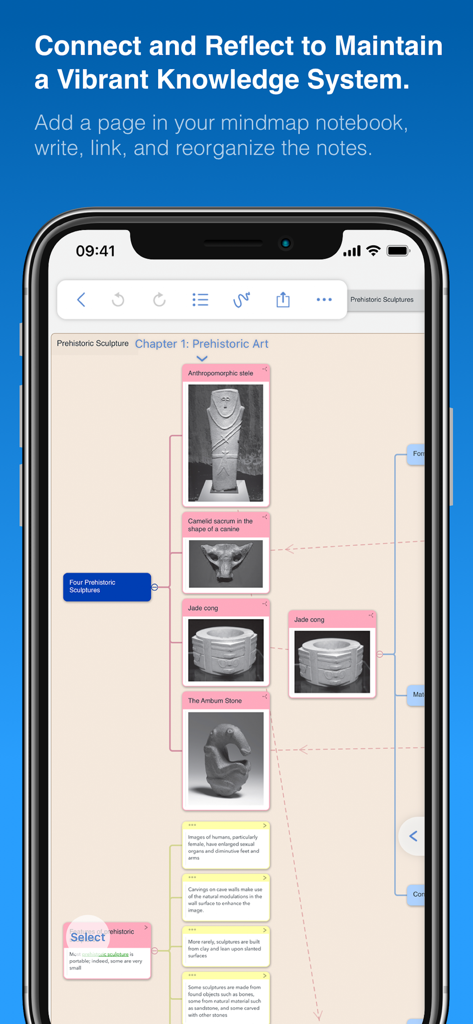
MarginNote 3 마인드맵 인터페이스, 학습 노트 및 선사 시대 조각 이미지 표시

MarginNote 3 마인드맵 인터페이스, 학습 노트 및 선사 시대 조각 이미지 표시

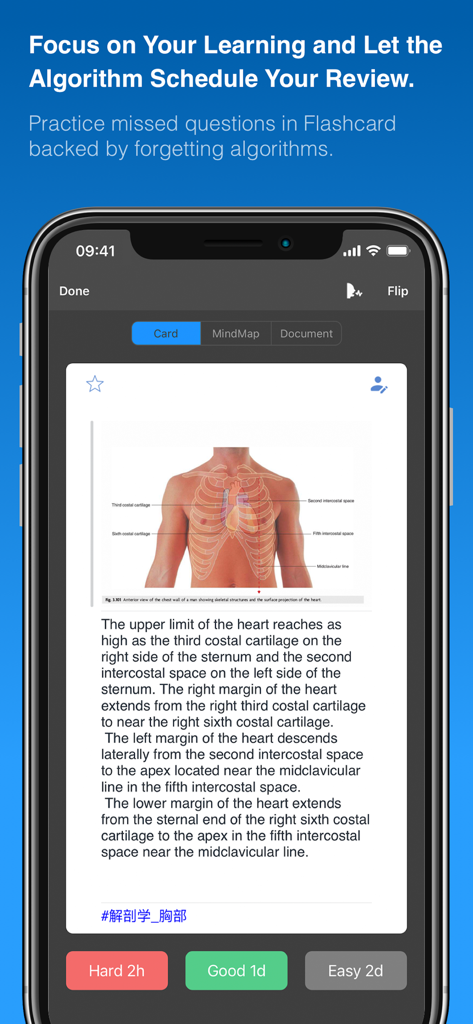
MarginNote 3의 플래시카드 인터페이스, 의료 다이어그램 및 간격 반복 버튼 표시

MarginNote 3의 플래시카드 인터페이스, 의료 다이어그램 및 간격 반복 버튼 표시

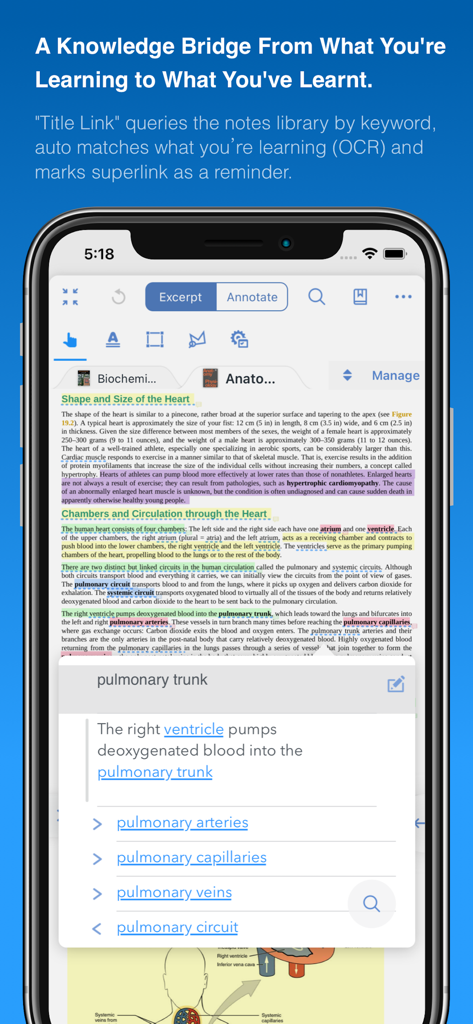
OCR을 통해 의료 연구 용어를 연결하는 Title Link 기능이 있는 iPhone의 MarginNote 3 앱 인터페이스

OCR을 통해 의료 연구 용어를 연결하는 Title Link 기능이 있는 iPhone의 MarginNote 3 앱 인터페이스

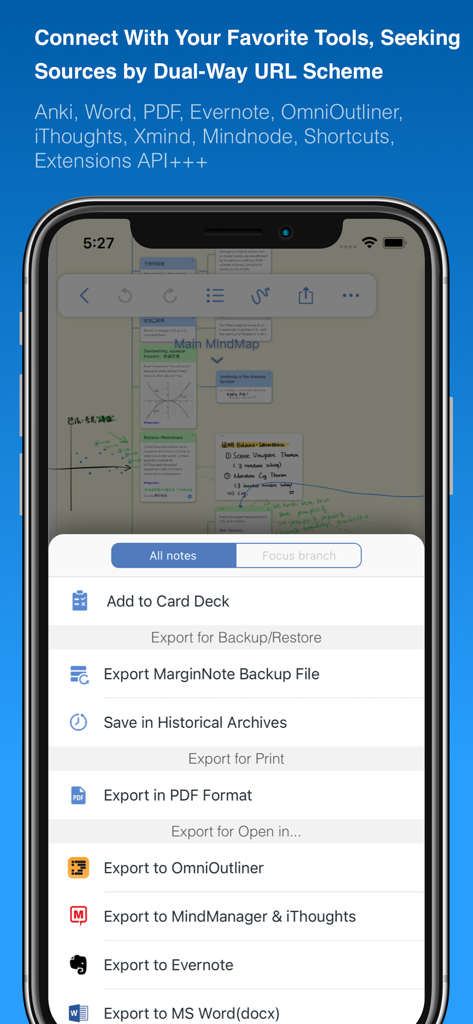
Anki Word Evernote 및 PDF와의 통합을 보여주는 MarginNote 3 내보내기 메뉴

Anki Word Evernote 및 PDF와의 통합을 보여주는 MarginNote 3 내보내기 메뉴

수동적 읽기에서 능동적 숙달로

이 앱을 돋보이게 하는 도구, 5M+ 명의 사용자가 선택.

🧠

통합 학습 파이프라인

읽기와 기억 사이의 격차를 해소하세요. 고효율 워크스페이스에서 PDF에서 직접 텍스트를 발췌하고 마인드맵을 생성하세요.

자동 능동 회상

하이라이트를 즉시 클로즈 삭제 플래시카드로 변환하세요. 간격 반복을 사용하여 방대한 양의 정보를 마스터하기 위해 Anki로 내보내세요.

🗺️

시각적 지식 매핑

단편화된 노트를 논리적 프레임워크로 구성하세요. 여러 문서에 걸쳐 아이디어를 연결하여 연구의 '큰 그림'을 시각화하세요.

전 세계 사용자들에게 사랑받는 앱

Trusted by 5M+ 명이 이 앱을 사랑합니다.

"

"MarginNote 3는 의대생에게 최고의 도구입니다. PDF 발췌에서 마인드맵 및 Anki 스타일 플래시카드로의 완벽한 파이프라인은 보드 준비 기간 동안 수많은 시간을 절약해 주었습니다. 매일 마스터해야 하는 정보의 양을 실제로 따라가는 첫 번째 앱입니다."

Dr. Sarah Jenkins, 의학 레지던트
"

"복잡한 소송을 관리하려면 수천 페이지에 걸쳐 점을 연결해야 합니다. 다른 문서의 발췌를 단일 시각적 프레임워크로 연결하는 기능은 혁신적입니다. 제 법률 조사 및 사건 전략의 중심 허브가 되었습니다."

Marcus Thorne, 수석 법률 연구원

리뷰 분석

사용자 리뷰 인사이트.

감정 점수

27%
부정적

요약

This mobile app receives mixed to largely negative feedback from users. Many appreciate its robust PDF reading capabilities and powerful study-oriented functionalities, and some note initial positive impressions and helpful customer support. However, the overall user experience is significantly hampered by widespread issues including frequent app crashes, critical data loss, and unreliable synchronization across devices. Furthermore, many users report a persistently non-functional translation feature and express strong dissatisfaction with the app's upgrade and pricing policy, citing perceived unfairness for long-term users.

주요 테마

App Functionality(3)
PDF Reading(2)
Study Tools(2)
Customer Support(1)
Initial Impression(1)

앱 소개

에 대해 알아야 할 모든 것 MarginNote 3.

설명

MarginNote 3, all brand new e-reader to better study and digest your books Integrating powerful tools for book annotation, mindmapping, flashcards and more, to build up your reading notes as never before. ============================================ Welcome to MarginNote. This is a highly powerful reading and study software and is applicable to Mac, iPad, and iPhone. By integrating the PDF/EPUB reader and multiple powerful study tools, MarginNote will enable learners to reorganize and connect knowledge from different aspects, then memorize and grasp it accordingly. Whatever your profession, such as student, educator, researcher, lawyer, or life-long learner, you may annotate and take notes through MarginNote, organize notes via Mindmap and Outline, connect knowledge horizontally via Hashtag and raise memory effect via the Flashcards. You will discover what MarginNote does is not to simply integrate these tools. Instead, it combines them deeply and skillfully, which makes it easier for users to toggle between different tools. What's New in MarginNote 3 * New and Clean UI Completely redesigned. * Improved performance and Running more smoothly * Support both Document Reading mode & Study Reading mode. * Excerpts & Note-taking * Enhanced Handwriting & apple-pencil support. * Support TextBox on PDF. * Support direct text-typing & sketching when editing note cards. * Support Auto OCR when excerpting on scanned PDFs. * Emphasis & Cloze * Support direct emphasis in powerful Emphasis mode both on PDF or Outline. * Support auto convert emphasis to Cloze in CardDeck. * Support creating Image-Occlusion flashcards. * Multi-Documents * Support both document tabs & split views to switch between documents. * MindMap * Auto grouping new excerpts by Document Table of Contents. * Support new brach display mode: Framework. * Swipe/Drag gestures to slide in/out Outline & Documents in Study mode. * Enhanced grouped cut/paste, drag to merge,.. etc. * Outline * Improved search and displaying keywords in results. * Improved styles. * CardDeck: * View Flashcards in MindMap mode and Document mode. * Enhanced Anki Export: Card styles, Image occlusions, Cloze * Enhanced Research web browser. * iCloud Sync * Fixed several design issue in previous versions. * More stable & improved performance. * Categories * Separate categories for Document, Study and Review. * Trash * Recover data from Trash and make data more safe. * Trial * 14-days free trial. MarginNote 2 features: Reading: - Support PDF and EPUB format; Annotating and NoteTaking: - Support text highlight and rectangular highlight; - Add notes directly at the page margin; the note editing area will not overlap with the book content at all; - Text, voice, picture, sketching and many other forms of comments in note; - Add hashtags to notes to facilitate the connection of notes; Outline and Mindmap: - Outline and Mindmap in one view; - Create Outline tree by swipe gestures; - Multi-selection editing such as group, merge, clone, etc; - Quick searching and filtering according to colors, hashtags, books. Flashcard: - Highlights and notes can be automatically turned into flashcards for review; - Spaced repetition adopting the Anki-based algorithm; - Switch to the linking book page at any time; iPad Pro & Apple pencil: - Split View of multiple tasks; - High-precision drawing by Apple pencil; - Fine tuned for Apple pencil; - Keyboard shortcuts; Import, Export and Sync: - Import webpages and notes from Evernote; - Export flashcards to Anki; - Export Outline to OmniOutliner; - Export Mindmap to iThoughts or MindManager; - Export to Evernote; - Export all the margin notes, MindManager, Outline and Pages to a printable PDF; - Sync books & notes with iCloud; Terms of Use: https://www.marginnote.com/press/marginnote-3-term-of-use Privacy Policy: https://www.iubenda.com/privacy-policy/92678020

최신 버전

3.7.32

크기

392.4 MB

출시일

2018년 8월 4일

오늘 당신의 개인 지식 제국을 구축하세요

단순히 읽는 것을 멈추고 자료를 마스터하기 시작한 5백만 명 이상의 연구원, 의대생 및 법률 전문가와 함께하세요. 14일 무료 체험을 시작하고 완벽한 학습 워크플로우의 힘을 경험하세요.

다운로드: App Store
FAQ

자주 묻는 질문

에 대해 알아야 할 모든 것 MarginNote 3

MarginNote 3은 무엇인가요?

MarginNote 3은 PDF/EPUB 읽기와 주석, 마인드맵, 플래시카드 도구를 통합한 강력한 읽기 및 학습 소프트웨어로, 사용자가 지식을 재구성하고 연결하고 기억하도록 돕습니다.

MarginNote 3은 어떤 플랫폼을 지원하나요?

MarginNote 3은 Mac, iPad, iPhone 기기를 지원합니다. 이들 Apple 플랫폼 전반에 걸쳐 사용할 수 있는 다용도 읽기 및 학습 도구입니다.

MarginNote 3은 PDF와 EPUB 형식을 모두 처리할 수 있나요?

예, MarginNote 3은 PDF와 EPUB 문서 형식을 모두 지원합니다. 이를 통해 사용자는 앱 내에서 다양한 디지털 책과 기사를 읽고 주석을 달 수 있습니다.

MarginNote 3은 OCR 기능을 제공하나요?

예, MarginNote 3은 스캔된 PDF에서 발췌할 때 자동 OCR(광학 문자 인식) 기능을 제공합니다. 또한 광범위한 텍스트 처리를 위한 텍스트 인식 엔진도 포함되어 있습니다.

MarginNote 3은 노트 정리에 어떻게 도움이 되나요?

MarginNote 3은 마인드맵과 개요 보기로 노트를 정리합니다. 사용자는 해시태그를 통해 지식을 연결하고 플래시카드로 기억 효과를 개선하여 효과적인 지식 관리를 할 수 있습니다.

MarginNote 3은 Apple Pencil을 지원하나요?

예, MarginNote 3은 Apple Pencil을 위한 향상된 필기 지원 및 미세 조정을 제공합니다. 또한 노트 카드를 편집할 때 스케치도 지원합니다.

사용자는 MarginNote 3에서 Anki로 플래시카드를 내보낼 수 있나요?

예, MarginNote 3은 사용자가 Anki로 플래시카드를 내보낼 수 있도록 허용합니다. 카드 스타일, 이미지 가리기, 클로즈 삭제를 지원하는 향상된 Anki 내보내기를 제공합니다.

MarginNote 3의 무료 평가판을 사용할 수 있나요?

예, MarginNote 3은 14일 무료 평가판을 제공합니다. 이를 통해 사용자는 구매 결정을 내리기 전에 앱의 기능과 성능을 테스트할 수 있습니다.

MarginNote 3은 문서 보기를 어떻게 처리하나요?

MarginNote 3은 문서 읽기 모드와 학습 읽기 모드를 모두 지원합니다. 또한 문서 탭과 분할 보기를 통해 여러 문서를 지원하여 전환할 수 있습니다.

MarginNote 3의 개인 정보 보호 정책은 어디에서 찾을 수 있나요?

MarginNote 3의 개인 정보 보호 정책은 iubenda 웹사이트에서 확인할 수 있습니다. 특정 URL은 https://www.iubenda.com/privacy-policy/92678020 입니다.

MarginNote 3에는 iCloud 동기화 기능이 있나요?

예, MarginNote 3은 iCloud 동기화를 지원합니다. 이 기능은 책과 노트가 사용자 기기 간에 동기화되도록 보장하고 전반적인 성능을 향상시킵니다.

MarginNote 3의 노트에 어떤 종류의 주석을 추가할 수 있나요?

MarginNote 3은 텍스트, 음성, 그림, 스케치를 포함한 다양한 주석 형식을 지원합니다. 사용자는 해시태그를 추가하여 노트를 연결할 수도 있습니다.

MarginNote 3은 삭제된 데이터를 복구할 수 있나요?

예, MarginNote 3에는 휴지통 기능이 포함되어 있습니다. 사용자는 휴지통에서 데이터를 복구하여 데이터 안전을 보장하고 우발적인 손실을 방지할 수 있습니다.

MarginNote 3의 '제목 링크' 기능은 무엇인가요?

'제목 링크' 기능은 키워드로 노트 라이브러리를 쿼리합니다. OCR을 사용하여 현재 학습 내용을 학습된 콘텐츠와 자동으로 일치시키고 알림 역할을 합니다.

MarginNote 3은 플래시카드로 기억력을 어떻게 향상시키나요?

MarginNote 3은 하이라이트와 노트를 자동으로 플래시카드로 만들어 복습할 수 있도록 합니다. Anki 기반의 간격 반복 알고리즘을 사용하여 기억 유지율을 최적화합니다.