Microsoft 365 Copilot

Microsoft 365 Copilot

다운로드: App Store다운로드: Google Play
Spark by MWM logo
로고: Microsoft 365 Copilot

Microsoft 365 Copilot: 전문적 우수성을 위한 AI 우선 도우미

시간을 되찾고 워크플로를 간소화하세요. AI와 채팅하여 복잡한 문서를 요약하고, 데이터를 분석하며, 어디서든 손쉽게 완성도 높은 콘텐츠를 만드세요.

다운로드: App Store

개발사

Microsoft Corporation

카테고리

Productivity

다운로드

117M+

사용자 평점

4.7/5

총 평가 수

4M+

지원 언어

33

효율성의 실제 모습

이 인터페이스를 사용하는 117M+ 명의 사용자.

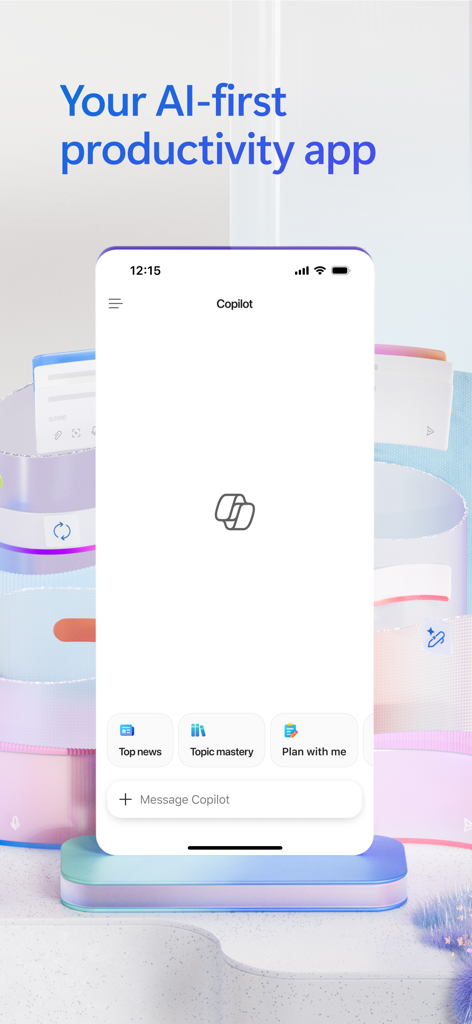
Microsoft 365 Copilot 모바일 앱 인터페이스, AI 채팅 및 생산성 기능 포함
Microsoft 365 Copilot 모바일 앱 인터페이스, AI 채팅 및 생산성 기능 포함

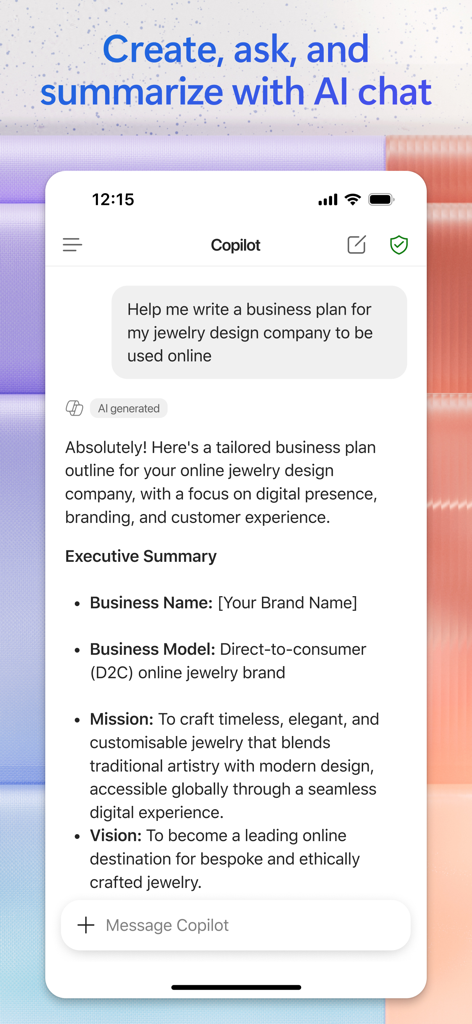
Microsoft 365 Copilot 앱이 채팅 인터페이스에서 보석 디자인 회사의 AI 생성 비즈니스 계획을 보여줍니다.

Microsoft 365 Copilot 앱이 채팅 인터페이스에서 보석 디자인 회사의 AI 생성 비즈니스 계획을 보여줍니다.

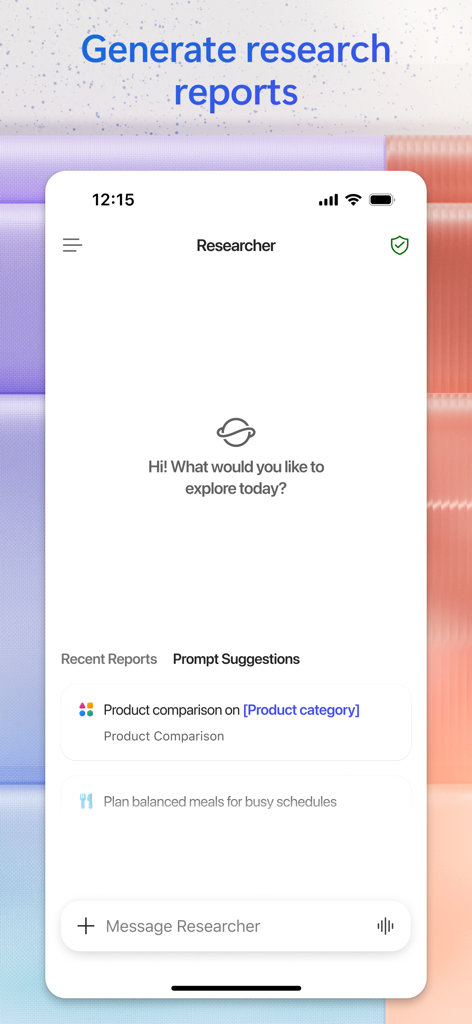
Microsoft 365 Copilot 앱 인터페이스가 연구 보고서 및 제품 비교 생성을 위한 프롬프트 제안이 있는 Researcher 기능을 보여줍니다.

Microsoft 365 Copilot 앱 인터페이스가 연구 보고서 및 제품 비교 생성을 위한 프롬프트 제안이 있는 Researcher 기능을 보여줍니다.

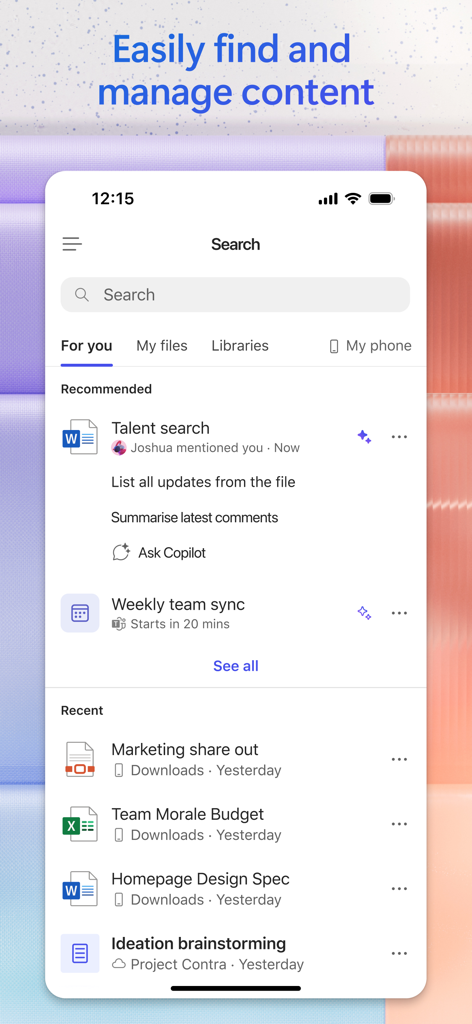
Microsoft 365 Copilot 검색 인터페이스가 추천 및 최근 오피스 문서를 표시합니다.

Microsoft 365 Copilot 검색 인터페이스가 추천 및 최근 오피스 문서를 표시합니다.

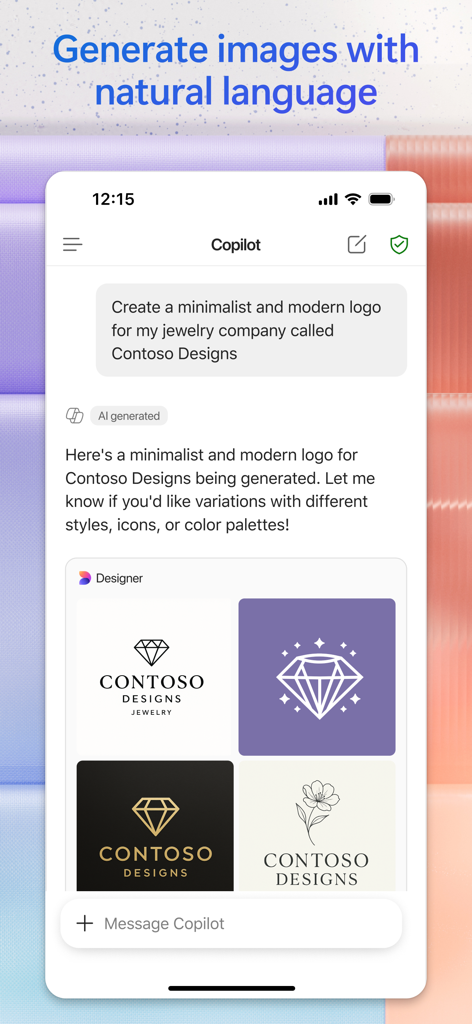
Microsoft 365 Copilot 앱 인터페이스가 보석 브랜드를 위한 AI 생성 로고를 보여줍니다.

Microsoft 365 Copilot 앱 인터페이스가 보석 브랜드를 위한 AI 생성 로고를 보여줍니다.

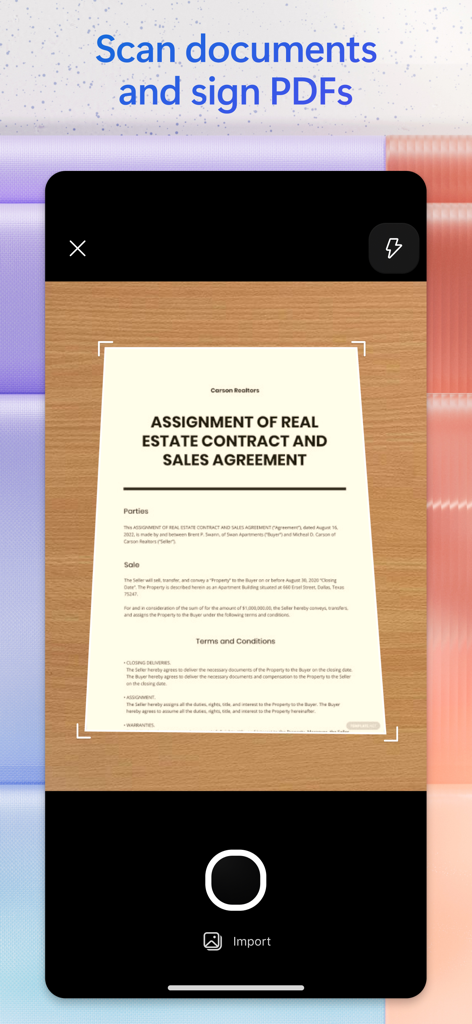
Microsoft 365 Copilot 앱을 사용하여 부동산 계약 문서를 스캔하는 모바일 인터페이스

Microsoft 365 Copilot 앱을 사용하여 부동산 계약 문서를 스캔하는 모바일 인터페이스

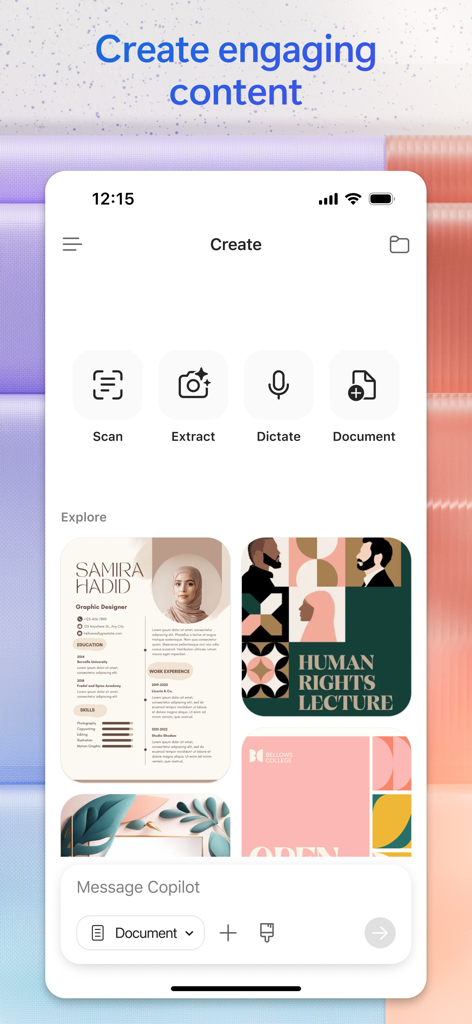
Microsoft 365 Copilot 앱 인터페이스가 스캔, 추출, 받아쓰기 및 전문 콘텐츠 디자인을 위한 AI 생성 도구를 보여줍니다.

Microsoft 365 Copilot 앱 인터페이스가 스캔, 추출, 받아쓰기 및 전문 콘텐츠 디자인을 위한 AI 생성 도구를 보여줍니다.

AI로 워크플로 마스터하기

이 앱을 돋보이게 하는 도구, 117M+ 명의 사용자가 선택.

🔍

무엇이든 즉시 요약

클라우드 문서, 이메일 및 스프레드시트에서 핵심 통찰력을 추출하도록 Copilot에게 요청하여 몇 시간의 독서 시간을 절약하세요.

🚀

몇 초 만에 초안 작성 및 디자인

작가적 슬럼프를 극복하세요. 휴대폰에서 직접 전문 초안, 마케팅 문구 및 AI 생성 시각 자료를 만드세요.

📱

원활한 모바일 생산성

음성 명령을 사용하여 이동 중인 하이브리드 전문가에게 완벽한 핸즈프리 환경에서 파일을 찾고 아이디어를 브레인스토밍하세요.

전 세계 사용자들에게 사랑받는 앱

Trusted by 117M+ 명이 이 앱을 사랑합니다.

"

"Copilot는 제가 하이브리드 근무 일정을 처리하는 방식을 완전히 바꿔 놓았습니다. 이동 중에 긴 이메일 스레드를 요약하고 음성 명령을 사용하여 회의를 준비할 수 있다는 것은 정말 생명의 은인입니다. 실제로 제 워크플로를 이해하고 매일 실질적인 시간을 절약해주는 최초의 AI 도구입니다."

Alex Rivera
"

"프리랜서 컨설턴트로서 특정 문서를 찾기 위해 오래된 폴더를 뒤지는 데 몇 시간을 낭비했습니다. 이제 앱에 찾아달라고 요청하기만 하면 됩니다. 연구 보고서를 생성하고 템플릿에서 빠른 소셜 미디어 배너를 만들 수 있는 기능 덕분에 제 도구 키트의 필수품이 되었습니다."

Sarah Jenkins

리뷰 분석

사용자 리뷰 인사이트.

감정 점수

30%
부정적

요약

The recent transformation of the Microsoft Office app into a Copilot-centric application has overwhelmingly drawn negative feedback from users. Many are highly dissatisfied with the removal of core Office functionalities, such as the ability to open, edit, or create Word, Excel, and PowerPoint documents directly, now forcing them to download separate apps. The new AI features are often described as pointless, unstable, and less productive than the previous integrated experience, with reports of crashes and issues like autocorrect glitches. While a few users find value in its capabilities for data analysis and quick presentations, the general consensus is that the update is a significant downgrade, ruining a previously useful all-in-one tool.

주요 테마

Overall App Quality(7)
Data Analysis Capabilities(1)
Presentation Creation(1)
AI Assistant Features(1)
User Interface & Design(1)

앱 소개

에 대해 알아야 할 모든 것 Microsoft 365 Copilot.

설명

The Microsoft 365 Copilot app is your AI-first productivity app for work and home. It provides one place for you to chat with your AI assistant(1), create and edit content, manage projects, and quickly find files - helping you get more done, without doing more.   With the Microsoft 365 Copilot app, you can(1):  • Chat with your AI assistant – Ask Copilot to summarize a document saved to the cloud (OneDrive or SharePoint) or on your phone, draft an email, or analyze a spreadsheet using natural language.   • Interact with voice – Talk to Copilot to help you prepare for your day, get answers, and brainstorm ideas hands-free.  • Find what matters fast – Find the strategy deck you were working on a month ago, a picture from your last family reunion, or a file that was attached to an email.  • Accelerate your learning – Ask Copilot to explain a concept, summarize recent trends, or help you prepare for a presentation.  • Get expert insights – Use built-in AI agents like Researcher and Analyst to generate research reports and analyze complex datasets.  • Create polished content – Create and edit images, posters, banners, videos, surveys and more with easy-to-use templates.  • Scan files – Scan documents, photos, notes and more with your mobile app.  • Manage projects easily - Bring together ideas, documents, and links and ask Copilot to summarize and connect the dots with Copilot Notebooks.  • Easily upload and save documents – Upload files like Word, Excel, or PDF from your phone’s storage to help Copilot give you answers – and you can also save files that Copilot creates directly to your phone.    Sign in with your work, school, or personal Microsoft account to start using the free app today.  (1)Availability of Microsoft 365 Copilot features may vary. Some capabilities require specific licenses or may be disabled by your organization's administrator. See this webpage for more information on feature availability by license.  Please refer to Microsoft’s EULA for Terms of Service for Microsoft 365. By installing the app, you agree to the terms and conditions: https://learn.microsoft.com/legal/microsoft-365/microsoft-365-copilot-mobile-license-terms

최신 버전

2.105.1

크기

673.1 MB

출시일

2013년 6월 14일

더 똑똑하게 일할 준비가 되셨나요?

Microsoft 365 Copilot를 사용하여 문서를 요약하고, 이메일을 초안하고, AI의 힘으로 할 일 목록을 정복하는 1억 1,700만 명 이상의 전문가와 함께하세요. 지금 무료로 다운로드하고 소중한 시간을 되찾으세요.

다운로드: App Store다운로드: Google Play
FAQ

자주 묻는 질문

에 대해 알아야 할 모든 것 Microsoft 365 Copilot

Microsoft 365 Copilot 앱은 무엇인가요?

Microsoft 365 Copilot 앱은 업무와 가정용으로 설계된 AI 우선 생산성 도구입니다. 채팅, 콘텐츠 생성, 프로젝트 관리, 파일 검색을 위한 중앙 AI 비서 역할을 하여 생산성을 향상시킵니다.

Microsoft 365 Copilot이 문서를 요약하는 데 도움이 되나요?

예, Microsoft 365 Copilot은 클라우드(OneDrive 또는 SharePoint)에 저장되거나 휴대폰에 직접 저장된 문서를 요약할 수 있습니다. 자연어를 사용하여 정보를 처리하고 요약합니다.

Microsoft 365 Copilot 앱은 음성 상호 작용을 지원하나요?

예, Microsoft 365 Copilot 앱은 음성 상호 작용을 지원합니다. 사용자는 Copilot과 대화하여 하루를 준비하고, 답변을 얻고, 핸즈프리로 아이디어를 구상할 수 있습니다.

Microsoft 365 Copilot을 사용하여 파일을 어떻게 찾을 수 있나요?

Microsoft 365 Copilot을 사용하면 전략 발표 자료, 사진, 이메일 첨부 파일 등 다양한 파일을 빠르게 찾을 수 있습니다. 이 앱은 콘텐츠 관리를 중앙 집중화하여 쉽게 액세스할 수 있도록 합니다.

Microsoft 365 Copilot이 연구 보고서를 생성할 수 있나요?

예, Microsoft 365 Copilot은 연구 보고서를 생성합니다. "연구원"과 같은 내장 AI 에이전트를 포함하여 전문적인 통찰력을 제공하고 복잡한 데이터 세트를 효과적으로 분석합니다.

Microsoft 365 Copilot이 이미지 생성 기능을 제공하나요?

예, Microsoft 365 Copilot은 이미지 생성 기능을 제공합니다. 사용자는 앱 내에서 사용하기 쉬운 템플릿을 사용하여 이미지, 포스터, 배너 및 비디오를 만들고 편집할 수 있습니다.

Microsoft 365 Copilot 앱은 무료로 사용할 수 있나요?

예, Microsoft 365 Copilot 앱은 무료로 사용할 수 있습니다. 사용자는 작업, 학교 또는 개인 Microsoft 계정으로 로그인하여 해당 기능에 액세스합니다.

Microsoft 365 Copilot 앱이 실제 문서를 스캔할 수 있나요?

예, Microsoft 365 Copilot 앱은 실제 문서를 스캔할 수 있습니다. 모바일 앱의 기능을 사용하여 문서를 직접 스캔하고, 사진과 메모를 찍습니다.

Microsoft 365 Copilot에 어떤 종류의 문서를 업로드할 수 있나요?

사용자는 Word, Excel 또는 PDF와 같은 파일을 휴대폰 저장소에서 Microsoft 365 Copilot으로 업로드할 수 있습니다. 이렇게 하면 Copilot이 더 관련성 높은 답변을 제공하고 생성된 파일을 저장할 수 있습니다.

모든 Microsoft 365 Copilot 기능의 가용성이 동일한가요?

아니요, Microsoft 365 Copilot 기능의 가용성은 다릅니다. 일부 기능에는 특정 라이선스가 필요하거나 조직의 관리자가 비활성화할 수 있습니다.