Microsoft Defender: Security

Microsoft Defender: Security

다운로드: App Store다운로드: Google Play
Spark by MWM logo
로고: Microsoft Defender: Security

Microsoft Defender: 가족 및 기기를 위한 보안

디지털 라이프의 완벽한 마음의 평화를 누리세요. Microsoft 365 구독에 포함된 전문가급 도구로 신원을 보호하고, 신용 점수를 모니터링하며, 모든 기기를 안전하게 보호하세요.

개발사

Microsoft Corporation

카테고리

Business

다운로드

4M+

사용자 평점

4.7/5

총 평가 수

52K+

지원 언어

33

내 보안을 한눈에

이 인터페이스를 사용하는 4M+ 명의 사용자.

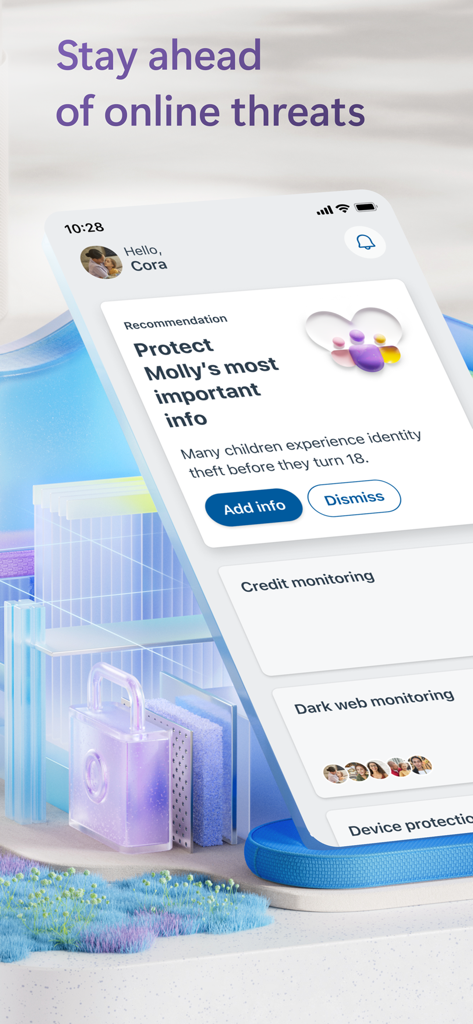
Microsoft Defender 앱 대시보드에 가족 구성원에 대한 신원 보호 권장 사항 및 온라인 위협 모니터링이 표시됩니다.

Microsoft Defender 앱 대시보드에 가족 구성원에 대한 신원 보호 권장 사항 및 온라인 위협 모니터링이 표시됩니다.

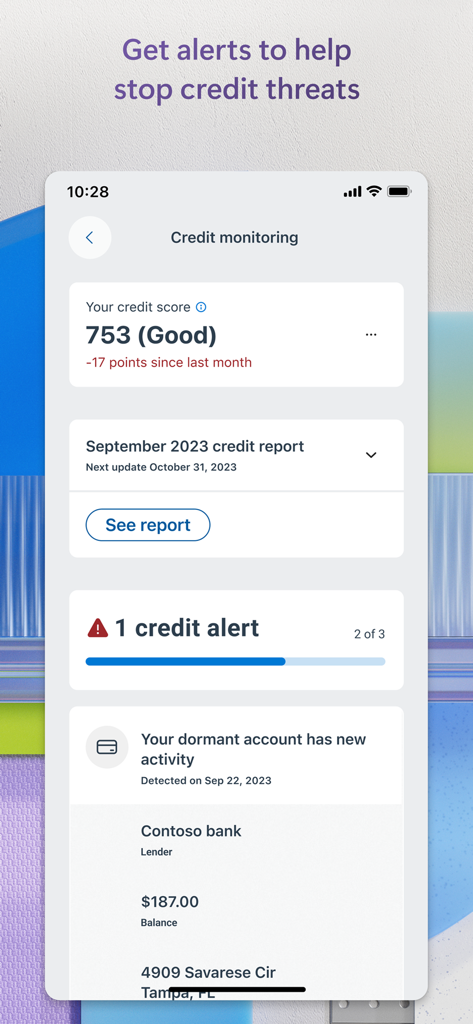
신용 점수와 보안 경고가 표시되는 신용 모니터링을 위한 Microsoft Defender 모바일 앱 인터페이스

신용 점수와 보안 경고가 표시되는 신용 모니터링을 위한 Microsoft Defender 모바일 앱 인터페이스

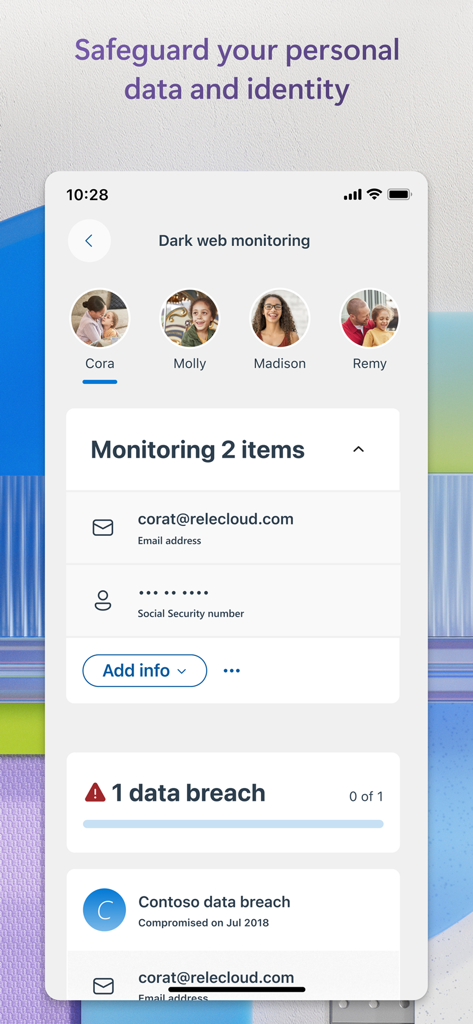
Microsoft Defender 다크 웹 모니터링 화면에 가족 신원 보호가 표시됩니다.

Microsoft Defender 다크 웹 모니터링 화면에 가족 신원 보호가 표시됩니다.

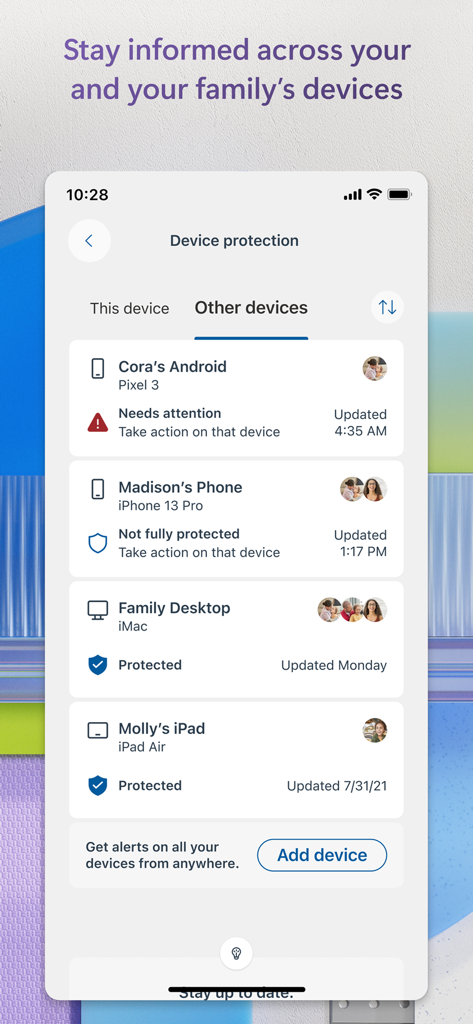
Microsoft Defender 인터페이스에 스마트폰 및 컴퓨터를 포함한 여러 연결된 가족 기기의 보안 및 보호 상태가 표시됩니다.

Microsoft Defender 인터페이스에 스마트폰 및 컴퓨터를 포함한 여러 연결된 가족 기기의 보안 및 보호 상태가 표시됩니다.

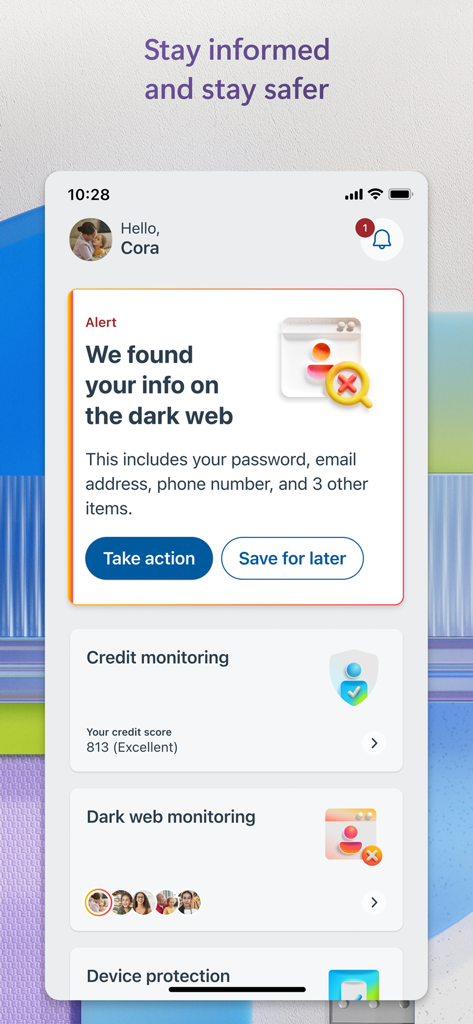
Microsoft Defender 대시보드에 다크 웹 신원 경고 및 신용 모니터링 점수가 표시됩니다.

Microsoft Defender 대시보드에 다크 웹 신원 경고 및 신용 모니터링 점수가 표시됩니다.

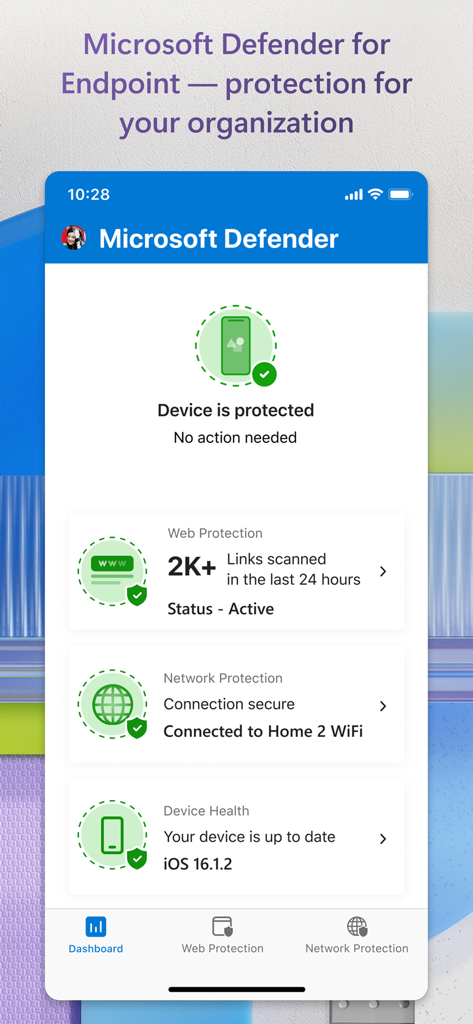
Microsoft Defender 앱 대시보드에 보호 상태 및 웹 보안 모니터링이 표시됩니다.

Microsoft Defender 앱 대시보드에 보호 상태 및 웹 보안 모니터링이 표시됩니다.

가족의 디지털 세계를 위한 종합 보안

이 앱을 돋보이게 하는 도구, 4M+ 명의 사용자가 선택.

🛡️

신원 및 신용 모니터링

지속적인 다크 웹 스캔으로 개인 데이터를 안전하게 보호하고, 월별 Experian® 보고서 및 즉시 알림으로 신용 건전성을 추적하세요.

👨‍👩‍👧‍👦

사랑하는 사람들이 항상 보호받도록 한 곳에서 가족의 휴대폰 및 노트북 보안 상태를 쉽게 모니터링하세요.

🆘

신원 복구 지원

최대 100만 달러의 신원 도용 보험과 24시간 연중무휴 복구 전문가 지원으로 마음의 평화를 얻고, 분실된 자금 및 정보를 복구하세요.

전 세계 사용자들에게 사랑받는 앱

Trusted by 4M+ 명이 이 앱을 사랑합니다.

"

"부모로서 아이들을 온라인에서 안전하게 지키는 것이 최우선입니다. Microsoft Defender를 사용하면 가족의 기기를 한 곳에서 쉽게 모니터링할 수 있습니다. 다크 웹 알림 및 신원 보호 기능은 우리가 보호받고 있다는 사실을 알게 해주는 마음의 평화를 제공하며, Microsoft 365 구독에 이미 포함되어 있어 우리 가정에 엄청난 가치를 제공합니다."

Sarah Jenkins, 직장맘
"

"복잡하지 않은 강력한 보안 솔루션을 찾고 있었습니다. 신용 모니터링 및 신원 도용 보험은 다른 곳에서는 엄청난 비용이 드는 수준의 보호를 제공합니다. 일상 업무에 방해가 되지 않으면서 개인 데이터와 기기를 보호하는 완벽한 '설정하고 잊어버리는' 앱입니다."

David Miller, 하이브리드 전문가

앱 소개

에 대해 알아야 할 모든 것 Microsoft Defender: Security.

설명

Microsoft Defender is an online security app for your personal life[1]and work [2]. Use Microsoft Defender for individuals[1] at home and on the go to stay safer online. Defender is an easy-to-use app that helps keep you and your family one step ahead of threats. Microsoft Defender for individuals is available exclusively with a Microsoft 365 Personal or Family subscription. All-in-one security app Protect your personal identity, and devices against malicious threats with antivirus scanning[3], threat monitoring[4], multidevice alerts, and expert guidance. Manage your security in one place ▪ Check the security status of your family’s devices and identity[5]. ▪ Get threat alerts, notifications, and recommended steps across your devices. ▪ Receive security tips and take recommended actions to improve your online security. Safeguard your family’s personal information ▪ Threats to your identity and personal identifying information[4] are continuously scanned on the dark web. ▪ Get credit monitoring with timely alerts and monthly credit reports.[6] ▪ Call an identity theft restoration expert anytime day or night if you need help. ▪ Get identity insurance coverage, up to USD1 million, to help cover legal and expert fees associated with restoration. Insurance coverage includes up to USD100,000 to recover lost funds.[7] Trusted device and data protection ▪ Anti-phishing protection for your and your family’s devices against new and existing threats [3]. ▪ Continuously scans for harmful links before you click on them to help protect you from malicious threats.   Microsoft Defender for Endpoint Microsoft Defender for Endpoint[2] is an industry-leading, cloud-powered endpoint security solution that helps to secure against ransomware, file-less malware, and other sophisticated attacks across platforms. 1. Microsoft 365 Family or Personal subscription required. Sign in with your Microsoft account. App is currently not available in certain Microsoft 365 Personal or Family regions. 2. If you are a member of a business or organization, login with your work or school email. Your school or business is required to have a valid license or subscription. 3. Does not replace existing malware protection on iOS and Windows devices. 4. Feature is available in the United States and US territories. 5. A one-time parent or legal guardian verification is required to receive dark web threat alert details for children. If the organizer’s family member is under 13, consent is not required to create and/or monitor a child’s identity. Consent is required to create and/or monitor identity of family members over 13 years of age. 6. Feature available in the United States and US territories. Credit score is a single bureau VantageScore 3.0 provided by Experian®. The monthly credit report is provided by Experian® using single bureau data. For users under the age of 18 or those without a credit history, credit score not included. Family organizers will not have the ability to onboard, view, and receive alerts related to family member credit monitoring. Your device's primary display language must be set to English. 7. The identity theft insurance is underwritten and administered by American Bankers Insurance Company of Florida, an Assurant company. Please refer to the actual policies for terms, conditions, and exclusions of coverage. Coverage may not be available in all jurisdictions. Review the Summary of Benefits: https://learn.microsoft.com/en-us/legal/microsoft-365/summary-of-benefits-for-itm.

최신 버전

1.1.70290103

크기

140.4 MB

출시일

2020년 11월 29일

오늘 가족의 디지털 라이프를 안전하게 보호하세요

받을 자격이 있는 올인원 보호 기능을 이용하세요. Microsoft 365 구독에 포함된 신원 모니터링, 신용 경고 및 100만 달러 보험 혜택을 활성화하세요.

다운로드: App Store다운로드: Google Play
FAQ

자주 묻는 질문

에 대해 알아야 할 모든 것 Microsoft Defender: Security

Microsoft Defender는 무엇인가요?

Microsoft Defender는 개인 및 업무 생활을 위한 온라인 보안 앱입니다. 바이러스 백신 검색 및 위협 모니터링과 같은 기능을 제공하여 개인과 가족을 온라인 위협으로부터 보호하는 데 도움이 되는 사용하기 쉬운 솔루션을 제공합니다.

Microsoft Defender는 구독이 필요한가요?

예, Microsoft Defender 개인용은 Microsoft 365 Personal 또는 Family 구독이 필요합니다. 직장 또는 학교용으로는 조직에서 발급한 유효한 라이선스 또는 구독이 필요합니다.

Microsoft Defender는 어떤 보안 기능을 제공하나요?

Microsoft Defender는 바이러스 백신 검색, 위협 모니터링, 다중 장치 알림 및 전문가 지침을 제공합니다. 또한 피싱 방지 기능과 악의적인 위협으로부터 보호하기 위한 유해 링크에 대한 지속적인 검색 기능을 제공합니다.

Microsoft Defender는 신용을 모니터링할 수 있나요?

예, Microsoft Defender는 시기적절한 알림과 월별 신용 보고서를 통해 신용 모니터링을 제공합니다. 이 기능은 미국 및 미국 영토에서 사용할 수 있습니다.

Microsoft Defender는 다크 웹 모니터링을 제공하나요?

예, Microsoft Defender는 귀하의 신원 및 개인 식별 정보에 대한 위협을 감지하기 위해 다크 웹을 지속적으로 검색합니다. 또한 데이터 유출에 대한 알림을 제공합니다.

Microsoft Defender에는 신원 도용 보험이 포함되나요?

예, Microsoft Defender는 복원과 관련된 법률 및 전문가 수수료에 대해 최대 100만 달러의 신원 보험을 제공합니다. 또한 분실 자금을 복구하기 위해 최대 100,000달러까지 지원합니다.

비즈니스 또는 조직을 위한 Microsoft Defender가 있나요?

예, Microsoft Defender for Endpoint는 조직을 위한 업계 최고의 클라우드 기반 엔드포인트 보안 솔루션입니다. 플랫폼 전반에 걸쳐 랜섬웨어, 멀웨어 및 정교한 공격으로부터 보호하는 데 도움이 됩니다.

Microsoft Defender는 가족 장치를 어떻게 보호하나요?

Microsoft Defender를 사용하면 가족 장치 및 신원의 보안 상태를 확인할 수 있습니다. 모든 장치에서 위협 알림 및 권장 단계를 제공하여 포괄적인 가족 보호를 보장합니다.

Microsoft Defender는 기존 바이러스 백신 소프트웨어를 대체하나요?

아니요, Microsoft Defender는 iOS 및 Windows 장치의 기존 멀웨어 보호를 대체하지 않습니다. 기본 바이러스 백신을 독립적으로 대체하는 것이 아니라 보안을 강화합니다.

Microsoft Defender가 유해한 링크를 검색할 수 있나요?

예, Microsoft Defender는 클릭하기 전에 유해한 링크를 지속적으로 검색합니다. 이 피싱 방지 기능은 귀하와 가족의 장치를 악의적인 위협으로부터 보호하는 데 도움이 됩니다.

Microsoft Defender는 신원 도용 복구를 어떻게 돕나요?

Microsoft Defender를 사용하면 도움이 필요한 경우 언제든지 신원 도용 복구 전문가에게 전화할 수 있습니다. 신원 도용 복구를 위한 전문가 지원을 제공합니다.

Microsoft Defender가 보안 문제에 대한 알림을 보내나요?

예, Microsoft Defender는 장치 전반에 걸쳐 위협 알림, 알림 및 권장 단계를 보냅니다. 또한 정보가 다크 웹에서 발견될 경우 알림을 제공합니다.