Microsoft PowerPoint

Microsoft PowerPoint

다운로드: App Store다운로드: Google Play
Spark by MWM logo
로고: Microsoft PowerPoint

Microsoft PowerPoint: 어디서든 자신 있게 만들고, 편집하고, 발표하세요

모바일 생산성의 전문 표준. 장치 간 원활하게 동기화하고, AI 기반 코칭으로 프레젠테이션을 다듬고, 휴대폰이나 태블릿에서 직접 영향력 있는 프레젠테이션을 전달하세요.

개발사

Microsoft Corporation

카테고리

Productivity

다운로드

123M+

사용자 평점

4.7/5

총 평가 수

3M+

지원 언어

33

모든 픽셀에 전문성을 담다

이 인터페이스를 사용하는 123M+ 명의 사용자.

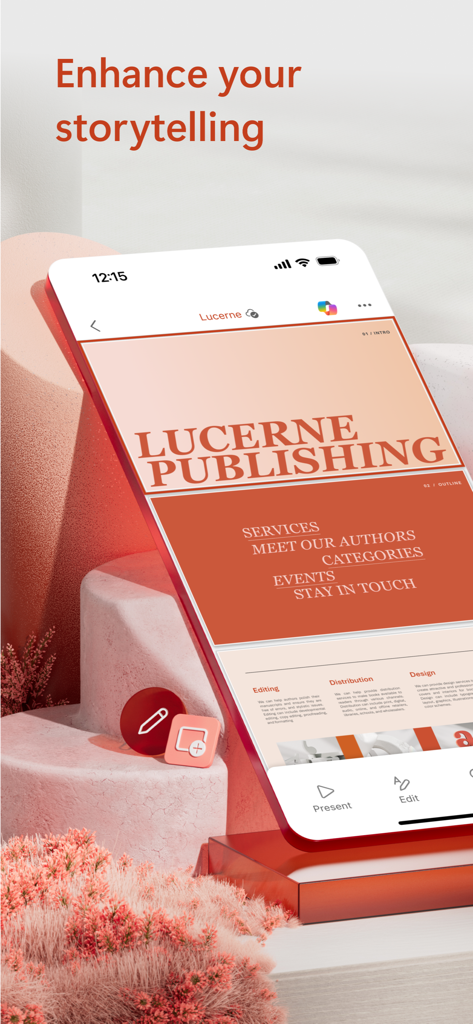
Microsoft PowerPoint 모바일 앱 인터페이스에서 "스토리텔링 강화"라는 헤드라인이 있는 전문가 프레젠테이션 덱을 보여줍니다.

Microsoft PowerPoint 모바일 앱 인터페이스에서 "스토리텔링 강화"라는 헤드라인이 있는 전문가 프레젠테이션 덱을 보여줍니다.

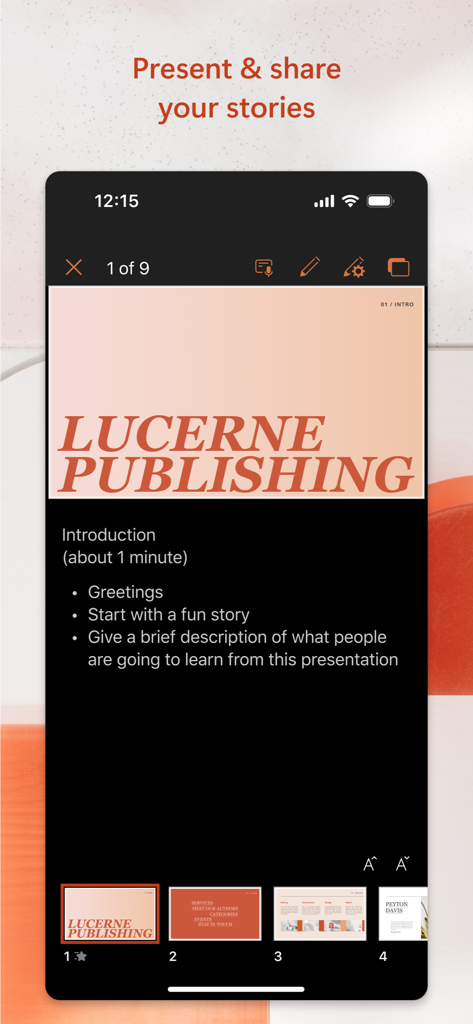
Microsoft PowerPoint 모바일 앱 인터페이스에서 발표자 노트가 있는 프레젠테이션 슬라이드를 표시합니다.

Microsoft PowerPoint 모바일 앱 인터페이스에서 발표자 노트가 있는 프레젠테이션 슬라이드를 표시합니다.

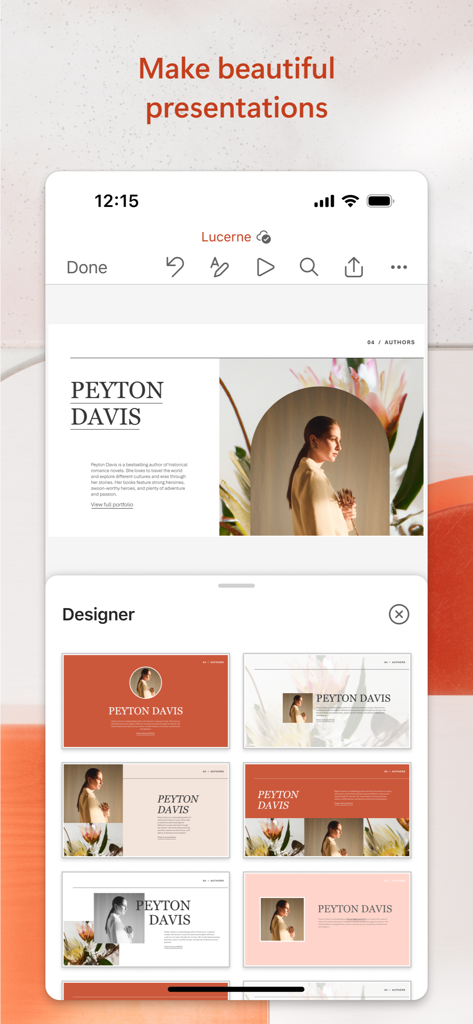
Microsoft PowerPoint 모바일 앱에서 전문가 프레젠테이션을 위한 자동 슬라이드 레이아웃 제안을 제공하는 디자이너 도구를 보여줍니다.

Microsoft PowerPoint 모바일 앱에서 전문가 프레젠테이션을 위한 자동 슬라이드 레이아웃 제안을 제공하는 디자이너 도구를 보여줍니다.

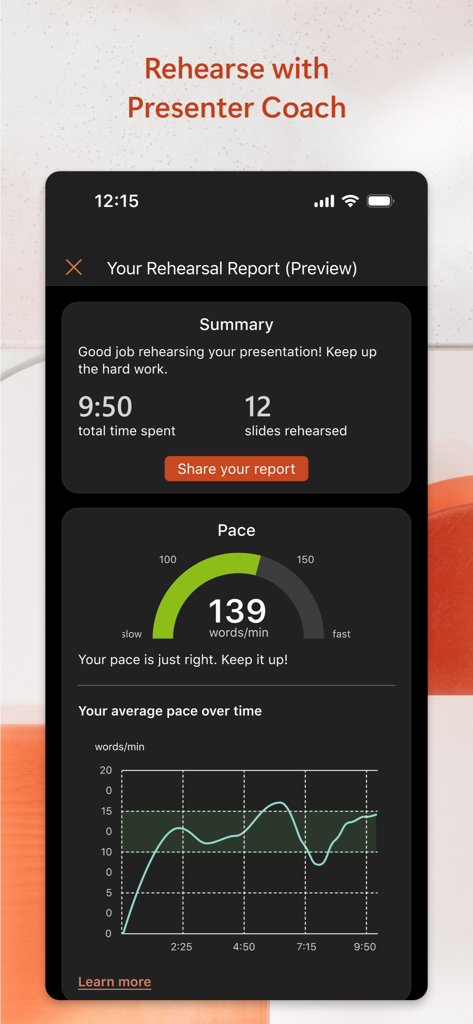
Microsoft PowerPoint 발표자 코치 연습 보고서에 말하기 속도 및 요약 통계가 표시됩니다.

Microsoft PowerPoint 발표자 코치 연습 보고서에 말하기 속도 및 요약 통계가 표시됩니다.

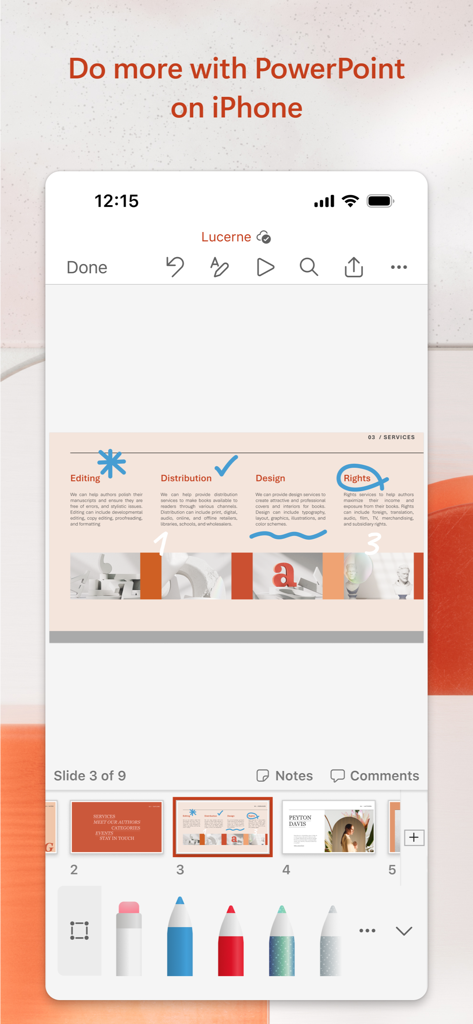
iPhone의 Microsoft PowerPoint 앱에서 디지털 드로잉 및 주석 도구를 사용하여 프레젠테이션 슬라이드를 편집하는 모습을 보여줍니다.

iPhone의 Microsoft PowerPoint 앱에서 디지털 드로잉 및 주석 도구를 사용하여 프레젠테이션 슬라이드를 편집하는 모습을 보여줍니다.

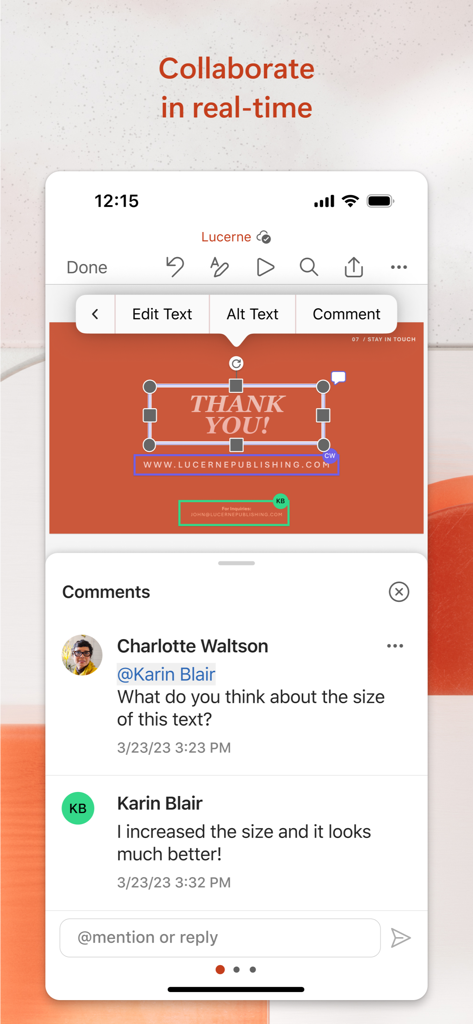
Microsoft PowerPoint 모바일 앱의 실시간 협업 및 댓글 기능.

Microsoft PowerPoint 모바일 앱의 실시간 협업 및 댓글 기능.

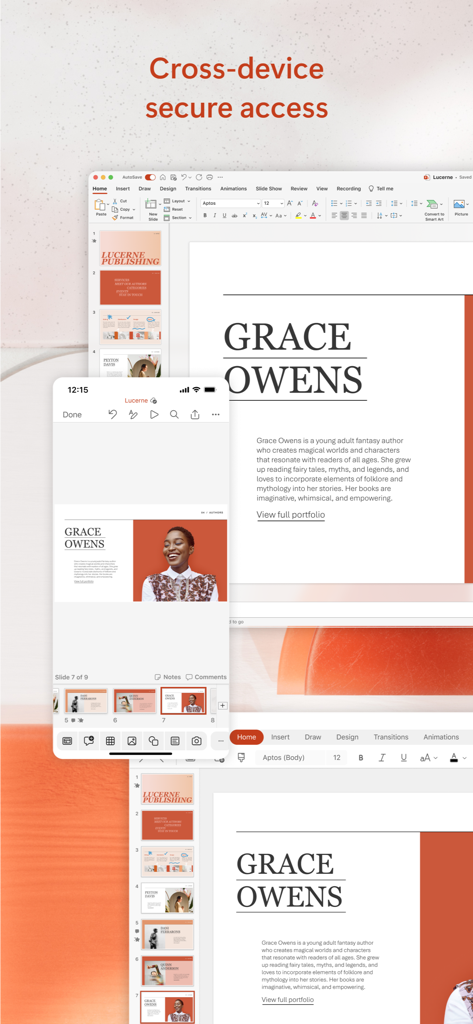
데스크톱과 모바일 화면에 동기화된 Microsoft PowerPoint 프레젠테이션

데스크톱과 모바일 화면에 동기화된 Microsoft PowerPoint 프레젠테이션

언제 어디서나 프레젠테이션 마스터하기

이 앱을 돋보이게 하는 도구, 123M+ 명의 사용자가 선택.

🔄

원활한 클라우드 연속성

PC에서 시작하고 모바일 장치에서 마무리하세요. OneDrive는 최신 편집 내용이 항상 동기화되어 중요한 순간에 사용할 준비가 되었는지 확인합니다.

🎤

AI 기반 발표자 코치

어떤 장소에서든 절대적인 자신감을 가지고 발표할 수 있도록 페이싱 및 말하기에 대한 실시간 피드백으로 발표 연습을 하세요.

🤝

실시간 협업

팀과 실시간으로 협업하세요. 휴대폰이나 태블릿에서 직접 슬라이드를 공유하고, 변경 내용을 추적하고, 댓글에 응답하세요.

전 세계 사용자들에게 사랑받는 앱

Trusted by 123M+ 명이 이 앱을 사랑합니다.

"

"영업 임원으로서 저는 끊임없이 고객 회의를 오갑니다. 기차에서 프레젠테이션 자료를 다듬고 도착할 때쯤이면 노트북과 완벽하게 동기화될 수 있다는 것은 놀랍습니다. 모바일 앱은 데스크톱 버전만큼 강력하며, 셀 수 없이 많은 시간을 절약해 주었습니다."

David Sterling
"

"발표자 코치는 대학 세미나 준비 방식을 완전히 바꿔 놓았습니다. 페이싱을 추적하고 불필요한 단어를 피하는 데 도움을 주는데, 이는 저에게 큰 어려움이었습니다. 아이폰만으로 어디서든 연습할 수 있고 무대에서 완전히 준비된 느낌을 받을 수 있다는 점이 마음에 듭니다."

Sarah Jenkins

앱 소개

에 대해 알아야 할 모든 것 Microsoft PowerPoint.

설명

The PowerPoint app gives you access to the familiar slideshow maker tool you already know. Create, edit, view, present, or share presentations quickly and easily from anywhere. Need to access your PowerPoint files quickly while on the go? PowerPoint provides a quick view of your recent slides and presentations for easy access on any device. Worried about multiple file versions when you work on PowerPoint mobile? Syncing is seamless across devices via OneDrive. PowerPoint lets you make a lasting impression with powerful and customizable slides and presentations that make you stand out. Create slideshows and present with confidence from anywhere. Making a delightful and impactful presentation has never been easier. PowerPoint gives you templates to work from and automatic design ideas for your presentations. Master your presentation with Presenter Coach, a AI tool designed to help with public speaking. Practice your presentation and get real-time suggestions to adjust your pacing, avoid “umms” and speak confidently. Requires an active Microsoft 365 subscription. Customize your presentations on the go, collaborating with others in real time. Sync your PowerPoint documents via OneDrive, share with coworkers and create amazing presentations as a team. Get the power of AI with Copilot1 in your favorite apps when you sign in with your Microsoft 365 subscription. Create, edit and share presentations with ease when you download Microsoft PowerPoint today. Present with confidence • Never miss a beat with PowerPoint on the go. You can make new presentations or continue working on existing ones. • PowerPoint syncs your presentations to OneDrive, so you can start a presentation on your PC, then edit using PowerPoint mobile. • A new Presenter Coach designed to provide feedback and assistance for your presentations. Customizable Slideshow Maker • With the powerful and highly customizable experience in PowerPoint, creating presentations that will make an impression and help you stand out is easy. • Create a slideshow from a template or make a presentation from scratch. Collaborate on Presentations • PowerPoint makes it easy to collaborate with others. • With 1-click sharing, quickly invite others to edit, view, or provide feedback on your slides. • Easily manage permissions and see who’s working on your presentation. • Stay on top of changes and feedback with integrated comments within the slides. • Compare changes to see how your presentation has evolved over time. Download Microsoft PowerPoint now and get the best way to create, edit and share slideshows and presentations from your iPhone or iPad. To create or edit documents, sign in with a free Microsoft account on devices with a screen size smaller than 10.1 inches. Unlock the premium Microsoft 365 experience with a qualifying subscription for your phone, tablet, PC, and Mac. Monthly Microsoft 365 subscriptions purchased from the app will be charged to your App Store account and will automatically renew within 24 hours prior to the end of the current subscription period unless auto-renewal is disabled beforehand. You can manage your subscriptions in your App Store account settings. This app is provided by either Microsoft or a third-party app publisher and is subject to a separate privacy statement and terms and conditions. Data provided through the use of this store and this app may be accessible to Microsoft or the third-party app publisher, as applicable, and transferred to, stored, and processed in the United States or any other country where Microsoft or the app publisher and their affiliates or service providers maintain facilities. Please refer to the Microsoft Software License Terms for Microsoft 365. See “License Agreement” link under Information. By installing the app, you agree to these terms and conditions.

최신 버전

2.105

크기

419.4 MB

출시일

2014년 3월 27일

최고의 나를 보여줄 준비가 되셨나요?

수백만 명의 성공한 사람들과 함께하세요. 오늘 PowerPoint를 다운로드하여 장치 간에 작업을 원활하게 동기화하고, AI 코칭으로 발표를 완벽하게 다듬고, 이동 중에도 영향력 있는 편집을 하세요.

다운로드: App Store다운로드: Google Play
FAQ

자주 묻는 질문

에 대해 알아야 할 모든 것 Microsoft PowerPoint

Microsoft PowerPoint 앱은 무엇인가요?

Microsoft PowerPoint 앱은 프레젠테이션을 만들고, 편집하고, 보고, 발표하고, 공유하는 데 사용되는 슬라이드 쇼 제작 도구입니다. 최근 파일에 빠르게 액세스하고 장치 간 원활한 동기화를 제공합니다.

Microsoft PowerPoint 앱으로 새 프레젠테이션을 만들 수 있나요?

예, Microsoft PowerPoint 앱을 사용하여 새 프레젠테이션을 만들 수 있습니다. 영향력 있는 슬라이드 쇼를 만드는 데 도움이 되는 템플릿과 자동 디자인 아이디어를 제공합니다.

Microsoft PowerPoint 앱은 협업 기능을 지원하나요?

예, PowerPoint 앱은 실시간 협업을 지원합니다. 사용자는 다른 사람을 초대하여 편집, 보기 또는 피드백을 제공하고, 권한을 관리하고, 통합된 댓글로 변경 사항을 추적할 수 있습니다.

Microsoft PowerPoint 앱에서 발표자 코치를 사용할 수 있나요?

예, Microsoft PowerPoint 앱에는 AI 도구인 발표자 코치가 포함되어 있습니다. 연습 중에 속도를 조정하고, 불필요한 단어를 피하고, 자신 있게 말하도록 실시간 제안을 제공합니다.

Microsoft PowerPoint에서 발표자 코치를 사용하려면 무엇이 필요하나요?

Microsoft PowerPoint 앱의 발표자 코치를 사용하려면 활성 Microsoft 365 구독이 필요합니다. 이 구독은 AI 기반 도구와 같은 고급 기능을 잠금 해제합니다.

여러 장치에서 PowerPoint 파일을 액세스할 수 있나요?

예, Microsoft PowerPoint 앱은 장치 간 액세스를 제공합니다. OneDrive를 통해 장치 간에 프레젠테이션을 원활하게 동기화하여 한 장치에서 시작하여 다른 장치에서 편집할 수 있습니다.

Microsoft PowerPoint 앱에서 프리미엄 기능을 어떻게 얻을 수 있나요?

PowerPoint 앱에서 프리미엄 Microsoft 365 환경을 잠금 해제하려면 자격이 되는 Microsoft 365 구독이 필요합니다. 이 구독은 휴대폰, 태블릿, PC 및 Mac에서 작동합니다.

Microsoft PowerPoint 앱에서 문서를 무료로 편집할 수 있나요?

예, 사용자는 PowerPoint 앱에서 무료 Microsoft 계정으로 로그인하여 화면 크기가 10.1인치 미만인 장치에서 문서를 무료로 만들거나 편집할 수 있습니다.

Microsoft PowerPoint 구독은 어떻게 갱신되나요?

PowerPoint 앱을 통해 구매한 월간 Microsoft 365 구독은 현재 기간이 끝나기 24시간 전에 자동으로 갱신됩니다. App Store 계정 설정에서 자동 갱신을 비활성화할 수 있습니다.

Microsoft PowerPoint 앱의 개인 정보 보호 정책은 어디에서 찾을 수 있나요?

Microsoft PowerPoint 앱은 별도의 개인 정보 보호 문 및 이용 약관의 적용을 받습니다. 데이터 사용에 대한 자세한 내용은 해당 문서를 참조하십시오. 앱 게시자가 제공합니다.

Microsoft PowerPoint 앱은 디자인 제안을 제공하나요?

예, Microsoft PowerPoint 앱은 프레젠테이션을 위한 자동 디자인 아이디어를 제공합니다. 또한 사용자가 영향력 있고 사용자 정의 가능한 슬라이드를 만드는 데 도움이 되는 템플릿을 제공합니다.