Midiflow Motion (Audiobus)

Midiflow Motion (Audiobus)

다운로드: App Store
Spark by MWM logo
로고: Midiflow Motion (Audiobus)

Midiflow Motion (Audiobus): 움직임을 순수한 표현으로 변환하세요

iPad를 전문가용 모션 컨트롤러로 변환하세요. 기기의 회전을 필터부터 피치 벤드까지 모든 MIDI 파라미터에 매핑하여 Audiobus 3 세션에 유기적이고 물리적인 역동성을 부여하세요.

다운로드: App Store

개발사

Johannes Doerr

카테고리

Music

다운로드

1K+

사용자 평점

4.4/5

총 평가 수

0

지원 언어

1

움직임 속의 퍼포먼스

이 인터페이스를 사용하는 1K+ 명의 사용자.

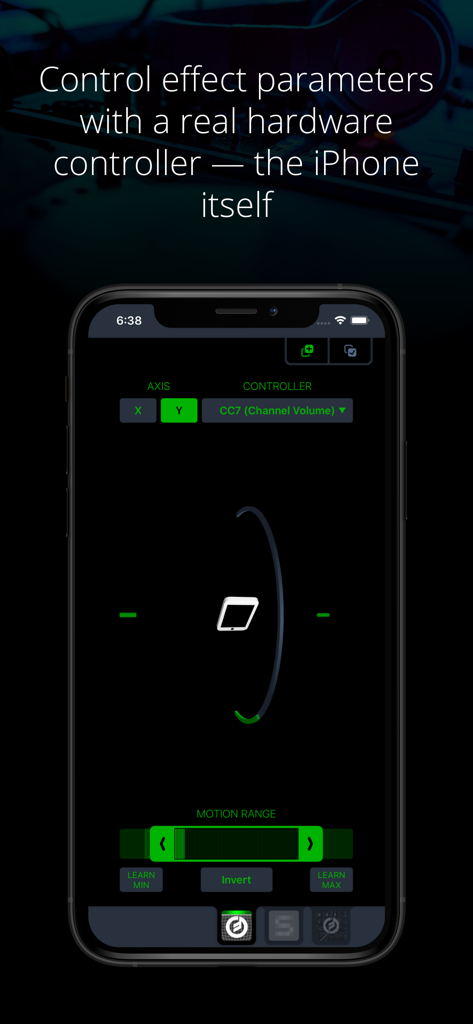
모션 기반 MIDI 제어 설정을 보여주는 iPhone의 Midiflow Motion 인터페이스

모션 기반 MIDI 제어 설정을 보여주는 iPhone의 Midiflow Motion 인터페이스

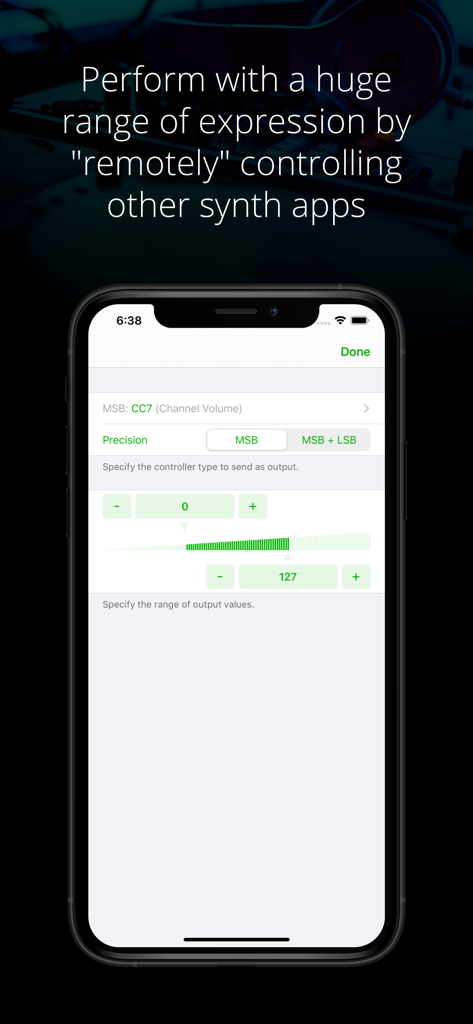
채널 볼륨 및 정밀도와 같은 MIDI 제어 파라미터를 구성하기 위한 Midiflow Motion 앱 인터페이스

채널 볼륨 및 정밀도와 같은 MIDI 제어 파라미터를 구성하기 위한 Midiflow Motion 앱 인터페이스

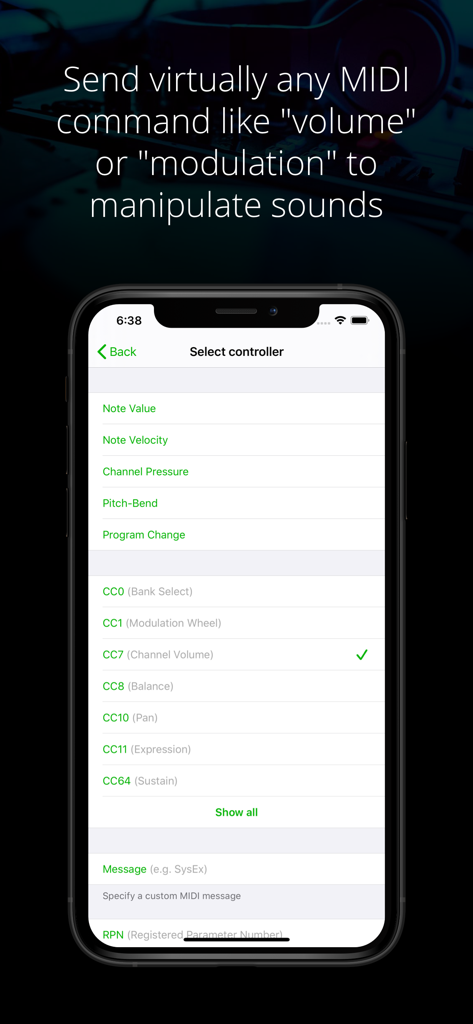
MIDI 컨트롤러와 볼륨 및 모듈레이션 같은 컨트롤 체인지 파라미터를 선택하는 메뉴를 보여주는 Midiflow Motion 앱 화면

MIDI 컨트롤러와 볼륨 및 모듈레이션 같은 컨트롤 체인지 파라미터를 선택하는 메뉴를 보여주는 Midiflow Motion 앱 화면

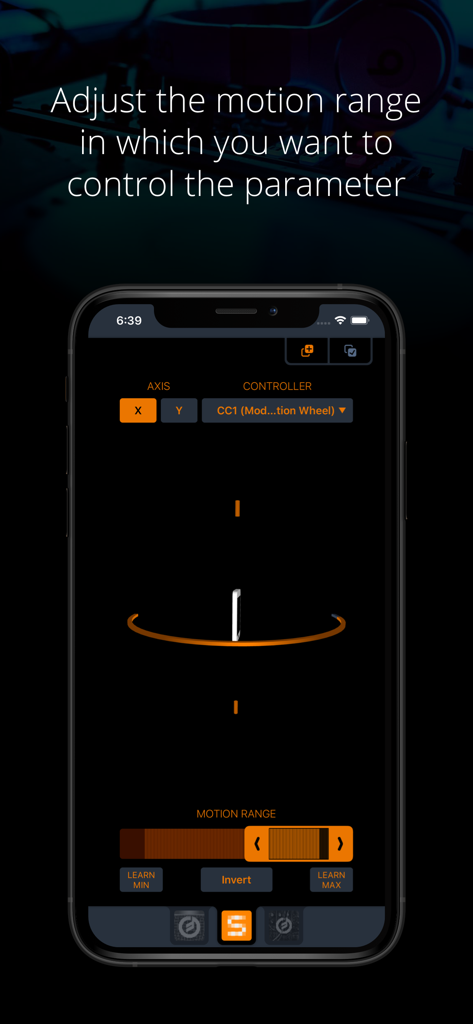
MIDI 컨트롤러 파라미터의 모션 범위를 조정하는 설정을 보여주는 iPhone의 Midiflow Motion 앱 인터페이스

MIDI 컨트롤러 파라미터의 모션 범위를 조정하는 설정을 보여주는 iPhone의 Midiflow Motion 앱 인터페이스

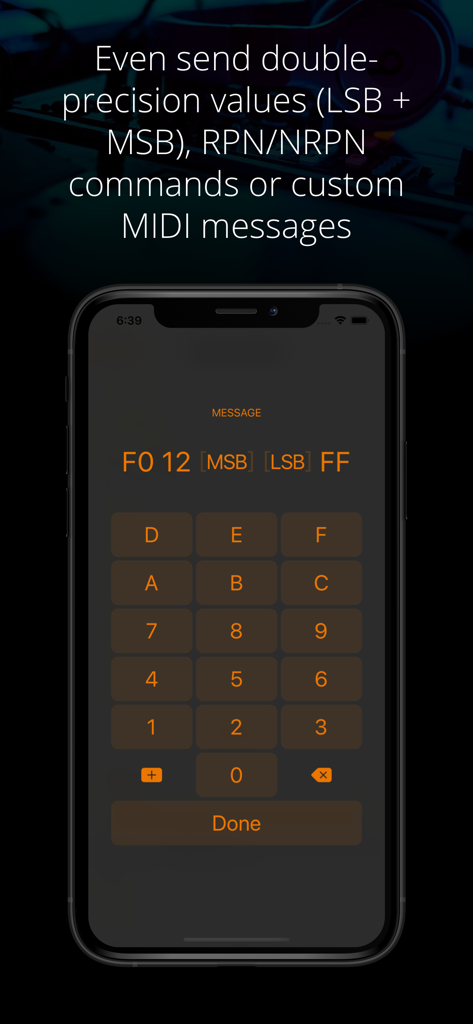
헥스 키패드를 사용하여 맞춤형 MIDI 메시지와 이중 정밀도 값을 입력하기 위한 Midiflow Motion 앱 인터페이스

헥스 키패드를 사용하여 맞춤형 MIDI 메시지와 이중 정밀도 값을 입력하기 위한 Midiflow Motion 앱 인터페이스

움직임을 음악적 표현으로 변환하세요

이 앱을 돋보이게 하는 도구, 1K+ 명의 사용자가 선택.

📱

제스처 기반 제어

기기 회전을 사용하여 필터, 피치 또는 볼륨을 조작하세요. 터치스크린만으로는 따라올 수 없는 유기적인 연주 방식입니다.

🎯

정밀한 MIDI 정확도

조정 가능한 모션 범위와 스마트 학습 버튼을 통해 14비트 고해상도 명령, NRPN 또는 맞춤형 MIDI 메시지를 전송하세요.

⛓️

통합된 신호 체인

Audiobus 3를 위해 제작되었습니다. 여러 인스턴스를 삽입하여 서로 다른 앱과 파라미터를 동시에 제어함으로써 복잡하고 진화하는 사운드스케이프를 만드세요.

전 세계 사용자들에게 사랑받는 앱

Trusted by 1K+ 명이 이 앱을 사랑합니다.

"

"Midiflow Motion은 제 라이브 셋을 완전히 바꿔놓았습니다. 화면을 응시하며 손가락을 미는 대신, iPad 전체를 움직여 소리를 만듭니다. 덕분에 공연이 유기적으로 느껴지고 관객에게 시각적인 즐거움을 줍니다. 단순히 샘플을 트리거하는 것이 아니라 진짜 악기를 연주하는 것 같아요."

Eli S., 실험적인 프로듀서
"

"파워 유저로서 이 앱의 기술적 깊이가 정말 마음에 듭니다. X축과 Y축 회전을 여러 MIDI CC 파라미터에 동시에 매핑하고, 모션 범위를 정밀하게 제어할 수 있는 기능은 정말 놀랍습니다. 지난 몇 년간 제 Audiobus 신호 체인에 추가한 MIDI 유틸리티 중 가장 안정적이고 표현력이 뛰어납니다."

Sarah J., 사운드 디자이너

앱 소개

에 대해 알아야 할 모든 것 Midiflow Motion (Audiobus).

설명

This MIDI sender app for Audiobus 3 lets you control effect parameters of other apps – in a way that no touch screen can replace – by moving the device. Set any kind of MIDI command like volume or modulation as output and fine-tune it to the exact motion range you want to perform with. You can even control multiple effects simultaneously. + Use device rotation around the X or Y axis + Adjust the range of motion for controlling a parameter + Adjust the range of output values + Send virtually any MIDI command (e.g. pitch-bend, any Control Change like modulation or expression, and even custom MIDI messages) + Control multiple parameters and/or multiple apps at the same time by inserting this app multiple times in Audiobus NOTE: This app requires Audiobus 3. Insert it into one or more MIDI sender ports to control the synth apps in the MIDI output ports of the respective pipelines. THE IPAD IS YOUR CONTROLLER Without a doubt, the iPad's touch screen is a revolutionary tool for musicians. However, it also comes with sensors that can track how you move your device around two axes. Using those sensors to control effect parameters allows you to perform with a huge amount of expression. CONTROL ALL KINDS OF PARAMETERS Many synth apps allow you to "remotely" control their parameters via MIDI messages. For that purpose, Midiflow Motion can send virtually any MIDI command to those apps, through Audiobus. Just select from the list of available parameters and the app starts sending messages when you move the device. Not only can you use basic Control Changes for "volume" or "modulation", you can also use double-precision commands (LSB + MSB), RPN/NRPN commands or custom MIDI messages. If you want to play notes, you might want to add Midiflow Scales behind this app in the Audiobus MIDI routing in order to map the notes to a scale. ADJUST MOTION RANGE The range selector at the bottom allows you to narrow down the motion range in which you want to control the parameter. The maximum range goes from -90 to +90 degrees. Use either the slider or the learn buttons to adjust the range according to your needs. CONTROL MULTIPLE PARAMETERS You can insert Midiflow Motion in Audiobus multiple times. That way, you can send multiple MIDI commands simultaneously. Each of them can be configured independently. For example, you can control the cutoff of a synth by rotation around the x-axis, and use the y-axis for the resonance parameter. It is like an x/y-pad, but with the whole iPad as the controller. You can also control parameters of different synths at the same time.

최신 버전

1.0.6

크기

4.7 MB

출시일

2017년 4월 3일

한계 없는 연주를 준비하셨나요?

기기를 전문가 수준의 모션 컨트롤러로 변환하세요. Midiflow Motion을 다운로드하고 Audiobus 3 신호 체인에 표현력 있는 물리적 움직임을 더하세요.

다운로드: App Store