Money Manager (Remove Ads)

Money Manager (Remove Ads)

다운로드: App Store다운로드: Google Play
Spark by MWM logo
로고: Money Manager (Remove Ads)

Money Manager: 모든 세부 사항을 위한 전문가 수준의 재정 관리

복식 부기, 고급 데이터 시각화 및 완전한 개인 정보 보호 기능을 통해 가계 계정을 관리하세요. 자동화보다 정밀성을 중시하는 세심한 소비자를 위해 설계된 광고 없는 전문가급 원장입니다.

개발사

Realbyte Inc.

카테고리

Finance

다운로드

498K+

사용자 평점

4.8/5

총 평가 수

48K+

지원 언어

19

당신의 재정, 시각화하다

이 인터페이스를 사용하는 498K+ 명의 사용자.

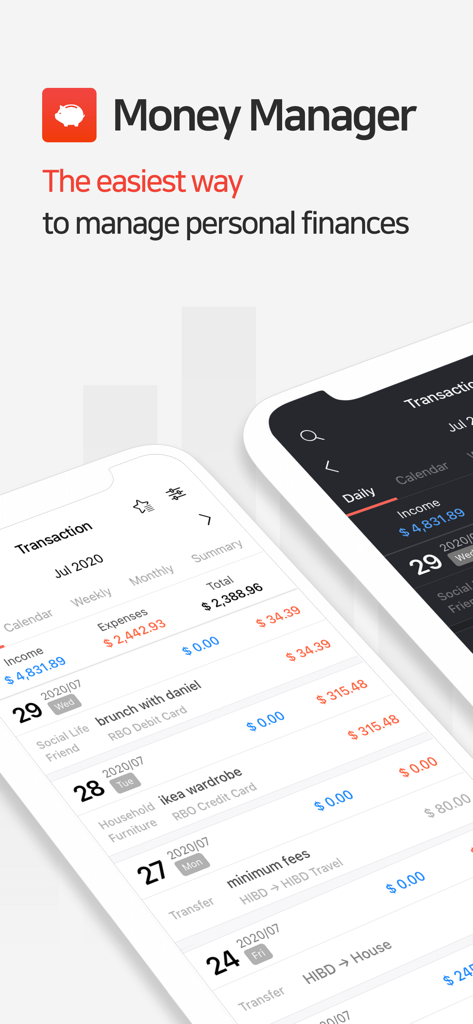
Money Manager 앱 인터페이스에 상세한 거래 내역 및 모바일 장치의 예산 추적이 표시됨.

Money Manager 앱 인터페이스에 상세한 거래 내역 및 모바일 장치의 예산 추적이 표시됨.

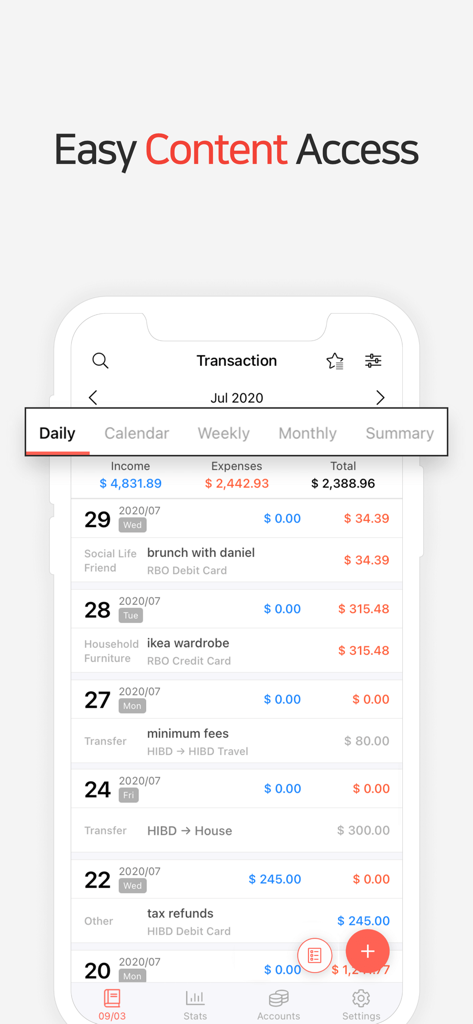
월별 수입 및 지출을 보여주는 Money Manager 앱의 일별 거래 목록

월별 수입 및 지출을 보여주는 Money Manager 앱의 일별 거래 목록

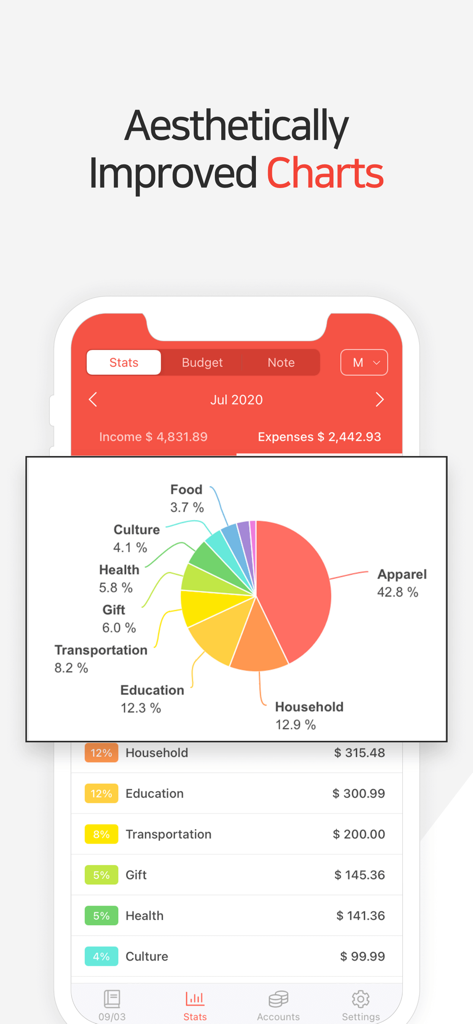
Money Manager 앱 인터페이스에 지출 파이 차트 및 카테고리별 지출 통계가 표시됨

Money Manager 앱 인터페이스에 지출 파이 차트 및 카테고리별 지출 통계가 표시됨

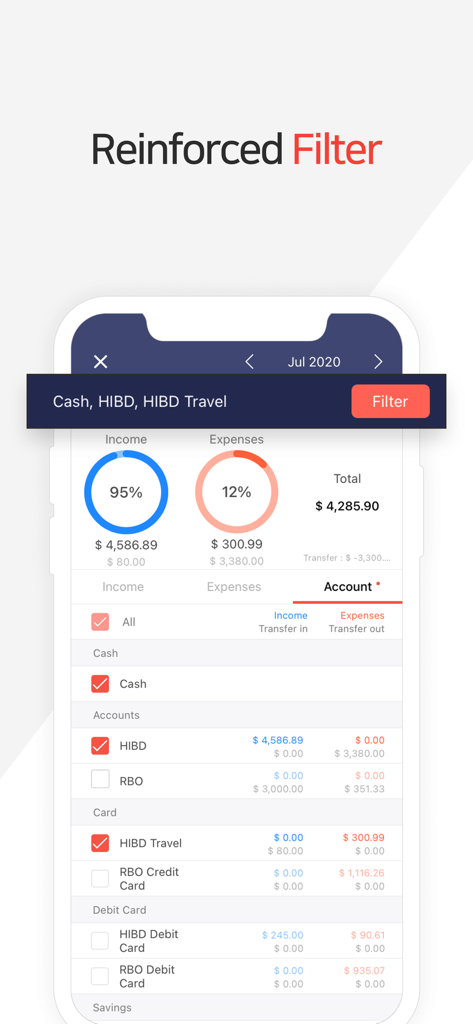
Money Manager 앱 화면에 특정 은행 계좌 및 카드에 대한 수입 및 지출 추적을 위한 강화된 필터 기능이 표시됨.

Money Manager 앱 화면에 특정 은행 계좌 및 카드에 대한 수입 및 지출 추적을 위한 강화된 필터 기능이 표시됨.

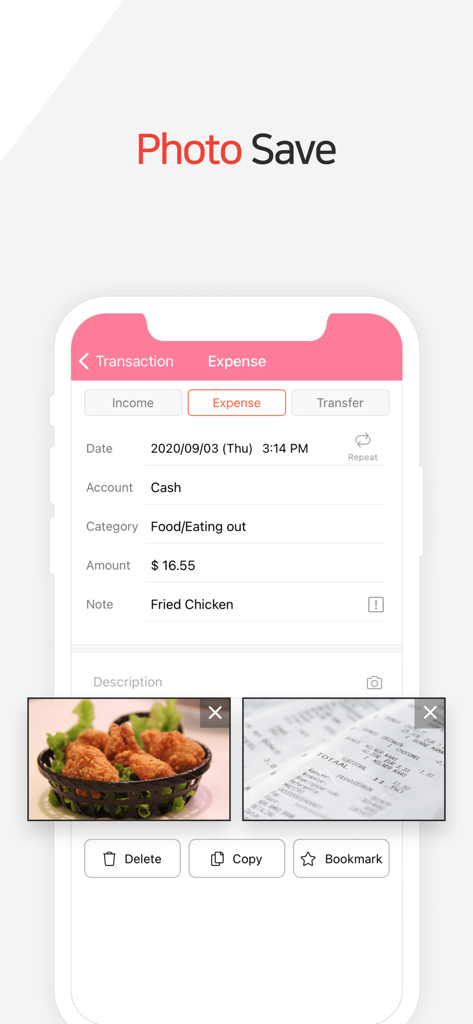
음식 지출에 대한 사진 및 영수증이 첨부된 Money Manager 앱 인터페이스

음식 지출에 대한 사진 및 영수증이 첨부된 Money Manager 앱 인터페이스

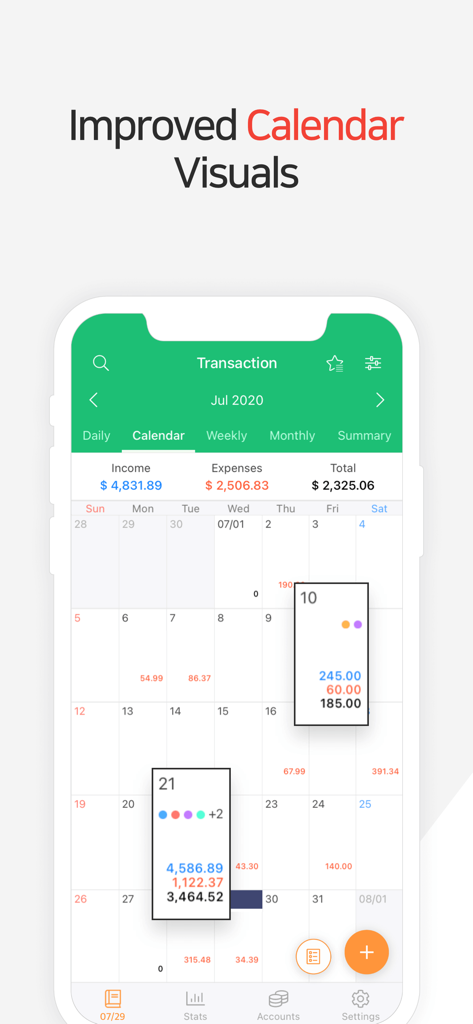
일별 재정 거래 및 총계를 보여주는 Money Manager의 월별 캘린더 인터페이스

일별 재정 거래 및 총계를 보여주는 Money Manager의 월별 캘린더 인터페이스

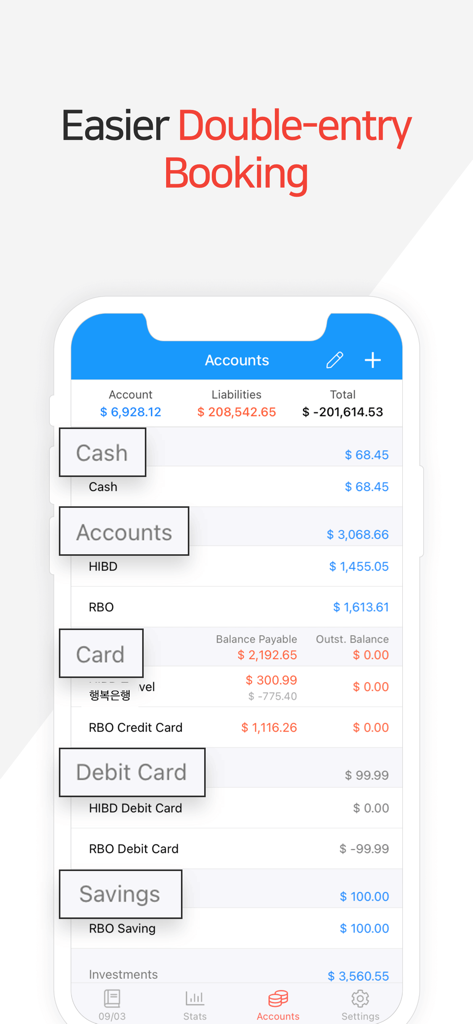
계정 잔액 및 복식 부기 요약을 보여주는 Money Manager 앱 인터페이스

계정 잔액 및 복식 부기 요약을 보여주는 Money Manager 앱 인터페이스

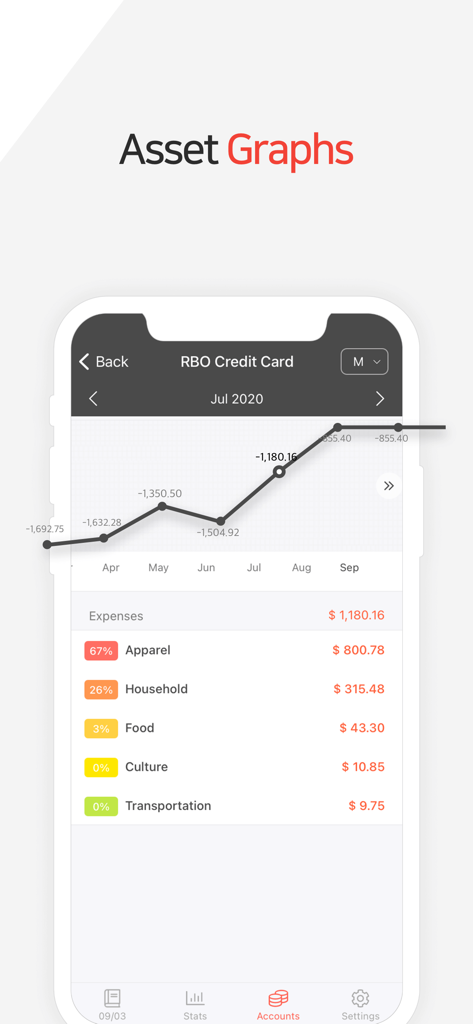
재정 자산 그래프 및 지출 카테고리를 보여주는 Money Manager 앱 인터페이스

재정 자산 그래프 및 지출 카테고리를 보여주는 Money Manager 앱 인터페이스

전문가 수준의 정밀함으로 재정을 마스터하세요

이 앱을 돋보이게 하는 도구, 498K+ 명의 사용자가 선택.

⚖️

전문가용 복식 부기 시스템

완전한 정확성을 위해 전문가용 원장을 모방한 시스템으로 기록이 완벽하게 균형을 이루도록 하세요.

🔒

개인 정보 우선 수동 추적

위험한 은행 연결을 피하세요. 안전한 수동 입력 및 비공개 클라우드 백업으로 데이터에 대한 완전한 제어를 유지하세요.

💻

고급 PC 데이터 관리

모바일 추적을 간단하고 광고 없이 유지하면서 Wi-Fi를 통해 데스크톱에서 심층적인 재무 검토를 수행하세요.

전 세계 사용자들에게 사랑받는 앱

Trusted by 498K+ 명이 이 앱을 사랑합니다.

"

"시중에 나와 있는 모든 금융 앱을 사용해 봤지만 Money Manager는 제가 필요로 하는 정확성을 제공하는 유일한 앱입니다. 복식 부기 시스템은 제 계정이 실제로 균형을 이루도록 보장하며, 제 재정 상황을 명확하게 파악하기 위해 은행 계좌를 연결할 필요가 없다는 점이 마음에 듭니다. 전문가적이고, 개인적이며, 믿을 수 없을 정도로 강력합니다."

Sarah J., 재무 분석가
"

"PC Manager 기능은 월간 검토에 있어 완전히 판도를 바꾸는 기능입니다. 낮에는 모바일 앱으로 빠르게 입력하고, 주말에는 노트북을 사용하여 그래프를 분석하고 예산을 조정합니다. 카테고리를 사용자 정의하고 월 시작 날짜를 변경할 수 있다는 점이 가계 지출 관리를 훨씬 쉽게 만듭니다."

Michael K., 기술 컨설턴트

앱 소개

에 대해 알아야 할 모든 것 Money Manager (Remove Ads).

설명

“Money Manager” is an optimized application for personal account management. Household account management is complicated. But we make it simple by simplifying the things that are complex. The default settings will get you started, and once you get used to it, you can alter the settings according to your needs with the highly flexible and customizable functions available. - Super easy and simple to enter data anytime, anywhere. - View your spending tendencies graphically. - View statistics by simply entering the data. - Search and calculator functions. - Set up sub-categories and main categories as necessary. - Manage all your accounts at once. - Use multiple currencies. - Check weekly, monthly, and annual statistics. - Use calendar view. - Use budget planning features to plan weekly, monthly, and annual budgets. - Change the start date of the month. ※ Applying double entry bookkeeping It facilitates efficient account management. Automatic double entry bookkeeping. ※ PC manager function You can view ‘“The New Money Manager” application using Wi-Fi. You can edit and sort the data by date, category or account group on the screen of your PC. In addition, you can see fluctuations of your accounts indicated on graphs on your PC. ※ Budget management function You can manage your budget. It shows your budget and expenditures on a graph so you can compare the number of your expenditures against your budget quickly. ※ Credit Card / Debit Card management function When entering a future payment date, you can see the payment amount and outstanding balance on the accounts page. You can connect your debit card to your accounts so that expenses are automatically recorded under a specific account. ※ Passcode You can specify the desired time lapse before the app requests a passcode. ※ Automatic money transfer and frequency functions You can set up automatic money transfers between your accounts and configure the frequency of those transfers. ※ Sort expenses by the recipient You can sort your expenses by the recipient and view this information graphically. ※ Payment Profiles You can easily enter frequent expenditures by creating payment profiles. ※ Backup / Restore You can backup and restore your data via email, iTunes and iCloud. ※ Multiple currency support – you can have individual entries in multiple currencies, and configure each account to calculate the total balance in your desired currency. Subscription pricing and terms: Money Manager offers auto-renewing monthly subscription at US$2.49/month and an auto-renewing yearly subscription at US$19.99/year to provide you with unlimited access to the Money Manager Data Sync Service while you maintain an active subscription. Payment will be charged to the credit card connected to your iTunes Account when you confirm the initial subscription purchase. Subscriptions automatically renew unless auto-renew is turned off at least 24-hours before the end of the current subscription period. Your account will be charged for renewal within 24-hours prior to the end of the current period, and the cost of the renewal will be identified. You may manage your subscription and auto-renewal may be turned off by going to your Account Settings after the purchase. Read more about our terms and conditions here: https://realbyteapps.com/policy/terms.html Privacy Policy: https://realbyteapps.com/policy/privacy.html

최신 버전

2.12.3

크기

58.5 MB

출시일

2012년 10월 4일

재정적 미래를 완벽하게 제어하세요

복식 부기의 정확성과 방해 요소 없이 498,000명 이상의 파워 유저와 함께 자산을 관리하세요.

다운로드: App Store다운로드: Google Play
FAQ

자주 묻는 질문

에 대해 알아야 할 모든 것 Money Manager (Remove Ads)

Money Manager (광고 제거)란 무엇인가요?

Money Manager는 개인 계정 관리를 위한 최적화된 애플리케이션으로, 쉬운 데이터 입력, 그래픽 지출 분석 및 사용자 정의 기능을 제공하여 가계 재정을 단순화합니다.

Money Manager는 여러 통화를 지원하나요?

네, Money Manager는 여러 통화를 지원합니다. 사용자는 다른 통화로 개별 항목을 가지고 원하는 통화로 총 잔액을 계산하도록 계정을 구성할 수 있습니다.

Money Manager는 예산 계획에 어떻게 도움이 되나요?

Money Manager는 주간, 월간 및 연간 예산을 위한 예산 계획 기능을 포함합니다. 예산 및 지출을 그래픽으로 표시하여 예산 대비 신속한 비교를 할 수 있습니다.

Money Manager로 신용카드 및 직불카드를 관리할 수 있나요?

네, Money Manager는 신용카드 및 직불카드 관리를 제공합니다. 향후 결제 금액과 미결제 잔액을 볼 수 있으며, 직불카드를 연결하여 자동 지출 기록을 할 수 있습니다.

Money Manager의 월간 구독료는 얼마인가요?

Money Manager의 월간 구독료는 월 $2.49 USD입니다. 이 구독은 자동 갱신되며 데이터 동기화 서비스에 대한 무제한 액세스를 제공합니다.

Money Manager는 복식 부기 원장을 사용하나요?

네, Money Manager는 복식 부기 원장을 적용합니다. 자동 복식 부기 원장을 통해 효율적인 계정 관리를 촉진합니다.

Money Manager를 사용하여 PC에서 재무 데이터를 어떻게 볼 수 있나요?

Money Manager는 PC 관리자 기능을 제공합니다. Wi-Fi를 사용하여 PC 화면에서 날짜, 범주 또는 계정 그룹별로 데이터를 보고, 편집하고, 정렬할 수 있습니다.

Money Manager에서 데이터를 어떻게 백업하나요?

Money Manager를 사용하면 데이터를 백업하고 복원할 수 있습니다. 이 작업은 이메일, iTunes 및 iCloud를 통해 수행할 수 있습니다.

Money Manager는 암호로 재무 정보를 보호할 수 있나요?

네, Money Manager에는 암호 기능이 포함되어 있습니다. 앱이 액세스를 위해 암호를 요구하기 전에 원하는 시간 간격을 지정할 수 있습니다.

Money Manager는 지출에 대한 시각적 차트를 제공하나요?

네, Money Manager는 지출 경향에 대한 그래픽 보기를 제공합니다. 통계를 표시하고 사용자가 그래프에 표시된 계정의 변동을 볼 수 있도록 합니다.

Money Manager에서 수신자별로 지출을 정렬할 수 있나요?

네, Money Manager에서는 수신자별로 지출을 정렬할 수 있습니다. 앱 내에서 그래픽으로 이 정보를 볼 수도 있습니다.

Money Manager에 영수증 사진을 저장할 수 있나요?

네, Money Manager는 사용자가 사진을 저장할 수 있도록 허용합니다. 앱은 인터페이스에 표시된 대로 지출 항목에 이미지를 포함하는 기능을 제공합니다.

Money Manager의 연간 구독 가격은 얼마인가요?

Money Manager의 연간 구독료는 연 $19.99 USD입니다. 이 자동 갱신 구독은 데이터 동기화 서비스에 대한 무제한 액세스를 제공합니다.